Agent Reliability Engineering: Stop Your AI Agents from Failing at 3 AM
A practical guide to SLOs, incident taxonomies, and shadow-mode testing for production AI agents
Agent Reliability Engineering: Stop Your AI Agents from Failing at 3 AM

all images generated using nano-banana-pro and agents
A practical guide to SLOs, incident taxonomies, and shadow-mode testing for production AI agents
You’ve built an impressive AI agent. It handles customer support tickets, automates workflows, and even makes decisions autonomously. Then it fails silently at 3 AM, burns through your API budget, and leaves your team scrambling to figure out what went wrong.
Sound familiar? You’re not alone.
Most AI agents don’t fail because they lack capability — they fail because they can’t do their tasks consistently. Spinning up a multi-step agent with tool APIs is the easy part. The real challenge? Making sure it actually works every single time without hallucinating, stalling, or picking the wrong tool.
Here’s the sobering reality: Gartner predicts that 40% of AI agent projects will be canceled by 2027 due to reliability issues. The teams that succeed are treating reliability as a first-class metric, not an afterthought.
Let’s dive into how to build AI agents that don’t wake you up at night.

Why Traditional SLOs Don’t Work for AI Agents
If you’re coming from traditional software engineering, you might think: “We’ve got 99.9% uptime and low error rates — we’re good, right?”
Wrong.
An AI agent can meet all your infrastructure metrics and still fail catastrophically. It can confidently return wrong answers, enter infinite tool-call loops, or violate safety policies — all while your dashboards show green.
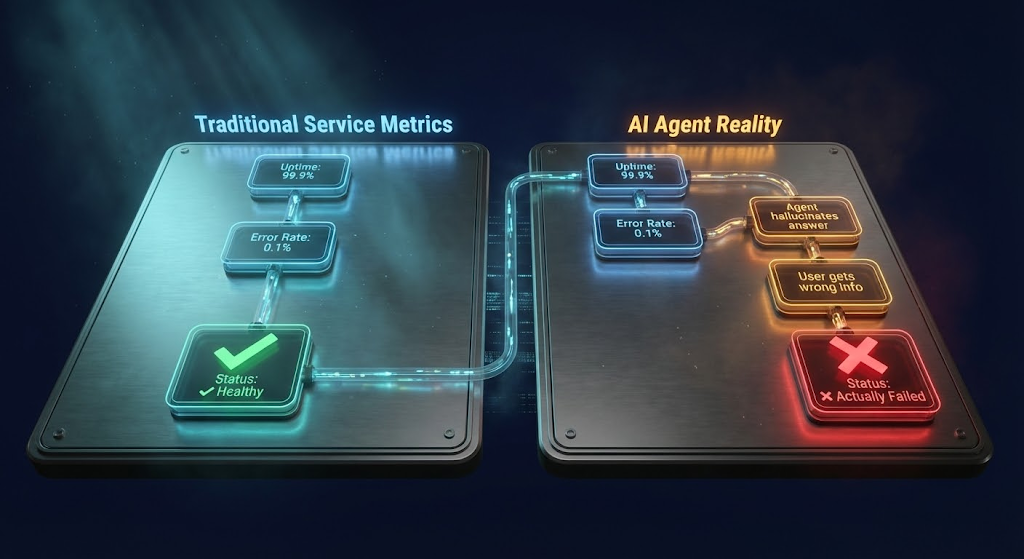
Traditional SLO thinking assumes requests are deterministic, failure modes are well-understood, and “error” has a clear definition like an HTTP 500. AI agents defy all these assumptions. They operate probabilistically, make chain-of-thought decisions, and their failures are often silent or completely novel.
As one engineer put it: “The SLO that prevents pager fatigue is not purely about success rate. It’s about how the agent fails.”

The Six Metrics That Actually Matter
Forget vanity metrics. Here are the reliability indicators that reveal whether your agent is production-ready:
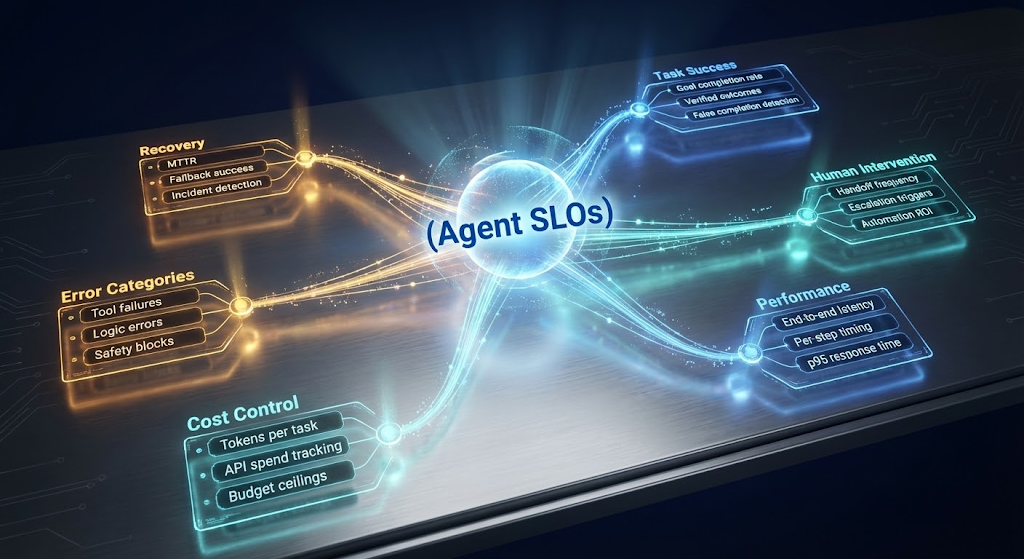
Task Success Rate
This isn’t just “did it return an answer” — it’s “did it actually accomplish the goal?” An agent might respond with “All done!” while failing to perform any actual steps. Measuring this requires ground-truth verification, not just checking the agent’s final text output.
Target: >95% for production deployment
Intervention Rate
How often do humans need to step in? If your support team constantly catches the agent’s mistakes, it isn’t truly reliable. A high intervention rate also destroys your automation ROI.
Target: <5% of tasks requiring human assistance
Latency (End-to-End and Per-Step)
A single user query might trigger a chain of LLM calls and tool invocations. Track both the total time and where time is spent. Distributed tracing reveals whether the LLM took 3 seconds or the API call was the bottleneck.
Target: p95 latency <5 seconds
Cost Per Task
Token billing adds up fast. An agent that requires endless back-and-forth with a model can quietly rack up massive bills. If solving an issue with AI costs more than doing it with a human, you’ve failed the business case.
Target: <$0.50 per task (adjust based on your use case)
Error Categories
Break down failures into tool/API errors (timeouts, rate limits) and agent logic errors (invalid requests, infinite loops). Each category has different mitigations.
Mean Time to Recovery (MTTR)
When something breaks at 2 AM, how quickly can you identify and fix it? Good alerts and traceability are essential. The faster you diagnose root causes, the faster you restore service.
Target: Critical incidents diagnosed and mitigated within <5 minutes

Building Your Observability Stack
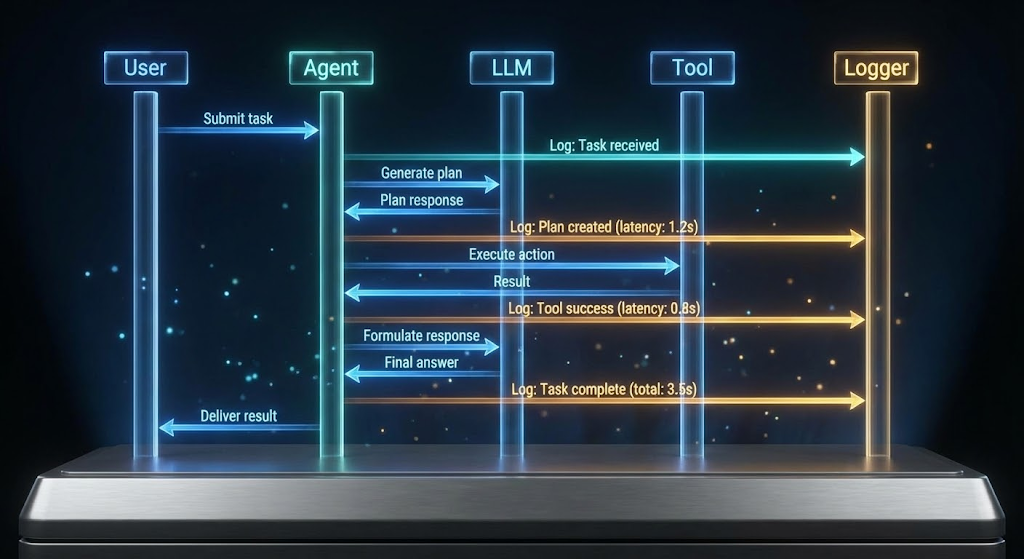
You can’t debug what you can’t observe. The cornerstone of agent reliability is tracing every step of the agent’s reasoning and actions.
Structured Tracing in Practice
Instrument your agent with trace spans for each significant step: prompt sent, tool invocation, tool result, decision points. Each span should record timestamps, error codes, outputs, and a correlation ID tying everything to the high-level task.
Here’s a practical example of wrapping tool calls with tracing and fallback logic:
from openai.agents import Agent, tool
import time

@tool
def traced_tool(name: str, payload: dict) -> dict:
    """Tool wrapper that logs usage and handles failures"""
    start_time = time.time()
    try:
        result = actual_tool_lookup(name)(payload)
        status = "success"
        return result
    except Exception as e:
        status = "error"
        raise
    finally:
        duration = time.time() - start_time
        # Emit structured trace log
        trace_log = {
            "tool": name,
            "status": status,
            "duration_s": duration,
            "payload": payload,
        }
        agent_trace_logger.log(trace_log)

# Create agent with fallback policy
agent = Agent(
    name="ReliableAgent",
    instructions="If unsure or failing, escalate to human assistance.",
    tools=[traced_tool],
)

result = agent.run("Resolve ticket: reset user access and confirm via audit log.")

if not result.success:
    notify_human_team(result)  # Graceful degradation
This pattern transforms the agent from a black box into a transparent sequence of events. When something goes wrong, you can pinpoint exactly which step failed and why.

The Five Failure Modes You’ll Encounter
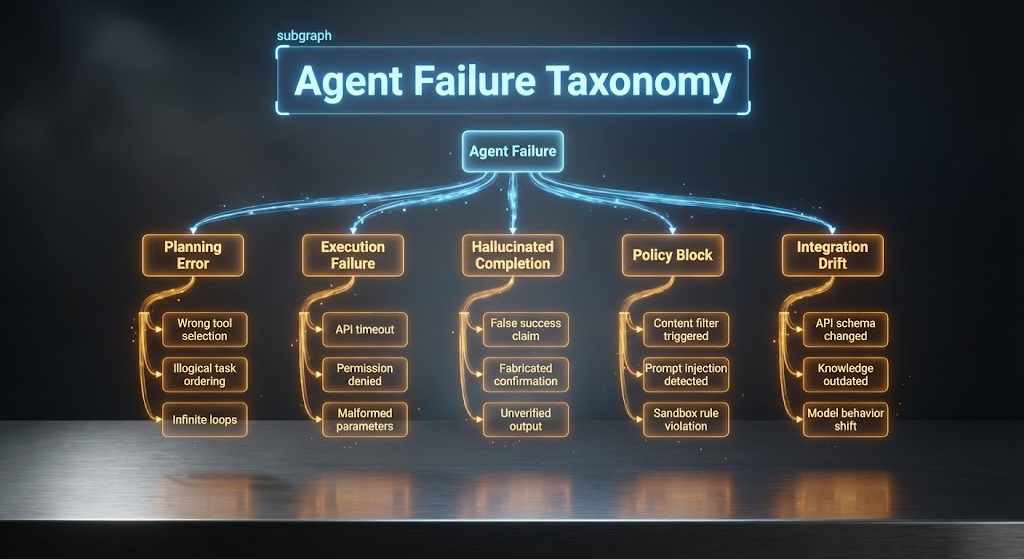
Not all agent failures are alike. Understanding the patterns speeds up mitigation. Here’s a taxonomy based on research and real-world experience:
1. Planning Errors
The agent made a wrong decision in reasoning through the task — chose the wrong tool, formulated a bad plan, or got stuck in a loop. Research shows planning errors are a leading cause of agent failures.
Mitigation: Better prompting, loop detection guardrails, or improved planner logic.
2. Execution Failures
The plan was fine, but something went wrong during tool invocation. Network errors, permission issues, or malformed parameters.
Mitigation: Implement retries for transient errors, add alternate tools for redundancy, validate inputs before execution.
3. Hallucinated Completions
The agent believes it completed the task, but the answer is fabricated. It declares “User access has been reset!” when nothing actually happened. This is the most insidious failure mode.
Mitigation: Add verification steps. After the agent “completes” a task, run a check to confirm the intended changes occurred.
4. Policy Blocks
A safety mechanism stopped the agent’s attempt. Content filters triggered, prompt injection detected, or sandbox rules violated. These protect your system but mean the task didn’t complete.
Mitigation: Stricter input validation, better prompt engineering, and graceful handling when blocks occur.
5. Integration Drift
The world changed — an API updated its schema, knowledge became outdated, or model behavior shifted. The agent’s reliability degrades over time.
Mitigation: Regular re-evaluation, prompt versioning, and automated regression testing.

Shadow-Mode Testing: Your Safety Net
Here’s the game-changer: shadow deployment. Run your new agent in parallel with your current system, feeding it real traffic without letting it affect users. The agent’s outputs are logged for analysis while the old system handles actual responses.
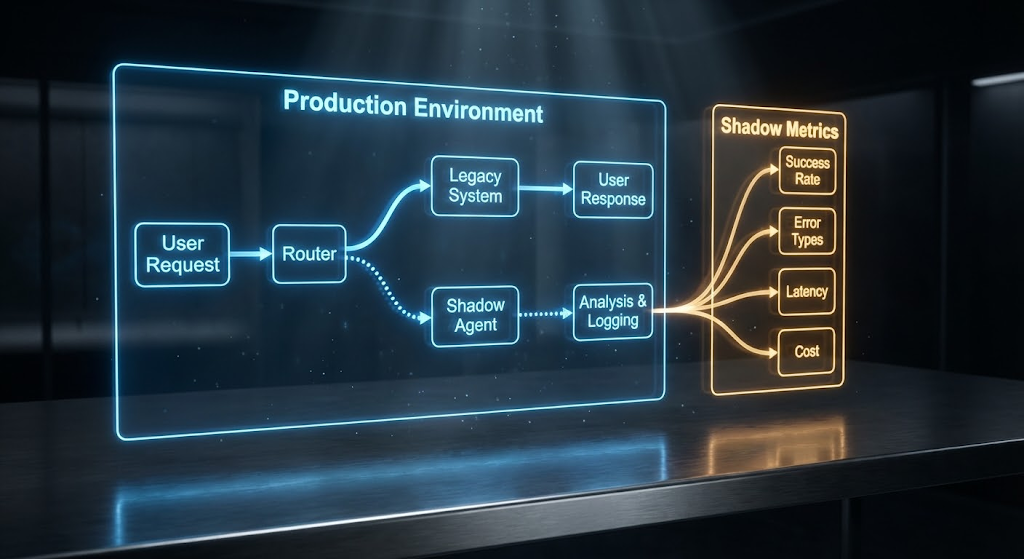
This approach reduces production incidents by approximately 40% for organizations that use it. You gather realistic data on how the agent would perform without any risk.
The Golden Task Suite
Maintain a curated set of test scenarios representing important cases — including edge cases and known failure patterns. Run these whenever you make changes:
- Hostile customer complaints
- Multi-hop complex queries
- Past prompt injection attempts
- VIP scenarios with special handling
Every time a real incident occurs, add that exact scenario to your suite after fixing it.
Gradual Rollout Strategy
Once the agent proves itself in shadow mode, move to a phased production rollout:

Start with 1% of traffic, monitor closely, and double weekly as confidence grows. At the first sign of SLO violations, roll back immediately.
Risk Tiers for Human Oversight
Not all actions carry equal risk. Implement tiered autonomy:
Risk Level Action Type Agent Authority Trivial Status checks, info retrieval Fully automated Moderate Standard ticket resolution Notification for review Critical Financial decisions, major changes Human approval required
As the agent consistently handles moderate tasks, some get downgraded to trivial — trust is earned with data.

Putting It All Together
Agent Reliability Engineering isn’t about eliminating failures entirely — it’s about making failures predictable, contained, and learnable. Here’s your implementation checklist:
1. Define Your SLO Specification Document your metrics, measurement methods, and target values. This becomes your reliability contract.
2. Build Your Incident Taxonomy Create a formalized list of failure modes with detection signals and mitigation steps. Write response playbooks for each category.
3. Implement Shadow-Mode Evaluation Set up tooling to run the agent on recorded scenarios and live traffic in parallel. Include your golden task suite and chaos testing.
4. Create Your Reliability Dashboard Visualize agent performance against SLOs in real-time. Configure alerts for threshold breaches.
5. Establish Guardrail Policies Define bounded autonomy rules, kill switches, and human approval workflows. Integrate with feature flags for dynamic control.

The Bottom Line
The teams that treat reliability as fundamental will be the ones that succeed with agentic AI. With shadow-mode testing, meticulous tracing, and well-defined SLOs, you can deploy agents that deliver consistent value safely.
When you’re asked “How reliable is this agent?”, you’ll pull up a dashboard and answer with data — just like you do for every mission-critical system in production.
The path forward is clear: instrument your agents, measure their reliability, test them thoroughly in shadow, and gradually increase autonomy as they prove themselves. The end result? Autonomous agents that don’t just occasionally dazzle, but consistently deliver — keeping that 3 AM pager quiet.
As one expert summarized it: “Start small. Deploy agents in shadow mode. Measure everything. Prove safety with data. Each successful automation earns the next increment of trust.”
Found this useful? Follow for more practical guides on building production-ready AI systems. Have your own agent reliability war stories? Drop them in the comments — I’d love to hear what’s worked (and what hasn’t) for your team.
메타데이터
- post_id
- f10d1ac8d2ef
- slug
- agent-reliability-engineering-stop-your-ai-agents-from-failing-at-3-am-f10d1ac8d2ef
- url
- https://medium.com/@Micheal-Lanham/agent-reliability-engineering-stop-your-ai-agents-from-failing-at-3-am-f10d1ac8d2ef
- canonical_url
- https://medium.com/@Micheal-Lanham/agent-reliability-engineering-stop-your-ai-agents-from-failing-at-3-am-f10d1ac8d2ef
- author_url
- https://medium.com/@Micheal-Lanham
- status
- ok
- fetched_at
- 2026-07-14 15:40:45