dbt Incremental Models vs. Snowflake Dynamic Tables
Catching late-arriving data, data freshness, and orchestration
dbt Incremental Models vs. Snowflake Dynamic Tables
Catching late-arriving data, data freshness, orchestration, and more
Consider a high-volume user events pipeline consisting of clickstream data (page views, clicks, scrolls, etc.) joined against a mutable user profile dimension (email address, age, interests). This joined table is materialized incrementally in dbt, refreshed every 20 minutes.
Sounds like simple stuff, until you’re hit with late-arriving events, in-place dimension updates (e.g., an updated email address), and hard deletes as a result from upstream GDPR Right To Be Forgotten requests.
In this post I want to lay out how the standard dbt incremental pattern breaks under those conditions, and compare it to a tool built to solve exactly this problem: Snowflake’s Dynamic Tables.
By the end, you’ll know:
- Where dbt’s incremental model fails
- What Dynamic Tables are and when they’re useful
- How to best incorporate Dynamic Tables into your dbt project
- Production-grade considerations when using Dynamic Tables and dbt
The Scenario: User Profiles Meet Event Tracking
Our pipeline consists of two tables:
**stg_events**, containing millions of rows a day of device clickstream data. Events arrive late constantly (see image below): spotty connections cause clients to batch and flush all events on reconnect. That means a session that took place in the morning might not reach the data warehouse until the evening.**stg_users**, a mutable dimension table. Users change contact information, update account metrics, and trigger GDPR Right to Be Forgotten requests. These requests require hard deletes from the source table.
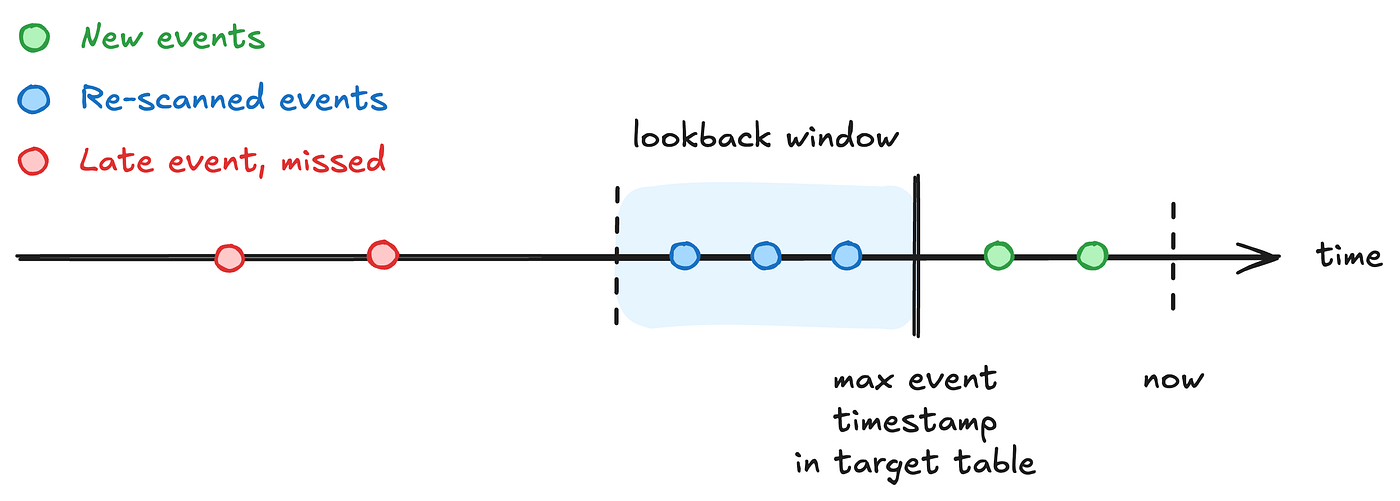
Catching late-arriving data requires a lookback window, but might not capture all late events.
Any pipeline joining these two tables has to get three things right: 1) late-arriving events, 2) in-place, retroactive dimension updates, and 3) upstream deletes (also reflected in past events).
Two Approaches to Incremental Models
Let’s assume we use our two source tables to create a fact table fct_user_events.
Approach 1: dbt’s Standard Incremental Model
Here’s the standard incremental model using a lookback window to also cover late-arriving events.
{{
  config(
    materialized='incremental',
    unique_key='event_id',
    incremental_strategy='merge'
  )
}}

with raw_events as (
    select * from {{ ref('stg_events') }}

    -- Problem 1: The arbitrary lookback window
    {% if is_incremental() %}
     where event_timestamp >= (
      select max(event_timestamp) from {{ this }}
     ) - interval '3 days'
    {% endif %}
),

user_profiles as (
    select * from {{ ref('stg_users') }}

    {% if is_incremental() %}
    -- Problem 2: Reading historical events to catch retroactive dimension updates
    where updated_at >= (select max(event_timestamp) from {{ this }}) - interval '3 days'
    {% endif %}
)

select
    e.event_id,
    e.user_id,
    u.user_email,
    e.event_name,
    e.event_timestamp
from raw_events as e
left join user_profilesas as u
 on e.user_id = u.user_id

-- Problem 3: Upstream DELETES are completely ignored.
-- Fixing this requires sepaarate, complex post-hook scripts.
Three things are wrong with this code, none of which are edge cases. That means they will occur in your pipeline, too.
Problem 1: The lookback window is arbitrary.
Using interval ‘3 days’ is picked based on a notion of how late data usually arrives, and not on how late data actually can and will arrive. Pick a small enough interval and late events are missed without errors or test failure. Expand the lookback window and every run re-scans days worth of data every 20 minutes. Have fun looking at your credit consumption exploding.
Problem 2: The dimension-refresh window is a second guess stacked on the first.
The stg_users table gets filtered based on updated_at, but only a few days before the max(event_timestamp) from the target table. An email address update will not be reflected in old events, just newer ones.
Problem 3: Deleteing GDPR compliancy.
In dbt, a merge statement inserts and updates, it does not delete. When a GDPR request hard-deletes a row from stg_users, old events in fct_user_events never find out. Old rows keep the stale user_email, or keep a join to a user_id that legally shouldn’t exist anymore. There’s no clean SQL fix inside the incremental model itself. That’s your compliancy out the window, and you need more separate code and logic to fix it.
Approach 2: Snowflake’s Dynamic Tables
Now contrast the above dbt implementation with the below one using a Dynamic Table.
{{
  config(
    materialized='dynamic_table',
    target_lag='20 minutes', -- Optional, see details below
    snowflake_warehouse='transform_wh'
  )
}}

select
    e.event_id,
    e.user_id,
    u.user_email,
    e.event_name,
    e.event_timestamp
from {{ ref('stg_events') }} as e
left join {{ ref('stg_users') }} as u
 on e.user_id = u.user_id
That’s the entire model. No is_incremental() macro, no unique_key, no lookback logic, no merge strategy.
Late-arriving events, in-place updates, and hard deletes on the source tables are all handled natively.

Regardless of how late an event arrives, Snowflake’s Dynamic Table will catch it.
Snowflake does the heavy lifting: it tracks the change stream on both source tables and incrementally maintains the output to stay within target_lag, deletes included. And also retroactively.
Every pain point in dbt’s default incremental model is a manual compensation for something Snowflake now does for you. Unfortunately, there’s no free lunch.
But first let’s go over how it actually works before getting into the trade-offs.
Snowflake Dynamic Tables 101
Imperative vs. Declarative
In programming, there’s a distinction between imperative programming and declarative programming. Imperative means you define how something gets done. Declarative means you specify what the end result should be.
A dbt incremental model is imperative: you tell the warehouse how to move data. Which rows to select, how to merge them, when the merge runs. You own it all.
A Dynamic Table is declarative: you tell Snowflake what the final table should look like, and it works backward to keep it correct and current. That’s what the query engine solves for you.
Keeping Track of Changes
Anyone familiar with Snowflake’s native tables (or Iceberg, Delta), is probably familiar with their time travel features. This feature keeps track of any changes made to a table since its previous version.
Dynamic Tables do the same thing. This is what Snowflake uses to identify the latest records in the source table, and saves you from having to deal with event timestamps and the the dbt’s verbose incremental logic.
target_lag Is a Freshness Objective, Not a Cron Schedule
The configuration target_lag = '20 minutes' does not mean the refresh runs every 20 minutes. Instead, it means the data should never be more than 20 minutes old relative to its sources.
Snowflake decides the actual refresh cadence, based on how fast upstream tables are changing, how expensive the transformation is, etc. Lower frequency upstream changes means fewer refreshes, frequent upstream changes means more refreshes.
Side Note: Dynamic Tables ≠ Materialized Views
At first glance, Dynamic Tables look similar to Dynamic Tables. There are a few key differences though. Materialized Views are deliberately constrained in a way Dynamic Tables aren’t: single source table, no joins, limited aggregate support. Materialized Views are built for simple projections over one table.
Dynamic Tables have no such restrictions. You can use multi-table joins, CTEs, window functions, complex aggregations, as long as it can be expressed in a select statement.
Now that we’ve had this crash course on Dynamic Tables, let’s get into some of the details.
Orchestration: Who Controls the Data Refresh?
Normally, dbt executes statements that either create tables or updates them with new data (i.e., inserts, updates). For Dynamic Tables, the only command that’s ever run is a simple create or alter dynamic table statement, which doesn’t actually move any data. The real refresh happens asynchronously, on Snowflake’s schedule, based on the target_lag parameter. Here’s where things get interesting.
The target_lag parameter is optional.
If you don’t set it, Snowflake will not update the table for you. The downside is that you have to update it. The advantage of that is you control exactly when that happens. But since dbt only creates a Dynamic Table, it does require a small workaround. Just add a post-hook to your model that will trigger a refresh.
{{
  config(
    materialized='dynamic_table',
    snowflake_warehouse='transform_wh',
    post_hook="ALTER DYNAMIC TABLE {{ this }} REFRESH"
  )
}}
Now you get the best of both worlds: the ease of use from declarative SQL, while still maintaining full control over when the data is refreshed. Win-win.
Testing in a Declarative, Asynchronous World
You can still run dbt test. Dynamic Tables are real, queryable objects, so your not_null, unique, and relationships tests all run.
However, for testing purposes, refreshing your table before running tests is a must. Otherwise a table might not have refreshed yet, causing you to test against an empty table or a table with stale data.
That means that the tests would pass or fail based on timing, not correctness.
To force a refresh before running your tests, use the above post-hook, or as an explicit orchestrator step between dbt run and dbt test.
Treat this as a hard rule for any CI/CD pipeline that deploys and immediately validates Dynamic Tables. The async gap isn’t an edge case, it’s the default behavior.
Cost Tracking
Aggressive Lag Keeps Warehouses Hot
A target_lag of 1 minute keeps the warehouse effectively always-on, continuously evaluating whether upstream changes warrant a refresh. That burns compute credits (more active time) and Cloud Services credits (more DAG evaluation cycles), a cost that’s easy to miss until it’s already large.
Pick a target lag to match the actual SLA.
A dashboard that’s refreshed hourly doesn’t need minute-level data freshness.
Run Dynamic Tables on Dedicated Warehouses
Don’t let Dynamic Table refreshes share a warehouse with other warehouses. A dedicated, named warehouse (e.g., dynamic_table_wh) gives clean cost attribution and workload isolation.
Cost Audit
Be aware of disproportionately high Cloud Service costs relative to regular compute costs. A spike in the former might signal that your target_lag is too aggressive, and that the actual frequency with which your source tables update doesn’t warrant that short lag.
Check costs using the below query first, before thinking this is a warehouse size problem.
SELECT
    warehouse_name,
    ROUND(SUM(credits_used), 2) AS total_credits,
    ROUND(SUM(credits_used_compute), 2) AS compute_credits,
    ROUND(SUM(credits_used_cloud_services), 2) AS cloud_services_credits
FROM SNOWFLAKE.ACCOUNT_USAGE.WAREHOUSE_METERING_HISTORY
WHERE start_time >= DATEADD('day', -7, CURRENT_TIMESTAMP())
GROUP BY warehouse_name
ORDER BY total_credits DESC;
Pipeline Failures, Resiliency & Alerting
The 5-Strike Rule
If a Dynamic Table fails its refresh five consecutive times, Snowflake automatically transitions it to SUSPENDED_DUE_TO_ERRORS. This safety valve stops a broken transformation from burning credits indefinitely. It’s a sensible default, but it also means a failure can go from just one (or five) bad refresh to a table seizing to update entirely. If you’re not looking for such errors, this will go unnoticed.
The Cascading Freeze
It’s possible to chain Dynamic Tables. If an upstream table gets suspended, every downstream table depending on it stops refreshing too. Not because they failed individually, but because their input never updated.
A single failing Dynamic Table can leave an entire chain of tables suspended or stale.
Fixing the root cause doesn’t automatically resume anything:
ALTER DYNAMIC TABLE fct_user_events_dynamic RESUME;A chain of five suspended tables means five manual RESUME statements. In the right order, of course.
Failure & Suspension
Looking for suspended tables is straightforward, but what do you do with the result?
SELECT
 name,
 scheduling_state:state::STRING AS state,
 scheduling_state:reason_code::STRING AS reason_code,
 scheduling_state:reason_message::STRING AS reason_message
FROM TABLE(INFORMATION_SCHEMA.DYNAMIC_TABLE_GRAPH_HISTORY())
WHERE state = 'SUSPENDED'
ORDER BY valid_from DESC;
One option is to turn this query into a scheduled task with a threshold alert. The columns reason_code and reason_message tell you why a table suspended, without having to dig through the query history.
When To Pick Which Option
My point here isn’t to pick a winner either way. Both have their use cases.
Where dbt Incremental Models Still Win
- Vendor portability. Dynamic Tables are Snowflake-native. Multi-warehouse pipelines, or anyone who wants the option to migrate away from Snowflake is best to stay away. Unless you want to rewrite your code, it might be better to stick to standard incremental models.
- Explicit, simple execution control. Incremental models run exactly when you call
dbt run. The power of Dynamic Tables is to hand scheduling to Snowflake's engine, but makes it difficult to sync a refresh with an external event. Alternatively, you could leave out thetarget_lagconfiguration and instead use a post-hook to let dbt runalter dynamic table ... refresh;. - Non-deterministic functions and custom logic. Dynamic Tables require a single query defining a state. Python UDFs, external function calls, procedural branching are not supported. Obviously dbt does.
Where Dynamic Tables Win
- Native change tracking. Updates to
stg_userspropagate downstream without any window logic. - Processing deletes. Hard deletes on a source table are reflected downstream automatically. No extra code or logic needed.
- No lookback window. No interval to get wrong, no window to tune. Any and all changes are always caught.
The tradeoff in a single sentence: Incremental models trade more code for more control and portability, whereas Dynamic Tables trade Snowflake lock-in and potential lack of execution control for no manual failures.
Avoid Dogmatism, Pick a Hybrid Approach
I’m not gonna tell you to migrate everything from dbt incremental to Dynamic Tables, or leave everything as is. My recommendation would be to mix and match.
- Dynamic Tables for staging and intermediate transformation. This is high-volume, mutation-heavy join work, where native delete handling and mutation tracking do the most work and the single
selectconstraint isn't a limitation. - dbt incremental models for the final presentation layer. These are your heavily aggregated marts, anything needing non-deterministic functions or custom logic, or when execution timing is tied to downstream SLAs. Or just use the post-hook described earlier for more execution control.
The Ultimate Decision Guide
[embed]A quick overview of what both options have to offer.
메타데이터
- post_id
- f13eb6062d68
- slug
- dbt-incremental-models-vs-snowflake-dynamic-tables-f13eb6062d68
- url
- https://blog.dataengineerthings.org/dbt-incremental-models-vs-snowflake-dynamic-tables-f13eb6062d68
- canonical_url
- https://blog.dataengineerthings.org/dbt-incremental-models-vs-snowflake-dynamic-tables-f13eb6062d68
- author_url
- https://medium.com/@luijk.r
- status
- ok
- fetched_at
- 2026-07-14 13:28:58