Tubi’s VOD Preflight QC: Automated Quality Control of Submitted Content
Tubi offers the largest collection of premium on-demand content, including over 300,000 movies and TV episodes and more than 400 exclusive…
Tubi’s VOD Preflight QC: Automated Quality Control of Submitted Content
Tubi offers the largest collection of premium on-demand content, including over 300,000 movies and TV episodes and more than 400 exclusive originals. To keep this vast library growing and up to date, we continuously ingest video files from a wide network of content partners.
But not all incoming videos are created equal. Some video files provided by content partners may not meet Tubi’s submission guidelines. Such problem videos can slow down our processing pipeline, increase operational costs, and — if left unchecked — can result in broken playback experiences for viewers.
- Parsing, transcoding, or packaging the video might fail.
- Processing might succeed only to have Tubi’s Content QA team discover a problem, which would then need to be manually fixed. Once fixed, processing must start again from the beginning.
- In the worst case, the problem video goes to production and is seen by the end viewer.
Tubi’s VOD Preflight QC project is intended to evaluate media files up front in order to flag problems. It is designed to
- catch problems using a fast process before sending videos to much slower, more costly full processing,
- give Tubi’s Content Processing team actionable information they can use for manual fixes, and
- lay the groundwork for future automated fixes
Note that Preflight QC checks only for audio and video issues; other potential content-delivery issues fall outside its scope.
Currently Supported Media Inspections
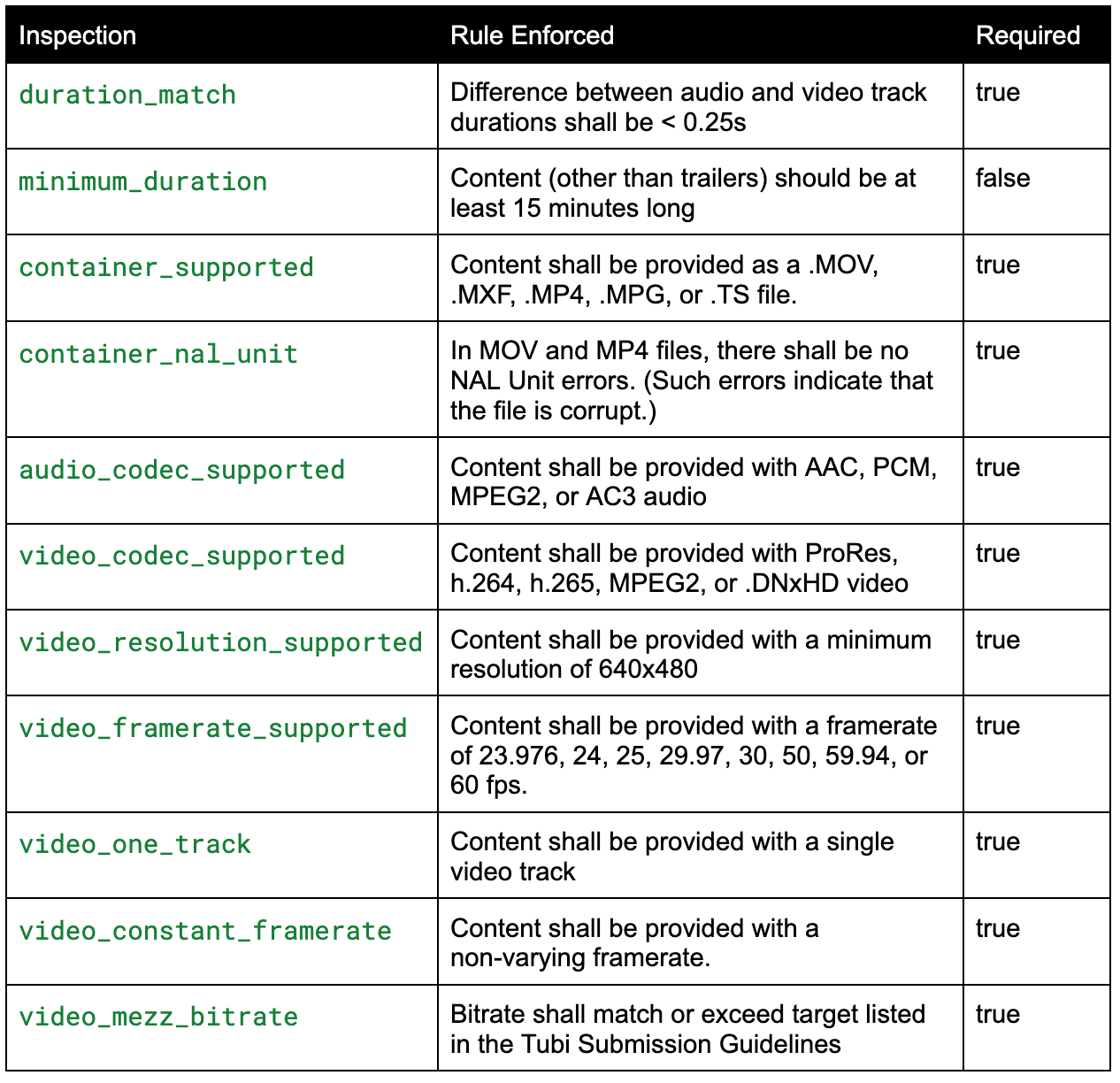
Preflight QC performs the following inspections on submitted media:
- Is the container format supported?
- Are the video and audio codecs supported?
- Do the audio and video track durations match (within a threshold)?
- Does the file meet Tubi’s minimum duration requirements for long-form content?
- If an MP4 or MOV file, can the file be parsed without error?
- Is there one, and only one, video track?
- Is the video bitrate sufficient for a good-quality video?
- Is the video framerate constant, and is it one of the supported framerates (23.976, 24, 25, 29.97, 30, 50, 59.94, 60 fps)?
- Is the video resolution at least standard definition (SD) or higher?
- Are there any undesirable colorbars, counting leaders, production slates, or timecode at the beginning or end of the video?
- Are there undesirable test tones at the beginning or end of the audio?
Preflight QC is a Feature of Tubi’s Zeus
Zeus is Tubi’s media processing system. It is directly responsible for parsing, analyzing, transcoding, and packaging videos that will be streamed to viewers.
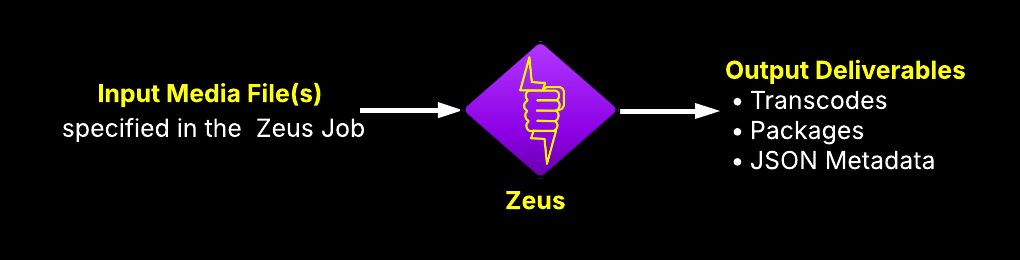
The Zeus QC job was created to check for problems with transcode and packaging output, but is also the basis for the new Preflight inspections. For Preflight QC, we wrote additional inspections applicable to partner source videos.
The QC job reads in a Media File, runs Zeus MediaParse to gather metadata.
Zeus uses a pipeline of media filters and codecs to process audio and video. The filters may be LibAV filters, or may be custom Zeus filters. In the case of Zeus MediaParse, the pipeline uses packet logger filters to extract metadata describing the video and audio.
The gathered metadata is then evaluated in a series of inspections. Each inspection will seek out the metadata it needs to look for issues.
Zeus QC Results
QC Results output include a list of inspections run for each source file. Each inspection result includes
- Inspection category (e.g., container, video, audio)
- Inspection name
- Required (boolean)
- Test Rule An explanation of the rule being tested.
- Status (pass, fail, warning)
- Notes If the inspection failed, this is a detailed explanation of why if failed, and if appropriate, the specific media time when the problem occurred.
QC Inspections in Detail
Basic Media Info Inspections
Some inspections can be run using basic data read by libavformat. This data is similar to what you might get from running FFProbe or MediaInfo. These inspections are very fast, assuming the file is a header-based format such as .mov, .mp4, or .wav.
Colorbar Detection

The video_no_colorbars inspection can flag a variety of color-bar flavors including those pictured below.
The video_no_colorbars inspection detects colorbars using the following techniques:
- A custom cascade classifier trained on images of various colorbars.
- A high amount of vertical repeat
- Saturated color.
When colorbars are detected, the inspection fails and the beginning and end times are reported in the QC results.
Slate and Timecode Detection
Slate and timecode inspections both require OCR, so they use the same metadata. The image below left shows an example of a production slate. The image below right shows an example of a burned-in timecode.
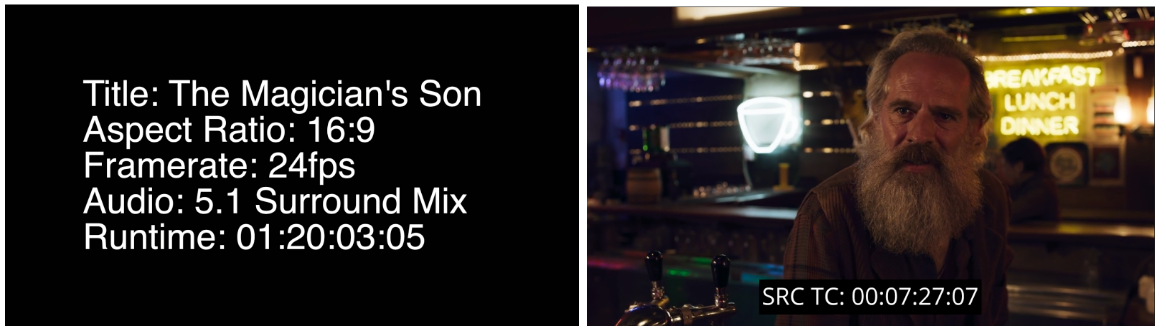
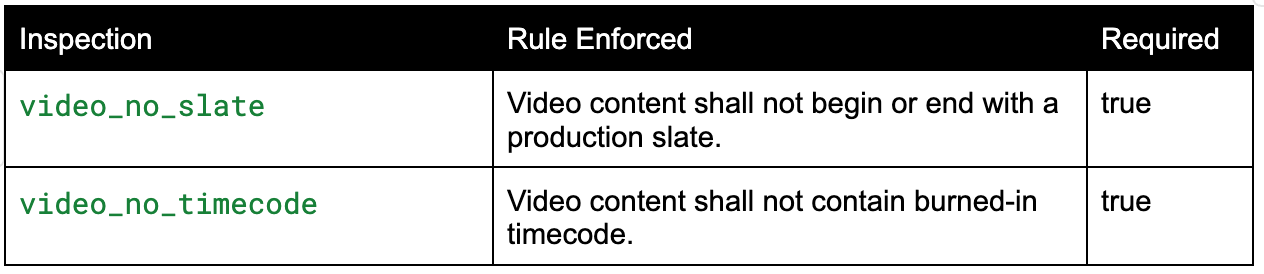
The video_no_slate inspection flags production slates by performing OCR, looking for a list of words that would appear with production info. (e.g., fps, aspect, ratio, codec, runtime, etc.)
This video_no_timecode inspection performs OCR on video frames, then uses a regex to search for groups of digits separated by colons and semicolons.
Note: OCR is run once for both inspections. Additionally, OCR is performed on a lower resolution, lower frame rate version of the video to save processing time.
When production info and/or timecode are detected, the inspection fails and the beginning and end times are reported in the QC results.
Countdown Leader Detection

The video_no_countdown inspection can flag a variety of counting leader flavors including those pictured below.
The video_no_countdown inspection detects countdown leaders using the following techniques:
- A custom cascade classifier trained on images of various counting leaders.
- Check frames for low color saturation, in order to rule out false positives.
When a countdown leader is detected, the inspection fails and the beginning and end times of the leader are reported in the QC results.
Test Tone Detection

This audio_no_tone inspection flags 440Hz and 1kHz test tones by running spectral analysis, looking for a prominent centroid at one of these frequencies. The image below shows what a tone might look like in a spectral analysis tool.
When tones are detected, the inspection fails and the beginning and end times are reported in the QC results.
User Interface
The results of Preflight QC inspections can be displayed in a tabular format, similar to the image below.
Conclusion
VOD Preflight QC is a new Zeus feature designed to proactively catch content issues before they disrupt the processing pipeline. By automating quality assurance checks at the earliest stage, it helps prevent costly rework, protects the end-user experience, and allows our content processing team to operate with greater speed and confidence.
Preflight QC marks a significant step toward a more resilient and scalable content ingestion system at Tubi. As we continue to expand our catalog, the need for automation and reliability becomes even more critical — and tools like this are paving the way forward.
메타데이터
- post_id
- f147263eb8a7
- slug
- tubis-vod-preflight-qc-automated-quality-control-of-submitted-content-f147263eb8a7
- url
- https://medium.com/tubi-engineering/tubis-vod-preflight-qc-automated-quality-control-of-submitted-content-f147263eb8a7
- canonical_url
- https://medium.com/tubi-engineering/tubis-vod-preflight-qc-automated-quality-control-of-submitted-content-f147263eb8a7
- author_url
- https://medium.com/@kcorcoran_43392
- status
- ok
- fetched_at
- 2026-06-16 19:09:56