Best note-taking app for Mac if you work with too much information
I’m a writer, so I take notes for almost everything I work on.
Best note-taking app for Mac if you work with too much information
Photo by Edi Simetzberger on Unsplash
I’m a writer, so I take notes for almost everything I work on.
For a simple app review, I might only need a few feature notes and a link to the pricing page. For a larger article, I usually collect research snippets, screenshots to check later, or questions for an expert.
The notes themselves are useful, but keeping them easy to find when I’m working across many projects at once might be problematic.
So I tested a few tools to find the best note-taking app for a content-heavy Mac workflow. I paid attention to structure, search, and whether the app made my notes easier to use after the first day.
Apple Notes: Good until the notes start piling up
Source: https://support.apple.com/en-gb/guide/notes/not18ab658ed/mac
I still use Apple Notes when I’m saving an idea, a link, or a short note from a call because it opens quickly and syncs across Apple devices.
Plus, Tags and Smart Folders make it more useful than a plain notes app. I can group notes by project, topic, or status, which helps when I don’t want to create too many folders.
Saves time with: Apple Notes is already on Mac and iPhone, so it’s good for quick notes that don’t need much structure.
Where it lacks: Project work gets messy. Once I have research notes, task reminders, and follow-ups in the same place, Apple Notes starts feeling too loose. Search works, but only if I remember the exact words I used.
My verdict: Apple Notes is probably the best free note-taking app if your notes stay simple. For heavier work, I’d want more connection between notes, tasks, and deadlines.
NotePlan: When notes keep turning into tasks
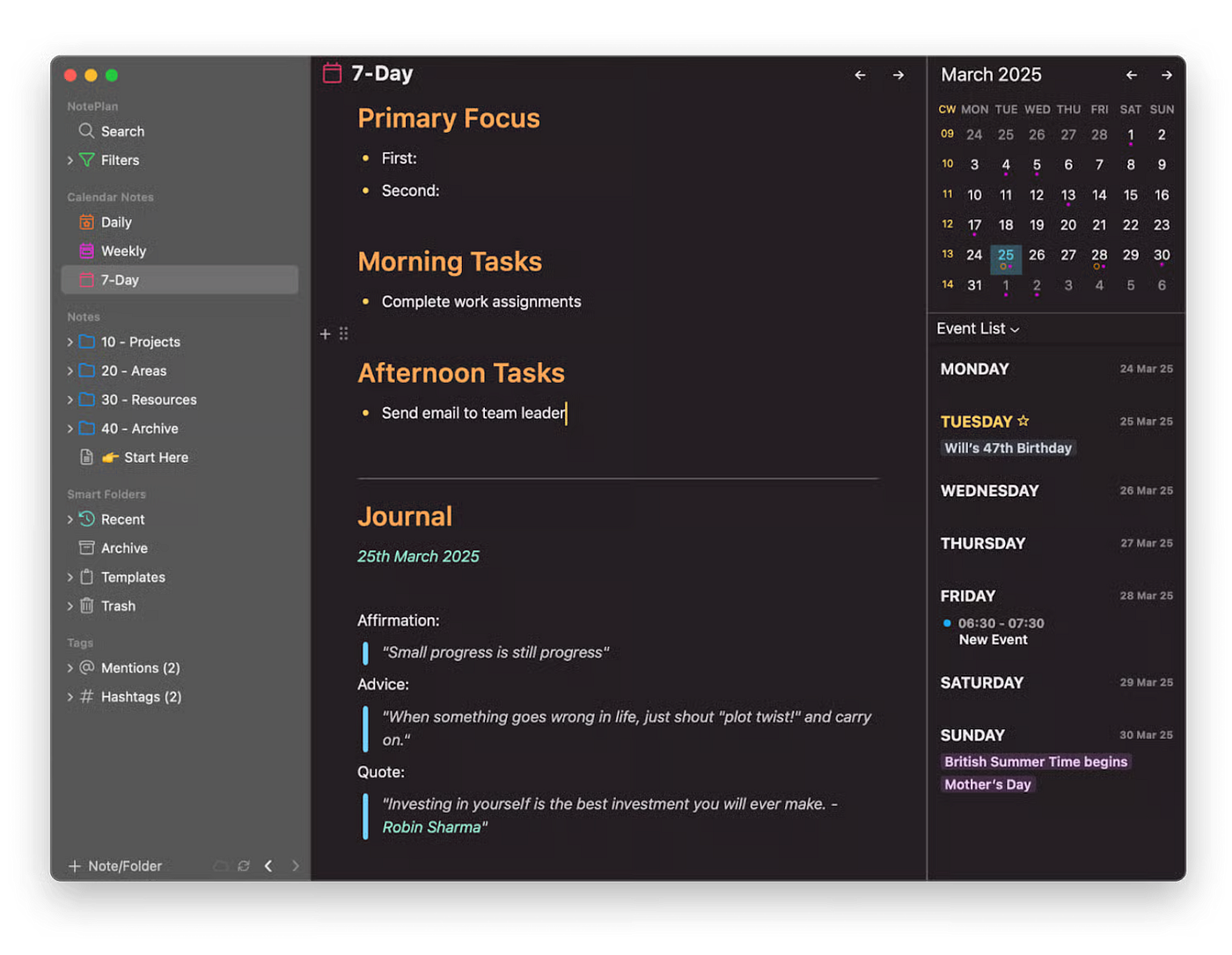
I used NotePlan for article planning, follow-up tasks, and notes I wanted to connect to specific days. The useful part is that a note doesn’t sit there alone. It can belong to a project, show up in a daily note, connect to a task, or sit next to the calendar context.
The daily notes view is the feature I’d probably use most. I can open the day, write what I’m working on, and link back to the project without building a complicated folder structure first.
Saves time with: NotePlan keeps notes, tasks, calendar items, tags, and project pages close to each other. It’s useful when information comes in during the day and needs somewhere practical to land.
Where it lacks: It works best if you like planning inside your notes. If you only want a quiet writing space, it may feel too task-oriented.
My verdict: NotePlan is my pick for the best note-taking app for Mac if your notes often become tasks, deadlines, and project follow-ups.
Obsidian: When notes need to connect over time
Source: https://obsidian.md
For me, Obsidian is better for research than for daily planning.
It stores notes as local Markdown files and makes linking between them easy. That’s useful when I’m collecting ideas that might matter later, like article references or app testing notes.
The backlink view is the part I care about most. If I write a note about AI writing patterns and link it to editing and examples I’ve collected, Obsidian keeps those connections visible. That’s more helpful than hiding everything in folders and hoping I remember where I saved it.
Saves time with: Obsidian is strong for connected notes, long-term research, and building a personal knowledge base.
Where it lacks: Syncing across devices needs extra setup or a paid sync plan. If you’re comparing the best note-taking app for your iPhone, I’d keep that in mind before choosing Obsidian as your main place for capture.
My verdict: Obsidian is best when your notes need to remember each other, especially for research-heavy work.
So, which note app to choose?
My answer depends on what “too much information” looks like. If I’m losing tasks, I want NotePlan. If I’m losing ideas, I want Obsidian. And if I’m only saving quick thoughts, Apple Notes is enough.
What note-taking app helps you keep information under control? Share your favorite in the comments.
메타데이터
- post_id
- f1896eab6582
- slug
- best-note-taking-app-for-mac-if-you-work-with-too-much-information-f1896eab6582
- url
- https://medium.com/@yulia.savliuk/best-note-taking-app-for-mac-if-you-work-with-too-much-information-f1896eab6582
- canonical_url
- https://medium.com/@yulia.savliuk/best-note-taking-app-for-mac-if-you-work-with-too-much-information-f1896eab6582
- author_url
- https://medium.com/@yulia.savliuk
- status
- ok
- fetched_at
- 2026-07-26 20:10:45