How We Built Our Own Over-the-Air Update System for React Native
CodePush is dead. The Play Store queue is slow. We had bugs to fix. So we built Ripple
How We Built Our Own Over-the-Air Update System for React Native
CodePush is dead. The Play Store queue is slow. We had bugs to fix. So we built Ripple
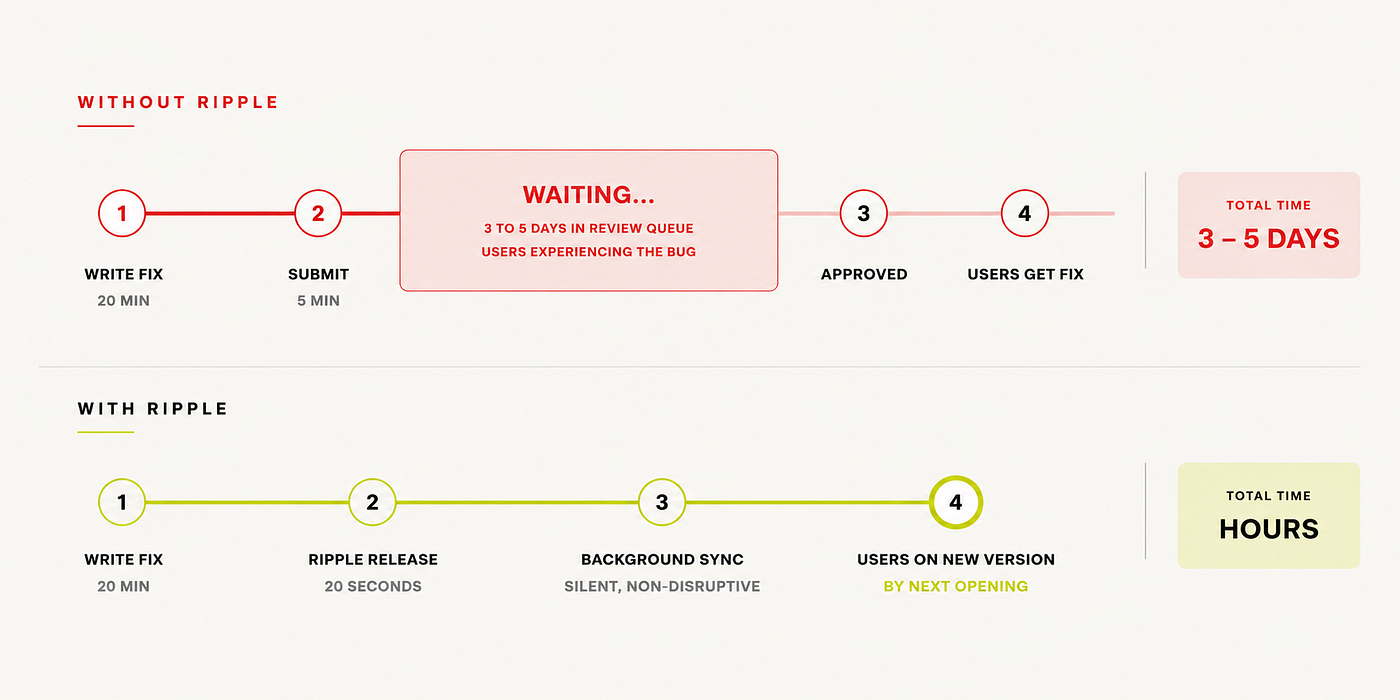
There’s a specific kind of dread that hits when you ship a bug to mobile. Not the bug itself, you’ve seen bugs before, you know how to fix bugs. It’s the waiting. You know exactly what’s broken. You know exactly which line of code caused it. You have the fix written, tested, and ready to go. And you’re staring at a three-day Play Store review queue while your users hit the same crash, over and over, every single hour.
We’d been here before. A null pointer in a payment screen. A broken navigation flow after an OS update. A typo in an error message that somehow made it past review and was now sitting in production, mocking us. Each time, the fix was trivial. Each time, the wait was not.
The conversation that finally broke us was mundane. An engineer said, almost as an aside: “The fix is one line. Why does it take three days to reach users?” Nobody had a good answer. We had a fast CI pipeline, thorough code review, solid test coverage and we were still held hostage by an external review process that didn’t care about our urgency.
That question is what eventually led us to build Ripple- our own over-the-air update system for React Native. This is the story of why we built it, how it actually works under the hood.
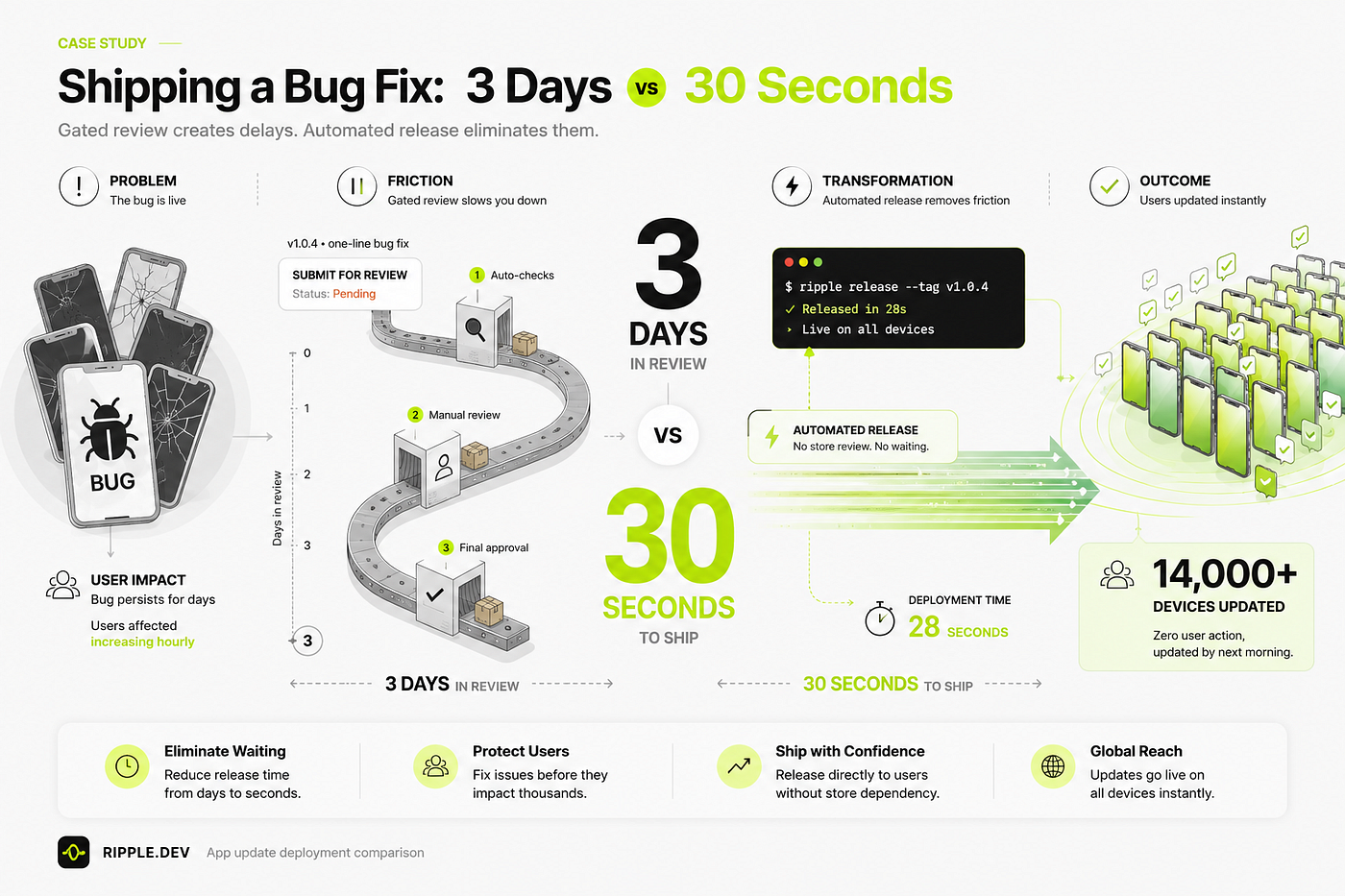
The Problem with Waiting
Before you can understand why OTA updates work, you need to understand something about how React Native apps are structured. Most people treat a mobile app as a single thing- you build it, you ship it, users download it. But a React Native app is actually two completely different layers bundled into one container.
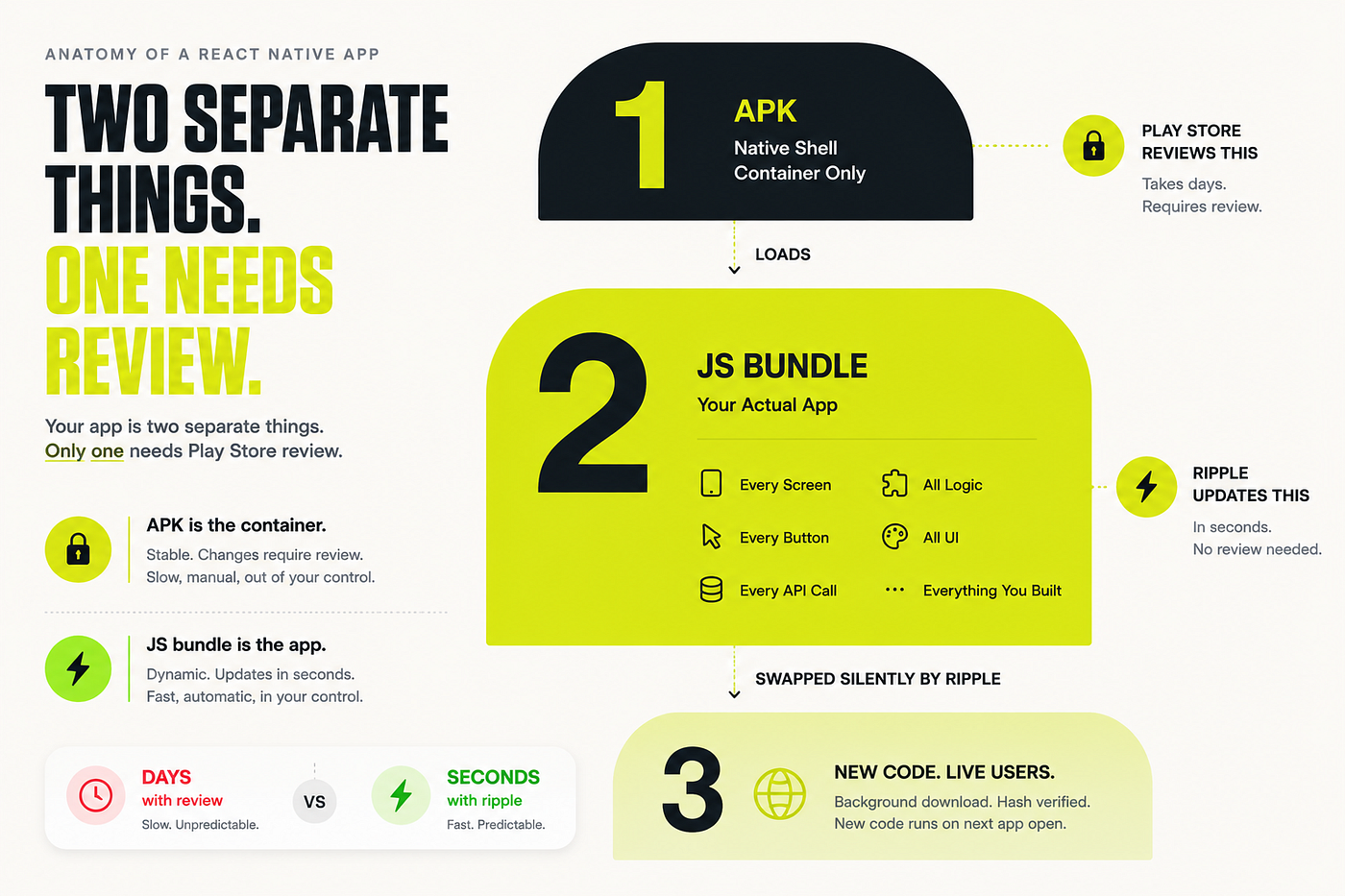
The first layer is the native shell- the APK on Android, the IPA on iOS. This is compiled Kotlin or Java (or Swift/Objective-C). It handles everything that requires direct access to the device: the camera, push notifications, Bluetooth, storage permissions, biometrics. This layer is compiled to native machine code. It’s what the operating system actually runs. And because it can access sensitive device capabilities, the app stores want to review it before it reaches users. That review exists for good reasons.
The second layer is the JavaScript bundle- a single compiled file that contains essentially everything you actually built. Every screen, every button, every API call, every business rule, every piece of UI logic. When React Native starts, the native shell loads this bundle and executes it. The bundle is just a file on disk. And files on disk can be replaced.
This is the fundamental insight that makes OTA updates possible. If you can replace the JavaScript bundle on a device without touching the native shell, you can ship new code without going through app store review. The native shell stays the same. The review stays valid. But the code users are actually running changes.
This insight isn’t new- it powered CodePush for years, and it’s well within Apple and Google’s guidelines as long as you’re only updating JavaScript and not the native layer. The mechanism has been understood for a long time. We just needed to own the infrastructure.
Why Not Just Use CodePush?
We tried. For a while, it was fine. CodePush was easy to set up, it worked reliably, and it solved the exact problem we needed solved. We shipped bug fixes between app store releases, iterated faster on UI changes, and generally felt less anxious about the gap between “fix is written” and “fix reaches users.”
Then Microsoft deprecated it.
The announcement was quiet and the timeline was tight. App Center- the platform CodePush was part of- was being wound down. We suddenly had to make a decision: migrate to a newer paid service, find an open-source alternative, or build our own.
We looked at the paid alternatives. They work. If you want a managed OTA solution and don’t want to operate infrastructure, they’re the right call. But for us, the pricing didn’t make sense at our scale, and more importantly, we’d just learned an expensive lesson about depending on a third party for a critical deployment path. We didn’t want to be here again in two years.
So we looked at the problem itself. How hard could it actually be?
“If the mechanism is simple enough that Microsoft could build it, it’s simple enough that we can too.”
It turned out to be simpler than we expected- not trivial, but well within the range of infrastructure a small team can own and operate. The core loop is straightforward: build the bundle, upload it to a server, have devices check for updates on startup, download if needed, swap atomically. The complexity is in the details- rollouts, rollbacks, hash verification, failure handling, but none of it is novel. It’s just software.
How Ripple Works
At its core, Ripple does one thing: a developer runs a single command, and every active device in the fleet receives the new code the next time they open the app. No app store submission. No review queue. No user action required.
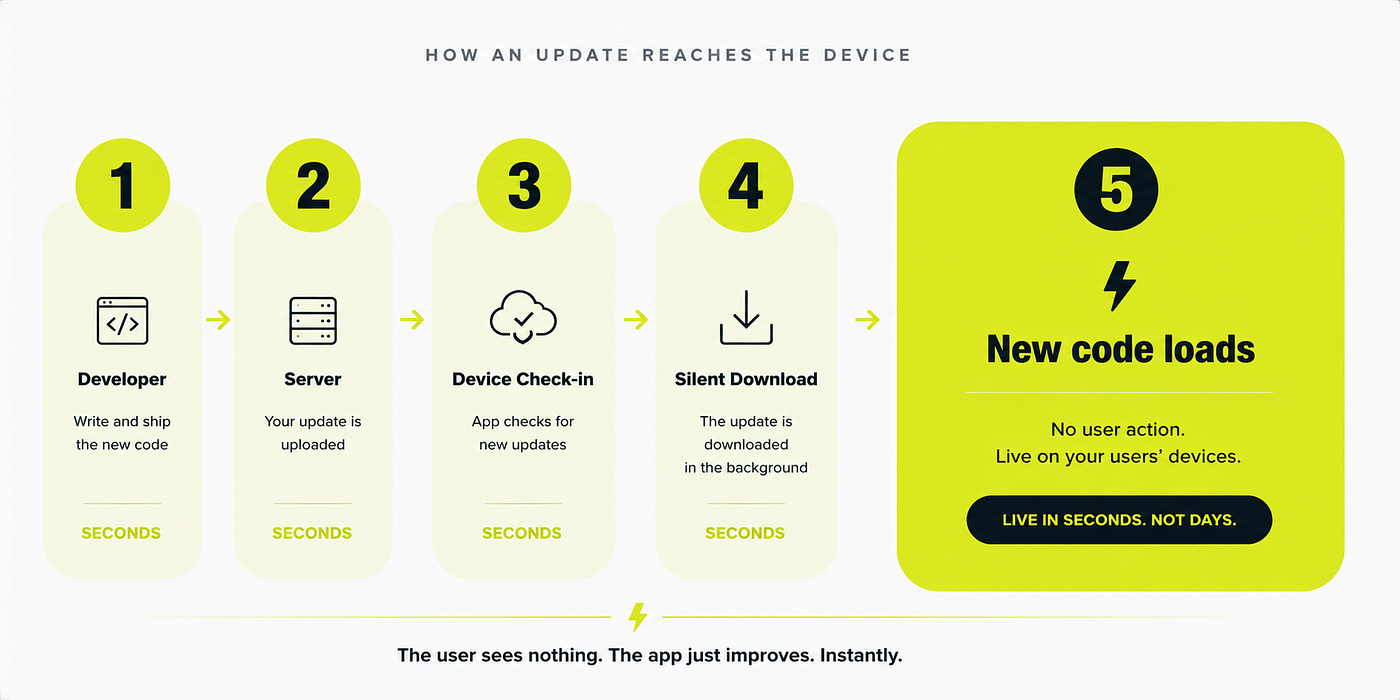
The flow has five steps. The developer runs ripple release --tag v1.0.4. The CLI bundles the React Native JavaScript and uploads it to the server. The server stores the bundle, records the release, and marks it as the active version for the specified rollout percentage.
From that point, the devices take over. Every time the app opens, the SDK sends a lightweight check-in request to the Ripple server: here's my current bundle version, here's my device ID, what should I be running? The server checks the device's bucket against the active release's rollout percentage. If the device should receive the update, the server responds with the new bundle's download URL. If not or if the device is already on the latest version, the server says nothing has changed and the app starts normally.
When a device does receive an update URL, it downloads the new bundle in a background thread while the user continues using the current version. The download doesn't interrupt anything. Once complete, the SDK verifies the bundle. If it checks out, the new bundle is written to disk atomically using a write-then-rename pattern so the old bundle is never in an inconsistent state. The next time the app opens, the native bridge loads the new bundle instead of the old one.
The key design decision was making this a pull model, not a push model.
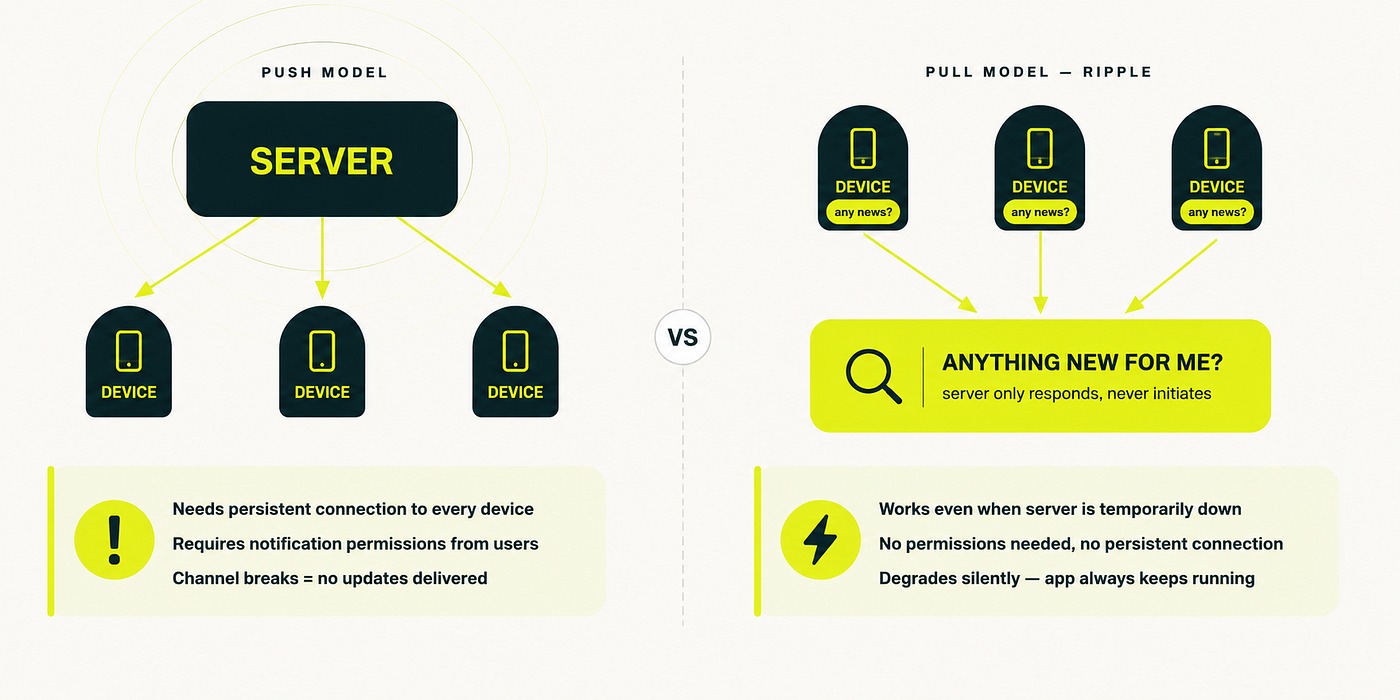
A push model would have the server notify devices when an update is available, essentially pinging every device when you ship. This sounds appealing but creates real operational complexity. You need to maintain persistent connections to every device, or use push notification infrastructure, or have some other channel. If any device isn’t reachable when you push, it misses the update. You need retry logic, delivery tracking, and fallback handling. You also need push notification permissions from users, which adds friction and can be denied.
The pull model avoids all of this. Devices ask the server if there’s anything new, on their own schedule, every time they open the app. The server never needs to know in advance which devices exist or how to reach them. If the server is down when a device checks in, the device just starts with its current bundle, graceful degradation with zero infrastructure complexity. The update will arrive the next time the device opens the app and the server is available. The simplicity of this tradeoff is significant: you trade immediate delivery (push) for operational resilience (pull), and for our use case- shipping fixes, not real-time commands, that tradeoff is obviously correct.
What the User Experiences
Nothing. That’s the point.
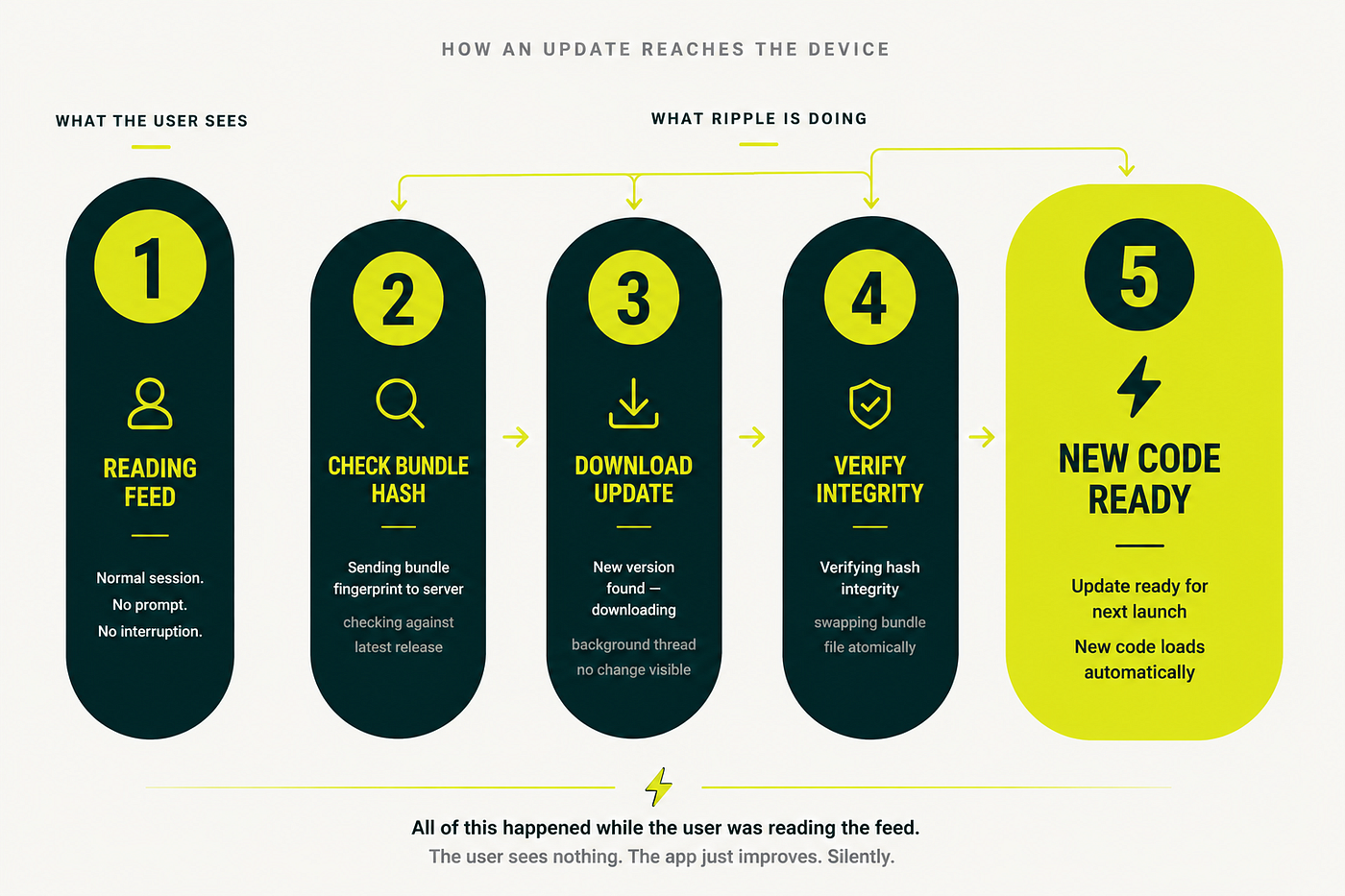
While a user is scrolling their feed or completing a task, Ripple is doing its work entirely in the background. The SDK sends the check-in request on a low-priority background thread. If an update is available, the download happens on another background thread, the app never blocks, never shows a loading indicator, never interrupts the user’s session. Verification and the atomic file swap happen in milliseconds. The whole process is invisible.
When the user next opens the app- after closing it, or after the process is killed and restarted, the native bridge picks up the new bundle from disk and executes it. The app launches normally, just running the new code. There’s no “update installed” notification. There’s no “what’s new” splash screen. The app just works, and it happens to be working better than it did yesterday.
This is the experience we were optimizing for. Not because we wanted to be clever about it, but because it’s the only experience that makes sense. Updates that interrupt users aren’t updates , they’re interruptions dressed as progress. The best infrastructure is the infrastructure users never notice.
Gradual Rollouts
We don’t ship to 100% of devices immediately. We learned that lesson the hard way- a bad release that we couldn’t pull back fast enough taught us that “ship to everyone” is a privilege you earn, not a default.
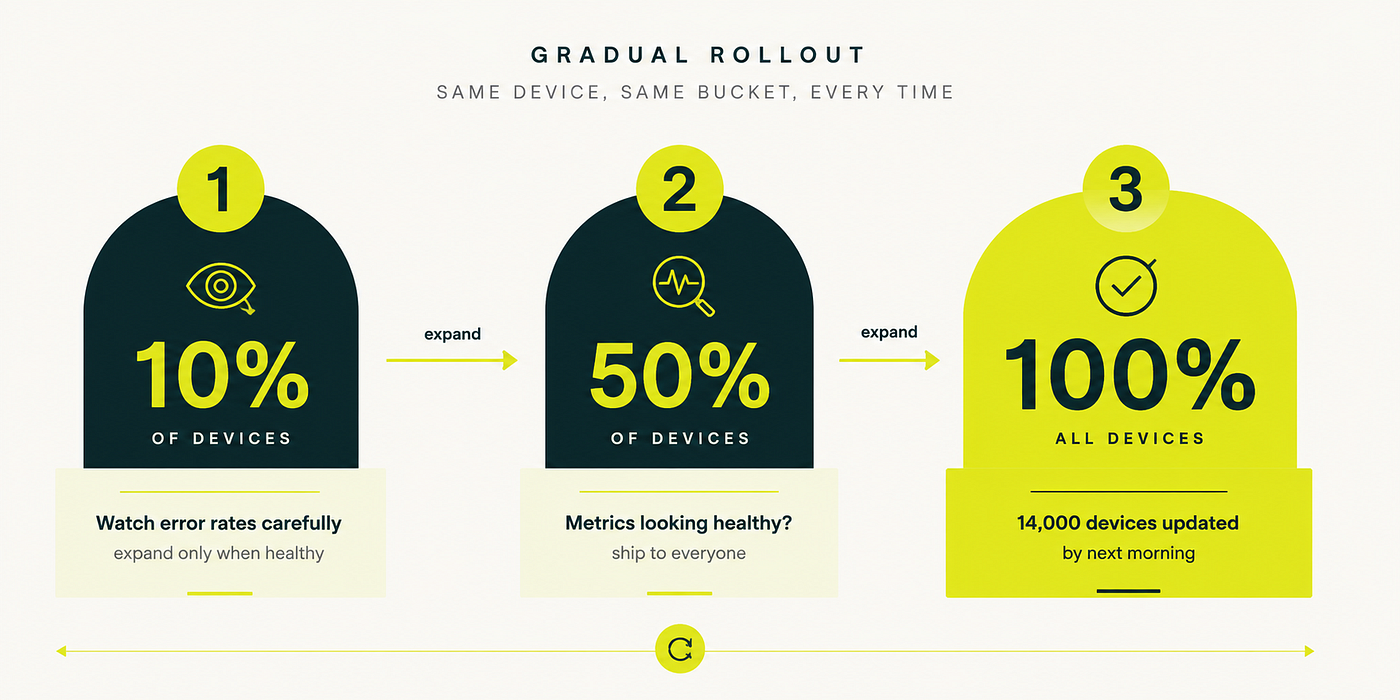
Ripple implements gradual rollouts using hash bucketing. When a device registers with the SDK, its unique ID is hashed and the result is normalized to a value between 0 and 100. When you release with --rollout 10, only devices whose bucket value falls below 10 receive the update. The rest stay on the current version.
The important property of this approach is determinism. The same device always lands in the same bucket. This means a device that receives a 10% rollout will also receive the same 50% rollout when you expand it, you're not randomly sampling each time, you're expanding a stable set. A device that's in bucket 7 will get every update whose rollout percentage is above 7. This makes rollout expansion predictable: you're not hoping the right devices get sampled, you're expanding a deterministic frontier.
It also means that if a device reports an error after an update, you can look up its bucket, and you know exactly which releases it has received. The audit trail is clean. There's no ambiguity about what code a given device was running at a given time.
The workflow in practice: we ship to 10%, watch error rates in our monitoring for an hour or two, expand to 50%, watch again, then go to 100%. For higher-risk releases, we might sit at 10% overnight. For a one-line bug fix with no surface area for regression, we go straight to 100% because we already have confidence in the change.
Rollback in One Command
The flip side of shipping fast is being able to stop fast. Gradual rollouts help you catch problems before they affect everyone, but sometimes a bug gets through and you need to pull back quickly.
ripple rollback
That's the entire command. No flags required for the common case. The server marks the previous stable version as the active release and immediately starts serving it to devices. Every device that checks in from that point, whether on the next app open, or within the next few minutes if the app is backgrounded, gets the rollback version.
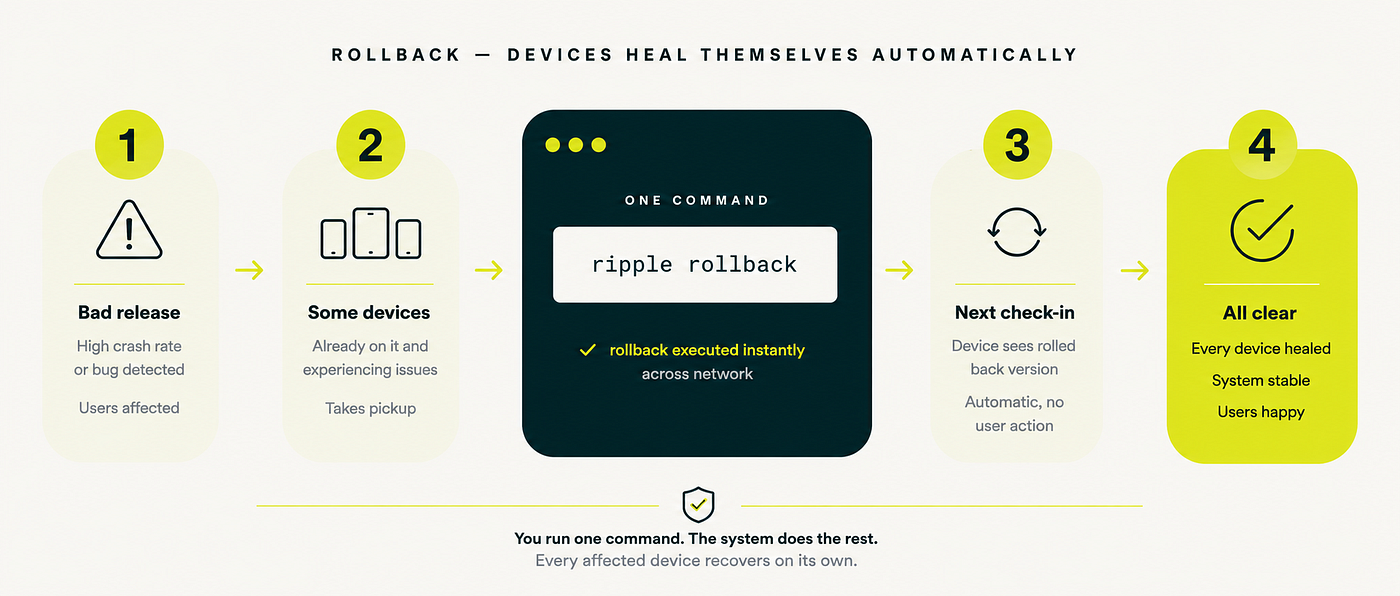
The thing that makes this powerful is that it propagates automatically to devices that already received the bad bundle. If 3,000 devices downloaded and applied the bad release before you caught the problem, they don’t stay stuck on it. The next time any of those devices opens the app, the check-in request comes back with the rollback version, and the device downloads and applies the previous bundle. By the next morning, if most of your users have opened the app at least once, the fleet self-heals.
Contrast this with a Play Store rollback, which involves submitting a new build, waiting for review, and then hoping users update. The window between “we know there’s a problem” and “users are no longer affected” is measured in days. With Ripple, it’s measured in hours at worst, and usually less.
We’ve used the rollback exactly once in production. A change to the navigation stack caused a crash on certain Android versions that our test matrix didn’t cover. We caught it when the first cohort’s crash rate spiked. The rollback command took three seconds. The devices self-healed over the next two hours as users opened the app. The incident was real, but the blast radius was bounded and the recovery was fast.
The Dashboard
We built a dashboard to monitor everything in real time. It’s not elaborate, we deliberately kept the scope small but it gives us exactly the visibility we need.
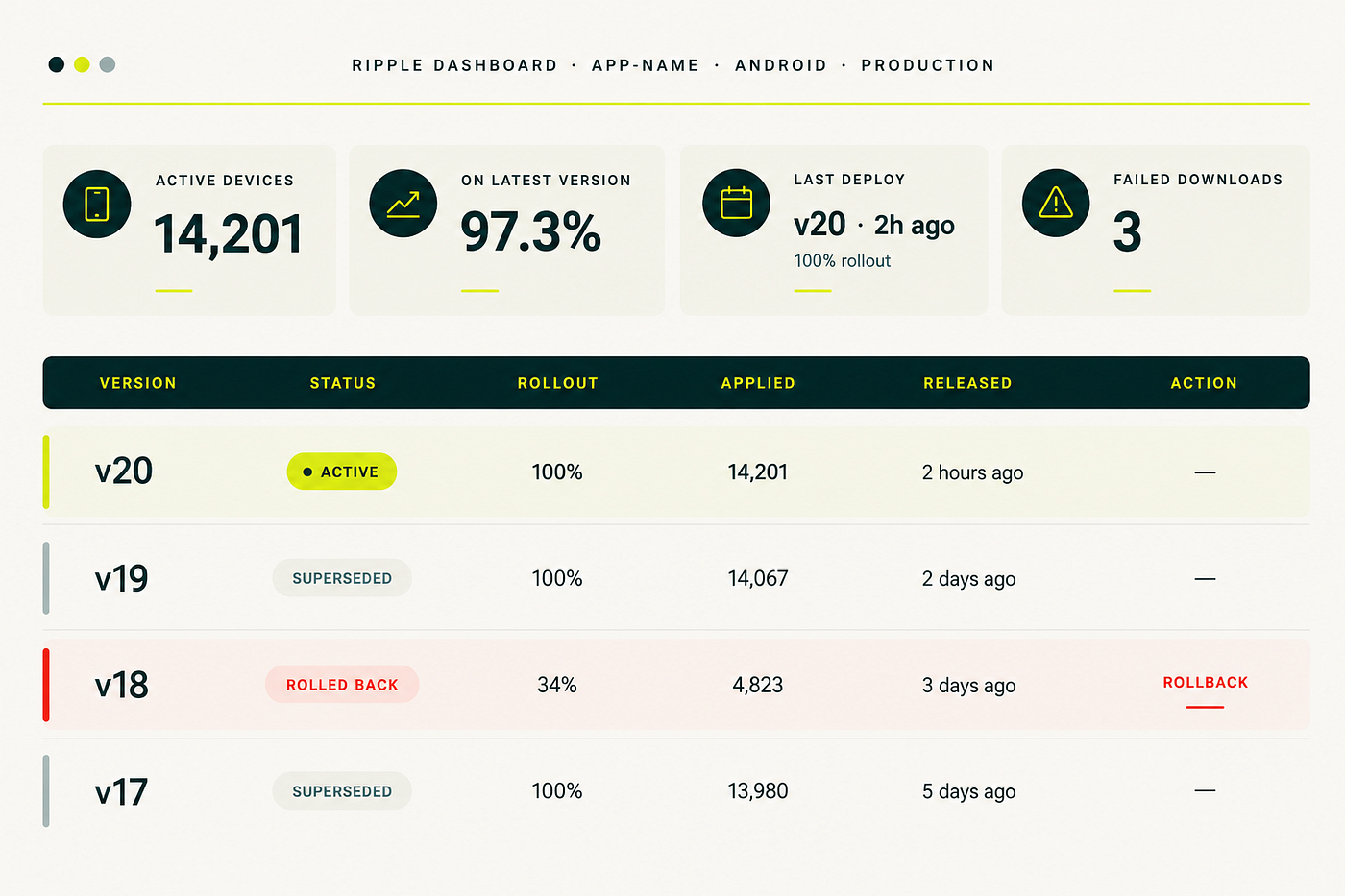
The key numbers are always visible: how many devices are active, what percentage are on the latest version, when the last release was, and how many downloads have failed. Below that, a release table shows every version in history: its rollout percentage, how many devices applied it, when it was released, and whether it’s active, superseded, or rolled back.
The “failed downloads” number deserves special attention. A failed download means a device started downloading a bundle but didn’t complete it, usually because the network dropped mid-transfer. In our experience, this number is almost always in the single digits. Devices retry on the next app open, so failures resolve themselves. But watching the number tells you if something systemic is wrong, like a bundle that’s too large for certain network conditions or a CDN issue affecting a specific region.
The rollback button next to the active release is the most important button on the page. It’s always one click away. We’ve never been happy to use it, but we’ve been very happy it exists.
The Safety Net
The first question everyone asks when they hear about OTA updates: what happens when something goes wrong during the update itself? What if the download corrupts? What if the verification fails? What if the new bundle crashes immediately on startup? Can an OTA update brick a device?
The answer, by design, is no.
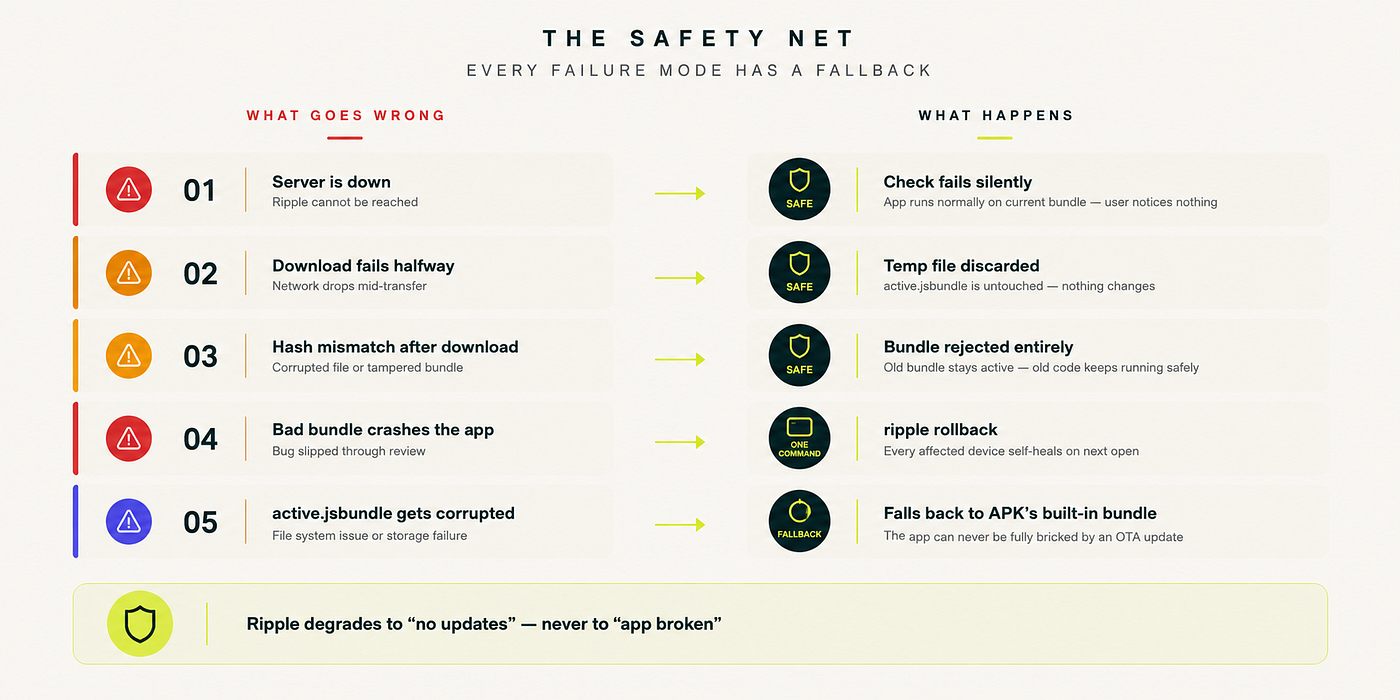
Every failure mode in Ripple is handled with the same principle: prefer the known-good state over any uncertain state. If the server is unreachable, the device runs on whatever bundle it already has. If a download fails halfway through, the partial file is discarded and the existing bundle is untouched, we write to a temp file first, and only replace the active bundle after a complete and verified download. If verification fails after download, the bundle is rejected entirely as if the download never happened. If the new bundle crashes on first launch, the SDK detects the crash and automatically falls back to the previous version.
And underneath all of this, there’s a final fallback that can never be removed: the original bundle that was compiled into the APK. Even if every OTA bundle on disk were somehow corrupted simultaneously, a scenario that’s essentially impossible in practice, but worth designing for, the app would fall back to the bundled version and continue to work. The APK is the floor. You can’t go lower than the floor.
“Ripple degrades to ‘no updates’ , never to ‘app broken’.”
This design philosophy comes directly from operating production infrastructure. The goal isn’t to prevent all failures- it’s to ensure that failures are contained, recoverable, and invisible to users. An update that fails silently and leaves everything working is infinitely better than an update that fails visibly and leaves something broken.
The Unexpected Benefit
We built Ripple to fix bugs faster. The ROI case was simple: if we can cut the time from “fix is written” to “fix reaches users” from three days to thirty seconds, that’s obviously worth doing. That was the pitch and it was correct.
What we didn’t expect was how it changed the way we think about shipping.
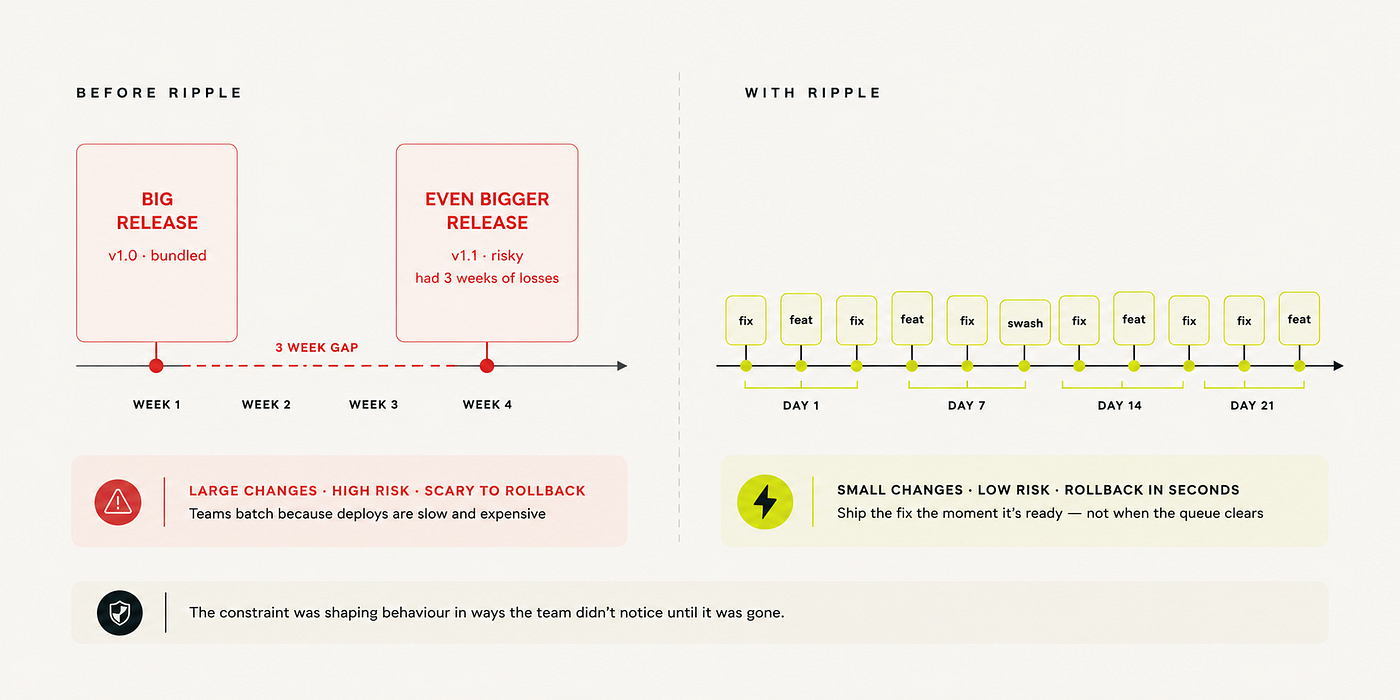
When deployments are expensive, teams batch. This is a well-documented phenomenon in DevOps- it’s one of the core insights of the DORA metrics research. When each deployment costs time, review cycles, coordination, and risk, the rational response is to accumulate changes and ship them together. You hold a one-line bug fix because it’s not worth the overhead of a deployment on its own. You bundle three weeks of changes into a single release. You hold your breath every time you ship because the blast radius of any individual change is now everything in the batch.
This batching isn’t laziness or bad process. It’s rational optimization under constraint. The problem is that it creates a feedback loop: batched releases are riskier (more changes, more surface area), so teams become more cautious about releasing, so they batch more, so releases get riskier. The constraint shapes the behavior.
With Ripple, the constraint is gone. A one-line bug fix ships immediately, on its own, without waiting for anything else. There’s no “next release window.” There’s no coordination cost. The fix ships when the fix is ready. And because each change ships independently, each change is small, well-understood, and easy to roll back if needed. The virtuous cycle of small, frequent, low-risk deployments replaces the vicious cycle of large, infrequent, high-risk ones.
We noticed the behavioral shift within the first month. Engineers stopped saying “we’ll get that in the next release.” The concept of a “release” as a discrete event mostly disappeared, we just ship things when they’re ready. The product team stopped scheduling “hotfix windows.” On-call engineers stopped dreading the question of how long a fix would take to reach users. The answer was always the same: it’s already out.
What We Learned
Building Ripple taught us something that seems obvious in retrospect but wasn’t obvious while we were living inside the old system: the constraint was shaping our behavior in ways we didn’t notice until it was gone.
The three-day review queue wasn’t just a delay. It was a constant, invisible tax on every engineering decision. It trained us to batch changes, to be conservative about what counted as “worth shipping,” to accept a background level of anxiety about known bugs that hadn’t reached users yet. We adapted to the constraint so thoroughly that we stopped noticing it was there.
Removing it didn’t just speed things up. It changed what was possible, what was normal, and what we expected of ourselves.
We’re not arguing that everyone should build their own OTA system. If you’re on React Native and the managed solutions work for your scale and budget, use them- they’re good. If you’re on a native-only codebase, none of this applies anyway. And if you’re a small team without the operational bandwidth to run your own update infrastructure, the risk-adjusted answer might be to pay for a managed service and focus your engineering time elsewhere.
But if you’re on React Native, you’ve outgrown the managed options, or you’ve been burned by depending on a third party for critical deployment infrastructure, it’s worth knowing that the mechanism is simple enough to own. The hard parts aren’t hard. The operational surface area is small. And the payoff, in speed and confidence and reduced anxiety, is real.
메타데이터
- post_id
- f1b22b5f99ab
- slug
- how-we-built-our-own-over-the-air-update-system-for-react-native-f1b22b5f99ab
- url
- https://engineering.lokalapps.com/how-we-built-our-own-over-the-air-update-system-for-react-native-f1b22b5f99ab
- canonical_url
- https://engineering.lokalapps.com/how-we-built-our-own-over-the-air-update-system-for-react-native-f1b22b5f99ab
- author_url
- https://medium.com/@dubeyprakhar13
- status
- ok
- fetched_at
- 2026-08-01 02:08:18




