發現一個 linux kernel 無法根據 BIOS ACPI 設定正確關閉 ASPM 的 bug
從 ACPI spec 查到 PCIe ASPM Control bit,它是在 FACP table 下的 IAPC_BOOT_ARCH flag:
發現一個 linux kernel 無法根據 BIOS ACPI 設定正確關閉 ASPM 的 bug
從 ACPI spec 查到 PCIe ASPM Control bit,它是在 FACP table 下的 IAPC_BOOT_ARCH flag:
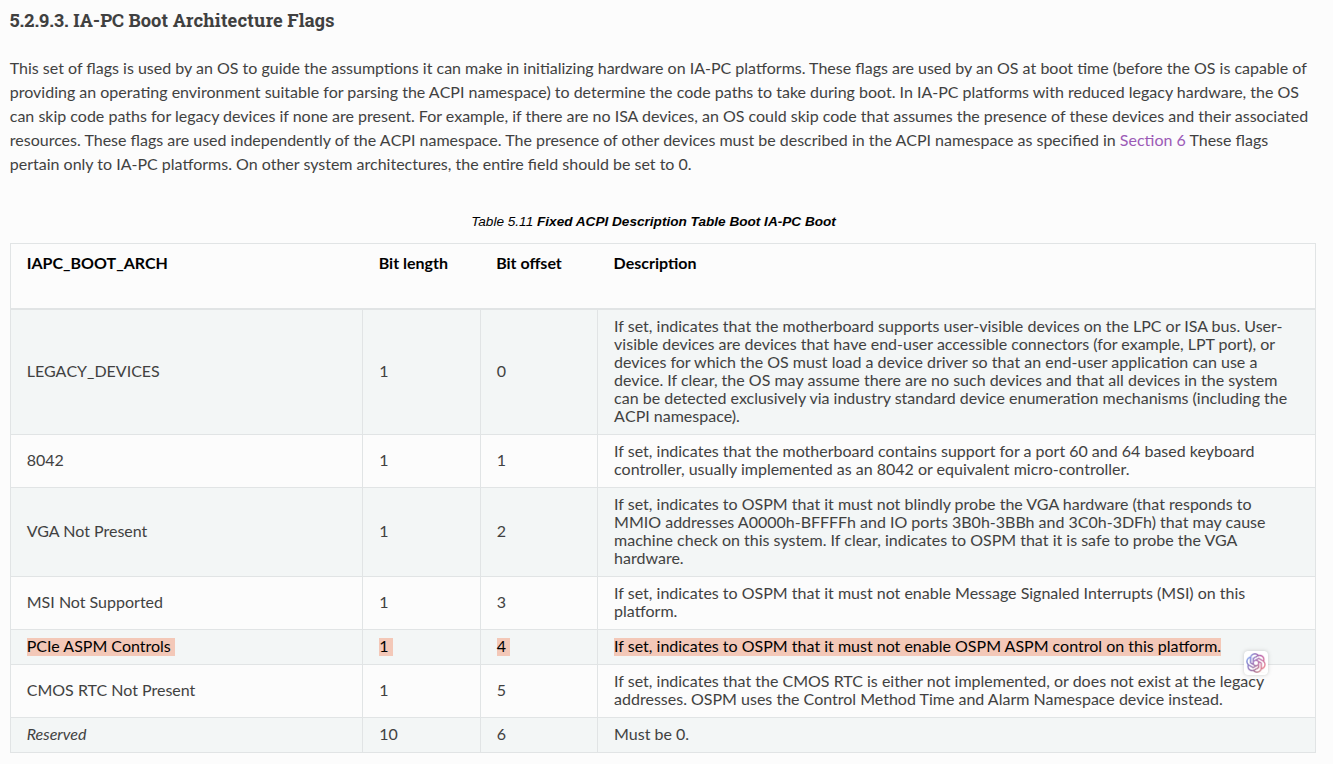
ACPI IA-PC boot flags
linux kernel 的對應位置:
static int __init acpi_pci_init(void)
{
    if (acpi_gbl_FADT.boot_flags & ACPI_FADT_NO_MSI) {
        pr_info("ACPI FADT declares the system doesn't support MSI, so disable it\n");
        pci_no_msi();
    }

    if (acpi_gbl_FADT.boot_flags & ACPI_FADT_NO_ASPM) {
        pr_info("ACPI FADT declares the system doesn't support PCIe ASPM, so disable it\n");
        pcie_no_aspm();
    }

    if (acpi_pci_disabled)
        return 0;

    acpi_pci_slot_init();
    acpiphp_init();

    return 0;
}
其中的 ACPI_FADT_NO_ASPM 定義在:
#define ACPI_FADT_NO_ASPM (1<<4) /* 04: [V4] PCIe ASPM control must not be enabled */在 linux 下將 asl code dump 出來並 decompile 查看:
sudo cat /sys/firmware/acpi/tables/FACP > facp.aml
iasl -d facp.aml
cat facp.dsl
facp.dsl
可以看到目前的 ACPI_FADT_NO_ASPM bit 是設為1,表示 BIOS 中的 asl code 已經正確設定 not support ASPM,但是 linux kernel 仍顯示 support:
sudo dmesg -w | grep -i aspm
sudo dmesg -w | grep -i aspm
[0.596992] ACPI FADT declares the system doesn't support PCIe ASPM, so disable it
[1.036814] acpi PNPOA08:00: _OSC: OS supports [ExtendedConfig ASPM ClockPM Segments MSI HP
X-Type3]
[1.037869] acpi PNPOA08:00: FADT indicates ASPM is unsupported, using BIOS configuration
[1.508751] igc 0000:06:00:0: can't disable ASPM; OS doesn't have ASPM control
[1.659018] igc 0000:07:00:0: can't disable ASPM; OS doesn't have ASPM control
[3.738220] igc 0000:08:00:0: can't disable ASPM; OS doesn't have ASPM control
[4.811803] igc 0000:09:00:0: can't disable ASPM; OS doesn't have ASPM control
[5.887415] igc 0000:0a:00:0: can't disable ASPM; OS doesn't have ASPM control
[6.974129] igc 0000:0b:00:0: can't disable ASPM; OS doesn't have ASPM control
[7.047419] igc 0000:0c:00:0: can't disable ASPM; OS doesn't have ASPM control
[8.127112] igc 0000:0d:00:0: can't disable ASPM; OS doesn't have ASPM control
可以看到, kernel 顯示 ACPI FADT declares the system doesn't support PCIe ASPM, so disable it,表示在 acpi_pci_init 的地方式有正確抓到BIOS 的設定,但是又顯示 OS supports [ExtendedConfig ASPM ClockPM Segments MSI HPX-Type3] ,表示在另外一個地方 kernel 沒有正確設定,導致 OS 又認為它 support ASPM。
static int __init pcie_aspm_disable(char *str)
{
    if (!strcmp(str, "off")) {
        aspm_policy = POLICY_DEFAULT;
        aspm_disabled = true;
        aspm_support_enabled = false;
        pr_info("PCIe ASPM is disabled\n");
    } else if (!strcmp(str, "force")) {
        aspm_force = true;
        pr_info("PCIe ASPM is forcibly enabled\n");
    }
    return 1;
}

__setup("pcie_aspm=", pcie_aspm_disable);

void pcie_no_aspm(void)
{
    /*
     * Disabling ASPM is intended to prevent the kernel from modifying
     * existing hardware state, not to clear existing state. To that end:
     * (a) set policy to POLICY_DEFAULT in order to avoid changing state
     * (b) prevent userspace from changing policy
     */
    if (!aspm_force) {
        aspm_policy = POLICY_DEFAULT;
        aspm_disabled = true;
    }
}

bool pcie_aspm_support_enabled(void)
{
    return aspm_support_enabled;
}
從上面的 code 可以看到,如果我們在 grub 中設定 pcie_aspm=off,在 pcie_aspm_disable() 中會把 aspm_support_enabled 設為 false ;但是在 pcie_no_aspm() 中,並沒有把 aspm_support_enabled 設為 false。這導致在 pci-acpi.c 中的 acpi_pci_init() 當判斷到 BIOS 設定 ACPI_FADT_NO_ASPM flag 時,呼叫到 pcie_no_aspm(),不會去設 aspm_support_enabled=false,這造成 pcie_aspm_support_enabled() 將會回傳預設值 true。
pcie_aspm_support_enabled() 會在 linux/drivers/acpi/pci_root.c 中被呼叫,並回傳 OSC_PCI_ASPM_SUPPORT flag:
static u32 calculate_support(void)
{
    u32 support;

    /*
     * All supported architectures that use ACPI have support for
     * PCI domains, so we indicate this in _OSC support capabilities.
     */
    support = OSC_PCI_SEGMENT_GROUPS_SUPPORT;
    support |= OSC_PCI_HPX_TYPE_3_SUPPORT;
    if (pci_ext_cfg_avail())
        support |= OSC_PCI_EXT_CONFIG_SUPPORT;
    if (pcie_aspm_support_enabled())
        support |= OSC_PCI_ASPM_SUPPORT | OSC_PCI_CLOCK_PM_SUPPORT;
    if (pci_msi_enabled())
        support |= OSC_PCI_MSI_SUPPORT;
    if (IS_ENABLED(CONFIG_PCIE_EDR))
        support |= OSC_PCI_EDR_SUPPORT;

    return support;
}
而 calculate_support() 會在 negotiate_os_control() 中被呼叫,要求 OS 支援 ASPM:
static void negotiate_os_control(struct acpi_pci_root *root, int *no_aspm)
{
    u32 support, control = 0, requested = 0;
    u32 cxl_support = 0, cxl_control = 0, cxl_requested = 0;
    acpi_status status;
    struct acpi_device *device = root->device;
    acpi_handle handle = device->handle;

    /*
     * Apple always return failure on _OSC calls when _OSI("Darwin") has
     * been called successfully. We know the feature set supported by the
     * platform, so avoid calling _OSC at all
     */
    if (x86_apple_machine) {
        root->osc_control_set = ~OSC_PCI_EXPRESS_PME_CONTROL;
        decode_osc_control(root, "OS assumes control of",
                   root->osc_control_set);
        return;
    }

    support = calculate_support();

    decode_osc_support(root, "OS supports", support);

    if (os_control_query_checks(root, support))
        requested = control = calculate_control();

    if (is_cxl(root)) {
        cxl_support = calculate_cxl_support();
        decode_cxl_osc_support(root, "OS supports", cxl_support);
        cxl_requested = cxl_control = calculate_cxl_control();
    }

    status = acpi_pci_osc_control_set(handle, &control, support,
                      &cxl_control, cxl_support);
        ......
        ......
}
因此,在 pcie_no_aspm() 中,少設定 aspm_support_enabled=false 會造成 OS 認為系統有支援 ASPM ,而強制開啟 ASPM 相關功能,就算 BIOS 已經在asl code FACP table 正確填入 not support ASPM flag。
這使得我們無法從 BIOS 端要求 OS 關閉 ASPM,只能夠過 OS 端 grub 設定來關閉 ASPM。
實驗修改 linux kernel
參考 ChatGPT 提供的作法:
https://chatgpt.com/share/69200027-947c-8002-ab2f-7b1523d31893
✅ How to Modify, Rebuild, and Boot a Custom Kernel in Debian
1. Install required packages
Debian makes kernel building easier using build-essential and fakeroot.
sudo apt update
sudo apt install build-essential fakeroot libncurses-dev xz-utils libssl-dev bc flex bison dwarves
Optional but recommended (for packaging):
sudo apt install libelf-dev2. Download the kernel source
You can use either:
Option A: Debian’s kernel source (recommended for Debian systems)
sudo apt install linux-source
cd /usr/src
tar xf linux-source-*.tar.xz
cd linux-source-*/
Option B: Kernel.org upstream source
wget https://cdn.kernel.org/pub/linux/kernel/v6.x/linux-6.11.tar.xz
tar xf linux-6.11.tar.xz
cd linux-6.11
3. Copy your current Debian kernel config
This avoids missing features (important if you want your system to boot normally).
cp /boot/config-$(uname -r) .configThen update the config:
make olddefconfigIf you want to adjust items manually:
make menuconfig4. Modify the kernel source
You can now edit any .c or .h file.
Example: modify PCIe, ACPI, scheduler, or driver code.
5. Build the kernel (Debian-style .deb packages)
This is the cleanest method for Debian systems:
make -j$(nproc) bindeb-pkgThis creates .deb packages in the parent directory, such as:
linux-image-6.x.x-custom_*.deblinux-headers-6.x.x-custom_*.deb
6. Install the custom kernel
cd ..
sudo dpkg -i linux-image-*-custom_*.deb
sudo dpkg -i linux-headers-*-custom_*.deb
This automatically adds the kernel to GRUB.
7. Update GRUB
Usually automatic, but you can force:
sudo update-grub8. Reboot
sudo rebootChoose the custom kernel in the GRUB menu (or it may become default depending on version naming).
Verify with:
uname -a9. If the kernel fails to boot
You can always boot from the previous kernel by selecting “Advanced options” in GRUB, or by holding Shift during boot.
在 pcie_no_aspm() 中加上 aspm_support_enabled=false :
void pcie_no_aspm(void)
{
    /*
     * Disabling ASPM is intended to prevent the kernel from modifying
     * existing hardware state, not to clear existing state. To that end:
     * (a) set policy to POLICY_DEFAULT in order to avoid changing state
     * (b) prevent userspace from changing policy
     */
    if (!aspm_force) {
        aspm_policy = POLICY_DEFAULT;
        aspm_disabled = true;
        aspm_support_enabled = false;
    }
}
重新 compile 後用修改後的 kernel 開機,結果即為正常
ASPM 顯示在 not requesting OS control:

同時,OS support 中不包含 ASPM:

後記
為什要關閉 ASPM?
因為我們遇到一個情況,硬體錯誤造成 OS 一直跳出 AER error log,雖然BIOS 可以將AER 功能關閉,但這會將所有的AER log (correctable, non-correctable) 都關閉。
因此我們想,如果AER log 是因為 ASPM 開啟所產生,那麼關閉 ASPM 應該才是正解。
不過由於 kernel 的這個 bug,從 BIOS 端無法通知 OS 正確關閉 ASPM,所以目前的 workaround 還是只能關閉 AER。
메타데이터
- post_id
- f1b3a8f43c7e
- slug
- 發現一個-linux-kernel-無法根據-bios-acpi-設定正確關閉-aspm-的-bug-f1b3a8f43c7e
- url
- https://medium.com/@allenyllee/%E7%99%BC%E7%8F%BE%E4%B8%80%E5%80%8B-linux-kernel-%E7%84%A1%E6%B3%95%E6%A0%B9%E6%93%9A-bios-acpi-%E8%A8%AD%E5%AE%9A%E6%AD%A3%E7%A2%BA%E9%97%9C%E9%96%89-aspm-%E7%9A%84-bug-f1b3a8f43c7e
- canonical_url
- https://medium.com/@allenyllee/%E7%99%BC%E7%8F%BE%E4%B8%80%E5%80%8B-linux-kernel-%E7%84%A1%E6%B3%95%E6%A0%B9%E6%93%9A-bios-acpi-%E8%A8%AD%E5%AE%9A%E6%AD%A3%E7%A2%BA%E9%97%9C%E9%96%89-aspm-%E7%9A%84-bug-f1b3a8f43c7e
- author_url
- https://medium.com/@allenyllee
- status
- ok
- fetched_at
- 2026-06-20 20:29:01