Installing Docker on Linux Mint With Docker Data Stored on a Separate HDD
A Practical Guide to Prevent Root Filesystem Exhaustion
Installing Docker on Linux Mint With Docker Data Stored on a Separate HDD
A Practical Guide to Prevent Root Filesystem Exhaustion
Author: Akash Platform: Linux Mint Cinnamon (Ubuntu Noble Base) Docker Version: 29.5.x Storage Architecture:
- OS → NVMe SSD
- Docker Runtime Data → NTFS HDD
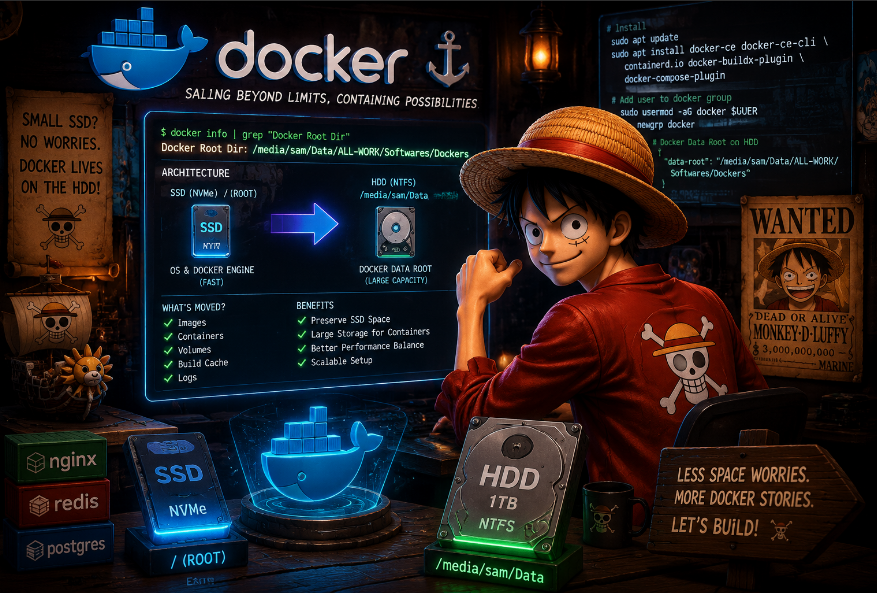
Abstract
This document details the complete process of installing Docker Engine on Linux Mint Cinnamon while redirecting Docker runtime storage away from the root SSD onto a larger secondary HDD.
The investigation covers:
- Linux Mint repository compatibility issues
- Docker repository configuration
- Permission management
- Docker daemon validation
- Moving Docker runtime storage to HDD
- Filesystem considerations for NTFS-backed Docker storage
- Operational risks and architectural tradeoffs
The final configuration successfully achieved:
- lightweight Docker installation on SSD,
- large-capacity container/image storage on HDD,
- preservation of limited root SSD capacity.
1. Motivation
The target system contained:
DeviceTypePurposeNVMe SSD (~120GB)ext4Linux OS1TB HDDNTFSData + Docker storage
The problem: Docker stores images, containers, build layers, logs, and volumes under:
/var/lib/dockerBy default, this resides on the root filesystem.
On small SSD systems, Docker eventually causes:
- root partition exhaustion,
- package manager failures,
- system instability,
- build failures,
- container crashes.
Therefore: a storage-redirection architecture was required.
2. Initial Environment
Filesystem Layout
Output from:
lsblk -fsda2 ntfs Data
nvme0n1p3 ext4Important distinction:
PartitionFilesystemLinux Rootext4Data HDDNTFS
3. Docker Installation Workflow
3.1 Prerequisites
Installed prerequisite packages:
sudo apt install -y ca-certificates curl gnupg lsb-release3.2 Docker GPG Key Installation
Created keyring directory:
sudo mkdir -p /etc/apt/keyringsAdded official Docker GPG key:
curl -fsSL https://download.docker.com/linux/ubuntu/gpg | \
sudo gpg --dearmor -o /etc/apt/keyrings/docker.gpg
4. Linux Mint Repository Compatibility Problem
Initial Failure
The first repository configuration used:
$(lsb_release -cs)which returned the Mint codename:
xiaAPT update then failed with:
E: The repository 'https://download.docker.com/linux/ubuntu xia Release' does not have a Release file.5. Root Cause Analysis
Linux Mint is Ubuntu-based but uses Mint-specific release codenames.
Docker repositories support Ubuntu codenames such as:
- jammy
- noble
but not Mint identifiers like:
- xia
- virginia
This creates a compatibility abstraction leak common across:
- Docker
- Kubernetes
- NVIDIA
- Hashicorp repositories
6. Correct Repository Configuration
The broken repository was removed:
sudo rm /etc/apt/sources.list.d/docker.listThen recreated manually using Ubuntu Noble:
echo \
  "deb [arch=$(dpkg --print-architecture) \
  signed-by=/etc/apt/keyrings/docker.gpg] \
  https://download.docker.com/linux/ubuntu noble stable" | \
sudo tee /etc/apt/sources.list.d/docker.list > /dev/null
7. Docker Installation
Repository metadata refreshed:
sudo apt updateDocker packages installed:
sudo apt install -y docker-ce docker-ce-cli containerd.io docker-buildx-plugin docker-compose-plugin8. Docker Daemon Verification
Docker service validation:
sudo systemctl status dockerResult:
Active: active (running)Daemon initialized successfully using:
- overlay filesystem backend, BuildKit, containerd runtime.
9. Docker Socket Permission Issue
Initial Docker CLI access failed:
permission denied while trying to connect to the docker API socketCause: user not added to Docker group.
10. Permission Fix
User added to Docker group:
sudo usermod -aG docker $USERGroup session refreshed:
newgrp dockerVerification succeeded:
docker info11. Redirecting Docker Storage to HDD
Objective
Keep:
- Docker binaries on SSD Move: images layers volumes container runtime data onto HDD.
12. Docker Data Root Configuration
A dedicated Docker directory already existed on HDD:
/media/User/Data/ALL-WORK/Softwares/DockersDocker daemon configuration:
sudo nano /etc/docker/daemon.jsonConfigured as:
{
  "data-root": "/media/User/Data/ALL-WORK/Softwares/Dockers"
}
13. Final Verification
Validation command:
docker info | grep "Docker Root Dir"Output:
Docker Root Dir: /media/User/Data/ALL-WORK/Softwares/DockersThis confirmed:
- Docker runtime data successfully redirected, root SSD preserved from container storage growth.
14. Storage Driver Validation
Docker storage backend validation:
docker info | grep "Storage Driver"Expected output:
overlay2or:
overlayfsThis confirms layered filesystem support is operational.
15. Architectural Assessment
Current Architecture
ComponentLocationLinux OSNVMe SSDDocker EngineNVMe SSDDocker Runtime DataNTFS HDD
16. Advantages of This Design
SSD Preserved
Avoids:
- root filesystem exhaustion,
- package failures,
- runaway Docker image growth.
Large Container Capacity
HDD provides:
- large image storage,
- build cache space,
- volume persistence.
Operational Simplicity
No separate partitioning or dedicated Docker disk required.
17. Risks and Tradeoffs
NTFS Backend Limitations
The Docker data directory resides on NTFS mounted through FUSE.
This introduces limitations:
AreaPotential IssuePermissionsUID/GID inconsistenciesPerformanceSlower metadata operationsDatabasesPoor random-write performanceOverlayFSEdge-case instabilityFile WatchingInotify inconsistencies
18. HDD Characteristics
SMART analysis identified the drive model as:
WDC WD10SPZXThis is an SMR (Shingled Magnetic Recording) HDD.
SMR drives:
- perform adequately for sequential workloads,
- degrade under heavy random writes.
Docker workloads that may stress SMR:
- CI/CD pipelines,
- database containers,
- image rebuild churn,
- Kubernetes.
19. Recommended Use Cases
This architecture is suitable for:
- learning Docker,
- development environments,
- web applications,
- lightweight containers,
- Docker Compose stacks,
- experimentation.
Less suitable for:
- production databases,
- Kubernetes clusters,
- heavy persistent write workloads.
20. Operational Maintenance
Monitor Docker Disk Usage
Check usage:
docker system dfRemove Unused Objects
Cleanup:
docker system pruneAggressive cleanup:
docker system prune -a21. Critical Operational Dependency
Docker now depends on successful HDD mounting.
If the HDD mount fails during boot:
- Docker may fail, or Docker may silently recreate directories on root SSD.
This is a subtle but important operational risk.
22. Long-Term Recommendation
For future improvement:
Preferred Architecture
Eventually migrate Docker runtime storage onto:
- ext4, XFS. or another Linux-native filesystem.
This would eliminate:
- NTFS permission translation issues,
- FUSE overhead,
- overlay filesystem edge cases.
23. Final Conclusion
The final system successfully achieved:
- stable Docker installation on Linux Mint,
- resolution of repository compatibility issues,
- user-level Docker access,
- Docker runtime storage redirected onto HDD.
The architecture is operationally sound for development and learning environments while preserving limited SSD capacity.
However, the solution also demonstrates an important Linux operational principle:
Filesystem compatibility layers are acceptable for convenience, but native Linux filesystems remain the superior long-term foundation for containerized workloads.
메타데이터
- post_id
- f1f8930697f3
- slug
- installing-docker-on-linux-mint-with-docker-data-stored-on-a-separate-hdd-f1f8930697f3
- url
- https://medium.com/@akash-yy/installing-docker-on-linux-mint-with-docker-data-stored-on-a-separate-hdd-f1f8930697f3
- canonical_url
- https://medium.com/@akash-yy/installing-docker-on-linux-mint-with-docker-data-stored-on-a-separate-hdd-f1f8930697f3
- author_url
- https://medium.com/@akash-yy
- status
- ok
- fetched_at
- 2026-06-17 08:20:12




