Know Exactly Where You Are on Your Diamond Painting Pattern — New Ruler Feature
If you’ve ever worked on a large diamond painting pattern, you know the feeling: you zoom in on one section, pan around for a while, and…
Know Exactly Where You Are on Your Diamond Painting Pattern — New Ruler Feature
If you’ve ever worked on a large diamond painting pattern, you know the feeling: you zoom in on one section, pan around for a while, and suddenly you have no idea which part of the canvas you’re actually looking at. On a 40x50cm piece, that gets old fast.
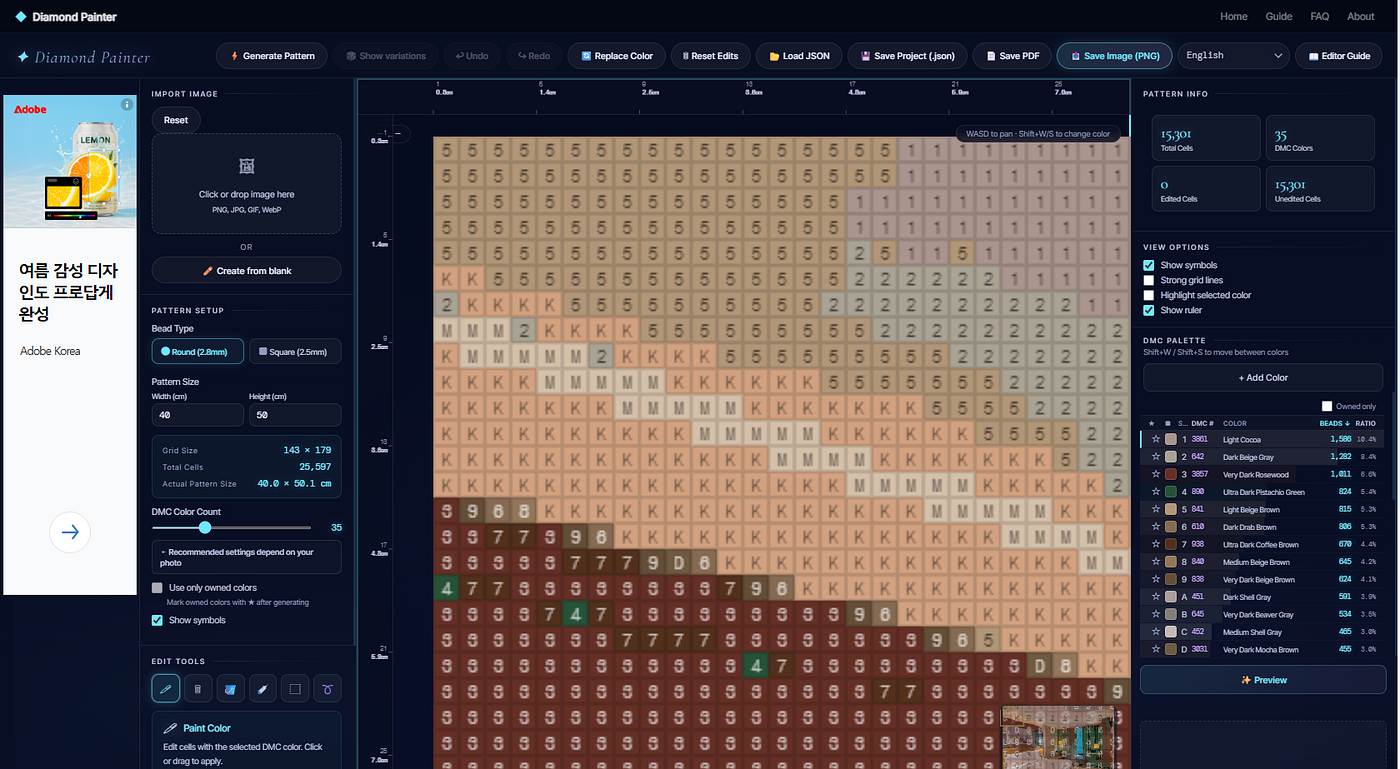
Diamond Painter now shows coordinate rulers along the top and left edge of the pattern editor to fix exactly that.
What’s new
The top ruler shows column numbers, the left ruler shows row numbers, and each tick also shows the real-world size in centimeters right below it. So under a cell number like “48,” you’ll see something like “13.2cm.”
That cm value uses the exact same calculation as the “Actual Pattern Size” shown in the sidebar — whether you’re using round beads (2.8mm) or square beads (2.5mm), the ruler tells you where you are in real physical terms, not just grid units.
Switch bead types and the cm values update immediately. If you’re still deciding between round and square beads, this is an easy way to get a feel for how the final size changes.
How to use it
Rulers are on by default — no setup needed. They stay in sync with every way you can move around the canvas: mouse drag, scroll zoom, pinch zoom, WASD keyboard panning, or clicking the minimap.
Don’t need them? There’s a “Show Ruler” checkbox in the Display Options panel on the right.
The tick spacing also adjusts automatically as you zoom. Instead of cramming numbers together or spacing them too far apart, it picks readable cm increments (1, 2, 5, 10, 20cm, and so on) based on your current zoom level.
Where this helps
- If you’ve already marked reference points on your physical canvas, you can check the exact cm position on screen against it.
- Getting a sense of how big a specific area (a face, a logo, whatever detail matters to you) will actually be once stitched.
- Comparing how pattern dimensions shift between round and square beads before you commit to a size.
Diamond Painter is still free, no account required, and processes everything in your browser — your photo never gets uploaded to a server.
메타데이터
- post_id
- f2367eb1f2ed
- slug
- know-exactly-where-you-are-on-your-diamond-painting-pattern-new-ruler-feature-f2367eb1f2ed
- url
- https://medium.com/@e.b8k.maker/know-exactly-where-you-are-on-your-diamond-painting-pattern-new-ruler-feature-f2367eb1f2ed
- canonical_url
- https://medium.com/@e.b8k.maker/know-exactly-where-you-are-on-your-diamond-painting-pattern-new-ruler-feature-f2367eb1f2ed
- author_url
- https://medium.com/@e.b8k.maker
- status
- ok
- fetched_at
- 2026-08-20 00:42:30