Deploying Azure Databricks with RFC-6598 Shared Address Space: Zero Routable IP Consumption
How to run large VNet-injected Databricks workspaces without spending a single routable IPv4 address — using an RFC-6598 “island” network…
Deploying Azure Databricks with RFC-6598 Shared Address Space: Zero Routable IP Consumption
How to run large VNet-injected Databricks workspaces without spending a single routable IPv4 address — using an RFC-6598 “island” network, Azure Firewall forced tunneling, and local SNAT.
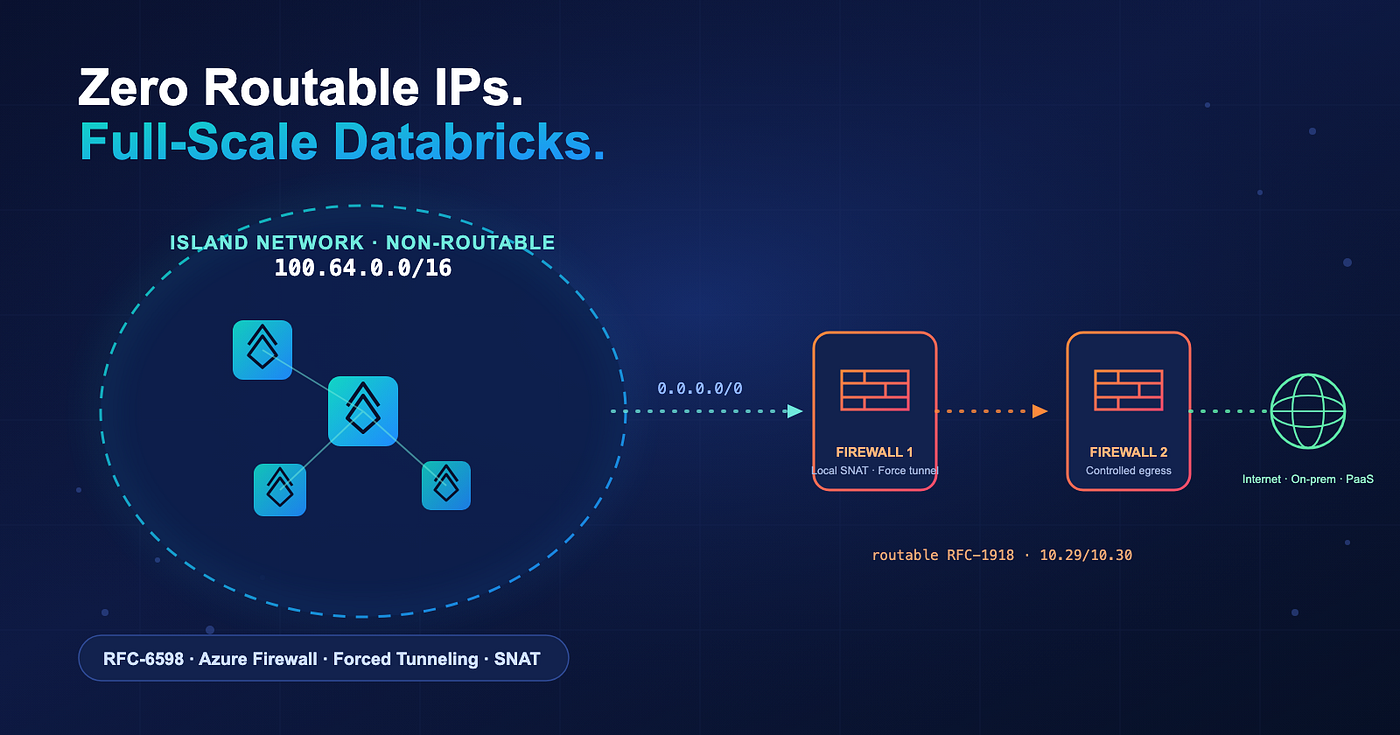
Zero Routable IPs
If you’ve ever tried to stand up a large Azure Databricks deployment inside a mature enterprise network, you’ve probably hit the same wall I have: there’s no routable IPv4 space left to give it.
VNet-injected Databricks isn’t shy about addresses. Every workspace needs a minimum of two delegated subnets — a container/host subnet and a private subnet — and high-concurrency clusters scale scale fast. In an organization that has already carved up most of its RFC-1918 space (10.0.0.0/8, 172.16.0.0/12, 192.168.0.0/16) across on-prem and cloud, finding contiguous, routable blocks for a new Databricks environment becomes a genuine blocker.
This post walks through a pattern that sidesteps the problem entirely. We deploy Databricks into a (100.64.0.0/16) “island” network which is part of the RFC-6598 network range of (100.64.0.0/10), then use Azure Firewall with forced tunneling and local SNAT to translate all egress behind a small block of routable RFC-1918 addresses.
The payoff: your Databricks workspaces consume effectively zero routable IPv4 space, while retaining controlled, inspected access to the internet, on-premises networks, and Azure PaaS dependencies.
Why IPv4 conservation matters in Azure
Corporate networks typically draw from the private IPv4 ranges defined by RFC 1918. On-premises, those ranges are usually more than enough. In the cloud, though, large networks are easy to build, and patterns like microservices, containerization, and elastic compute (Databricks clusters very much included) drive IPv4 consumption up quickly. Microsoft’s own guidance is explicit: treat IPv4 addresses as a limited resource and adopt conservative address-management practices.
Microsoft’s Azure Architecture Center documents two primary methods to minimize routable IPv4 consumption in large Azure networks:

Two methods to minimize routeable IPv4 consumption
The Databricks RFC-6598 pattern in this post is a specialized application of Method 1: Databricks runs in an isolated, non-routable RFC-6598 VNet, and Azure Firewall provides the SNAT boundary back to routable space.
Why RFC-6598 (100.64.0.0/10) specifically
RFC 6598 — “IANA-Reserved IPv4 Prefix for Shared Address Space” — reserves 100.64.0.0/10 (100.64.0.0–100.127.255.255) for Carrier-Grade NAT (CGNAT) deployments. It's well-suited to this use case for three reasons:
- No collision with existing private space. It doesn’t overlap the RFC-1918 ranges you almost certainly already use on-premises and across other Azure VNets, eliminating the routing conflicts that reusing
10.xspace would introduce. - Designed for intermediate, NATted traffic. The range is intended for traffic that is neither routable on the corporate LAN nor on the public internet — exactly the role Databricks cluster traffic plays before it’s SNATted at the firewall.
- A
/10is enormous.100.64.0.0/10provides ~4 million addresses. Carving a/16(65,536 addresses) per Databricks environment leaves ample room for even very large, multi-workspace deployments without ever touching your routable inventory.
Note: Azure supports RFC-6598 space in VNets, but it isn’t part of the default “private” ranges Azure documents as recommended. Treat
100.64.0.0/10as non-routable within your network — it must not be advertised over ExpressRoute/VPN to on-prem, and it must not overlap any address space that needs to reach Databricks directly. All cross-boundary reachability is handled via SNAT and Private Link, described below.
Reference architecture
The design uses two resource groups and a two-firewall topology:
**ip-conserve— the isolated island network**. Contains the RFC-6598 VNet (100.64.0.0/16) where Azure Databricks, supporting VMs, Bastion, and private endpoints for the control plane live. This network is non-routable to the rest of the enterprise.**ip-conserve-fw— the firewall resource group. Contains Firewall 1 (local SNAT / force-tunnel gateway) and Firewall 2** (controlled egress to internet and on-premises via a routable transit hub).
Traffic flow at a glance:
- Databricks clusters and VMs in the RFC-6598 VNet send all non-local traffic (
0.0.0.0/0) — via a user-defined route (UDR) — to Firewall 1. - Firewall 1 performs local SNAT, translating RFC-6598 source addresses behind its routable RFC-1918 IP, and force-tunnels the traffic onward.
- Firewall 2 applies network and application rules for controlled egress to the internet, on-premises (via the routable transit hub / ExpressRoute or VPN gateway), and Azure PaaS dependencies.
- Azure PaaS dependencies (ADLS / Blob storage, artifacts, logs, Event Hubs) are reached over Private Link / private endpoints through the tenant-routable hub, with Private DNS zones for resolution.

Figure 1 — RFC-6598 island-network architecture: Databricks in the non-routable VNet, with Firewall 1 (local SNAT / force tunnel) and Firewall 2 (controlled egress).
Address plan
The RFC-6598 VNet is provisioned as a /16, with infrastructure subnets carved from the top of the range so the bulk of the space stays available for Databricks workspace subnets.

Address plan
Databricks workspace subnets (public/private) can be sized per workspace from the remaining 100.64.x.x space. Because this space is non-routable and dedicated, subnets can be generous (e.g., /24 per role) without impacting your routable inventory.
Prerequisites
- An Azure subscription with permissions to create VNets, Azure Firewall (Standard or Premium SKU, managed via Firewall Policy), route tables, and VNet peerings.
- A small block of routable RFC-1918 space for the two firewall VNets (two
/24s in this design). This is the only routable space the deployment consumes. - A decision on one-firewall vs. two-firewall topology (see Alternate method below). Two firewalls is recommended.
- A connectivity design for on-premises reachability (ExpressRoute or VPN gateway) attached to the routable transit hub, if required.
- Familiarity with the Databricks VNet-injection (“bring your own VNet”) deployment model.
Step-by-step deployment (two-firewall — recommended)
This procedure creates an RFC-6598 VNet at /16, connects it to an Azure Firewall (Standard or Premium SKU) with forced tunneling and local SNAT, then peers that environment to a second hub firewall for controlled internet and on-premises access.
Relevant Microsoft references:
- Forced Tunneling —
[learn.microsoft.com/azure/firewall/forced-tunneling](https://learn.microsoft.com/en-us/azure/firewall/forced-tunneling) - Local SNAT (SNAT private ranges) —
[learn.microsoft.com/azure/firewall/snat-private-range](https://learn.microsoft.com/en-us/azure/firewall/snat-private-range) - Azure Firewall rule processing —
[learn.microsoft.com/azure/firewall/rule-processing](https://learn.microsoft.com/en-us/azure/firewall/rule-processing)
1. Create the RFC-6598 VNet in a resource group (100.64.0.0/16). At creation, add subnets at the end of the CIDR range for private endpoints, VMs, and Bastion:
- PE:
100.64.253.0/24 - Utility (for VMs):
100.64.254.0/24 - Bastion (for VMs):
100.64.255.0/26
2. Create a separate RFC-1918 /24 VNet for the Azure Firewall that will act as the local NAT gateway (SNAT) for the RFC-6598 network. During firewall install you'll need two subnets:
AzureFirewallManagementSubnet—/26(required for forced tunneling)AzureFirewallSubnet—/26
3. Deploy an Azure Firewall (Standard or Premium SKU) with an associated Firewall Policy, following the procedure for forced tunneling. Make note of the firewall’s private IP address.
4. Configure local SNAT. In the associated Firewall Policy, open the SNAT (Private IP ranges) settings and set the private range to 255.255.255.255/32. Azure Firewall does not SNAT traffic destined to its configured private ranges, so a single /32 means almost no destination is treated as local — and the firewall SNATs effectively all traffic.
Do not use
0.0.0.0/0here — that designates every destination as private and disables SNAT entirely, which breaks the local-SNAT design. The setting and its meaning are identical on Classic and Standard/Premium; on Standard/Premium it lives in the Firewall Policy.
5. Peer the RFC-6598 VNet to the Firewall 1 VNet.
6. Create a route table for the RFC-6598 VNet’s Databricks and VM subnets that sends all non-local traffic (0.0.0.0/0) to the Firewall 1 private IP (next hop type: Virtual Appliance). Associate it with the Databricks public/private subnets.
7. Create a pass-through network rule on Firewall 1 that collects all traffic from the RFC-6598 VNet and, using the route from the previous step, forwards it to Firewall 2.
8. Create a second RFC-1918 /24 VNet for the egress firewall. During install you'll need one subnet:
AzureFirewallSubnet—/26
9. Deploy Azure Firewall (with Firewall Policies) using the new VNet/subnet. This is Firewall 2, your controlled egress point to the internet and on-premises.
10. Create the required network rules on Firewall 2 for Databricks assets (minimum set):
adb-storage— storage (ADLS / Blob)adb-eh— Event Hubsadb-sql— SQL (control plane metastore / external)adb-cp— Azure Databricks control plane
11. Create application rules for egress to the internet (optional, as required by your policy — e.g., for library/package installation).
12. Deploy the Databricks workspace(s) into the RFC-6598 VNet (VNet injection, using the public/private subnets), then validate (see below).
Validation
From a Databricks notebook, run:
%sh
curl https://ipinfo.io/ip
The command should return the public IP of Firewall 2 — confirming that cluster egress is being SNATted and force-tunneled through the firewall chain rather than originating from a routable Databricks address. If it returns anything else (or fails), revisit the UDR (Step 6), the local SNAT setting (Step 4), and the pass-through rule (Step 7).
Alternate method (single firewall)
A simpler topology uses only Firewall 1. Follow Steps 1–7 above (creating Firewall 1 with forced tunneling enabled and local SNAT), then skip the second firewall and deploy Databricks directly.
In this variant, because non-local traffic is not forwarded to a second firewall via an explicit 0.0.0.0/0 rule, Azure Firewall's default NAT sends the traffic to the internet, allowing clusters to come up and reach external dependencies.
Recommendation: Use two firewalls. The second firewall provides a clean separation of concerns — it’s dedicated to egressing traffic to the internet or pointing at an ExpressRoute/VPN gateway for on-premises access — and gives you a single, well-defined point at which to monitor and inspect all egress traffic. The single-firewall method is best reserved for proofs of concept.
Design considerations & best practices
- Keep RFC-6598 strictly non-routable. Don’t advertise
100.64.0.0/10(or the/16used here) over ExpressRoute or VPN. Its conservation benefit depends on it never consuming or colliding with routable space. - PaaS access via Private Link. Reach ADLS/Blob, artifacts, logs, and Event Hubs through private endpoints in the PE subnet with the appropriate Private DNS zones, rather than over public egress, to keep data-plane traffic private and inspected.
- Control-plane reachability. Use the Private DNS zone for the Databricks control plane (and Private Link where applicable) so the workspace resolves and reaches the control plane from inside the island network.
- SNAT capacity. Azure Firewall SNAT uses non-privileged source ports per instance. For large, bursty Databricks egress, monitor SNAT port utilization and scale the firewall SKU accordingly (start modest; move to Standard/Premium if egress volume is high).
- Right-size firewall SKUs. SNAT itself isn’t resource-intensive; choose the egress firewall SKU based on the inspection features (TLS inspection, IDPS) you require, not just throughput.
- TLS inspection (Premium SKU). Enable TLS inspection on the egress firewall (Firewall 2) to decrypt, inspect, and re-encrypt outbound HTTPS from Databricks clusters — surfacing threats and data movement that would otherwise be opaque inside the SNAT boundary. TLS inspection (and IDPS) requires the Azure Firewall Premium SKU, so select Premium for Firewall 2 where policy mandates deep packet inspection of egress. Pair it with a Firewall Policy that trusts your internal CA and excludes endpoints that pin certificates (certain Azure PaaS / Databricks control-plane calls) from interception.
- Monitoring. Centralize firewall logs (the dedicated egress firewall makes this clean) for audit and security review of all Databricks outbound traffic.
- This pattern repeats. Because the RFC-6598 space is dedicated and non-routable, you can stamp this island-network pattern out for additional Databricks environments without re-consuming routable IPs each time.
- Use Service Endpoint Policies (SEP) to minimize firewall costs. All traffic passes through the firewall in this type of deployment. Azure virtual network service endpoint policies filter outbound traffic from the classic compute plane, ensuring connections are only made to specific Azure Storage accounts. For example, Databricks pulls container images from artifact storage for each node in a cluster — which can be 12 GB per image. SEPs let you filter this traffic through the Azure backbone instead of routing it through the firewall.
References
- Microsoft Learn: Prevent IPv4 Exhaustion in Azure —
[learn.microsoft.com/azure/architecture/networking/guide/internet-protocol-version-4-exhaustion](https://learn.microsoft.com/en-us/azure/architecture/networking/guide/internet-protocol-version-4-exhaustion) - Microsoft Learn: Azure Firewall forced tunneling —
[learn.microsoft.com/azure/firewall/forced-tunneling](https://learn.microsoft.com/en-us/azure/firewall/forced-tunneling) - Microsoft Learn: Azure Firewall SNAT private IP ranges —
[learn.microsoft.com/azure/firewall/snat-private-range](https://learn.microsoft.com/en-us/azure/firewall/snat-private-range) - Microsoft Learn: Azure Firewall rule processing —
[learn.microsoft.com/azure/firewall/rule-processing](https://learn.microsoft.com/en-us/azure/firewall/rule-processing) - Microsoft Learn: VNet address ranges FAQ —
[learn.microsoft.com/azure/virtual-network/virtual-networks-faq](https://learn.microsoft.com/en-us/azure/virtual-network/virtual-networks-faq#what-address-ranges-can-i-use-in-my-virtual-networks) - IETF: RFC 6598 — IANA-Reserved IPv4 Prefix for Shared Address Space —
[rfc-editor.org/rfc/rfc6598.html](https://www.rfc-editor.org/rfc/rfc6598.html) - Microsoft Learn: Configure Azure virtual network service endpoint policies for storage access from classic compute —
[learn.microsoft.com/azure/databricks/security/network/classic/service-endpoints](https://learn.microsoft.com/en-us/azure/databricks/security/network/classic/service-endpoints) - GitHub Repository with Terraform code to build this example — github.com/ScottGriz/databricks-tools/tree/main/rfc6598-databricks-terraform
Have you run into IPv4 exhaustion with cloud data platforms? I’d love to hear how you’ve tackled it — drop a comment below.
메타데이터
- post_id
- f25f17d48e2f
- slug
- deploying-azure-databricks-with-rfc-6598-shared-address-space-zero-routable-ip-consumption-f25f17d48e2f
- url
- https://medium.com/databricks-platform-sme/deploying-azure-databricks-with-rfc-6598-shared-address-space-zero-routable-ip-consumption-f25f17d48e2f
- canonical_url
- https://medium.com/databricks-platform-sme/deploying-azure-databricks-with-rfc-6598-shared-address-space-zero-routable-ip-consumption-f25f17d48e2f
- author_url
- https://medium.com/@scottgriz_66302
- status
- ok
- fetched_at
- 2026-07-19 13:52:23