Reverse Engineering the Simda Malware Loader: From Packed Binary to C2 Infrastructure
An in-depth analysis of the Simda malware loader using static and dynamic analysis techniques to uncover payload decryption, anti-analysis…
Reverse Engineering the Simda Malware Loader: From Packed Binary to C2 Infrastructure
An in-depth analysis of the Simda malware loader using static and dynamic analysis techniques to uncover payload decryption, anti-analysis logic, persistence, and network infrastructure.
Challenge Link:https://malops.io/challenges/simda
The Call
It was a Tuesday when the alert came through. A workstation on the network had been flagged — suspicious outbound traffic, multiple connections to foreign IP addresses, all linked to the Simda botnet.
For those unfamiliar, Simda isn’t your average piece of malware. It’s a loader — a gateway drug for worse things. It doesn’t just infect a machine; it opens the door for whatever comes next. Ransomware, spyware, banking trojans — Simda rolls out the red carpet.
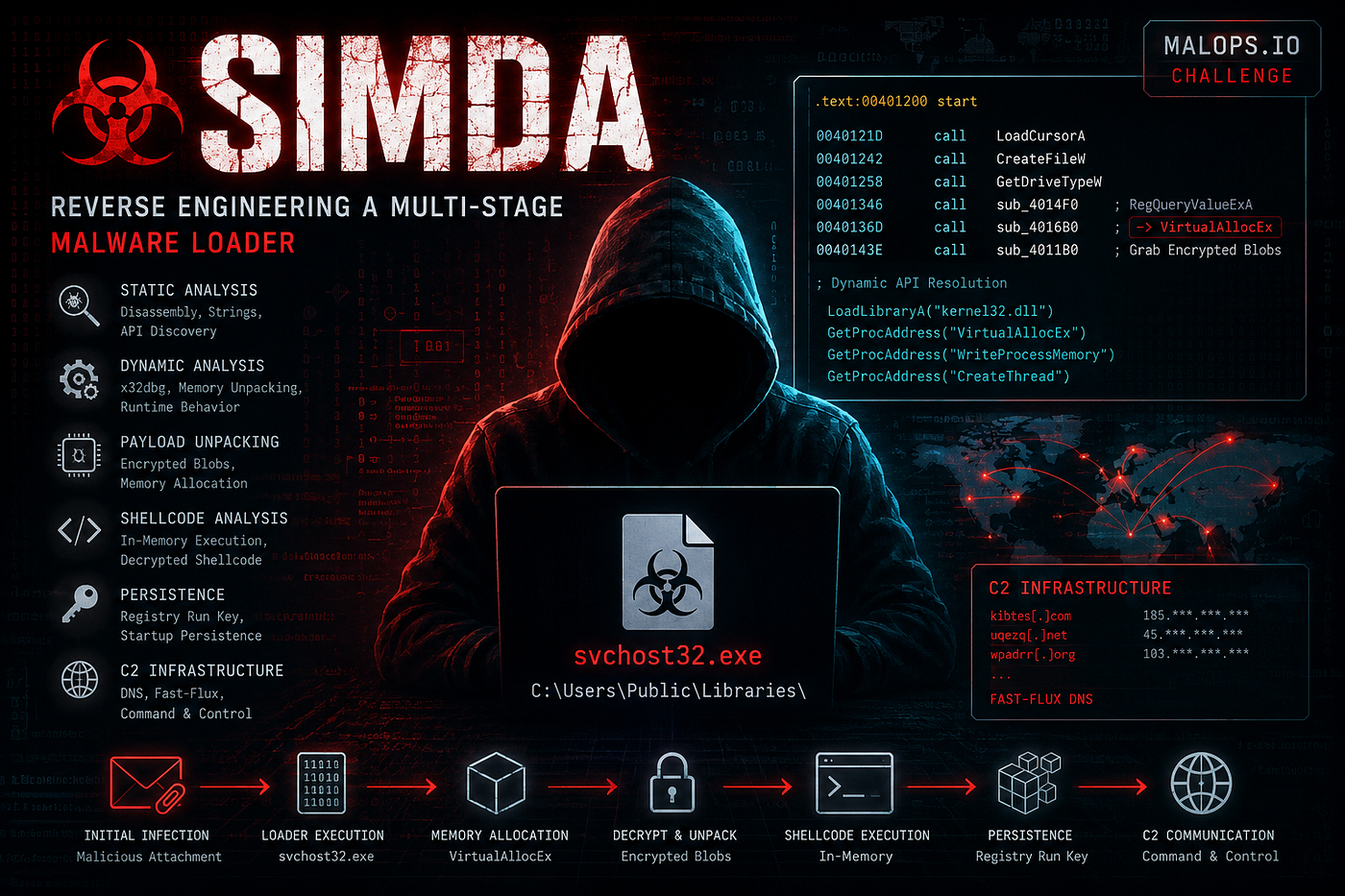
Forensic triage painted a clear picture: a malicious binary named svchost32.exe had embedded itself in **C:\Users\Public\Libraries\**, and DNS queries were resolving to random-looking domains through fast-flux hosting. Classic botnet infrastructure.
My task was straightforward but daunting: investigate the provided artifacts, trace the infection from entry to command-and-control, and figure out what this thing was really doing. This is the story of how I took it apart — one question at a time.
Chapter 1: The Hidden Memory Allocation
I started where every analyst starts — the Import Table. I expected to see **VirtualAlloc**, **HeapAlloc**, **LocalAlloc**, maybe even **malloc**. Standard memory allocation functions. But this binary had none of them. Instead, it only imported **LoadLibraryA** and **GetProcAddress** from **KERNEL32**.**dll**.
The malware was hiding its intentions through dynamic API resolution. Classic, but effective.
I began tracing execution from the main entrypoint (start at 0x401200). The flow unfolded methodically:
- Anti-analysis checks using
**LoadCursorA**,**CreateFileW**,**GetDriveTypeW** - Registry queries via
**sub_4014F0** - Then — the critical call to
**sub_4016B0**
I double-clicked into sub_4016B0 and there it was:

VirtualAllocEx Resolution in IDA Pro
The **0x40** flag jumped out at me — **PAGE_EXECUTE_READWRITE**. It wasn’t just allocating memory. It was allocating memory it intended to run code from.
LPVOID __cdecl sub_4016B0(SIZE_T size)
{
  HMODULE hKernel32 = LoadLibraryA("kernel32"); // LibFileName
  LPVOID (__stdcall *pVirtualAllocEx)(HANDLE, LPVOID, SIZE_T, DWORD, DWORD);

  pVirtualAllocEx = GetProcAddress(hKernel32, "VirtualAllocEx"); // ProcName

  if ( size == 2 )
    size = 634880;

  // Allocates memory in current process ((HANDLE)-1) with PAGE_EXECUTE_READWRITE (64 / 0x40)
  return pVirtualAllocEx((HANDLE)-1, 0, size, 0x3000 /*MEM_COMMIT|MEM_RESERVE*/, 0x40);
}
Decompiled VirtualAllocEx Call
Q: What is the first Windows API used by the malware to allocate memory?
Answer:
VirtualAllocExChapter 2: The Deconstructed Registry Key
Next, I turned my attention to a RegOpenKeyA call. The second parameter — the subkey path — wasn’t stored as a clean string. It was being built at runtime.
Looking at the disassembly:
4012cd  mov     byte ptr [eax+5], 5Ch    ; '\'
4012d7  mov     byte ptr [ecx+6], 7Bh    ; '{'
The malware was patching characters into a buffer at runtime — writing \ at index 5 and { at index 6. The base string was **clsid{d66d6f99-cdaa-11d0-b822–00c04fc9b31f}**, and it was being assembled into a proper COM Class ID path.

Registry Key Pointer Analysis
I checked the pointer in the memory window and confirmed it:

Buffer Memory String Inspection
The first parameter (**hKey**) was **HKEY_CLASSES_ROOT** — and the full path resolved to:
clsid\{d66d6f99-cdaa-11d0-b822-00c04fc9b31f}Q: What does the second parameter given to RegOpenKeyA point to?
Answer:
clsid\{d66d6f99-cdaa-11d0-b822-00c04fc9b31f}Chapter 3: Grabbing the Encrypted Blobs
To unpack its second stage, the malware first allocated an executable memory region using **VirtualAllocEx**. Then it entered a chunked extraction loop inside the main entrypoint.
I traced the arguments passed inside this loop and found the culprit — ***sub_4011B0*** at address ***0x4011B0***. This function was responsible for actively grabbing encrypted payload chunks from the raw source buffer and transferring them into executable memory.

Extraction Loop Analysis
40143E  push    edx               ; Source: Raw encrypted payload buffer
401450  push    eax               ; Destination: Allocated VirtualAllocEx buffer
401451  call    sub_4011B0        ; <-- Grabs & copies encrypted blob chunks
The decompiled pseudocode revealed a straightforward byte-by-byte copy loop:
for ( i = 0; ; ++i )
{
 if ( i >= a3 ) break;
 *(_BYTE *)(i + a1) = *(_BYTE *)(i + a2);
}
Once **sub_4011B0** finished grabbing the entire encrypted blob across multiple **0x44**-byte chunks, the malware immediately executed **sub_401000** to decrypt the staged buffer in-place.
Q: The malware dynamically resolves Windows API function names in memory, and decrypts a large blob of data, which function is responsible for grabbing the encrypted blobs? Provide address in hex.
Answer
0x4011B0Chapter 4: The Initial Decryption Key
Following the payload extraction loop, **start** called **sub_401000** to decrypt the buffer in memory.

Decryption Routine in IDA Pro
Inside sub_401000, the malware iterated through the payload buffer in 4-byte increments:
for ( unsigned int i = 0; i < total_size; i += 4 )
{
 *(_DWORD *)(buffer_ptr + i) += i; // Step 1: Offset arithmetic
 sub_401650(3, i + 0xB0B6); // Step 2: XOR with rolling key
}
The decryption logic in **sub_401650** confirmed the XOR transformation:
int decrypted_dword = current_key ^ *(_DWORD *)current_buf_chunk;
*(_DWORD *)current_buf_chunk = decrypted_dword;
At the very first iteration (i=0), the calculated key was **0 + 0xB0B6 = 0xB0B6**. That was the initial decryption key — a 16-bit word value of 45238 in decimal.
Q: What is the initial decryption key used to decrypt the encrypted blobs (word size)?
Answer:
0xB0B6Chapter 5: The First Decrypted API
After the decryption routine finished, the stage-2 payload was sitting in executable memory. I inspected the first 64 bytes of the decrypted plaintext buffer, and there it was — the API import table reconstruction, laid out in plain text:
+0x0000:  47 65 74 50 72 6f 63 41 64 64 72 65 73 73 00 00  |GetProcAddress..|
+0x0010:  00 56 69 72 74 75 61 6c 41 6c 6c 6f 63 00 00 00  |.VirtualAlloc...|
+0x0020:  00 00 56 69 72 74 75 61 6c 46 72 65 65 00 00 00  |..VirtualFree...|
+0x0030:  00 00 00 55 6e 6d 61 70 56 69 65 77 4f 66 46 69  |...UnmapViewOfFi|
**GetProcAddress** at offset **0x00**. The very first API string recovered. The stage-2 payload immediately leveraged it to resolve subsequent memory management and process injection functions.
Q: What is the name of the first Windows API function decrypted?
Answer:
GetProcAddressChapter 6: The Push-and-Return Trampoline
This was elegant. To evade heuristic analysis looking for suspicious indirect register jumps (jmp eax, call ecx), the malware used a ”Push-and-Return Trampoline” technique inside **sub_401130**.
At the end of start, the malware calculated the entrypoint offset inside the decrypted stage-2 buffer:
4014B5  mov     ecx, dword_4CA0C8
4014BB  add     ecx, 86ED0h           ; Stage-2 Shellcode Entrypoint
4014C1  mov     dword_4CA094, ecx     ; Stores target address
Then inside **sub_401130**:
401150  mov     ecx, dword_4CA094     ; Loads Stage-2 Shellcode Address
401164  push    ecx                   ; Pushes Shellcode Address onto Stack
401165  jmp     short $+2            ; 2-byte anti-disassembly junk
401167  retn                          ; <-- RETN pops ECX directly into EIP!
The trick was beautiful in its simplicity:
- Push the target address onto the stack
- Hit
retn - The CPU pops the value into
EIP - Control transfers seamlessly from stage-1 into stage-2 heap memory
Q: What is the address of the ret instruction responsible for jumping to decrypted shellcode?
Answer
0x401167Chapter 7: The Decryption Offset
Looking at the disassembly at the end of **start**, immediately after calling **sub_401000**:
4014AD  call    sub_401000            ; In-place payload decryption
4014B2  add     esp, 8
4014B5  mov     ecx, dword_4CA0C8     ; Base Address of allocated memory
4014BB  add     ecx, 86ED0h           ; <-- Entrypoint Offset = +0x86ED0
4014C1  mov     dword_4CA094, ecx     ; Stored for trampoline jump
The decompiled pseudocode confirmed it:
sub_401000(dword_4CA0C8, dword_4CA084);     // Decrypt payload
dword_4CA094 = dword_4CA0C8 + 552656;       // 552656 decimal = 0x86ED0 hex
return sub_401130(dword_4CA0C8 + 552656);
The base allocated memory was **dword_4CA0C8**, and the first instruction executed was 552,656 bytes into the unpacked buffer.
Q: Based on the memory allocated by the malware, what is the offset of the first instruction executed after decryption? Provide answer in hex.
Answer
0x86ED0Chapter 8: The Second API After Decryption
To catch this, I set up breakpoints in x32dbg:
bp GetProcAddress
bp VirtualAlloc
bp ZwUnmapViewOfSection
Then I followed a simple process:
- Restart the malware (
Ctrl + F2) - Hit
F9untilGetProcAddressbreakpoint triggered - Watch the stack panel —
[ESP+8]shows the API name being requested - Count the resolutions

x32dbg Breakpoint Analysis
First hit: one API. Second hit: another API. The string that appeared at **[ESP+8]** on that second hit was **LoadLibraryExA**.
Q: What is the second API called by the malware after decryption?
Answer
LoadLibraryExAChapter 9: The Secondary Decryption Key
This required dynamic analysis. During Stage 2 execution, the malware called **VirtualAlloc** to reserve memory for unpacking an embedded PE payload. I:
- Set a Hardware Breakpoint (Write / Dword) on the first byte of the newly allocated memory
- Continued execution past the initial
memsetbuffer clearing - The hardware breakpoint triggered a second time, pausing inside the unpacking loop

Secondary Decryption Loop in x32dbg
The disassembly revealed:
mov edx, dword ptr ss:[ebp-4] ; Load loop counter index (i)
add edx, 3E9 ; Add fixed constant 0x03E9
…
xor edx, dword ptr ds:[eax] ; Decrypt: buffer[i] ^= (i + 0x03E9)
The fixed constant was **0x03E9**.
Q: The malware decrypts another part in memory with another dynamic key, what is the fixed addition value to the key in hex (word size)?
Answer
0x03E9Chapter 10: The Hardcoded IPs
To extract these, I tracked memory allocations dynamically in x32dbg:
- Set breakpoint on
**VirtualAlloc** - Used
**Ctrl + F9**(Execute till return) to let the API finish - EAX held the base address of the newly allocated buffer
- Let the secondary decryption loop complete its work

Memory Allocation Tracking
After decryption, inspecting the memory address revealed the standard PE signature (**4D 5A 90 00**). I dumped the memory to a file and loaded it into IDA Pro.
Inside the .**rdata** section, right next to the C2 check-in URL parameter **controller=hash&mid=**, I found the three hardcoded fallback IP addresses in plain text:

Hardcoded C2 IP Addresses
Q: There are 3 hardcoded IPs, list them in the format: IP1,IP2,IP3 (same order as found)
212.117.176.187,79.133.196.94,69.57.173.222Chapter 11: The Anti-Analysis Fortress
During static analysis in IDA Pro, I traced cross-references to **CreateToolhelp32Snapshot**, **GetComputerNameA**, and **GetUserNameA**. All roads led to **0x401B98** — the master anti-analysis routine.
This function was the malware’s central defense mechanism:
- Process Enumeration:
**CreateToolhelp32Snapshot**to find analysis tools like**cv.exe** - Registry Scanning:
**RegOpenKeyExA**to detect VMs and monitoring software - Environment String Matching: Checking for
”**SANDBOX**”,”**CURRENTUSER**”,”**C:\file.exe**” - Anti-Debugging: Checking
**PEB->BeingDebugged,NtGlobalFlag,IsDebuggerPresent(), scanning for `”OllyDbg**”`
If the detection score exceeded **0x1E**, the malware locked into an infinite loop.

Anti-Analysis Function Overview

Anti-Analysis Implementation Detail
Q: What is the address of the function that performs anti-analysis checks?
Answer:
0x401B98Chapter 12: The Dynamic C2 IPs
This was the trickiest part. I needed to:
- Bypass Evasion: NOP out the anti-analysis lockup trap at
**0x00392295**with**90 90 90 90 90** - Intercept Network Wrappers: Observe instructions pushing arguments into
**sub_D6A7C** - Inspect Memory Dumps: Read the populated global IP buffers.

Dynamic IP Extraction Process
The first two IPs showed up immediately:
000D23E6 | BF 50520F00 | mov edi, sample_02250000.F5250 ; IP #1
000D240E | 68 70540F00 | push sample_02250000.F5470 ; IP #2
Navigating to the adjacent buffer at **0x000F5578** revealed the third:

Third Dynamic IP Address
Q: The malware will use completely different 3 IPs than the hardcoded ones, list them in order: 7x.xxx.xx.xxx,2xx.xx.xx.xx,1xx.xxx.xx.xxx
79.142.66.239,217.23.12.63,109.236.87.106Chapter 13: The Persistence Copy
In function **sub_405C5F**, the malware called:
ExpandEnvironmentStringsA("%appdaa%\\ScanDisc.exe", Dst, 0x104u);
CopyFileA(CurrentFileName, Dst, 0);
Persistence Copy Routine
It copies the running executable into the user’s Application Data folder under the hidden name **ScanDisc.exe**.
Q: To which Windows environment variable–based folder does the malware copy itself?
Answer:
%APPDATA%Chapter 14: The Registry Persistence
Once copied to **%APPDATA%**, the malware modified Windows Registry keys via **sub_4038E3**:

Registry Modification Process
The target: **HKEY_CURRENT_USER\SOFTWARE\Microsoft\Windows\CurrentVersion\RunOnce**

RunOnce Registry Key
Windows would automatically relaunch the payload every time the user logged in.
Q: What is the registry key the malware uses for persistence?
Answer:
HKEY_CURRENT_USER\SOFTWARE\Microsoft\Windows\CurrentVersion\RunOnceChapter 15: The Launch Argument
Examining the decompiled persistence function **sub_4038E3**:
wsprintfW(v4, aSS_1, Dst, aOpt_1);
RegSetValueExW(phkResult, ValueName, 0, 1u, (const BYTE *)v4, 2 * wcslen(v4));
The format template was ”%s” %s — the first parameter was the binary path, the second was hardcoded to the wide character string `L”opt”`.

Launch Argument Construction
The final registry execution command:
"C:\Users\<User>\AppData\Roaming\ScanDisc.exe" optQ: What is the argument the malware will launch itself with?
Answer:
optThe Full Picture
What started as a suspicious network alert turned into a complete dissection of Simda’s multi-stage loader architecture. Here’s what the analysis revealed:
- Stage 1: A compact loader using dynamic API resolution and anti-sandbox checks to evade detection
- Stage 2: Decrypted in-memory using a rolling XOR key (
**0xB0B6**), resolving**GetProcAddress**as its first API - Stage 3: Another layer of encryption (
**0x03E9**key) hiding the actual C2 configuration - Persistence: Registry RunOnce key with
**%APPDATA%\ScanDisc.exe opt** - C2 Infrastructure: Both hardcoded fallback IPs and dynamically resolved C2 servers
The Simda botnet doesn’t just infect machines — it builds layers of obfuscation, each one requiring patience and precision to peel back. But once you understand the pattern — dynamic resolution, multi-stage decryption, environment checks — you can follow the breadcrumbs to the bitter end.
That’s the thing about malware analysis. It’s not about being the smartest person in the room. It’s about being the most persistent.
For a complete step-by-step reverse engineering walkthrough, including screenshots and detailed analysis, visit my GitHub repository:
Thanks for reading. If you found this breakdown helpful, feel free to connect with me or follow for more malware analysis deep dives.
메타데이터
- post_id
- f2b738948b8a
- slug
- reverse-engineering-the-simda-malware-loader-from-packed-binary-to-c2-infrastructure-f2b738948b8a
- url
- https://medium.com/@ckant/reverse-engineering-the-simda-malware-loader-from-packed-binary-to-c2-infrastructure-f2b738948b8a
- canonical_url
- https://medium.com/@ckant/reverse-engineering-the-simda-malware-loader-from-packed-binary-to-c2-infrastructure-f2b738948b8a
- author_url
- https://medium.com/@ckant
- status
- ok
- fetched_at
- 2026-07-15 18:51:36