Shot detection is the cheap feature everyone underestimates
A friend of mine spent two months trying to add a “smart preview” feature to a video product, the kind of thing you see on every modern…
Shot detection is the cheap feature everyone underestimates
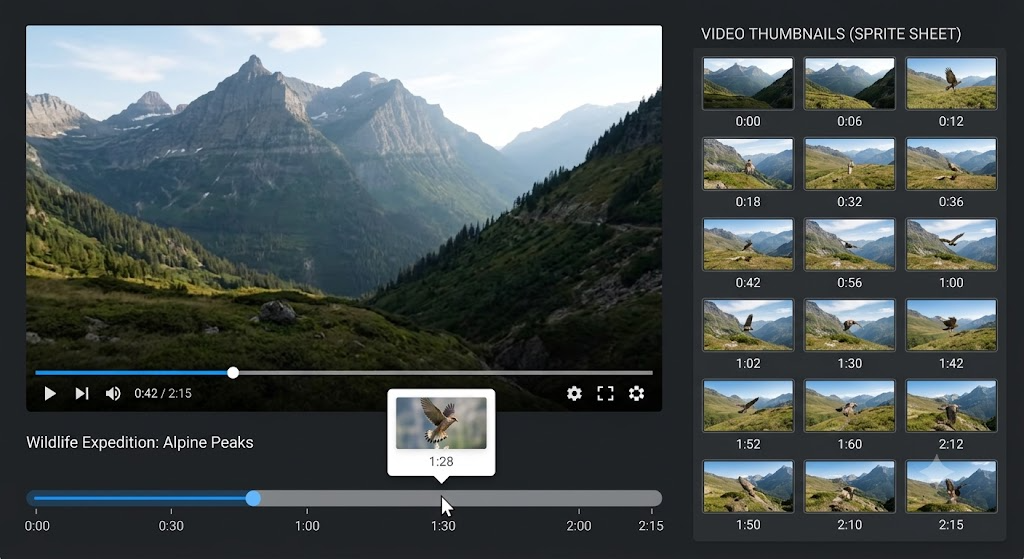
A friend of mine spent two months trying to add a “smart preview” feature to a video product, the kind of thing you see on every modern social app where the thumbnail subtly changes as you scrub through it. The first attempt grabbed a frame every ten seconds. It looked fine on talking-head content and embarrassing on anything else; the preview of a soccer game showed the same patch of grass nine times in a row, with one frame of a goal celebration tucked between them.
What they actually wanted, though they did not know to ask for it this way at first, was shot detection. Not scene understanding, not AI-generated highlights, not summarization. Just the underlying signal: where does one continuous shot end, and the next begin. With that signal, the preview problem solves itself: pick one frame per shot, not one frame per ten seconds, and the grass disappears, the goal stays.
Shot detection is one of those building blocks that punches well above its weight, and it has been quietly improving while the noise around video AI has been getting louder. PySceneDetect 0.7, released earlier this month, is the version I would reach for today if I had to add a shot-aware feature to anything I was shipping.
Shot, scene, segment: the words that bite teams
The first thing a shot-detection project tends to get wrong is the vocabulary. “Scene” is overloaded in video parlance, and when product managers, video engineers, and ML teams all use the same word for different things, the spec drifts until everyone is solving a different problem.
A shot is what a single uninterrupted camera take produces. Cut to a new camera angle, you have a new shot. This is what PySceneDetect actually detects, and where the open-source heuristic methods do most of their useful work.
A scene is a higher-level idea: a group of related shots that share place, time, or action. A two-person dialogue cutting back and forth between A and B is one scene, multiple shots. Detecting scenes properly needs more than pixel deltas; it needs some understanding of content, and that is where you start paying for ML.
A segment, in the streaming sense, is what your packager produces: a one-, two-, or six-second slice of the bitstream. Has nothing to do with shots or scenes. Worth saying out loud, because three different teams will sit in a room and use “segment” to mean three different things.
PySceneDetect is unambiguously a shot detector. Once you accept that, a lot of the product-side scope tension melts away.
What PySceneDetect actually buys you in 2026
The library has been around for a long time, but the 0.7 line (released this month) is the version I would bet on for new work. It bundles five complementary detectors, each appropriate for a different kind of content. Knowing which one to pick is most of the skill:
- detect-content is the default and the right starting point for anything diverse. It works in HSV color space and flags shots when the frame-to-frame delta crosses a threshold. Good for cuts, less good for fades.
- detect-adaptive wraps the same idea but with a rolling average baseline, which makes it tolerant of fast camera motion. The right pick for sports, action, anything where the camera itself is part of the action.
- detect-threshold is the luminance-based one. It catches fades to black, fades to white, and is the cheap way to find act breaks in long-form content.
- detect-hist does histogram delta detection, useful when the content is dimensionally weird (cartoons, anime, anything that breaks the assumptions of perceptual detectors).
- detect-hash uses perceptual hashing, and is the one I reach for on content with a lot of near-duplicate frames, like screen recordings or motion graphics.
The reason I am bothering to list all five is that “use PySceneDetect” without picking the right detector is how the project I mentioned at the top spent two months stuck. They were running detect-content on sports highlights and getting noise; detect-adaptive on the same clips cleaned the boundaries up overnight.
The shape of the pipeline that actually ships
The version of this I have seen work, more than once now, is a small, dumb worker that does roughly the following.
The upload pipeline drops the source video into object storage. A worker picks it up, runs PySceneDetect with the right detector for the content type, and gets back a list of shot boundaries with timecodes and frame numbers. The worker writes the list to a database, then asks FFmpeg to extract one keyframe per shot (or, if the producer wants a richer artifact, six frames per shot for a sprite sheet preview). The frames go to a CDN; the boundary list stays in the database; downstream features (preview hover, chapter generator, smart auto-clip) read whichever they need.
The whole thing is roughly a hundred lines of Python on top of OpenCV-decoded frames. It is also CPU-bound in a way that matters: PySceneDetect uses OpenCV for decode, which means the bottleneck on most jobs is the decode, not the detector. If your worker is a single thread on a small instance, a long talking-head video takes its own length to process. Spread across cores, you can comfortably run faster than real time on a modern box.
The reason this matters is the budget conversation. Teams I talk to keep assuming shot detection has to be a GPU job, because all the other recent video work has been. It does not. A worker on commodity CPU, with the right detector and a reasonable concurrency model, will give you shot boundaries on a year’s worth of uploads at a cost that is rounding error next to the encoding bill. The reason to pay for the managed AI shot detectors is not throughput. It is the cases where the heuristic breaks down: long crossfades, heavy motion graphics, dissolve-heavy edits, content where shots and scenes blur into each other.
The thing this unlocks that PMs do not see
Once a video has a shot boundary list, a surprising number of downstream features become cheap.
Chapter generation is straightforward: every Nth shot that is at least M seconds long, drop a chapter. Apply some rules for minimum chapter length, and the result is good enough for almost any non-storytelling content (instructional videos, talks, podcasts, sports).
Smart thumbnails get a foundation: pick the highest-quality frame from each of the first three shots, run them through a sharpness and face score, and the editor’s “pick a thumbnail” experience is one tap rather than a manual scrub.
Auto-clipping for shorts gets a shape: take the shots tagged by some heuristic (an audio energy spike, a face change, a transcript keyword), then snap to the nearest shot boundary instead of cutting mid-shot. The clips stop looking like clips and start looking like edits.
Preview-on-hover, the original feature my friend was building, gets the sprite sheet it needs. One frame per shot, not one frame per ten seconds.
None of these features need a frontier-grade video model. They need a CPU worker and a sensible detector.
The pieces I would not skip
A few practical pieces worth getting right on day one:
Save the frame-level detector output, not just the boundaries. The CSV that PySceneDetect emits has the per-frame metric score, and the day you need to tune the threshold for a new content type, that file is the difference between a one-hour experiment and a one-day reprocess.
Cache the detector output keyed on the content hash, not the asset ID. The next time someone re-uploads a near-identical file, the worker should hit cache. This matters more than people think for product workflows where editors iterate.
Pick the detector per content class, not per platform. The same product probably has talking heads, screen recordings, and user-generated chaos all going through the same worker. Detecting the content class (it is a small classifier or, honestly, a content-type field from the uploader) and routing to the right detector is worth the day it costs to build.
Treat the result as a signal, not as truth. The shot boundary list is roughly right roughly always. The places it is wrong are the same places a human editor would also pause and think: long dissolves, slow camera moves, ambiguous fades. The downstream features that work in production are the ones designed to be merely better, not perfect.
What this changes about the build vs buy conversation
The PySceneDetect work I am describing is not a replacement for the managed AI offerings doing scene-level understanding, automatic highlight generation, or multimodal indexing. Those products are doing more than shot detection, and the gap between “where the camera cuts” and “what the scene is about” is real.
What it is, is the cheapest serious building block for a class of features that PMs keep asking for and engineers keep over-scoping. Before a team commits to a frontier model API for a feature, the question to ask is: would a shot boundary list be enough. For chapter generation, smart thumbnails, hover previews, and the simpler kinds of auto-clipping, the answer is yes, and the version of the library that landed two weeks ago is the one I would build on.
If you have an upload pipeline and you have not yet added a worker that emits a shot boundary list per asset, that is probably the highest-leverage thing your video team could ship this month. Most of what people imagine “video AI” looks like, from the user side, is what you do with that list.
메타데이터
- post_id
- f2dc5b0f09d3
- slug
- shot-detection-is-the-cheap-feature-everyone-underestimates-f2dc5b0f09d3
- url
- https://medium.com/@nikodev1/shot-detection-is-the-cheap-feature-everyone-underestimates-f2dc5b0f09d3
- canonical_url
- https://medium.com/@nikodev1/shot-detection-is-the-cheap-feature-everyone-underestimates-f2dc5b0f09d3
- author_url
- https://medium.com/@nikodev1
- status
- ok
- fetched_at
- 2026-06-09 15:37:30