5 Best Free AI Anime Generators in 2026: Comparing Results with the Same Prompt
You have probably searched for a free AI anime generator, tried one, and ended up with something that looked nothing like actual anime. The…
5 Best Free AI Anime Generators in 2026: Comparing Results with the Same Prompt
You have probably searched for a free AI anime generator, tried one, and ended up with something that looked nothing like actual anime. The characters feel off. The art style looks like a generic illustration. The eyes are wrong. The colors are flat.
This happens because most AI image generators are built for general use. They were not trained specifically on anime art. So when you type “anime girl with silver hair,” you get something that is kind of anime-ish but not really there.
This article fixes that. We tested five tools using the exact same prompt so you can see how each one handles anime-style generation under the same conditions. All tools were tested on their free plan. No paid upgrades, no tricks.
The prompt we used across all tools:
“A silver-haired anime swordsman battling giant monsters in a dark fantasy world, epic action pose, glowing sword, cinematic lighting, ultra-detailed anime style, dynamic battle scene, 4K. “
What Is an AI Anime Generator?
A general AI image generator can make all kinds of images. You can ask for a landscape, a logo, a portrait, or an anime character. But the results vary a lot depending on what the model was trained on.
An anime-focused AI generator is different. It uses models or LoRA (Low-Rank Adaptation) files that are specifically trained on anime artwork. This means the output looks closer to actual anime, with the right proportions, line art, shading style, and character features that anime fans recognize immediately.
If you are serious about getting anime-style results, the type of model behind the tool matters more than anything else.
How We Compare Free AI Anime Generators
Every tool in this list was tested using the same prompt, the same character concept, and the same style description. We did not change the wording for any tool.
We evaluated each generator on three main things:
- Anime style accuracy refers to how closely the output matches actual anime art. Does it have the right facial proportions? The right eye style? Does it feel hand-drawn in the way anime art typically does?
- Character consistency looks at whether the character looks like a coherent, designed person rather than a random blend of features that do not fit together.
- Overall image quality covers sharpness, color balance, lighting, and detail level in the final output.
Best Free AI Anime Generators (Same Prompt Comparison)
1. PixAI — Best for Beginners Who Want Genuine Anime Results
Overview
PixAI was built specifically for anime and manga-style image generation. Unlike tools that treat anime as one style option among many, PixAI centers its entire workflow around it. The platform has a library of anime-focused models and LoRA files that users can select before generating.
Anime Style Performance
Out of all five tools, PixAI produced the most recognizable anime result with our test prompt. The silver hair had proper anime shading with soft gradients. The eyes were large, detailed, and expressive in the way anime characters typically are. The uniform had clean linework with consistent shading.
The Prompt Helper feature deserves special mention here. Instead of needing to write technical prompt strings, you can describe what you want in plain language and the tool helps you shape it into something the model understands. This is a big deal for beginners.
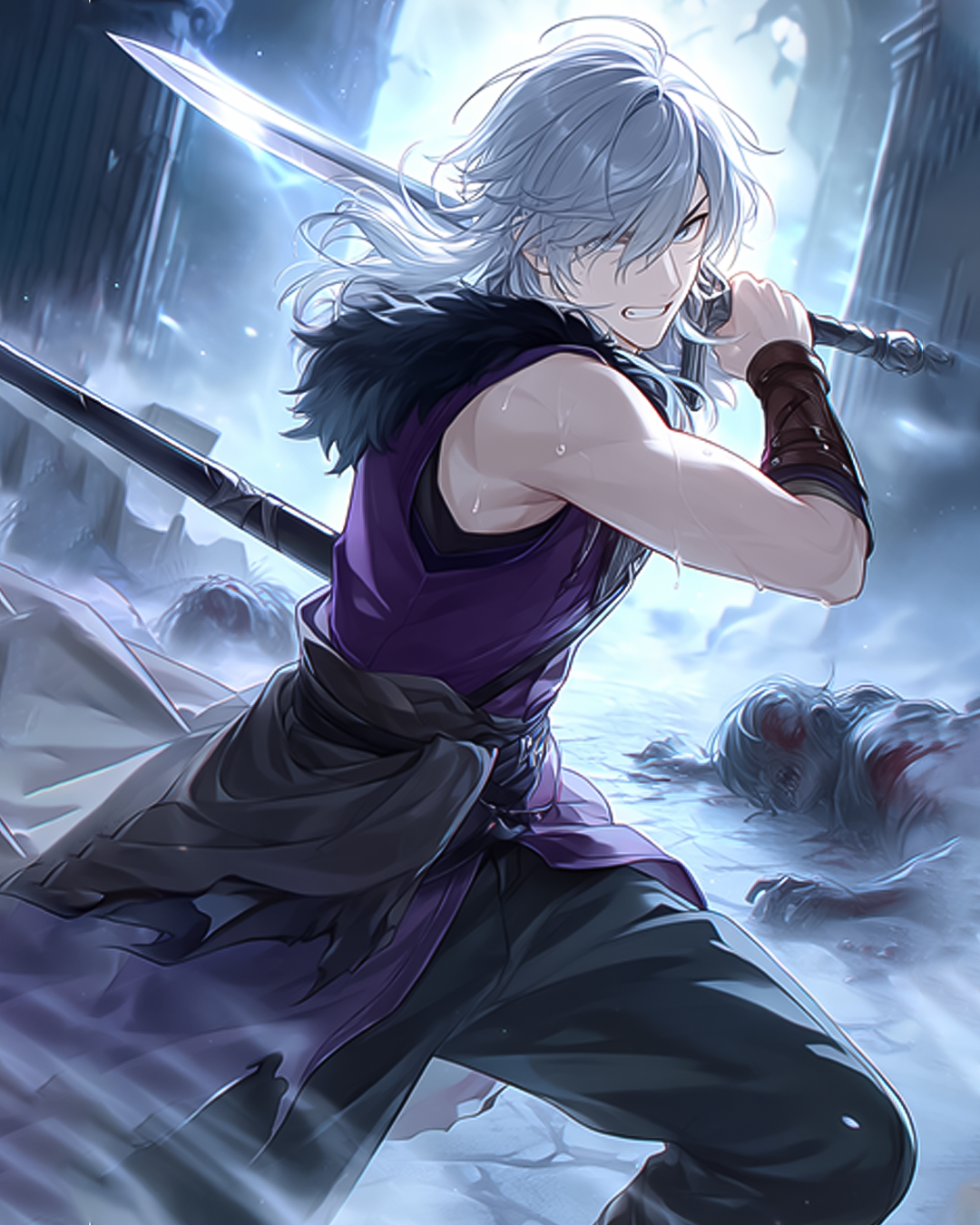
Image generated by PixAi
Free Plan Limitations
PixAI gives you daily credits on the free plan. These are enough to generate several images each day. Some advanced models require more credits per generation, so premium models may use up your daily allowance faster.
Best For
Beginners who want real anime results without learning complex prompt syntax. Also great for anyone creating original characters.
Start generating on PixAI here: https://pixai.art/en?utm_source=saad&utm_medium=article&utm_campaign=bestaianime
2. Stable Diffusion (via web interfaces) — Best for Power Users Who Want Full Control
Overview
Stable Diffusion is an open-source model that runs through various web interfaces like Automatic1111 or online platforms. It supports thousands of community-trained anime models and LoRA files, making it extremely flexible for those who know how to use it.
Anime Style Performance
With the right model loaded, Stable Diffusion produced sharp, detailed anime results. The test prompt gave us a clean character with expressive features. However, getting good results required selecting the right checkpoint model and adding negative prompts to filter out unwanted styles. Without that setup work, the output can be inconsistent.
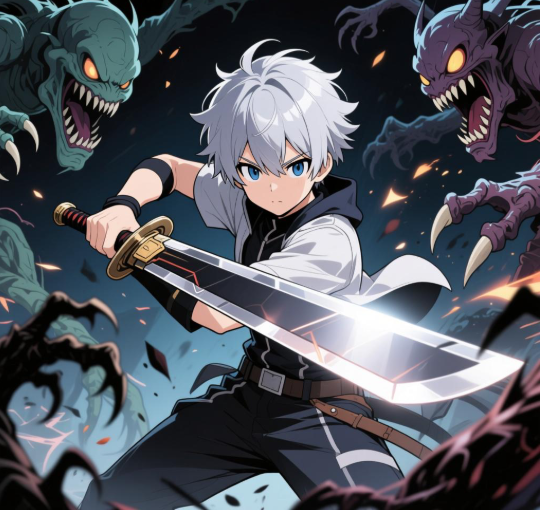
Image generated by Stable Diffusion
Free Plan Limitations
The open-source version is technically free to run locally if you have a capable GPU. Web-based interfaces often offer free tiers but with queue times or limited daily generations.
Best For
Users who want maximum control over models and settings and are comfortable doing some research to get there.
3. Adobe Firefly — Best for Users Who Want Clean, Safe-to-Use Outputs
Overview
Adobe Firefly is Adobe’s AI image generation platform. It is integrated into Creative Cloud products and is known for producing commercially safe images trained on licensed content.
Anime Style Performance
With our test prompt, Firefly produced a stylized illustration that had some anime characteristics but leaned toward a more Western digital art look. The character had large eyes and soft coloring, but the overall feel was not as close to traditional anime as PixAI or Stable Diffusion. It looks polished, just not specifically anime.
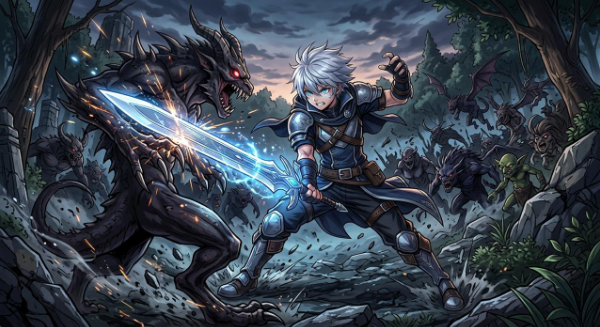
Image generated by Adobe Firefly
Free Plan Limitations
Adobe offers a free tier with a limited number of monthly generative credits. The output quality is consistent, but anime-specific models are not available.
Best For
Designers or content creators who need AI-generated art for commercial projects and prioritize safety of use over anime accuracy.
4. Microsoft Image Creator (Bing Image Creator) — Best for Quick, Casual Use
Overview
Microsoft Image Creator is powered by DALL-E and available for free through Bing. It is one of the most accessible tools since it requires no sign-up beyond a Microsoft account.
Anime Style Performance
Our test prompt produced a character that was recognizably anime-inspired. The hair and eyes had some of the right qualities, but the overall style felt more like a semi-realistic illustration with anime influence rather than a proper anime art style. It works for casual use but will not satisfy anyone with specific anime aesthetics in mind.
Free Plan Limitations
You get a set number of boosted (faster) generations per week. After those are used, generation still works but takes longer. No hard daily cap for basic use.
Best For
Casual users who want a quick anime-style image without setting up accounts on specialized platforms.
5. Canva AI Image Generator — Best for Non-Technical Users Who Need Anime in a Design
Overview
Canva has built AI image generation into its design platform. You can generate an image and immediately place it into a social media graphic, poster, or presentation without switching tools.
Anime Style Performance
Canva’s generator handled our test prompt with a result that had colorful, expressive qualities. It was not strict anime but had a stylized character feel. For someone who needs anime-influenced visuals inside a design project, it works reasonably well. For someone focused on true anime art, it falls short.
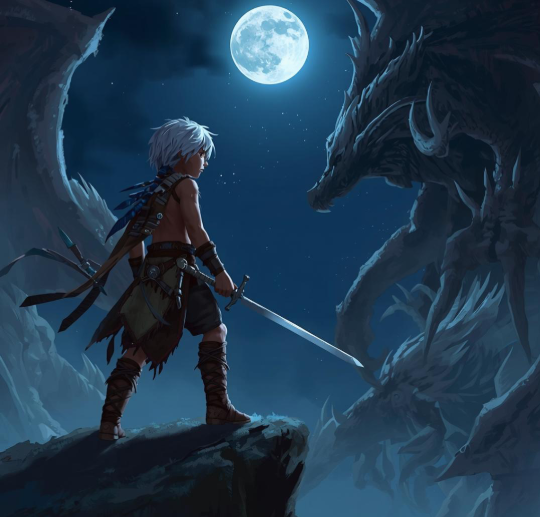
Image generated by Canva Ai
Free Plan Limitations
Canva’s free plan includes a limited number of AI image generations per month. The feature is easy to use but the anime model depth is not comparable to dedicated tools.
Best For
Non-technical users who need anime-style visuals as part of a broader design project rather than standalone art.
Free AI Anime Generator Comparison Table
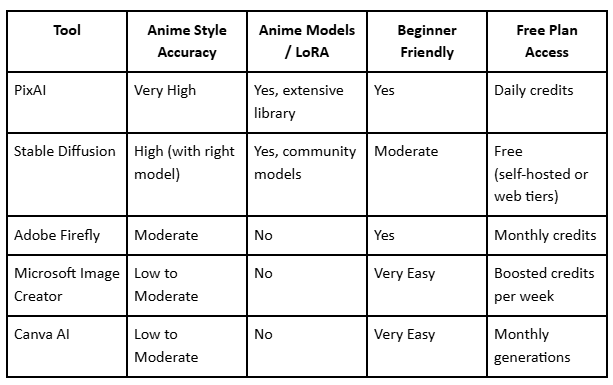
Why PixAI Is Different for Anime-Style Generation
Most AI image tools treat anime as a style tag. You type “anime style” and the model tries to interpret what that means based on its general training data. The results are inconsistent.
PixAI approaches this differently. The platform was built from the ground up for anime and manga image generation. Here is what sets it apart:
Anime-focused models and LoRA options
PixAI has a catalog of models that are specifically trained on anime artwork. Users can also browse and apply LoRA files that target specific sub-styles, like certain anime series aesthetics, character types, or art techniques. This level of control is not available on general-purpose platforms.
Prompt Helper for beginners
Writing a good AI image prompt is a skill. Most beginners do not know what words to include, what to avoid, or how to describe lighting and style in a way the model understands. PixAI includes a Prompt Helper that guides you through this. You describe what you want in normal language and the tool helps translate it into an effective prompt.
Beginner-friendly workflow
Everything on PixAI is designed around the assumption that many users are creating anime art for the first time. The interface does not overwhelm you with technical settings upfront. You can generate a solid result quickly, then explore advanced options as you get comfortable.
For a full look at the platform and documentation: https://docs.pixai.art/
Free vs Paid: What You Can Actually Do for Free
“Free” means different things across different tools, and it is worth being clear about what you actually get.
On Microsoft Image Creator, you can generate images without spending money at all. The free tier is genuinely unlimited in terms of access, just slower after your boosted credits run out. This makes it easy to experiment with no pressure.
On Canva, the free plan includes a small number of AI generations per month. It is enough to try the feature but not for ongoing regular use.
Adobe Firefly’s free tier gives you monthly generative credits. Once they are used, you either wait for renewal or upgrade. The output quality is consistent, and what you get in the free tier is representative of what the tool does.
Stable Diffusion is free at its core since it is open source. The barrier is technical: running it well requires a capable machine or using a third-party web interface that may have its own usage limits.
PixAI offers daily credits on its free plan. The amount is enough to generate multiple images each day. This lets you build a real creative habit without immediately needing to pay. The free experience on PixAI is genuinely usable for anime generation, not just a taste that disappears after one or two tries.
Across the board, free plans are real enough to help you decide which tool fits how you work. None of them are permanent unlimited access, but they are all honest starting points.
Which AI Anime Generator Should You Choose?
If you are a complete beginner, go with PixAI. The combination of anime-specific models, the Prompt Helper, and a clean interface means you will get good results without needing to learn a lot first.
If you are creating original characters (OC), PixAI and Stable Diffusion are the strongest options. PixAI is easier to start with. Stable Diffusion gives you more control once you are ready to dig into model selection.
If you are a content creator who needs anime-style visuals inside designs or social media posts, Canva offers the smoothest workflow. Adobe Firefly is a better choice if you need commercially licensed output.
If you just want to try something quickly without any setup, Microsoft Image Creator is the easiest starting point.
Conclusion
Most AI image generators were not built with anime in mind. When you use a general-purpose tool with an anime prompt, you often get something that is close but not quite right. The style feels diluted.
The tools in this comparison are all genuinely free to start with, and each one has a real use case. But if anime accuracy is what matters to you, the difference between a general tool and an anime-focused one is visible in every single image.
PixAI stood out across all our testing criteria because it is purpose-built for the style. The anime models, the LoRA library, and the beginner-friendly workflow make it the most practical choice for anyone who wants real anime-style results from a free plan.
Try PixAI for free and see the difference a purpose-built anime generator makes: https://pixai.art/en?utm_source=saad&utm_medium=article&utm_campaign=bestaianime
메타데이터
- post_id
- f2eae315b8bc
- slug
- 5-best-free-ai-anime-generators-in-2026-comparing-results-with-the-same-prompt-f2eae315b8bc
- url
- https://medium.com/@saadahmadlone/5-best-free-ai-anime-generators-in-2026-comparing-results-with-the-same-prompt-f2eae315b8bc
- canonical_url
- https://medium.com/@saadahmadlone/5-best-free-ai-anime-generators-in-2026-comparing-results-with-the-same-prompt-f2eae315b8bc
- author_url
- https://medium.com/@saadahmadlone
- status
- ok
- fetched_at
- 2026-06-28 10:39:35




