Python’s Magic: Why list Isn’t a Linked List and Why dict Feels Instant
Understanding these internals helps you write faster, more predictable code in real-world, high-load applications.
Python’s Magic: Why list Isn’t a Linked List and Why dict Feels Instant
Understanding these internals helps you write faster, more predictable code in real-world, high-load applications.
Introduction
If you’ve journeyed from print("Hello, World!") to your first serious Python project, you’ve probably fallen in love with lists and dictionaries. But why do they behave the way they do? This piece peeks under the hood of CPython (the reference implementation of Python written in C) to explain two things every performance-minded engineer should know:
listis a dynamic array, not a linked list.dictgets its near-constant time lookups from a carefully engineered hash table.
Understanding these internals helps you write faster, more predictable code in real-world, high-load applications. Where we mention time complexity, we’ll spell it out the first time (for example, O(1) means constant time; O(n) means linear time; this is often called Big-O notation, a way to describe how an algorithm scales).
Part 1: list — Dynamic Array in Disguise
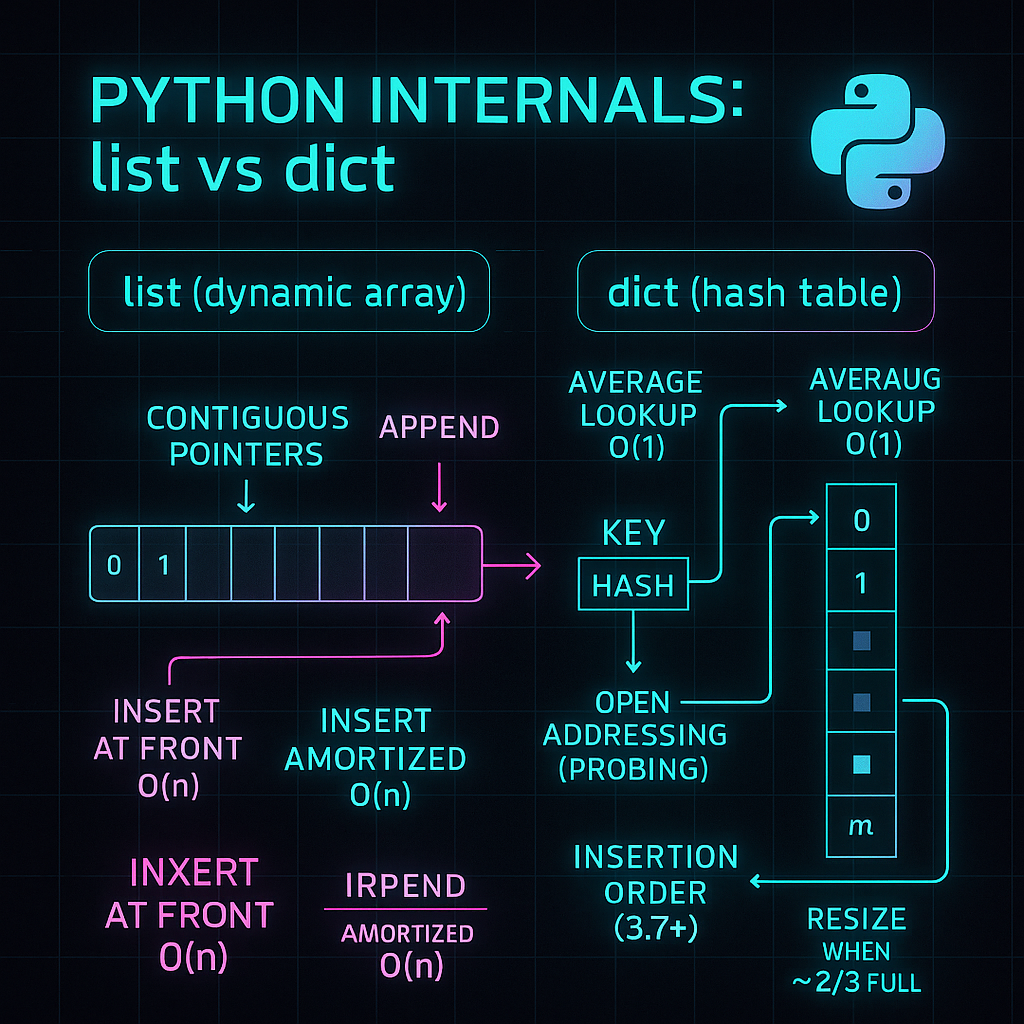
The name list is a bit cheeky. In CPython, a list is not a classic linked list. It’s a dynamic array.
What that means
- Contiguous memory block: Elements live back-to-back in memory.
- Pointers, not payloads: A list stores pointers to Python objects, not the objects themselves. On a 64-bit build, each pointer is typically 8 bytes, which makes indexed access blazing fast.
Think of a long storage tray with numbered slots. Each slot holds a card with the address of the actual object. Access by index is just pointer arithmetic:
base_address + i * pointer_size → constant time (O(1)).
The .append() trick: amortized O(1)
Appending to the end feels instant because CPython over-allocates. When it grows the list, it requests extra space so the next several .append() calls don’t need to reallocate. When the spare room runs out:
- Python allocates a larger block,
- copies existing pointers,
- writes the new pointer, and
- frees the old block.
That copy step is linear (O(n)), but it happens rarely, so the amortized cost of .append() is still constant (O(1)).
Instrumented example: track capacity jumps and growth factor
# list_growth.py
import sys
from time import perf_counter

def track_list_growth(n=60):
    """
    Append items to a list and log only when the allocated footprint changes.
    We also estimate a growth factor to visualize over-allocation behavior.
    """
    xs = []
    prev_bytes = sys.getsizeof(xs)
    print(f"[init] items=0, bytes={prev_bytes}")

    t0 = perf_counter()

    for i in range(n):
        xs.append(i)
        cur_bytes = sys.getsizeof(xs)
        if cur_bytes != prev_bytes:
            delta = cur_bytes - prev_bytes
            factor = f"{(cur_bytes / prev_bytes):.2f}" if prev_bytes else "NA"
            print(f"[grow] items={len(xs):2d}, bytes={cur_bytes}, +{delta}B, x{factor}")
            prev_bytes = cur_bytes

    t1 = perf_counter()
    print(f"[append] amortized append time ≈ {(t1 - t0)/max(1, n):.3e}s/op")

if __name__ == "__main__":
    track_list_growth(60)
Sample output (varies by platform/Python build):
[init] items=0, bytes=56
[grow] items= 1, bytes=88, +32B, x1.57
[grow] items= 5, bytes=120, +32B, x1.36
[grow] items= 9, bytes=184, +64B, x1.53
[grow] items=17, bytes=248, +64B, x1.35
[append] amortized append time ≈ 1.234e-07s/op
Notice the stepwise growth — those are reallocations with extra capacity.
When lists get slow
- Insert at front/middle:
my_list.insert(0, x)or inserting in the middle is O(n) because it must shift pointers to make room. - Pop/delete from front:
my_list.pop(0)ordel my_list[0]is also O(n) due to left-shifts. - Slicing:
new_list = my_list[a:b]makes a new list and copies pointers for O(k) where k is slice length.
Practical takeaways
- Need frequent adds/removes at both ends? Use
**collections.deque(double-ended queue; pronounced “deck”) with O(1)**append,appendleft,pop,popleft. - Know your target size? Prefer list comprehensions over repeatedly calling
.append()in a loop. Comprehensions help CPython pre-size and avoid multiple growth steps. - Lists are perfect for ordered data with fast index access, but they’re not your friend for heavy churn at the front or in the middle.
Part 2: dict — Hash Tables Done Right
If lists are neat numbered shelves, dictionaries are that magical cupboard where you whisper the item’s name and it appears. Whether 10 items or 10 million, average lookup time is roughly the same thanks to a hash table.
The three pillars
- Hash function (
hash()): Maps a key (string, number, tuple, etc.) to an integer. Good hashes are stable for the key and well-distributed. - Internal array: A
dictstores entries in an array of slots (often called buckets or slots). - Collision handling: Different keys can map to the same slot. CPython uses open addressing with a smart probing strategy to find the next open slot.
From insert to lookup
For my_dict['name'] = 'Alice':
- Compute
hash('name')→ big integer. - Map to an array index via fast masking (size is a power of two).
- If the slot is empty, store a triple: (hash, key, value).
- On lookup, recompute the hash, jump to the index, verify hash and key, and return the value.
Collisions: open addressing
If a target slot is busy (collision), CPython computes a probe sequence (based on the hash) to find the next suitable slot. This avoids per-bucket linked lists and keeps cache behavior friendly.
Why average O(1)?
Most operations (insert, lookup, delete) involve:
- one hash,
- one index computation,
- and a small number of slot checks.
That’s constant time on average (O(1)). Worst case can degrade to O(n), but CPython’s hashing and resize policy make that vanishingly rare in practice.
Growth and insertion order (Python 3.7+)
As the table fills (around two-thirds full), CPython resizes to reduce collisions and re-inserts existing items into a bigger array.
Since Python 3.7, insertion order is guaranteed by the language (CPython 3.6 already had it as an implementation detail). The modern dict keeps order and speed.
Instrumented example: bytes per element and growth steps
# dict_growth.py
import sys

def track_dict_growth(n=80):
    """
    Insert keys into a dict and log when the memory footprint grows.
    Also report an approximate bytes-per-item ratio for intuition.
    """
    d = {}
    prev_bytes = sys.getsizeof(d)
    print(f"[init] items=0, bytes={prev_bytes}, bytes_per_item=NA")

    for i in range(n):
        d[i] = i
        cur_bytes = sys.getsizeof(d)
        if cur_bytes != prev_bytes:
            bpi = f"{cur_bytes / len(d):.1f}" if len(d) else "NA"
            print(f"[grow] items={len(d):2d}, bytes={cur_bytes}, bytes_per_item≈{bpi}")
            prev_bytes = cur_bytes

if __name__ == "__main__":
    track_dict_growth(80)
Sample output (varies by platform/Python build):
[init] items=0, bytes=64, bytes_per_item=NA
[grow] items= 6, bytes=240, bytes_per_item≈40.0
[grow] items=11, bytes=368, bytes_per_item≈33.5
[grow] items=22, bytes=640, bytes_per_item≈29.1
Why keys must be immutable (hashable)
A dictionary’s behavior depends on the key’s hash. If the key could change after insertion, its hash (and therefore its slot) could change, breaking the table.
# hashability_demo.py
def demo_hashability():
    # Case 1: list as a key -> TypeError (lists are mutable)
    try:
        k = [1, 2]
        _ = {k: "nope"}
    except TypeError as e:
        print(f"[list key] error: {e}")

    # Case 2: tuple is hashable if all its items are hashable
    try:
        k = (1, 2)
        m = {k: "works"}
        print(f"[tuple key] ok: {m}")
    except TypeError as e:
        print(f"[tuple key] unexpected error: {e}")

    # Case 3: tuple containing a list -> still unhashable
    try:
        k = (1, [2])
        _ = {k: "nope"}
    except TypeError as e:
        print(f"[tuple-with-list key] error: {e}")

    # Case 4: set is unhashable; frozenset is hashable
    try:
        k = {1, 2}
        _ = {k: "nope"}
    except TypeError as e:
        print(f"[set key] error: {e}")

    try:
        k = frozenset({1, 2})
        m = {k: "works"}
        print(f"[frozenset key] ok: {m}")
    except TypeError as e:
        print(f"[frozenset key] unexpected error: {e}")

if __name__ == "__main__":
    demo_hashability()
Output:
[list key] error: unhashable type: 'list'
[tuple key] ok: {(1, 2): 'works'}
[tuple-with-list key] error: unhashable type: 'list'
[set key] error: unhashable type: 'set'
[frozenset key] ok: frozenset({1, 2}): 'works'
Keys must be hashable (i.e., immutable with a stable __hash__): strings, numbers, tuples of hashables, frozenset (an immutable set), and so on.
Part 3: Wrap-Up (and a Quick Self-Check)
**list is a dynamic array**:
- Fast random access (O(1)).
- Inserts/deletes in the middle or front are O(n) due to shifting.
.append()is amortized O(1) thanks to over-allocation.
**dict is a hash table**:
- Inserts/lookups/deletes are average O(1) with open addressing.
- Grows in jumps and preserves insertion order (Python 3.7+).
- Keys must be immutable/hashable.
Self-check (answers in your head, no cheating):
- Why is
list.insert(0, x)slower thanlist.append(x)? - What does “amortized O(1)” mean for
.append()? - Why does
dictneed immutable keys? - What does Python do when a
dictgets ~two-thirds full? - Since which version is
dictinsertion order guaranteed by the language?
Footnote for the curious
- All details here describe CPython. Alternative Python implementations may differ internally, but the Big-O behavior and language guarantees remain the same for your day-to-day code.
- “API” is Application Programming Interface — and yes, diving beneath it now and then pays off.
메타데이터
- post_id
- f32b3f7639ff
- slug
- pythons-magic-why-list-isn-t-a-linked-list-and-why-dict-feels-instant-f32b3f7639ff
- url
- https://medium.com/@virtualik/pythons-magic-why-list-isn-t-a-linked-list-and-why-dict-feels-instant-f32b3f7639ff
- canonical_url
- https://medium.com/@virtualik/pythons-magic-why-list-isn-t-a-linked-list-and-why-dict-feels-instant-f32b3f7639ff
- author_url
- https://medium.com/@virtualik
- status
- ok
- fetched_at
- 2026-06-15 20:49:13