Launch Your Code into the Universe
Turn your project into a shining star on GitHub !
Launch Your Code into the Universe
Turn your project into a shining star on GitHub !

Starting your coding journey with GitHub is an important step for a developer. It allows you to store your code online, track changes, and share your work with others. As undergraduate students, it is the profile of our skills and knowledge. In this article, you’ll learn how to push your first project to GitHub simply and clearly by learning about concepts.
🌟 What is GitHub?
GitHub is an online platform where developers can upload and manage their code via Git. It helps you collaborate with others and keeps your project safe in the cloud.
🌟 What is Git ?
Git is the engine of your code universe. It does not need the Internet to work. Simply, Git is a version control system that helps you track changes in your code over time on your local machine. It's like a smart history tracker of a project.
Follow these simple steps and send your code on its first space mission.
🛠️ What You Need Before Starting ?
Before you begin, make sure you have:
• A GitHub account
If you do not have an account, visit the GitHub website and create your account: Sign up for GitHub
• Git installed on your local computer
After the installation, go to your terminal and confirm your installation.
git --version• A project folder ready on your system
📁 Step 1: Create a New Repository
-
Go to your GitHub account
-
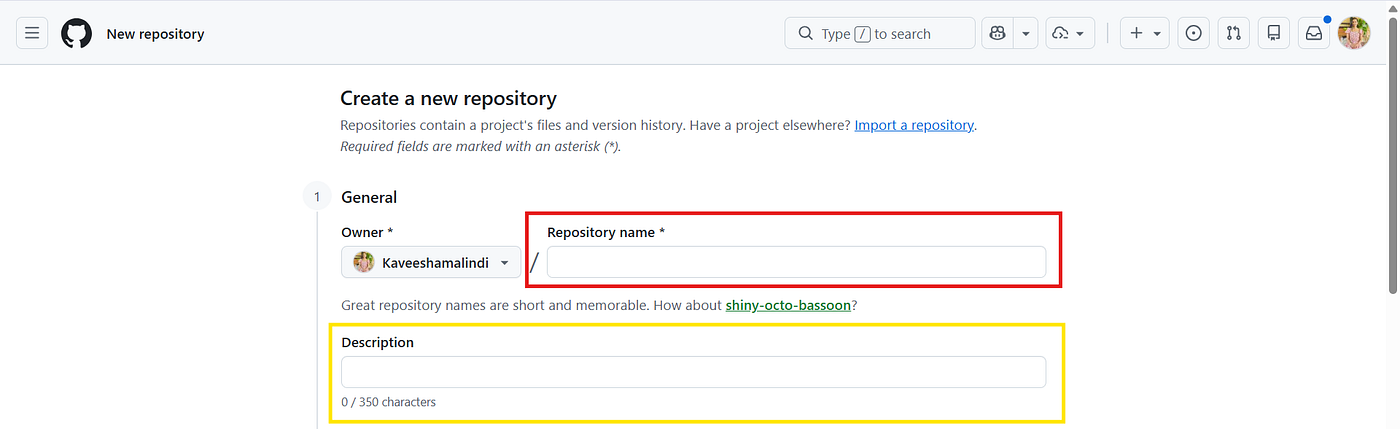
Click on New Repository

- Give a name for your project
-
Add a short description (optional)
-
Click Create Repository

💻 Step 2: Open Your Project Folder
Open your project folder using a terminal or command prompt.
cd your-project-folder🔗 Step 3: Initialize Git
Turn your folder into a Git repository:
git init➕ Step 4: Add Your Files
Add all your project files:
git add .Or add each file separately:
git add index.html📝 Step 5: Commit Your Changes
Save your changes with a message:
git commit -m "initial commit"Tips: Write clear commit messages
🌍 Step 6: Connect to GitHub
Copy your repository URL from GitHub and connect it:
git remote add origin https://github.com/your-username/your-repo-name.git
🚀 Step 7: Push Your Project
Upload your code to GitHub:
git push -u origin main🎉 Congratulations!
Your project is now live on GitHub. You can share the GitHub repository link with others, continue updating your code, and even collaborate with developers around the world.
Starting is always the hardest part, but once you push your first project, everything becomes easier. Practice is the key to success. So practice these commands on your terminal and collaborate with others. That enhances your knowledge by exploring new things.
💻 Happy coding, make a space explorer ! ✨
메타데이터
- post_id
- f32c67090722
- slug
- launch-your-code-into-the-universe-f32c67090722
- url
- https://medium.com/@senarathnemalindi/launch-your-code-into-the-universe-f32c67090722
- canonical_url
- https://medium.com/@senarathnemalindi/launch-your-code-into-the-universe-f32c67090722
- author_url
- https://medium.com/@senarathnemalindi
- status
- ok
- fetched_at
- 2026-06-23 03:48:11