Measuring Network Throughput with iperf3: Host-to-Host and Pod-to-Pod
Network performance is critical for distributed applications, especially in Kubernetes environments. This guide walks you through using…
Measuring Network Throughput with iperf3: Host-to-Host and Pod-to-Pod
Network performance is critical for distributed applications, especially in Kubernetes environments. This guide walks you through using iperf3 to measure network throughput between VMs and between pods across Kubernetes clusters which should be helpful to improve the performance of your server running in Kubernetes.
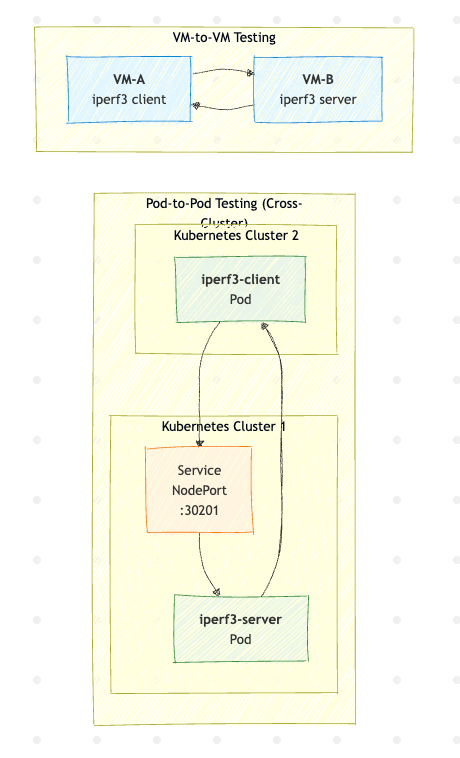
Overview
iperf3 is a widely-used network testing tool that measures bandwidth between two endpoints. We’ll cover two scenarios:
- Host-to-Host (VM-to-VM): Direct network throughput between virtual machines
- Pod-to-Pod: Network throughput between Kubernetes pods, which includes container networking overhead
Prerequisites
- Two VMs or physical hosts with network connectivity
- Two Kubernetes clusters (or one cluster with multiple nodes)
- iperf3 installed on hosts (
apt install iperf3oryum install iperf3)
Part 1: Host-to-Host (VM-to-VM) Testing
Installation
On both VMs, install iperf3:
# Debian/Ubuntu
sudo apt update && sudo apt install -y iperf3

# RHEL/CentOS
sudo yum install -y iperf3
Running the Test
On the server VM:
iperf3 -sOn the client VM:
# Basic TCP test
iperf3 -c <SERVER_IP>

# Extended 60-second test
iperf3 -c <SERVER_IP> -t 60

# UDP test with target bandwidth
iperf3 -c <SERVER_IP> -u -b 10G

# Parallel streams for higher throughput
iperf3 -c <SERVER_IP> -P 4
Part 2: Pod-to-Pod Testing in Kubernetes
Server Deployment (Cluster 1)
Create iperf3-server.yaml and expose iperf server using node port:
apiVersion: v1
kind: Namespace
metadata:
  name: network-test
---
apiVersion: apps/v1
kind: Deployment
metadata:
  name: iperf3-server
  namespace: network-test
  labels:
    app: iperf3-server
spec:
  replicas: 1
  selector:
    matchLabels:
      app: iperf3-server
  template:
    metadata:
      labels:
        app: iperf3-server
    spec:
      containers:
      - name: iperf3
        image: networkstatic/iperf3
        args: ["-s"]
        ports:
        - containerPort: 5201
          protocol: TCP
        - containerPort: 5201
          protocol: UDP
        resources:
          requests:
            cpu: "2"
            memory: "512Mi"
          limits:
            cpu: "4"
            memory: "1Gi"
---
apiVersion: v1
kind: Service
metadata:
  name: iperf3-server-nodeport
  namespace: network-test
spec:
  type: NodePort
  selector:
    app: iperf3-server
  ports:
  - name: tcp
    port: 5201
    targetPort: 5201
    nodePort: 30201
    protocol: TCP
  - name: udp
    port: 5201
    targetPort: 5201
    nodePort: 30201
    protocol: UDP
Client Deployment (Cluster 2)
Create iperf3-client.yaml:
apiVersion: v1
kind: Namespace
metadata:
  name: network-test
---
apiVersion: apps/v1
kind: Deployment
metadata:
  name: iperf3-client
  namespace: network-test
  labels:
    app: iperf3-client
spec:
  replicas: 1
  selector:
    matchLabels:
      app: iperf3-client
  template:
    metadata:
      labels:
        app: iperf3-client
    spec:
      containers:
      - name: iperf3
        image: networkstatic/iperf3
        command: ["sleep", "infinity"]
        resources:
          requests:
            cpu: "2"
            memory: "512Mi"
          limits:
            cpu: "4"
            memory: "1Gi"
Deployment Steps
Cluster 1 (Server):
kubectl apply -f iperf3-server.yaml

# Verify the NodePort service
kubectl get svc -n network-test iperf3-server-nodeport
Cluster 2 (Client):
kubectl apply -f iperf3-client.yaml

# Run tests via NodePort
kubectl exec -it -n network-test deploy/iperf3-client -- \
  iperf3 -c <NODE_IP> -p 30201
Test Results Analysis
The following table shows actual throughput measurements comparing VM-to-VM and Pod-to-Pod network performance:
Test TypeDirectionFinal Bitrate (Receiver)VM to VMVM-A → VM-B7.29 Gbits/secVM to VMVM-B → VM-A10.0 Gbits/secPod to PodPod-A → Pod-B5.06 Gbits/secPod to PodPod-B → Pod-A4.73 Gbits/sec
Key Observations
- VM-to-VM achieves higher throughput: Direct VM communication reached up to 10 Gbits/sec, representing near line-rate performance.
- Pod-to-Pod has ~30–50% overhead: Container networking (CNI plugins, network namespaces, iptables/eBPF rules) introduces overhead, reducing throughput to ~5 Gbits/sec.
- Asymmetric performance: Both VM and Pod tests show different speeds depending on direction, which may indicate:
- Different NIC configurations
- Asymmetric routing paths
- CPU availability differences between nodes
Best Practices for Accurate Measurements
- Adequate resources: Use at least 2 CPU cores and 512Mi memory for 10Gbps+ testing
- Multiple test runs: Run tests multiple times and average the results
- Test both directions: Network paths may be asymmetric
- Consider parallel streams: Use
-P 4for very high throughput networks - Test during low-traffic periods: Other workloads affect results
Conclusion
iperf3 provides valuable insights into network performance across different environments. The overhead observed in Pod-to-Pod communication is expected due to the additional networking layers in Kubernetes. When planning capacity, account for this overhead in your network bandwidth calculations.
메타데이터
- post_id
- f3343d4962fa
- slug
- measuring-network-throughput-with-iperf3-host-to-host-and-pod-to-pod-f3343d4962fa
- url
- https://medium.com/@mirilittleme/measuring-network-throughput-with-iperf3-host-to-host-and-pod-to-pod-f3343d4962fa
- canonical_url
- https://medium.com/@mirilittleme/measuring-network-throughput-with-iperf3-host-to-host-and-pod-to-pod-f3343d4962fa
- author_url
- https://medium.com/@mirilittleme
- status
- ok
- fetched_at
- 2026-07-15 06:14:08