🔊 Odio: Introducing the Missing Piece to Unleash Linux Multimedia
A free REST API + Home Assistant integration to control MPRIS players, PipeWire audio, and systemd user services
🔊 Odio: Introducing the Missing Piece to Unleash Linux Multimedia
Introduction
For over a decade, I’ve kept old hardware alive on Linux: homemade NAS and HTPC since 2013, a Raspberry Pi B+ audio server running 24/7 since 2020 that I documented here. Big thanks to the Debian and Openmediavault projects to make this possible.
Like many, I built a multimedia setup I’m proud of. But cleanly integrating it into Home Assistant always felt hacky, with scattered integrations, SSH scripts, and fragile glue.
go-odio-api v0.4 is built for people like us. An ultra-lightweight Go daemon exposing a clean REST API to control everything in your Linux user session: MPRIS players (Spotify, VLC, Firefox, MPD), PulseAudio/PipeWire, systemd user services. No root. No hacks. Just Linux primitives.
The 3 Pillars (Modular Backends)
1. MPRIS Control (enabled by default)
Lists all compatible players in real time: Spotify, VLC, Firefox, MPD (with mpd-mpris or mpDris2), etc.
Full actions: play/pause/stop/next/prev, volume, seek, shuffle/loop
GET /players # instant inventory
POST /players/{player}/play
POST /players/{player}/volume # {“volume”: 0.5}
POST /players/{player}/seek # {“offset”: 1000000}
2. PulseAudio/PipeWire Management (enabled by default)
Server info, client listing, volume/mute per client or general output in real time. Limited PipeWire support via pipewire-pulse
Endpoints:
GET /audio/server
POST /audio/server/volume # {“volume”: 0.5}
GET /audio/clients
POST /audio/clients/{client}/mute
3. systemd USER Services (opt-in, security-critical, central to power)
This backend is a real game-changer — and potentially the riskiest if I screw up the security. But it’s absolutely essential for home automation power users because you need to start/stop/restart services remotely: launching Kodi media centers, firing up Firefox kiosks for Netflix/YouTube, restarting pulseaudio, MPD or shairport-sync when they glitch. Here’s the idea.
How it works (explicit whitelist required):
systemd:
 enabled: true
 user:
   — mpd.service # your music daemon (w/ MPRIS)
   — shairport-sync.service # AirPlay receiver (see my Medium article)
   — spotifyd.service # headless Spotify (needs MPRIS build)
   — firefox-kiosk@netflix.com.service # Netflix kiosk → auto MPRIS player
   — firefox-kiosk@youtube.com.service # YouTube kiosk → auto MPRIS player
   — kodi.service # full media center (w/ MPRIS addon)
   — vlc.service # VLC daemon
 system: # monitoring only!
 — bluetooth.service # watch system-wide BT status
 — upmpdcli.service # UPnP renderer
Endpoints:
GET /services # ALL whitelisted units + real-time status
POST /services/user/mpd.service/start # launch music daemon
POST /services/user/kodi.service/restart # reboot media center
POST /services/user/firefox-kiosk@netflix.com.service/stop # kill Netflix kiosk
The Security Model
Layer 1 is dead simple: systemd backend is disabled by default. You must explicitly set systemd.enabled: true AND provide a whitelist of units in config.yaml. No units listed = zero exposure. That’s the bare minimum.
The real protection: Odio enforces user-session mutations only through a an application-layer lockdown, regardless of your system configuration.
Let’s say you messed up your dbus policies through SSH trying to let regular users start system services, or your polkit rules are wide open, Odio’s will still refuses to execute the operation.
You can monitor system-wide units like bluetooth.service or upmpdcli.service (they show live status in GET /services), but never start/stop/restart them. For that, you’ll still need SSH and a CLI.
Remote Kodi restarts, Netflix kiosk launches, MPD service restarts. All possible without opening a giant systemd security hole. Application-layer enforcement makes it safe. Other protections:
- bind: localhost by default, single interface or all interfaces, exposing Odio is your choice.
- Odio opens only the required sytemd bus based on config
- Odio throughs a fatal error if you try to run it as root.
There’s no authentication, yet, but Odio is meant for trusted LAN only anyway, not Internet exposure.
Without this backend secured properly, you’d be screwed for real home automation use cases. With it, I really hope every one can hack around safely.
Why This Design?
Odio is built around the principle of “dumb core, smart integrations” Unix style. The API stays deliberately simple, stable, and reliable. The real magic comes from the integrations.
The User Session Bet
The architecture makes a critical choice: all multimedia services run as systemd user units (systemctl --user), not system-wide daemons.
Why? Because this pattern has been a Linux best practice since systemd v208. Media services handle per-user resources: audio sinks, display sessions, D-Bus contexts, that belong in user space.
This is the key unlock: by running everything in the user session, Odio talks to a single, unified D-Bus session bus. PulseAudio/Pipewire, MPRIS players (Spotify, VLC, Firefox, MPD, Kodi), user systemd units, all expose an interface on that bus. Odio doesn’t need to know what Spotify is. Or VLC. Or your custom MPD setup. It just listens to the D-Bus session for MPRIS-compatible players and exposes them via HTTP. You add a new player? It shows up automatically. Zero code change. Zero config. This is what makes Odio universal without being bloated.
Test in 2 Minutes
Build from source (no prebuilt binaries on purpose for now):
git clone https://github.com/b0bbywan/go-odio-api
cd go-odio-api
go build -o odio-api .
./odio-api
Or Docker (build your own image):
git clone https://github.com/b0bbywan/go-odio-api
cd go-odio-api
docker build -t odio-api .
docker compose up
Immediate test: Start a youtube or vlc video, spotify or mpd player and test
curl http://localhost:8018/players # your MPRIS players
curl http://localhost:8018/audio/clients # your Pulse clients
curl -X POST http://localhost:8018/players/mpd/pause # it worksInstallation: systemd user service
# ~/.config/systemd/user/odio-api.service
[Unit]
Description=Odio API
After=sound.target network-online.target
Wants=sound.target network-online.target

[Service]
ExecStart=/usr/local/bin/odio-api
Restart=always
RestartSec=12

[Install]
WantedBy=default.target
systemctl --user enable --now odio-api.serviceIntegrations & Roadmap
Odio’s real power comes from integrations. The API is just plumbing infrastructure. The magic happens when you connect it to actual control interfaces.
odio-ha: The Home Assistant Integration
I’ve already built the first proper integration to prove what go-odio-api can do: **odio-ha**.
It exposes:
- Audio control:
media_player.odio_audio_receiverfor global PulseAudio/PipeWire volume/mute - Per-service control: separate
media_playerper systemd service (mpd, kodi, shairport-sync, etc.) with power on/off, volume, state tracking - MPRIS players (in progress): auto-discovered players (Spotify, VLC, Firefox, MPD) with full playback control and metadata
The real power — integration inheritance:
Once odio-ha exposes your services, you can map them to native HA integrations. Example: MPD runs on your audio server (Odio manages the service), but you want rich features (playlists, album art). Just map the mpd odio service to your existing mpd integration when you set up Odio-ha Integration
- Odio handles service lifecycle (start/stop/restart)
- HA’s MPD integration handles rich playback
- Everything centralized on the right host — your media server
Same for Kodi, Spotify Connect, Snapcast, or any player. Odio becomes the hub that makes all your HA integrations point to the correct machine.
All local. No cloud. No SSH scripts. Automations and voice control just work.
Current state: odio-apiv0.4 + odio-hav0.2.2 (add the repository in HACS) gives you clean control over audio and services.

Odio Integration v0.3.0

Odio entity example
What’s next
Bluetooth Backend (target v0.5): Turn your Linux box into a fully controllable Bluetooth speaker:
- Toggle Bluetooth power, pairing mode via API
- Accept connections from phones, tablets, laptops
- Playback control and metadata exposed through MPRIS (play/pause/next/prev, track info)
- The speaker appears as a
media_playerentity in Home Assistant via odio-ha - Full remote control: no bluetoothctl/bt-agent/custom script hell
Fake a commercial Bluetooth speaker, but with full API control
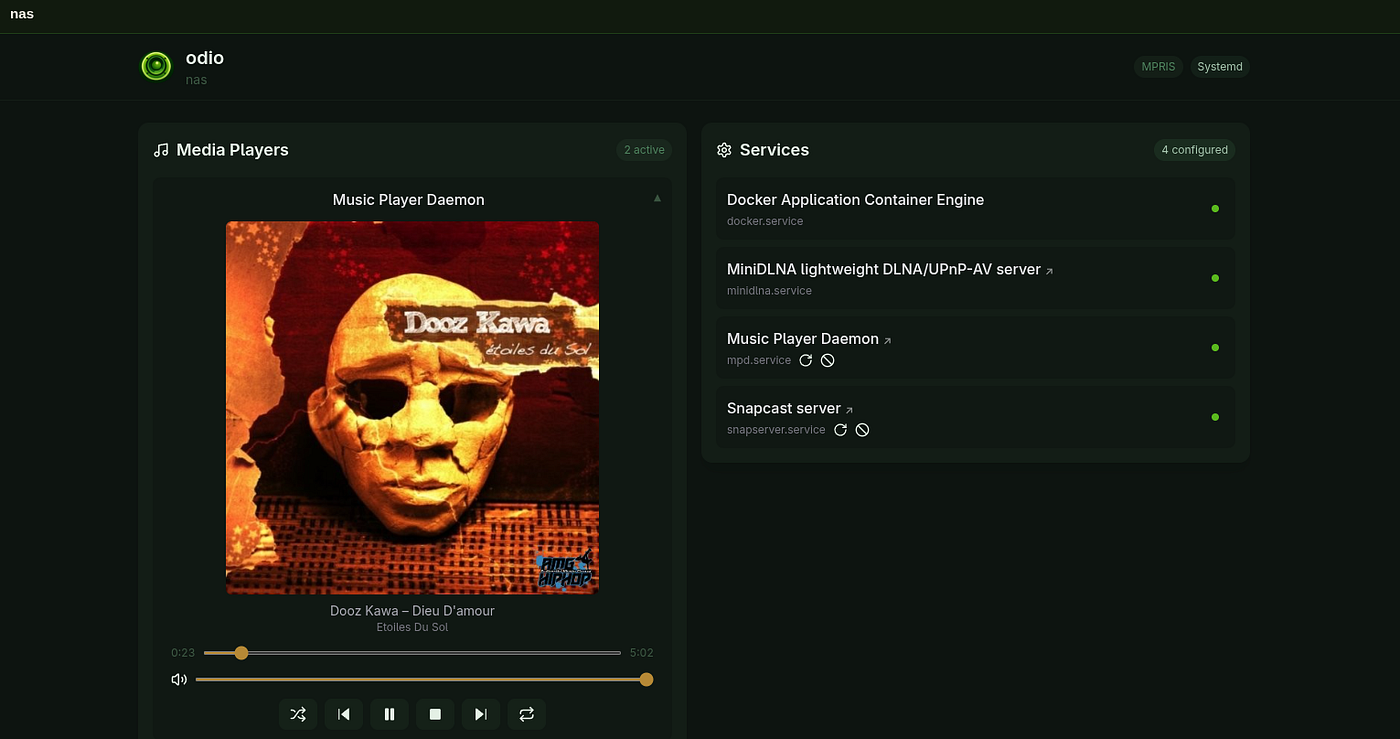
Built-in dashboard (target v0.6):
Simple web UI served by go-odio-api itself on http://localhost:8018/ui/. I don’t need to tell more, just let screenshot do the talking. There’s a good chance it becomes my HTPC homepage at login.

Dev UI version
PR are on the way !
Later: SSE, Authentication, Wayland Remote Control, Photos Casting…
Join the Project
Odio is very early stage. I pushed the very first commit on January 25, 2026, barely three weeks ago. It’s a Proof of Concept and experiment with Claude Code that went much better than expected. Video players weren’t even in the initial scope.
v0.4.0 works out of the box, but there’s a long road ahead. Expect bugs. I’ve mobilized 12 years of Linux multimedia tinkering and 15 years of startup experience to turn that POC into production-grade software: low footprint and portability across architectures and distributions for my old hardware, increasing test coverage since I broke v0.1.2, exhaustive config/README, and solid debug logs for integration developement... I’m building this to be as universal and lasting as possible, not just for my use case, but for yours too. And I can’t do this alone.
I need your help to keep this on the right path.
Does it work on your setup? What breaks? What’s missing? What pain points does your current stack have that we could solve together?
Try it: github.com/b0bbywan/go-odio-api - github.com/b0bbywan/odio-ha Run it on your hardware. Tell me what works and what doesn’t. Show me your setup. If you want to contribute code, even better. Go is a wonderful language for this use case.
This is what I want to build: the multimedia remote platform Linux has been missing. Universal. Local. Free. Built on stable primitives that already work.
But it only becomes that if it solves your problems, not just mine.
Let’s build it together.
Fun fact: no me di cuenta de que “Odio” significa hate en español, pero me encanta el nombre, y hasta hice que el número de puerto coincidiera con él, así que lo mantendré.
메타데이터
- post_id
- f3a0baae4f5e
- slug
- odio-introducing-the-missing-piece-to-unleash-linux-multimedia-f3a0baae4f5e
- url
- https://medium.com/@mathieu-requillart/odio-introducing-the-missing-piece-to-unleash-linux-multimedia-f3a0baae4f5e
- canonical_url
- https://medium.com/@mathieu-requillart/odio-introducing-the-missing-piece-to-unleash-linux-multimedia-f3a0baae4f5e
- author_url
- https://medium.com/@mathieu-requillart
- status
- ok
- fetched_at
- 2026-06-22 05:41:33