Performing Sentiment Analysis with VADER NLP Library Using Streamlit: A Beginner’s Guide
Natural Language Processing (NLP) is an important field of study in the world of Artificial Intelligence (AI) that deals with the…
Performing Sentiment Analysis with VADER NLP Library Using Streamlit: A Beginner’s Guide
Natural Language Processing (NLP) is an important field of study in the world of Artificial Intelligence (AI) that deals with the interaction between computers and human languages. One of the most popular tools used for sentiment analysis in NLP is the VADER (Valence Aware Dictionary and Entiment Reasoner) library.
In this tutorial, we will explore how to use VADER with Streamlit, a powerful open-source framework for creating data-driven web apps.
Setting Up
First, we need to set up our development environment. We will be using Python 3.8 or higher, so make sure you have it installed. Next, install the required libraries by running the following command in your terminal:

The streamlit library will help us build a user interface for our app, while vaderSentiment will provide the sentiment analysis functionality.
Building the App
With the dependencies installed, we can now start building our app. Create a new Python file and add the following code:
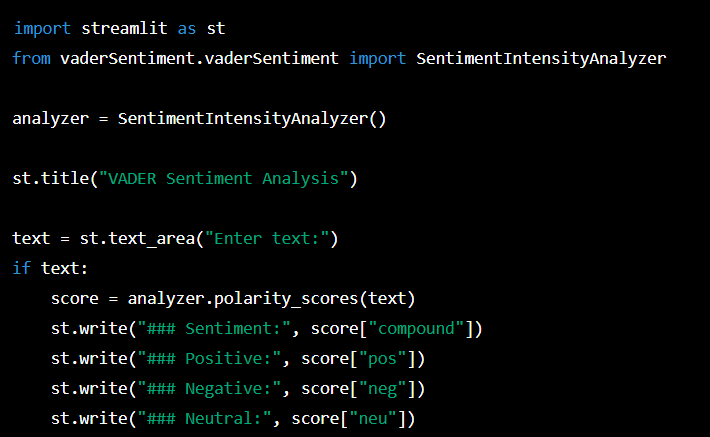
This code imports the required libraries and creates an instance of the SentimentIntensityAnalyzer class from VADER. It then creates a Streamlit app with a title, and a text area where the user can input text.
The if text: statement checks if the user has entered any text. If so, the polarity_scores method of the analyzer object is called to analyze the sentiment of the text. The results are then displayed using Streamlit's write method.
Running the App
To run the app, save the code to a file named app.py and run the following command in your terminal:

This will launch the app in your default web browser.

Output in the browser
Conclusion
In this tutorial, we have learned how to use the VADER library with Streamlit to perform sentiment analysis. By combining the power of these two tools, we can easily create a user-friendly app that can analyze the sentiment of text in real-time.
You can extend this app by adding more features such as visualizations, or by using different NLP libraries to perform other types of analysis. With Streamlit, the possibilities are endles
You can also download the code from my repo on Github:
https://github.com/ajiva84/Vadersentiment
Link to learn more about Streamlit and Vader:
메타데이터
- post_id
- f42f3e4e4901
- slug
- performing-sentiment-analysis-with-vader-nlp-library-using-streamlit-a-beginners-guide-f42f3e4e4901
- url
- https://medium.com/@azamjiva/performing-sentiment-analysis-with-vader-nlp-library-using-streamlit-a-beginners-guide-f42f3e4e4901
- canonical_url
- https://medium.com/@azamjiva/performing-sentiment-analysis-with-vader-nlp-library-using-streamlit-a-beginners-guide-f42f3e4e4901
- author_url
- https://medium.com/@azamjiva
- status
- ok
- fetched_at
- 2026-06-17 08:20:12