Week 11:- Ports & Protocols: The Hidden Language of the Internet
Introduction: Imagine Your Home Receives Mail
Week 11:- Ports & Protocols: The Hidden Language of the Internet
Introduction: Imagine Your Home Receives Mail
Imagine your house is a computer on the internet. Every day, your mailman (the network) arrives with packages addressed to your house. But here’s the thing — your house has multiple doors:
- Door 1 (Port 80): Receives regular letters (web pages)
- Door 2 (Port 443): Receives locked, secure packages (encrypted web pages)
- Door 3 (Port 25): Receives email
- Door 4 (Port 22): Allows only trusted friends with special keys (SSH access)
Without specific doors, packages would pile up at your front entrance and nobody would know what to do with them.
This is exactly how ports and protocols work on the internet. Today, let’s understand this hidden system that powers every connection you make online.
1: What Are Ports?
The Simple Explanation:
A port is a virtual door on your computer. Your computer has 65,535 ports (numbered 0–65535), and each one can be used for a specific purpose.
Think of it this way:
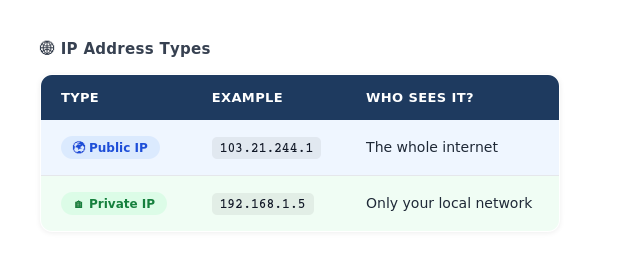
- Your computer’s IP address is like your home address:
192.168.1.5 - Your port number is like the door number on your address:
192.168.1.5:22(Door 22)
When someone wants to connect to your computer, they send a message to:
IP Address : Port Number
192.168.1.5 : 22
(Your house) : (The specific door)
Why Do We Need Ports?
Imagine a single door in your house. Everyone — your friends, delivery people, strangers — all use the same door. Complete chaos, right?
With ports, we can:
- Web service uses port 80 (HTTP)
- Email service uses port 25 (SMTP)
- Remote access uses port 22 (SSH)
- Database uses port 3306 (MySQL)
Each service has its own door. Clean, organized, and secure.
2: What Are Protocols?
The Simple Explanation:
A protocol is a set of rules that determine HOW data is sent and HOW the receiving computer should handle it.
Think of it like this:
Scenario 1: Mail Protocol
- Rule 1: Address must be on the front
- Rule 2: Message goes inside
- Rule 3: Recipient reads and throws away
Scenario 2: Email Protocol (SMTP)
- Rule 1: Email header contains sender info
- Rule 2: Body contains the message
- Rule 3: Server receives and stores
Scenario 3: Web Protocol (HTTP)
- Rule 1: Client sends a “GET” request
- Rule 2: Server responds with webpage data
- Rule 3: Connection closes
Why Do We Need Protocols?
Without protocols, computers wouldn’t understand each other. Imagine sending a package to your friend without any standard format — they won’t know:
- Where it came from
- What’s inside
- How to respond
Protocols are the universal language that makes the internet work.
3: Important Ports Every Cybersecurity Pro Must Know
i)Port 22: SSH (Secure Shell)
What it does: Allows secure remote login to computers
Real-world example: You’re traveling and need to access your server. Instead of going to the office, you open SSH on port 22, enter your password/key, and you’re in.
Why it matters for security: SSH is heavily targeted by hackers. They try to break in using:
- Brute force (guessing passwords)
- Key theft
- Default credentials
Protection: Use strong passwords, disable root login, use SSH keys instead of passwords.
ii)Port 80: HTTP (Hyper Text Transfer Protocol)
What it does: Serves unencrypted web pages
Real-world example: When you visit http://example.com, you're connecting on port 80.
Why it matters for security: Data sent over HTTP is not encrypted. A hacker on your network can see:
- Passwords you type
- Credit card numbers
- Personal information
The Problem: Websites should NEVER use HTTP for sensitive data.
iii)Port 443: HTTPS (HTTP Secure)
What it does: Serves encrypted web pages (HTTP + SSL/TLS)
Real-world example: When you visit https://www.bank.com, you're connecting on port 443. Your data is encrypted.
Why it matters for security: This is the good guy. All sensitive websites use this. The little lock icon means the connection is encrypted.
Best practice: If a website doesn’t have HTTPS, don’t enter sensitive data.
iv)Port 25: SMTP (Simple Mail Transfer Protocol)
What it does: Sends emails
Real-world example: When you hit “Send” in Gmail, it uses SMTP on port 25 to send the email to the mail server.
Why it matters for security: Open SMTP servers are dangerous because:
- Spammers use them to send mass emails
- Attackers impersonate legitimate emails (phishing)
Real attack: A hacker finds an open SMTP server and sends 1 million spam emails from your domain. Now your domain reputation is destroyed.
v)Port 3306: MySQL (Database)
What it does: Allows access to MySQL databases
Real-world example: Your web application connects to the database to store/retrieve user data.
Why it matters for security: Exposing port 3306 to the internet is like leaving your data vault door open. Attackers can:
- Steal all customer data
- Delete databases
- Modify records
- Install malware
Real attack: Thousands of MongoDB databases were ransomed because port 27017 was exposed to the internet.

Important Ports
4: Important Protocols Every Cybersecurity Pro Must Know
i)TCP (Transmission Control Protocol)
What it does: Ensures data arrives safely and in order
Real-world analogy: You send a letter to your friend:
- You write it carefully
- You address it properly
- You track the delivery
- You wait for confirmation that they received it
How it works:
- Connection established (handshake)
- Data sent in chunks
- Each chunk is confirmed (“I received chunk 1”)
- Connection closed properly
ii)UDP (User Datagram Protocol)
What it does: Sends data fast, but doesn’t guarantee delivery
Real-world analogy: You shout a message across a crowded room:
- Fast delivery
- Doesn’t care if everyone heard
- No confirmation needed
How it works:
- Send the data
- Don’t wait for confirmation
- Done
iii)ICMP (Internet Control Message Protocol)
What it does: Sends diagnostic messages (ping, traceroute)
Real-world example: You “ping” a server to see if it’s alive.
ping google.com
Response: Yes, I'm here! ✓
Why it matters for security:
- Useful for diagnosing network issues
- But attackers use it for reconnaissance
- Some admins block ICMP to hide their servers
iv)DNS (Domain Name System)
We covered this in Week 10, but as a quick reminder:
DNS translates domain names to IP addresses.
You: "Take me to google.com"
DNS: "That's IP 142.250.1.1"
Your browser: "Connecting to 142.250.1.1"
Security threat: DNS spoofing — attacker tricks DNS to send you to fake website.
v)TLS/SSL (Encryption Protocol)
What it does: Encrypts the connection between you and the server
Real-world analogy: Instead of sending a postcard (everyone can read it), you send a locked box (only recipient has the key).
How it works:
- Browser requests secure connection
- Server sends digital certificate
- They agree on encryption method
- All data is encrypted
Why it matters: Without TLS, passwords and credit cards are visible to anyone on the network. This is why HTTPS (HTTP + TLS) is mandatory.
5: Why Should You Care? (The Security Angle)
As a cybersecurity professional, understanding ports and protocols helps you:
i) Harden Your Systems
❌ Open Port 23 (Telnet) = Attacker can log in
✅ Close Port 23 = Attacker blocked
ii)Detect Attacks
🚨 Seeing 10,000 connections on Port 445 = Ransomware trying to spread
✅ You block it immediately
iii)Understand Firewall Rules
Rule: Block all inbound traffic except ports 80, 443, 22
Translation: Only web browsing and SSH are allowed
iv)Investigate Security Breaches
Attack discovered: "Check port 3306 (MySQL)"
Finding: Database was exposed to the internet for 3 months
Impact: 1 million customer records stolen
v)Build Secure Applications
❌ Use HTTP for banking website = Customer data stolen
✅ Use HTTPS for banking website = Customer data encrypted
Conclusion: You’re Now a Ports & Protocols Expert
What you learned today:
- Ports are virtual doors on your computer (65,535 of them)
- Protocols are rules for how data is sent and received
- TCP is reliable but slow; UDP is fast but unreliable
- HTTP is insecure; HTTPS is encrypted and safe
- SSH (port 22) is secure remote access; Telnet (port 23) is insecure and outdated
- Database ports (3306, 5432) are high-value attack targets
- Firewalls control which ports are accessible
In Week 12, we’ll dive into — HTTP/HTTPS — requests, responses, headers and ARP how to actually block the bad guys using what you learned about ports and protocols.
Until then, remember: Ports are doors, protocols are languages. Know which doors are open and who speaks which language on your network.
Have questions about ports and protocols? Drop them in the comments below! And if this helped you understand networking better, share it with someone learning cybersecurity.
If you found this article helpful and would like to support my cybersecurity learning journey, you can do so here:
https://buymeacoffee.com/nis.sec
You can connect with me on social media platforms.
Linkedin: https://www.linkedin.com/in/nishant-kumar-3a07952b6/
Twitter:https://x.com/BugBugproofmind
메타데이터
- post_id
- f45dc3c16d45
- slug
- week-11-ports-protocols-the-hidden-language-of-the-internet-f45dc3c16d45
- url
- https://meetcyber.net/week-11-ports-protocols-the-hidden-language-of-the-internet-f45dc3c16d45
- canonical_url
- https://meetcyber.net/week-11-ports-protocols-the-hidden-language-of-the-internet-f45dc3c16d45
- author_url
- https://medium.com/@nishant__kumar
- status
- ok
- fetched_at
- 2026-06-11 12:34:08