Demystifying WebMCP: Google Chrome’s New Bridge to Local AI Models
The line between the web and our local machines has been blurring for years. We’ve seen powerful web apps, offline capabilities, and…
Demystifying WebMCP: Google Chrome’s New Bridge to Local AI Models
WebMCP
The line between the web and our local machines has been blurring for years. We’ve seen powerful web apps, offline capabilities, and progressive web technologies. But now, we’re on the cusp of another major shift: bringing the immense power of large language models (LLMs) directly into the browser.
Google is pushing hard on this front with features like Gemini in Chrome. However, as developers, we don’t just want to use pre-built AI; we want to interact with it, enhance it, and weave it into our own applications. That’s where the new WebMCP (Model Context Protocol) comes in. It’s an emerging standard that could change how we think about web-based AI. Let’s break it down.
For What Purpose Was It Introduced?
The big challenge with integrating sophisticated AI into the web isn’t just about running a model. It’s about context and standardization.
Imagine you’re building a writing assistant for Chrome. You want it to understand the full text of the user’s current email, a relevant document, and maybe even some project data. How do you get all that information (the “context”) to the AI model efficiently and securely, whether that model is running locally in the browser or on the user’s machine?
Previously, every web app had to find its own way to gather and manage this context. It was fragmented, hard to maintain, and a security headache. WebMCP was introduced to solve this. Its primary goals are:
- Standardizing Context Delivery: It creates a universal way for web apps to pack up all the relevant information and send it to an AI model, ensuring the model knows the full story.
- Facilitating On-Device AI: While cloud-based models are powerful, on-device models offer incredible speed, lower costs, and better privacy. WebMCP makes it easier for web apps to tap into these local resources.
- Cross-Browser and Cross-Model Compatibility: By defining a protocol, Google is paving the way for any model to be connected to any compatible browser, not just a single-vendor solution.
How Does WebMCP Work?
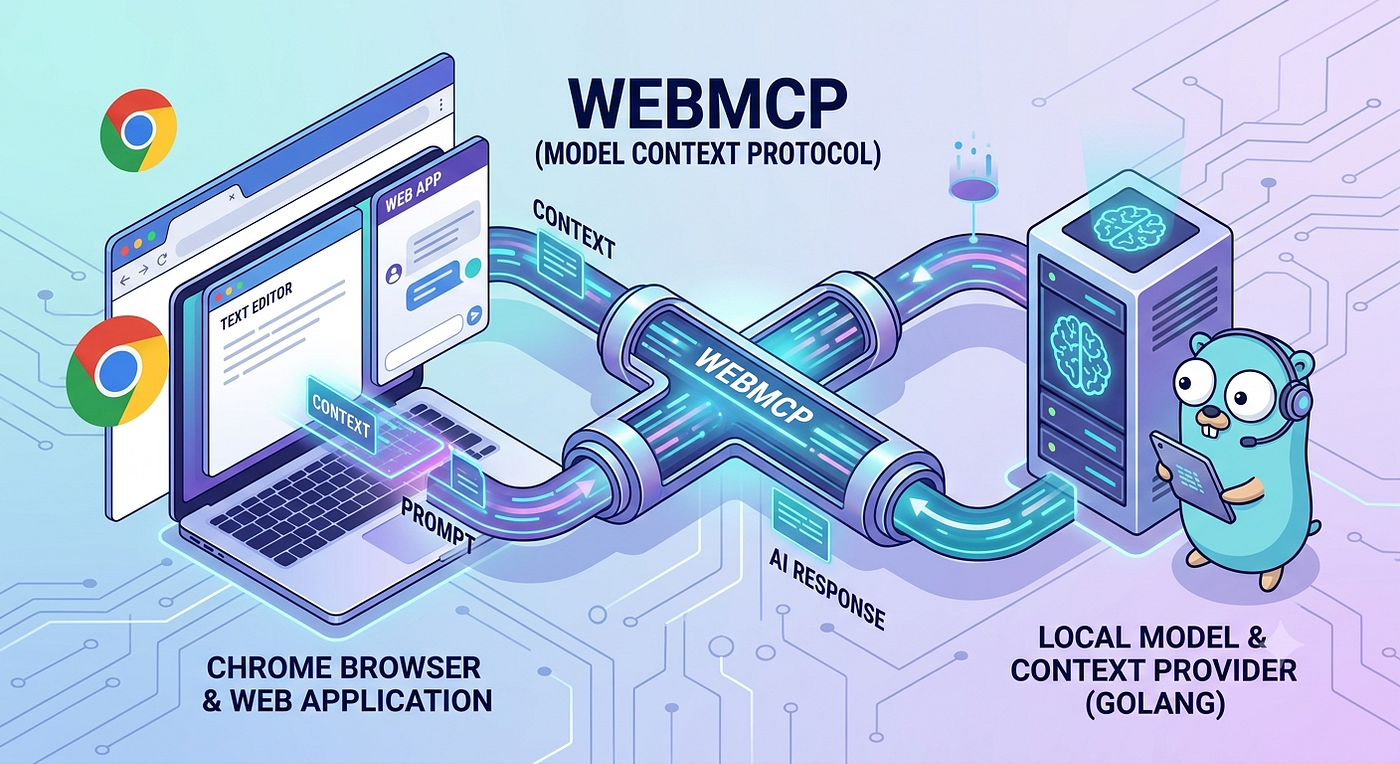
At its heart, WebMCP is a communication protocol, likely based on standards like JSON-RPC. Think of it as a language that web applications and AI model “providers” speak. The flow looks like this:
- The Web Application: A developer writes a web app. When it needs AI assistance, it gathers the necessary text, documents, or data from the current page.
- Structuring the Request: Instead of just sending a raw prompt, the web app uses WebMCP to create a structured message. This message contains not only the prompt (“Summarize this email”) but also the crucial context (the email text itself, perhaps some metadata).
- The Browser’s Role: Chrome acts as the intermediary. It takes this structured WebMCP request and routes it to a model “provider.”
- The Model Provider: This is a component (it could be a separate process on the user’s machine, or even a specialized web worker) that has an LLM. It “speaks” WebMCP, so it receives the structured request, understands the context, processes it with the model, and then sends back a WebMCP-formatted response with the AI’s output.
This standardized approach separates the app’s logic from the model’s implementation, making everything cleaner and more robust.
How Can We Use It? (Conceptually)
WebMCP is still in its early stages and being rolled out iteratively. Developers will interact with it primarily through a set of upcoming browser APIs (like navigator.ai and others under discussion).
Conceptually, your javascript code would look something like this (this is a conceptual example, not final code):
// A hypothetical example of using a future WebMCP-enabled API
async function getSummary() {
  const currentArticleText = document.getElementById('article-content').textContent;

  // 1. We connect to a "provider" (this detail is still evolving)
  const assistant = await navigator.ai.createAssistant();

  // 2. We use WebMCP to structure our request, including context.
  // The API handles the underlying protocol.
  const response = await assistant.process({
    prompt: "Summarize this article for a busy professional.",
    context: {
      type: "text",
      value: currentArticleText,
      source: "the current page"
    }
  });

  console.log("Summary:", response.text);
}
Behind the scenes, the browser would take your process call, convert it to the standardized WebMCP format, and handle the secure communication with the underlying model provider.
How Can We Use It in Golang?
This is where things get interesting for backend and systems developers. WebMCP isn’t just about the browser; it’s about the entire ecosystem of model providers. A powerful way to use WebMCP is to build a Model Provider using Go.
In this scenario, your Go application would act as a local service or proxy that hosts an LLM and exposes it via the WebMCP protocol. Chrome would then connect to your Go app. This lets you run custom or open-source models (like Llama, Mistral, or a fine-tuned model) and make them available to web applications on that machine.
Here’s a high-level approach to building a WebMCP provider in Go:
- Implement the Server: Start by creating a Go network server (likely over HTTP or a gRPC connection on a local port).
- Define WebMCP Endpoints: Your server needs to handle specific endpoints that correspond to the WebMCP standard, such as for initialization, model info, and processing requests.
- Parse and Structure Data: You will need to write Go structs to parse the JSON-RPC messages coming from the browser. Your Go code needs to understand how to read the context and the prompt from the structured payload.
- Connect Your Model: This is the core. You’ll use Go’s interop capabilities (like cgo or a library) to communicate with your LLM. For example, you could have a separate process running a model via llama.cpp or any other model server, and your Go app acts as the WebMCP gateway to it.
- Return WebMCP Responses: After your model generates an output, your Go application must format it according to the WebMCP response structure and send it back to the browser.
A conceptual code snippet for the handler might look like this:
// A very simplified, conceptual example of a WebMCP request handler in Go
package main

import (
    "encoding/json"
    "fmt"
    "net/http"
)

// Define structures for WebMCP messages (simplified)
type MCPRequest struct {
    JSONRPC string      `json:"jsonrpc"`
    Method  string      `json:"method"`
    Params  MCPParams   `json:"params"`
    ID      interface{} `json:"id"`
}

type MCPParams struct {
    Prompt  string                 `json:"prompt"`
    Context map[string]interface{} `json:"context"`
}

type MCPResponse struct {
    JSONRPC string      `json:"jsonrpc"`
    Result  MCPResult   `json:"result"`
    ID      interface{} `json:"id"`
}

type MCPResult struct {
    Text string `json:"text"`
}

func mcpHandler(w http.ResponseWriter, r *http.Request) {
    // 1. Read and parse the incoming WebMCP JSON-RPC request
    var req MCPRequest
    if err := json.NewDecoder(r.Body).Decode(&req); err != nil {
        http.Error(w, err.Error(), http.StatusBadRequest)
        return
    }

    if req.Method == "process" {
        // 2. Extract context and prompt
        prompt := req.Params.Prompt
        contextData := req.Params.Context
        fmt.Printf("Received Prompt: %s\n", prompt)
        fmt.Printf("Context: %+v\n", contextData)

        // 3. *Your logic here*: Prepare the context, invoke your local LLM, and get the result.
        // For this demo, we just simulate a response.
        aiOutput := fmt.Sprintf("Simulated AI response using context: '%s'", contextData["value"])

        // 4. Create and send a structured WebMCP response
        resp := MCPResponse{
            JSONRPC: "2.0",
            Result:  MCPResult{Text: aiOutput},
            ID:      req.ID,
        }
        w.Header().Set("Content-Type", "application/json")
        json.NewEncoder(w).Encode(resp)
    }
}

func main() {
    http.HandleFunc("/mcp", mcpHandler)
    fmt.Println("WebMCP provider listening on :8080...")
    http.ListenAndServe(":8080", nil)
}
This simple example shows the core idea. While you wouldn’t typically run a production LLM inside a web server like this, your Go application becomes the essential standardized link, making custom on-device AI a reality for the web.
Conclusion
WebMCP is a low-level protocol, but its implications are huge. By creating a standardized way to deliver context to on-device models, it unlocks a new world of powerful, private, and fast web applications. While the APIs are still in flux, understanding WebMCP now gives you a significant advantage as you begin to build the next generation of AI-infused web experiences. For Go developers, it’s a perfect opportunity to build the essential bridging infrastructure that will make local AI widely accessible. It’s a protocol we should all be watching closely.
메타데이터
- post_id
- f45fbc6a3785
- slug
- demystifying-webmcp-google-chromes-new-bridge-to-local-ai-models-f45fbc6a3785
- url
- https://medium.com/@f_s_n.2012/demystifying-webmcp-google-chromes-new-bridge-to-local-ai-models-f45fbc6a3785
- canonical_url
- https://medium.com/@f_s_n.2012/demystifying-webmcp-google-chromes-new-bridge-to-local-ai-models-f45fbc6a3785
- author_url
- https://medium.com/@f_s_n.2012
- status
- ok
- fetched_at
- 2026-08-21 07:50:16




