BPMN beginners project
This week, I worked on a project that required me to plan a BPMN process for the development of a pizza delivery e-commerce. For better…
BPMN beginners project
This week, I worked on a project that required me to plan a BPMN process for the development of a pizza delivery e-commerce. For better understanding, first, I will explain the basics of BPMN, and then, I will describe my project.
BPMN stands for Business Process Management Notation. It is a flow chart method that models the steps of a planned business process from end to end. There are four element types that are used to create a business process diagram. They are swimlanes, flow elements, connecting objects and artifacts.
Swimlanes are graphical containers that represent participants of a process. There are two types of swimlanes: pools and lanes.
The flow elements are elements that connect with one another to form business workflow, they define the behavior of a process. There are three flow elements: events, activities and gateways. I will not define the flow elements completely in order not to make this article too long. Instead, I will focus on the elements that I used on my project.
Activity: any work that is being performed in a process.
A normal task is a single action that occurs in a business process and it is represented by the following symbol:
Task event
Event: anything that “happens” during the course of a business process.
Each process begins with an initiating event, called the start event, which is represented by the following symbol
Start event
Many start events contain an icon in the middle to define the event’s trigger. For example, a start event that contains an envelope icon indicates that a message arrives and triggers the start of the process.
Start event with message trigger
End events are styled with a single thick black line. End events are always thrown because there is no process to catch after the final event. They are characterized by the following symbol:
End event
A process is completed when a final message is thrown. After processing some system, it is likely that you will need to notify someone, so it’s common to include a thrown message to end your flow
End flow with message
A timer Intermediate Event indicates a waiting time within the process. It can be used within a sequence flow or attached to the boundaries of an activity to indicate an exception flow.
A message Intermediate Event indicates that a message can be sent or received. It can be used within a sequence flow or attached to the boundaries of an activity to indicate an exception flow.
Gateway: you can use it to control the flow of a process.
Exclusive gateway, represented by the symbol bellow, is based on a condition, it breaks the flow into one of the two or more mutually exclusive paths.
Exclusive Gateway Symbol
An Event-Based Gateway represents a point in the process where only one of many paths of the process can be selected based on an event, not on data expression conditions. Remaining paths will be disabled.
A Parallel Gateway is used to create parallel flows. As convergence is used to synchronize multiple parallel paths into one. The flow continuous when all the incoming sequence flows have reached the gateway
The connectors that connect the flow elements are called connecting objects. There are four of them: sequence flows, message flows, associations and data associations. On my project, I only used the sequence flow, which is represented by a solid line and arrowhead that depicts the order in which activities are performed:
Sequence flow
The message flow symbol is a dashed line with and open circle at the start of the line and open arrowhead where the line terminates:
Message flow
In order to develop my project for a fictional pizza delivery e-commerce, I was given the following activities:
Client’s activities:
- Choose pizza ()
- Order pizza ()
- Ask about the pizza ()
- Pay for the pizza ()
- Get the pizza ()
- Eat the pizza ()
Server’s activities
- Receive the order ()
- Answer client’s info request ()
Pizzaiolo’s activities
- Make the pizza ()
Delivery person’s activities
- Deliver the pizza ()
- Receive the payment ()
I was requested to create a BPMN diagram using the following:
- Pools
- Lanes for each actor
- An event that initiates the process and one that ends
- Intermediate events
- Message exchange between the actors
- Gateways
- Others
When I created the process, I included the following activities:
Client’s activities:
- Request the menu ()
- Keep waiting ()
- Cancel order ()
Server’s activities
- Send the menu ()
- Send the order to the pizza chef()
Regarding the delivery person’s activities, I used an exclusive gateway where the client has to choose between two forms of payment methods, cash or ATM card. If the client chooses cash, the delivery person will have to verify if he/she needs to give change. If the client chooses an ATM card, the delivery person will check which card the client wishes to use, credit card or debit card. Then, she/he must swipe the chosen card in the card machine.
The Pizza Delivery E-commerce process ends when the payment is made. The client process ends when he/she eats the pizza.
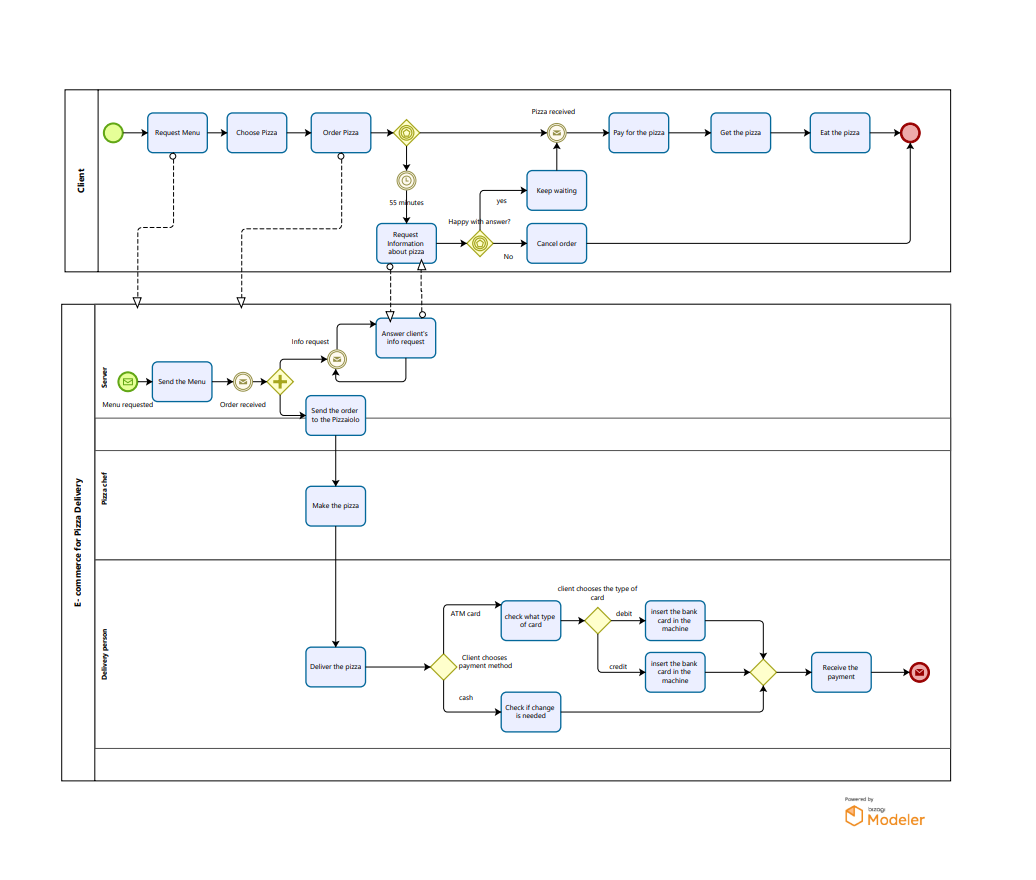
E-commerce for pizza delivery BPMN process using Bizagi
Links to references used:
Bizagi https://www.bizagi.com/en
Lucidchart < https://www.lucidchart.com/pages/bpmn>
Mastertheboss http://www.mastertheboss.com/bpm/bpmn-20/bpmn-tutorial-for-beginners/
Visual-paradigm https://www.visual-paradigm.com/guide/bpmn/what-is-bpmn/
메타데이터
- post_id
- f497939cd2a4
- slug
- bpmn-beginners-project-f497939cd2a4
- url
- https://medium.com/@dani_arnold/bpmn-beginners-project-f497939cd2a4
- canonical_url
- https://medium.com/@dani_arnold/bpmn-beginners-project-f497939cd2a4
- author_url
- https://medium.com/@dani_arnold
- status
- ok
- fetched_at
- 2026-07-26 13:28:39