What If You Could Just Describe Your Integration?
Introducing the TIBCO Flogo® Design Assistant (Tech Preview)
What If You Could Just Describe Your Integration?
Introducing the TIBCO Flogo® Design Assistant (Tech Preview)
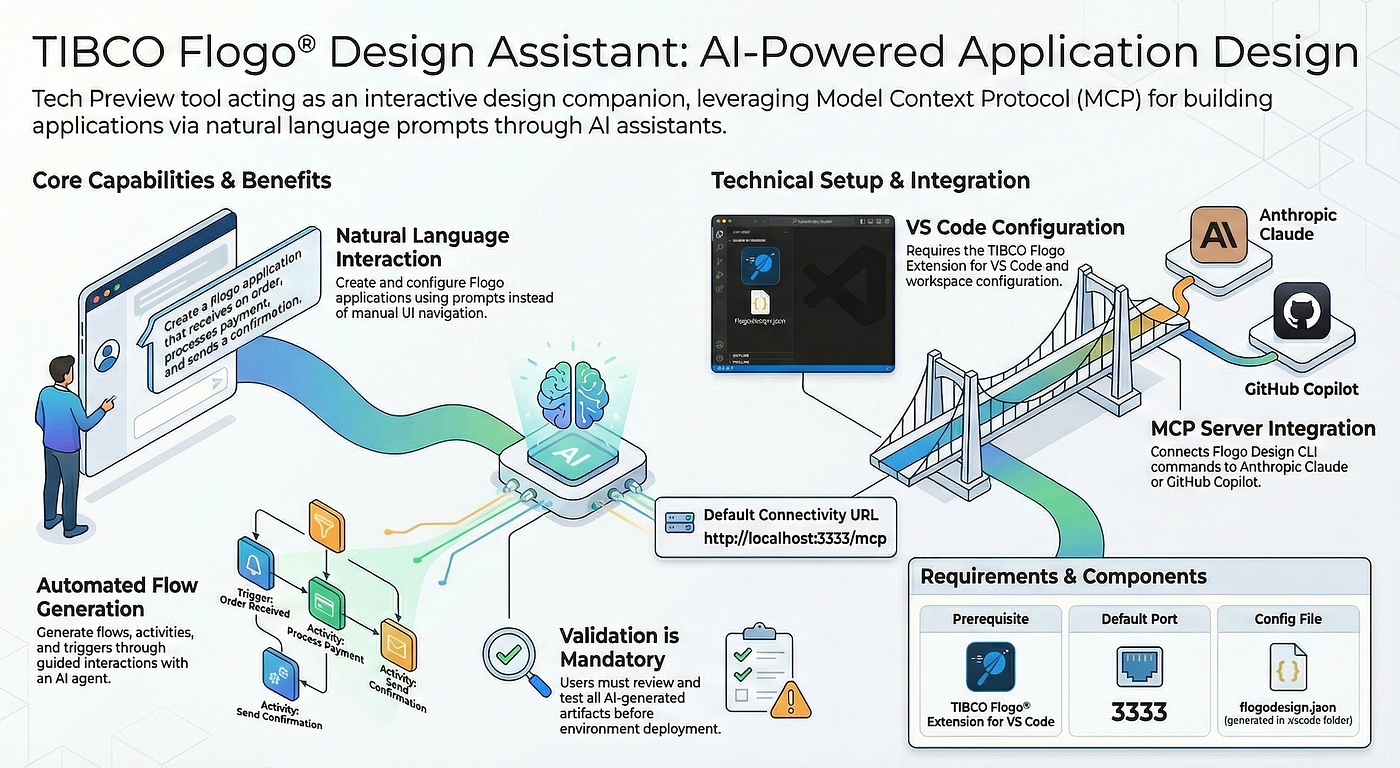
The Integration Bottleneck
In the world of cloud-native development, speed is everything. But even with low-code tools like TIBCO Flogo®, the manual process of selecting triggers, configuring activities, and mapping data can slow down innovation.
What if you could simply describe the integration you want — and watch it appear?
We’re excited to spotlight the TIBCO Flogo® Design Assistant, a newly added preview feature that brings generative AI to the heart of your integration design process.
What is the Flogo AI Design Assistant?
The AI Design Assistant is an intelligent companion embedded directly within the Flogo Enterprise ecosystem. Currently in Preview, it leverages Large Language Models (LLMs) to translate natural language prompts into fully functional Flogo flows.
Instead of searching through a library of hundreds of connectors, you tell the assistant what you’re trying to achieve — and it handles the heavy lifting of initial scaffolding.

TIBCO Flogo Design Assistant (Dev Companion)
Why Use It?
Accelerated Prototyping Go from a business requirement to a working flow in seconds, not minutes.
Lowered Barrier to Entry Newer developers can build complex integrations without needing deep knowledge of every Flogo activity or schema.
Reduced Context Switching No more digging through documentation to find the right connector. The Assistant suggests the best path forward based on your intent.
Focus on Logic, Not Plumbing Spend your time on the unique business logic that matters, while the AI handles the boilerplate configuration.
Use Case: Real-Time Customer Notification System
Imagine a retail company that wants to automate customer outreach. Whenever a new high-value order is placed in their system, they want to:
- Capture the order via a REST API
- Check the inventory status
- Send a personalized “Thank You” email to the account manager
Doing this manually requires configuring an HTTP Trigger, several InvokeRestService activities, and careful data mapping for the Slack message.
Let’s see how the Design Assistant changes that.
Demo: Building the Flow with AI
Step 1: The Prompt
Open the AI Client (Claude) and enter a natural language command:
“Create a flow for a customer notification system. It should:
- Expose a REST endpoint that accepts an Order ID as input
- Query a database to fetch order details including customer name and order total. USe postgre database and configure it with values.
- Send a formatted email with the order summary to dummy account manager.”
Step 2: Intelligent Scaffolding
The Assistant analyzes your request and automatically:
- Generates an HTTP Trigger with the correct input parameters
- Adds a Database Query activity
- Adds a Slack connector activity
Step 3: Refinement & Mapping
The Assistant doesn’t just drop icons on a canvas. It suggests intelligent data mappings — identifying that the OrderID from the trigger should be used as the key for the database query, and that the CustomerName from the database result should populate the Slack message body.
Step 4: Human-in-the-Loop
You remain in control. Review the AI-generated flow, tweak the logic, add your security credentials, and deploy.
The result? In our demo scenario, the AI Assistant generated a complete flow — trigger, database query, email notification, and initial data mappings — in approximately 1–2 minutes. Manual configuration of the same flow typically requires 20–30 minutes for an experienced developer.
See demo video where Design Assistant in action.
[embed]
A Note on Preview Expectations
As a preview feature, the AI Design Assistant excels at generating straightforward integrations using common connectors and triggers. It’s ideal for rapid prototyping and getting a head start on new flows.
For highly complex logic, custom schemas, or niche connectors, you’ll want to review and refine the generated output. We’re actively improving the model based on user feedback — so the more you use it, the smarter it gets.
Looking Ahead: The Future of Integration
The Flogo AI Design Assistant is more than just a shortcut — it’s a shift toward Intent-Based Integration.
As this feature moves from Preview to General Availability, expect even deeper contextual awareness: automatic error handling suggestions, performance optimizations, and smarter mapping recommendations.
메타데이터
- post_id
- f4aeba846f11
- slug
- what-if-you-could-just-describe-your-integration-f4aeba846f11
- url
- https://medium.com/@mpandav32/what-if-you-could-just-describe-your-integration-f4aeba846f11
- canonical_url
- https://medium.com/@mpandav32/what-if-you-could-just-describe-your-integration-f4aeba846f11
- author_url
- https://medium.com/@mpandav32
- status
- ok
- fetched_at
- 2026-07-13 06:23:13




