FluxGate: Feature Flags That Feel Like a Delivery Platform (Not Just Toggles)
Let me put it this way: most feature flag tools feel like a fancy switchboard. FluxGate feels like a release system. It’s built around how…
FluxGate: Feature Flags That Feel Like a Delivery Platform (Not Just Toggles)

Evaluation Dashboard
Let me put it this way: most feature flag tools feel like a fancy switchboard. FluxGate feels like a release system. It’s built around how teams actually ship — staged rollouts, approvals, real‑time visibility, and a fast edge runtime — so feature flags become a first‑class part of delivery instead of an afterthought.
Here’s the walkthrough, in plain language.
The UI: It Actually Feels Like a Control Room
The UI isn’t just a list of flags. It’s dashboards, rollout status, live activity, and approvals all in one place. You can see what’s happening right now, which means you make better calls faster.
The Dashboards (What You Actually See Day‑to‑Day)
FluxGate ships three core dashboards that answer different operational questions:
System Overview: A high‑level health panel. It shows total features, evaluations today, active clients, and overall success rate, plus alerts, top features, recent activity, and growth trends. It’s the “is the system healthy?” view.
Evaluation Analytics: A deep dive into evaluation behavior. You can filter by feature, environment, and client, switch between 24h/7d/30d windows, and explore timelines, distribution charts, top features, and a detailed evaluations table. It’s the “what’s being evaluated, and how is it performing?” view.
Feature Rollout: The release‑focused dashboard. It tracks rollout health, pending approvals, pipeline status, kill‑switch state, dependency relationships, and recent rollout events. It’s the “are we shipping safely?” view.
Together, these give you a full loop: system health → evaluation behavior → rollout execution.
Creating a Feature (What It’s Like in Practice)
Before you create a feature, you typically create a pipeline. Think of a pipeline as the rollout path for a feature. It’s a sequence of stages, and each stage is connected to a specific environment (dev, staging, prod, etc.). That gives you a clear, reusable release flow: one pipeline can be applied to many features, and each stage inherits its environment‑specific behavior.

Pipeline with branches
Once the pipeline exists, feature creation looks like this:
Step 1: Basics
You enter the feature key, description, and pick a type:
- Simple: classic on/off
- Contextual : targeting + variants.
You can also define feature dependencies here. Dependencies make sure a feature only evaluates as active when its prerequisite features are already enabled. It’s a simple way to prevent broken rollouts — for example, hiding a new checkout flow unless the new pricing model is also on.

Feature Basic Information
Step 2: Variants (if Contextual)
This is where FluxGate gets interesting. Variants let you return real values, not just true/false:
- Strings for copy tests
- Numbers for pricing experiments
- Booleans for on/off behavior
- JSON for configs

Feature Variants
Step 3: Pipeline selection
Instead of wiring environments by hand, you select a pipeline. That instantly attaches the feature to its stage sequence (dev → staging → prod, etc.) and shows the rollout path visually.
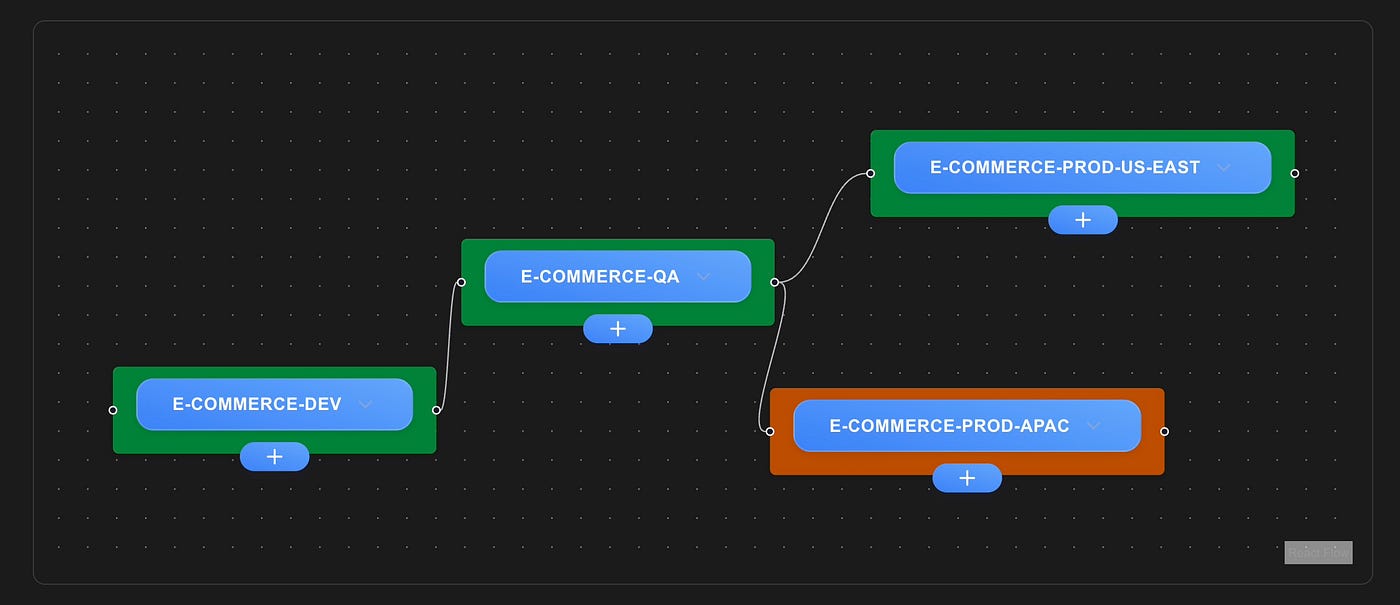
Feature Pipeline
Step 4: Stage Editor
Click a stage and set your rules:
- Criteria are defined per stage in the pipeline, so each environment can have its own targeting and rollout strategy.
- Drag‑and‑drop priority ordering (so rules are deterministic).

Feature Stage Criteria
- Target by user context (tier, region, role, etc.).
- Set rollout percentage right there in the rule.

Feature Stage Compound Rules
This is where traffic management really happens. Each stage gives you two ways to route traffic:
-
Weighted split: distribute traffic across multiple variants by percentage (great for experiments and gradual rollouts).
-
Specific variant: force a single variant for a rule (useful for VIP users, canary groups, or hard overrides).

Stage Trafic Management
That’s also where compound rules shine — you can combine AND/OR logic to build real audience segments without writing custom code.
And to make targeting consistent, FluxGate lets you define contexts (like tier, region, role, or any custom attribute). Those contexts are reusable across the system, so when you build rules, you’re selecting from a shared vocabulary instead of inventing one‑off fields. It keeps rule building consistent, makes targeting easier, and reduces mistakes across teams.
This feels less like “fill in a form” and more like “design your rollout.”
The Backend: Built for Delivery, Not Just CRUD
Behind the UI, FluxGate is doing some real work:
- GraphQL for CRUD, auth, and live subscriptions.
- gRPC for edge streaming and evaluation.
- Postgres for persistent state (features, approvals, pipelines, metrics).
- A dedicated evaluation engine for deterministic bucketing and targeting.
The important bit: updates stream to the edge in seconds, so changes go live without polling or restarts.
The Standout Features (The Ones That Change How You Ship)
✅ Variants beyond booleans
Flags can return structured values (string/number/boolean/JSON). You can ship A/B tests, configuration, and pricing changes without redeploys.
✅ Priority‑based targeting
Rules are evaluated in order, so there’s no guessing about which rule “wins.” You control the precedence explicitly.
✅ Compound rules + weighted splits
Mix AND/OR logic for real segmentation, then distribute traffic across multiple variants with precise percentages.
✅ Kill switch + auto‑rollback
One click to disable a feature, with optional automatic re‑enablement. You can see kill‑switch status live in the UI.
✅ Real‑time analytics
Dashboards update in near‑real time. You can monitor rollout health without waiting for batch reports.
Approvals: Real Governance Without Slowing Teams Down
FluxGate treats approvals as a first‑class workflow:
- Define approval policies by environment.
- Require a number of approvers with specific roles.
- Stage changes automatically create approval requests.
- Approvers review, comment, approve/reject in one place.
- Updates appear live, so everyone stays aligned.
This is the kind of governance that doesn’t feel like red tape.
Here’s what that looks like in practice:
- Approval Policies are managed in a dedicated policies page. Team admins (and full admins) can create, edit, and delete policies. Each policy describes where it applies (all environments, production only, or selected environments), how many approvals are required, and which roles are allowed to approve.

Approval Policy Creation
- The Approvals page is the operational inbox. It lists requests by status (pending/approved/rejected/cancelled/auto‑approved), supports quick filtering, and lets reviewers add comments when they approve or reject. It also supports “my requests” views so teams can focus on the changes they own.

Approvals
- Roles feed directly into policies. FluxGate has protected system roles (Approver, Requester, Team Admin) and allows admins to create global custom roles. Those roles become the building blocks for approval policies — so you can say “only Approver + Security can approve production deployments,” or require multiple approvers from distinct roles.
Metrics & Experiments (Preview Feature)
FluxGate also includes a Metrics & Experiments area that’s marked as a preview feature. It’s designed to connect feature flags with business outcomes.

Metrics
Here’s how it helps teams:
- Define metrics (conversion, numeric, or duration) with clear names, units, and descriptions.
- Track outcomes by variant, so you can see which variation is actually winning.
- Review time‑series trends and compare variants side‑by‑side.
- Identify winners with summary stats, sample size, and conversion rates (or numeric performance).
For organizations, this bridges the gap between “we shipped a feature” and “did it actually improve anything?” Even in preview, it turns flags into measurable experiments rather than gut‑feel rollouts.
The Edge Server: Why Performance and Resilience Are So Good
This is the part that makes FluxGate feel production‑ready.
The edge server evaluates flags in memory, so there’s no database call in the hot path. It subscribes to live updates from the backend, meaning it’s always current, but still fast and local.
That gives you:
- Sub‑10ms evaluation (often faster)
- No single point of failure for evaluation traffic
- Graceful recovery if the backend hiccups (edge keeps serving cached state)
Sidecar‑first, but not locked in
The edge is primarily designed as a sidecar (run it next to your service for ultra‑low latency). But it can also run as a standalone service if you prefer a shared edge tier.
OpenFeature alignment (OFREP)
FluxGate’s edge server also speaks the OpenFeature Remote Evaluation Protocol (OFREP). That means you can evaluate flags using a standards‑based API that’s compatible with the OpenFeature ecosystem. It’s a clean way to keep integrations portable while still using FluxGate’s targeting, variants, and analytics behind the scenes.
Here’s a simple OFREP evaluation call:
curl --location 'http://localhost:8081/ofrep/v1/evaluate/flags/BulkOrderDiscount' \
--header 'Origin: http://api.test.web' \
--header 'Content-Type: application/json' \
--data '{
  "context": {
    "targetingKey": "1245",
    "accountAge":"11",
    "userTier": "test",
    "reagon:": "eu-west-1",
    "userId":"853",
    "environment_id": "9d1c08dd-a14f-4ae8-bbdc-b31bf2c972f3"
  }
}'
Load Test Results (10× Traffic)
Two load tests are included in the repo:
The tests ran with 0.5 CPU and 512MB memory limits. All tests passed without any failures, and latency stayed under 1 millisecond, even at 10× load. In this setup, 1× load = 500 evals/sec, so 10× = 5,000 evals/sec.
Memory stayed stable across runs:
- Fixed users test (load_test.js): ~46 MB

CPU Utilization

Memory Utilization
- Unique users test (load_test_unique_users.js): ~98 MB

CPU Utilization

Memory Utilization
That’s exactly what you want from an edge evaluation layer: predictable performance and steady resource usage under pressure.
Final Take
FluxGate isn’t just “feature flags with a UI.” It’s a delivery platform:
- The UI is built for operations, not just configuration.
- The backend streams updates so changes are live fast.
- The edge server keeps evaluations fast and resilient under load.
If you want feature flags that behave like part of a real release system, FluxGate is built for that.
More details are available here.
If you build or consume FluxGate, SDK implementations for every language are welcome contributions — just plug into the edge AND grab metrics via the APIs described above.
메타데이터
- post_id
- f4dc637ef6d7
- slug
- fluxgate-feature-flags-that-feel-like-a-delivery-platform-not-just-toggles-f4dc637ef6d7
- url
- https://medium.com/@keazkasun/fluxgate-feature-flags-that-feel-like-a-delivery-platform-not-just-toggles-f4dc637ef6d7
- canonical_url
- https://medium.com/@keazkasun/fluxgate-feature-flags-that-feel-like-a-delivery-platform-not-just-toggles-f4dc637ef6d7
- author_url
- https://medium.com/@keazkasun
- status
- ok
- fetched_at
- 2026-07-09 16:18:44

