OpenAI Cost Optimization for AI SaaS: A Practical Builder’s Guide to Lower Token Spend
Your AI feature can look profitable in a demo and still quietly lose money in production. The danger is not always a bad model choice. It…
OpenAI Cost Optimization for AI SaaS: A Practical Builder’s Guide to Lower Token Spend

Your AI feature can look profitable in a demo and still quietly lose money in production. The danger is not always a bad model choice. It is often a workflow that sends too much context, retries too often, uses an expensive model for easy work, or lets users trigger unlimited agent loops.
That is why OpenAI cost optimization has become a practical engineering topic, not just a finance topic. Recent developer discussion has shifted from “can we build this?” to “can we run this without burning the margin?” OpenAI’s own pricing page now makes the tradeoff visible: frontier models, cached input pricing, Batch processing, Flex processing, web search calls, and container usage all change the real cost of an AI SaaS workflow.
This guide is for builders who use OpenAI APIs inside SaaS products, internal automation, coding workflows, support tools, research agents, or AI workflow platforms. It is about using stronger models where they matter, measuring workflow cost, and adding guardrails before token spend becomes a surprise.
Why OpenAI API cost gets out of control
Most AI SaaS cost problems start small. A founder adds a helpful assistant. A developer passes the full customer record into the prompt because it improves quality. A support workflow retries when the answer is weak. An agent gets access to tools and starts planning multiple steps. Each individual call looks reasonable. The monthly bill tells a different story.
The common pattern is simple: usage grows faster than cost discipline. The team measures model quality, but not cost per successful workflow. They track total tokens, but not which product action caused them. They optimize prompts, but not retrieval, caching, routing, retries, or user limits.
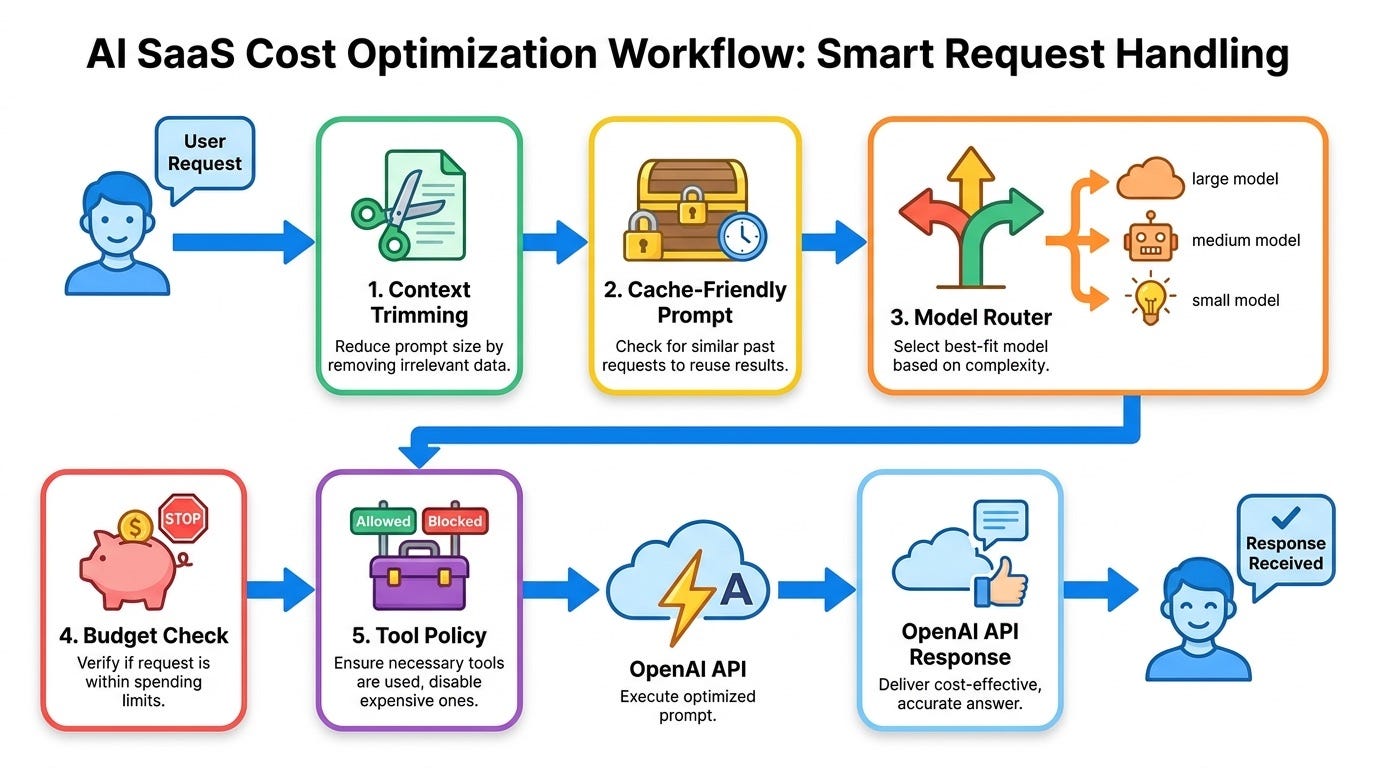
OpenAI cost optimization for AI SaaS is really about workflow economics. You are not just paying for text. You are paying for a chain of decisions:
- How much context you send with each request
- Which model handles each task
- How many tool calls an agent is allowed to make
- Whether repeated context can benefit from prompt caching
- Whether work can run asynchronously through Batch processing
- Whether lower-priority work can use Flex processing
- How often failed or uncertain outputs retry
- How much user activity is included in each plan tier
Once you see the system this way, cost optimization becomes a product and architecture problem. That is good news, because architecture problems can be designed.
The cost model builders should understand
OpenAI API pricing is usually shaped by input tokens, cached input tokens, output tokens, model choice, and optional tools or processing modes. The exact prices can change, so always check the current pricing page before making a financial decision. The more durable lesson is the structure.
Input tokens are the instructions, user message, retrieved documents, conversation history, schemas, tool definitions, and other context you send. Output tokens are what the model generates. Cached input pricing, Batch processing, Flex processing, and built-in tools can all change the real workflow cost.
For SaaS builders, the practical question is not “which OpenAI model is cheapest?” It is:
What is the cheapest reliable path for this specific user outcome?
A legal document review workflow may deserve a stronger model, better retrieval, and a stricter evaluation gate. A short classification task may not. A nightly enrichment job can often be asynchronous. A live user-facing assistant may need lower latency. A background summary can tolerate slower processing. A risky tool action may need approval, not another expensive reasoning pass.
Start with cost per completed workflow
Total monthly spend is too blunt. Tokens per request is better, but still incomplete. The metric that matters for an AI SaaS product is cost per completed workflow.
Examples:
- Cost per resolved support ticket
- Cost per generated sales email accepted by a user
- Cost per document summarized with a quality score above threshold
- Cost per code review comment that survives human review
- Cost per research report delivered without manual rework
This metric stops teams from celebrating cheap calls that fail. It also stops them from overpaying for outputs that users ignore. A workflow that costs three cents and succeeds is cheaper than a workflow that costs half a cent but needs five retries and human cleanup.
At minimum, log these fields for every AI workflow:
{
  "workflow_id": "support_triage",
  "user_id": "user_123",
  "plan": "pro",
  "model": "selected_model_name",
  "input_tokens": 4200,
  "cached_input_tokens": 3100,
  "output_tokens": 650,
  "tool_calls": 2,
  "retries": 1,
  "latency_ms": 7800,
  "estimated_cost_usd": 0.042,
  "outcome": "resolved",
  "quality_score": 0.86
}
You do not need perfect analytics on day one. You do need enough visibility to answer a few blunt questions: which workflow costs the most, which one fails the most, which users trigger unusual spend, and which prompts keep growing without improving outcomes?
Use model routing instead of one-model architecture
A common mistake is sending every task to the same strong model because it is simpler. Simplicity is useful early, but it becomes expensive when traffic grows. Many SaaS workflows contain a mix of easy, medium, and hard steps. They should not all use the same model path.
A practical routing design has at least three lanes:
- Fast lane: simple classification, extraction, rewriting, formatting, and lightweight moderation.
- Standard lane: normal user-facing generation, summarization, planning, and support responses.
- Heavy lane: complex reasoning, high-risk decisions, multi-document synthesis, code generation, and tasks with expensive failure.
The routing decision can start with rules. You do not need a complex router at the beginning.
def choose_model(task):
    if task["risk"] == "high" or task["requires_deep_reasoning"]:
        return "frontier_model"
    if task["type"] in ["classify", "extract", "format", "rewrite_short"]:
        return "small_or_mini_model"
    if task["context_tokens"] > 50000 and task["quality_requirement"] == "high":
        return "frontier_model_with_cost_budget"
    return "standard_model"
The goal is not to downgrade everything. The goal is to reserve expensive reasoning for places where it changes the outcome. For AI SaaS builders, model routing is often the fastest path to lower spend without hurting the user experience.
Design prompts for caching, not just accuracy
Prompt caching can reduce the cost of repeated input when requests share stable prefixes. This matters because many SaaS prompts include repeated system instructions, style rules, policies, schemas, tool descriptions, or product documentation. If that stable context changes on every request, you make caching harder. If you structure it well, repeated input can become cheaper.
A cache-friendly prompt usually separates stable content from dynamic content:
- Stable system rules first
- Stable tool schemas next
- Stable product policies or rubric next
- Dynamic customer data later
- Dynamic user request last
Here is the idea in a simplified format:
STABLE_PREFIX:
You are a support workflow assistant for a SaaS product.
Follow these safety rules...
Use this response rubric...
Tool schema: ...
Escalation policy: ...
DYNAMIC_CONTEXT:
Customer plan: Pro
Recent ticket: ...
Relevant docs: ...USER_REQUEST:
Help resolve this issue...Many teams accidentally break this pattern by injecting timestamps, random IDs, changing examples, or user-specific details into the top of the prompt. That may not look costly in development, but it can reduce cache reuse at scale.

Prompt caching is not a magic switch. Builders still need to check eligibility and current platform behavior. But the product lesson is durable: stable context should be stable in your prompt architecture.
Reduce context before reducing quality
When bills rise, teams often jump straight to cheaper models. Sometimes that works. But the quieter waste is usually excessive context. Long prompts feel safe because they give the model more information. They also increase cost, latency, and the chance that irrelevant details distract the model.
Before changing models, inspect what you send. Look for:
- Full conversation histories when a compact state would work
- Entire documents when only a few sections are relevant
- Repeated policy text that could be cached or referenced more compactly
- Verbose tool schemas with unused fields
- Large JSON objects where the task only needs three attributes
- Debug metadata included in production prompts
A good retrieval layer is a cost-control layer. It should rank, filter, trim, and explain what it included. For a support assistant, that may mean retrieving the top three relevant help docs, not the whole knowledge base. For a code assistant, it may mean passing the target function and nearby types, not the entire repository. For a finance workflow, it may mean passing normalized fields instead of raw exports.
Use Batch API for work that does not need to be live
Not every AI task deserves real-time processing. SaaS products often contain background jobs that users do not need instantly: nightly summaries, content enrichment, lead scoring, data cleanup, large-scale tagging, report generation, search index preparation, and evaluation runs.
OpenAI’s pricing page describes Batch processing as a way to save on inputs and outputs when requests can run asynchronously within a longer window. The exact discount and terms should be checked on the current pricing page, but the workflow principle is clear: real-time should be reserved for real-time value.
Good candidates for Batch processing include:
- Backfilling embeddings or summaries for existing customer data
- Running eval datasets overnight
- Generating draft descriptions for a catalog
- Classifying old support tickets
- Preparing weekly account intelligence reports
Poor candidates include live chat, interactive coding, approval-time decisions, voice workflows, and anything where the user is waiting on the screen.
Use Flex processing for lower-priority workloads
Flex processing is designed for lower-cost requests that can tolerate slower or less predictable processing. That makes it useful for non-production tasks, internal automation, experiments, and workloads where delay is acceptable.
For AI SaaS builders, this can become a product design feature. You can separate urgent and non-urgent AI work:
- Instant response for user-facing actions
- Queued response for bulk enrichment
- Lower-cost processing for free-plan background tasks
- Standard processing for paid workflows with strict expectations
The key is transparency. Do not make a user wait unpredictably for something they expect immediately. But if a task is clearly labeled as background processing, slower lower-cost execution may be perfectly acceptable.
Put budgets inside the product, not only the dashboard
OpenAI dashboards and billing alerts are useful, but they are not enough for a SaaS product. By the time a billing alert fires, the workflow may already have created a bad customer experience or a margin problem. Cost control should exist inside your application.
Useful budget controls include:
- Per-user daily and monthly AI usage budgets
- Per-workflow maximum token budgets
- Maximum tool calls per agent run
- Retry limits with clear fallback behavior
- Plan-based usage quotas
- Admin controls for team-level AI spend
- Soft warnings before hard limits
Here is a simple budget guard:
def enforce_budget(run):
    if run.estimated_cost > run.workflow_budget:
        return "ask_user_to_confirm_or_downgrade"
    if run.tool_calls > run.max_tool_calls:
        return "stop_and_summarize_progress"
    if run.user_monthly_spend > run.user_plan_limit:
        return "pause_until_plan_reset"
    return "continue"
Budget controls should not feel punitive. They should protect users from surprise usage, protect the business from runaway costs, and force the product to explain tradeoffs clearly.
Stop agent loops before they become invoices
Agentic workflows are useful because they can plan, call tools, inspect results, and continue. That same loop can become expensive when the agent gets stuck. A failed tool call, ambiguous instruction, missing permission, or weak stopping rule can turn one task into dozens of model calls.
For every agent workflow using OpenAI tools, define:
- A maximum number of planning steps
- A maximum number of tool calls
- A maximum cost per run
- Stop conditions for repeated failures
- Fallback behavior when confidence is low
- Human approval for expensive or risky actions
A practical pattern is to make the agent produce a short run plan before execution:
{
  "goal": "Resolve customer billing issue",
  "planned_steps": [
    "Retrieve account record",
    "Check invoice status",
    "Draft response"
  ],
  "max_tool_calls": 3,
  "requires_approval": false,
  "estimated_cost_tier": "low"
}
If the plan expands during execution, pause and re-evaluate. The pause may feel slower, but it prevents the product from funding confusion.
Control tool costs separately from model costs
Tool use can change workflow economics. Web search calls, code containers, file search, external APIs, and internal database operations may each add cost, latency, and risk. Track them separately from tokens. Ask which tools improve outcomes, which tools trigger retries, and which tools are allowed when internal data is enough. In many workflows, the best optimization is not a shorter prompt. It is a better tool policy.
Build evals that include cost
Evaluation is often framed as accuracy testing. That is necessary, but incomplete. A production AI SaaS eval should include cost and latency. Otherwise, a prompt that improves answer quality by one percent while doubling cost may look like a win in testing and a loss in production.
A useful eval record includes:
- Task input
- Expected behavior or grading rubric
- Model used
- Prompt version
- Input tokens
- Output tokens
- Tool calls
- Cost estimate
- Latency
- Quality score
- Pass or fail reason
Then compare variants by quality per dollar, not quality alone. This is especially important for AI SaaS builders who price their product with monthly subscriptions. If usage is unbounded and cost is invisible, your most active customers can become your least profitable customers.
Map cost controls to SaaS pricing plans
AI cost optimization also affects pricing and packaging. If your product includes AI usage, every plan should connect value, limits, and expected cost. Common options include monthly AI credits, usage-based add-ons, separate limits for real-time and background jobs, team-level budgets, and premium pricing for high-cost reasoning or research workflows. Clear limits build more trust than hidden throttles.
A practical OpenAI cost optimization checklist
If you are reviewing an existing AI SaaS workflow, start here:
- Measure cost per completed workflow. Do not rely only on total tokens.
- Separate task types. Classification, extraction, generation, reasoning, and tool-use workflows should not share one default path.
- Route models by difficulty and risk. Use stronger models where they improve outcomes.
- Make prompts cache-friendly. Keep stable instructions stable and place dynamic content later.
- Trim context aggressively. Retrieve only what the task needs.
- Use Batch for asynchronous work. Do not pay real-time prices for jobs users do not need immediately.
- Use Flex where delay is acceptable. Keep it away from urgent user-facing actions.
- Add workflow budgets. Limit tokens, retries, tool calls, and agent steps.
- Track tool costs. Web search, containers, and external APIs need separate visibility.
- Include cost in evals. Optimize for quality per dollar, not only answer quality.
Common mistakes that make OpenAI workflows expensive
Sending the whole database row
Many teams pass raw objects into prompts because it is convenient. This leaks irrelevant fields into the context and increases cost. Create task-specific context shapes instead.
Using retries as quality control
Retries can help with transient failures, but repeated regeneration is a weak substitute for better prompts, better retrieval, or clearer constraints. Track retry causes.
Letting free-plan users trigger heavy workflows
If a free plan can run expensive research, long-context summarization, or multi-step agents without limits, the business model is fragile. Offer useful limits and clear upgrade paths without making the product feel hostile.
Ignoring output length
Output tokens can be expensive. Tell the model the expected answer length. Use structured outputs when possible. Do not ask for a long explanation when the UI needs three bullet points.
Optimizing only after the bill arrives
Cost controls should ship with the feature. Retrofitting them later is harder because users may already expect unlimited behavior.
Where OpenAI cost optimization fits in an AI SaaS architecture
A mature AI SaaS architecture usually has a cost-control layer between product features and model calls. That layer estimates cost, selects the model and processing mode, applies user and workflow budgets, prepares context, tracks token and tool usage, and stores outcome signals. This shared layer prevents every feature from inventing its own expensive retry behavior.
A balanced view: do not over-optimize too early
There is also a risk in optimizing too early. If you are still proving that users want the workflow, start with basic logging and simple limits. Then optimize the workflows that show real adoption. The best cost change is not the cleverest trick; it is the change that lowers spend while preserving the user outcome.
Final takeaway
OpenAI cost optimization for AI SaaS is no longer optional plumbing. It is part of product quality. Users want useful AI features, but builders need those features to be reliable, explainable, and economically sustainable.
The practical path is clear: measure cost per completed workflow, route models by task difficulty, structure prompts for caching, trim context, use asynchronous processing when possible, set budgets inside the product, and evaluate quality per dollar.
If you do that, you do not have to choose between powerful AI and a sustainable SaaS business. You can use stronger models where they matter and build cheaper paths where they do not.
FAQ
What is OpenAI cost optimization for AI SaaS?
It is the practice of reducing OpenAI API spend while preserving useful product outcomes. It includes model routing, prompt caching, context trimming, Batch processing, Flex processing, budget limits, evals, and better usage analytics.
What is the most important metric for AI SaaS token spend?
Cost per completed workflow is usually more useful than total tokens. It connects spend to business value, such as resolved tickets, accepted drafts, completed reports, or successful automations.
How can prompt caching reduce OpenAI API cost?
Prompt caching can lower the cost of repeated input when requests share stable prompt prefixes. Builders can improve cache-friendliness by keeping system instructions, schemas, rubrics, and policies stable while placing dynamic user context later.
When should AI SaaS builders use Batch API?
Batch processing is a good fit for asynchronous work such as nightly summaries, eval runs, data enrichment, ticket classification, and backfills. It is not a good fit for live user interactions where someone is waiting.
How do model routing and cost control work together?
Model routing sends simple tasks to cheaper paths and reserves stronger models for complex, risky, or high-value tasks. Cost controls then limit retries, tool calls, tokens, and workflow spend so the route does not become open-ended.
메타데이터
- post_id
- f5487df8f10d
- slug
- openai-cost-optimization-for-ai-saas-a-practical-builders-guide-to-lower-token-spend-f5487df8f10d
- url
- https://medium.com/toward-next-ai/openai-cost-optimization-for-ai-saas-a-practical-builders-guide-to-lower-token-spend-f5487df8f10d
- canonical_url
- https://medium.com/toward-next-ai/openai-cost-optimization-for-ai-saas-a-practical-builders-guide-to-lower-token-spend-f5487df8f10d
- author_url
- https://medium.com/@towardnextai
- status
- ok
- fetched_at
- 2026-06-12 18:14:10