Dynamic Tables + dbt: A powerful combination
Data transformations are the core building blocks of any effective data strategy and customers have relied on dbt (data build tool) to…
Dynamic Tables + dbt: A powerful combination
Data transformations are the core building blocks of any effective data strategy and customers have relied on dbt (data build tool) to build data pipelines in Snowflake. Version-controlled SQL, modular models, built-in testing, lineage graphs — it brought software discipline to data transformation at exactly the right moment.
In this blog, Igor Belianski and I walk you through the recent improvements we have made to the dbt adapter that makes it easy to use Dynamic Tables (DT) within dbt.
Snowflake Dynamic tables are a declarative approach to data transformation, where you define what you want with a SQL query and a target freshness requirement, and Snowflake automatically materializes and maintains the result. Under the hood, it tracks what changed in the source data and processes only those deltas when the query structure allows — falling back to a full recompute when it doesn’t.
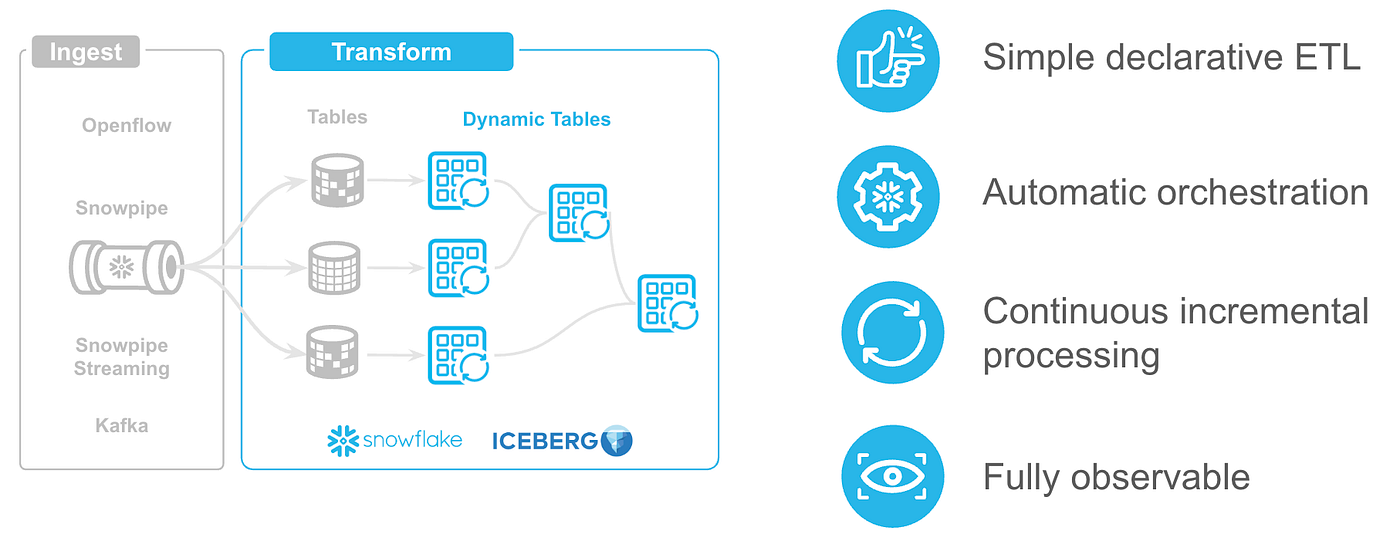
Dynamic Tables: A table type that automatically and continuously materializes the results of a query
CREATE OR REPLACE DYNAMIC TABLE customer_lifetime_value
TARGET_LAG = '1 hour'
WAREHOUSE = transform_wh
AS
SELECT
customer_id,
SUM(amount) AS total_spend,
COUNT(*) AS order_count,
MIN(created_at) AS first_order
FROM orders
GROUP BY 1;
No scheduler. No DAG. No pipeline code. Just SQL and a freshness guarantee.
With recent improvements to the dbt-snowflake adapter, it combines the software engineering discipline of dbt (testing, docs, version control) with incremental refresh automations of Dynamic Tables. For the right queries, that means no {% if is_incremental() %} blocks, no watermark logic, no unique_key — just SQL.
dbt + Dynamic Tables: So Close, Yet So Far
When Snowflake shipped Dynamic Tables, the reaction from the dbt community was immediate: this should be the default materialization. The logic was obvious — dbt handles orchestration, Dynamic Tables handle transformation and refresh mechanics. Each does what it’s best at.
But there was a fundamental difference between how dbt and Dynamic Tables orchestrate the pipeline. Dbt assumes it dictates run times, while Dynamic Tables rely on Snowflake’s automatic scheduling based on lag requirements, leading to a disconnect where dbt would finish a run but the Dynamic Table model would immediately become stale as Snowflake’s independent scheduler took over.
And that was just the scheduling problem. As Snowflake continued to invest in Dynamic Tables — adding INITIALIZATION_WAREHOUSE, IMMUTABLE WHERE, CLUSTER BY, and others — the dbt-snowflake adapter simply hadn’t caught up yet. Changing the SQL body of an existing dynamic table would error or silently no-op. Schema evolution wasn’t handled. The integration was functional, but it wasn’t great.
dbt + Dynamic Tables Today
Here’s an example of a complete dbt project using Dynamic Tables:
-- models/marts/customer_lifetime_value.sql

{{ config(
materialized='dynamic_table',
snowflake_warehouse='transform_wh'
 - no target_lag: dbt manages refresh timing by default
) }}
SELECT
customer_id,
SUM(amount) AS total_spend,
COUNT(*) AS order_count,
MIN(created_at) AS first_order
FROM {{ ref('stg_orders') }}
GROUP BY 1
$ dbt run - select marts.customer_lifetime_value1. Creates (or alters) the dynamic table definition
2. Issues ALTER DYNAMIC TABLE customer_lifetime_value REFRESH
3. Waits for refresh to complete
dbt run now does what you’d expect. Here’s why.
The Scheduler: Who’s In Charge?
The new Dynamic Table scheduler parameter, now exposed in the dbt-snowflake adapter, is the key piece. Simply omitting target_lag — or explicitly setting scheduler: DISABLE — tells Snowflake not to refresh autonomously. Instead the dynamic table trusts an external orchestrator to trigger refreshes at the right time. In a dbt project, that means after each build dbt issues an explicit ALTER DYNAMIC TABLE … REFRESH — a synchronous, isolated refresh that completes before dbt run returns. You get deterministic, pipeline-controlled freshness with the minimal possible config: just a warehouse.
There’s a subtler but important effect here. When Dynamic Tables run with scheduler: ENABLE, they form a self-consistent cascade: a downstream DT refresh triggers upstream DT refreshes at the same snapshot tick, guaranteeing consistency across the pipeline. That’s a powerful property in a purely autonomous setup — but does not work elegantly inside a dbt project, where dbt already owns the execution order. A dbt-triggered refresh on one table unexpectedly pulling upstream tables along with it would undermine the entire orchestration model. With scheduler: DISABLE, that cascading logic is turned off. Each dynamic table is refreshed in isolation, reading whatever its upstream tables currently hold — which maps cleanly onto how dbt walks its DAG.
If you prefer Snowflake to manage freshness autonomously, just set a target_lag and the scheduler defaults to ENABLE. The orchestration model is a choice, not an accident.
dbt Tables vs. Dynamic Tables: Same SQL, Smarter Execution
dbt supports multiple materialization strategies. The simplest — materialized: table — drops and recreates the table from scratch on every dbt run. For tables that rarely change or are cheap to recompute, that’s perfectly reasonable. For heavier transformations, dbt also offers materialized: incremental, where you explicitly control what gets processed each run by writing an {% if is_incremental() %} filter. It’s a well-designed pattern that gives you precise control.
Dynamic Tables offer a more declarative alternative. Switching a materialized: table model to materialized: dynamic_table with refresh_mode: FULL is a drop-in upgrade with zero SQL changes — Snowflake tracks which micropartitions actually changed and skips unnecessary recompute. And when you’re ready to explore incremental processing, you don’t need to write any incrementalization logic at all:
{{ config(
materialized='dynamic_table',
snowflake_warehouse='transform_wh'
 -- refresh_mode defaults to AUTO: Snowflake uses INCREMENTAL
 -- if the query supports it
) }}
Snowflake analyzes the query’s dependency structure and determines whether incremental processing is safe. In many cases — aggregations, joins, filters over append-only sources — it just works. No {% if is_incremental() %} blocks, no watermark expressions, no unique_key. The incremental logic lives in the engine, not in your SQL.
The Incremental Problem, Solved
dbt’s incremental materialization is where most teams feel the complexity ceiling. It works — but it asks a lot from you:
-- The classic dbt incremental model

SELECT
customer_id,
DATE_TRUNC('day', created_at) AS order_date,
SUM(amount) AS total_amount,
COUNT(*) AS order_count
FROM {{ ref('stg_orders') }}
{% if is_incremental() %}
 - Watermark logic: only process new rows
WHERE created_at > (SELECT MAX(order_date) FROM {{ this }})
{% endif %}
GROUP BY 1, 2
To make this work correctly, you need to define:
-
A
unique_keyfor upsert semantics -
A watermark expression that correctly identifies new rows
-
Late-arriving data handling (what if a row arrives after the watermark?)
-
A full-refresh strategy for when the logic changes
It’s easy to to get this wrong, and the bugs are subtle — duplicate rows, missed late arrivals, stale aggregates that quietly diverge from reality.
Now compare that to a Dynamic Table with refresh_mode: INCREMENTAL:
-- The same model as a dynamic table - zero incremental logic

SELECT
customer_id,
DATE_TRUNC('day', created_at) AS order_date,
SUM(amount) AS total_amount,
COUNT(*) AS order_count
FROM {{ ref('stg_orders') }}
GROUP BY 1, 2
That’s the whole model — Snowflake manages the freshness requirements and dependencies under the hood. Snowflake’s query engine uses change tracking to identify exactly which rows in stg_orders changed since the last refresh, propagates only those deltas through the aggregation, and updates the affected output rows. Late arrivals are handled automatically — change tracking sees them regardless of when they land.
Your SQL stays clean. Your logic stays simple. And you get correct incremental processing out of the box.
For aggregations, joins, filters, and most real-world transformation patterns, Dynamic Tables give you incrementalization for free. The complexity lives in Snowflake’s query engine, not in your SQL.
A Practical Migration Path
The safest way to adopt Dynamic Tables in an existing dbt project is in two deliberate steps.
Step 1: Try by replacing CTAS models with Dynamic Tables
Start with your non-incremental materialized: table models — the ones that run DROP + CREATE AS SELECT on every dbt run. These are the lowest-risk candidates. Just swap the materialization, and provide a Snowflake warehouse:
config:
materialized: dynamic_table
snowflake_warehouse: my_wh
The semantics are identical from dbt’s perspective: dbt run triggers a refresh and waits for it to complete. But there’s an immediate upside — if none of the upstream source data changed since the last refresh, Snowflake skips the refresh entirely. Your pipeline still succeeds, but the compute cost is zero. For models that run frequently but whose sources change infrequently, this alone can be a meaningful cost reduction.
In addition, Dynamic Tables default to refresh_mode = AUTO. With AUTO, Snowflake analyzes your query and promotes it to incremental refresh if the query structure supports it. When it works well, it’s significantly faster and cheaper — only the changed rows are processed.
While Snowflake supports various sophisticated SQL functions in incremental refresh mode, there are use cases where a full refresh might be more sophisticated than an incremental refresh. The AUTO mode helps you gauge that based on your query.
Incremental DTs excel at append-heavy tables where a small fraction of rows change per refresh cycle — event logs, transaction streams, CDC feeds. Delta propagation through a SUM() or JOIN is much cheaper than reprocessing the full dataset. A full refresh DT might be more prudent if a large proportion of the base table changes between refreshes — a bulk update, a backfill, a table that gets fully rewritten — the overhead of tracking and applying individual row deltas can exceed the cost of a clean full recompute. In these cases, refresh_mode: FULL is both simpler and faster.
Validate that outputs match your existing tables before moving to the next step.
Step 2: Use the optional properties of Dynamic Tables to optimize and incrementalize
You can further optimize your dbt incremental models and DTs to get incremental performance. This includes using more sophisticated functions (here), improving clustering, and setting refresh_mode = ‘incremental’. You could choose a dual warehouse strategy with initialization_warehouse, where reinitializations and full refreshes that require more compute go to the larger warehouse, while incremental processing happens in a smaller shared warehouse. Last but not the least, you could use immutable constraints. Immutability constraints let you mark portions of a dynamic table as static. When you define an immutability constraint, Snowflake skips those rows during refresh, which improves performance, especially for tables that contain large amounts of historical data.
config:
+on_configuration_change: apply | continue | fail
+target_lag: downstream | <time-delta>
+snowflake_initialization_warehouse: <warehouse-name>
+refresh_mode: AUTO | FULL | INCREMENTAL
+initialize: ON_CREATE | ON_SCHEDULE
+scheduler= ENABLE | DISABLE
+cluster_by: <column-name> | [<column-name>, <column-name>, …]
+immutable_where: <condition>
+transient: true | false
There is no substitute for measuring this at production scale. Query patterns that look incremental-friendly in development (small tables, predictable deltas) can behave differently against full-size production data with real-world change distributions.
Try It Now
The changes are live in dbt-labs/dbt-adapters and will be available out of the box with v1.11.5 (documentation).
Start with Step 1 — swap a few non-incremental table models to materialized: dynamic_table. Then experiment with advanced options where incrementalization makes sense.
If you run into questions, hit edge cases, or want to share what’s working — the dbt community slack channel hosted by dbt-labs is the right place. It’s where practitioners working with Snowflake and dbt compare notes, surface issues, and shape where the adapter goes next. Your feedback from production is exactly what drives improvements like the ones described here. To join follow instructions: https://docs.getdbt.com/community/join (Slack channel [#db-snowflake] )
The idea was always right. Now the integration is too.
메타데이터
- post_id
- f550ebc23d60
- slug
- dynamic-tables-dbt-a-powerful-combination-f550ebc23d60
- url
- https://medium.com/snowflake/dynamic-tables-dbt-a-powerful-combination-f550ebc23d60
- canonical_url
- https://medium.com/snowflake/dynamic-tables-dbt-a-powerful-combination-f550ebc23d60
- author_url
- https://medium.com/@pd.dutta
- status
- ok
- fetched_at
- 2026-08-07 08:47:49