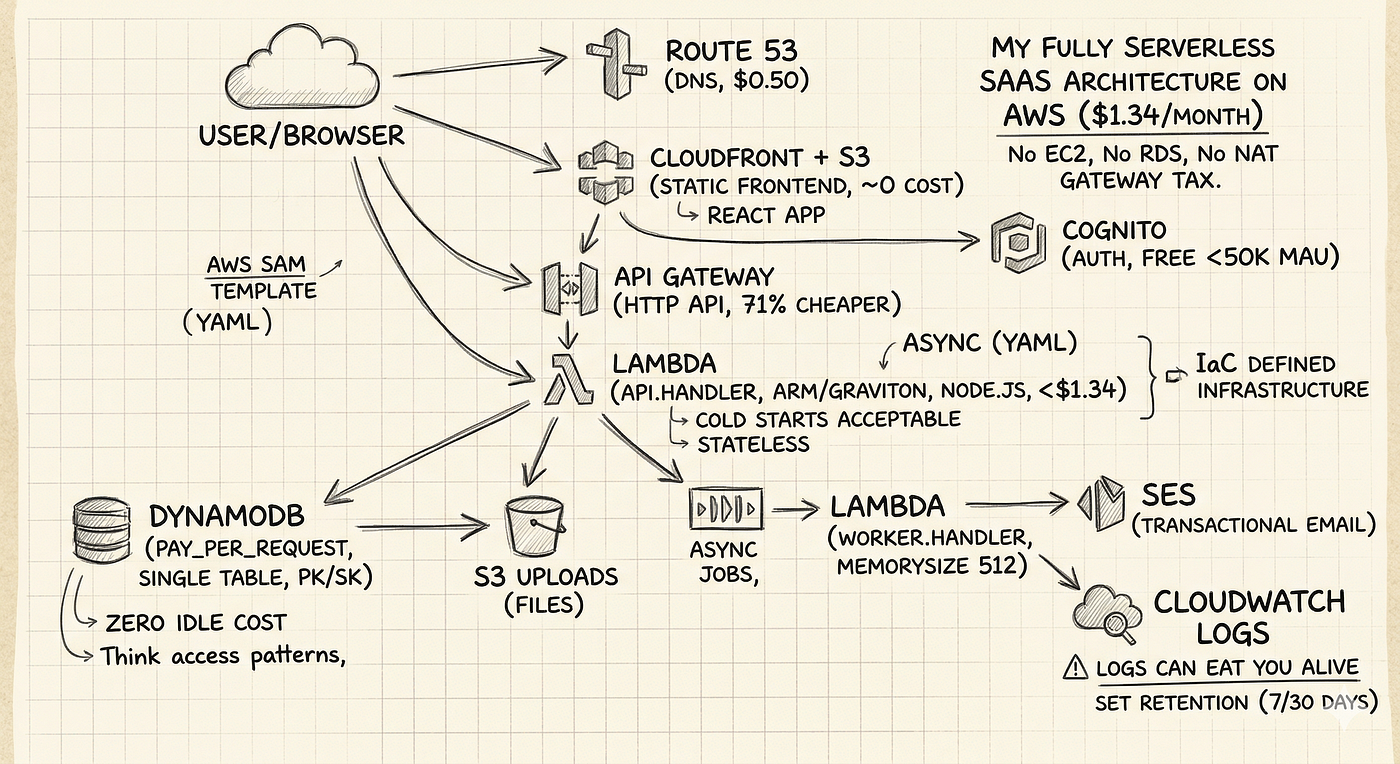
From Notebook to Cloud: How I Built a Real Inventory System for Kenyan Small Businesses Using…
A complete walkthrough of building a production-grade serverless system; eight phases, real debugging, the AWS Well-Architected Framework…
From Notebook to Cloud: How I Built a Real Inventory System for Kenyan Small Businesses Using Python and AWS
A complete walkthrough of building a production-grade serverless system; eight phases, real debugging, the AWS Well-Architected Framework, live demo, and everything in between.
Before We Start: Why This Article Exists
On July 4, 2026, I stood on stage at AWS Community Day Kenya — Pwani Edition in Mombasa and delivered a live technical demo in front of a room full of engineers, students, and cloud practitioners.
The system I demoed was not a tutorial app. It was a production-grade serverless inventory management system that I designed, built, broke, fixed, and deployed; eight phases over several weeks, with real debugging at 2am, real Terraform state disasters, and a live demo that kept me honest.
This article captures everything. The architecture decisions. The trade-offs I made and why. The code. The mistakes. The fixes. The moments where things didn’t work and what I learned from them.
By the end of this article, you will understand:
- How to build a complete serverless system on AWS from scratch
- Why each architectural decision was made the way it was, and what the alternatives were
- What real cloud engineering looks like when things go wrong
- How the AWS Well-Architected Framework applies to a real project, not just a whitepaper
- How Infrastructure as Code, CI/CD, monitoring, and security fit together in practice
Whether you are a beginner who has never touched AWS, a developer looking for a realistic reference project, or a recruiter trying to understand what “serverless cloud engineering” actually means in practice, this article is written for you.
The Problem We Are Solving
Walk into almost any small shop in Nairobi, Mombasa, or any town across Kenya. Behind the counter, you will find one of three things: a worn notebook, a shared WhatsApp message thread, or a basic spreadsheet on someone’s phone.
This is how stock is tracked. Manually. After the fact. By memory.
The consequences are predictable:
Stockouts happen silently. Nobody notices that cooking oil is running low until a customer asks for it and it is not there. By then, a sale is already lost.
Overstocking wastes money. Without a clear view of what is already on the shelves, shop owners reorder items they already have too much of.
Human error compounds over time. A wrong number in a notebook, a miscounted restock, a forgotten sale, each small mistake makes the picture less accurate.
Time is wasted on counts that should be automatic. A shop owner spending two hours every Sunday counting stock manually is spending two hours not running their business.
The solution is not complicated. A small business in Kenya does not need SAP or an enterprise ERP system. They need something simple, honest about stock levels, accessible from any phone & from anywhere, and reliable enough to trust.
That is what we built.
What I Built: Smart Inventory Assistant
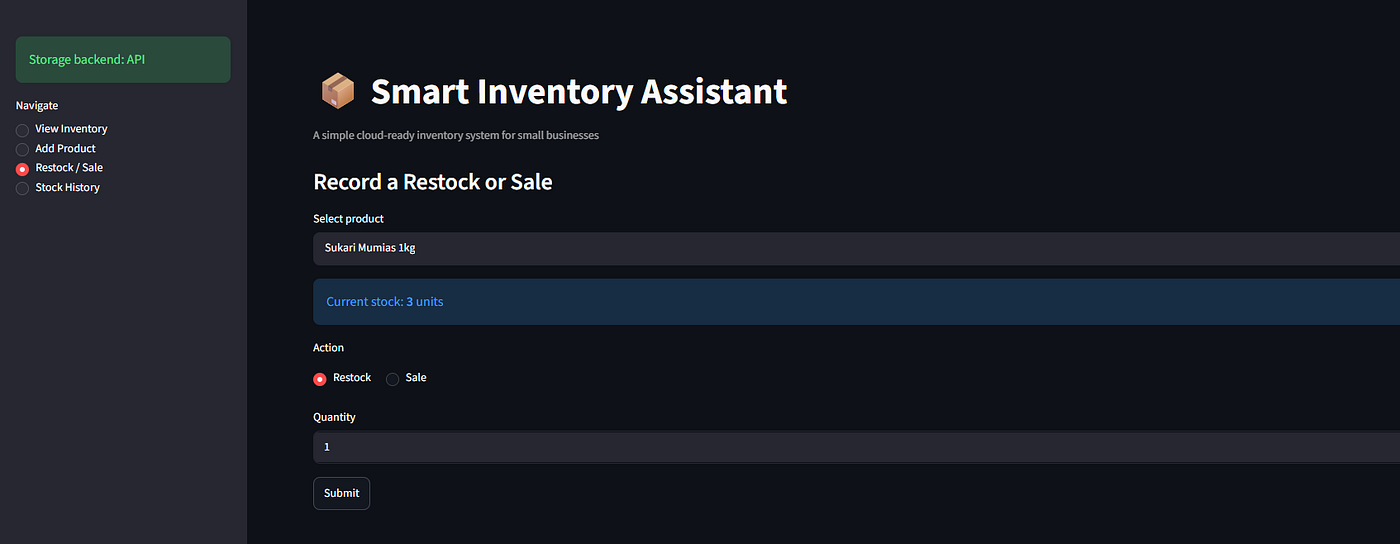
Smart Inventory Assistant is a serverless cloud inventory system built specifically for small businesses. It lets a shop owner:
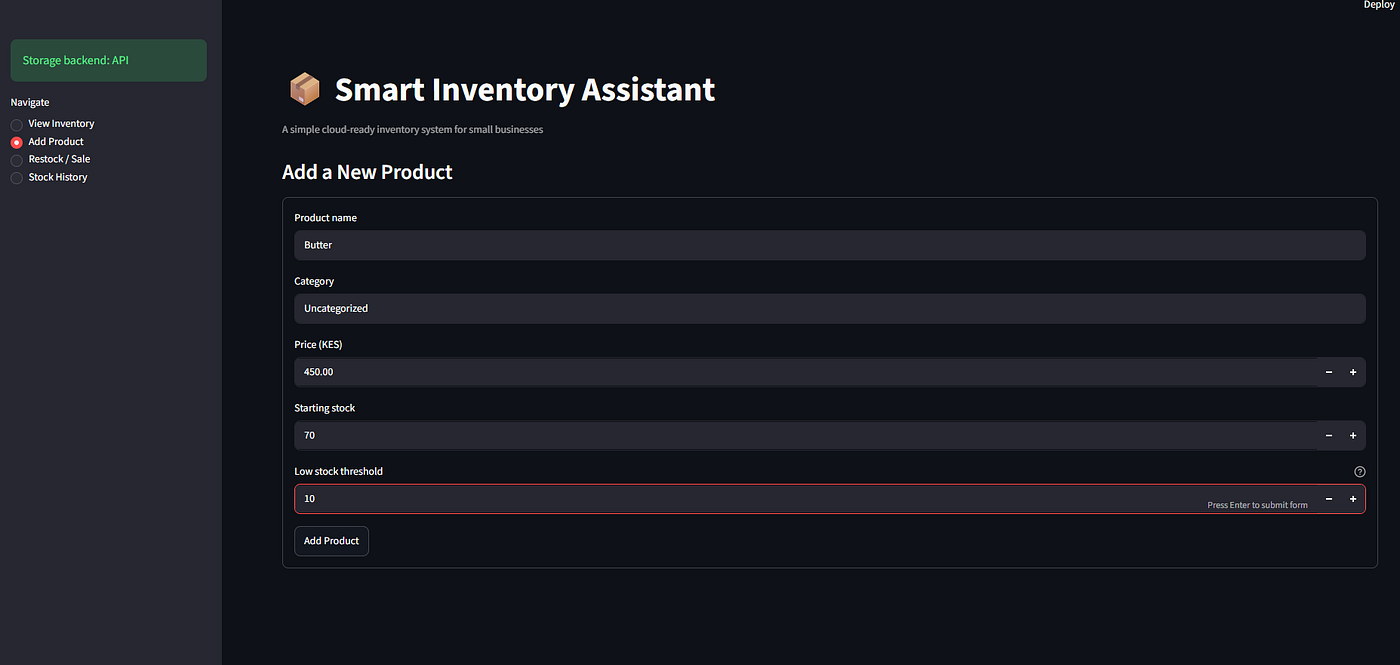
- Add products with name, category, price, starting stock, and a low-stock threshold
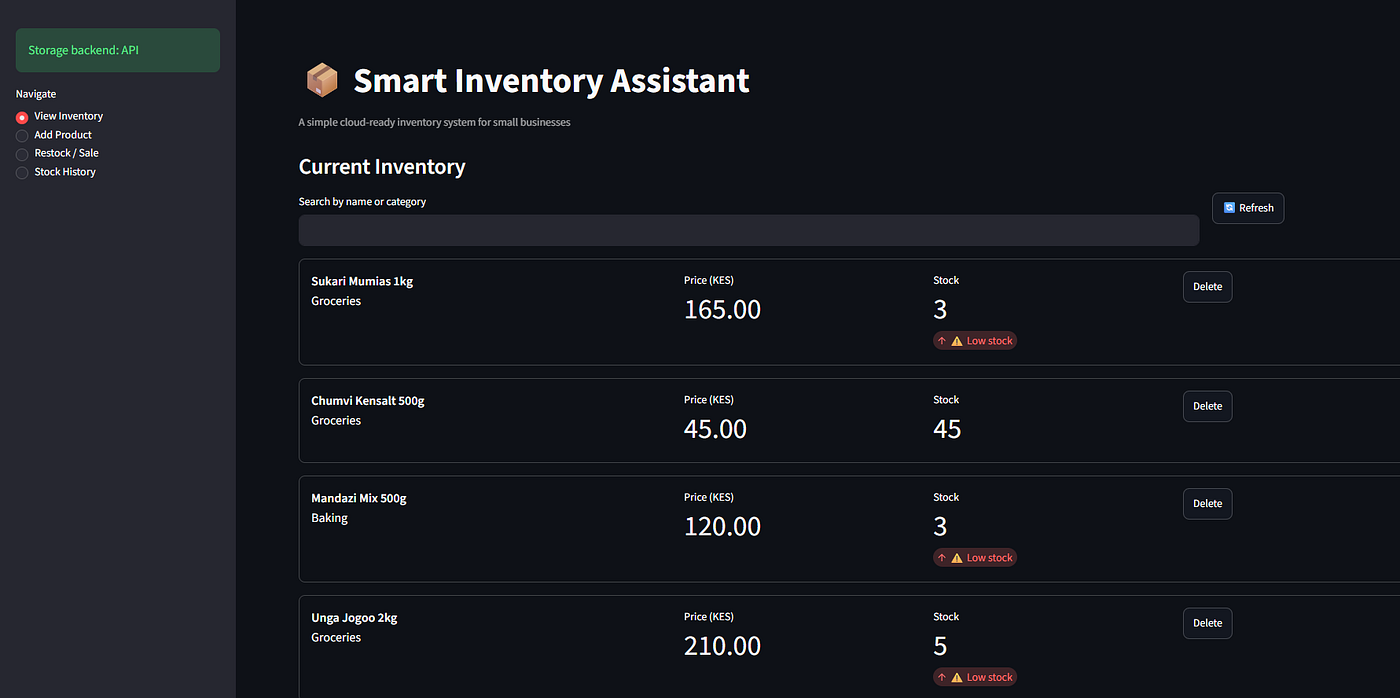
- See all products at a glance with live low-stock warnings highlighted automatically
- Search by name or category instantly
- Record restocks — when new stock arrives, one click updates the count and logs the movement
- Record sales — when a customer buys something, the stock decreases immediately
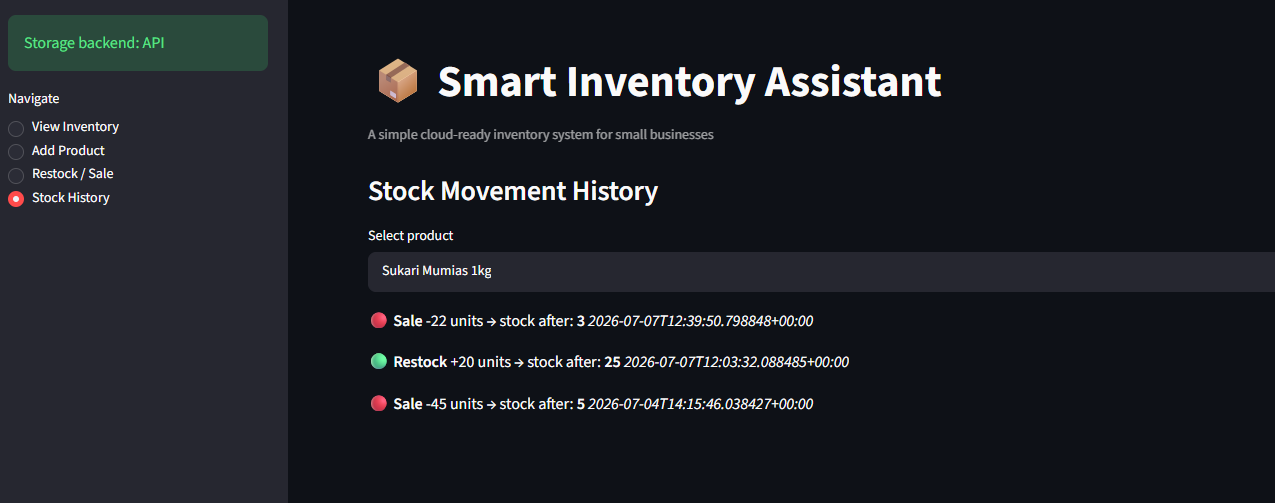
- View the complete history of every stock change for every product — a permanent audit trail
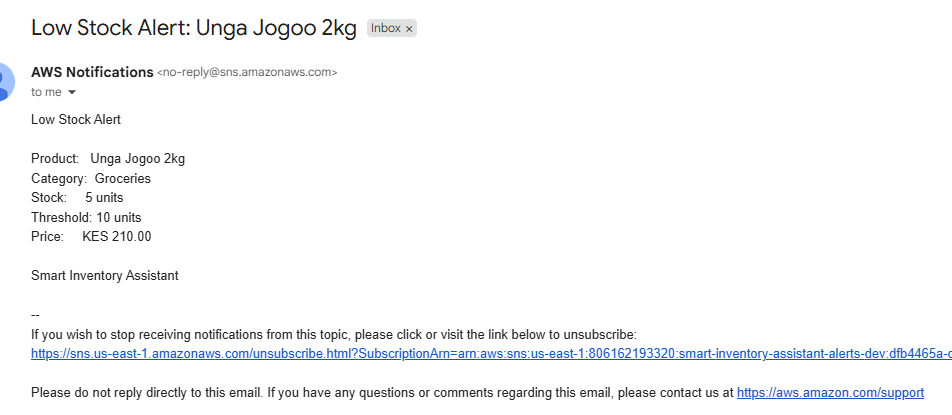
- Receive email alerts when a product drops to or below its low-stock threshold
Everything runs on AWS. No server to manage. No idle costs. Pay only when the system is actually used.
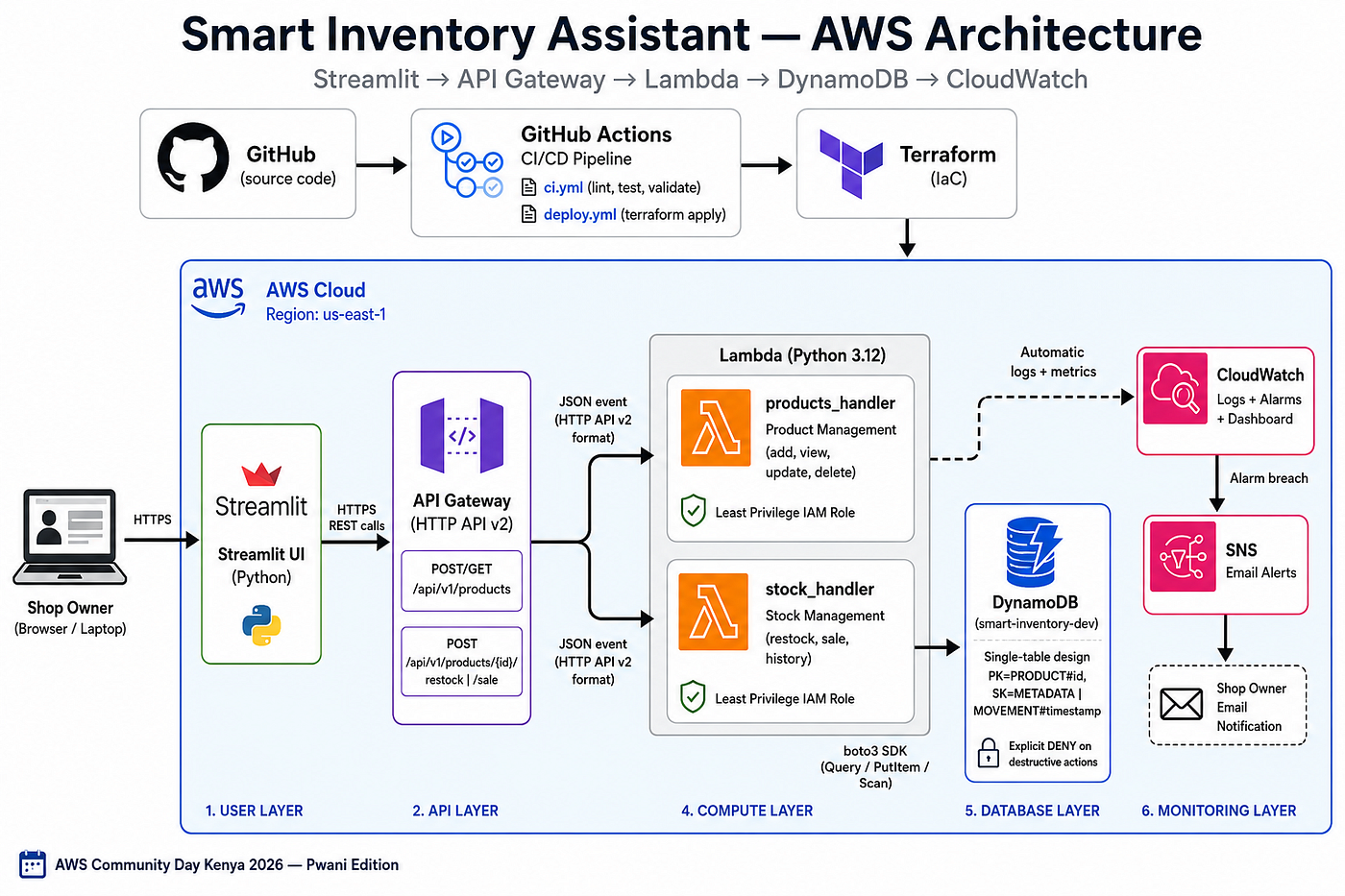
The Architecture: How It All Fits Together
Before writing a single line of code, I designed the architecture. Understanding how the pieces fit together is essential, not just for building it, but for explaining it, defending it, and extending it later.
Shop Owner (browser)
        ↓ HTTPS
API Gateway (public endpoint)
        ↓
Lambda Functions (Python 3.12)
  ├── products_handler  (add, view, update, delete)
  └── stock_handler     (restock, sale, history)
        ↓
DynamoDB (single-table design)
        ↓
CloudWatch (logs + alarms + dashboard)
        ↓
SNS → Email alert (low stock notification)
GitHub Actions → CI/CD pipeline → automated deploy
Terraform → all infrastructure as code
S3 → Terraform state with native lockingWhat each piece does, in plain language:
Streamlit is the browser-based UI. A shop owner opens it on any device and sees their inventory. It is built entirely in Python; no HTML, no CSS, no JavaScript required.
API Gateway is the public HTTPS door into the system. It receives every request from Streamlit and routes it to the right Lambda function.
Lambda is where the business logic runs. Two separate functions handle different concerns: one for managing products, one for managing stock movements. They run only when a request arrives, no server sits idle between requests.
DynamoDB stores all the data. A single table holds both products and stock movement history, using a design pattern called single-table design.
CloudWatch automatically receives logs from every Lambda invocation. Alarms fire when error rates spike or response times slow down.
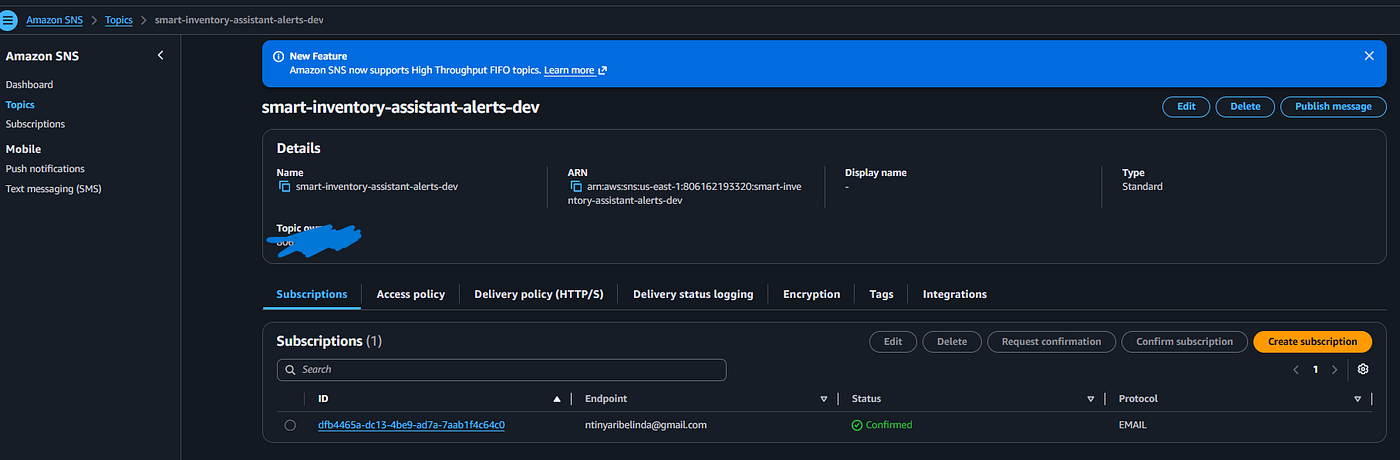
SNS (Simple Notification Service) delivers email alerts when a product hits its low-stock threshold.
Terraform provisions all of this as code; reproducible, version-controlled, reviewable infrastructure.
GitHub Actions runs the CI/CD pipeline, automatically testing, linting, and deploying on every code push.
The Tech Stack
Layer            Technology                    Why
─────────────────────────────────────────────────────────────────────────────
Frontend         Streamlit (Python)            Pure Python, no UI framework overhead
Backend logic    Python 3.12 + Pydantic        Type-safe, validated data models
Cloud compute    AWS Lambda                    Serverless, pay-per-use
Database         AWS DynamoDB                  Managed NoSQL, scales automatically
API layer        AWS API Gateway (HTTP API v2) HTTPS endpoint, routes to Lambda
IaC              Terraform 1.10+               Reproducible infrastructure
CI/CD            GitHub Actions                Automated test and deploy
Monitoring       CloudWatch + SNS              Logs, alarms, email alerts
Security         IAM least privilege           Explicit deny on destructive actions
Code quality     Black, Ruff, pytest           Automated formatting and 23 tests
A list of services tells you what was built. The trade-offs tell you why. Every choice below was a deliberate decision with alternatives considered and rejected.
Streamlit Over a Custom Frontend
The alternative was a React or Vue frontend, a proper SPA with a dedicated deployment, its own build pipeline, and a completely separate codebase to maintain.
The trade-off: a custom frontend would give more control over UI design. It would also require a second language, a second deployment, a second failure surface, and weeks of work before a single AWS service was touched.
Streamlit meant the entire application UI, business logic, cloud integration was written in one language, in one codebase. For a portfolio project and live demo, that coherence matters. The audience at Community Day did not come to see a CSS framework. They came to see serverless architecture. Streamlit kept the focus where it belonged.
The constraint is real: Streamlit is not a production-ready frontend for a multi-tenant SaaS product. For this use case a demo-first, single-business MVP, it was exactly right.
API Gateway HTTP API v2 Over REST API v1
AWS offers two flavours of API Gateway: REST API (v1) and HTTP API (v2). REST API is the older, more feature-rich option. HTTP API is the newer, faster, and significantly cheaper alternative.
For this project, the trade-off was straightforward. HTTP API v2 has lower latency, costs roughly 70% less per million requests, and covers everything the project needs: Lambda proxy integration, CORS, and HTTPS routing. The advanced features of REST API v1, request/response transformations, WAF integration, usage plans were not needed at this stage.
The one catch: HTTP API v2 sends a different event structure to Lambda than REST API v1. rawPath instead of path. requestContext.http.method instead of httpMethod. Both need to be checked in the handler, and local test events use v1 format while production uses v2. That mismatch caused a debugging session that could have been avoided with better documentation reading upfront.
Lambda Over a Containerised Service
The alternative to Lambda was running the FastAPI backend in a container on ECS Fargate or EC2.
A container would give more control: longer execution windows, no cold starts, persistent connections to DynamoDB. The trade-off is that a container runs continuously. For a small business inventory system with irregular, unpredictable usage, paying for 24/7 compute capacity is waste.
Lambda charges only for the milliseconds the function actually runs. At typical small business transaction volumes a few dozen requests per day the Lambda cost is effectively zero. A Fargate task running continuously would cost several US dollars per month even with zero traffic. For a business where margins are thin, that difference is meaningful.
The cold start concern is real but manageable. Lambda cold starts on Python 3.12 with a small deployment package are typically under 500 milliseconds, acceptable for an inventory system that is not a real-time trading platform.
DynamoDB Over PostgreSQL or MySQL
The most common question about this architecture is: why not use a relational database? PostgreSQL is well understood, has a rich query language, and has been the default for web applications for decades.
The answer is access pattern design. This application has exactly three queries: get a product by ID, list all products, and get all stock movements for a product. None of these requires a join. None requires aggregation across tables. None requires the full power of SQL.
DynamoDB handles these three queries with a single-table design. A single Query call returns a product and all its movements together. In PostgreSQL, you would need a products table, a stock_movements table, a foreign key relationship, and a JOIN. That means more schema design, more migration management, and greater operational overhead.
The cost and operational argument is equally strong. DynamoDB is fully managed, no RDS instance to size, patch, or back up. At low traffic it costs near nothing. It scales horizontally without manual intervention. For a serverless project where “no servers to manage” is a design goal, a managed relational database instance would be a contradiction.
The trade-off: DynamoDB requires you to design your access patterns upfront. You cannot query by an arbitrary field without a Global Secondary Index. If the business requirements change significantly say, the need to run complex sales analytics queries a relational database would serve better. That is a known limitation accepted at design time.
Terraform Over AWS CDK or SAM
AWS SAM (Serverless Application Model) is designed specifically for Lambda-based applications and has tighter native integration with the AWS ecosystem. AWS CDK lets you define infrastructure in Python, the same language as the rest of the project.
Terraform was chosen for one reason: portability and market relevance. Terraform is cloud-agnostic, the same mental model applies whether you are deploying to AWS, Azure, or GCP. For a project explicitly designed as a portfolio demonstration, Terraform fluency is more broadly valued in the job market than SAM or CDK proficiency.
The trade-off: Terraform’s archive_file data source handles Lambda packaging less gracefully than SAM’s native sam build command. That limitation caused the out-of-memory crash described in the challenges section. SAM would have handled it without intervention. That is a genuine cost of the Terraform decision, accepted in exchange for broader applicability.
Designing with the AWS Well-Architected Framework
The AWS Well-Architected Framework is a set of six design principles that AWS publishes to help engineers build systems that are secure, reliable, and efficient. Most engineers encounter it as a checkbox exercise. This project applies it as a design guide, each pillar influenced real implementation decisions.
Operational Excellence
Operational excellence is about running systems reliably, learning from failures, and improving over time.
In this project, it meant writing infrastructure as code from day one. Every AWS resource; Lambda functions, DynamoDB table, API Gateway, IAM roles, CloudWatch alarms, SNS topic is defined in Terraform. There are no manually configured resources, no clickops, no configuration drift.
It also meant building CI/CD from the beginning rather than as an afterthought. The GitHub Actions pipeline runs Black, Ruff, pytest, and Terraform validation on every push. The deploy pipeline runs on merge to main only after all checks pass. Deployment is not a manual process, it is an automated consequence of a code review.
Structured JSON logging in CloudWatch completed the operational picture. When something breaks, there is a searchable, queryable record of what happened. Not because something went wrong, but because we planned for the fact that something eventually would.
Security
Security is not a phase you add at the end. It is a constraint that shapes every decision.
The most important security decision in this project was IAM least privilege. The Lambda execution role has exactly five DynamoDB permissions: GetItem, PutItem, DeleteItem, Query, and Scan nothing more. It also carries an explicit DENY on destructive operations: DeleteTable, UpdateTable, and CreateTable, which cannot be overridden by any subsequent allow policy.
No secrets are hardcoded anywhere in the codebase. Environment variables are injected at deployment time through Terraform variables and GitHub Actions secrets. The ALERT_EMAIL address, the AWS account ID, the API Gateway URL, none of these appear in source code.
Security headers on every Lambda response (X-Content-Type-Options, X-Frame-Options, Strict-Transport-Security) follow OWASP guidelines without requiring a WAF. Input validation runs before business logic on every request, capping payload size at 50KB and checking for injection patterns in string fields.
Reliability
Reliability means the system continues to work correctly even when individual components fail.
Serverless architecture provides a significant baseline of reliability for free. Lambda, DynamoDB, API Gateway, and SNS are all managed services with AWS-guaranteed availability SLAs. There are no application servers to patch, no databases to back up, no infrastructure to restart after a failure.
DynamoDB’s ConsistentRead=True setting on all read operations was a deliberate reliability decision. Without it, DynamoDB's eventual consistency model can return stale data in the seconds after a write enough to show an incorrect stock count immediately after a sale. Strong consistency adds a small latency cost and a slightly higher read unit cost, accepted in exchange for guaranteed correctness.
CloudWatch alarms on Lambda error rate, duration, and throttle count provide the early warning layer. If the system degrades, an alarm fires before a shop owner notices a problem.
Performance Efficiency
Performance efficiency means using the right resources for the task, and using them well.
Lambda with Python 3.12 and a minimal deployment package (handlers, models, services no unnecessary dependencies) keeps cold start times under 500 milliseconds. DynamoDB’s single-table design means every core query is a single API call. There are no joins, no sequential queries, no N+1 patterns.
API Gateway HTTP API v2 has measurably lower latency than REST API v1 for Lambda proxy integrations. That latency difference is small in absolute terms; tens of milliseconds but it is a free performance improvement that required no additional engineering effort.
Cost Optimization
Cost optimization means paying only for what you use, and not paying for what you don’t.
The serverless architecture of this project is cost-optimal by design. Lambda charges per invocation and per millisecond of execution. DynamoDB charges per read and write unit. API Gateway charges per million requests. SNS charges per notification published. CloudWatch charges for log ingestion and metric evaluations.
At typical small business transaction volumes assume 200 stock operations per day, the total monthly cost is well under 50 Kenyan shillings. A comparable system on a continuously running EC2 instance or RDS database would cost orders of magnitude more, even if traffic dropped to zero.
The S3 bucket for Terraform state has versioning enabled, which costs a few cents per month for state file history. That cost is worth paying to be able to roll back to a previous infrastructure configuration if a deployment goes wrong.
Sustainability
Sustainability means minimizing the environmental impact of the system.
Serverless architecture is inherently more sustainable than always-on infrastructure. Lambda functions consume compute resources only when they are running. An EC2 instance consumes power continuously regardless of whether it is serving requests. For a small business inventory system with intermittent usage, the difference in energy consumption is significant.
This is not greenwashing, it is a genuine benefit of the pay-per-use model. Efficient use of resources is good for costs and good for the environment simultaneously.
Reflection: Applying the Well-Architected Framework before writing code not as a review exercise after deployment changed the design in concrete ways. IAM least privilege was stricter than it might otherwise have been. Structured logging was built in from the start rather than added when debugging became painful. The choice of HTTP API v2 over REST API v1 was driven partly by cost pillar thinking. The framework turns “good ideas” into “design requirements” and that shift matters.
The Data Model: How I Designed DynamoDB
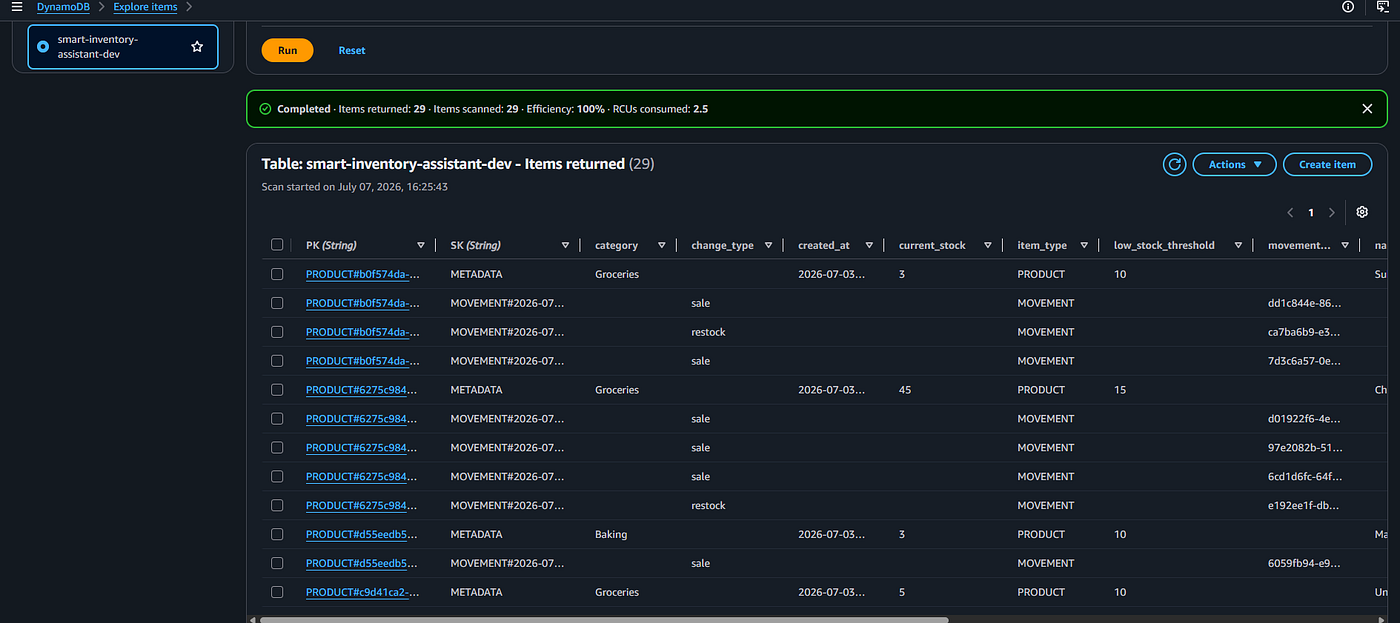
DynamoDB is not a relational database. There are no tables with fixed columns, no SQL queries, no joins. It is a key-value store where every item has a partition key (PK) and an optional sort key (SK).
We use a pattern called single-table design, putting both products and stock movements in the same table, distinguished by their sort keys.
A product item looks like this:
PK:  PRODUCT#uuid-here
SK:  METADATA
name: "Sukari Mumias 1kg"
category: "Groceries"
price: 165  (stored as Decimal)
current_stock: 50
low_stock_threshold: 10
item_type: "PRODUCT"
A stock movement looks like this:
PK:  PRODUCT#uuid-here        (same PK as the product)
SK:  MOVEMENT#2026-07-04T10:00:00Z
change_type: "sale"
quantity: 5
resulting_stock: 45
item_type: "MOVEMENT"
Why single-table design?
When you query for a product and its movement history, you use one DynamoDB Query call with PK = “PRODUCT#uuid”. Everything belonging to that product, the metadata and all its movements comes back in one call, ordered by sort key.
In a traditional relational database, you would need two separate queries and a join. In DynamoDB, you design your access patterns upfront and let the key structure do the work.
The most important DynamoDB rule I learned the hard way:
boto3, the AWS Python SDK, cannot serialize Python float values. DynamoDB requires Decimal for numeric values. When product.price comes out of a Pydantic model as a Python float, it must be converted to Decimal(str(price)) before writing to DynamoDB. After reading, Decimal values must be converted back to float so Pydantic can validate them.
Missing this conversion causes put_item to fail silently, the write appears to succeed but nothing is saved. This is exactly what caused the “stock not updating” bug that took hours to debug.
Phase 0: Planning Before Code
The most valuable phase in the project was the one with no code at all.
I spent time on:
- Business requirements — who uses the system, what they need to do, what problems they face
- User stories — concrete descriptions of each feature from the shop owner’s perspective
- Data model — what a Product is, what a StockMovement is, how they relate
- API contract — what endpoints exist, what they accept, what they return
- Folder structure — where every file lives before a single file is created
The most important decision made in Phase 0 was why restock and sale are separate endpoints rather than one generic "update stock" endpoint.
The answer: intent belongs in the API. A sale and a restock are fundamentally different business events. They need different logging, different validation, and could have different authorization rules in future. A single PATCH /products/{id}/stock endpoint with a +5 or -3 delta loses the meaning of what happened. POST /products/{id}/restock and POST /products/{id}/sale are self-documenting.
Phase 1 and 2: Local App with Clean Architecture
Before touching AWS, I built the system locally using a three-layer architecture:
streamlit_app.py     → UI layer (collects input, displays results)
inventory_service.py → Service layer (business rules)
json_store.py        → Storage layer (reads/writes JSON file)
The storage layer is deliberately dumb. It reads and writes raw JSON with no knowledge of what a “product” is or what “stock” means. The service layer knows the business rules, stock can never go below zero, a sale quantity must be positive, but has no idea how data is stored. The UI layer knows how to display results but contains no business logic.
Why does this separation matter?
When Phase 4 arrived and I replaced local JSON with DynamoDB, only json_store.py needed to change. The service layer, all 23 tests, and the UI were completely untouched. The abstraction paid off exactly as intended.
In Phase 2, I introduced Pydantic models, formal Python classes that describe the shape of our data and validate it automatically. This is where Product, StockMovement, AddProductRequest, and StockUpdateRequest were defined.
class Product(BaseModel):
    product_id: str = Field(default_factory=lambda: str(uuid.uuid4()))
    name: str = Field(..., min_length=1)
    category: str = Field(default="Uncategorized")
    price: float = Field(..., ge=0)
    current_stock: int = Field(default=0, ge=0)
    low_stock_threshold: int = Field(default=10, ge=0)
@property
def is_low_stock(self) -> bool:
return self.current_stock <= self.low_stock_thresholdI also wrote 23 automated tests covering every business rule:
test_sale_cannot_exceed_available_stock
test_sale_that_exactly_empties_stock_is_allowed
test_product_at_exact_threshold_is_flagged
test_restock_logs_a_movement
test_movement_history_is_ordered_most_recent_first
These tests ran in under a second. Every time I changed anything, confidence came from seeing 23 green checkmarks, not from manually clicking through every page.
Phase 3: FastAPI Backend
Before moving to Lambda, I built a FastAPI backend that exposed the same service layer through a standard REST API.
This phase had one major teaching moment: FastAPI generates interactive documentation automatically at /docs. Every endpoint, every field, every validation rule appears there without writing a single line of documentation manually.
GET    /api/v1/products              → list all products
POST   /api/v1/products              → create product
GET    /api/v1/products/{id}         → get one product
PUT    /api/v1/products/{id}         → update product
DELETE /api/v1/products/{id}         → delete product
POST   /api/v1/products/{id}/restock → increase stock
POST   /api/v1/products/{id}/sale    → decrease stock
GET    /api/v1/products/{id}/history → movement history
The FastAPI routes were intentionally thin, they validated input using the Pydantic models from Phase 2, called the service layer, and returned results. No business logic lived in the routes.
Phase 4: AWS Serverless Migration
This is where the system became real.
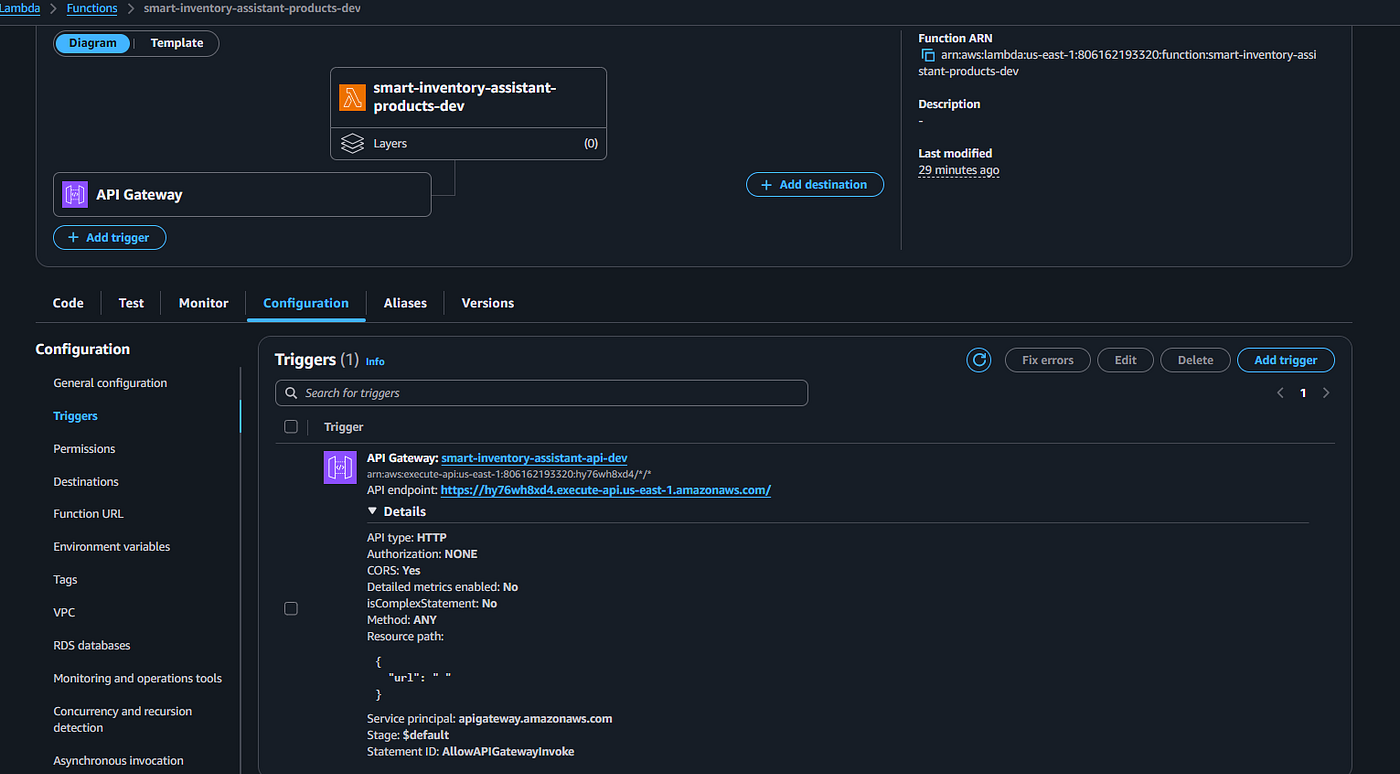
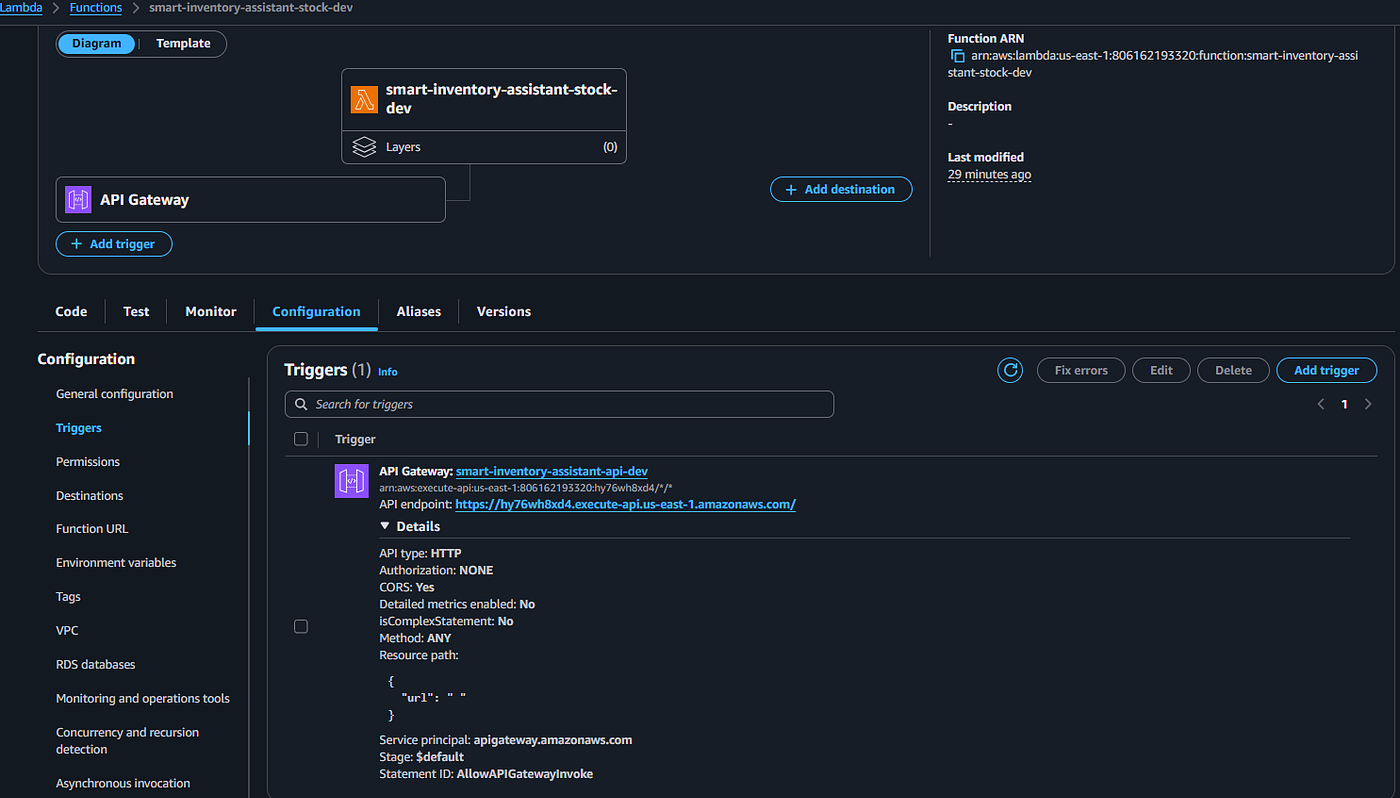
Lambda functions replaced the FastAPI server. Instead of a continuously running process, AWS Lambda runs our Python code only when a request arrives and stops it when the response is sent. For a small business inventory system, this means near-zero idle costs.
DynamoDB replaced the local JSON file. A managed NoSQL database that scales automatically, never loses data when a laptop closes, and is accessible from anywhere.
API Gateway replaced localhost:8000. A real HTTPS URL that anyone with a browser can call.
The Lambda handler structure follows a simple pattern:
def handler(event: dict, context) -> dict:
    method = (
        event.get("httpMethod") or
        event.get("requestContext", {}).get("http", {}).get("method", "")
    )
    path = event.get("path") or event.get("rawPath", "")

if method == "POST" and not product_id:
        return _create_product(event)
    elif method == "GET" and not product_id:
        return _list_products(event)
    ...
One critical detail: API Gateway HTTP API (v2) sends events with rawPath and requestContext.http.method, not path and httpMethod like REST API (v1). Both need to be checked because local testing uses v1 format while Lambda receives v2.
The Lambda response must always be a specific structure:
{
    "statusCode": 200,
    "headers": {"Content-Type": "application/json"},
    "body": json.dumps(data)  # body must be a STRING, not a dict
}
Phase 5: Security Hardening
Security is not a phase you add at the end. But there are specific hardening steps that happen after the core system works.
IAM least privilege — the Lambda execution role has exactly five DynamoDB permissions: GetItem, PutItem, DeleteItem, Query, Scan. It has an explicit DENY on destructive actions:
Statement = [{
  Sid    = "DenyDestructiveDynamoDBActions"
  Effect = "Deny"
  Action = [
    "dynamodb:DeleteTable",
    "dynamodb:UpdateTable",
    "dynamodb:CreateTable",
  ]
  Resource = "*"
}]
Explicit DENY wins in AWS IAM evaluation order. Even if a wildcard allow policy is accidentally attached to the role later, the deny survives. Lambda cannot delete the table under any circumstances.
Input validation runs before any business logic. Payload size is capped at 50KB. String fields are checked for script injection patterns. Path parameters are sanitised before being passed to the service layer.
Security headers are added to every response:
"X-Content-Type-Options": "nosniff",
"X-Frame-Options": "DENY",
"Strict-Transport-Security": "max-age=31536000; includeSubDomains",
"Cache-Control": "no-store",
Phase 6: CI/CD with GitHub Actions
Every push to GitHub now triggers an automated pipeline.
The CI pipeline runs on every branch, every push:
- name: Check formatting (Black)
  run: black --check --diff app/ tests/

- name: Lint (Ruff)
  run: ruff check app/ tests/
- name: Run tests
  run: pytest tests/ -v --tb=short
  env:
    PYTHONPATH: app/frontend
    STORAGE_BACKEND: json
- name: Terraform Validate
  run: terraform validate
The deploy pipeline runs only on merge to main, and only if CI passes:
jobs:
  deploy:
    needs: [ci]
    steps:
      - name: Build Lambda package
        run: |
          cp -r app/handlers staging/handlers
          cp -r app/frontend/models staging/models
          pip install pydantic boto3 --target staging \
            --platform manylinux2014_x86_64 \
            --python-version 3.12
          zip -r lambda_package.zip staging/
- name: Terraform Apply
        run: terraform apply -auto-approve tfplan
A critical lesson about Lambda packaging in CI:
The Lambda ZIP must be built before terraform plan runs. This is because filebase64sha256(zip_path) is evaluated by Terraform at plan time. If the ZIP does not exist yet, plan fails. The ZIP must also be built using Linux-compatible binary wheels ( — platform manylinux2014_x86_64) because Lambda runs on Linux even if the developer is on Windows.


Phase 7: Monitoring with CloudWatch
Structured logging means every log line from Lambda is valid JSON:
{
  "timestamp": "2026-07-04T09:30:00Z",
  "level": "INFO",
  "message": "Incoming request",
  "method": "POST",
  "path": "/api/v1/products/{id}/sale",
  "request_id": "abc-123"
}
JSON logs are searchable in CloudWatch. You can filter by field, not just text match. When something goes wrong at 2am, finding the exact error takes seconds instead of minutes.
CloudWatch alarms fire when:
- Lambda error count exceeds 5 in 5 minutes
- Lambda p90 duration exceeds 10 seconds
- Lambda throttles exceed 10 in 5 minutes
The low-stock email alert publishes a custom CloudWatch metric from Lambda after every sale that triggers a threshold:
if updated.is_low_stock:
    cloudwatch.put_metric_data(
        Namespace="SmartInventory",
        MetricData=[{
            "MetricName": "LowStockAlert",
            "Dimensions": [{"Name": "ProductName", "Value": updated.name}],
            "Value": 1,
            "Unit": "Count"
        }]
    )
A CloudWatch alarm on this metric fires to an SNS topic, which sends an email to the shop owner within 60 seconds of the sale.
Phase 8: The Live Demo
On July 4, 2026, this system ran live in front of a room of engineers in Mombasa.
The Challenges: What Real Cloud Engineering Looks Like
No project reaches production without things going wrong. Here is an honest account of the hardest problems and how I solved them, including what each one taught me about building systems that work under real conditions.
The DynamoDB Float Crash
What happened: After switching to DynamoDB, recording a sale or restock appeared to succeed, the UI showed a success message but the stock number never changed in the inventory view. The CloudWatch logs showed no errors.
Root cause: Python float cannot be serialized by boto3’s DynamoDB resource. When product.price = 145.0 from a Pydantic model was written to DynamoDB, the put_item call silently failed because 145.0 is a float, not a Decimal. The operation returned HTTP 200 with no data written.
Fix: Added conversion functions in dynamodb_store.py:
def _to_dynamo(obj):
    if isinstance(obj, float):
        return Decimal(str(obj))
    if isinstance(obj, dict):
        return {k: _to_dynamo(v) for k, v in obj.items()}
    return obj

def _from_dynamo(obj):
    if isinstance(obj, Decimal):
        return float(obj)
    if isinstance(obj, dict):
        return {k: _from_dynamo(v) for k, v in obj.items()}
    return obj
Also added ConsistentRead=True to all scan and get operations so Streamlit always reads the latest write, not eventually consistent stale data.
Lesson: DynamoDB’s type system is not Python’s type system. Always convert at the boundary. When a service returns HTTP 200 but produces no visible effect, the bug is almost always in the data transformation layer, not the business logic.
The Lambda Deployment Crash
What happened: Running terraform apply crashed the provider with fatal error: out of memory. The Terraform AWS provider tried to load the entire project directory into memory to ZIP it, including venv/ which was 400MB.
Fix: Moved Lambda packaging out of Terraform entirely and into a shell script that copies only what Lambda needs (handlers, models, services, storage, config.py) into a clean staging directory before zipping.
Lesson: Never point Terraform’s archive_file data source at a directory containing a virtual environment. Terraform is an infrastructure tool, not a build tool. Keep them separate.
The Terraform State Disaster
What happened: The first local terraform apply saved state to the local machine. When GitHub Actions ran the CI/CD pipeline, it initialized against an empty S3 state file and tried to create everything from scratch hitting "already exists" errors for DynamoDB, IAM, and Lambda.
Fix: Used terraform import to bring all existing AWS resources into the state file:
terraform import module.dynamodb.aws_dynamodb_table.inventory smart-inventory-dev
terraform import module.iam.aws_iam_role.lambda_execution smart-inventory-lambda-role-dev
Then added prevent_destroy = true to the DynamoDB table so no future pipeline could ever destroy it.
Lesson: Remote state must be configured before the first terraform apply The pipeline is the single source of truth for infrastructure changes. Running applies both locally and in CI against different state files is a recipe for resource conflicts and data loss. Configure the S3 backend on day one, not day ten.
The SNS Email That Never Arrived
What happened: CloudWatch logs showed “Published low-stock SNS alert” but no email arrived. The SNS subscription existed but showed PendingConfirmation.
Root cause: Three separate issues: the SNS subscription confirmation email was never clicked; a CI deploy had recreated the subscription with a placeholder email because the ALERT_EMAIL GitHub secret was not set; and old SNS confirmation links cannot be reused after a subscription is deleted and recreated.
Fix: Set ALERT_EMAIL in GitHub secrets, confirmed the new subscription email, and added a direct sns:Publish from the Lambda handler so alerts include the product name and current stock level in the message body.
Lesson: Infrastructure that depends on a manual confirmation step must be documented and verified before the demo. Check it the night before. Any service with a pending human action; SNS confirmation, IAM role trust, SES sandbox approval is a single point of failure that tests and Terraform cannot catch.
IAM Permissions: The Principle of Least Privilege in Practice
The IAM setup taught a lesson that no tutorial properly explains: the difference between knowing what least privilege means and actually implementing it under deadline pressure is significant.
The first version of the Lambda role had dynamodb: on **.It worked immediately. It also meant Lambda could delete the production table.
Tightening to five explicit permissions and adding an explicit DENY on destructive operations took an extra hour and required reading the DynamoDB API documentation carefully. That hour was worth spending. The explicit DENY is not just a best practice; it is a safety net for future mistakes, future team members, and future scope creep.
Preparing for a Live Demo
A live demo is a different class of problem from a working system. A working system can have rough edges, undocumented workarounds, and environment-specific quirks. A live demo cannotor if it does, you need to know exactly where they are and how to handle them.
Three things made the demo survivable:
Seeded data. Twelve products from Kenyan shops were loaded before the session. The audience immediately recognized the items: Sukari Mumias, Sabuni Omo, Unga Jogoo. That recognition created immediate buy-in because the application felt familiar from the very first screen.
Simplifying the architecture. The original plan was to demonstrate the complete request flow: Streamlit → API Gateway → Lambda → DynamoDB. Less than 24 hours before the session, the API-backed demo stopped working reliably. Rather than risk debugging on stage, I switched the Streamlit application to use DynamoDB directly as the storage backend for the live demonstration. The production architecture still routes requests through API Gateway and Lambda; the direct DynamoDB connection was purely a demonstration-time decision to maximize reliability. It was a reminder that a live demo is about communicating ideas clearly, not proving every component under pressure.
Knowing the system well enough to adapt. Because I understood how each part of the architecture fit together, changing the storage backend did not change the story I wanted to tell. I could still explain where API Gateway and Lambda belonged in a production deployment while demonstrating inventory management, stock updates, and DynamoDB in real time.
After the event, I went back to the code, traced the root cause, and fixed the issue. The application now works as originally designed, with requests flowing through API Gateway, Lambda, and DynamoDB. Looking back, the experience reinforced an important lesson: sometimes the right decision for a live demo is to prioritize reliability first, then return afterward to solve the engineering problem properly.
The Three-Layer Architecture: Why It Saved Everything
The single best decision in the entire project was establishing three separate layers from day one:
UI Layer        → knows about screens and buttons
Service Layer   → knows about business rules
Storage Layer   → knows about reading and writing data
These layers do not cross. The UI never touches the database. The service layer never imports Streamlit. The storage layer has no opinion about what a “product” is.
The payoff came in Phase 4. When I moved from a local JSON file to DynamoDB, only dynamodb_store.py changed. The 23 tests kept passing. The business rules stayed intact. The UI kept working.
Later, when I added api_gateway_store.py a storage implementation that routes calls through API Gateway instead of boto3 directly I swapped backends by changing one environment variable:
STORAGE_BACKEND=json      → reads/writes local JSON file
STORAGE_BACKEND=dynamodb  → reads/writes DynamoDB via boto3
STORAGE_BACKEND=api       → sends HTTP requests to API Gateway
The service layer never knew any swap happened. That is exactly what good architecture feels like.
Running It Yourself
Clone the repository and follow these steps.
Local development (no AWS needed):
git clone https://github.com/Bel-94/Smart-Inventory-Assistant.git
cd Smart-Inventory-Assistant
pip install -r requirements.txt
cd app/frontend
streamlit run streamlit_app.py
With live AWS (full chain):
# Windows
$env:STORAGE_BACKEND = "api"
$env:API_GATEWAY_URL = "https://YOUR_API_GATEWAY_URL"
cd app/frontend
streamlit run streamlit_app.py
# Mac/Linux
export STORAGE_BACKEND=api
export API_GATEWAY_URL=https://YOUR_API_GATEWAY_URL
cd app/frontend
streamlit run streamlit_app.pyRun the tests:
cd app/frontend
pytest ../../tests/ -v
All 23 tests should pass in under one second.
What This Project Demonstrates
For technical readers and hiring managers, this project shows:
- Serverless architecture design — Lambda, API Gateway, DynamoDB in a real production pattern
- Infrastructure as Code — complete Terraform modules for every AWS resource
- CI/CD — automated test, lint, and deploy pipeline with GitHub Actions
- Pydantic data validation — type-safe models enforced at every boundary
- IAM least privilege — explicit deny on destructive actions, scoped permissions per service
- CloudWatch observability — structured logging, metric alarms, SNS notifications
- Clean architecture — three-layer separation that survived four major technology swaps
- Real debugging — every challenge documented with root cause and fix
- AWS Well-Architected alignment — each pillar applied to real implementation decisions
For non-technical readers, this project shows that cloud engineering is not about memorizing AWS services. It is about understanding problems, designing solutions, and staying calm when the system breaks at midnight the day before a live demo.
The system I built could be deployed for a real shop in Nairobi today. It would cost less than 50 Kenyan shillings per month at typical small business transaction volumes. It would never lose data because a notebook got wet. It would never fail to warn about low stock because nobody remembered to check.
That is the point.
What’s Next: Future Enhancements
The foundation is solid. The layers are already separated. The security is already in place. Each enhancement below adds capability without rebuilding what exists — and that is the reward for building clean architecture from the start.
Note: The following are planned future enhancements, not currently implemented features.
Amazon Cognito for authentication — right now the system has no login. Any user with the Streamlit URL can access the inventory. Cognito would add user accounts, session management, and role-based access control allowing the owner to give read-only access to staff and full access to managers without changing the business logic layer.
Mpesa payment integration — connecting sales to Mpesa STK Push would close the loop between stock and money. A sale would decrease stock and simultaneously trigger a payment request. The business owner would have one system instead of two separate records to reconcile.
SMS low-stock alerts via SNS — email works for shop owners who check email regularly. For a mama mboga in Likoni, an SMS is more reliable and more immediate. SNS supports SMS delivery through the same topic, this is a one-line configuration change with significant real-world impact.
Amazon Bedrock for AI inventory forecasting — the movement history table already stores every sale and restock with timestamps. That data is the input for a demand forecasting model. With Amazon Bedrock, a foundation model could analyze seasonal patterns and suggest optimal restock quantities, turning the audit trail into business intelligence.
Amazon EventBridge for event-driven workflows — currently a sale directly triggers a CloudWatch metric. As the system grows, decoupling events from consequences with EventBridge would allow multiple downstream effects from a single sale: update stock, trigger alert, log movement, notify a supplier, without coupling those actions in Lambda code.
Amazon SQS for resilient processing — high-volume scenarios (a flash sale, a market day) could generate more simultaneous stock updates than Lambda handles gracefully without throttling. An SQS queue between API Gateway and Lambda would absorb burst traffic and process updates in sequence, preventing race conditions on stock counts.
Multi-branch inventory — the architecture already uses PRODUCT#uuid as the partition key. Adding a BRANCH#id dimension to the key structure would support multiple shop locations with one system, one Terraform deployment, and one monitoring dashboard.
Sales analytics dashboard — the movement history is a complete record of every transaction. A read-only analytics view using DynamoDB Streams into a lightweight aggregation Lambda could produce daily sales summaries, top-selling products, and revenue trends without touching the operational database.
Barcode scanning — Streamlit supports camera access on capable devices. A barcode scanning component would let staff look up products by scanning instead of typing, reducing errors and increasing speed at the point of sale.
Key Takeaways
The most important lessons from eight phases of building this system:
- Plan before you code. The data model design, the API contract, and the three-layer architecture decision were all made before a single line was written. Every one of them paid off directly.
- Intent belongs in the API. A sale endpoint and a restock endpoint are not the same as an "update stock" endpoint. The distinction matters for logging, auditing, and future authorization rules.
- DynamoDB’s type system is not Python’s type system. Convert at the boundary, every time, without exception.
- Remote Terraform state before the first apply. Not after. Before. This is the single most common Terraform mistake and one of the most time-consuming to fix.
- Lambda packaging is a build problem, not an infrastructure problem. Keep Terraform doing infrastructure and CI doing builds.
- Explicit DENY in IAM is not the same as absence of ALLOW. An explicit DENY cannot be overridden. Build it in from day one.
- Structured JSON logging is not optional. It is the difference between debugging in seconds and debugging in hours when something breaks at 2am.
- The Well-Architected Framework is a design tool, not a review checklist. Apply it before writing code, not after deploying.
- Test CI scripts on the same OS as the CI runner. Windows PowerShell and ubuntu-latest bash are not the same thing. They will not warn you.
- For a live demo, have a fallback plan. Less than 24 hours before the session, I realized the API-backed version was not reliable enough to demonstrate confidently. Instead of hoping it would work on stage, I switched the Streamlit application to use DynamoDB directly. The presentation stayed focused on the architecture and the business problem, and after the event I fixed the API issue and restored the intended design.
- Clean architecture survives technology swaps. The three-layer separation survived four storage backends without a single business rule changing.
- Serverless is not magic. It is a trade-off. No idle costs and no servers to manage, in exchange for cold starts, stateless execution, and type system mismatches you have to handle yourself.
About the Author
I’m a Cloud and DevOps Engineer, an AWS Community Builder (Serverless track), and Community Admin & Women in Tech Lead at EveOps. I’m passionate about building cloud solutions, sharing what I learn, and helping others start their journey in cloud computing.
I presented this project live at AWS Community Day Kenya 2026 — Pwani Edition in Mombasa on July 4, where I also had the opportunity to serve as a Women in Tech panelist.
I regularly write about AWS, cloud engineering, and the lessons I learn from building real-world projects on Medium, and I document my projects and experiments publicly on GitHub.
GitHub: github.com/Bel-94 LinkedIn: linkedin.com/in/belinda-ntinyari Medium: AWS in Plain English
If this article helped you understand serverless architecture, AWS, or real-world cloud engineering follow for more. If you are building something similar and want to talk through the design, reach out.
Before you go
- Please take a moment to like the post and follow the writer!
- Did you know that over 400,000 developers share what they’re building, learning, and discovering across our platforms every month? Learn how you can contribute here
메타데이터
- post_id
- f5650334a91d
- slug
- from-notebook-to-cloud-how-i-built-a-real-inventory-system-for-kenyan-small-businesses-using-f5650334a91d
- url
- https://aws.plainenglish.io/from-notebook-to-cloud-how-i-built-a-real-inventory-system-for-kenyan-small-businesses-using-f5650334a91d
- canonical_url
- https://aws.plainenglish.io/from-notebook-to-cloud-how-i-built-a-real-inventory-system-for-kenyan-small-businesses-using-f5650334a91d
- author_url
- https://medium.com/@ntinyaribelinda
- status
- ok
- fetched_at
- 2026-07-16 20:45:22