Top 10 Test Management Tools for 2026
What is a Test Management Tool?
Top 10 Test Management Tools for 2026
Top 10 Test Management Tools for 2026
What is a Test Management Tool?
A test management tool is software that helps QA teams plan, organize, execute, and track manual and automated tests in one central workspace. It replaces scattered spreadsheets, wikis, and shared docs with a single source of truth for test cases, test runs, defects, requirements, and reports.
A good test management tool gives QA leads full visibility into test coverage, links every test back to a requirement and defect for end-to-end traceability, and supports both manual testers and automation engineers in the same workflow. Modern platforms also sync with issue trackers like Jira, integrate with automation frameworks like Selenium and Playwright, and use AI to generate test cases, detect duplicates, and report bugs by helping you ship faster without sacrificing quality.
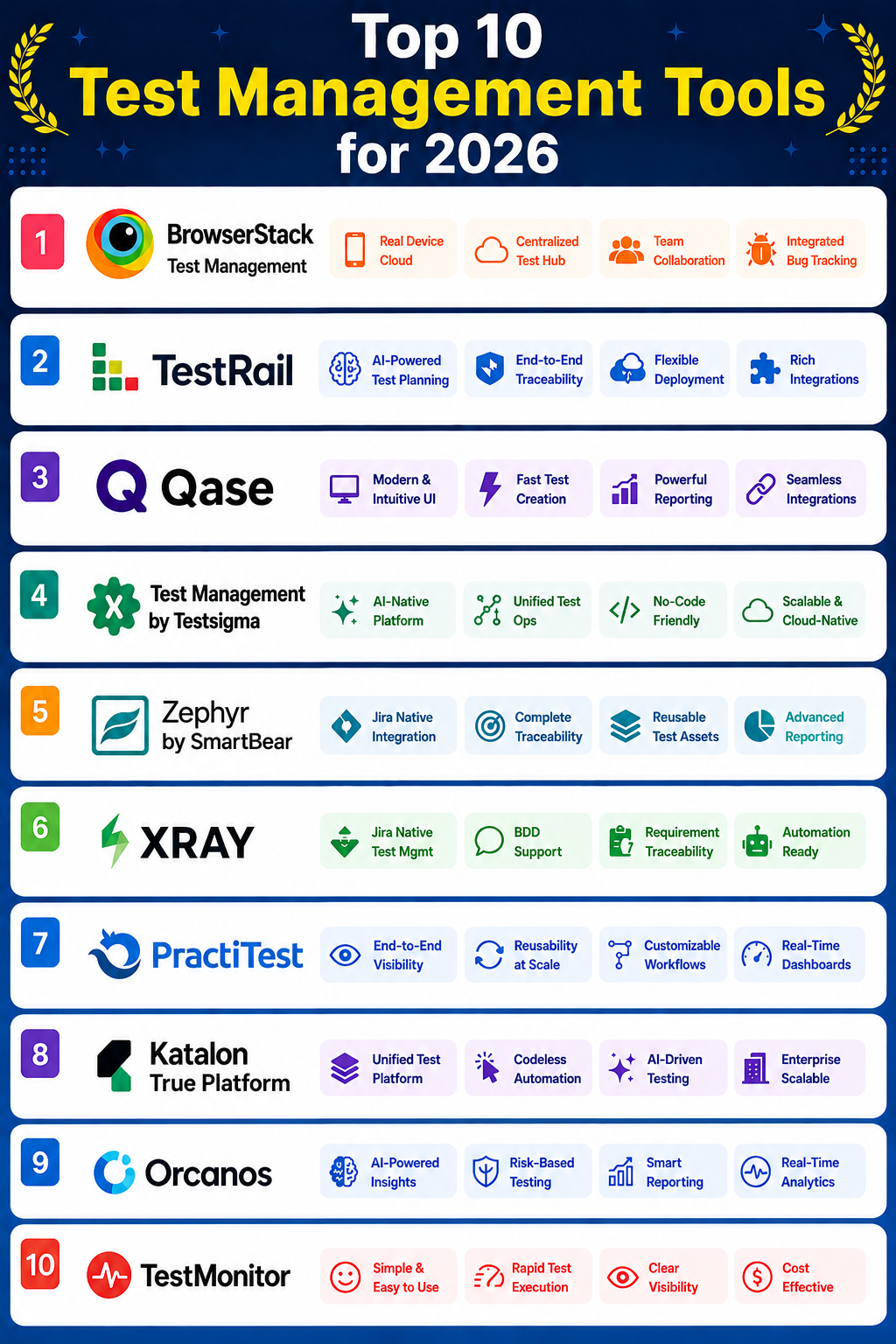
For QA leads, engineering managers, and CEOs evaluating their options, here are the top 10 test management tools for 2026.
1. BrowserStack
BrowserStack Test Management is an AI-powered, all-in-one test management product within the larger BrowserStack testing ecosystem, designed to manage manual and automated tests in one place. It brings together test case creation, execution, reporting, and analytics with AI agents that auto-generate test cases, detect duplicates, and convert manual tests into low-code automation. For QA leads already using BrowserStack for cross-browser and real-device testing, Test Management closes the loop by tying test cases, runs, and results directly to execution environments — and for CEOs, the executive dashboards offer Net Quality Score, defect leakage, and 50+ engineering metrics that unify quality data across the SDLC.
Developed By
BrowserStack Test Management is developed by BrowserStack Inc., founded in 2011 by Ritesh Arora and Nakul Aggarwal in Mumbai, India. The company is headquartered in Mumbai, with additional offices in San Francisco, New York, and Dublin. BrowserStack reached unicorn status in 2021 with a $4 billion valuation, has raised $250M+ from Accel, Bond, and Insight Partners, and now supports over 50,000 customers with 1,200+ employees globally. Its testing platform powers more than two million tests daily across 22 global data centers.
Key Features
- AI-Powered Test Case Creation — Get AI-based suggestions to create new test cases or enhance existing ones, helping QA teams move 90% faster on test authoring.
- Test Case Generator Agent — Convert any requirement artifact (Jira story, ADO work item, PRD) into actionable test cases automatically.
- Test Deduplication Agent — Automatically detect duplicate test cases across the repository with smart suggestions to consolidate or archive them.
- Low-Code Authoring Agent — Convert manual test cases into low-code automated tests without writing scripts from scratch.
- Shared Steps in Test Cases — Mark repeating steps as shared inside test cases to reduce duplication and improve reusability across the suite.
- One-Click Test Case Addition — Create test cases with a single click without filling in all fields, ideal for fast test planning sessions.
- BDD Template — Structure test scenarios using the Given-When-Then format for behavior-driven development.
- Custom Test Case Template — Build custom templates that match unique testing needs and reuse them across projects.
- Drag-and-Drop Test Cases — Easily move test cases across projects and test suites without manual restructuring.
- Global Search — Search specific test cases across all project entities, not just within the active project.
- Custom Fields (Form & Results) — Add custom form fields for test cases and custom result fields for test runs to tailor test management around team workflows.
- Test Case History & Versioning — Track changes to test cases over time with full version history (Team Pro and above).
- Quick Import — Import test cases from existing test management tools using APIs or from CSV files, with automatic field mapping and on-the-fly custom field creation. Test data import in 24 hours.
- Two-Way Jira Binding — AI-powered Jira app where test cases and test runs are visible and manageable in both Test Management and Jira, with AI assistance to create and manage tests from Jira directly.
- Test Management for Azure DevOps — Native integration that lets teams manage test cases tied to ADO work items, with AI-driven auto-generation of test cases and end-to-end traceability from requirements to defects.
- Manual & Automated Test Runs — Plan, execute, and track both manual and automated test runs. Dynamic test case selection automatically includes relevant cases, and automation results can be uploaded from JUnit-XML or BDD-JSON reports.
- Dashboard Analytics & Test Reports — High-level overview and drilled-down details on test cases and test runs, with smart reports that automatically identify flaky tests, new failures, and unique errors.
- AI-Driven Failed Test Analysis — Debug test failures 95% faster with AI-driven root cause categorization.
- Executive Dashboards — Track 50+ quality engineering metrics, including coverage, defect leakage, flakiness, cycle time, and stability. Includes Net Quality Score, Key Wins, Focus Areas, and AI-powered Q&A.
- Quality Gates & GitHub PR Checks — Automatically block or allow code merges and deployments based on test quality criteria.
- Role/User-Based Access Control — Advanced data access management for large teams across multiple projects.
- Geo Region Restriction — Ensure compliance with data residency regulations and internal organizational policies.
- Webhooks & API Reference — Programmatic access for custom integrations and workflows.
Supported Integrations
BrowserStack Test Management integrates with 50+ tools, including: Jira, Azure DevOps, Asana (issue trackers), TestNG, WebdriverIO, Nightwatch.js, Appium, Playwright (50+ test automation frameworks), Jenkins, Azure Pipelines, Bamboo, CircleCI (CI/CD tools), and Test Reporting & Analytics for upload of automation results.
Pricing Models
BrowserStack Test Management offers three plans with annual or monthly billing. Annual billing saves up to 25%.
- Team — $99/month (billed annually) for 5 users. Improves testing efficiency with customization and full traceability. Includes Test Case Customization using Custom Fields, Shared Steps in Test Cases, Advanced Filtering for Test Cases, Test Run Customization, Reports on Traceability & Defects, and Create Test Cases & Test Runs in Jira.
- Team Pro — $199/month (billed annually) for 5 users. Transforms test management with insights and instant debugging. Includes everything in Team, plus Dynamic Selection of Test Cases in Test Runs, Reports Across All Projects (upcoming), Test Case History & Versioning, Archive & Retrieve Test Cases, and Review and Approve Workflow.
- Team Ultimate (Best Value) — Custom pricing (Inquire for pricing / Contact Sales). Reimagines Test Management with AI and built-in Test Reporting & Analytics. Includes everything in Team Pro, plus Automatic Flaky Test Detection, AI-driven Failure Reason Categorisation, Automatic New Failures/Always Failing/Performance Anomaly Tagging, and Custom Dashboards with Pluggable Widgets.
Free Trial: Yes, create a free account to get started. What’s included:
- Instant Access to Real Devices
- 30 mins each of interactive browser and mobile app testing
- 100 mins of automated browser testing
- 100 mins of automated mobile app testing
- 5000 screenshots/month for visual testing with Percy
- Testing on internal development environments
Ratings
- G2: 4.5 / 5 (BrowserStack — 5,000+ reviews across the broader platform)
- Capterra: 4.5 / 5
- Gartner Peer Insights: 4.5 / 5
Popular Customers
Trusted by more than 50,000 customers across 135+ countries, including Google, Amazon, Microsoft, X (Twitter), Coca-Cola, Nike, Booking.com, Warner Bros. Discovery, United Nations, HSBC, Spotify, and Tesla.
Best Selling Points
- 8 AI agents across the full testing lifecycle — From test planning, authoring, execution, validation, to maintenance — built ground-up, not wrapped around GPT.
- 90% faster test case creation and 50% improved test coverage — Verified productivity gains reported by customers.
- Native integration with BrowserStack’s testing ecosystem — Direct connection to cross-browser and real-device testing infrastructure for end-to-end workflows.
- Executive dashboards with Net Quality Score — Quality engineering insights that unify data across test management, CI/CD, defect tracking, and 30+ tools.
- Quality Gates and GitHub PR checks — Block or allow code merges based on test quality, embedding QA into the deployment workflow.
- 24-hour test data import — Migrate from existing test management tools (including TestRail) using APIs or CSV without major switching overhead.
Awards
- Forbes Cloud 100 — Named for four consecutive years on the top 100 private cloud companies list
- Unicorn Status (2021) — Reached $4 billion valuation, becoming the 15th Indian unicorn of 2021
- BrowserStack was recognized as a 2026 TrustRadius Buyer’s Choice Award winner based entirely on verified customer reviews, highlighting its strong reputation for delivering value, capabilities, and user experience to software testing teams worldwide.
- Verified 2026 G2 badges not confirmed from publicly available sources for BrowserStack Test Management as a standalone product.
Pros & Cons
Pros: Extremely user-friendly with effortless integration and testing across various devices, diverse real devices that simplify cross-browser and cross-platform testing, a wide variety of devices and browsers that improve testing efficiency, flexible and scalable cross-browser testing capabilities across devices, easy testing with real devices and browsers for both web and mobile.
Cons: Slow performance during tests that creates uncertainty about whether issues are with the app or the emulator, slow loading times during simultaneous use and automated test execution, expensive and less accessible for individual testers or small projects with limited budgets, testing difficulties with limited control over environments and audio/video restrictions during sessions, slow speed leading to lag during testing sessions even with fast internet.
2. TestRail
TestRail lets you manage all of your manual, exploratory, and automated tests in one place to gain full visibility into your testing. Centralizing testing activities, it makes it easier to access and manage test assets, reduce duplication, and provide consistency across the entire testing process, giving QA teams a single source of truth from test creation through execution and reporting.
Developed By
TestRail is developed by Gurock Software GmbH, founded in 2004, with headquarters in Frankfurt, Germany, and additional offices in Dublin, Austin, and Houston. In 2016, Gurock was acquired by Idera, Inc., and today operates as part of Sembi, a subsidiary of Idera that brings together a portfolio of software testing and application security brands.
Key Features
- Centralized Test Repository — Organize, manage, and track your automated and manual test cases in hierarchical folders within one collaborative platform.
- Reusable Test Cases — Reuse test cases across multiple test runs and copy them to new suites or projects to eliminate duplicate work.
- Custom Fields — Create and manage unique test case fields, such as a dropdown menu to select the automation status of a test case or a multi-line text field to detail goals as part of an exploratory session.
- Import Test Cases — Migrate any existing test cases from CSV files or other test management tools to maintain your historical data when switching platforms.
- Quick-add Test Cases — Quickly outline your testing scenarios by adding one or more test cases without filling in all test case fields, perfect for rapid test planning sessions.
- Test Case Templates — Use out-of-the-box templates for scripted, steps-based, or exploratory tests, or define your own templates to ensure consistency and efficiency.
- Test History — Record all changes to test cases and historical results for every test, so you can see who executed the test, which test plans and runs the test was included in, and any associated comments.
- Shared Test Steps — Reuse the same set of test steps across multiple test cases. Edit a single set of steps once, and the edits will automatically be distributed to all test cases using those steps.
- Test Suites — Use a single, centralized test case repository to store and organize cases, or divide into different repositories to gain more granularity and control.
- Test Case Versioning — Compare test case versions side-by-side to track how test cases have changed over time and roll back when needed.
- Coverage Reports — Link tests to issues to find requirement gaps, reduce defect leakage, and ensure tests cover your application’s features.
- Test Case Approvals — Set up collaborative review and approval processes to ensure test cases accurately define your application and meet your organization’s standards.
Supported Integrations
TestRail integrates with: Selenium, Kiuwan, testRigor, Jira, Ranorex Studio, Azure DevOps, GitHub, Global App Testing, Jenkins, Sauce Labs, CircleCI, Travis CI, ClickUp, Monday.com, Curiosity Software, Aha! Develop, Redmine, Cypress, JUnit5, NUnit, Pytest, Robot Framework, TestNG, Bugzilla, Mantis, Bitbucket, GitLab, Pivotal Tracker, Asana, Assembla, Axosoft, FogBugz, Rally Software, Trac, Trello, YouTrack, Confluence, Functionize, and Playwright.
Pricing Models
TestRail offers two paid plans, billed per user. Both plans are available on a monthly or annual subscription, with the annual option being more cost-efficient.
- Professional Plan — $38 per seat/month ($456 per user for 12 months). Includes traceability and coverage reporting, test cases and suites, test runs, plans and milestones, defect and requirements integrations, TestRail API, on-cloud or on-premise deployment, and AI-powered features.
- Enterprise Plan (Recommended) — $76 per seat/month ($912 per user for 12 months). Includes everything in Professional, plus automatic daily backups (Cloud only), single sign-on (SSO), advanced auditing, test case version control & approvals, test parameterization, project admin permissions, cross-project reporting, priority support, on-cloud or on-premise deployment, and AI-powered features.
Free Trial: Yes, both plans come with a 30-day free trial. No credit card required.
Ratings
- G2: 4.4 / 5
- Capterra: 4.3 / 5 based on 176+ user reviews Capterra
- Gartner peer insights: 3.5 / 5
Popular Customers
More than 10,000 QA teams trust TestRail, including Siemens, Abbott, Rakuten, Cisco, NASA, PayPal, and Ford.
Best Selling Points
- All-in-one test management — Manage manual, exploratory, and automated tests from a single centralized platform.
- AI-powered productivity — Plan and execute tests up to 90% faster with AI test case generation powered by Sembi IQ, with intelligence trained by actual testers and human-in-the-loop controls.
- Flexible deployment — Choose between cloud-hosted or on-premise deployment to meet your security and compliance needs.
- Extensive integration ecosystem — Native connections with leading automation frameworks, CI/CD tools, and issue trackers eliminate tool silos.
- Enterprise-grade traceability — Coverage reports, test history, versioning, and approval workflows make it ideal for regulated and audit-heavy environments.
- Proven at scale — Trusted by 10,000+ QA teams worldwide, including Fortune 500 enterprises and global brands.
Awards
2021 — Best Results, Best Relationship, Best Usability, Most Implementable, and Users Love Us in G2’s Winter 2021 Grid for Test Management
2020 — Momentum Leader, Most Implementable, Best Relationship, Best Usability, and Users Love Us in G2’s Winter 2020 Grid for Test Management; also named Leader in the Software Testing Tools category
2019 — #1 in G2’s Fall 2019 Grid for Software Testing and Test Management; won Best Enterprise Support, Most Implementable, Easiest Enterprise Administration, Momentum Leader, and Users Love Us; also named #1 most popular test management tool in the DevTestOps Landscape Survey 2019
Pros & Cons
Pros: Easy organization and maintenance of test cases, simple and easy to use, organization and ease of use across the test management process, easy organization and tracking of test cases, strong Jira integration for defect linking and traceability.
Cons: Slow performance with large test suites and multiple configurations or users, slow loading times on large projects and extensive test suites, steep learning curve with unintuitive settings on large datasets, clunky and outdated UI, poor UI design that slows down navigation with large test suites.
3. Qase
Qase is a test management platform that helps QA teams create, organize, execute, and track test cases from a single workspace. It’s built for teams that want a modern alternative to legacy test management tools, with a clean interface for managing test repositories, test runs, and defects. For QA leads and engineers, Qase centralizes manual and automated test results, links them to requirements, and gives leadership real-time visibility into test coverage, pass rates, and release readiness without manually compiling reports.
Developed By
Qase is developed by Qase Inc., a software company headquartered in San Francisco, California, with engineering teams distributed across Europe. The company focuses exclusively on building modern test management software for QA and engineering teams.
Key Features
- Test Case Management — Create and manage a complete test model tree without limits on hierarchy or depth, organized by feature, component, or release.
- Test Runs — Create manual and automated test runs and track results in a single record that stores environment, build, configuration, and logs for every execution.
- Shared Steps — Maintain reusable test steps that update across all linked test cases, eliminating duplication when test steps change.
- Custom Fields — Customize test cases around your team’s workflow with custom fields available on paid plans.
- Test Case Review — Submit and review pull requests against your test model, then approve or decline changes, a Git-style review workflow for test cases (Business and Enterprise plans).
- Defect Management — Create and manage defects directly linked to test runs, with two-way sync to issue trackers.
- Smart Test Wizard — Guided flows for designing test suites faster, helping new QA members onboard without learning a complex structure.
- Requirements Traceability Matrix — Link test cases to user stories and requirements to see coverage for any scope and track impact when requirements change.
- Qase Query Language (QQL) — Filter and group test cases and runs using a dedicated query syntax, useful for slicing large test repositories quickly.
- Customizable Dashboards & Reporting — Build dashboards with KPIs like coverage, pass rates, failure trends, flakiness, and cycle time per project or release. Share with stakeholders using read-only seats.
- Test History — Retain test execution data from 30 days (Free) up to unlimited history (Enterprise), with add-on extensions available on Startup and Business plans.
- Role-Based Access Control — Manage permissions across users and projects, available from the Business plan upward.
Supported Integrations
Qase integrates with: Jira, Jira Server & Data Center, Asana, Azure DevOps, Bitbucket, ClickUp, Cypress, GitHub, GitHub CI, GitLab, GitLab CI, Jenkins, Linear, Monday, Slack, Trello, and YouTrack — with 35+ integrations across issue trackers, automation frameworks, and team communication tools.
Pricing Models
Qase offers four plans, billed per user. Both monthly and annual subscriptions are available, with the yearly option saving 20%.
- Free Plan — $0/user. For students and hobbyists learning the basics of a TMS. Includes up to 3 users, up to 2 projects, 500 MB storage, 30-day test history, and 25k/month API results.
- Startup Plan — $24/user. Includes up to 20 users, unlimited test runs and projects, 100 GB storage, 90-day test history (extendable with add-on), dashboards and reporting, 35+ integrations, and custom fields.
- Business Plan (Recommended) — $30/user. Includes everything in Startup, plus up to 100 users, unlimited storage, role-based access control, 1-year test history (extendable), test case review, Qase Query Language, and requirements traceability.
- Enterprise Plan — Custom pricing. Includes everything in Business, plus multi-workspace SSO (SAML 2.0), single sign-on with SCIM provisioning, SLA, unlimited data history, dedicated success manager, and enterprise support.
Free Trial: Yes, Qase offers a 14-day free trial of the fully functional test management platform. No credit card required.
Ratings
- G2: 4.8 / 5
- Capterra: 4.8 / 5
- Gartner Peer Insights: 4.6 / 5
Popular Customers
Qase is used by 2,000+ companies, including SUSE, Wolt, Asana, Bitly, Bumble, Crypto.com, and Rakuten.
Best Selling Points
- Modern, user-friendly interface — Built for teams that find legacy test management tools clunky, with a design QA engineers consistently call out as easy to navigate.
- End-to-end requirements traceability — Every requirement maps to test cases and results, so teams can trace exactly what was tested and what wasn’t when issues hit production.
- Git-style test case reviews — Pull-request-based approval workflow keeps test cases as carefully version-controlled as code.
- Powerful query language for large repositories — QQL lets QA teams filter and group test cases the same way developers filter logs.
- Strong free tier — A fully functional free plan supports up to 3 users, making it practical for small teams to adopt without procurement overhead.
- Fast support — 24/5 support via email and live chat with under 5-minute response time.
Awards
Verified data was not found from publicly available sources.
Pros & Cons
Pros: User-friendly interface with a modern and adaptable design, outstanding customer support with quick and professional communication, efficient test management backed by responsive support, easy integration capabilities that improve collaboration across teams, and conditional test cases that simplify similar testing scenarios.
Cons: Limited customization options that restrict versatility in integration and report generation, testing difficulties with step management and CSV import, integration issues with GitLab and some third-party services, missing features with requests for expanded advanced testing functionality, and limited capabilities in test configurations and milestone management.
4. Test Management by Testsigma
Test Management by Testsigma is an agentic test management platform built around an AI coworker called Atto, which deploys specialized AI agents to handle sprint planning, test case generation, test execution, and bug reporting. It’s designed for QA teams that want to replace spreadsheets and legacy tools with a single repository that connects directly to Jira sprints. For QA leads and CEOs evaluating modern alternatives, it stands out for its two-way Jira sync, AI-generated test cases tied to user stories, and a free-forever plan that makes it accessible to small teams without procurement overhead.
Developed By
Test Management by Testsigma is developed by Testsigma Technologies Inc., founded in 2019 by Pratheep Velicherla, Rajesh Reddy, and Rukmangada Kandyala. The company is headquartered in San Francisco, California, with engineering operations in Bangalore, India. Testsigma has raised $12.8M in funding from investors, including Accel and MassMutual Ventures.
Key Features
- Sprint Planner Agent — Automatically detects new Jira sprints the moment they begin and pulls every story into Testsigma. No manual input required from QA teams.
- Story-to-Test Mapping — Every test case generated by the platform links directly to a Jira story with clear steps, preconditions, and validations, giving a visible coverage matrix from day zero of the sprint.
- AI Test Case Generator — Creates detailed, contextual test cases with positive flows, negative flows, and edge cases, eliminating manual copy-pasting from spreadsheets and reducing missed test scenarios.
- Editable AI-Generated Tests — Tests are auto-filled with steps, data, and preconditions, but remain fully editable through an interactive chat to tweak any step.
- Reusable Test Cases — Test cases are reusable across different scenarios, removing duplication and the need to recreate similar tests.
- The Runner (AI Test Execution) — Human-in-the-loop AI execution with live browser execution, visual step logs, and auto-generated test data, while QA stays in control of the run.
- Test Run Tracking Dashboard — Centralized dashboard to track runs, monitor progress, and fix issues as they arise.
- Non-Functional Testing Detection — Auto-detects usability bugs, accessibility gaps, and visual/UI inconsistencies in parallel with regular test steps, giving early visibility into quality issues beyond functional defects.
- The Bug Reporter Agent — Logs bugs to Jira, Linear, or ClickUp with full context and reproducible steps the moment a step fails. Generates a summary, description, and steps to reproduce for human review before submission.
- Two-Way Jira Sync — Bidirectional sync with Jira lets users link bugs to new or existing Jira issues with a single click, and supports linking a single bug to multiple existing issues.
- Unlimited Custom Fields — Available on the Pro plan for enhanced test organization around team-specific workflows.
- Advanced Filtering and Reporting — Filter test cases, runs, and results, with reporting tools available across all paid plans.
- CSV Import — Migrate existing test cases from CSV files when moving from another test management tool.
- Role-Based Access Controls — Advanced RBAC available on the Enterprise plan (coming soon as per current roadmap).
Supported Integrations
Test Management by Testsigma offers 40+ native integrations on the Enterprise plan, including Jira, Linear, and ClickUp for two-way bug sync. Free Forever supports two integrations of choice, Pro supports unlimited integrations (coming soon), and Enterprise includes 40+ integrations with unlimited CI/CD triggers.
Pricing Models
Test Management by Testsigma offers three plans, billed per user.
- Free Forever — $0. Test management solution for individuals and small teams. Includes complete test management for up to 10 users, unlimited projects, test cases, and test runs, 10 GB total storage with 25 MB attachments per test case, advanced filtering and reporting tools, CSV import, two integrations of your choice, 60-day data retention, and a community support forum.
- Pro Plan — $8/user/month (discounted from $29). For fast-growing teams. Includes everything in Free Forever, plus agentic AI-based test generation and reporting, support for up to 25 users, read-only access, 50 GB total storage with 1 GB attachments per test case, unlimited custom fields, unlimited integrations (coming soon), 1-year data retention, enterprise-grade security with SSO, and 24/5 priority support.
- Enterprise Plan — Custom pricing. For high-scale teams. Includes everything in Pro, plus agentic AI-based test execution, 200 GB total storage with 5 GB attachments per test case, AI-powered test suggestions and dynamic test plans (coming soon), advanced role-based access controls (coming soon), unlimited CI/CD triggers, custom notifications and data sets, 3-year data retention, and 40+ integrations. Bundled with autonomous test automation across applications.
Free Trial: Yes — Testsigma offers a 7-day free trial. No credit card required.
Ratings
- G2: 4.5 / 5
- Capterra: 4.6 / 5
- Gartner Peer Insights: 4.5 / 5
Popular Customers
Test Management by Testsigma is used by leading organizations including Cisco, Carrier, KFC, Nestlé, Sanofi, ZEISS, FairPrice, Hansard Global PLC, Nagra Kudelski, Samsung, Nofi, Epsilon, ALTEN, MRM, and DHL.
Used by 10K+ QA teams.
Best Selling Points
- Agentic AI workflow — Atto deploys specialized AI agents for sprint planning, test creation, execution, and bug reporting, with a human-in-the-loop approach so QA stays in control.
- Native two-way Jira sync — Auto-detects new sprints, pulls stories, generates linked test cases, and syncs bug status bidirectionally without manual updates.
- Sprint-ready from day zero — Review-ready test cases generated the moment a sprint becomes active, giving QA teams a coverage matrix before testing begins.
- Strong free tier — Free Forever supports up to 10 users with unlimited projects, test cases, and test runs — a rare offering at this scale.
- Aggressive paid pricing — Pro plan at $8/user/month is among the lowest in the modern test management category.
- Non-functional testing in parallel — Detects usability, accessibility, and visual/UI issues alongside functional test steps without separate tooling.
Awards
- 2026 — G2 Winter 2026 Leader and Momentum Leader badges; also named Top 50 Best Software 2026 (India) by G2
- 2024 — SoftwareSuggest High Performer 2024 and Best Support Winter 2024
Pros & Cons
Pros: Easy to use for testing across platforms without programming expertise, ability to create automation tests without coding experience, excellent customer support that improves the overall experience, strong automation support that boosts testing efficiency, time-saving features that allow efficient script development with minimal training.
Cons: Slow performance when executing larger test suites resulting in longer wait times for results, testing difficulties with complex API challenges and slow execution times, frequent errors when using mobiledriver in the framework, complexity in automated testing and customization often requires external support, steep learning curve that can be overwhelming for newcomers.
5. Zephyr by SmartBear
Zephyr is a Jira-native test management and automation platform built by SmartBear for QA teams that live inside the Atlassian ecosystem. It lets testers plan, automate, track, and report on tests directly within Jira, with no-code test automation powered by SmartBear Halo AI. For QA leads and CEOs running Jira-centric development, Zephyr eliminates the need to switch between separate test management tools and the project tracker, keeping requirements, test cases, defects, and execution results in a single workspace. SmartBear also offers QMetry for Jira (QTM4J), an AI-enabled test management product positioned for teams that need modern, audit-ready quality engineering at scale, but this section focuses on Zephyr.
Developed By
Zephyr is developed by SmartBear Software, a software quality company founded in 2009 and headquartered in Somerville, Massachusetts, USA, with offices across the United States, the United Kingdom, Ireland, Poland, and India. SmartBear’s product portfolio includes Zephyr, QMetry, TestComplete, Swagger, ReadyAPI, and BugSnag, all focused on software testing, API development, and application stability.
Key Features
- Native Jira Integration — Coordinate all test management activities, including test planning, automation, execution, tracking, and reporting, directly inside Jira without switching tools.
- 360-Degree Traceability — Track requirements across test cases, test cycles, test plans, and execution results, with broad-ranging traceability and test case coverage statistics via built-in reports.
- Hierarchical Test Folders — Access all test assets from a single repository organized in hierarchical folders, with reusability across Jira projects, releases, and sprints for regression testing.
- Cross-Project Reports and Dashboard Gadgets — Over 70 cross-project reports and dashboard gadgets to track coverage, progress, and quality of tests inside Jira, shareable across teams.
- Versioning, Test Data, and Parameters — Track test case versions with a full change history, reuse test data and parameters across cases, and eliminate duplication with shared steps.
- Manual Test Management — Available across all plans, covering test case creation, organization, execution, and tracking inside Jira.
- BDD Support — Behavior-Driven Development workflow support is included on all Zephyr plans.
- Data Residency — Available on Standard and Advanced plans for teams with compliance requirements.
- No-Code Test Automation — Limited on Standard, Expanded on Advanced. Build automated tests inside Jira without scripting, with SmartBear Halo AI generating optimized test steps.
- Smart Test Step Suggestions — AI-powered suggestions for test steps available on Standard and Advanced plans, reducing time spent writing repetitive test cases.
- Record and Play Automation — Capture user actions and replay them as automated test cases, available on Standard and Advanced.
- Self-Healing Locators — Automated tests update locators automatically when application UIs change, reducing test maintenance overhead.
- Parallel Testing, Cross-Browser, and Cross-Channel No-Code Automation — Available exclusively on the Zephyr Advanced plan for teams needing full-scale automation breadth.
- BDD and CI/CD Tool Integration — Integrate with the BDD or CI/CD tool of your choice to fit existing pipelines.
Supported Integrations
Zephyr integrates natively with Jira Cloud, Jira Server (10.0.0–10.6.1), and Jira Data Center (11.0.0–11.3.6), along with BDD frameworks and major CI/CD tools. As a SmartBear product, it also connects with other SmartBear quality tools across the testing lifecycle.
Pricing Models
Zephyr offers three Jira-based plans plus QMetry for Jira (QTM4J) as a separate product. Pricing is per-user with both monthly and annual billing.
- Zephyr Essential — $10/month for teams of 10 (≈ $1/user average). Includes manual test management, cross-project reporting, and BDD support.
- Zephyr Standard — Includes everything in Essential, plus data residency, limited no-code test automation, smart test step suggestions, and record-and-play automation.
- Zephyr Advanced — $15/month for teams of 10. Includes everything in Standard, plus expanded no-code automation, parallel testing, cross-browser no-code automation, and cross-channel no-code automation.
- QMetry Test Management for Jira (QTM4J) — A separate SmartBear product for teams needing audit-ready quality engineering at scale. Pricing available via the Atlassian Marketplace.
Free Trial: Yes — all Zephyr apps on the Atlassian Marketplace offer a 30-day free trial for teams of all sizes.
Ratings
- Atlassian Marketplace (Zephyr Essential): 3.9 / 5 (900 reviews, 12,179 installs)
- Atlassian Marketplace (Zephyr — Test Management and Automation for Jira): 4.1 / 5 (485 reviews, 20,482 installs)
- G2 (Zephyr Enterprise): 4.1 / 5
- Gartner Peer Insights: 4.4 / 5
- Capterra: 3.5 / 5
Popular Customers
Zephyr by SmartBear is used by major enterprises, including Microsoft, JetBlue, Adobe, Pfizer, Google, National Geographic, Expedia, Canon, and Dow Jones.
Best Selling Points
- Jira-native architecture — Built as a Jira app from the ground up, so test management lives in the same workspace where requirements and defects already exist.
- Tiered automation depth — Plans scale from manual-only test management (Essential) up to full no-code parallel and cross-browser automation (Advanced).
- SmartBear Halo AI — AI-powered test step suggestions, auto-generated validations, and self-healing locators reduce time spent writing and maintaining tests.
- 70+ built-in reports and dashboard gadgets — Coverage, progress, and quality metrics surface directly in Jira dashboards.
- Trust signals on Marketplace — “Cloud Fortified” and “Partner Supported” badges from Atlassian, plus 32,000+ combined installs across the Zephyr product line.
- Enterprise pedigree — Used by Microsoft, Google, Adobe, JetBlue, Pfizer, and other Fortune 500 companies, with audit-ready quality engineering available via the sister product QMetry.
Awards
Verified award data was not found from publicly available sources.
Pros & Cons
Pros: Strong automation capabilities that improve test organization and tracking efficiency, reliable bug detection backed by organized test documentation, responsive customer support that helps with onboarding and ongoing usage, solid test organization features for managing and tracking large test repositories, and effective test tracking that supports overall testing efficiency.
Cons: Steep learning curve with difficult navigation and a slow interface, poor UI with unintuitive navigation and sluggish performance, slow loading times that affect navigation and search experiences, slow overall performance that frustrates day-to-day usage, slow web interface that impacts the overall product experience.
6. Xray
Xray is a Jira-native test management platform that lives inside the Jira issue tracker, using special Jira issue types so QA and dev teams can manage requirements, test cases, executions, and defects without leaving the tool. It covers the full testing lifecycle — planning, specification, organization, execution, and reporting — and supports both manual and automated tests, including BDD with Cucumber, JUnit, NUnit, and Robot. For QA leads in Jira-heavy organizations, Xray’s advantage is that it’s not an add-on layered on top of Jira but a tool built around Jira’s data model, with native traceability between user stories, test cases, and execution results.
Developed By
Xray is developed by Xpand IT, a Platinum Atlassian Solution Partner founded in 2003 in Lisbon, Portugal. Xray was first released in 2014 after Portugal Telecom challenged Xpand IT to build a Jira-native test management tool. The product later operated under Xblend Software and was acquired by Idera, Inc. in May 2021. Today, Xray operates as part of Sembi, an Idera subsidiary that brings together a portfolio of software quality brands, including TestRail and Xray. Xray maintains offices in Portugal (headquartered in Amadora) and the United States.
Key Features
- Native Jira Experience — Built using Jira issue types, so test cases, test plans, test sets, test executions, and pre-conditions all behave like native Jira issues with full Jira workflow, permissions, and JQL support.
- AI Test Case Generation — Transform requirements into structured test cases instantly with AI-powered generation, supporting both Manual and Cucumber formats, with human-in-the-loop control at every step.
- AI Test Script Generation — Available on the Advanced plan, generating automation test scripts from requirements.
- Requirements Traceability — Native linking between requirements, test cases, test executions, and defects, with detailed traceability reports showing exactly where a test went right or wrong.
- Cross-Project Reporting — Track coverage, progress, and quality across multiple Jira projects with built-in coverage statistics and traceability reports.
- Test Case Management and Execution — Full lifecycle support, including manual test execution with results stored as Jira issues.
- BDD Support — Native Behavior-Driven Development workflow with Cucumber integration, including Gherkin syntax test cases stored in Jira.
- Test Automation Framework Integration — Native integration with leading automation frameworks, including Cucumber, Selenium, JUnit, NUnit, and Robot Framework, so automated test results feed back into Xray inside Jira.
- REST and GraphQL APIs — Programmatic access to all test data for custom dashboards, CI/CD integration, and reporting pipelines.
- Real-Time Test Indexing — Tests are indexed in real time, so you maintain full control of the testing process at any scale.
- Exploratory Testing Integration — Companion desktop tool for exploratory testing of web, mobile, and desktop apps, with results flowing into Xray and Jira.
- Smart Orchestration — Manage testing across large codebases with orchestration that scales for complex, large-scale projects.
Supported Integrations
Xray integrates with: Jira Cloud, Jira Server, Jira Data Center, Cucumber, Selenium, JUnit, NUnit, Robot Framework, and major CI/CD pipelines via REST and GraphQL APIs. As a Jira-native app, it also works alongside other Atlassian Marketplace tools, including its sister product Xporter for reporting.
Pricing Models
Xray offers two editions: Standard and Advanced, across both Cloud and Data Center hosting. Pricing is per Jira user with monthly and annual billing options.
Xray Cloud Standard
- $0.83 per user/month
- $100/year for 10 users
- Includes test case management and execution, cross-project reporting and traceability, REST/GraphQL API, BDD support, AI test case generation, 100 GB storage, 60 API calls per minute, and 24/5 support.
Xray Cloud Advanced
- $1.00 per user/month
- $120/year for 10 users
- Includes everything in Standard, plus AI test script generation, 250 GB storage, 100 API calls per minute, 24/5 support, and Usage Monitor.
Xray Data Center
- $4.79 per user/month (billed annually)
- $2,875/year for 50 users
- Self-hosted option for organizations with data residency or on-premise requirements.
Free Trial: Yes, a 30-day free trial is available across all editions.
Ratings
- G2 (Xray Test Management): 4.3 / 5
- Atlassian Marketplace: Strong ratings across Cloud and Data Center editions
- Capterra: 4.2 / 5
Popular Customers
Xray is trusted by over 10 million testers, developers, and QA managers managing 100+ million test cases monthly at 10,000+ companies in 135 countries, including 137 of the Fortune Global 500. Named customers include BMW, NASA, Lufthansa, Nike, Samsung, Porsche, Disney, JP Morgan, Vodafone, Audi, Schindler, Ericsson, and Airbus.
Best Selling Points
- True Jira-native architecture — Built using Jira issue types, not as an overlay, so tests behave like Jira issues with full JQL, workflow, and permissions support.
- Massive enterprise adoption — 137 of the Fortune Global 500 use Xray, with 5.6 million+ users across 5,000+ companies.
- AI-powered test generation — Convert requirements into structured manual or Cucumber test cases instantly, with human review at every step.
- Strong automation framework support — Native integration with Cucumber, Selenium, JUnit, NUnit, and Robot, so automation results live alongside manual tests in Jira.
- Cost-effective at scale — Cloud Standard starts at $0.83/user/month, among the lowest per-user pricing in enterprise test management.
- Backed by Idera — Under the same parent as TestRail since 2021, giving long-term stability for enterprise procurement.
Awards
Verified award data was not found from publicly available sources. Xray is consistently ranked as the #1 Manual & Automated Test Management App on the Atlassian Marketplace.
Pros & Cons
Pros: Complete traceability that improves organization and progress tracking, rich organizational options that enable efficient test execution and reporting, end-to-end traceability for tracking testing progress, detailed reporting with comprehensive insights on testing status, easy to use with strong Jira integration, and efficient reporting capabilities.
Cons: Complex and slow interface that makes navigation challenging for newcomers and large projects, user difficulty due to interface complexity and slow performance, complexity that creates a steep curve when managing large test suites, integration issues that hinder team collaboration and system efficiency, session issues, including duplicate detection problems and lack of dashboard integration.
7. PractiTest
PractiTest is an end-to-end SaaS test management platform that consolidates manual, exploratory, and automated tests into one QA workspace. Its differentiator is a flexible data structure; instead of trapping tests inside rigid folders, it lets QA teams tag tests across unlimited dimensions and filter views from any angle in a single click. For QA leads running cross-functional testing operations, PractiTest delivers built-in requirements, test cases, test runs, issues, and dashboards under one license, with SmartFox AI handling test generation, duplicate detection, and test value scoring across the testing lifecycle.
Developed By
PractiTest is developed by PractiTest Ltd., founded in 2008 by Yaniv Iny (CEO) and Joel Montvelisky (Chief Product Officer). The company is headquartered in Rehovot, Israel, with an additional office in Rosemont, Illinois, USA. PractiTest is privately held and focuses exclusively on test management software, with customers reporting 30% less test maintenance, 25% faster coverage, and 20% more efficient execution after adoption.
Key Features
- Flexible Data Structure — Organize tests across unlimited dimensions rather than rigid folders. Tag based on multiple attributes and filter views from any angle in one click, removing the limits of traditional test repository hierarchies.
- Complete Test Type Coverage — Manage scripted manual tests, exploratory testing sessions, and automated test results in a single platform with full traceability across all types.
- SmartFox AI — Built-in AI suite that includes Adaptive Test Generator (creates test steps from requirements), Test Value Score (suggests which tests to run, skip, or retire based on historical data), Duplication Guardian (flags similar tests before creating duplicates), and Talk to Your Project (natural language QA queries).
- End-to-End Test Modules — Five core modules included on all plans: Milestones, Requirements, Test Case Library, Test Sets & Runs, and Issues Management.
- QA Intelligence & Release Readiness Scoring — Model your testing data to calculate release readiness scores based on coverage, execution progress, and risk — going beyond simple pass rates.
- Test Planning & Creation — Import requirements from Jira or Azure DevOps, surface tests instantly, identify coverage gaps, and create tests with AI, claimed up to 90% faster than traditional planning workflows.
- Test Execution & Defect Tracking — Capture defects with full context during execution, sync defects automatically to issue trackers, with AI-guided defect logging.
- Real-Time Dashboards & Reports — Daily status, execution status, coverage, defects, and automation visibility in real time, with drill-down traceability and exportable stakeholder reports.
- Two-Way Issue Tracker Sync — Real-time bidirectional sync with Jira, Azure DevOps, ClickUp, and other trackers, including an embedded panel for in-tool visibility.
- xBot Automation Orchestration — Schedule, trigger, and sync automated test runs automatically across multiple automation frameworks.
- FireCracker Integration — Bring automation results into PractiTest via API or FireCracker for a unified view of manual and automated testing with real-time failures, trends, and progress.
- MCP Integration — Connects AI tools to live QA data (requirements, tests, runs, defects) securely, enabling AI agents to answer questions and act on QA context.
- Concurrent Licensing Option — Available on the Corporate plan for teams where users don’t all need access simultaneously.
Supported Integrations
PractiTest integrates with:
Requirements & Issue Tracking — Jira, Azure DevOps, ClickUp, GitHub, Mantis, Bugzilla, Assembla, FogBugz, YouTrack, Trac, LightHouse, Slack. Automation — Selenium, Playwright, Cypress, Cucumber, Robot Framework, TestNG.
CI/CD — CircleCI, GitLab, MCP, Jenkins, Bamboo, Azure Pipelines.
AI Integration — MCP-based integration for connecting AI tools to live QA data.
Pricing Models
PractiTest offers two plans, billed per tester license. Yearly billing is available across both plans (Corporate is yearly-only).
- Team Plan — $49 per user/month. Starter package with 5 users, scales as your team grows. Includes unlimited projects, E2E Test Modules, Data Intelligence Pack, SmartFox AI capabilities, and 5 read-only comment users per license.
- Corporate Plan — Custom pricing (contact sales). Best for complex QA organizations. Available with yearly billing only, with a minimum of 10 tester licenses. Includes everything in Team, plus 10 read-only comment users per license, Advanced Security Pack, Control & Compliance Pack, multilingual support, multiple two-way issue integrations, premium onboarding and support, and concurrent licensing option.
Free Trial: Yes, a 14-day free trial is available, with full access to all platform features, including AI capabilities.
Ratings
- G2: 4.3 / 5 (233 reviews)
- Capterra: 4.5 / 5
- Gartner Peer Insights: 4.5 / 5
Popular Customers
PractiTest is used by McAfee, NHS, Envision Healthcare, DXC Technology, easyJet, AST, Pei Wei Asian Kitchen, UCSF, NCR, Nets, New York Life, Sony, Abbott, Viacom, and Louis Vuitton.
Best Selling Points
- All five core QA modules included — Requirements, Test Cases, Test Sets, Runs, and Issues bundled in one license, no separate purchases for traceability.
- Flexible, tag-based data structure — Filter and view tests across unlimited dimensions instead of being trapped in folder hierarchies.
- SmartFox AI built-in (no credit system) — AI-powered test generation, duplicate detection, and test value scoring are included on Team and Corporate plans without per-action credit charges.
- Release Readiness scoring — Goes beyond pass rates to model coverage, execution progress, and risk into shippable confidence scores.
- Transparent pricing on Team plan — Per-user pricing published openly, so teams can budget without sales calls.
- Vendor-agnostic integration approach — Built for teams using best-of-breed tools across issue tracking, automation, CI/CD, and AI.
Awards
- 2024 — Recognized as a Sample Vendor in Gartner’s Hype Cycle for test management
- 2024 — Intellyx Digital Innovator Award for innovation in digital transformation
- 2025 — PractiTest QA Leader of the Year Award (industry recognition program hosted by PractiTest)
Pros & Cons
Pros: User-friendly interface that helps new employees learn the tool quickly, comprehensive test case management that improves efficiency and traceability across the testing lifecycle, strong Jira integration for managing both manual and automated testing, simple and robust functionality that supports team collaboration and test management efficiency, and strong organization features that keep the testing process clear and manageable.
Cons: Difficult learning curve that makes initial usage challenging for newcomers, filtering issues that require manual adjustments and cause workflow delays, steep learning curve with advanced features and customization options, learning curve that often requires additional training for a smoother experience, non-intuitive interface that makes navigation and adaptation difficult.
8. Katalon
Katalon True Platform is an agentic, AI-augmented test management platform that unifies manual, automated, and AI-generated tests in a single workspace. Its differentiator is the deployment of AI agents that can analyze requirements, create test cases, automate them, and execute them — manual or automated — while keeping human accountability and traceability at every step. For QA leads and CEOs evaluating modern alternatives to legacy test management tools, Katalon eliminates tool sprawl by combining test management, automation, execution, and reporting into one platform, with role-based controls and configurable dashboards giving leadership real-time visibility into coverage, release readiness, and quality metrics.
Developed By
Katalon True Platform is developed by Katalon, Inc., founded in 2016 by Vu Lam and Uy Tran. The company is headquartered in Atlanta, Georgia, USA, with engineering operations in Vietnam, and has raised approximately $28.7M in funding (Series A led by Elephant Venture Capital). Katalon serves more than 30,000 QA and DevOps teams across 80+ countries and has been certified as a Great Place To Work® for three consecutive years.
Key Features
- AI-Powered Requirement Analysis — AI agents analyze incoming requirements and surface test coverage gaps before testing even begins.
- AI-Powered Test Case Creation from Requirements — Generate manual and automated test cases directly from requirements, with full traceability from spec to execution.
- AI-Powered Autonomous Manual Test Execution — Direct an AI agent to execute manual tests on your behalf without requiring traditional test automation scripts.
- AI-Powered Automation Script Generation — Generate automation scripts (no-code to full-code) from natural language descriptions of test scenarios.
- AI Self-Healing — Automation tests update locators automatically when application UIs change, reducing maintenance overhead for large automation suites.
- AI-Powered Bug Reporting — Generate detailed bug reports from failed test runs with context and reproducible steps.
- AI-Powered Manual and Automation Insights — AI agents surface flakiness, root cause analysis, and quality trends across both manual and automated test results.
- Test Case Centralization — Single source of truth for all test cases, manual and automated, across teams and projects.
- Test Schedule & Cloud Execution — Schedule and run tests on-demand with cloud or self-hosted execution, including parallel test execution.
- Manual Testing Suite — Plan, design, execute, and log bugs for manual tests with no-code workflows.
- Test Reporting & Analytics — Track test execution details, flaky test detection, automation failure root cause analysis, traceability and coverage reports, with custom widgets and dashboards.
- Cross-Project Reports — Available on the Enterprise Edition for organizations managing testing across multiple projects.
- Role-Based Access Control & Permissions — Granular permissions available on Enterprise Edition with SSO, SCIM provisioning, audit logs, IP allowlisting, and compliance controls.
- Customizable Fields — Configure test case fields to match team workflows (Enterprise Edition).
- Web, Mobile, Desktop, and API Testing — Author and manage tests across all major application types in one platform.
Supported Integrations
Katalon True Platform integrates with: Jira, Azure DevOps, Slack, CI/CD pipelines, Playwright, version control systems, and major testing frameworks. Collaboration via email and Slack is built in, with task management system integration through Jira and Azure DevOps.
Pricing Models
Katalon True Platform offers two editions, billed per seat with monthly or annual billing.
- Team Edition — $167 per seat/month (billed annually) or $185 if billed monthly. Designed for small to mid-size teams. Special Package Offer: $67 per seat/month for 5 seats (60% discount, billed annually). Includes AI agents for manual and automation test creation, execution, bug reporting, and result analytics; manual testing (plan, design, execute, log bugs); no-code to full-code automation; cloud and self-hosted test execution environment; unified test management; reporting and analytics; web, mobile, desktop, and API testing; integrations with Jira, Slack, CI/CD, and more; and digital support.
- Enterprise Edition — Custom pricing (Talk to Sales). For large businesses operating at scale. Includes everything in Team, plus cross-project reports, role-based access and permissions, Single Sign-On (SSO), SCIM user provisioning, IP allowlisting, audit logs, compliance controls, and live support.
Free Trial: Yes, 30-day free trial of the True Platform with unlimited agentic AI capabilities, full manual and automation testing access, cloud and self-hosted execution, integrations, and no credit card required.
Ratings
- G2: 4.5 / 5 (Leader)
- Capterra: 4.5 / 5
- Gartner Peer Insights: 4.4 / 5
Popular Customers
Katalon is trusted by 30,000+ QA and DevOps teams in 80+ countries, including Nasdaq, Samsung, Oracle, Tokio Marine, and Fifth Third.
Best Selling Points
- Agentic AI across the full testing lifecycle — AI agents handle requirement analysis, test creation, execution (manual and automation), and reporting, with human-in-the-loop control.
- Manual + automation + AI in one platform — Eliminates tool sprawl by unifying every test type in a single workspace.
- Cloud or self-hosted execution — Flexibility to run tests in Katalon’s cloud or on your own infrastructure, with parallel execution support.
- Visionary in 2025 Gartner Magic Quadrant — Recognized for AI-Augmented Software Testing Tools, validating the platform’s direction for enterprise procurement.
- G2 Leader for 18 consecutive quarters — Sustained category leadership across test management and software testing reports.
- Strong package pricing for small teams — 60% discount for 5-seat package brings Team Edition to $67 per seat/month, lowering entry cost for growing teams.
Awards
- 2026 — G2 Spring 2026 Leader
- 2026 — G2 Spring 2026 Momentum Leader
- 2026 — G2 Spring 2026 High Performer (Enterprise)
- 2025 — Visionary in the Gartner® Magic Quadrant™ for AI-Augmented Software Testing Tools
- G2 Leader — Recognized in software testing for 18 consecutive quarters
- Inc. 5000 — Ranked among America’s fastest-growing software companies
- Great Place To Work® — Certified for three consecutive years
Pros & Cons
Pros: Exceptionally easy to use, simplifying automation processes with minimal guidance needed, easy automation that improves testing efficiency, strong automation support with reliable integration and reporting, exceptional implementation ease that makes test automation accessible for everyone, and strong time-saving features that enable quick and efficient automation testing.
Cons: Slow performance with larger test suites and during execution, advanced features priced on the higher side, system delays during execution, especially with complex tests, and report viewing limitations, frequent bugs, including crashes and glitches that disrupt functionality, steep learning curve due to limited training, and complex project variable and settings management.
9. Orcanos
Orcanos is a test management tool built specifically for medical device manufacturers and regulated industries where compliance, traceability, and audit-readiness are non-negotiable. Unlike general-purpose test management platforms, Orcanos sits inside a wider ALM (Application Lifecycle Management) and QMS (Quality Management System) suite, so test cases, requirements, FMEA risk management, and design controls all live in one central repository. For QA leads and CEOs in medtech, pharma, or aviation, Orcanos shortens the path from test planning to submission-ready documentation — generating test design and result reports in MS-Word format with one click, ready for FDA, ISO 13485, IEC 62304, and ISO 14971 audits.
Developed By
Orcanos is developed by Orcanos Software Ltd., founded in 2005 by Zohar Peretz (Co-Founder & CEO). The company is headquartered in Givatayim, Israel, with R&D centers in both Israel and India. Orcanos focuses exclusively on integrated ALM, QMS, and regulatory compliance for regulated industries, particularly medical device manufacturing, pharmaceuticals, and aviation.
Key Features
- Test Execution — Plan, execute, and record test results inside the same workspace where requirements and risks already live. Mark tests as Pass, Fail, or Blocker with one click.
- Integrated Bug Tracking from Test Runs — Report defects directly from a test run, with all relevant test case information, including steps, automatically imported into the new bug ticket — no duplicate data entry.
- Traceability and Requirements Coverage — Tight integration with requirements management and FMEA risk management ensures every test traces back to a requirement and a risk control, with full traceability stored in a single repository.
- Custom Link Types — Set link types as coverage, verification, validation, and more, supporting the structured traceability needed for medical device V&V documentation.
- Custom Filters and Alerts — Notify stakeholders about requirements that have no test traced to them, or about requirements linked to failed test cases — useful for closing gaps before audits.
- Risk Verification Tracking — Test cases can be tracked and traced to ensure that levels of risk have been properly assessed and verified, with results saved as verification evidence for compliance.
- Test Parameters — Build predefined configurations using test parameters, then reuse them when executing tests across different environments or device variants.
- Test Tracking and Reports — Comprehensive dashboards, matrix tables, and charts to track test run results, with summary reports for projects and features, parameter-based reports, and traceability reports.
- Missing Traceability Detection — Automatically identifies requirements without test cases, an essential safeguard for regulated submissions.
- Defect Verification Workflow — Manage the full defect verification process inside a single system, with an audit trail.
- One-Click Word Document Generation — Generate test design and test result documents with custom styling and built-in templates. Export to HTML and MS-Word in one click — built for medical device manufacturers preparing submissions.
- Out-of-the-Box Templates — Pre-built templates for test design and result documentation, available across all plans.
Supported Integrations
Orcanos integrates with its own ALM, QMS, FMEA risk management, and document control modules in a single central repository. The platform also offers API access for custom integrations with external test automation tools and third-party systems, and is designed for easy integration into any test automation tool.
Pricing Models
Orcanos offers three plans for teams of different sizes. Pricing details are available on request.
- Starter — Ideal for startups and small teams. Includes 3 users, 5 viewers, 3 projects, up to 4 QMS processes or Full ALM module, Document Control, Risk Management, and out-of-the-box templates.
- Essentials (Recommended) — For small to medium teams. Includes 5 users, 10 viewers, unlimited projects, everything in Starter, plus full QMS + ALM modules and the ability to add users as you grow.
- Professional — Unleashes the full potential of Orcanos. Includes 5 users, 10 viewers, unlimited projects, and everything in Essentials, plus the ability to build your own process.
Free Trial: Not publicly mentioned on the pricing page. Demo can be requested directly from Orcanos sales.
Ratings
- G2: 4.3 / 5 (125 reviews)
- Capterra: 4.6 / 5
- Gartner Peer Insights: 4.4 / 5
Popular Customers
Orcanos is trusted by medical device and regulated-industry leaders, including cSense, Elcam Medical, Wandercraft, Aspect Imaging, Scopio, Nucleix, Biosense (J&J), Flextronics, Mazor Robotics, ReWalk, EBS Tech, and Lumenis.
Best Selling Points
- Purpose-built for medical device compliance — Designed around FDA, ISO 13485, IEC 62304, and ISO 14971 requirements rather than retrofitted for them.
- One-click submission-ready documents — Generate Word documents for test design and test results with custom templates — built to cut hours of audit prep work.
- Tightly integrated ALM, QMS, and risk management — Tests, requirements, FMEA risks, and design controls live in one repository with full traceability between every artifact.
- Missing traceability detection — Automatically flags requirements without test coverage, closing audit gaps before they become findings.
- 30% reduction in manual management effort — By integrating risk into development and QMS processes, teams cut overhead.
- 20+ years of regulated industry focus — Founded in 2005 with a single domain focus, giving deep familiarity with how regulators expect test evidence to look.
Awards
Verified industry award data is not publicly listed for Orcanos.
Pros & Cons
Pros: Exceptional customer support with timely assistance and professional help with issues, ease of use that makes the tool accessible even for non-tech-savvy team members, comprehensive features that improve efficiency and traceability in product development and management, strong customizability that allows tailored solutions for workflow and team collaboration, and user-friendly document management with an efficient and clear interface.
Cons: Feature limitations, including a lack of integrations and a slow export process, slow performance with lagging load times, and unresponsive features that hinder usability, steep learning curve with complex ALM features that take time to master, difficult usability due to complexity in the admin setup process, not intuitive with complex navigation, and unclear access to essential files.
10. Testmonitor
TestMonitor is a test management platform built for software testers, by software testers, with a focus on simplicity over complexity. It covers the full testing process — from requirements and test case design through planning, execution, and reporting — in a single workspace, with a side-by-side interface that lets testers mark results right next to the relevant test case. For QA leads running user acceptance testing (UAT), business analysts driving system implementations, and CEOs who want a tool that non-technical stakeholders can actually use, TestMonitor stands out for its accessible interface, executive dashboards, and ability to run tests across tablets, mobile devices, and computers without specialist training.
Developed By
TestMonitor is developed by TestMonitor (Testmanagement BV), founded on December 1, 1997, by two computer science students (including René Ceelen), starting from an apartment in Eindhoven. The company is headquartered in Gorinchem, South Holland, Netherlands. In August 2024, TestMonitor was acquired by Cerios, a Dutch “House of Brands” software quality group that also includes Salves, Valori, De Agile Testers, and Quality Accelerators. Today, TestMonitor serves over 350 clients across 30+ countries, with the United States, Canada, the United Kingdom, Australia, the Netherlands, Germany, and Belgium as its largest markets.
Key Features
- Intuitive Test Case Development — Create consistent test cases that follow industry standards or internal best practices, with estimated durations, rich text formatting, and draft management to refine cases before publishing.
- Detailed Test Case Authoring — Document clear preconditions and expected results, attach data sets, images, and supplementary files so testers have everything they need to validate requirements.
- Milestones, Sprints, and Test Run Planning — Define sprints, test runs, and iterations using built-in planning features without needing external project management tools.
- Side-by-Side Result Capture — Mark test results right next to the relevant test case, post comments tied to results, or create issues using the built-in issue tracker — eliminating context-switching between tools.
- Built-in Issue Tracker — Capture defects directly from a failing test result with all context preserved, no separate bug tracking system required.
- Multi-Angle Reporting — Generate reports with custom detail levels to track and share testing progress, organize test run outcomes, and view upcoming tester activity.
- Test Case Coverage Reports — Show testing outcomes based on each requirement, giving a clear coverage picture for release decisions.
- Cross-Device Test Execution — Run tests via tablets, mobile devices, or computers through the secure cloud platform — useful for UAT teams testing in real environments.
- Centrally Managed Test Case Repository — Collaborate on test case development with a case-by-case audit trail that tracks changes, handles version control, and ensures transparency.
- Custom Fields — Create custom fields for requirements, risks, test cases, test runs, issues, and more. Supported formats include text, rich text, drop-down, multi-select, numbering, checkboxes, user, and date.
- Custom Lists and Custom Branding — Available on Professional and above for organizations wanting tailored data structures and white-labeled experiences.
- Project Role Assignment — Assign dedicated roles to project members and define project milestones for structured project governance.
- Test Automation Integration — Connect with 30+ test automation tools to bring automation results into the same workspace as manual UAT tests.
- Two-Way Sync Integrations — Bidirectional sync with issue trackers and project management tools, keeping defects and stories aligned between TestMonitor and external systems.
- Importing Features — Build large test suites quickly by importing test cases from existing tools, a frequently praised feature in customer reviews.
Supported Integrations
TestMonitor integrates with 30+ tools across test automation, issue tracking, and project management. The platform connects with popular project management and developer tools via Zapier, and offers API access for custom integrations. Two-way sync integrations are available on the Professional plan and above.
Pricing Models
TestMonitor offers three plans with monthly or annual billing. Annual billing saves up to 50%.
- Starter — $11/user/month. Includes 3 users. Everything you need to get started — affordable and efficient. Includes all core features, integrated issue tracker, customizable reports, integrations & API, and test automation integration with 30+ tools.
- Professional — $16/user/month. Team size from 5 to 100 users. For teams looking for a full-featured and scalable QA platform. Includes everything in Starter, plus custom fields, custom lists, custom branding, Single Sign-On (OIDC), and two-way sync integrations.
- Enterprise — Custom pricing. Starts at 10 users. For organizations seeking enterprise-grade services with a personal approach. Includes everything in Professional, plus SAML 2.0 SSO, SCIM provisioning, two-factor enforcement, priority support, custom invoicing, flexible user boost, customer success, and access to monthly onboarding webinars.
Free Trial: Yes — “Try for Free” available across all plans.
Ratings
- G2: 4.6 / 5
- Capterra: 4.7 / 5
- Gartner Peer Insights: 4.5 / 5
Popular Customers
TestMonitor is trusted by 1,000+ customers worldwide, including Travelex, Atos, GlobalLogic, Informa, TaskUs, Skechers, Puratos, and Rijkswaterstaat.
Best Selling Points
- Built for both first-time and professional testers — Designed to make testing accessible to non-technical stakeholders, ideal for UAT and business-led testing initiatives.
- Side-by-side test execution interface — Mark results right next to the test case, removing the context-switching common in legacy tools.
- Strong UAT positioning — Frequently mentioned as the “perfect User Acceptance Testing tool” in customer reviews, with importing features for rapid test suite development.
- Cross-device cloud testing — Run tests on tablets, mobile devices, or computers via the secure cloud platform — built for distributed testing teams.
- Executive dashboards — Brilliant dashboards highlighted by customers as a standout feature for leadership visibility.
- 27+ years of test management focus — Founded in 1997, one of the longest-running test management tools in the market, now backed by Cerios for long-term enterprise stability.
Awards
Verified industry award data is not publicly listed for TestMonitor.
Pros & Cons
Pros: Intuitive interface and ease of use that simplifies the testing process, strong accountability features for testers and developers, brilliant dashboards that give executives clear visibility, powerful importing features that help develop large test suites quickly, and rapid and responsive customer support.
Cons: Steep initial learning curve for new users with limited hands-on tutorials, inability to assign multiple individuals to the same test run for true collaborative execution, cost can be high for smaller teams or individual users, lack of published SOPs and best-practice guidelines on how to maximize the tool’s features, and occasional gaps in onboarding documentation for first-time users.
Frequently Asked Questions (FAQs)
1. What is a test management tool?
A test management tool is software that helps QA teams plan, organize, execute, and track manual and automated tests in one central workspace. It replaces scattered spreadsheets, wikis, and shared docs with a single source of truth for test cases, test runs, defects, requirements, and reports.
Modern test management tools also link test cases to user stories and requirements, sync defects with issue trackers like Jira, and give QA leads dashboards to track release readiness. Examples covered in this article include TestRail, Qase, Testsigma, Zephyr, Xray, PractiTest, Katalon, BrowserStack, Orcanos, and TestMonitor.
2. Which is the best test management tool in 2026?
There is no single best test management tool in 2026 — the right choice depends on your team’s stack, scale, and industry.
- For Jira-native teams: Zephyr by SmartBear or Xray
- For modern, AI-first QA teams: Testsigma, Qase, or Katalon True Platform
- For enterprise traceability and audits: TestRail or PractiTest
- For medical device or regulated industries: Orcanos
- For UAT and business-led testing: TestMonitor
- For real-device cross-browser testing combined with test management: BrowserStack Test Management
3. What is the difference between test management and test automation tools?
Test management tools organize what to test, who tests it, and what the results are. Test automation tools execute the tests themselves using scripts or AI agents.
Some platforms now do both — Katalon True Platform, Testsigma, and BrowserStack Test Management combine test management with built-in automation. Others, like TestRail and Qase, focus purely on test management and integrate with automation frameworks like Selenium, Cypress, and Playwright.
4. How much does a test management tool cost in 2026?
Test management tools in 2026 range from free to $185+ per user per month. Pricing typically scales with users, features, and enterprise security needs.
- Free tiers: Qase (up to 3 users), Testsigma Free Forever (up to 10 users), TestMonitor (Try for Free)
- Budget-friendly: Xray Cloud Standard ($0.83/user/month), Testsigma Pro ($8/user/month), TestMonitor Starter ($11/user/month), Zephyr Essential (~$1/user average for 10 users)
- Mid-range: Qase Business ($30/user/month), TestRail Professional ($38/user/month), PractiTest Team ($49/user/month)
- Premium: TestRail Enterprise ($76/user/month), Katalon Team Edition ($167–$185/seat/month)
Most vendors offer 14- to 30-day free trials before committing.
5. Which test management tools have built-in AI in 2026?
The leading test management tools with built-in AI in 2026 are Katalon, Testsigma, BrowserStack, Xray, PractiTest, and Qase.
- Katalon runs AI agents across requirement analysis, test creation, execution, and reporting
- Testsigma uses Atto AI agents for sprint planning, test generation, execution, and bug reporting
- BrowserStack deploys 8 AI agents, including a test case generator, deduplication, and low-code authoring
- Xray offers AI test case generation and AI test script generation
- PractiTest includes SmartFox AI for test generation, duplication guard, and test value scoring
- TestRail has Sembi IQ for AI-powered test generation (up to 90% faster planning)
6. Which test management tool integrates best with Jira?
Zephyr by SmartBear and Xray are the most deeply Jira-integrated test management tools because they’re built directly inside Jira as native apps, not as overlays.
- Zephyr is used by Microsoft, Google, Adobe, and JetBlue, and has 32,000+ combined Atlassian Marketplace installs
- Xray uses native Jira issue types and is trusted by 137 of the Fortune Global 500
For teams that want Jira sync but prefer a separate platform, Testsigma, Qase, PractiTest, and TestRail all offer two-way Jira sync without requiring Jira-native architecture.
7. What is the best test management tool for small teams or startups?
The best test management tools for small teams or startups in 2026 are Qase, Testsigma, and TestMonitor.
- Qase Free Plan — $0 for up to 3 users with 500 MB storage and 30-day test history
- Testsigma Free Forever — $0 for up to 10 users with unlimited projects, test cases, and test runs
- TestMonitor Starter — $11/user/month for 3 users with all core features
These plans support fully functional test management without procurement overhead.
8. What is the best test management tool for regulated industries like medical devices or pharma?
Orcanos is the best test management tool for medical device, pharma, and regulated industries because it’s purpose-built for FDA, ISO 13485, IEC 62304, and ISO 14971 compliance.
Unlike general-purpose tools, Orcanos integrates ALM, QMS, FMEA risk management, and document control in a single repository. It also generates submission-ready test design and test result documents in MS-Word format with one click, cutting hours of audit prep. It’s used by Biosense (J&J), ReWalk, Mazor Robotics, and Wandercraft.
9. Which test management tools offer the best free trial?
Most leading test management tools offer 7- to 30-day free trials with no credit card required.
- TestRail — 30-day free trial on both Professional and Enterprise plans
- Katalon True Platform — 30-day trial with unlimited AI capabilities
- Xray — 30-day free trial across all editions
- Zephyr — 30-day trial via Atlassian Marketplace
- PractiTest — 14-day trial with full access to all features, including AI
- Qase — 14-day fully functional trial
- Testsigma — 7-day free trial
- TestMonitor — Try for Free is available across all plans
- BrowserStack — Free account with real device access, automated browser/app testing, and Percy visual testing
Orcanos does not publicly list a free trial but offers a demo on request.
10. How do test management tools support traceability and compliance?
Test management tools support traceability by linking every test case to a requirement, test run, execution result, and defect. This creates an end-to-end audit trail that QA leads, auditors, and CEOs can rely on for release decisions.
Tools like TestRail, PractiTest, Xray, and Orcanos go further with coverage reports that flag requirements without test coverage, version history for test cases, and approval workflows. Orcanos and PractiTest are specifically built for regulated industries where traceability is a compliance requirement, not a nice-to-have.
11. Can test management tools replace spreadsheets and shared docs?
Yes — test management tools are designed specifically to replace spreadsheets, wikis, and shared documents that QA teams outgrow as they scale.
Spreadsheets break down with multiple testers, large test suites, and release cycles. Test management tools solve this with version control, audit trails, real-time dashboards, role-based access, and automated reporting. Customers report measurable gains after switching — PractiTest customers see 30% less test maintenance, BrowserStack customers see 90% faster test case creation, and Katalon customers see 18 consecutive quarters of G2 Leader recognition.
12. What features should I look for when choosing a test management tool?
When choosing a test management tool, look for these core features that match your team’s workflow:
- Centralized test repository with hierarchical folders or tag-based organization
- Reusable test cases and shared steps to reduce duplication
- Test case versioning and full change history
- Requirements traceability linking tests to user stories and defects
- Two-way sync with issue trackers like Jira, Azure DevOps, or ClickUp
- Test automation framework integration with Selenium, Cypress, Playwright, JUnit, etc.
- Real-time dashboards and coverage reports for QA leads and stakeholders
- AI-powered test case generation for faster authoring (becoming standard in 2026)
- Role-based access control for large or distributed teams
- CSV import and migration support for switching from another tool
13. Which test management tool has the largest enterprise customer base?
When looking strictly at large-scale enterprise adoption, Tricentis qTest and OpenText ALM (formerly Micro Focus/HP ALM) hold the largest enterprise customer bases, particularly in highly regulated industries like banking, telecom, and government. In the agile and Jira-native space, Xray and Zephyr by SmartBear lead with massive installation numbers driven by tight Atlassian integration.
Enterprise test management tools generally fall into three categories:
Dedicated Enterprise Platforms
- Tricentis qTest — The premier choice for large-scale enterprise portfolios, valued for centralizing QA metrics, managing manual testing, and integrating with automation tools like Tricentis Tosca.
- OpenText ALM / Quality Center — The legacy heavyweight, deeply embedded in banking, telecom, and government for its strict compliance reporting and end-to-end Application Lifecycle Management capabilities.
Jira-Native Market Leaders
- Xray — The most popular choice for agile and BDD teams that want test management to live natively as Jira issue types. Used by 137 of the Fortune Global 500.
- Zephyr by SmartBear — Extremely widespread in Jira-centric organizations, offering deep enterprise traceability, advanced reporting, and scaling through the broader SmartBear quality ecosystem.
Standalone & Scalable Tools
- TestRail — The industry standard for structured, standalone test case management. Used across both mid-size and large teams that need deep execution tracking, milestones, and strong Jira and Azure DevOps integrations.
If your organization is Jira-first, evaluate Xray or Zephyr Scale. If you need a standalone or compliance-heavy tool to govern a massive portfolio, Tricentis qTest is widely considered the enterprise heavyweight.
Other major enterprise platforms include:
- TestRail — 10,000+ QA teams, including Siemens, Cisco, NASA, PayPal, Ford
- BrowserStack — 50,000+ customers across 135+ countries, including Google, Amazon, Microsoft
- Katalon — 30,000+ QA and DevOps teams across 80+ countries
- Zephyr by SmartBear — Used by Microsoft, Google, Adobe, JetBlue, Pfizer, Canon, Dow Jones
14. What is the most common complaint about test management tools?
The most common complaint across G2 and Capterra reviews for test management tools in 2026 is slow performance with large test suites.
The second most common complaint is a steep learning curve for advanced features like custom workflows, complex traceability, and admin configuration.
Newer tools like Qase and TestMonitor are generally praised for user-friendly UIs but get marked down for limited customization and onboarding documentation.
15. Will AI replace test management tools by 2030?
No — AI is unlikely to replace test management tools by 2030, but it will fundamentally change how they work.
By 2030, test management tools are expected to evolve from passive repositories into agentic platforms where AI agents handle test planning, test case generation, execution, bug reporting, and reporting — with humans staying in control of decisions. This is already visible in 2026 through Katalon’s AI agents, Testsigma’s Atto coworker, BrowserStack’s 8 specialized agents, and PractiTest’s SmartFox suite. The role of QA shifts from manual execution to designing test strategy, validating AI output, and owning release decisions.
메타데이터
- post_id
- f5b679ddbd43
- slug
- top-10-test-management-tools-for-2026-f5b679ddbd43
- url
- https://medium.com/@shanikaw/top-10-test-management-tools-for-2026-f5b679ddbd43
- canonical_url
- https://medium.com/@shanikaw/top-10-test-management-tools-for-2026-f5b679ddbd43
- author_url
- https://medium.com/@shanikaw
- status
- ok
- fetched_at
- 2026-06-29 01:02:39