ลองสร้าง dotnet cli เพื่อตรวจสอบจำนวน Component ของแต่ละ Repo ใน Nexus
จากปัญหาที่ว่า Sonatype Nexus เริ่มจะ Limit จำนวน Component / Request ในแต่ละเดือนแล้ว อ้างอิงจาก…
ลองสร้าง dotnet cli เพื่อตรวจสอบจำนวน Component ของแต่ละ Repo ใน Nexus
จากปัญหาที่ว่า Sonatype Nexus เริ่มจะ Limit จำนวน Component / Request ในแต่ละเดือนแล้ว อ้างอิงจาก https://community.sonatype.com/t/issue-with-cleanup-policies-preview-displays-artifact-but-they-are-not-cleaned-when-the-cleanup-task-run/14960/11
For Original Post: ลองสร้าง dotnet cli เพื่อตรวจสอบจำนวน Component ของแต่ละ Repo ใน Nexus — Naiwaen@DebuggingSoft
ถ้าใครตาม Blog ตอนก่อนหน้าจะเจอว่าเราคุมพื้นที่การใช้งานได้จะ โดยไปกำหนด สร้าง Cleanup Policy บน Sonatype Nexus Repository แค่มันมีคำถาม แต่ละ Package อย่าง nuget / maven / npm มันใช้ไปจำนวนเท่าไหร่
ปัญหาตัว Nexus มันไม่บอก นอกจากบอก Usage Limit
และเดียวที่บอก usage ให้หน้าจอ License มันไม่บอกอะไรเลยครับ ว่าแต่ละ Package ใช้ไปจำนวนเท่าไหร่
License > Historical Usage มันไม่บอกอะไรเลยครับ ว่าแต่ละ Package
เลยเป็นที่มาของการพยายามหาทางเข้าไปเก็บข้อมูลทำ Stat ว่าแต่ละ Product ใช้ไปเท่าไหร่ พอดีแอบไปเห็นว่าตัว Nexus เค้าให้ OpenAPI มาด้วยครับ
V1 เอาง่ายขึ้นเป็น shell script
ตัว Script เต็มตามด้านล่างเลยครับ กำหนดตัวแปร NEXUS_URL / USER ที่เหลือมันจะไล่ curl ไปเรื่อยๆ และขยับไปหน้าถัดไป โดยแนบ continuationToken
#!/bin/sh

NEXUS_URL="https://your-nexus:8081"
USER="admin:p@ssword"

count_format() {
  FORMAT=$1
  count=0
  token=""

  while true; do
    URL="$NEXUS_URL/service/rest/v1/search?format=$FORMAT&limit=1000"
    if [ -n "$token" ]; then
      URL="$URL&continuationToken=$token"
    fi

    response=$(curl -sk --user "$USER" "$URL")
    items=$(echo "$response" | jq '.items | length')
    count=$((count + items))
    token=$(echo "$response" | jq -r '.continuationToken // empty')

    [ -z "$token" ] && break
  done

  echo "$FORMAT: $count"
}

count_format npm
count_format maven2
count_format nuget
count_format pypi
count_format raw
count_format docker
npm: 1523
maven2: 10000 <<< MAX 10000
nuget: 10000
pypi: 88แต่หลังจากลองหลายรอบ ผมบวกแล้วไม่เท่ากับหน้า Dashboard ของ Nexus ครับ มันหายไปหลายหมื่นเลย แล้วสังเกตุว่า nuget / maven2 และเหมือน API Search น่าจะกำหนด Max Result ได้ที่ 10000 ด้วย
เลยเอาหวะ กลับมาในสิ่งที่เราแข็งที่สุด Coding ครับ
V2 DOTNET
เอาตัว shell script v1 มาทำ CLI App ทำเป็น Python Script ทำ Feature Count จาก ก่อน ใช้ Copilot ช่วยจนได้ตัว POC นะ อันนี้ผมมองว่า AI มันน่าจะเก่งกับ Python มากกว่า ทำแบบง่ายๆยิง Request แต่ที่นี้เปลี่ยนจาก
- ใช้ API Search มันจะไปติด Limit ของ Elasticsearch ได้แค่ 10000 result แม้ว่า ver 3.88 จะย้ายไป SQL Search แล้ว แต่นั้นแหละปรับการ Search ดีขึ้น มี Limit ส่วน Component / Request Limit ใน OSS Version
- มาใช้ API components ไล่นับเอาถืกๆนี้แหละ
หลังจากตรวจแล้ว ทำงานได้ Copilot CLI เลยมาแปลง Draft กากๆ จาก Python เป็น dotnet อีกที มองว่า Code Python ที่ทำงานได้เป็น Context แต่มาปรับเพิ่ม ถ้าไม่ระบุ reponame มาให้ไปไล่หา repo ทั้งหมดที่มีจาก API repositories (List Repositories)
จากนั้นปรับ Structure นิดหน่อยเพิ่ม Feature เข้ามา นอกจาก Count / List และ Remove ด้วย ซึ่งมี Output ที่เป็น JSON เพราะมี Idea ผูกกับ CI/CD ต่อครับ ถ้าเป็น JSON มันเอาไปทำอะไรต่อได้ง่าย
Feature
- Count Component ตาม Repo
- List Component/Asset โดยให้เรียงตามวันที่ขอล่าสุด หรืออยู่มานาน ออกมาเป็น json เช่นกัน
- Remove Component เอา json ที่ได้จาก List Component อาจจะผ่าน jq มา filer ก่อน และส่งให้มันทำการลบ Component ไปครับ
- ผลลัพธ์มีทั่งแบบ json และ html เพื่อทำ report
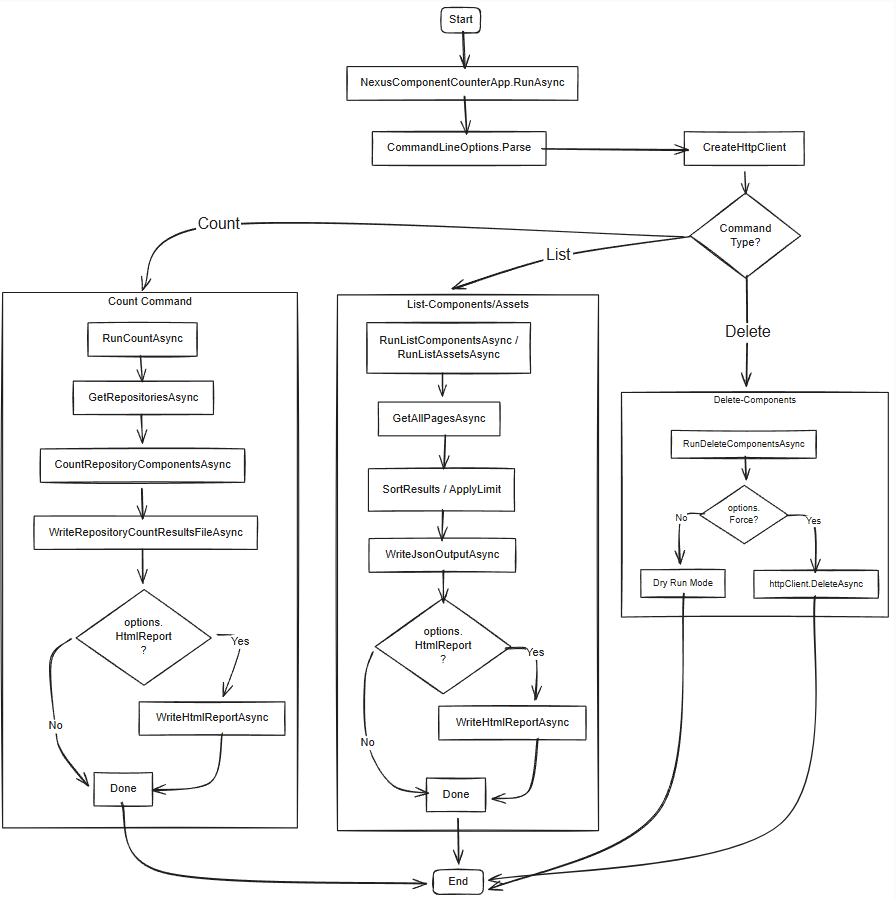
สำหรับภาพรวมการทำงาน จะเป็นตามภาพนี้ครับ ภาพเต็มไปดูใน Blog หลักนะ
อันนี้แถมเคสที่ทำ Report อาจจะไปผูกกับ jenkins ได้ตามนี้เลย
pipeline {
    agent {
        label 'jenkins-dotnet'
    }
    options {
        buildDiscarder(logRotator(numToKeepStr: '6', artifactNumToKeepStr: '6'))
        timeout(time: 10, unit: 'MINUTES')
        timestamps()
    }
    environment {
        NEXUS_API_URL = "http://nexus.ds.local:8081/service/rest/v1"
        NEXUS_CREDS_ID = "nexus3-report-jenkins"
    }
    parameters {
        booleanParam(name: 'CLEANUP', defaultValue: true, description: 'Clean up WorkSpace')
    }
    stages {
        stage('Run Counter') {
            steps {
                withCredentials([usernamePassword(credentialsId: "${NEXUS_CREDS_ID}", usernameVariable: 'NEXUS_USERNAME', passwordVariable: 'NEXUS_PASSWORD')]) {
                    // ใช้ powershell (pwsh หรือ powershell) ในการรันคำสั่ง
                    powershell "NexusCounterTools.exe count --url ${NEXUS_API_URL} --html "
                }
            }
        }

        stage('Send Email') {
            steps {
                script {
                    def files = findFiles(glob: '*.html')

                    if (files.length > 0) {
                        def reportContent = readFile(files[0].path)

                        emailext (
                            subject: "Nexus Component Report - ${env.BUILD_NUMBER}",
                            body: reportContent,
                            mimeType: 'text/html',
                            to: 'scm@wealth.co.th'
                        )
                    } else {
                        error "Not Found HTML Report "
                    }
                }
            }
        }
    }

    post {
        cleanup {
            script {
                if (env.CLEANUP == 'true') {
                    cleanWs();
                }
            }
        }
    }
}
หลัง Pipeline Run จะมีเมล์จะประมาณนี้
ส่วน Code Repo https://github.com/pingkunga/dotnet-nexus-tools นี้เลย
Donate & Support: https://www.buymeacoffee.com/pingkunga
메타데이터
- post_id
- f5ca2d2c82a0
- slug
- ลองสร้าง-dotnet-cli-เพื่อตรวจสอบจำนวน-component-ของแต่ละ-repo-ใน-nexus-f5ca2d2c82a0
- url
- https://medium.com/@pingkunga/%E0%B8%A5%E0%B8%AD%E0%B8%87%E0%B8%AA%E0%B8%A3%E0%B9%89%E0%B8%B2%E0%B8%87-dotnet-cli-%E0%B9%80%E0%B8%9E%E0%B8%B7%E0%B9%88%E0%B8%AD%E0%B8%95%E0%B8%A3%E0%B8%A7%E0%B8%88%E0%B8%AA%E0%B8%AD%E0%B8%9A%E0%B8%88%E0%B8%B3%E0%B8%99%E0%B8%A7%E0%B8%99-component-%E0%B8%82%E0%B8%AD%E0%B8%87%E0%B9%81%E0%B8%95%E0%B9%88%E0%B8%A5%E0%B8%B0-repo-%E0%B9%83%E0%B8%99-nexus-f5ca2d2c82a0
- canonical_url
- https://medium.com/@pingkunga/%E0%B8%A5%E0%B8%AD%E0%B8%87%E0%B8%AA%E0%B8%A3%E0%B9%89%E0%B8%B2%E0%B8%87-dotnet-cli-%E0%B9%80%E0%B8%9E%E0%B8%B7%E0%B9%88%E0%B8%AD%E0%B8%95%E0%B8%A3%E0%B8%A7%E0%B8%88%E0%B8%AA%E0%B8%AD%E0%B8%9A%E0%B8%88%E0%B8%B3%E0%B8%99%E0%B8%A7%E0%B8%99-component-%E0%B8%82%E0%B8%AD%E0%B8%87%E0%B9%81%E0%B8%95%E0%B9%88%E0%B8%A5%E0%B8%B0-repo-%E0%B9%83%E0%B8%99-nexus-f5ca2d2c82a0
- author_url
- https://medium.com/@pingkunga
- status
- ok
- fetched_at
- 2026-06-26 21:52:29