[FCM] Push Test with V1
reference 1. After the date of writing, according to Google policy, UI and changes may exist. 2. The push test was conducted only on iOS…
[FCM] Push Test with V1
reference
- After the date of writing, according to Google policy, UI and changes may exist.
- The push test was conducted only on iOS.
- Screenshots were captured based on an OS with “Korean language” applied.

{“error”:”Deprecated endpoint, see https://firebase.google.com/docs/cloud-messaging/migrate-v1"}
If you test using the existing method after the writing date, the following error message will appear in Postman.
{"error":"Deprecated endpoint, see https://firebase.google.com/docs/cloud-messaging/migrate-v1"}The simplest test is with the changed V1.

reference
- For iOS, check if the bundle ID matches the .plist set in the project.
- When using various schemas, there may be multiple .plists, so it may be necessary to check the app ID. (Project Settings — Confirm App ID)
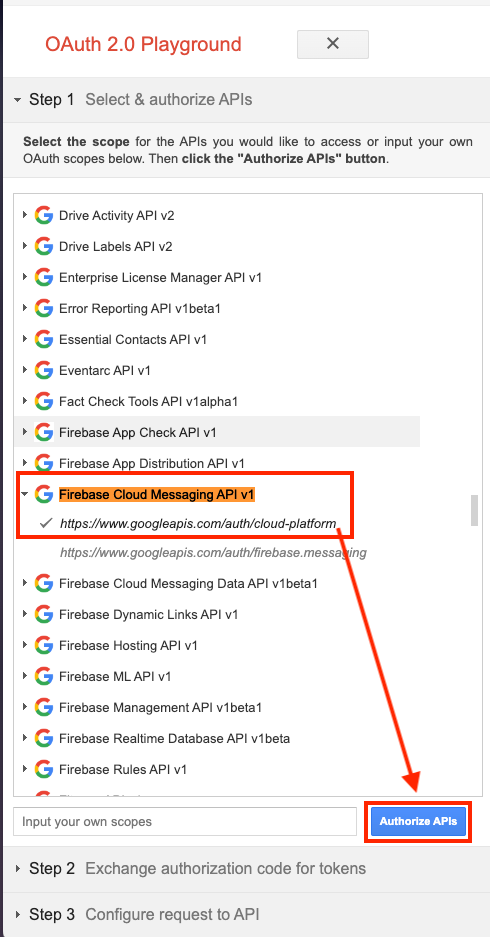
Step 1.
After accessing https://developers.google.com/oauthplayground, Firebase Cloud Messaging API v1 ▶ https://www.googleapis.com/auth/cloud-platform ▶ Authorize APIs

Step 2.
Tap Allow.

Step 3.
Tap ‘Exchange authorization code for tokens’

Step 4.
HTTP Method: POST Request URI: https://fcm.googleapis.com/v1/projects/(**projectid**)/messages:send

reference The ‘projectid’ can be found in Project Settings ▶ General in that project inside the Console.

Step 5.
Enter the json format as instructed on the official website, then tap the close button to close.
{
   "message":{
"token":"FCM token value issued by the App",
      "notification":{
        "body":"This is an FCM notification message!",
        "title":"FCM Message"
      }
   }
}
Step 6.
Tap ‘Send the request’ and check the results on the right.
iOS Special Features


(1)
If .p12 certificate is set in the Push certificate settings section of the Console, the following error may occur.
error: 401 Error code: “THIRD_PARTY_AUTH_ERROR”

When you search for errors on the error information page, you will see the following information.
'A message targeted to an iOS device or a web push registration could not be sent. Check the validity of your development and production credentials.'If you change the .p12 certificate to a .p8 certificate, you can resolve the error and send push alarms normally.
(2)
The .p12 certificate is based on a certificate (APN certificate), and the .p8 certificate is based on a token (APN authentication key).
Inside FCM, support for .p12 certificates now appears to be relatively unfriendly.
Additionally, the official Firebase website strongly recommends using a .p8 certificate rather than a .p12 certificate.
Therefore, when performing FCM push testing using this method, you must register a .p8 certificate.
메타데이터
- post_id
- f5d0aa6ab153
- slug
- fcm-push-test-with-v1-f5d0aa6ab153
- url
- https://medium.com/@kemikim/fcm-push-test-with-v1-f5d0aa6ab153
- canonical_url
- https://medium.com/@kemikim/fcm-push-test-with-v1-f5d0aa6ab153
- author_url
- https://medium.com/@kemikim
- status
- ok
- fetched_at
- 2026-08-18 06:42:31