App Role in HashiCorp Vault
Prerequiste
App Role in HashiCorp Vault
Photo by Jason Dent on Unsplash
Prerequiste
- Running vault server (You can follow link to bootstrap vault server)
Listing and Enabling Secrets Engine/Auth Methods
There are multiple secrets engine provided by the hashicorp out of the box. But only cubbyhole is enabled by default.
We will be using CLI to list and enable secrets enginer. In this use case, we would like to fetch the secrets from the python application. So we would need couple of features
- AppRole [Authentication Methods]
- KV2 [Secrets Engine]
Before listing we would need to authenticate in cli as well. Initially if you tried to login using command vault auth list there would be error.
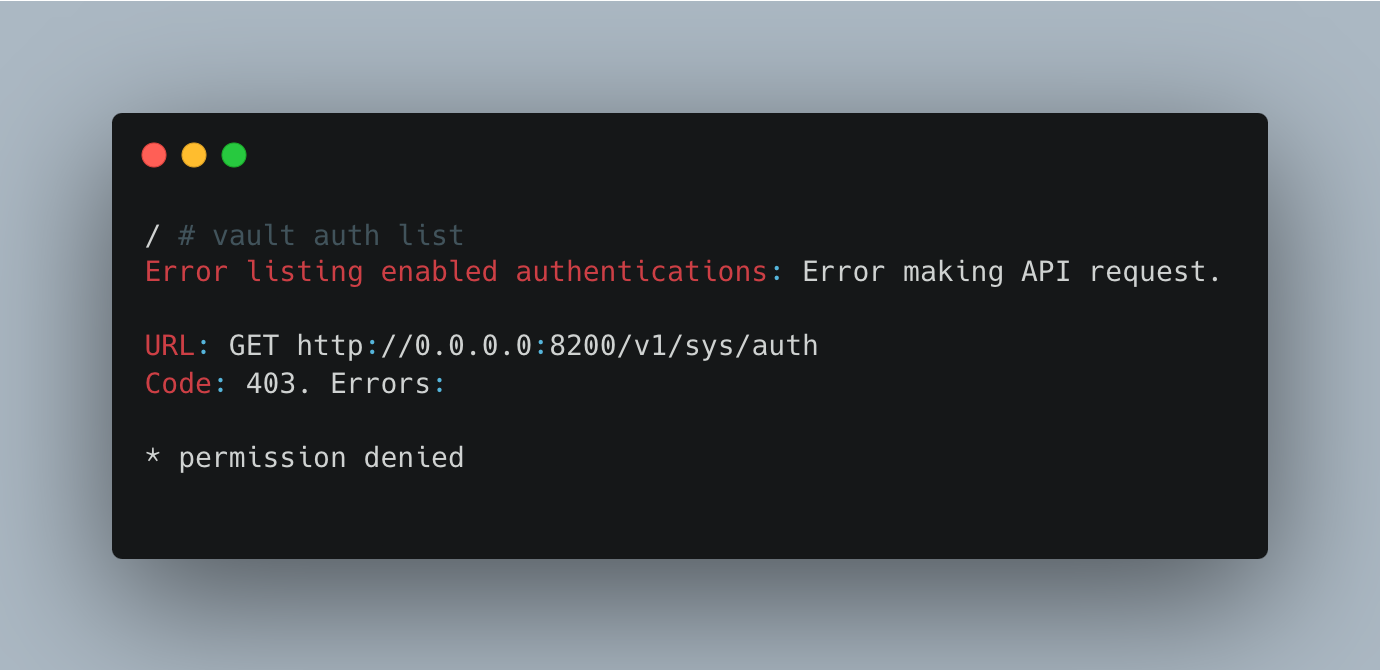
We can login using the command vault login ${TOKEN}

Listing Authentication Methods
We can list authentication methods that are enabled using the command
$ vault engine list

Now we would also enable Authentication Methods (AppRole) using the command
$ vault auth enable -path=app/project1 -description="AppRole for Project1" approle
Enabling Secrets Engine (KV2)
Now we would enable required secrets engine using the command:
$ vault secrets enable -path=app/project1/ -description="Used for Stroring Secrets for Project1" kv-v2
Now lets us populate some secrets
$ vault kv put app/project1/microserviceA SECRET1=vaule1 SECRET2=vaule2
Creating a Policy for the AppRole
We would need to create a policy and attach this to appRole. We are allowing appRole to list and read secrets.
vault policy write approle -<<EOF
path "app/project1/data/*" {
  capabilities = [ "read", "list" ]
}
path "app/project1/metadata/*" {
  capabilities = [ "read", "list" ]
}
EOF
Generate RoleID and Secrets
Now we would need to generate the Role ID and Secrets which we will be using to connect application and vault.
$ vault write auth/app/project1/role/project1 \
>     token_policies="approle" \
>     token_ttl="1h" \
>     token_max_ttl="4h"
Generate RoleID
$ vault read auth/app/project1/role/project1/role-idGenerate Secret
$ vault write -f auth/app/project1/role/project1/secret-idNow we need to keep RoleID and SecredID. We would be using hvac python package to interact with python programmatically. Sample program would be
$ pip3 install hvacimport hvac
import os
import logging
import json
# Set up logging
logging.basicConfig(level=logging.INFO,
format='%(asctime)s - %(levelname)s - %(message)s')
logger = logging.getLogger(__name__)
# Load variables from environment
VAULT_URL = os.getenv('VAULT_URL', 'http://127.0.0.1:8200')
ROLE_ID = os.getenv('VAULT_ROLE_ID', 'xxxxx-xxxxx-xxxx-xxxxxx')
SECRET_ID = os.getenv(
'VAULT_SECRET_ID', 'xxxxx-xxxxx-xxxx-xxxxxx')
SECRET_PATH = os.getenv('VAULT_SECRET_PATH', 'microserviceA')
APPROLE_MOUNT_POINT = os.getenv('VAULT_APPROLE_MOUNT_POINT', 'app/project1')
KV_MOUNT_POINT = os.getenv('VAULT_KV_MOUNT_POINT', 'app/project1')
def main():
# Create a Vault client
client = hvac.Client(url=VAULT_URL)
# Authenticate using AppRole
try:
client.auth.approle.login(
role_id=ROLE_ID,
secret_id=SECRET_ID,
mount_point=APPROLE_MOUNT_POINT
)
except hvac.exceptions.VaultError as e:
logger.error(f"Authentication failed: {str(e)}")
return
# Check if authentication was successful
if not client.is_authenticated():
logger.error("Authentication failed!")
return
logger.info("Authentication successful!")
# Read the secret
try:
secret_version = client.secrets.kv.v2.read_secret_version(
path=SECRET_PATH,
mount_point=KV_MOUNT_POINT,
raise_on_deleted_version=False
)
secret_data = secret_version['data']['data']
# Format secrets as a JSON string
secrets_json = json.dumps(secret_data, indent=2)
logger.info(f"Secrets for {SECRET_PATH}:\n{secrets_json}")
except hvac.exceptions.InvalidPath:
logger.error(f"No secret found at path: {SECRET_PATH}")
except Exception as e:
logger.error(f"Error reading secret: {str(e)}")
if __name__ == "__main__":
main()After running the script our output would look something like:
2025-03-07 08:38:34,369 - INFO - Authentication successful!
2025-03-07 08:38:34,372 - INFO - Secrets for microserviceA:
{
  "SECRET1": "vaule1",
  "SECRET2": "vaule2"
}
This way we are able to authenticate using AppRole, and fetch secrects during the run time.
메타데이터
- post_id
- f5d86f6da3f0
- slug
- app-role-in-hashicorp-vault-f5d86f6da3f0
- url
- https://medium.com/@bnay14/app-role-in-hashicorp-vault-f5d86f6da3f0
- canonical_url
- https://medium.com/@bnay14/app-role-in-hashicorp-vault-f5d86f6da3f0
- author_url
- https://medium.com/@bnay14
- status
- ok
- fetched_at
- 2026-06-10 22:22:12

