How I Streamed Kong API Gateway Logs Into IBM QRadar SIEM
A practical guide to wiring Kong’s access logs into QRadar using a 20-line rsyslog relay — no custom connectors, no Enterprise license, no…
How I Streamed Kong API Gateway Logs Into IBM QRadar SIEM
A practical guide to wiring Kong’s access logs into QRadar using a 20-line rsyslog relay — no custom connectors, no Enterprise license, no proprietary magic.
TL;DR
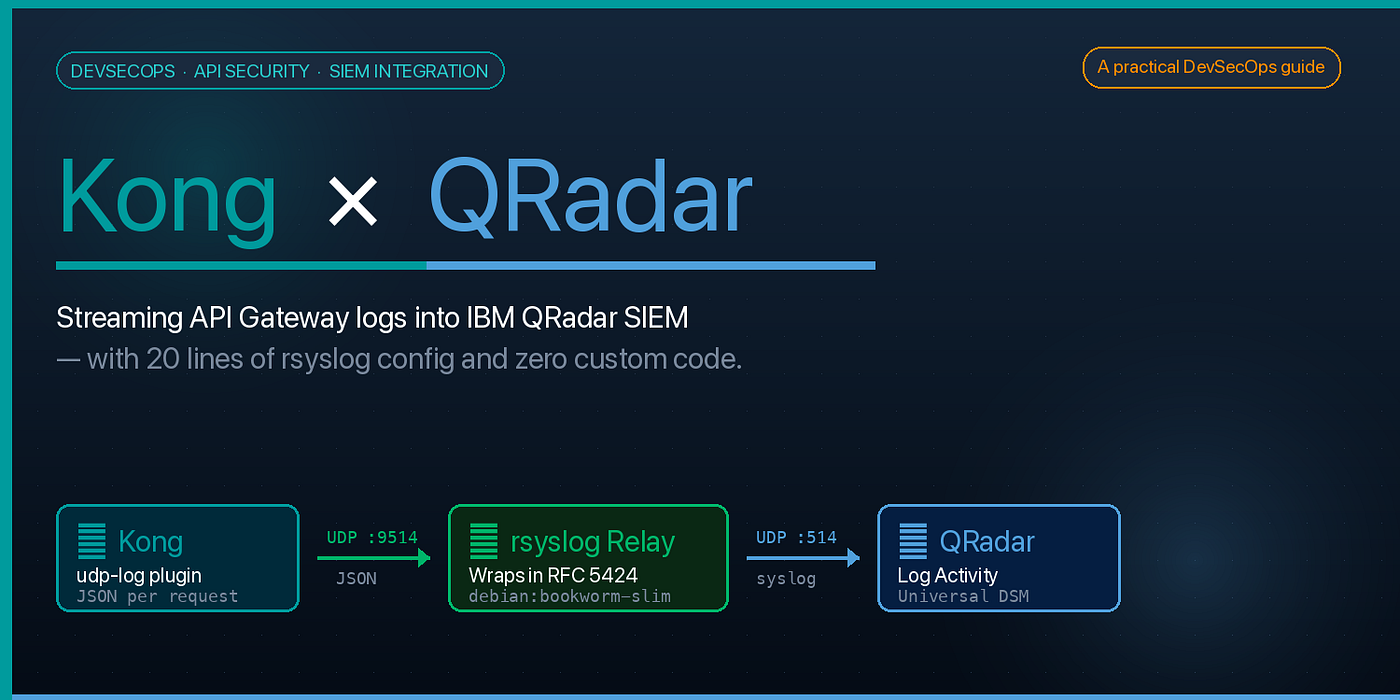
Kong has a built-in udp-log plugin. QRadar speaks syslog. Put a tiny rsyslog container between them to translate Kong's JSON into RFC 5424 syslog, and you have a production-grade API security telemetry pipeline in about an hour.
Kong ──(JSON, UDP)──► rsyslog relay ──(RFC 5424, UDP 514)──► QRadarThe hard part is not the plumbing. It’s one gotcha about how QRadar matches incoming events to a log source. I’ll get to that.
Why This Matters
If you run an API gateway, you’re already sitting on a goldmine of security telemetry: every authentication event, every 4xx, every unusual client pattern flows through it. Most teams log this to stdout, ship it to a generic log aggregator, and call it a day.
But your SOC is watching QRadar. Or Splunk. Or Sentinel. If API logs aren’t there, they may as well not exist.
I wanted:
- Every Kong request visible in QRadar Log Activity in near-real-time
- No code changes — just configuration
- No dependency on Kong Enterprise
- Standard protocols so the pipeline survives vendor churn
Here’s how I built it.
The Three-Box Architecture
There are exactly three components, and each does one thing.
┌──────────────┐   JSON     ┌───────────────┐   RFC 5424    ┌──────────────┐
│     Kong     ├──UDP 9514─►│ rsyslog relay ├──UDP 514─────►│    QRadar    │
│  (udp-log)   │            │  (container)  │               │ (log source) │
└──────────────┘            └───────────────┘               └──────────────┘
Kong (3.9 OSS, DB-less) produces one JSON log event per API request, shipped via the built-in udp-log plugin. No agents, no sidecars, no Kong plugins you have to write.
rsyslog relay — a 20-line config in a debian:bookworm-slim container. It receives Kong's JSON on UDP 9514 and re-emits each message inside a standards-compliant RFC 5424 syslog envelope.
QRadar ingests the syslog on UDP 514. A Universal DSM log source parses the payload and makes it searchable in Log Activity.
That’s it. Let’s wire it up.
Step 1 — Kong (5 lines of config)
With DB-less Kong, everything lives in declarative/kong.yml. Add the udp-log plugin:
plugins:
  - name: udp-log
    config:
      host: syslog-relay    # Docker service name of the relay
      port: 9514
      timeout: 10000
I also add file-log to /dev/stdout so I can docker logs my way through debugging without waiting for the full pipeline. Cheap insurance.
A minimal docker-compose.yml:
services:
  kong:
    image: kong:3.9
    environment:
      KONG_DATABASE: "off"
      KONG_DECLARATIVE_CONFIG: /kong/declarative/kong.yml
    ports: ["8000:8000", "8001:8001"]
    volumes: ["./declarative:/kong/declarative"]
    depends_on: [syslog-relay]
syslog-relay:
build: ./rsyslog
ports: ["9514:9514/udp"]Step 2 — The rsyslog Relay (the “translator”)
This is where the real work happens. Kong emits raw JSON. QRadar expects syslog. rsyslog bridges the two with a template.
**rsyslog/rsyslog.conf:**
$MaxMessageSize 65536module(load="imudp")
# NOTE: omfwd is built-in — do NOT load it explicitlytemplate(name="QRadarKong" type="string"
string="<%pri%>1 %timestamp:::date-rfc3339% kong-api-gateway kong-gateway - - - %msg%\n"
)input(type="imudp" port="9514" ruleset="to_qradar")ruleset(name="to_qradar") {
action(
type="omfwd"
target="<QRADAR_IP>"
port="514"
protocol="udp"
template="QRadarKong"
)
}**rsyslog/Dockerfile:**
FROM debian:bookworm-slim
RUN apt-get update -qq && \
    apt-get install -y --no-install-recommends rsyslog && \
    rm -rf /var/lib/apt/lists/*
COPY rsyslog.conf /etc/rsyslog.conf
EXPOSE 9514/udp
CMD ["rsyslogd", "-n", "-f", "/etc/rsyslog.conf"]
A typical output message looks like:
<13>1 2026-04-17T08:15:25Z kong-api-gateway kong-gateway - - - {"request":{"method":"GET","uri":"/api/orders"},"response":{"status":200}, ...}Notice the hard-coded hostname: kong-api-gateway. Remember that string.
Step 3 — The QRadar Log Source
In the QRadar console: Admin → Log Sources → Add.
FieldValueNameKong API GatewayLog Source TypeUniversal DSMProtocolSyslogLog Source Identifierkong-api-gatewayEnabled✓
Then Admin → Deploy Changes and wait for COMPLETE (30–90 seconds).
Generate some traffic:
curl http://localhost:8000/test/getOpen Log Activity, filter Log Source = Kong API Gateway, and events should appear within seconds.
The Gotcha That Cost Me Three Hours
Here’s the one that every blog post glosses over.
QRadar matches incoming syslog events to a log source by the HOSTNAME field in the RFC 5424 header — not by the source IP address.
The default rsyslog template uses %hostname%, which resolves to the container's dynamic hostname (something like abc123def456). QRadar sees a hostname it doesn't recognise, creates an auto-discovered log source, and your carefully-configured Kong API Gateway log source sits there empty with a status of "No events received."
The fix is the one line you saw in the template:
string="<%pri%>1 %timestamp:::date-rfc3339% kong-api-gateway kong-gateway - - - %msg%\n"
                                            ^^^^^^^^^^^^^^^^
                                            fixed string, not %hostname%
The hostname in the template must byte-match the log source identifier in QRadar. If you change one, change both.
Four Other Traps I Fell Into
1. Never load omfwd explicitly. rsyslog's omfwd output module is compiled in. module(load="omfwd") causes a fatal startup error. Only input modules (imudp, imtcp) need explicit loading.
2. nc -zu proves nothing. Netcat always reports success for UDP — it's connectionless. Use tcpdump -i eth0 udp port 514 on the QRadar host to confirm packets actually arrive.
3. The Alpine rsyslog image is missing omfwd.so. The popular rsyslog/syslog_appliance_alpine image doesn't include the forwarding module. Use a debian/ubuntu base and install rsyslog from apt.
4. QRadar needs a deploy after every log source change. Creating or modifying a log source doesn’t take effect until you POST /api/config/deployment/deploy_changes and wait for COMPLETE. If you forget, events will go nowhere and the log source will show status ERROR with no obvious reason why.
Verifying with AQL
QRadar’s Ariel Query Language is your friend here:
SELECT
  LOGSOURCENAME(logsourceid) AS logsrc,
  sourceip,
  count(*) AS events,
  max(starttime) AS last_seen
FROM events
WHERE LOGSOURCENAME(logsourceid) = 'Kong API Gateway'
LAST 10 MINUTES
If you see events > 0 and a recent last_seen, the pipeline is live.
If the log source exists but events = 0, your hostname almost certainly doesn’t match the identifier. Check docker logs kong-syslog-relay --tail 5 and look at the hostname field in the RFC 5424 line.
What You Get Out of It
With Kong events now flowing into QRadar, the SOC can:
- Alert on auth anomalies — spikes of 401/403 from the same consumer
- Detect brute-force patterns — high-frequency requests from a single source IP
- Correlate API traffic with threat intel — QRadar can cross-reference source IPs against its IP reputation feeds
- Build compliance dashboards — the full Kong JSON payload (including consumer, route, service, latency) is preserved in the event
None of that required writing a single line of Kong plugin code or paying for Kong Enterprise.
Scaling the Pattern
This same relay works for any number of Kong instances. Point them all at the relay’s hostname or VIP, and QRadar sees them as a single log source (which is usually what you want — Kong is your API gateway, even if it runs as a fleet).
If you need per-gateway attribution, just use a different hostname in each relay’s template (kong-api-prod, kong-api-staging) and create matching log sources.
For higher throughput, scale the relay horizontally behind a UDP load balancer, or switch to TCP syslog (omfwd supports it with one parameter change) and consider TLS (StreamDriver="gtls") for encryption-in-transit.
Closing Thoughts
The thing I love about this integration is how boring it is. No proprietary connector. No vendor lock-in. Just UDP, JSON, and a standards-compliant syslog envelope. If rsyslog didn’t exist, I could replace it with socat and sed in a pinch.
The lesson, as always: prefer boring plumbing over clever integrations. Kong’s job is to be a gateway. QRadar’s job is to be a SIEM. A 20-line rsyslog config is enough glue for them to speak — and nothing more needs to change when either side upgrades.
If you’re running Kong (or any API gateway that supports UDP syslog) and you don’t have its logs in your SIEM yet, spend the hour. Your SOC will thank you.
Found this useful? The full Docker Compose repo with working configs is in my GitHub — link in bio. If you’ve hit other QRadar log source quirks, drop them in the comments.
Tags: kong api-gateway qradar siem devsecops rsyslog observability security-engineering
메타데이터
- post_id
- f5f89599bf8a
- slug
- how-i-streamed-kong-api-gateway-logs-into-ibm-qradar-siem-f5f89599bf8a
- url
- https://medium.com/@zelarsoft/how-i-streamed-kong-api-gateway-logs-into-ibm-qradar-siem-f5f89599bf8a
- canonical_url
- https://medium.com/@zelarsoft/how-i-streamed-kong-api-gateway-logs-into-ibm-qradar-siem-f5f89599bf8a
- author_url
- https://medium.com/@zelarsoft
- status
- ok
- fetched_at
- 2026-06-18 00:10:23