GLM-5V-Turbo Beats Opus 4.6 on Multimodal Benchmarks
GLM-5V-Turbo is Z.AI’s first multimodal coding foundation model, built for vision-based coding tasks.
GLM-5V-Turbo Beats Opus 4.6 on Multimodal Benchmarks
GLM-5V-Turbo is Z.AI’s first multimodal coding foundation model, built for vision-based coding tasks.
It clearly dominates in most categories of multimodal coding.
It also hit #5 on BridgeBench SpeedBench with 221.2 tokens/sec, faster than Gemini 3.1 Pro, Claude Sonnet/Opus, and GPT 5.4.
GLM-5V-Turbo is purpose-built for multimodal agentic scenarios, native vision for images/videos/designs/GUI agents, plus it has a deep Claude Code and OpenClaw synergy.
If your agents handle screens, layouts, or visual inputs, you should give GLM-5V-Turbo a try because it has native support for images, video, and documents.
The model also excels at long-horizon planning, complex coding, and action execution, making it well-suited for agentic use-cases (e.g. autonomous UI exploration) in addition to one-shot prompt completions.
Under the hood, GLM-5V-Turbo was trained with a fully fused multimodal pipeline (text + vision) from pretraining through fine-tuning.
Its CogViT visual encoder gives it strong vision understanding capabilities (handling images, video, PDF/doc layouts).
At the same time, it retains powerful coding skills on par with text-only models, thanks to an MoE architecture inherited from GLM-5.
Here’s its pricing, significantly cheaper that its rivals:
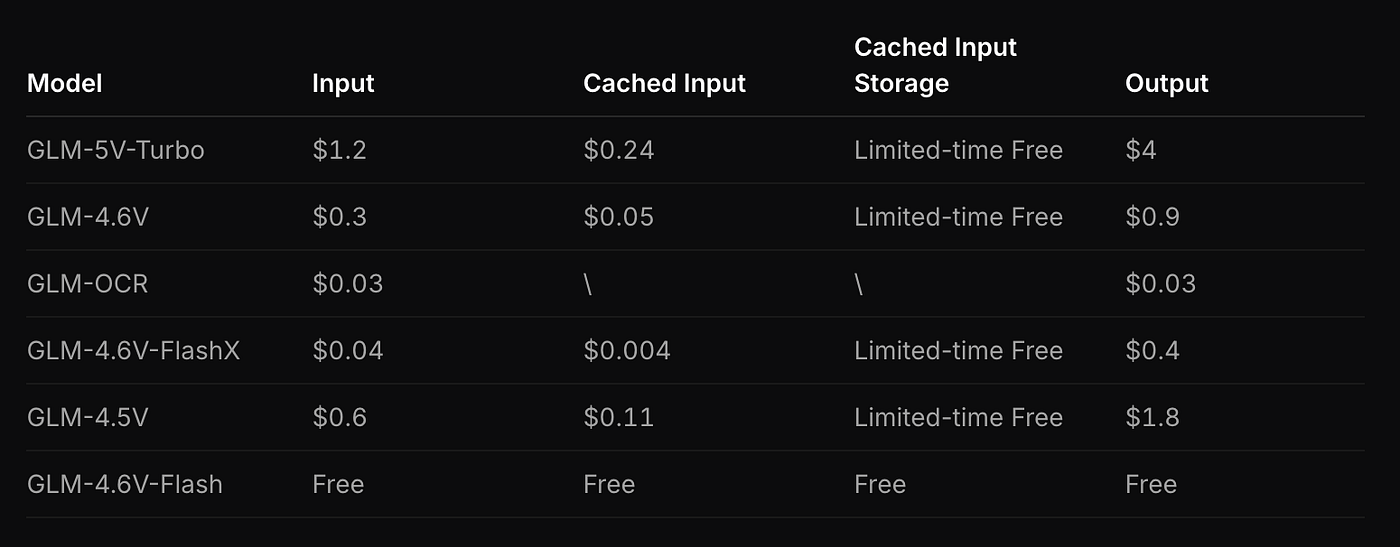
https://docs.z.ai/guides/overview/pricing
To share a few examples, it can create interactive 3D apps at ease.
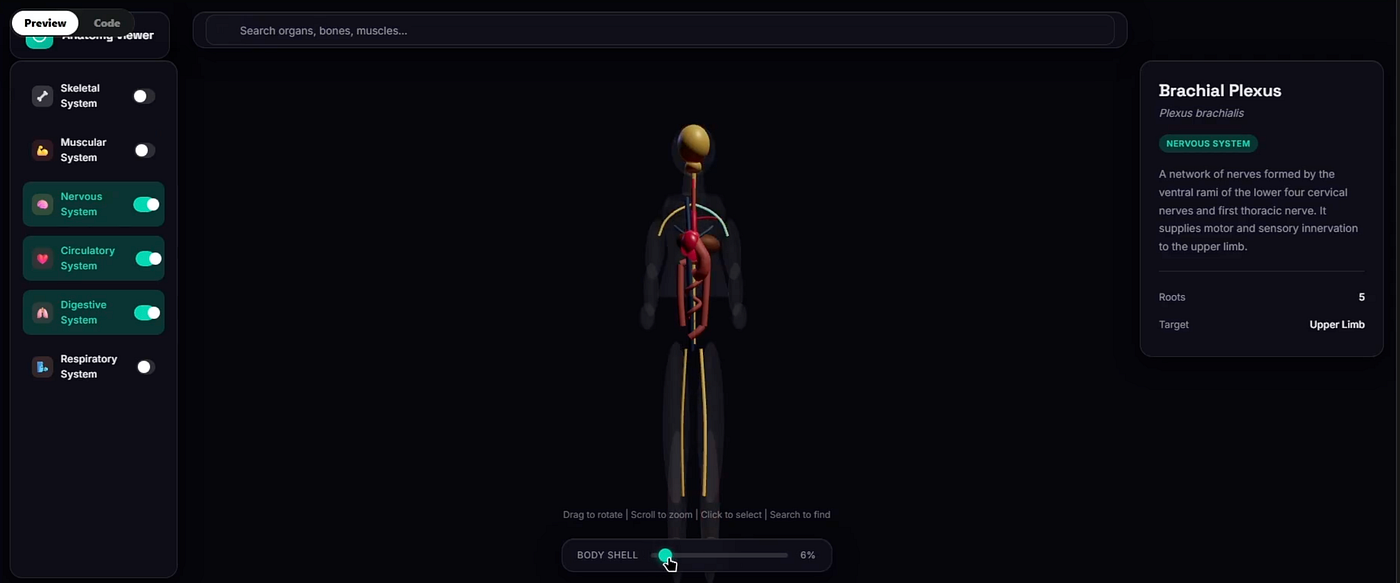
It can also generate UIs from screenshots, but in my experience, Kimi 2.5 is still in a league of its own for frontend apps. Curious to hear what your experience has been.
It also scores competitively on pure-code tasks like backend, frontend and repo exploration in CC-Bench-V2.
This means developers get a vision-augmented coding assistant that does not compromise text-based reasoning.
Let me walk you through its “skills”, code examples, and workflow tips when building vision-driven agents.
Getting Access to GLM-5V-Turbo
To use GLM-5V-Turbo, you’ll need a Zhipu AI (Z.ai) API account and key. Here are the steps:
- Register and Get API Key: Go to the Zhipu Open Platform and register. In your user center, generate an API key (API token).
- Choose Endpoint: Zhipu offers a general API endpoint (
https://open.bigmodel.cn/api/paas/v4/chat/completions) and a Coding Plan endpoint (https://open.bigmodel.cn/api/coding/paas/v4) for coding tasks. If you have the GLM Coding subscription, use the coding endpoint, otherwise the general endpoint also works for GLM-5V-Turbo by specifying the model name. The coding endpoint may offer faster speeds and higher limits for coding tasks. - Install SDK (Optional): Zhipu provides SDKs for Python and Java. For Python, use:
pip install zai-openapiFor Java, you can pull their SDK from Maven.
Set environment Variable: Export your API key in your shell.
export ZHIPU_API_KEY="YOUR_ZHIPU_API_KEY"The official “skills” scripts rely on this env var by default.
Set Model Name: The model is identified as "glm-5v-turbo" in the API. In the Python/Java SDK or curl, set "model": "glm-5v-turbo".
With that, you’re ready to start making calls.
Quickstart: Calling the API
You can use a simple HTTP API call to get outputs. Here’s a basic curl example:
curl  -X  POST  "https://open.bigmodel.cn/api/paas/v4/chat/completions"  \
-H "Content-Type: application/json" \
-H  "Authorization: Bearer $ZHIPU_API_KEY"  \
-d '{
  "model":  "glm-5v-turbo",
  "messages": [
    {"role":  "system",  "content":  "You are a helpful AI code assistant."},
    {"role":  "user",  "content":  "<#1> <image of a login form design>"}
  ],
  "temperature":  0.8,
  "stream":  true
}'
This request tells GLM-5V-Turbo to interpret the image (placeholder <#1>) according to the prompt. Using stream: true returns tokens progressively.
Alternatively, with the Python SDK (zai-openapi), you could do:
from zai_openapi import ZhipuClient
client = ZhipuClient(api_key="YOUR_API_KEY")

resp = client.chat_completions.create(
  model="glm-5v-turbo",
  messages=[
    {"role": "system", "content": "You are a useful AI assistant."},
    {"role": "user", "content": "<#1> <image:login.png>"}
  ],
  temperature=0.7,
  stream=False,
)

print(resp.choices[0].message.content)
This will POST to the API and return the model’s answer. (Replace "<#1> <image:login.png>" with actual image attachments or URLs as per the API spec.)
For streaming output, the SDK supports async or callback patterns.
Costs & Context: GLM-5V-Turbo supports up to 200K tokens context and 128K tokens output, which is more than enough. Note that at these scales, token usage can be high. If using GLM Coding plan, check the Zhipu pricing page. (At time of writing, GLM-5V-Turbo costs about $0.96 per 1K input tokens and $3.20 per 1K output tokens on OpenRouter’s listing)
GLM-V Skills: CLI Tools for Common Tasks
Zhipu has open-sourced a set of command-line skills built on the GLM-V (vision) models.
These provide ready-made scripts for tasks like captioning, grounding, resume screening, etc.
They serve as examples of how to use the model, and can be integrated into development pipelines.
The GitHub repo zai-org/GLM-V contains a skills/ directory with each skill’s code and usage instructions.
For example, the Image Captioning skill (glmv-caption) lets you get descriptive captions for one or more images. After cloning the repo (or installing via their clawhub package), you can run:
python scripts/glmv_caption.py --images "https://example.com/photo.jpg"This calls GLM-5V’s captioning endpoint and the output is the full caption text.
You can caption multiple images at once (by providing multiple --images args), or even a video URL with --videos.
Similarly, the Visual Grounding skill (glmv-grounding) allows pinpointing an object in an image given a description.
Example usage might be:
python  scripts/glmv_grounding.py  --images  "https://example.com/scene.jpg"  \
--prompt "Locate all the red cars."
This outputs bounding box coordinates for the described objects. Grounding is useful for UI automation: e.g., “find the submit button” or “highlight the error message area” on a screenshot.
The Document-Based Writing skill (glmv-doc-based-writing) can process a PDF or document and generate a summary or draft report. For example:
python scripts/glmv_doc_based_writing.py --files "annual_report.pdf" --prompt "Write a 3-point summary of this report."This will output text grounded on the document’s content. Likewise, PDF-to-PPT and PDF-to-Web skills convert documents into presentation slides or simple web pages (by extracting structure and assets).
Setting Up Skills: Each skill’s SKILL.md contains installation and usage info. In short, clone the repo:
git clone https://github.com/zai-org/GLM-V.git
cd GLM-V/skills/glmv-caption
pip install -r requirements.txt
Ensure your ZHIPU_API_KEY is set (the scripts read this environment variable). Then run the Python scripts as shown.
These scripts serve as reference code, you can copy their logic into your apps or call the underlying Python functions directly.
Below is an example excerpt from the glmv-caption/SKILL.md showing usage and how it calls the GLM-V API:
# Caption a single image by URL
python  scripts/glmv_caption.py  --images  "https://example.com/photo.jpg"

# Caption multiple images
python  scripts/glmv_caption.py  --images  img1.jpg  img2.png  "https://example.com/img3.jpg"

# Caption a video by URL (mp4/mkv/mov)
python  scripts/glmv_caption.py  --videos  "https://example.com/clip.mp4"

# Custom prompt (e.g. focus on architecture style in the image)
python  scripts/glmv_caption.py  --images  photo.jpg  --prompt  "Describe the architecture style in detail"
These commands will print the AI-generated caption (or multi-line descriptions for videos/files) to stdout.
You can also use --output result.json to save the raw JSON response.
Coding Workflow Examples
Let’s illustrate a quick workflow: say you have a design mockup (image) for a web app, and you want GLM-5V-Turbo to generate frontend code. You could do something like:
- Convert image to base64 or URL and craft a prompt:
{
  "model": "glm-5v-turbo",
  "messages": [
    {"role": "system", "content": "You are an AI that writes frontend code from design images."},
    {"role": "user", "content": "<#1> <image:design_mockup.png>"}
  ]
}- Send to API: The model will output code. (The exact format depends on your prompt template; e.g. “Output React component files based on this design.”)
- Process output: The AI might respond with code blocks or JSON. Use the API’s structured output features or post-processing to parse them into actual files.
For example, given two mobile page mockup images, the model output is shown as multiple code files (like home.html, styles.css, etc.). In your app, you’d take this JSON response and write the content into files.
For now, assume the model’s full output is in resp.choices[0].message.content.
result = resp.choices[0].message.content
print("Generated code:\n", result)
You could even pipe the result into a file, or better yet, use streaming to build the output in real-time (for large code, see the streaming example below).
Streaming Output (Real-Time)
For lengthy code generation, enable streaming.
In the Python SDK:
async  for chunk in client.chat_completions.stream(
  model="glm-5v-turbo",
  messages=[{"role":"system","content":"Write code from image."}, {"role":"user","content":"<#1> <image:demo.png>"}],
  temperature=0.6,
):
print(chunk.choices[0].delta.get("content", ""), end="", flush=True)
This way, code appears line-by-line as it’s generated, allowing early feedback. The model supports streaming to mimic typing.
Integration with Agents (OpenClaw, Claude)
A key feature is that GLM-5V-Turbo is deeply agent-ready.
For example, when used within OpenClaw or Claude Code, the model can not only interpret visual context, but also output structured actions (tool calls, function calls, navigation commands).
“After integrating GLM-5V-Turbo, OpenClaw can understand webpage layouts, GUI elements, and chart information, helping the agent handle complex real-world tasks”.
Concretely, if building an agent that uses GLM-5V-Turbo under the hood, you might:
- Parse GUI: Give the agent a screenshot or a browser view encoded as image. GLM-5V-Turbo can return metadata or actions, such as “click the login button”, which you map to environment actions.
- Use function-calling mode: You can craft assistant responses that trigger callbacks or JSON outputs. The model can output something like
{"tool": "click", "args": {"selector": "#submit"}}. - Leverage vision tools: The expanded toolchain supports web reading and drawing annotations. For instance, you might instruct the model to “draw a box around the ‘Profile’ menu button” and it could output coordinates, which your UI test agent uses.
These agentic workflows are complex, but GLM-5V-Turbo’s training on multi-step, tool-using RL data means it handles them better than a vanilla LLM.
For example, in AndroidWorld and WebVoyager benchmarks (simulating real UI navigation tasks), GLM-5V-Turbo is reported to lead performance.
This suggests it can follow multi-page instructions with visual cues.
Note: Building a robust agent involves more than just the model. You’d typically wrap the API in a loop, handle errors, maintain state, etc.
Fortunately, GLM-5V-Turbo offers “Intelligent caching” and can “plan actions” autonomously, but test thoroughly.
Example: Debugging a Web Layout
As a practical snippet, imagine you have a screenshot of a misaligned webpage and want GLM-5V-Turbo to diagnose it.
You might do:
resp = client.chat_completions.create(
  model="glm-5v-turbo",
  messages=[
    {"role":"system","content":"You help debug web pages."},
    {"role":"user","content":"<#1> <image:buggy_page.png>"}
  ],
)
print(resp.choices[0].message.content)
And the model could reply something like “The heading element is overlapping the navbar (CSS z-index issue). The header container’s width is larger than the viewport.
One fix is to add max-width: 100% to the <header> and adjust the margin-top.” or even output a code diff.
Engineering Best Practices
When using GLM-5V-Turbo in production, keep these tips in mind:
- Token limits: With context up to 200K tokens, you can feed very long prompts or many images. But remember, images and videos count heavily. Use efficient encoding (e.g. give URLs rather than base64 blobs if possible).
- Chunking large inputs: If processing a long document or video, split it into segments and call the model sequentially, stitching answers.
- Error handling: If the model fails or hallucinates (rare but possible), handle it gracefully. The skills scripts emphasize no fallback captioning, they simply output the error.
- Prompt clarity: For code tasks, clarify format in your prompt. e.g. “Output JSON with keys
file_nameandcontentfor each code file.” The model supports structured output as a capability, but you have to define the structure. - Caching and state: Long multi-turn tasks can be costly. Use Function Calling or maintain history smartly. Zhipu supports “context caching” to optimize long chats.
- Multimodal alignment: The magic is in how visual and text interact. GLM-5V-Turbo was trained with “multimodal collaborative optimization”, but for best results, keep image descriptions concise and relevant. For example, accompany an image with the specific question (“What’s wrong with the layout?”).
- Security & Privacy: Visual inputs might contain sensitive info. Ensure you have rights to use images you send, and be mindful of privacy (images of people, private documents, etc.). Also, the model is on the entity list (US sanctions), so it must run on non-restricted compute.
Code Snippets
Below are some concrete code examples illustrating GLM-5V-Turbo usage.
Python (Non-Streaming)
from zai_openapi import ZhipuClient
client = ZhipuClient(api_key="YOUR_API_KEY")

# Multimodal prompt with an image URL
resp = client.chat_completions.create(
  model="glm-5v-turbo",
  messages=[
    {"role": "system", "content": "You convert UI designs to React code."},
    {"role": "user", "content": "<#1> <image:https://myapp.com/designs/page1.png>"}
    ],
  temperature=0.5,
)
generated_code = resp.choices[0].message.content
print(generated_code)
Invokes GLM-5V-Turbo with an image. The model’s output (generated_code) could be HTML/CSS/JS or similar.
Python (Streaming)
import asyncio
from zai_openapi import ZhipuClient

async  def  stream_code():
client = ZhipuClient(api_key="YOUR_API_KEY")
async  for chunk in client.chat_completions.stream(
  model="glm-5v-turbo",
  messages=[
    {"role": "system", "content": "Output Python code."},
    {"role": "user", "content": "<#1> <image:ui_flow.png>"}
    ],
  temperature=0.3,
):

delta = chunk.choices[0].delta
print(delta.get("content", ""), end="")
print()

asyncio.run(stream_code())
Here we stream tokens as they arrive, printing code in real time. The delta.get("content","") yields incremental text.
CLI Skill Example: Captioning an Image
# After setting ZHIPU_API_KEY and installing skill requirements
python  scripts/glmv_caption.py  --images  "https://example.com/ui.png"  \
--prompt "Provide a detailed caption of this webpage layout."

# Expected output: Text describing the image (e.g. "A dark-themed login page with a header, username/password fields, and a login button").
This uses the GLM-V caption skill to explain an interface. The --prompt flag customizes the caption request.
CLI Skill Example: PDF to Website
python  scripts/glmv_pdf_to_web.py  --files  "https://example.com/specs.pdf"  \
--output website.html
This will take an academic paper or spec sheet and turn it into a basic HTML website, extracting sections and images. (The underlying skill is documented as “PDF to academic project website conversion”.)
Each CLI script’s SKILL.md has many more options (like --thinking mode for chain-of-thought, or temperature settings).
Architecture & Training Highlights
While using the model doesn’t require knowing its internals, it’s insightful to understand why GLM-5V-Turbo works as it does.
There are four main innovations:
- Native Multimodal Fusion: GLM-5V-Turbo fuses visual and textual data at every stage, during pretraining and RL fine-tuning. The “CogViT” vision backbone is state-of-the-art in object recognition and spatial reasoning. This ensures the model truly understands images, not just captioning them.
- 30+ Task Collaborative RL: During reinforcement learning, the model was optimized on a mix of over 30 task types simultaneously (including STEM questions, vision grounding, video reasoning, GUI actions, coding agents, etc.). This prevents overfitting to one domain and yields a more generalist agent.
- Agentic Data Construction: Recognizing that there isn’t much real data of agents performing vision-coding tasks, the team synthetically generated scenarios and annotations. They injected “agentic meta-capabilities” during pretraining (e.g. they explicitly trained on GUI action sequences and prompt-agent loops).
- Expanded Multimodal Toolchain: They extended the model’s toolkit beyond text. For example, it can perform box drawing (bounding boxes), screenshot annotation, and even web reading (interpreting HTML/text from a webpage). This lets an agent draw on the screen, click elements, or scroll pages, all as part of its reasoning steps. As stated, “the model supports multimodal search, drawing, and web reading” in addition to text tools.
These upgrades allow GLM-5V-Turbo to function as a visual agent assistant with memory and external tools.
The model’s scale (14B vision encoder, 40B coding-weights active, total 744B params) also helps, yet performance isn’t solely because of size but it’s the training design and tool integration that give it an edge on coding tasks.
Getting Started with GLM-V Skills
To experiment, clone the GLM-V repo and try a few skills:
git  clone  https://github.com/zai-org/GLM-V.git
cd  GLM-V/skills/glmv-caption
pip  install  -r  requirements.txt

# Caption a sample image
python  scripts/glmv_caption.py  --images  "https://picsum.photos/seed/pic/600/400"
Or install all skills via Clawhub (a skill manager) as the GLM Master Skill suggests:
npx clawhub@latest install glmv-caption glmv-grounding glmv-doc-based-writing glmv-pdf-to-ppt glmv-pdf-to-web glmv-prd-to-app glmv-web-replicationEach skill’s SKILL.md has detailed usage and examples. Since these skills are open-source, you can also embed their Python logic directly in your own tools or review how they call the Zhipu API.
Concluding Thougths
Early adopters can leverage GLM-5V-Turbo to build smarter assistants (e.g. agents that debug UIs, generate dashboards from sketches, or autonomously test web flows).
Zhipu’s multi-billion-dollar backing and public roadmap (and open-source components) suggest rapid evolution.
Bonus Articles
메타데이터
- post_id
- f6376822eb32
- slug
- glm-5v-turbo-beats-opus-4-6-on-multimodal-benchmarks-f6376822eb32
- url
- https://medium.com/@agentnativedev/glm-5v-turbo-beats-opus-4-6-on-multimodal-benchmarks-f6376822eb32
- canonical_url
- https://medium.com/@agentnativedev/glm-5v-turbo-beats-opus-4-6-on-multimodal-benchmarks-f6376822eb32
- author_url
- https://medium.com/@agentnativedev
- status
- ok
- fetched_at
- 2026-06-23 19:38:28