Going Paperless as a Student: Organize Notes, Assignments, and Handouts with Ditto Scan
Stop Losing Notes and Start Building Your Digital Study Library
Going Paperless as a Student: Organize Notes, Assignments, and Handouts with Ditto Scan
Stop Losing Notes and Start Building Your Digital Study Library
Every student knows the struggle.
A notebook goes missing before an exam. Important handouts get buried inside a backpack. Assignment pages become mixed up. Printed study materials slowly pile up until finding a specific page becomes nearly impossible.
In today’s digital world, students need a smarter way to manage their study materials.
Instead of carrying stacks of paper, you can turn your smartphone into a portable document scanner and create an organized digital archive of your academic work.
With Ditto Scan, students can scan notes, organize assignments, combine multiple pages into PDFs, and access important documents whenever they need them.
Why Students Should Digitize Their Study Materials
Paper notes are useful, but they come with several challenges:
- Easy to lose
- Difficult to organize
- Hard to share
- Vulnerable to damage
- Take up physical space
Digital copies solve these problems.
Once your notes are scanned and stored digitally, they become easier to organize, archive, and share with classmates.
Many students discover that digital organization reduces stress during exam preparation because study materials are always available when needed.
[embed]
What Can Students Scan?
A document scanner app isn’t limited to official paperwork.
Students can scan virtually any study material.
Class Notes
Capture handwritten notes from lectures and tutorials.
Assignments
Keep digital copies of completed assignments before submission.
Printed Handouts
Store worksheets, reference sheets, and classroom materials.
Research Materials
Organize printed articles, reports, and study resources.
Exam Preparation Notes
Build revision guides from multiple sources into a single PDF document.
Whiteboard Notes
Capture important information before it gets erased.
Build a Digital Study Archive
One of the biggest challenges students face is organizing materials from multiple subjects.
Imagine having separate digital folders for:
- Mathematics
- Physics
- Chemistry
- Biology
- Computer Science
- Business Studies
Instead of searching through piles of paper, you can simply open the relevant project and find your documents instantly.
This creates a structured study system that grows with you throughout the semester.
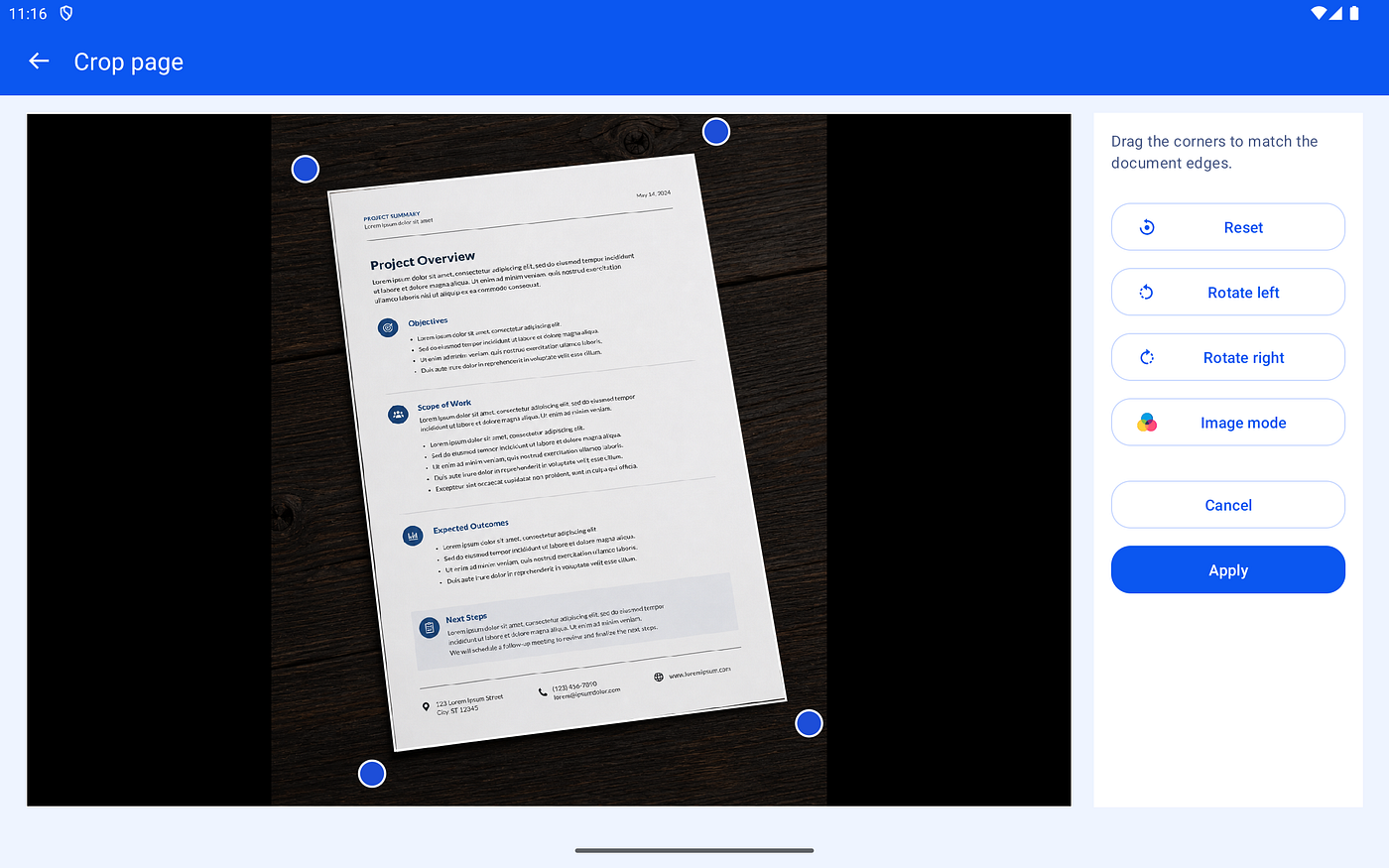
Scan Notes Using Your Phone Camera
Traditional scanners are expensive and inconvenient for students.
Ditto Scan allows you to capture pages directly using your phone.
Helpful capture features include:
- Flash control
- Camera grid overlay
- Live image mode preview
These tools help produce cleaner and more readable document scans.
Whether you’re scanning notes in a classroom, library, or dorm room, your phone becomes a portable scanner that fits in your pocket.
Improve Readability with Document Enhancement
Handwritten notes often suffer from:
- Poor lighting
- Shadows
- Faded writing
- Uneven backgrounds
Ditto Scan includes multiple enhancement modes that can improve document clarity.
Choose from:
- Natural
- Enhanced Color
- Grayscale
- Black & White
Different subjects and note styles may benefit from different enhancement options.
For example, color notes may look best with Enhanced Color, while text-heavy notes often work well in Grayscale or Black & White.
Combine Multiple Pages into One PDF
Many study materials span multiple pages.
Instead of managing dozens of separate photos, Ditto Scan allows students to create multi-page document projects.
This is particularly useful for:
- Lecture notes
- Lab reports
- Assignments
- Research summaries
- Revision guides
Once completed, the entire project can be exported as a single PDF document.
This makes sharing and studying significantly easier.
Reorder Pages When Needed
Students frequently scan pages out of sequence.
Maybe a page was skipped accidentally or added later.
With Ditto Scan, you can:
- Drag and drop pages into the correct order
- Add additional pages later
- Replace pages without rebuilding the document
- Remove unnecessary pages
This flexibility helps keep documents organized even when edits are required.
Create Better Revision Material
Exam preparation often involves collecting information from many sources.
You might combine:
- Classroom notes
- Printed handouts
- Homework solutions
- Reference materials
By scanning these pages into a single project, you can create comprehensive revision PDFs that are easier to review before exams.
Instead of carrying multiple notebooks, you can keep everything together in one organized document.
Share Notes with Classmates
Students frequently exchange notes and study resources.
Once a document has been scanned and exported, it can be shared quickly as a PDF.
This is useful when:
- A classmate misses a lecture
- Group projects require document sharing
- Study groups need common materials
- Assignment references need distribution
PDF files are universally supported and maintain consistent formatting across devices.
Stay Organized Throughout the Semester
As semesters progress, study materials accumulate rapidly.
Ditto Scan helps students stay organized through:
- Project names
- Search functionality
- Project thumbnails
- Page counts
- Last updated information
Instead of scrolling endlessly through image galleries, students can locate important materials quickly.
This becomes increasingly valuable during midterms and final exams.
Perfect for School, College, and University Students
Whether you’re studying in:
- High school
- College
- University
- Technical institutions
- Professional certification programs
Having a digital archive of your academic materials can make studying more efficient and less stressful.
Final Thoughts
Success in academics isn’t just about studying harder — it’s also about staying organized.
Digitizing notes, assignments, and handouts helps reduce clutter, prevents lost materials, and makes revision easier when exam season arrives.
With Ditto Scan, students can capture documents, organize study materials, build multi-page PDFs, and maintain a personal digital study library directly from their Android device.
If you’re looking for a simple way to organize your academic life and reduce dependence on paper, Ditto Scan can become an essential part of your study toolkit.
Download Ditto Scan
Website: https://deepakpk.com/dittoscan
Google Play Store: https://play.google.com/store/apps/details?id=com.deepakpk.documentscanner
Amazon Appstore: https://www.amazon.com/dp/B0H4DQ4X9K/
메타데이터
- post_id
- f693bde4fd21
- slug
- going-paperless-as-a-student-organize-notes-assignments-and-handouts-with-ditto-scan-f693bde4fd21
- url
- https://medium.com/@deepakpk/going-paperless-as-a-student-organize-notes-assignments-and-handouts-with-ditto-scan-f693bde4fd21
- canonical_url
- https://medium.com/@deepakpk/going-paperless-as-a-student-organize-notes-assignments-and-handouts-with-ditto-scan-f693bde4fd21
- author_url
- https://medium.com/@deepakpk
- status
- ok
- fetched_at
- 2026-06-20 20:29:01