Azure App Security Series — Part6 — About Tokens
- Tokens ( JSON Web Tokens ) are a piece of data that carries information about user’s identity that helps with the process of…
Azure App Security Series — Part6 — About Tokens
Photo by rc.xyz NFT gallery on Unsplash
-
Tokens ( JSON Web Tokens ) are a piece of data that carries information about user’s identity that helps with the process of authentication and authorisation.
-
There 3 types of tokens -
-
ID Tokens — Access Tokens — Refresh Tokens
-
A token would contain multiple pieces of information that allows the app to verify user permissions on the resource and token validity.
-
Quick definition about each token type -
-
ID Token — This token is issued by authorization server. It contains basic information about the user — such as user credentials that helps to verify who the user claim to be as. Authorization server is related to identity provider ( IAM System )
-
Access Token — The client ( Browser, command line, any other apps ) present this token while accessing the protected resource ( such as Azure Portal ). This token is a unique combination of client app, user, and resource. This token is generally valid for 1 hour.
-
Refresh Tokens — Provided to the client along with access token. These tokens are used to get new access tokens, ID Tokens and refresh tokens. This is also tied to a user, client app. Default expiry of this token is 90 days for inactive refresh tokens and no expiry for active tokens.
-
Microsoft Identity platform implements tokens in JSON Web token format that contain claims ( simply name value pairs )
-
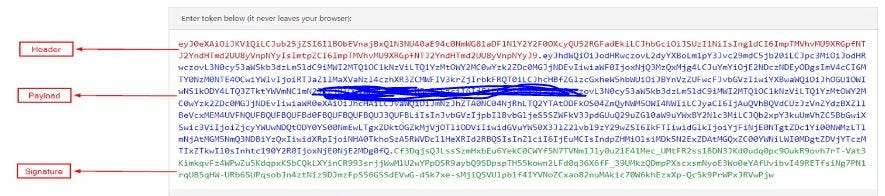
These JWT Tokens are split in 3 parts — 1) Header, 2) Payload and, 3) Signature
-
Header contains the information about token type, how to validate and method it was digitally verified.
-
Payload contains all important information about the user , app that is calling to get the tokens / perform authorization.
-
Signature contains the material that is used to validate the token.
Header, Payload and Signature Sections of a Token —
Decoded Token ( https://jwt.ms ) —

Token Header Claims —

Token Payload Section —


Thank you for reading this article.
Link to my other stories — https://medium.com/@bloggertech927
Link to CAWASP -https://www.alteredsecurity.com/azureappsec
메타데이터
- post_id
- f6a776ce0d08
- slug
- azure-app-security-series-part6-about-tokens-f6a776ce0d08
- url
- https://medium.com/@bloggertech927/azure-app-security-series-part6-about-tokens-f6a776ce0d08
- canonical_url
- https://medium.com/@bloggertech927/azure-app-security-series-part6-about-tokens-f6a776ce0d08
- author_url
- https://medium.com/@bloggertech927
- status
- ok
- fetched_at
- 2026-07-18 23:24:10




