CAPTCHA Workflows Are an Operations Risk, Not Just a Browser Problem
A business workflow does not usually fail because of one dramatic system outage.
CAPTCHA Workflows Are an Operations Risk, Not Just a Browser Problem
A business workflow does not usually fail because of one dramatic system outage.
More often, it fails because of a small dependency that nobody fully owns.
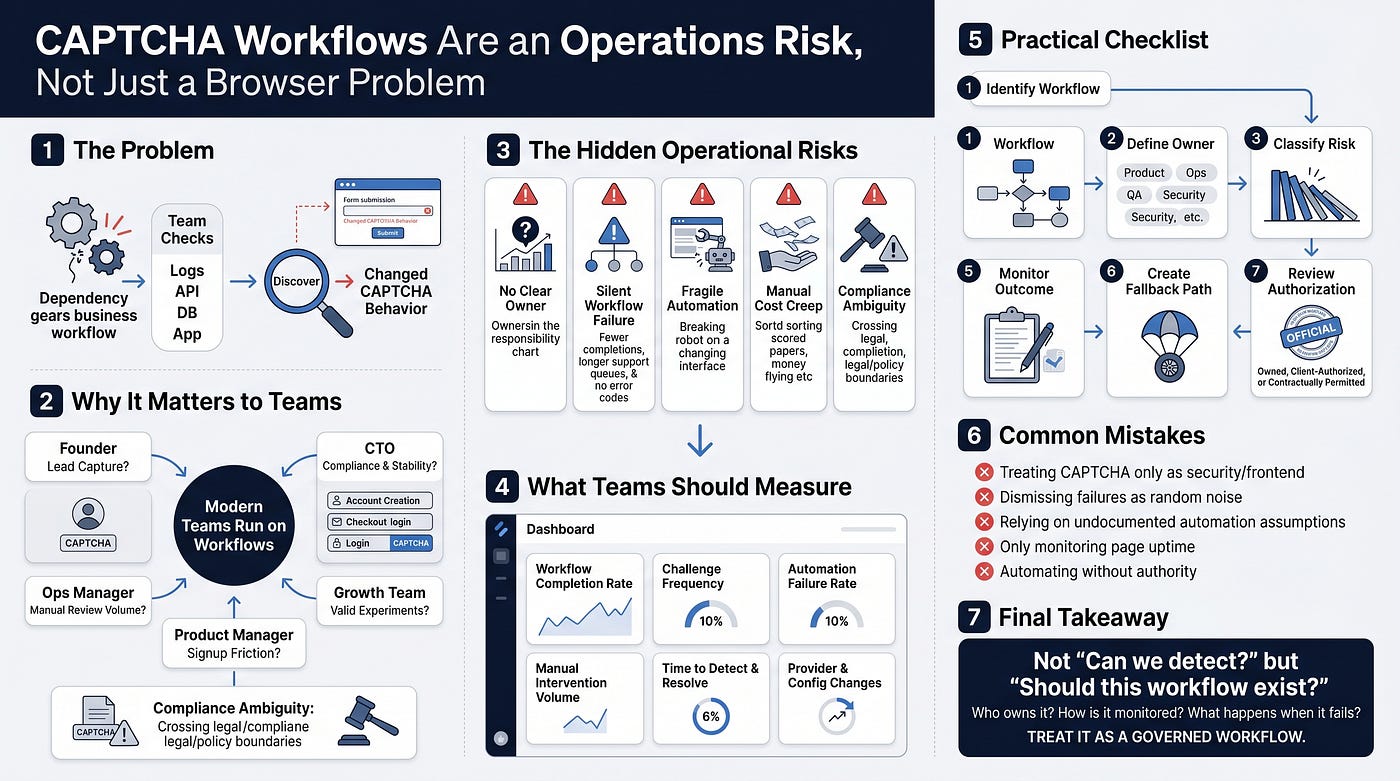
A form stops submitting. A QA script starts failing. A client-authorized data process suddenly returns incomplete results. A growth workflow that worked yesterday now needs manual attention. The team checks the application, the database, the API, and the deployment logs. Everything looks fine.
Then someone discovers the issue: the page’s CAPTCHA behavior changed.
For many teams, CAPTCHA is treated as a security or frontend detail. It sits somewhere between product, engineering, compliance, and operations. Because of that, it often becomes nobody’s responsibility until it blocks a workflow.
That is the real business problem.
CAPTCHA detection is not only about finding a sitekey or identifying whether a page uses reCAPTCHA, Turnstile, hCaptcha, or another provider. For teams that rely on browser-based testing, onboarding flows, partner workflows, internal tools, or approved automation, CAPTCHA behavior becomes part of the operating environment.
When that environment changes, the cost is rarely limited to one failed task.
Why this issue matters to teams
Modern teams run on workflows.
A founder cares whether lead capture is working. A CTO cares whether automation is stable and compliant. An operations manager cares whether manual review volume is increasing. A product manager cares whether signup friction is rising. A growth team cares whether experiments are being distorted by verification failures.
CAPTCHA systems sit directly inside these workflows.
They appear during account creation, checkout, form submission, login, password reset, quote requests, scraping prevention, fraud prevention, and other high-value steps. When they work well, teams barely notice them. When they change unexpectedly, they can create hidden operational drag.
The issue becomes more serious because CAPTCHA behavior is often dynamic. A page may not show a challenge until a user clicks a button, scrolls, submits a form, changes location, triggers a risk score, or loads a third-party script. This means a basic uptime check may say the page is healthy while the real workflow is already failing.
That gap matters.
A landing page can be online but unusable. A test suite can pass the first page load but fail at submission. A partner-authorized automation flow can appear technically active while returning low-quality or incomplete outputs.
This is where business teams need a different mindset. CAPTCHA-related failures should not be treated as random technical interruptions. They should be treated as reliability signals.
The hidden operational risks
The biggest CAPTCHA risk is not that a challenge exists. The risk is that teams do not know when, why, or how it changes.
Here are the common operational failure points.
1. No clear owner
CAPTCHA may be implemented by engineering, required by security, felt by support, and measured by growth. Without ownership, there is no one responsible for documenting how it behaves, when it was changed, or what workflows depend on it.
2. Silent workflow failure
CAPTCHA issues may not produce clean error messages. Instead, teams may see vague symptoms: fewer completed forms, failed automated tests, longer support queues, lower conversion, or more retries.
3. Fragile automation
Any browser-based workflow that depends on page structure can break when CAPTCHA providers, script loading, iframe behavior, or verification parameters change. This is especially true when teams rely on undocumented assumptions.
4. Manual cost creep
When automated or semi-automated workflows fail, people fill the gap. Operations teams start checking records manually. QA teams rerun tests. Support teams investigate complaints. These costs are rarely tracked as a CAPTCHA issue.
5. Compliance ambiguity
CAPTCHA-related workflows can cross legal, contractual, or policy boundaries if teams do not define where automation is allowed. That is why process design matters as much as technical detection.
What teams should measure
A mature team does not need to turn CAPTCHA monitoring into a complex engineering project. But it does need a few basic signals.
Start with workflow-level metrics rather than technical noise.
Track completion rate on forms or flows where CAPTCHA appears. A sudden drop may indicate friction, provider changes, failed rendering, or increased challenge frequency.
Track challenge frequency across important user journeys. If more users are being challenged than expected, the issue may affect conversion or support volume.
Track automation failure rate for QA, client-authorized workflows, or internal tools. The key is not only whether a script failed, but whether it failed at a verification step.
Track manual intervention volume. If operations teams are stepping in more often, the hidden cost should be visible.
Track time to detect and time to resolve. These two metrics reveal whether the team has ownership and monitoring in place.
Track provider and configuration changes. Any switch between CAPTCHA types, changes in rendering behavior, or updates to verification parameters should be documented.
The goal is not to monitor CAPTCHA for its own sake. The goal is to protect the workflows that CAPTCHA touches.
A simple decision framework
Teams can use a practical framework before they build, maintain, or troubleshoot CAPTCHA-related workflows.
1. Identify the workflow
Which business process depends on this page or verification step? Examples include signup, checkout, onboarding, lead submission, QA testing, customer support, fraud review, or client-authorized data operations.
2. Define the owner
Who owns the workflow if CAPTCHA behavior changes? This should not be vague. Assign responsibility to a team or role: product, operations, QA, engineering, security, or growth.
3. Classify the risk
Ask what happens if the workflow fails for one hour, one day, or one week. Does it affect revenue, customer experience, compliance, reporting, or team productivity?
4. Document normal behavior
Record which CAPTCHA provider appears, where it appears in the journey, whether it loads immediately or after interaction, and what conditions seem to trigger it. Keep this documentation business-readable, not just technical.
5. Monitor the outcome
Do not only monitor page uptime. Monitor form submission, conversion, test success, failure reason, and manual fallback volume.
6. Create a fallback path
If the workflow fails, who is notified? What manual process takes over? How are affected users or clients handled? What is the escalation path?
7. Review authorization
Before any automation is used, confirm that the environment is owned, client-authorized, or contractually permitted. This is not a small detail. It is part of operational governance.
This type of workflow should only be used in owned, client-authorized, or contractually permitted environments.
Safe and authorized use matters
CAPTCHA exists to reduce abuse, protect systems, and control access. Any workflow involving CAPTCHA detection, browser automation, testing, or third-party verification should be reviewed carefully.
For internal QA, owned properties, staging environments, and client-approved operations, detection can help teams understand why workflows fail and how to improve reliability. For unauthorized environments, the same activity can create legal, ethical, and contractual risk.
This is why mature teams do not treat CAPTCHA-related work as a shortcut. They treat it as a governed workflow.
The practical question is not simply, “Can the team detect the CAPTCHA?”
The better question is, “Should this workflow exist? Who owns it, and how is it monitored? And what happens when it fails?”
For teams that need the technical background, the original guide on browser-console CAPTCHA detection explains the detection side. The next step is turning that knowledge into an operational checklist: ownership, monitoring, fallback planning, and authorization review.
메타데이터
- post_id
- f6fee78cfd24
- slug
- captcha-workflows-are-an-operations-risk-not-just-a-browser-problem-f6fee78cfd24
- url
- https://medium.com/@nadaahmeed1212/captcha-workflows-are-an-operations-risk-not-just-a-browser-problem-f6fee78cfd24
- canonical_url
- https://medium.com/@nadaahmeed1212/captcha-workflows-are-an-operations-risk-not-just-a-browser-problem-f6fee78cfd24
- author_url
- https://medium.com/@nadaahmeed1212
- status
- ok
- fetched_at
- 2026-06-09 15:37:30



