From AWS Lambda to GCS — Keyless Multi-Cloud Access with Outbound Identity Federation
Learn how AWS workloads can authenticate to external services without static credentials using identity tokens
From AWS Lambda to GCS: Keyless Multi-Cloud Access with Outbound Identity Federation
Introduction
In multi-cloud environments, workloads often need to access services outside their home cloud. Traditionally, this requires managing long-lived credentials like API keys or service account keys. These static credentials are difficult to rotate, easy to leak, and increase security risks.
AWS IAM Outbound Identity Federation solves this by letting AWS workloads authenticate to external services without long-lived credentials. Instead of storing secrets, workloads obtain short-lived JSON Web Tokens (JWTs) from AWS Security Token Service (STS) and present them to external systems. These services verify the token and grant access based on its claims, with no shared secrets needed. This follows Zero Trust principles: every request is explicitly authenticated using a verifiable token that is short-lived, scoped, and auditable.
In this article, we’ll explore how this works through a practical example: an AWS Lambda function uploading data to a Google Cloud Storage (GCS) bucket using federated identity, without service account keys or static credentials.
How AWS IAM Outbound Identity Federation Works
At a high level, outbound identity federation follows a simple and secure token exchange flow:
- AWS workload requests an identity token. An application running on AWS (for example, Lambda or EC2) requests a token from AWS STS using its existing IAM role credentials.
- AWS STS issues a signed JWT. AWS STS returns a short-lived, cryptographically signed JSON Web Token (JWT) that represents the workload’s identity.
- Application presents the JWT to an external service. The workload sends the JWT to a trusted external identity provider or service for authentication.
- External service retrieves AWS public keys. The external service fetches AWS verification keys from the AWS JSON Web Key Set (JWKS) endpoint.
- JWT is verified and validated. The external service validates the JWT’s signature, issuer, audience, and claims to confirm it was issued by AWS and has not been tampered with.
- External credentials are issued. After successful verification, the external service exchanges the JWT for its own short-lived credentials, which the workload uses to access external resources.
AWS Lambda to GCP GCS Example
To illustrate this in action, we’ll build a keyless bridge that allows an AWS Lambda function to securely upload files to a Google Cloud Storage (GCS) bucket.

AWS to GCP Identity Federation
Since the architecture above visualizes the handshake, we’ll jump straight into the configuration steps required to bridge these two environments.
AWS Setup
First, we must authorize your AWS account to act as a cryptographically verifiable identity provider.
Enable Outbound Federation:
- In the AWS console, navigate to IAM service. From the left hand menu click Account Settings, under STS section find Outbound Identity Federation, click on the enable button. A token issuer url will be enabled for you.

Outbound Identity Federation
- It will look something like this: https://<id>.tokens.sts.global.api.aws
- Copy it somewhere safe.
Create a Lambda Role:
- Assign it the normal AWSLambdaBasicExecutionRole as you would for any Lambda function.
- Add the permission sts:GetWebIdentityToken to the role. This allows the Lambda to call the STS API to obtain its own JWT.

GetWebIdentityToken Permission
GCP Setup
Now we tell Google Cloud to recognize AWS as a trusted authority.
Create a Workload Identity Pool:
- In the GCP Console, go to IAM & Admin > Workload Identity Federation. Create a pool named
aws-lambda-pool.

Workload Identity Federation
- Click continue. Under “Add a provider to pool,” select OpenID Connect from the provider list (don’t select AWS, that’s the older method).
- Give the provider a name like
aws-sts-providerand paste the issuer URL that we copied earlier from the AWS console. Under audiences, select "Allowed Audience" and enter the name of your allowed audience.

Workload Identity Provider
- Finally, under attribute mapping, map
google.subjecttoassertion.suband click save.

Attribute Mapping
Create the Service Account:
- Navigate to IAM & Admin > Service Accounts.
- Click Create Service Account.
- Name it
lambda-storage-writer. - Grant Permissions: Search for and select Storage Object User (this allows reading and writing to buckets).
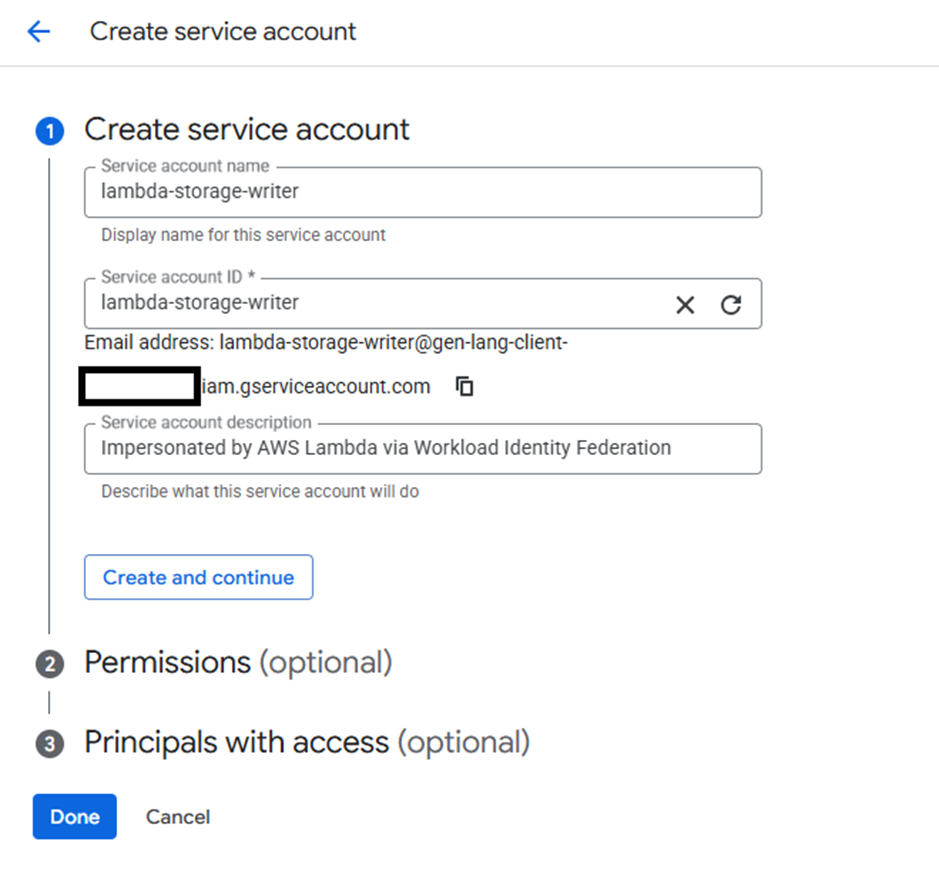
Create Service Account
- Click Done.
Configure the Trust Relationship:
- In GCP, you need to tell the service account which identities can impersonate it.
- Stay in the Service Accounts list and click on the email of the service account you just created.
- Go to the Permissions tab at the top.
- Click Grant Access.
- Under New Principals, enter a string that represents your AWS Role following this pattern: principal://iam.googleapis.com/projects/PROJECT_NUMBER/locations/global/workloadIdentityPools/POOL_ID/subject/AWS_ROLE_ARN
- Note: You can find your Project Number on the GCP Dashboard.
- Role: Select Workload Identity User.

Workload Identity User
- Click Save.
A Walkthrough of the Lambda Function
With our infrastructure bridge built, the Lambda function needs to perform a three-step handshake to move from an AWS identity to a GCP-authorized session.
The Identify Phase: Generating the AWS JWT
The function starts by asking AWS STS to sign a document that proves its identity. Unlike traditional IAM calls, we use the get_web_identity_token method.
def get_aws_subject_token():
 sts_client = boto3.client(“sts”, region_name=AWS_REGION)
 response = sts_client.get_web_identity_token(
 Audience=[“gcp-storage-access”],
 SigningAlgorithm=”RS256",
 DurationSeconds=60
 )
return response[“WebIdentityToken”]- The Claim: This generates a JSON Web Token (JWT).
- The Security: We set
DurationSeconds=60. This token is short-lived and only exists long enough to be traded for a Google token.
The Exchange Phase: Trading AWS for Google
Next, we send that AWS-signed token to the Google Security Token Service (STS). Google verifies the signature against your AWS Issuer URL and, if valid, issues a temporary federated token.
def exchange_aws_to_gcp_token(subject_token):
 response = requests.post(
 GCP_STS_ENDPOINT,
 json={
 “grant_type”: “urn:ietf:params:oauth:grant-type:token-exchange”,
 “audience”: f”//iam.googleapis.com/{WIF_POOL_PROVIDER}”,
 “subject_token”: subject_token,
 “subject_token_type”: “urn:ietf:params:oauth:token-type:jwt”,
 # … additional oauth params
 }
 )
 return response.json()[“access_token”]
Crucial Step: Notice we aren’t using a GCP SDK here. A simple HTTP POST request handles the exchange, keeping our Lambda lightweight.
The Authorize Phase: Impersonating the Service Account
The federated token proves who the Lambda is, but it doesn’t have permissions yet. We must trade that token one last time to impersonate our target GCP Service Account.
def impersonate_service_account(federated_token):
 response = requests.post(
 f”{GCP_IAM_CREDENTIALS_ENDPOINT}/projects/-/serviceAccounts/{GCP_SA_EMAIL}:generateAccessToken”,
 headers={“Authorization”: f”Bearer {federated_token}”},
 json={“scope”: [“https://www.googleapis.com/auth/devstorage.read_write"]}
 )
return response.json()[“accessToken”]- The Result: We now have a standard GCP Access Token. To Google Cloud Storage, our Lambda now looks and acts exactly like a native GCP Service Account.
Putting It All Together
The complete Lambda function code, including all helper functions and the main handler, is available in this [GitHub repository/gist link]. Feel free to use it as a starting point for your own multi-cloud integration projects.
Conclusion
AWS IAM Outbound Identity Federation enables a clean, modern approach to cross-cloud access that aligns with Zero Trust principles and eliminates many long-standing security and operational challenges:
Zero Static Credentials No service account keys, API keys, or long-lived secrets to store, rotate, or protect.
Strong, Verifiable Workload Identity External services can identify exactly which AWS workload (for example, a specific Lambda execution role) is making the request, rather than trusting broad network access or shared credentials.
Lower Operational Overhead Tokens are issued dynamically and exchanged in-memory, removing the need for secret distribution pipelines or external credential stores.
Not GCP-Specific While this example uses AWS to GCP Cloud Storage, the same pattern applies to any cloud provider or SaaS platform that supports OIDC or JWT-based trust. The only requirements are the ability to validate AWS-issued tokens, enforce audience and claim checks, and map identity to permissions.
As multi-cloud and hybrid architectures become the norm, this keyless, identity-first model provides a secure, auditable, and scalable foundation for integrating AWS workloads with external systems without introducing new secrets or expanding the attack surface.
References
- AWS IAM Outbound Identity Federation Documentation
- AWS Blog: Simplify access to external services using AWS IAM Outbound Identity Federation
- GCP Workload Identity Federation Guide
- boto3 get_web_identity_token API Reference
- GitHub Repository: aws-outbound-federation-demo
- OpenID Connect (OIDC) Specification
- OpenID Connect explained
메타데이터
- post_id
- f72ceeb43ff1
- slug
- from-aws-lambda-to-gcs-keyless-multi-cloud-access-with-outbound-identity-federation-f72ceeb43ff1
- url
- https://towardsaws.com/from-aws-lambda-to-gcs-keyless-multi-cloud-access-with-outbound-identity-federation-f72ceeb43ff1
- canonical_url
- https://towardsaws.com/from-aws-lambda-to-gcs-keyless-multi-cloud-access-with-outbound-identity-federation-f72ceeb43ff1
- author_url
- https://medium.com/@saad.07
- status
- ok
- fetched_at
- 2026-08-27 11:53:23