Git Worktrees Are the Guardrails for Agentic Development
The move is not manually juggling worktrees all day. The move is letting your agentic tools create isolated lanes, then understanding…
Git Worktrees Are the Guardrails for Agentic Development
The move is not manually juggling worktrees all day. The move is letting your agentic tools create isolated lanes, then understanding enough Git to know what they are doing.
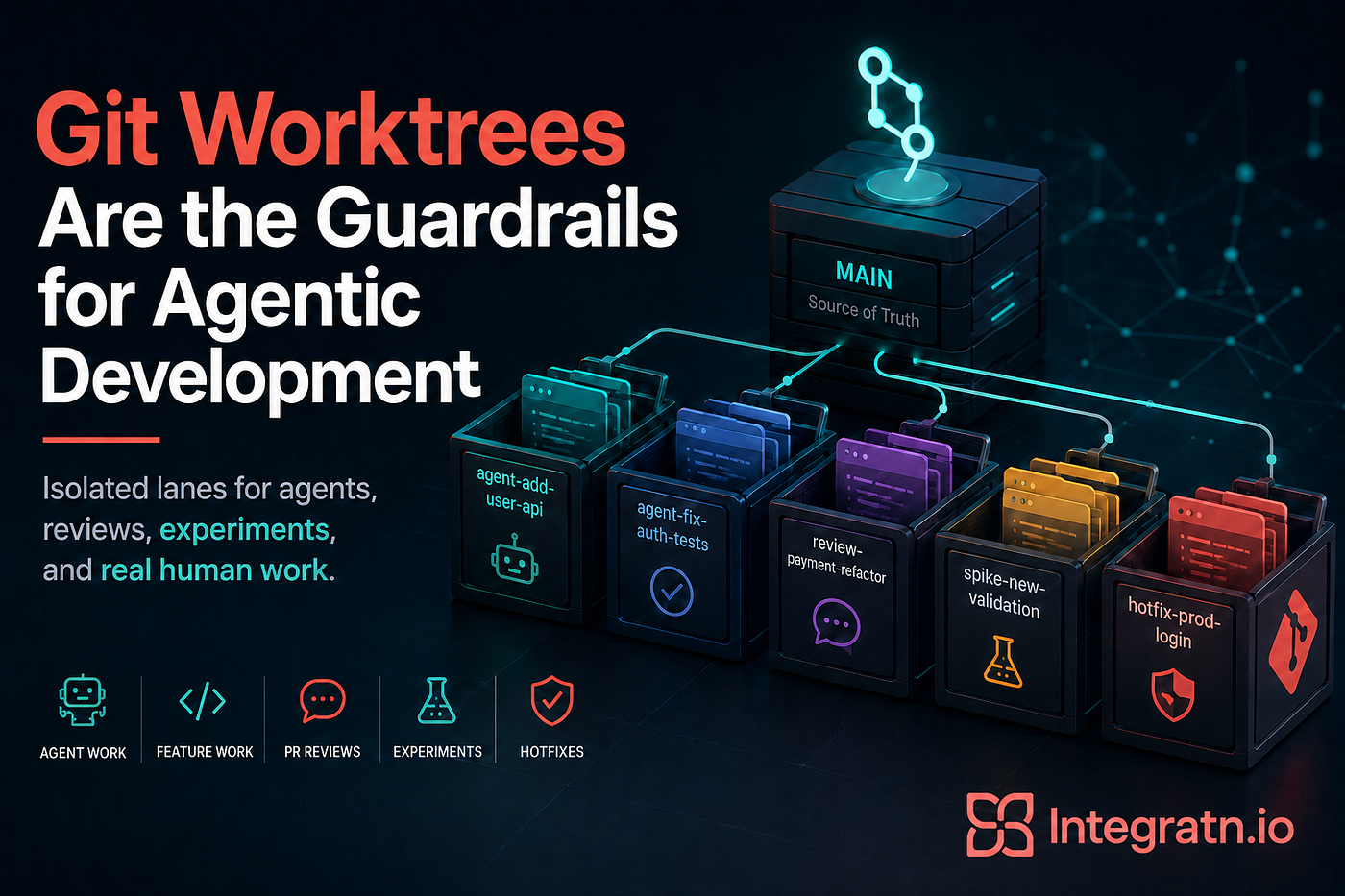
Agentic development changes the shape of how we work.
It is not just autocomplete anymore. We are handing agents real tasks.
Fix this bug. Add this endpoint. Refactor this package. Write the tests. Review this branch. Go find why this thing is haunted.
That is powerful, but it also creates a new kind of chaos.
If your workflow still assumes one repo, one branch, one terminal, and one human carefully moving from task to task, agentic development is going to feel like a pileup. You will have your own work in progress, an agent halfway through a feature, another agent researching a bug, a PR you need to review, and a random production issue that just walked through the wall like the Kool-Aid Man.
This is where git worktree gets interesting again.
Not because you should spend your whole day manually creating worktrees.
Because the modern agent tools are starting to use worktrees as the isolation layer.
Claude Code can start directly in a managed worktree.
VS Code Copilot CLI can run background sessions in worktree isolation.
Codex can run a thread in a worktree, then hand it back to your local checkout when you are ready to inspect it.
That is the actual pattern.
Git worktrees are becoming the filesystem-level guardrail for agentic development.
The old problem got louder
The normal Git workflow has always had a little friction baked into it.
You clone the repo. You create a branch. You start coding away. Then someone drops a PR review on you and the GitHub diff is not enough. So now you stash your work, switch branches, pull their code, review it locally, then try to get back to where you were without losing the plot.
Annoying, but manageable.
Now add agents.
You ask an agent to implement something and it starts editing files. Cool. But then you want another agent to inspect a different problem. Or you want to review a teammate’s PR while the agent is still working. Or you want to try two approaches to the same fix and compare them.
Without isolation, everything starts fighting over the same working directory.
That is how you get weird file changes, broken context, accidental overwrites, and the classic developer experience of:
Wait, why is this file changed?
Magic, but the bad kind.
The agentic development version of the story
As a developer, I want to run human work, agent work, PR reviews, experiments, and emergency fixes in parallel without everything stepping on everything else.
I want an agent to have its own sandbox.
I want the tool to manage that sandbox where possible.
I want repo-level instructions so every agent understands the conventions.
I want ignored files like .env.local handled intentionally.
I want the option to keep work in the background until I am ready to inspect it.
I want to move agent work into my foreground workspace when I need to validate it myself.
And I want all of that without cloning the same repo five times like an animal.
Worktrees are the mechanism, not the workflow
Here is the important shift.
The old workflow was:
I manually create worktrees so I can work on multiple branches.The agentic workflow is:
My agent tool creates isolated worktrees for background work, and I understand the Git model well enough to review, hand off, branch, clean up, and debug when something gets weird.That distinction matters.
You can still create worktrees manually. I still do sometimes.
But for agentic development, the better default is to let the tool manage the lane:
Claude Code session -> Claude-managed worktree
Copilot CLI session -> VS Code-managed worktree
Codex thread -> Codex-managed worktree
Manual Git worktree -> fallback or long-lived special case
You do not need to turn your terminal into a worktree factory.
You need conventions that tell you when to use Local, when to use Worktree, and when to hand work from one to the other.
The core convention: foreground vs background
This is the model that made everything click for me:
Local = foreground work
Worktree = background work
Local is where I am actively steering, inspecting, debugging, running the app, and using my normal editor setup.
Worktree is where I let an agent cook on something scoped while I keep moving.
That gives me a simple rule:
If I need to watch it closely, keep it Local.
If it can run independently, send it to a Worktree.
If it starts in one mode and needs the other, use Handoff where the tool supports it.
This is especially useful because not every task deserves the same level of attention.
A small test fix? Worktree.
A well-defined endpoint from an existing plan? Worktree.
A risky auth refactor where I need to steer every few minutes? Local first.
A background implementation that now needs real debugging in my normal IDE? Hand it off to Local.
That is controlled chaos with guardrails.
Claude Code pattern: start the session in a worktree
Claude Code has first-class worktree support.
The most direct pattern is not:
git worktree add ...
cd ...
claude
That works, but it is not the main pattern.
The main pattern is:
claude --worktree feature-author:
claude -w feature-authClaude creates an isolated worktree and starts the session there.
By default, Claude puts the worktree under:
.claude/worktrees/<name>and creates a branch named something like:
worktree-<name>So one of the first repo conventions should be:
.claude/worktrees/That keeps Claude-managed worktrees from showing up as random untracked folders in your main checkout.
Now you can run multiple sessions without hand-rolling the directory structure yourself:
claude --worktree add-user-api
claude --worktree fix-auth-tests
claude --worktree review-payment-refactor
Each one gets a separate isolated checkout.
Each one gets its own branch context.
Each one can work without stomping on the others.
Look at that. Order from chaos.
Claude Code pattern: choose the right base
By default, Claude Code worktrees branch from the repository’s default branch through origin/HEAD.
That is a great default for fresh work.
main -> Claude worktree -> isolated agent changesBut sometimes you want the agent to work from your current in-progress state.
Maybe you already wrote half the implementation locally and want a subagent to fix the tests from that exact state.
In that case, Claude supports setting the worktree base to local HEAD:
{
  "worktree": {
    "baseRef": "head"
  }
}
That changes the convention:
fresh work -> default branch
in-progress delegated work -> local HEAD
This matters because otherwise you will wonder why the agent cannot see the code you just wrote.
It is not haunted. It is just branching from a clean remote base.
Claude Code pattern: PR review without manual checkout
This is another place where the docs are better than the old manual workflow.
If you want Claude to work against a pull request, you can start a worktree from the PR directly:
claude --worktree "#1234"or with a full PR URL:
claude --worktree https://github.com/example/repo/pull/1234Claude fetches the pull request and creates the worktree for it.
That means the PR review pattern becomes:
Start Claude in a PR worktree
Ask it to inspect, test, and summarize
Open the worktree if you need hands-on review
Keep your current workspace clean
That is much closer to how agentic review should feel.
You are not stashing your work.
You are not manually creating a review branch.
You are asking the agent to create an isolated PR lane.
Claude Code pattern: copy ignored files with .worktreeinclude
A fresh worktree is a fresh checkout.
That means ignored files like .env, .env.local, local config, test credentials, and generated dev settings may not exist in the new worktree.
This is where a lot of agent workflows quietly break.
The agent starts in a clean directory, tries to run the app, and suddenly it cannot connect to anything because the ignored local files are missing.
Claude Code handles this with .worktreeinclude.
Example:
.env
.env.local
config/secrets.json
The file uses .gitignore style syntax and only copies files that are already ignored.
That is exactly the behavior I want.
The convention is simple:
- Keep secrets out of Git.
- Document which ignored files are needed.
- Use
.worktreeincludefor Claude-managed worktrees. - Still keep setup repeatable.
This is the difference between “the agent can actually run the app” and “the agent spends 20 minutes discovering your laptop.”
Claude Code pattern: isolate subagents too
Worktrees are not only for top-level sessions.
Claude subagents can also be isolated with worktrees.
For a custom subagent, add this to the frontmatter:
---
name: test-fixer
description: Fix failing tests while keeping changes scoped
isolation: worktree
---
That creates a cleaner model:
main Claude session = coordinator
subagent worktree = isolated execution lane
The main session can reason, delegate, review, and decide what to keep.
The subagent can go modify files without trampling the coordinator’s working directory.
That is a much better pattern than letting multiple agents mutate the same checkout and hoping everyone remains polite.
Agents are not polite.
Agents are chaos toddlers with grep.
Give them lanes.
VS Code Copilot CLI pattern: use Worktree isolation for background sessions
VS Code Copilot CLI is built around background agent sessions.
That is the key thing.
These sessions run independently on your machine while you keep working in VS Code. So the pattern is not “open terminal, manually create branch, start agent.” The pattern is to start a Copilot CLI session from VS Code and choose the right isolation mode.
Copilot CLI gives you two modes:
Workspace isolation Worktree isolation
Workspace isolation means the agent edits your current workspace directly.
Worktree isolation means VS Code creates a separate Git worktree for the session and applies the agent’s changes there.
My convention:
Use Workspace isolation for paired work. Use Worktree isolation for background work.
If I am actively watching the agent and steering every few minutes, Workspace isolation is fine.
If I am sending a task off to run while I keep working, Worktree isolation is the default.
VS Code Copilot CLI pattern: plan local, implement in background
The handoff pattern is the important part.
For complex tasks, I do not want to immediately send the agent off with a vague paragraph.
I want to plan first.
A good flow looks like this:
- Use a local VS Code agent session to clarify the task.
- Ask for a plan.
- Review and tighten the plan.
- Hand the session to Copilot CLI.
- Let Copilot CLI run the implementation in Worktree isolation.
- Review the worktree when it is done.
That gives you the best of both worlds.
Local chat is good for shaping the work.
Background worktree execution is good for letting the agent actually grind through the change.
That is way better than:
Add password reset.That prompt is how repos get cursed.
VS Code Copilot CLI pattern: understand auto-commits
One detail I like in the Copilot CLI worktree model is that, when using Worktree isolation, the agent commits changes to the worktree at the end of each turn.
That means the session history and commit history stay aligned.
This changes how I think about review.
I am not only reviewing one giant final diff. I can inspect the sequence of agent turns as commits.
That is useful when the agent wanders.
You can spot the turn where things got weird and steer from there.
The convention:
Do not treat auto-commits as production commits.
Treat them as agent checkpoints.
Squash, rewrite, or clean them up before opening a PR.
Agent commits are breadcrumbs.
They are not sacred.
Codex pattern: Worktree is background, Local is foreground
Codex has the cleanest mental model for this:
Local = foreground
Worktree = background
When you start a new Codex thread, you can select Worktree under the composer, choose the starting branch, and submit your prompt. Codex creates the worktree for that thread.
By default, Codex-managed worktrees run in detached HEAD.
That is important.
It means Codex can spin up several background worktrees without polluting your branch list with random feature branches before you know whether the work is worth keeping.
That is the right default.
The convention:
Do not create a branch until the work is worth keeping.
Let Codex run detached.
Review the result.
Then either create a branch or hand it off to Local.
That feels much more like modern agentic development.
The branch comes after the work proves useful, not before.
Codex pattern: use Handoff instead of fighting Git
The biggest Codex concept to understand is Handoff.
Handoff moves a thread between Local and Worktree.
This matters because Git only allows a branch to be checked out in one worktree at a time.
So if a branch is checked out in a Codex worktree and you try to check it out locally, Git may throw something like:
fatal: 'feature/a' is already used by worktree at '<WORKTREE_PATH>'The wrong response is: Why is Git broken?
The right response is: Use Handoff.
If the work is in the background and you want to bring it into your normal IDE, hand it off to Local.
If you are working locally and want Codex to keep going in the background, hand it off to Worktree.
That is the clean pattern.
Background execution -> Worktree
Hands-on validation -> Local
Move between them -> Handoff
Do not fight branch ownership.
Let the tool move the work safely.
Codex pattern: managed vs permanent worktrees
Codex-managed worktrees are meant to be lightweight and disposable.
That is good for most agent work.
one thread -> one managed worktree -> review -> keep or discardBut sometimes you want a longer-lived environment.
Maybe the setup is expensive.
Maybe the task spans multiple sessions.
Maybe you have a dev server or dependency cache you do not want to rebuild constantly.
That is where permanent worktrees fit.
My convention:
Codex-managed worktree -> normal background task
Permanent worktree -> long-lived environment
Local -> foreground validation
Again, the pattern is not “manually create everything.”
The pattern is choosing the right execution lane.
Repo conventions matter more than prompts
Worktree isolation protects files.
It does not magically teach the agent how your repo works.
That is where repo conventions come in.
Depending on the tool, that might mean:
AGENTS.md
CLAUDE.md
.github/copilot-instructions.md
I like having a generic AGENTS.md even if a specific tool uses something else. It creates one obvious place to document how agentic work should happen in the repo.
Keep it focused:
# Agent Instructions
## Working agreement
- Prefer tool-managed worktrees for autonomous or background work.
- Use local workspace edits only when the user is actively steering.
- Keep changes scoped to the requested task.
- Do not perform unrelated refactors.
- Do not reformat unrelated files.
- Do not update dependencies unless the task requires it.
- Before finishing, summarize:
- files changed
- tests run
- risks or follow-up work## SetupRun: make setup## VerificationRun: make verify## Boundaries
Do not modify:
production secrets
generated files unless regeneration is part of the task
unrelated Terraform state files
unrelated lock filesThis is not about being precious.
It is about saving tokens, time, and sanity.Every time you have to re-explain the repo, the testing pattern, the commit expectations, or what “done” means, you are paying for context that should have already existed.
I went deeper on quality gates, local AI, and validation loops in Local AI Is Becoming the Cost Control Layer for Agentic Development, so I will not rehash that whole thing here.
When manual worktrees still make sense
Manual Git worktrees are still useful. They are just not the default agentic pattern anymore. I still reach for manual worktrees when:
- I want a long-lived local checkout outside a tool-managed directory
- I need a very specific branch layout
- I am reviewing a PR without involving an agent
- I am working with a tool that does not manage worktrees yet
- I want full control over location, naming, and cleanup
Example:
git worktree add ../review-payment-refactor -b review-payment-refactor origin/payment-refactorFor this workflow, the important part is simpler: worktrees give the agent a lane, repo instructions give it direction, and your verification step decides whether the work survives.
That still works.
It is still useful.
It is just the fallback pattern, not the main event.
The main event is:
Let the agent tool create the lane. Use Git knowledge to understand, review, and clean up the lane.
Cleaning up after yourself
Even with tool-managed worktrees, cleanup matters.
Claude may prompt you to keep or remove a worktree depending on whether there are changes.
Codex-managed worktrees are treated as disposable and can be cleaned up by Codex over time.
VS Code removes Copilot CLI worktrees when linked sessions are gone.
But you should still know the Git commands.
List worktrees:
git worktree listRemove one manually if needed:
git worktree remove <path>Clean up stale references:
git worktree pruneThis is the “break glass” knowledge.
Most of the time the tool should manage it.
When the repo gets haunted, Git still gives you the exorcism commands.
My agentic worktree flow now
Here is the updated flow I keep coming back to:
- Keep my local workspace for foreground work.
- Put repo conventions in
AGENTS.md,CLAUDE.md, or.github/copilot-instructions.md. - Give the repo one obvious setup command and one obvious verify command.
- Use tool-managed worktrees for background agent tasks.
- Use
.worktreeincludeor setup scripts for ignored local files. - Let the agent work in isolation.
- Bring work forward through the tool’s review, branch, or handoff flow.
- Review the diff like a normal PR.
- Clean up or let the tool clean up.
- Use manual Git worktree commands only when you need full control.
In Claude Code, that might look like:
claude --worktree add-user-apiIn VS Code Copilot CLI, that might look like:
Plan locally, then hand off to Copilot CLI with Worktree isolation.In Codex, that might look like:
Start the thread in Worktree.
Let Codex work in the background.
Use Handoff when you need to bring it Local.
Same underlying idea.
Different tool UX.
The convention stays consistent.
The bigger point
Agentic development is not just about better prompts.
It is about workflow design.
If you give agents messy instructions inside a messy repo state, do not be shocked when they produce messy work. The model matters, sure. But the operating environment matters too.
Worktrees give agentic tools a simple way to create clean boundaries:
- One task
- One isolated execution lane
- One agent session
- One diff to review
- One verification path
- One decision to keep, hand off, branch, or discard
That is controlled chaos with guardrails.
And right now, that is about the best description I have for modern software development.
TLDR
Do not manually juggle worktrees as your default agentic workflow.
Let the tools manage them.
Use Claude Code --worktree for isolated sessions.
Use Claude subagent isolation: worktree when delegating parallel work.
Use VS Code Copilot CLI Worktree isolation for background implementation.
Use Codex Worktree for background threads and Handoff when you need to move work into Local.
Keep manual git worktree commands in your back pocket for long-lived environments, PR review, and cleanup.
The real convention is simple:
Local is foreground. Worktree is background. Handoff moves work between them. Quality gates decide if the work survives.
Go give your agents their own lanes and PROFIT.
메타데이터
- post_id
- f7378724d506
- slug
- git-worktrees-are-the-guardrails-for-agentic-development-f7378724d506
- url
- https://blog.integratn.io/git-worktrees-are-the-guardrails-for-agentic-development-f7378724d506
- canonical_url
- https://blog.integratn.io/git-worktrees-are-the-guardrails-for-agentic-development-f7378724d506
- author_url
- https://medium.com/@james-integratn-io
- status
- ok
- fetched_at
- 2026-06-11 18:57:12