How Your Phone Knows Its Battery Percentage
Have you ever stopped to wonder how your phone knows what is going on inside a sealed chemical pouch?
How Your Phone Knows Its Battery Percentage
Have you ever stopped to wonder how your phone knows what is going on inside a sealed chemical pouch?
The short answer is that it involves a fascinating layer of communication between hardware sensors and software algorithms. It is not magic. It is a constant digital interrogation. Here is exactly how your device turns chemical energy into that percentage on your screen.
The Battery Management System
A modern lithium-ion battery is more than a container full of reactive chemicals. Built directly into the battery module is a tiny, incredibly important circuit board known as the Battery Management System (BMS).
Think of the BMS as the air traffic controller for your power supply. It is packed with hardware sensors that continuously monitor several physical states:
- Voltage: The electrical potential remaining in the cells.
- Current flow: How much power is currently being drawn out or pushed in during charging.
- Temperature: How hot or cold the battery is operating.
- Battery health: The total number of charge and discharge cycles the battery has survived.
A fully charged lithium-ion cell might output exactly 4.2V. When it is nearly empty, that output drops to around 3.0V. The BMS watches this physical voltage constantly to keep your device safe and powered.
Chem to Code
The physical battery operates in the analog form. It’s in the world of raw voltage. Your operating system lives in the digital world of ones and zeros. A computer processor cannot read an analog voltage.
To bridge this gap, the BMS uses a component called an Analog-to-Digital Converter (ADC). The ADC acts as an active translator.
If the battery sensor reads a physical voltage of 3.85V, the ADC processes that raw electrical signal and spits out a digital value (like the number 3850). Now, the hardware has something the software can read and compute.
Conversation
Your device processor and the BMS are connected via specific communication channels. Engineers use protocols like I2C, SMBus, SPI, or USB Power Delivery to let these components talk to each other.
Every few seconds, your operating system sends a ping to the battery controller asking for a status update.
The BMS replies with the translated digital data, delivering a report that includes the voltage, the current power draw, the internal temperature, and an estimated charge level.
Putting It on Your Screen
Once the operating system (whether it is iOS, Android, Windows, or macOS) receives that data packet, a dedicated piece of software called a kernel driver takes over. The driver hands the information up to the user interface, which finally renders that familiar battery icon and percentage text.
To visualize this entire pipeline, you can use a simple plumbing analogy:
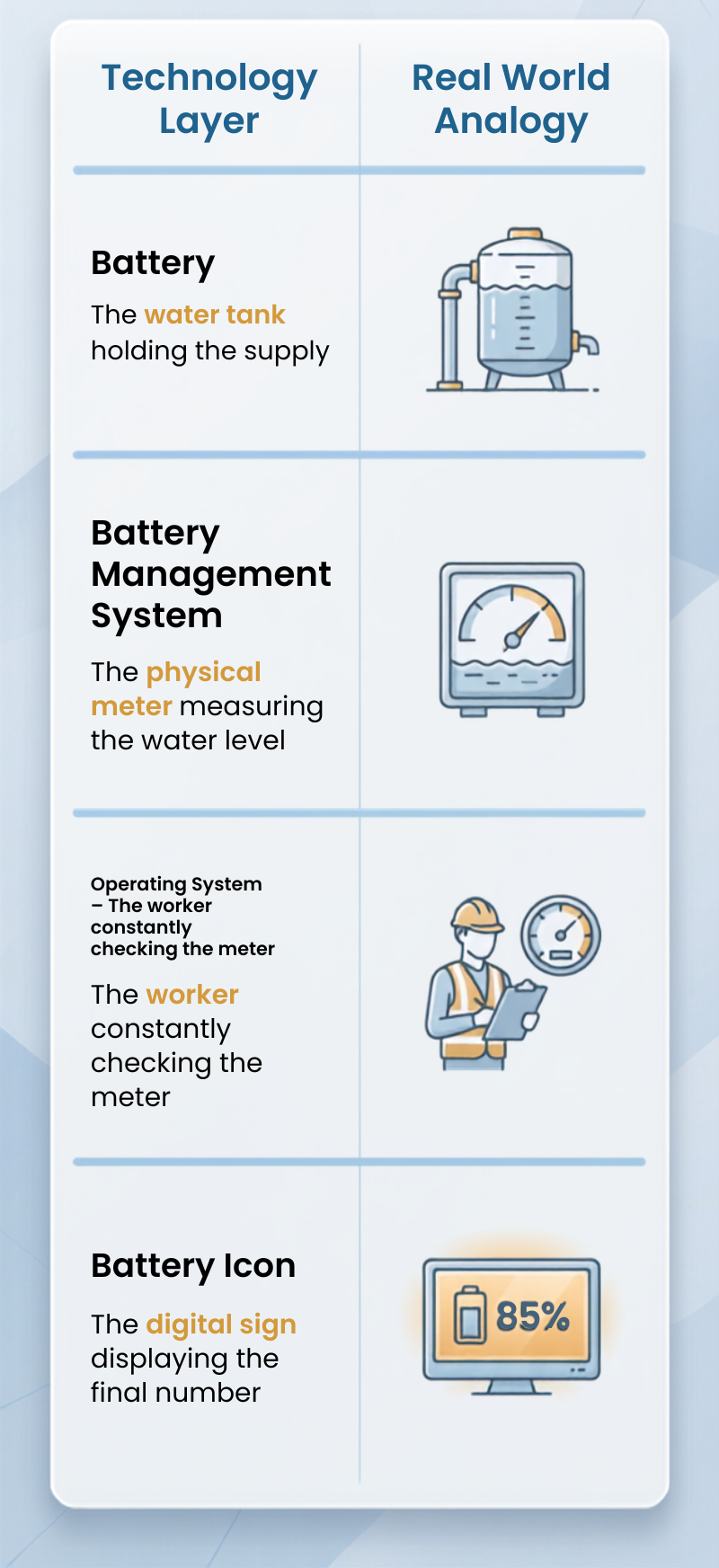
Image created using Canva
PLOT TWIST!!
The percentage on your screen is usually not a direct measurement. It is an extremely well-educated guess.
Battery chemistry is chaotic. A battery sitting at a 50 percent charge will not simply output half of its maximum voltage. The voltage curve drops off unevenly based on the age of the battery, the current temperature of the room, and how heavy your processing load is at that exact second.
To account for this, the BMS and the operating system run complex estimation algorithms known as fuel gauges. These fuel gauges take the raw digital voltage, factor in your current usage patterns, adjust for the temperature, and calculate the most statistically probable battery percentage.
So the next time your phone dies at two percent, you will know why. The physical sensors did not fail. The math algorithm simply made a miscalculation about the chemistry happening inside your device.
메타데이터
- post_id
- f79e637115d2
- slug
- how-your-phone-knows-its-battery-percentage-f79e637115d2
- url
- https://medium.com/@rudratech/how-your-phone-knows-its-battery-percentage-f79e637115d2
- canonical_url
- https://medium.com/@rudratech/how-your-phone-knows-its-battery-percentage-f79e637115d2
- author_url
- https://medium.com/@rudratech
- status
- ok
- fetched_at
- 2026-07-29 11:52:52