BLE Advertiser Now Simulates the 5 Real-World BLE Systems Developers Actually Build For
From retail beacons to patient monitors, here’s how live manufacturer data updates in BLE Advertiser let you test against the same…
BLE Advertiser Now Simulates the 5 Real-World BLE Systems Developers Actually Build For
From retail beacons to patient monitors, here’s how live manufacturer data updates in BLE Advertiser let you test against the same continuous-advertising behavior real production hardware uses, no restart artifacts, no hardware required.
I wrote about the mechanics of live manufacturer data updates a little while back: how AdvertisingSet.setAdvertisingData() lets you change what a device is broadcasting without ever calling stop or start. What I didn't spend much time on is where this actually shows up in production hardware, not test rigs. Once you start looking at real BLE deployments across retail, logistics, healthcare, and smart buildings, a pattern becomes obvious. Continuous advertising with changing payloads isn't an edge case. It's the default architecture for most BLE devices that report status rather than just identity.
Here are five categories where that distinction between “restart advertising” and “update advertising in place” stops being a technical footnote and starts being the difference between a system that works and one that quietly loses devices. In each case, the hardware itself doesn’t have a choice about how it behaves. It’s advertising continuously because the use case demands it. The only question is whether the tools used to build and test against that hardware account for that, or whether they’re quietly training developers to accept behavior that the real devices never actually exhibit.
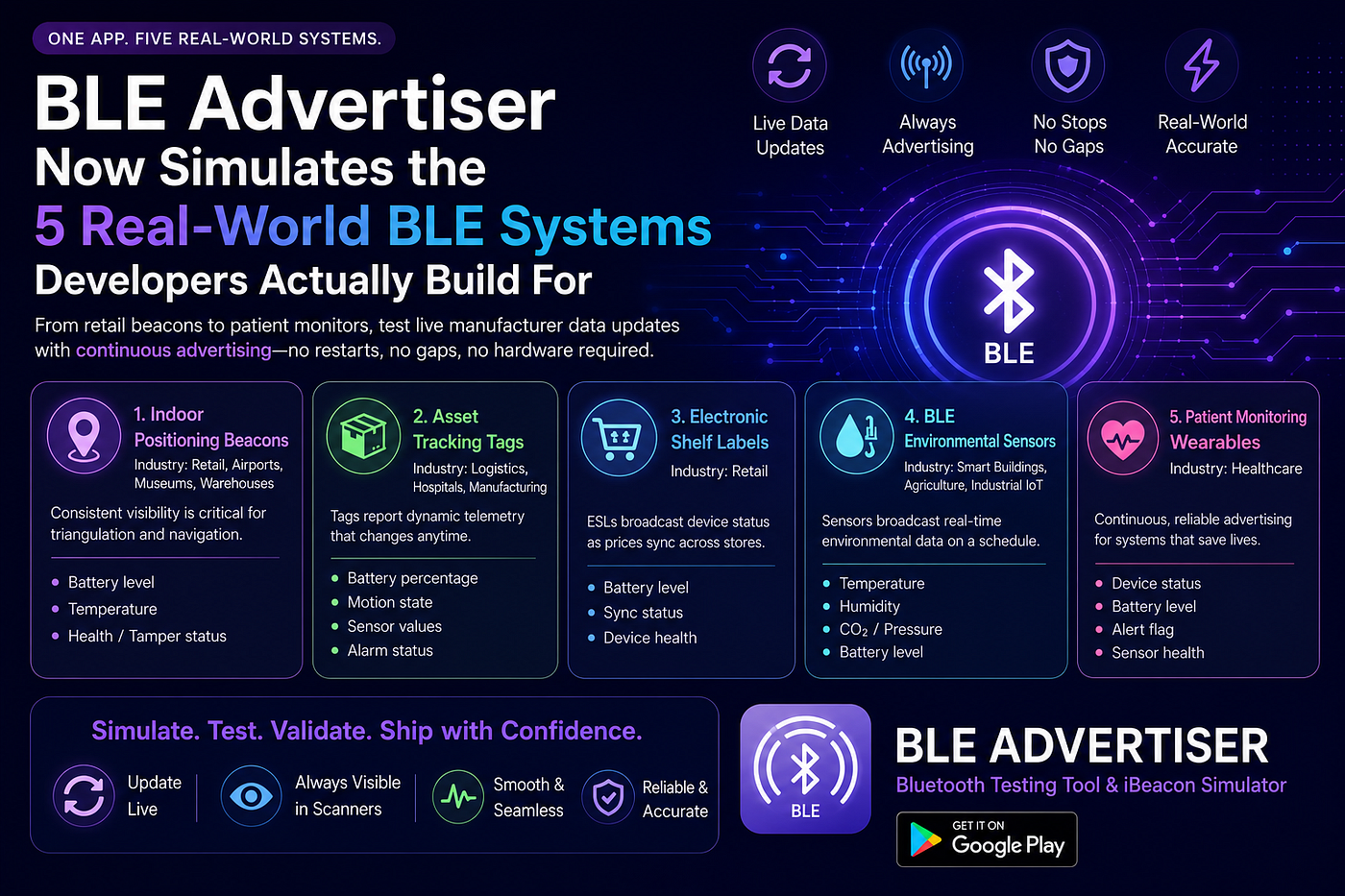
1. Indoor positioning beacons
Industry: retail, airports, museums, warehouses
Indoor positioning depends on beacons being consistently visible to scanning infrastructure, whether that’s a phone app guiding a visitor through a museum or a fixed gateway triangulating asset position in a warehouse. Most of these beacons don’t just broadcast a static UUID. They also carry telemetry in manufacturer data: battery level, temperature, sometimes a health or tamper status flag.
The problem is that telemetry changes. A battery reading that drifts from 82% to 81% is a tiny update, but if the beacon has to stop advertising, rebuild its payload, and start again to reflect it, the beacon disappears from the air for a moment every time that happens. Multiply that across thousands of beacons in a large retail footprint or airport terminal, and you get a positioning system with periodic blind spots that have nothing to do with signal strength or physical obstruction.
Live manufacturer data updates solve this at the source. The beacon’s identity, timing, and position in the advertising cycle stay untouched. Only the bytes that changed actually change. Scanners don’t lose track of it, location tracking doesn’t glitch, and battery telemetry stays current without costing the system continuity. This is the same category of hardware companies like Kontakt.io, Minew, and BlueCats build for, and it’s a useful category to keep in mind if you’re testing positioning infrastructure: your test beacons need to behave the same way the production ones do, or you’re validating against a scenario that doesn’t exist in the field.
If you’re building the scanning side of a positioning system, the practical test here is straightforward: configure a simulated beacon with a battery or temperature field, update it repeatedly while your app is actively resolving position, and watch whether your positioning logic treats the update as a seamless value change or briefly loses the beacon. If it’s the latter, that’s a bug your users will eventually notice as flickering or jumping location markers, and it’s much cheaper to catch on a bench than in a live deployment.
2. Asset tracking tags
Industry: logistics, hospitals, manufacturing
Asset tags are a rougher version of the same problem, because their manufacturer data changes more often and for more reasons. A tag attached to a pallet, a hospital bed, or a piece of manufacturing equipment typically reports battery percentage, motion state, one or more sensor values, and an alarm status, and any of those fields can change within seconds of the asset moving, tipping, or crossing a threshold.
This is where stop/start advertising becomes actively dangerous rather than just annoying. If a gateway briefly loses sight of a tag every time its motion state flips, and motion state flips constantly on a tag that’s actually moving, the system generates a stream of false “asset not detected” events layered on top of the real ones. Anyone maintaining that system ends up building tolerance logic just to filter noise created by the advertising layer itself, not the actual asset behavior they’re trying to track.
Continuous visibility matters more here than almost anywhere else on this list, because the entire value proposition of asset tracking is knowing where something is right now, not where it was before the last advertising restart. Companies like Zebra Technologies, Wiliot, and HID Global’s Bluvision line build in this space, and the pattern holds regardless of vendor: the tag has to keep talking while its status changes, not go quiet and come back.
For teams building gateway software or a fleet dashboard against this kind of hardware, the useful test isn’t a single tag reporting a single change. It’s several simulated tags updating independently and often, closer to how a real warehouse floor behaves during a shift. That’s the scenario most likely to surface race conditions or missed-detection bugs in gateway firmware, and it’s exactly the scenario a restart-based simulator struggles to reproduce accurately.
3. Electronic shelf labels
Industry: retail
Electronic shelf labels are a slightly different shape of the same requirement. Instead of environmental telemetry, an ESL typically reports device-level status in its manufacturer data: battery level, synchronization state with the central pricing system, and general device health. These values shift during normal operation, particularly synchronization status, which changes every time a price update propagates through the store.
The operational requirement here is that maintenance tooling, whether that’s a handheld scanner a store associate carries or a fixed gateway monitoring the shelf network, always has an accurate read on which labels are in sync and which aren’t. An ESL that has to interrupt its advertisement to report a sync status change creates a brief window where that exact status is unknowable, which is a bad trade-off for a field that exists specifically to catch synchronization failures quickly.
Retail ESL vendors including SES-imagotag, Hanshow, and SoluM operate in this space at meaningful scale, and the underlying requirement, uninterrupted status visibility during frequent updates, is the same one that makes live manufacturer data updates relevant to anyone testing or building similar shelf-label style systems.
Anyone building the store-side software that monitors label fleets benefits from simulating a sync-status flip in isolation from any other change. Toggling just that one field while everything else on the label stays constant makes it easy to confirm your monitoring tool reacts to the status change itself, rather than to a broader disruption caused by the label going briefly off the air.
4. BLE environmental sensors
Industry: smart buildings, agriculture, industrial IoT
Environmental sensors are probably the clearest case for live updates, because their entire job is reporting a value that changes on a fixed interval. Temperature, humidity, CO2, pressure, and battery level get sampled and broadcast on a schedule that can run anywhere from once a second to once every few minutes, depending on the deployment.
None of that requires reconnecting or restarting anything. The sensor takes a reading, updates its manufacturer data, and keeps advertising exactly as it was. What it doesn’t need is a stop/start cycle standing between the measurement and the broadcast, since that just adds latency and radio overhead to a device that’s often running on a coin cell battery and needs every bit of power efficiency it can get.
This is also the category where the gap between a good simulator and a bad one is most visible during development. A test rig that restarts advertising on every reading behaves nothing like a real sensor that just keeps talking. Products like RuuviTag, Minew’s environmental sensor line, and Blue Maestro’s sensors all follow the continuous-advertising pattern, and it’s worth testing against that same pattern rather than a restart-based approximation of it if you’re building anything that ingests this kind of data.
It’s also the category where high-frequency updates are most likely to be tested, since environmental readings often refresh every second or faster in a bench setting even if production intervals are longer. That makes it a good stress test for your ingestion pipeline’s parsing throughput specifically, separate from any question about whether it can keep up with advertising restarts.
5. Patient monitoring wearables
Industry: healthcare
Healthcare wearables carry the highest stakes on this list, and not by a small margin. A hospital wearable reporting device status, battery level, an alert flag, or general sensor health is being watched by a gateway that’s part of a monitoring system someone’s care might actually depend on. These wearables advertise near-continuously, and clinical or operational software on the receiving end is built around the assumption that the advertisement is always there.
Interrupting that advertisement, even briefly, to push out a status change is not a trade-off healthcare systems can casually accept. A delayed alert flag, even by the length of a stop/start cycle, isn’t an abstract inconvenience in this context. Continuous, uninterrupted advertising isn’t a nice-to-have for patient monitoring hardware. It’s close to a baseline requirement, which makes this category the strongest argument for building on live in-place updates rather than a restart pattern, whatever the underlying use case looks like.
For anyone testing gateway or ward-monitoring software against this kind of device, simulating an alert flag flip with zero advertising interruption is the closest a bench test gets to the real failure mode a clinical system needs to catch reliably. If your test setup can only reproduce that scenario with a visibility gap baked in, it’s not really testing the alert path. It’s testing a version of the alert path with an artifact your production hardware won’t have.
What this means for testing
The common thread across all five categories isn’t the industry. It’s the architecture. Every one of these device types treats advertising as a continuous channel that carries changing state, not a one-time announcement that gets rebuilt occasionally. None of them are well served by a stop/start cycle, and testing against a simulator that uses one means testing against a scenario that doesn’t match production behavior.
That’s the gap BLE Advertiser’s live manufacturer data update feature is built to close. Instead of approximating beacon, tag, label, sensor, or wearable behavior with a restart loop, you can simulate the actual pattern: continuous advertising with a payload that changes in place, on whatever interval you need, without the visibility gaps that come from stopping and starting. If you’re building a gateway, a scanning app, or ingestion software for any of the categories above, that’s the difference between a test rig that tells you something true and one that quietly trains you to tolerate a bug that only exists in your test setup.
None of this requires owning a warehouse full of asset tags or a hospital’s worth of patient monitors to validate. The whole point of a phone-based simulator is being able to reproduce the advertising behavior of any of these device categories on a desk, before the real hardware is in hand or while it’s still being sourced. The categories above cover a wide slice of what BLE hardware actually does in production, and testing against an accurate simulation of that behavior early tends to be a lot cheaper than finding the same gap after deployment.
BLE Advertiser is free on the Google Play Store, and the live-edit option for manufacturer data sits in the same advertising configuration screen you already know. More on the app at bleadvertiser.gt.tc.
Which of these five is closest to what you’re building or testing against? I’d like to know what’s giving you the most trouble.
메타데이터
- post_id
- f7b509b9a5e5
- slug
- ble-advertiser-now-simulates-the-5-real-world-ble-systems-developers-actually-build-for-f7b509b9a5e5
- url
- https://medium.com/@miniiot/ble-advertiser-now-simulates-the-5-real-world-ble-systems-developers-actually-build-for-f7b509b9a5e5
- canonical_url
- https://medium.com/@miniiot/ble-advertiser-now-simulates-the-5-real-world-ble-systems-developers-actually-build-for-f7b509b9a5e5
- author_url
- https://medium.com/@miniiot
- status
- ok
- fetched_at
- 2026-08-04 22:06:55