Running Athene-V2 Locally: A Comparative Guide to Deploying the Next-Gen LLM on Your Machine
Athene-V2, the cutting-edge 72B parameter model suite, is a groundbreaking advancement in AI, excelling in targeted specializations like…
Running Athene-V2 Locally: A Comparative Guide to Deploying the Next-Gen LLM on Your Machine
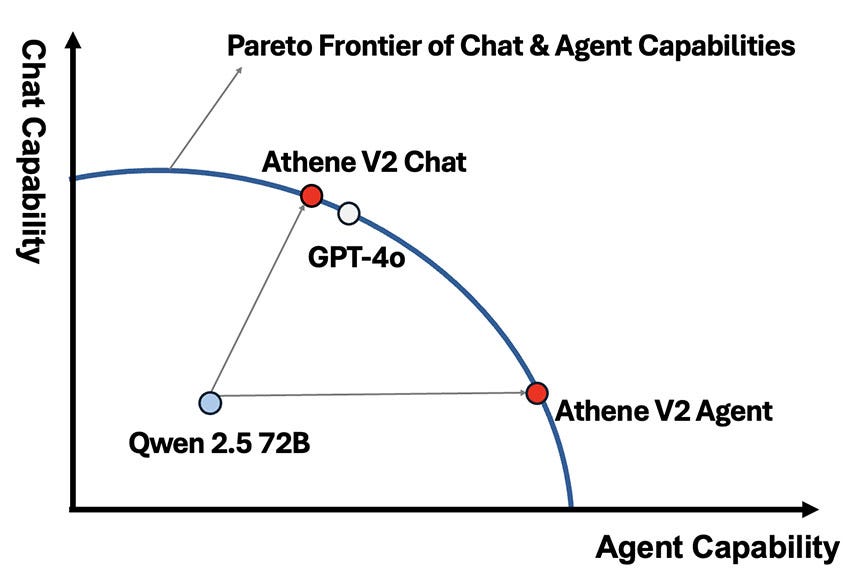
Source :The post-training pipeline of Athene-V2 pushes Qwen 2.5 into a better pareto frontier for chat and agent capabilities, matching GPT-4o across benchmarks by Nexusflow
Athene-V2, the cutting-edge 72B parameter model suite, is a groundbreaking advancement in AI, excelling in targeted specializations like chat interaction and agent performance. Whether you’re a developer, researcher, or enterprise professional, running Athene-V2 locally allows you to harness its full potential for custom use cases. However, deploying such a powerful model requires careful preparation and understanding of the available methods.
This article provides a comprehensive guide to installing and running Athene-V2 locally, with a focus on comparing deployment options to help you choose the best approach for your needs.
Overview of Athene-V2 and Its Variants
Athene-V2 offers two primary variants tailored to specific use cases:
- Athene-V2-Chat-72B: Optimized for state-of-the-art dialogue, this variant excels in conversational helpfulness, code completion, and long-form text processing.
- Athene-V2-Agent-72B: Focused on agent-like capabilities, it is designed for precision in enterprise-level tasks such as function calling and complex data filtering.
Both models rely on the Qwen 2.5 foundation and are fine-tuned using Nexusflow’s advanced post-training pipelines.
System Requirements
Running Athene-V2 locally demands robust hardware and software configurations:
Hardware Requirements:
- GPU: Minimum 80GB VRAM (NVIDIA A100 or equivalent recommended for full model loading).
- RAM: At least 128GB system memory.
- Storage: 1TB of free SSD space for storing model weights and auxiliary files.
Software Requirements:
- Operating System: Linux or macOS (Windows WSL 2 may work but is not officially supported).
- Python Version: 3.8 or higher.
- CUDA Version: 11.7 or higher for GPU acceleration.
- Dependencies: PyTorch 2.0, Hugging Face Transformers, and Nexusflow utilities.
Installation and Deployment Options
There are three main methods to install and run Athene-V2 locally. Each approach offers distinct advantages and trade-offs.
Method 1: Standard Deployment with Hugging Face Transformers
Steps:
- Install Dependencies:
pip install torch torchvision transformers2. Download Model Weights: Athene-V2 weights can be downloaded from Nexusflow’s secure repository. Use the following command to fetch the model:
wget -O athene-v2-72b.pth [model_weights_url]3. Load the Model: Use Hugging Face Transformers to load the model:
from transformers import AutoModelForCausalLM, AutoTokenizer

tokenizer = AutoTokenizer.from_pretrained("Nexusflow/Athene-V2-72B")
model = AutoModelForCausalLM.from_pretrained("path_to_model_weights", device_map="auto")- Run Inference:
inputs = tokenizer("Hello, Athene-V2!", return_tensors="pt")
outputs = model.generate(inputs["input_ids"], max_length=100)
print(tokenizer.decode(outputs[0], skip_special_tokens=True))
Pros:
- Simple setup using popular libraries.
- Supports fine-tuning workflows via Hugging Face.
Cons:
- Requires large VRAM for inference.
- Limited performance optimizations for edge cases.
Method 2: Optimized Deployment with DeepSpeed
Steps:
- Install DeepSpeed:
pip install deepspeed2. Configure DeepSpeed: Create a JSON configuration file (ds_config.json) to optimize memory usage and parallelism:
{
   "train_micro_batch_size_per_gpu": 1,
   "gradient_accumulation_steps": 1,
   "fp16": {     "enabled": true   },
   "zero_optimization": {
     "stage": 3,
     "offload_optimizer": {
       "device": "cpu",
       "pin_memory": true
     }
   }
 }
3. Launch with DeepSpeed:
deepspeed --num_gpus=4 run_athene_v2.py --deepspeed_config ds_config.json4. Run Inference: Use the DeepSpeed API to interact with the model:
from deepspeed import DeepSpeedEngine
engine = DeepSpeedEngine(config="ds_config.json")
output = engine.inference(input_data="How does Athene-V2 perform?")
print(output)
Pros:
- Efficient memory management with zero redundancy optimization.
- Ideal for multi-GPU setups.
Cons:
- Requires additional configuration knowledge.
- Higher initial setup complexity.
Method 3: Dockerized Deployment for Isolation
Steps:
- Install Docker: Download and install Docker from the official site.
- Pull Nexusflow’s Docker Image:
docker pull nexusflow/athene-v2:latest3. Run the Container: Start a Docker container with GPU support:
docker run --gpus all -it nexusflow/athene-v2:latest4. Run Inference Inside the Container: Within the container, execute Python scripts for model interaction:
python run_athene_v2.pyPros:
- Isolated environment prevents dependency conflicts.
- Simplifies updates via Docker image pulls.
Cons:
- Requires familiarity with Docker.
- Slightly slower inference compared to native GPU setups.
Post-Training and Fine-Tuning
Athene-V2 models can be fine-tuned for specific applications using Nexusflow’s pipelines. Key steps include:
- Prepare Custom Datasets: Format your dataset to align with your use case, such as chat conversations or function-calling tasks.
- Leverage Nexusflow Tools: Use the Nexusflow RLHF pipeline to optimize model performance for specific metrics, such as precision-recall tradeoffs.
- Evaluate with Benchmarks: Compare fine-tuned models against standard benchmarks like bigcode-bench-hard or MATH.
Tips for Efficient Deployment
- Use Gradient Checkpointing: Save memory during training by enabling gradient checkpointing.
- Monitor GPU Utilization: Use tools like
nvidia-smito track GPU usage and identify bottlenecks. - Regularly Update Dependencies: Stay up-to-date with Nexusflow’s latest model releases for optimal performance.
Conclusion
Running Athene-V2 locally empowers developers and enterprises to explore the full potential of advanced LLM capabilities. Whether you prioritize ease of setup, memory efficiency, or portability, there’s a deployment method suited to your needs. With proper configuration and optimization, Athene-V2 can redefine your AI workflows, excelling in dialogue, agent functions, and beyond.
By following this guide, you can confidently deploy Athene-V2 on your local machine and take the first step toward leveraging this next-generation model for your projects. For enterprise customization and advanced tuning, contact Nexusflow for tailored solutions and expert support.
메타데이터
- post_id
- f7bf92ff0414
- slug
- running-athene-v2-locally-a-comparative-guide-to-deploying-the-next-gen-llm-on-your-machine-f7bf92ff0414
- url
- https://levelup.gitconnected.com/running-athene-v2-locally-a-comparative-guide-to-deploying-the-next-gen-llm-on-your-machine-f7bf92ff0414
- canonical_url
- https://levelup.gitconnected.com/running-athene-v2-locally-a-comparative-guide-to-deploying-the-next-gen-llm-on-your-machine-f7bf92ff0414
- author_url
- https://medium.com/@pathumh3
- status
- ok
- fetched_at
- 2026-07-22 02:02:09







