From UI Kit to Enterprise Engine: A Practical Guide to Design System Governance
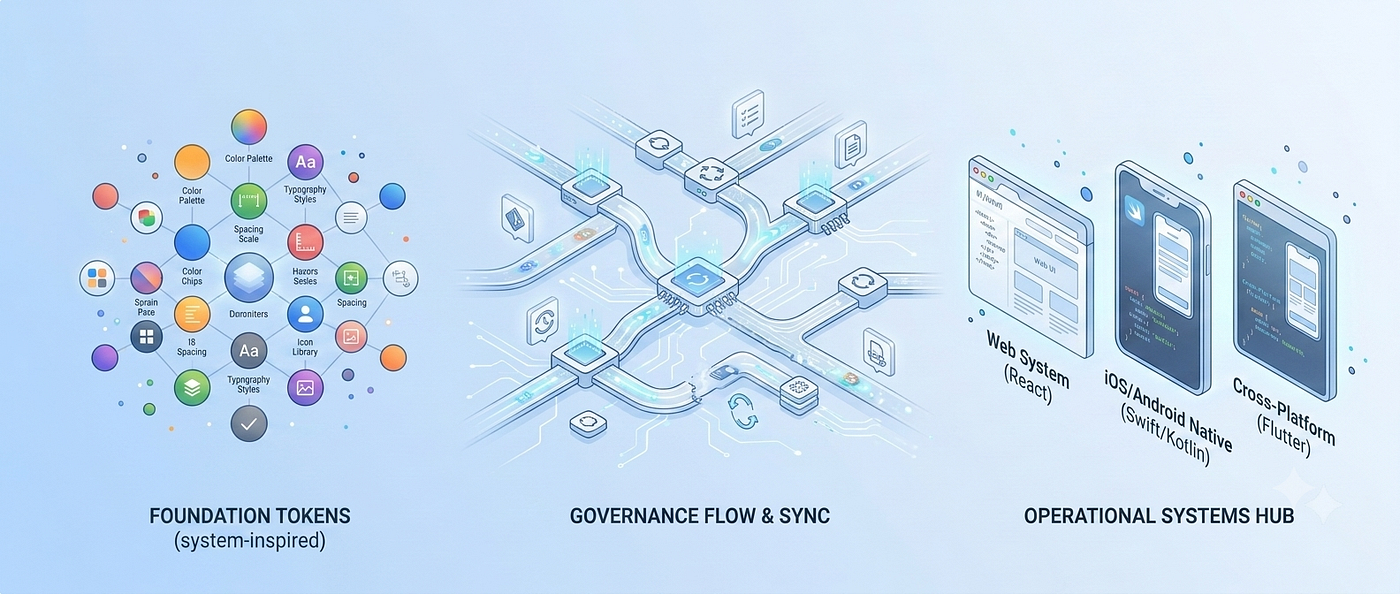
From UI Kit to Enterprise Engine: A Practical Guide to Design System Governance
A beautifully organized Figma file is just the beginning. Here is how to build, scale, and govern a system that your team actually wants to use.
We’ve all been there. You inherit a massive Figma file for a product ecosystem, zoom into a dashboard, and discover there are 14 different, slightly distinct hex codes for the color “primary blue.”
A design system isn’t just a library of visual assets; it’s the operational nervous system of your product team. Over the last 16 years of building and scaling digital products, I’ve seen countless design systems collapse under their own weight. They rarely fail because the UI was poorly crafted. They fail because the governance model couldn’t handle the messy, human realities of cross-functional scale.
**The Inspiration The foundational philosophy of this guide is built upon Marina Budarina’s *UI System Mastery*. Her book provides an exceptional blueprint for starting with a lean, functional UI kit rooted in variables and atomic tokens. This article tackles the next step: taking that pristine foundation and governing it across a sprawling ecosystem of diverse product squads and codebases.**
Here is how to transition from a foundational UI kit into a living, fully governed enterprise engine.
1. The Foundation: Start with a Smart UI Kit
Budarina’s methodology emphasizes a critical truth: do not start by designing components. Start by defining the language.
When you leap straight into drawing cards and modals, you inevitably create inconsistencies. Instead, a scalable UI kit begins with a robust token architecture. Design tokens are the irreducible atoms of your visual language — storing colors, typography scales, grid structures, and spacing rules as agnostic data points.
They follow a specific hierarchy, moving from abstract definitions to concrete applications:
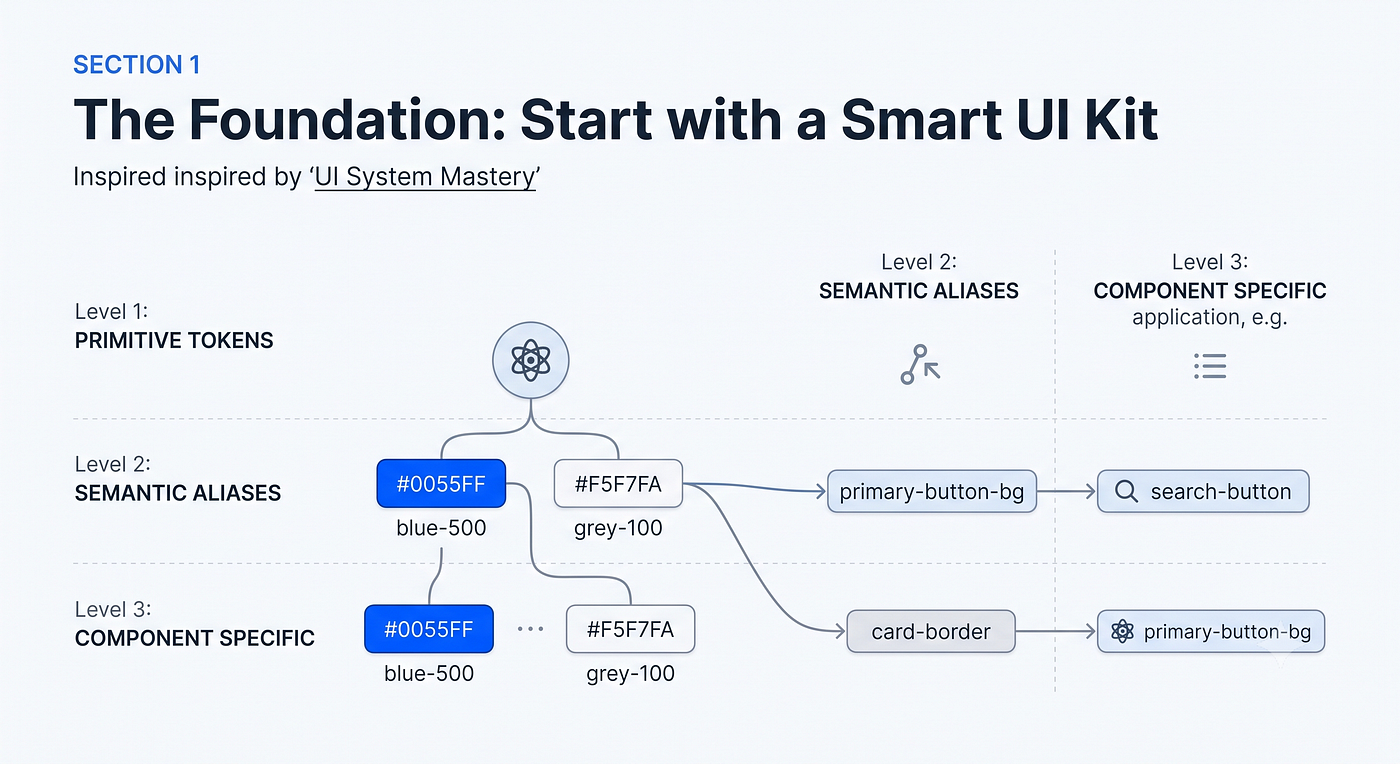
Diagram 1: The Token Hierarchy. This illustrative visualization displays how design tokens stack. We define abstract values (PRIMITIVE TOKENS, like blue-500), assign them meaning (SEMANTIC ALIASES, like primary-button-bg), and then apply them specifically to components.
Imagine you are building a travel booking app. Marketing decides the brand needs to feel “warmer” and wants to change the core brand color. If you hardcoded #0055FF across 300 screens, you are in for a long weekend. But if you used tokens, when the rebrand hits, you just update the primitive blue-500 token. The change cascades through the semantic tokens, updates the components, and repaints the entire ecosystem perfectly in seconds.
Key takeaway: You aren’t just designing for today; you are building an API for your visual design.
2. The Engineering Handoff: Speaking the Same Language
A beautifully structured Figma file doesn’t help much if a developer has to manually click around to guess the exact corner radius of a button. The real magic of a design system happens when it crosses the gap between design and code.
In the old days, “handoff” meant giving developers a static file and hoping for the best. I remember a project where a developer manually coded a button’s spacing as 15 pixels because they misread the spec, while another developer on a different screen used 16 pixels. It seems like a minor thing, but over hundreds of screens, these tiny, innocent fractures add up, making the final product feel unpolished and sloppy.
Today, design tokens fix this by acting like a universal translator between designers and engineers. This creates a single source of truth that feeds multiple platforms.
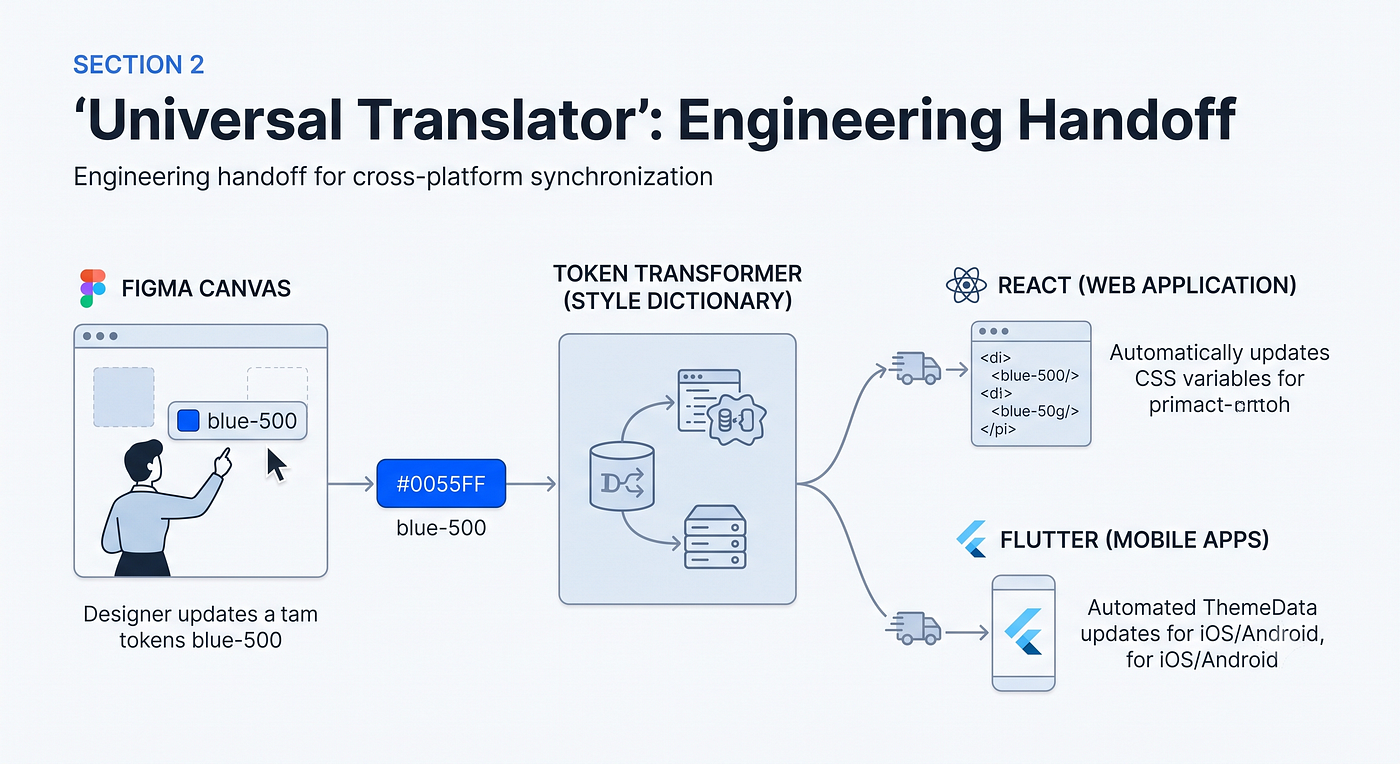
Diagram 2: The Automated Handoff Flow. This diagram visualizes the universal translator concept. A design change in Figma (the source, left) is exported as a centralized data file. Automated tools (the ‘Token Transformer’, center) translate that data into code, simultaneously updating both React (Web) and Flutter (Mobile) applications (right).
By using this approach, you completely eliminate the “visual drift” of manual handoffs. Your engineering squad building for multiple platforms simultaneously (often with frameworks like React and Flutter) receives identical,automated styling updates.
3. The Governance Model: Mentorship Over Policing
If the token architecture is the engine of your design system, the governance model is the steering wheel. However, the biggest mistake organizations make is treating governance like a rigid audit.
If a design system feels like a set of handcuffs, product teams will find ways to break out of them. Instead, think of governance as a collaborative feedback loop rooted in shared ownership.
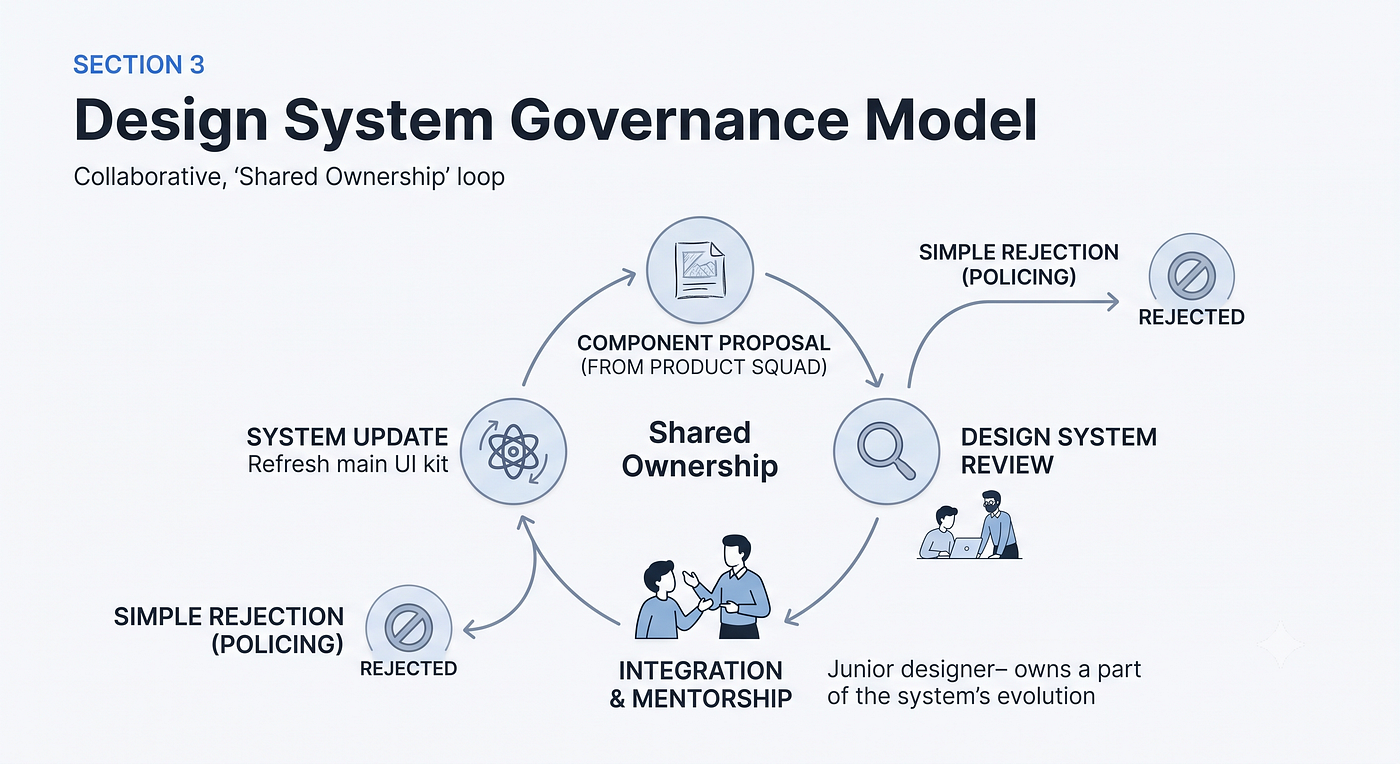
Diagram 3: The Governance Feedback Loop. This visualization shows a healthy circular workflow (the ‘Shared Ownership’ loop) contrasted with strict policing. A new component proposal (top) enters the review cycle (right). Instead of simple rejection (far right), the process emphasizes collaboration and mentorship (bottom), where senior and junior designers integrate the component, feeding it back into the main system update (left).
When I review feature workflows with junior designers, I use a mentorship mindset. If they introduce a custom hex code for a warning banner instead of using the established semantic token, I don’t just reject the design. I’ll sit down with them and explain why the token exists — how using the custom hex code will break the automated handoff we built for the engineering squad (Visual 2), and how it won’t automatically switch when a user toggles on “Dark Mode.”
By balancing strict architecture with empathetic mentorship, your system becomes a catalyst for team growth and product velocity.
4. Accelerating the Workflow with AI
As a system scales, the administrative overhead — writing documentation, mapping edge cases, preparing presentation decks — can drain your creative energy. This is where integrating Generative AI into your UX workflows becomes a game-changer.
Instead of treating AI as a replacement, treat it as a thought partner that augments the human workflow and automates the busywork.
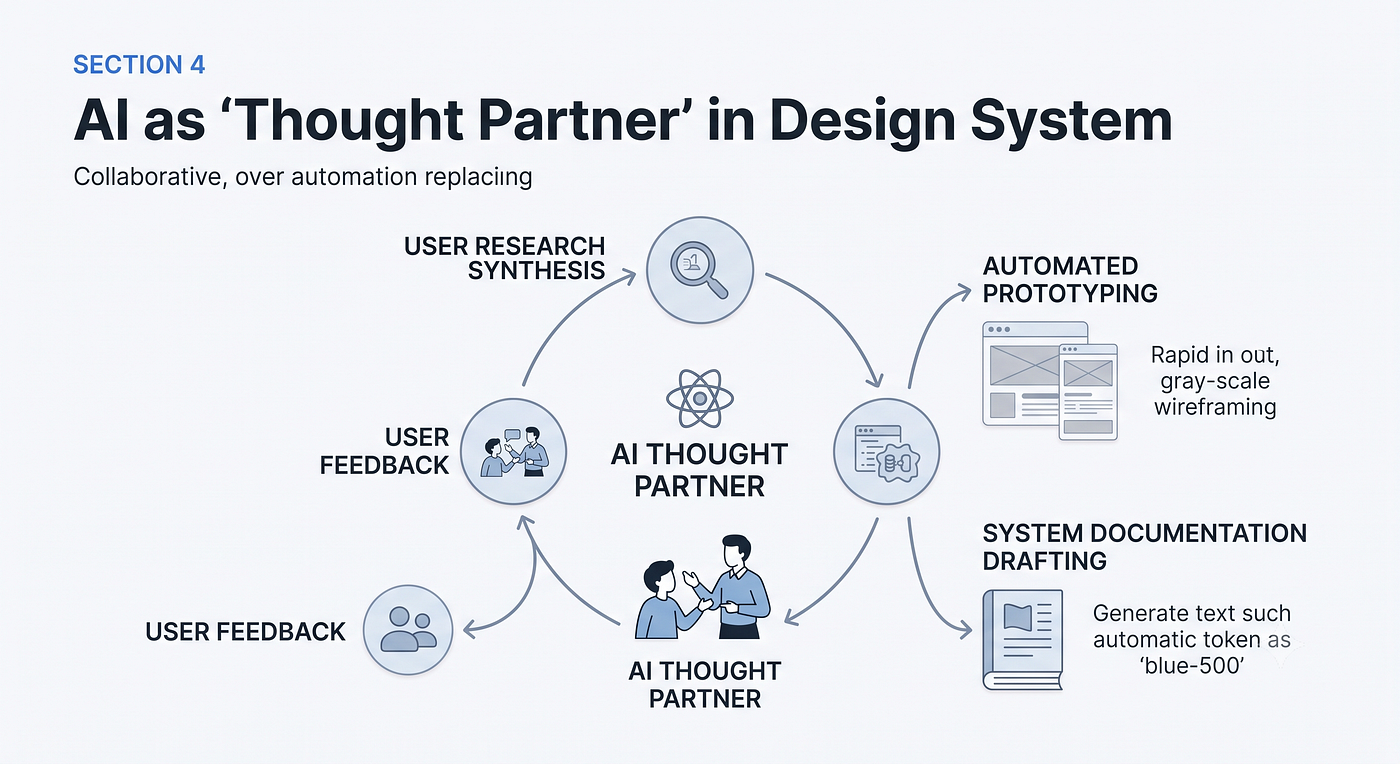
Diagram 4: AI as a Thought Partner in the UX Workflow. This illustrative diagram shows an augmented feedback loop. The AI hub (center) assists with synthesis and repetitive tasks. Output from the system (like the established ‘blue-500’ token, left) feeds into automated processes like rapid prototyping (top right) and documentation drafting (bottom right), accelerating the cycle between user feedback and system integration.
I regularly use AI tools to automate repetitive token updates, accelerate rapid prototyping, and synthesize usability testing transcripts. By offloading the busywork, you free up your team to focus on solving complex human problems.
The Bottom Line
Scaling the UI System Mastery approach from a standalone UI kit to an enterprise-grade engine requires more than just a good eye for typography. It requires systems thinking, a frictionless partnership with engineering, and a culture of mentorship. By locking down your token architecture, automating your handoffs, and treating governance as an exercise in team-building, your design system will stop being a bottleneck and start being a launchpad.
메타데이터
- post_id
- f81454b89ee7
- slug
- from-ui-kit-to-enterprise-engine-a-practical-guide-to-design-system-governance-f81454b89ee7
- url
- https://www.designsystemscollective.com/from-ui-kit-to-enterprise-engine-a-practical-guide-to-design-system-governance-f81454b89ee7
- canonical_url
- https://www.designsystemscollective.com/from-ui-kit-to-enterprise-engine-a-practical-guide-to-design-system-governance-f81454b89ee7
- author_url
- https://medium.com/@rakeshpatels
- status
- ok
- fetched_at
- 2026-07-09 03:40:04