[MCP] We connected PrestaShop to AI. Here’s what we learned.
5 months of Beta, 2,000 downloads, a production V1… What we learned connecting an e-commerce platform to AI agents.
[MCP] We connected PrestaShop to AI. Here’s what we learned.
In November 2025, at the PrestaShop Dev Conf, we announced a module that lets users run their e-commerce store with the help of AI. After 5 months of Beta, 1,200 stores are MCP-ready, dozens of third-party modules have joined the adventure, and we’ve shipped the V1 of the PrestaShop MCP Server module. Here’s what we learned along the way.
AI agents want to act, they were missing a common language
For a while now, LLMs have done more than just answer questions. They can reason, plan, chain actions together. ChatGPT, Claude, Gemini, Mistral… all of them are evolving into agents capable of interacting with the real world.
For an e-commerce merchant, the promise is huge: instead of navigating through 5 back-office screens to check stock, update a product description in 3 languages, or analyze the month’s orders, you’d simply ask for it in plain language.
But for that to work, you need a bridge between the AI and the store. Not just a chatbot bolted onto a FAQ, but a real, structured protocol that lets the agent discover what it can do, understand the available data, and execute actions safely.
That’s exactly what the Model Context Protocol (MCP) offers.
MCP, a standard to connect AI to the real world
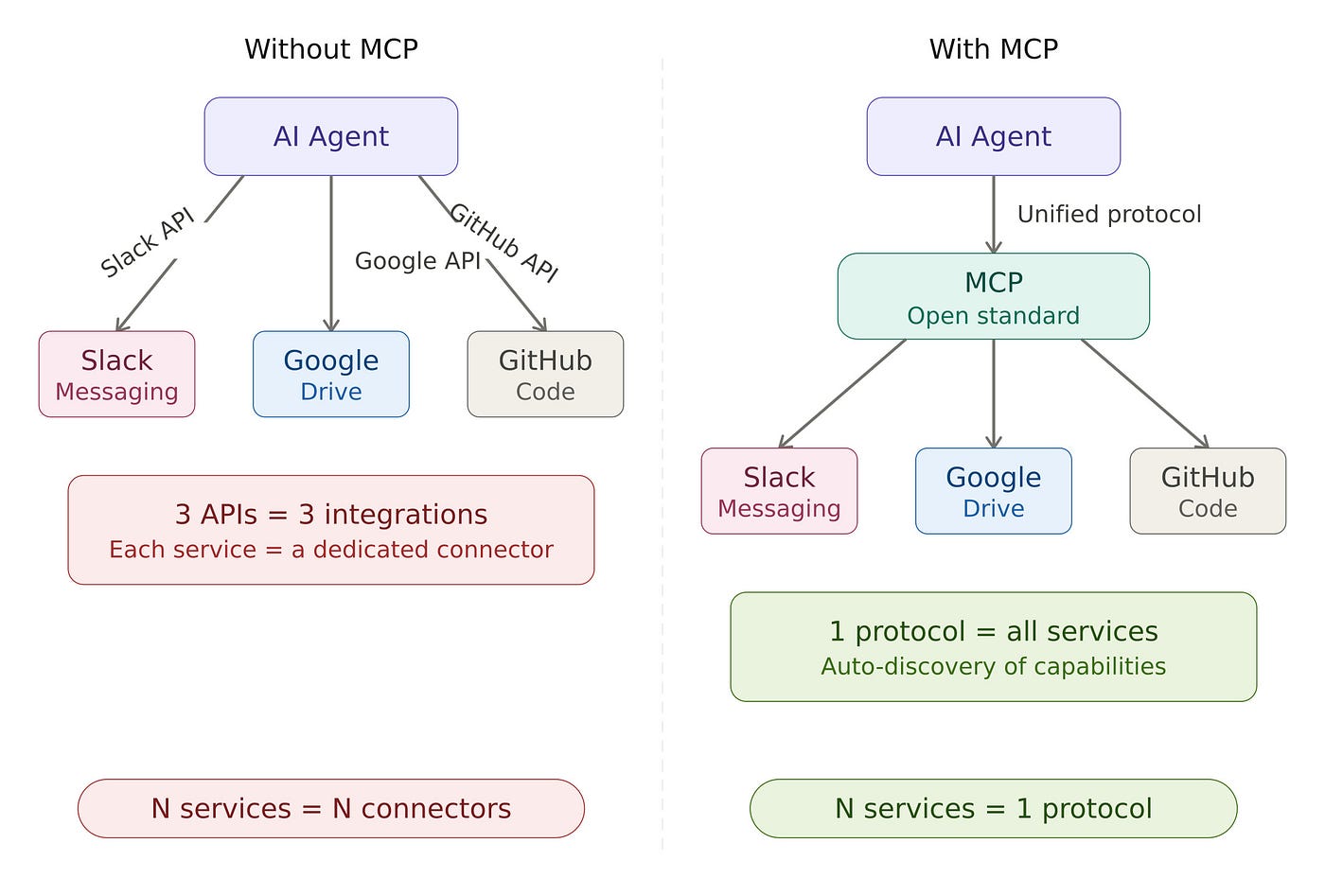
MCP is an open standard, introduced by Anthropic in late 2024, that defines how an AI application connects to an external system. To put it simply: just as REST or GraphQL standardized communication between web applications, MCP standardizes the exchanges between AI agents and the tools they use. A common language that lets any compatible agent, ChatGPT, Claude, Gemini, connect to and interact with any MCP server, without custom integration.
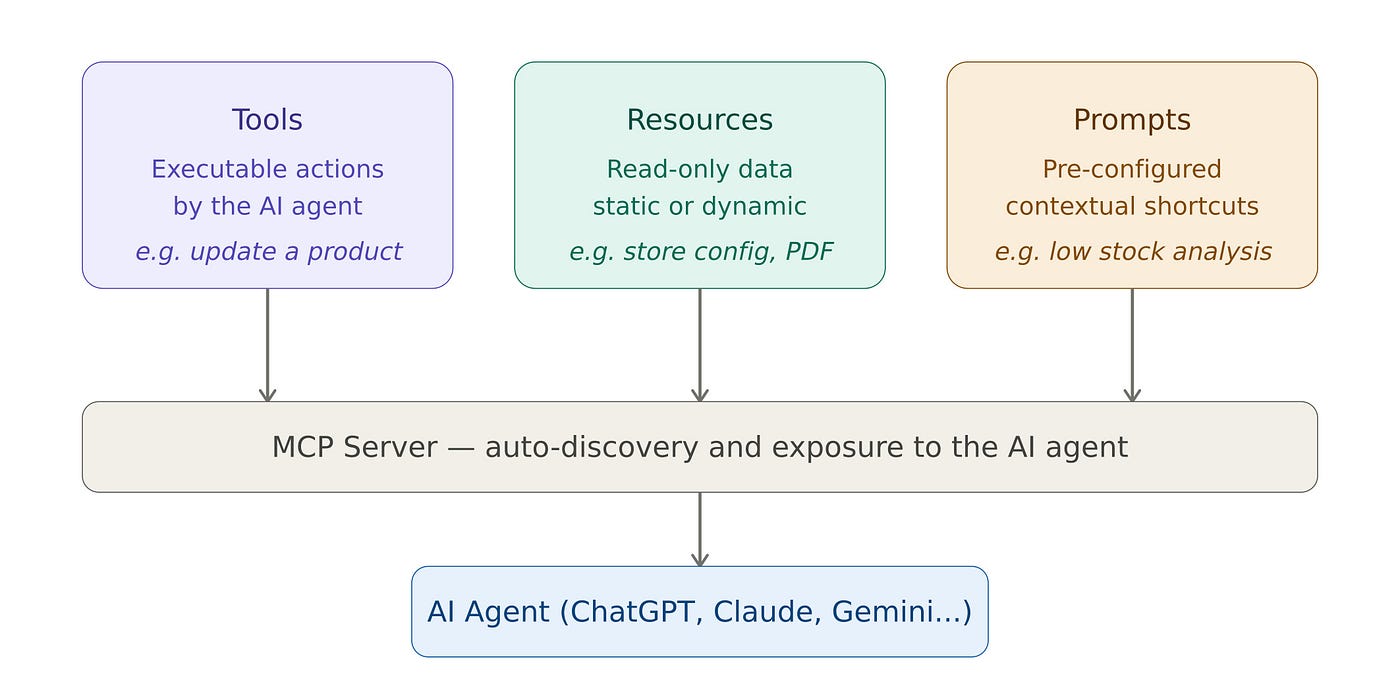
Concretely, the protocol revolves around 3 “primitives” (or capabilities):
- Tools are the actions the agent can execute. Searching for a product, updating an order, generating a discount voucher, each tool is a business capability exposed to the AI, with its parameters, description, and validation rules.
- Resources are the data the agent can read. They can be static (a PDF file, a piece of documentation) or dynamic (accessible by URL, the store configuration, a product’s details, a real-time report, and so on).
- Prompts are pre-configured contextual shortcuts. The merchant clicks “Low stock analysis” and the agent immediately knows what to do, without having to formulate a complex request.
What sets MCP apart from a plain REST API is that it’s built for AI agents: it’s stateful (the server maintains context between requests), self-describing (the agent discovers the available capabilities on its own), and optimized for reasoning (clear descriptions, validation schemas, behavior annotations).
From idea to Beta module, behind the scenes
The bet
When we started exploring MCP at PrestaShop back in 2025, the protocol was still young. The PHP SDK only existed in version 0.4. Few e-commerce platforms had taken a position on the topic. We had a simple conviction: rather than building a proprietary integration with a single AI provider, we’d bet on an open standard that leaves merchants free to choose their agent, ChatGPT, Claude, Gemini, or any other compatible MCP client.
2 modules, one ecosystem
The founding choice was to split the project into 2 distinct building blocks:
- ps_mcp_server is the MCP server itself, the technical bridge. It exposes an HTTP endpoint at
/mcp, handles OAuth authentication and sessions, and, this is the heart of the system, it automatically discovers the MCP capabilities of every module installed on the store. Concretely, the server scans the PHP files of modules that declare themselves MCP-compatible, detects the PHP attributes (#[PsMcpTool],#[PsMcpResource],#[PsMcpPrompt]), and registers them. No manual configuration, no mapping file, everything is declarative. The module runs on PHP 8.1+ with PrestaShop 8.2 and above, including PrestaShop 9 compatibility. - ps_mcp_tools is the companion module, free, providing a first set of business tools: managing products, orders, customers, images, and languages. Beyond its functional value, it’s first and foremost a demonstrator: it shows what the protocol and AI make possible on a PrestaShop store, and it plugs into the server through the same discovery mechanism as any third-party module.
This separation isn’t an architectural whim. It’s a platform choice. We didn’t want to build everything ourselves, we wanted to create an enabler that lets the entire PrestaShop community take ownership of the protocol and enrich it. The server is the infrastructure; the tools are the ecosystem’s business.
The November 2025 Dev Conf
We presented the Beta module at the PrestaShop Dev Conf in November 2025. The message was twofold: show merchants what conversational AI could bring to their daily work, and show developers how simple it was to make their modules compatible.
The response went beyond our expectations: real interest, sharp questions, and above all, developers who immediately started exploring MCP compatibility for their own modules.
[embed]
What it changes for a merchant
Let’s set the technical side aside for a moment. Here are a few examples of what MCP makes possible day to day.
- Run your catalog through conversation. Selling in English, French, and Spanish? Ask the AI to update a product description in all 3 languages in a single request. Search for a product by name, check its details, all without leaving your conversation.
- Analyze your orders in plain language. “Show me this week’s orders sorted by amount”, the agent queries the store, structures the data, and gives you an actionable answer. No report to export, no filters to configure.
- Run analyses in one click. Pre-configured Prompts let you trigger complex workflows without formulating anything. A “low stock analysis” prompt lists every out-of-stock product and suggests restocking quantities.
Go further with specialized modules. This is where the ecosystem comes into its own. Beyond the 38 native tools, partners, agencies, and merchants themselves have published their own MCP-compliant modules. The range covered goes well beyond analytics: content and blogging, SEO and sitemaps, loyalty and referral programs, payment-link generation, transactional email management, theme and template editing, customer support and tickets, RFM segmentation and lifetime value, production tracking, VAT filings, multi-marketplace comparisons… and the list grows every week. All in plain language, the agent moving across several modules to orchestrate a complete action: analyze, decide, execute, verify.
We’ll soon publish a dedicated article with detailed use cases. But the principle is there: each MCP-compliant module adds a layer of intelligence to the store, and the agent combines them naturally.
What it opens up for developers
If you build PrestaShop modules, here’s why MCP should matter to you, and why it’s far simpler than you might think.
Making an existing module MCP-compatible
The code delta is minimal. 2 steps are enough. First, declare MCP compatibility in your module’s main class:
public function isMcpCompliant()
{
    return true;
}
Then annotate the methods you want to expose with PHP attributes:
#[PsMcpTool(
    name: 'search_product_by_name',
    description: 'Search a product in the store by name only.'
)]
public function searchProduct(string $searchTerms): array {
    // your existing logic
}
The MCP server does the rest. Its discovery mechanism automatically scans your module’s src/ directory, detects the attributes, and registers your Tools, Resources, and Prompts. It even auto-prefixes the names with your module's name to guarantee uniqueness, zero possible conflict with other modules.
No heavy refactoring, no configuration file to maintain. If your module already exposes business logic in PHP classes, you’re just a few annotations away from making it accessible to every AI agent on the market.
Building an MCP module from scratch
For those starting from zero, we provide a boilerplate module on GitHub with the complete structure. You’ll find the 4 types of MCP elements there: Tools (actions), Resources (static data), Resource Templates (dynamic data parameterized by URI), and Prompts (contextual shortcuts).
The documentation at docs.mcp.prestashop.com details the best practices: name your tools clearly, use consistent vocabulary across your tools, validate inputs through the JSON schema, and implement guardrails (result limits, permission checks, loop detection).
The ecosystem effect
Today, we count more than 50 third-party MCP-compatible modules. Not all are on the Marketplace yet, but the ecosystem is being built, step by step.
Each MCP-compliant module enriches the store’s intelligence. A logistics module that exposes a shipment-tracking tool. A CRM module that makes customer segmentation accessible. A reporting module that opens its data to AI analysis. It all composes together, the agent discovers the full set of available capabilities and uses them in synergy.
Our role, at PrestaShop, isn’t to build everything. It’s to provide the foundations and the tools so the community can take ownership. MCP doesn’t turn PrestaShop into a mere “ChatGPT connector.” It turns it into an AI-ready platform, where every module can become a tool for artificial intelligence.
Security: granting access without losing control
Handing an AI agent the keys to your store raises a legitimate question: can the AI break something? We put several layers of security in place.
- OAuth 2.0 authentication with PrestaShop Accounts ensures that only users with a valid PrestaShop account can connect in a production environment. Each token is cryptographically signed and has a limited lifespan.
- An authorized members list adds an extra layer: even with a valid PrestaShop account, a user must be explicitly added to the MCP Server’s member list. The merchant keeps full control.
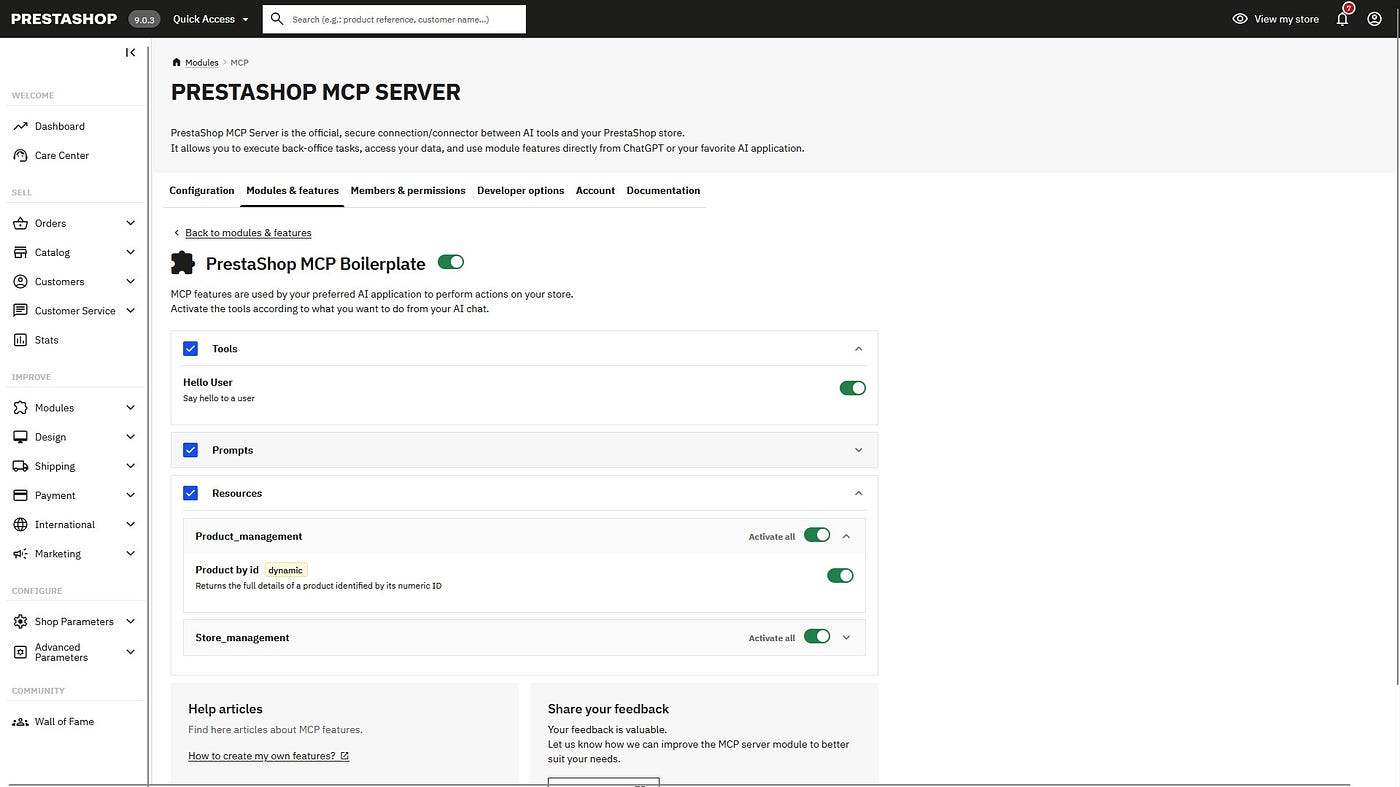
- Granular tool control lets you enable or disable each tool individually from the back-office. Don’t want the AI touching orders? One click and it’s done.
Beyond these mechanisms, we wanted to go further on verification. A full penetration test (pentest) was carried out by a CREST-certified French firm specialized in offensive security. The audit surfaced vulnerabilities that we fixed before V1. When you give an AI agent the ability to act on a store, you don’t just trust yourself, you have it checked by independent experts.
What the Beta taught us, and what we shipped in V1
After 5 months of Beta, here’s what the numbers say:
- 2,000 downloads. The signal of interest is clear ; MCP + e-commerce attracts attention.
- 1,200 MCP-ready stores. The number of stores fully onboarded onto MCP.
- 370 stores connected to an LLM. The shift to real-world usage. Around 31% of MCP-ready stores take the leap.
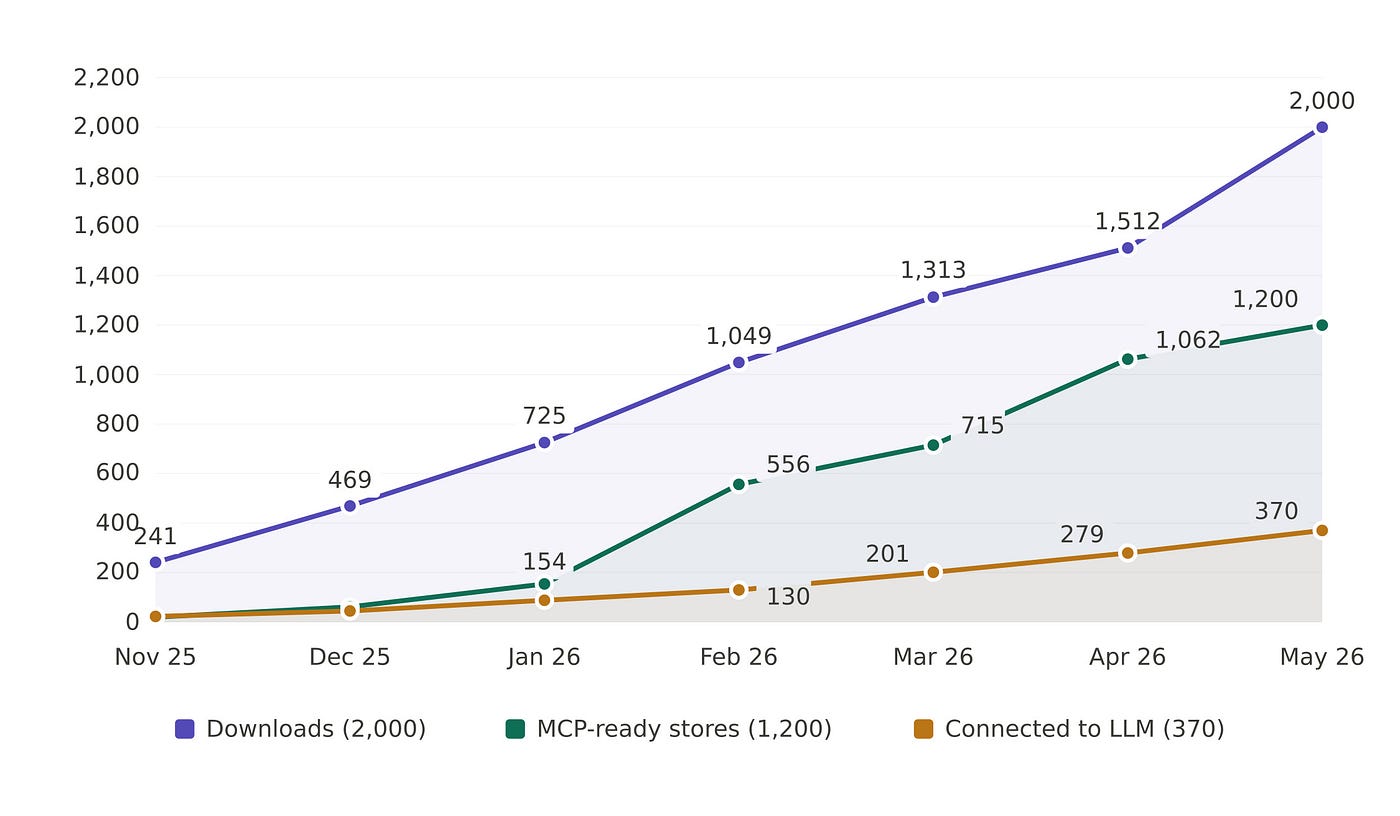
The takeaway is clear: the main friction point sits between onboarding and connecting to an LLM. Merchants install and configure, but the actual step of connecting to ChatGPT, Claude, or another agent remains too high a hurdle for many.
That’s exactly what we addressed in the production V1. Here’s what’s new:
- On the developer side: new authentication modes (Token and No-Auth for development), and STDIO mode support for local dev. The idea is to remove friction for those building on MCP.
- On connectivity: native compatibility with n8n for workflow automation. Conversational AI is one entry point, but many merchants and agencies also want to connect MCP to broader automation chains.
- On AI features: the integration of Prompt templates and Resources (static and dynamic) to enrich the context the agent can draw on.
- On security and guidance: Tool annotations (
write,destructive, etc.) to better frame what LLMs are allowed to do. Plus fine-grained permission management per user and per Tool, Prompt, and Resource. - On the technical foundation: migration to the official MCP PHP SDK.
What’s next?
Beyond V1, our roadmap explores several directions:
- Simplifying activation. The Beta numbers make it plain: this is our number-one priority. We’ll keep reducing the number of steps between installation and the first conversation with the AI, improve the module’s UX in the back-office, and document compatibility with more LLMs.
- Developing new tools. Bulk actions, advanced automations, there’s still a lot of potential to unlock in a merchant’s daily operations.
- Contributing to an MCP Client built directly into the PrestaShop back-office, so merchants can interact with their AI agent without leaving their working environment.
- Exploring Agentic Commerce. This is the topic moving the whole industry in 2026. OpenAI and Stripe’s ACP (Agentic Commerce Protocol) already enables interactions inside ChatGPT. Google’s UCP (Universal Commerce Protocol) covers the full cycle, from discovery to after-sales service. These protocols are complementary to MCP, and we’re following them very closely. Concretely, we’re studying several avenues: MCP App UI to render interfaces directly inside the LLM, WebMCP to enable AI interactions with end customers on the store’s storefront, and compatibility with the ACP and UCP protocols.
We’re only at the beginning. But the foundations are there: a stable server, a growing set of third-party modules, and a developer community that’s starting to think “AI-ready” when designing a module.
Join the adventure
Merchants: the module is available for free on the Addons Marketplace. Install it, connect your AI agent, and tell us what you think! The feedback form is built right into the module.
Developers: make your modules MCP-compatible. The documentation and the boilerplate are there for that. Every Tool, Prompt, and Resource you expose makes the ecosystem smarter for everyone.
Conversational e-commerce is only just beginning. Let’s build it together!
I’m the PM of the MCP module at PrestaShop. If you have questions, feedback, or ideas, feel free to reach out or leave a comment.
메타데이터
- post_id
- f8186dd51d59
- slug
- mcp-we-connected-prestashop-to-ai-heres-what-we-learned-f8186dd51d59
- url
- https://medium.com/@geric.fosse/mcp-we-connected-prestashop-to-ai-heres-what-we-learned-f8186dd51d59
- canonical_url
- https://medium.com/@geric.fosse/mcp-we-connected-prestashop-to-ai-heres-what-we-learned-f8186dd51d59
- author_url
- https://medium.com/@geric.fosse
- status
- ok
- fetched_at
- 2026-06-17 10:21:25



