Keep Your Skool Community Active With Fresh Topics
Track trends automatically, find new ideas, and plan Skool community posts faster with Google Alerts!
Keep Your Skool Community Active With Fresh Topics
Track trends automatically, find new ideas, and plan Skool community posts faster with Google Alerts!
As a Skool community owner or admin, staying ahead of trends in online communities, growth strategies, promotion tactics, and niche-specific discussions is essential. It helps you create timely content, spark relevant conversations, and position your community as a go-to resource.
The good news is that you don’t need expensive software or membership. Free tools like Google Alerts make it simple to monitor emerging topics automatically. Google Alerts delivers fresh articles, blog posts, forum threads, news, and discussions straight to your email inbox or RSS feed. From there, you can curate insights, share breakdowns, and start new threads in your Skool community.
Here’s a practical guide to setting this up and using it effectively for Skool promotion and engagement.
Why Tracking Trends Matters for Your Skool Community
Timely content wins: Spotting rising topics helps you post early and keep members engaged.
Build authority: Regularly sharing curated insights shows members you’re plugged in, without needing to create everything from scratch.
Boost engagement and growth: Trend-based polls, questions, and “hot take” threads often get higher participation and more referrals.
Competitive edge: Monitor what other platforms or communities are buzzing about, so you can adapt promotion tactics faster.
The Primary Tool: Google Alerts
Google Alerts is still reliable in 2026 for scanning the web for news, blogs, web pages, and discussions based on your chosen keywords. It sends email notifications (or RSS updates) when new matching content appears.
Strategy 1: Create Alerts for Your Niche Keywords
Go to google.com/alerts, then create a new alert for your niche keyword. For example, if your target niche is “vibe coding”, just enter that keyword.
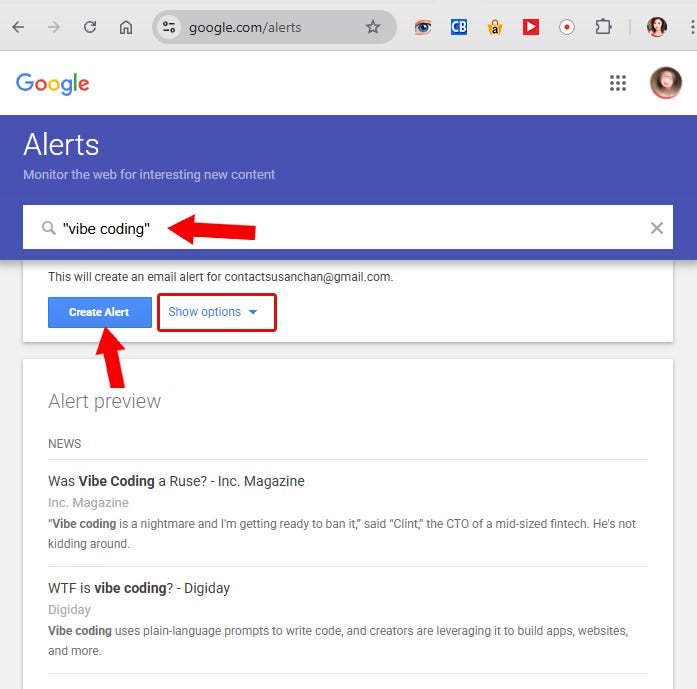
Under Options, you can choose how often you want alerts, select sources, set language and region, and decide whether to receive updates by email or RSS feed.
You can also enter multiple keywords related to your niche, or create multiple alerts for different niches.
Strategy 2: Find New Skool Growth and Promotion Strategies
Use Google Alerts to monitor content related to Skool community growth strategies.
In the search box, enter keyword phrases like: “Skool community” OR “Skool promotion” OR “Skool growth hacks”
You can also use operators like AND and OR.
For example: “Skool community” AND “free traffic”
To reduce irrelevant results, exclude noise by adding negative keywords, such as: “Skool community” -job -hiring
This filters out job posts and other unrelated content.
Strategy 3: Track Posts Across Other Skool Communities
You can use Google Alerts to discover new posts from other Skool communities too.
Try this search combination in Google Alerts:
site:skool.com AND “vibe coding”
This can surface posts and discussions about “vibe coding” across Skool, depending on what Google has indexed.
Strategy 4: Track Posts From a Specific Skool Community (Competitor Research)
Want to monitor posts from a particular Skool community, including competitors?
Try this search combination: *site:skool.com/COMMUNITY-PAGE-URL AND “amazon kdp”*
This can bring up new posts mentioning “amazon kdp” from that specific community, as long as the community is public and Google is indexing its pages.
Google Alerts Options to Customize Results

- How often: Choose “As-it-happens” for real-time updates (best for fast-moving trends), or “Once a day” to avoid inbox overload.
- Sources: Use Automatic (recommended), or narrow it down to News, Blogs, Web, or Discussions.
- Language/Region: Set to English and your target audience’s region.
- How many: “Only the best results” keeps it high-quality and low-volume.
- Deliver to: Your email, or RSS if you prefer using a reader.
Google Alerts takes only a minute to set up and runs passively. Over time, it keeps your content fresh, your members engaged, and your community growing through value-first promotion. You can edit or delete alerts anytime by visiting the Google Alerts page and managing your selected alerts.
This strategy gives you a steady stream of fresh trends to fuel valuable posts, discussions, and growth in your Skool community. Start small with 3 to 5 targeted keywords today, share one insight this week, and watch how quickly it positions you as the connected, helpful admin people want to follow and join.
Hope you enjoyed this article. I highly appreciate your comments and feedback. Make sure to visit my new Skool community, **Activity Book Creator Lab**.
메타데이터
- post_id
- f844c8a81ecf
- slug
- keep-your-skool-community-active-with-fresh-topics-f844c8a81ecf
- url
- https://medium.com/@alianjamparuthi/keep-your-skool-community-active-with-fresh-topics-f844c8a81ecf
- canonical_url
- https://medium.com/@alianjamparuthi/keep-your-skool-community-active-with-fresh-topics-f844c8a81ecf
- author_url
- https://medium.com/@alianjamparuthi
- status
- ok
- fetched_at
- 2026-07-29 19:38:38




