Load Balancers — L4 vs L7 Explained
“Just put a load balancer in front of it.”
Load Balancers — L4 vs L7 Explained
“Just put a load balancer in front of it.”
Okay, but which kind? How does it work? What’s the difference between L4 and L7?
Let’s demystify load balancers.
What Load Balancers Do
Distribute traffic across multiple servers.
                   ┌─────────────┐
                   │    Server 1 │
Client ──> LB ─────┼─────────────┤
                   │    Server 2 │
                   ├─────────────┤
                   │    Server 3 │
                   └─────────────┘
Benefits:
- High availability (one server dies, others continue)
- Scalability (add more servers as needed)
- No single point of failure
- SSL termination
- Health checking
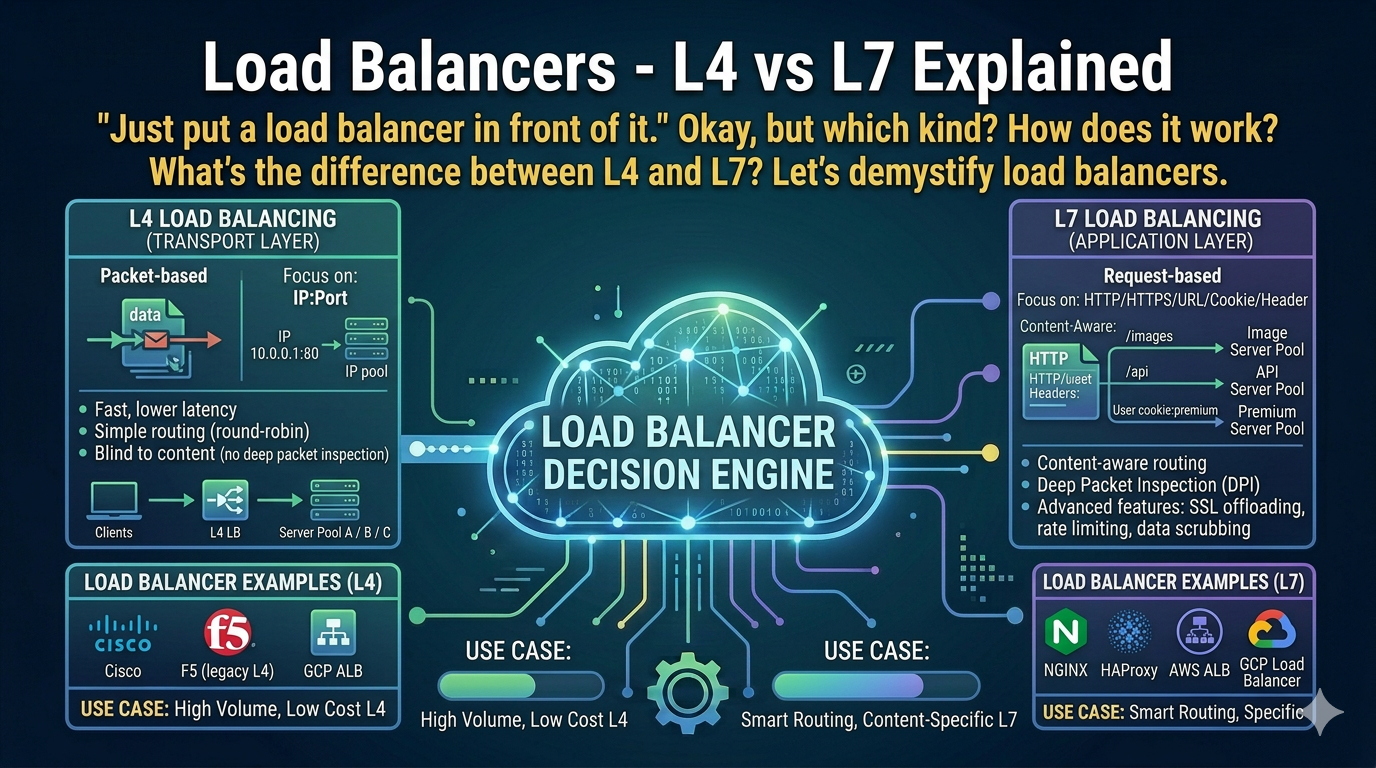
L4 vs L7 — The Key Difference
Layer 4 (Transport Layer)
Makes decisions based on IP and Port. Doesn’t look at content.
Client request:  192.168.1.50:54321 → 10.0.0.1:80

L4 LB sees:      Source IP, Source Port, Dest IP, Dest Port
L4 LB doesn't see: HTTP headers, URL path, cookies

Decision: Forward to backend based on IP/port only
Characteristics:
- Fast (no packet inspection)
- Protocol agnostic (works with any TCP/UDP)
- Can’t route based on URL path
- Can’t modify HTTP headers
- Connection-level decisions
Layer 7 (Application Layer)
Makes decisions based on HTTP content. Inspects packets.
Client request:
  GET /api/users HTTP/1.1
  Host: example.com
  Cookie: session=abc123

L7 LB sees:      URL path, headers, cookies, body
L7 LB can:       Route /api/* to API servers
                 Route /static/* to CDN
                 Add/remove headers
                 Terminate SSL
Characteristics:
- Slower (packet inspection)
- HTTP/HTTPS aware
- Path-based routing
- Header manipulation
- Cookie-based sessions
- SSL termination
Visual Comparison
L4 Load Balancer:
┌──────────────────────────────────────────────────┐
│ I see: TCP connection from 1.2.3.4:54321         │
│ I forward to: Backend 1 (round robin)            │
│ I don't care what's in the packets               │
└──────────────────────────────────────────────────┘

L7 Load Balancer:
┌──────────────────────────────────────────────────┐
│ I see: GET /api/users with Header: X-User: john  │
│ I route: /api/* → API cluster                    │
│         /static/* → Static cluster               │
│ I add: X-Forwarded-For header                    │
│ I terminate: SSL here                            │
└──────────────────────────────────────────────────┘
Load Balancing Algorithms
Round Robin
Distribute equally in sequence.
Request 1 → Server A
Request 2 → Server B
Request 3 → Server C
Request 4 → Server A (repeat)
Good for: Equal capacity servers, stateless apps.
Weighted Round Robin
Some servers get more traffic.
Server A (weight 3): Gets 3 requests
Server B (weight 1): Gets 1 request
Server C (weight 1): Gets 1 request
Good for: Mixed capacity servers.
Least Connections
Send to server with fewest active connections.
Server A: 10 connections → Skip
Server B: 3 connections  → Send here
Server C: 7 connections  → Skip
Good for: Long-lived connections, varying request times.
IP Hash
Same client IP always goes to same server.
hash(192.168.1.50) % 3 = 1 → Always Server BGood for: Simple session affinity (but consider: what if server dies?).
Least Response Time
Send to fastest responding server.
Server A: avg 50ms  → Send here
Server B: avg 200ms → Skip
Server C: avg 100ms → Skip
Good for: Heterogeneous backends.
Health Checks
Load balancers check if backends are healthy.
# HTTP health check
path: /health
interval: 10s
timeout: 5s
healthy_threshold: 2
unhealthy_threshold: 3
expected_codes: 200-299

LB → GET /health → Server A → 200 OK ✓
LB → GET /health → Server B → 500 Error ✗
LB → GET /health → Server B → 500 Error ✗ (2nd failure)
LB → GET /health → Server B → Timeout ✗ (3rd failure)
Server B marked unhealthy, removed from pool
Health check types:
TCP:   Can I connect to the port?
HTTP:  Does /health return 200?
gRPC:  Does grpc.health.v1 respond?
SSL/TLS Termination
Where SSL is terminated matters.
Terminate at Load Balancer
Client ──HTTPS──→ LB ──HTTP──→ Backend
                  ↑
              SSL ends here
Pros:
- Backends don’t handle SSL
- Centralized certificate management
- Easier debugging (plain HTTP internally)
Cons:
- Traffic unencrypted internally
- LB needs certificates
End-to-End Encryption
Client ──HTTPS──→ LB ──HTTPS──→ BackendPros:
- Encrypted all the way
- Required for compliance sometimes
Cons:
- More complex
- Certificates on every backend
SSL Passthrough (L4)
Client ──HTTPS──→ LB ──HTTPS──→ Backend
                  ↑
              Just forwards, doesn't decrypt
Pros:
- LB doesn’t need certificates
- True end-to-end encryption
Cons:
- No L7 features (can’t route by path)
- Backends handle SSL
Cloud Load Balancers
AWS
ALB (Application Load Balancer) = L7
- Path-based routing
- Host-based routing
- WebSocket support
- Lambda targets

NLB (Network Load Balancer) = L4
- Ultra low latency
- Static IPs
- TCP/UDP
- Millions of requests/sec

CLB (Classic Load Balancer) = Legacy
- Don't use for new projects
GCP
HTTP(S) Load Balancer = L7 (Global)
- Global anycast IP
- URL-based routing
- Cloud CDN integration

TCP/UDP Load Balancer = L4 (Regional)
- Regional
- TCP/UDP support
- Low latency

Internal Load Balancer = L4/L7 (Internal)
- Private IPs only
- VPC traffic
Azure
Application Gateway = L7
- URL routing
- WAF integration
- SSL termination

Azure Load Balancer = L4
- TCP/UDP
- Zone redundant
- Internal or public
Kubernetes Load Balancing
Service Types
# ClusterIP (internal L4)
apiVersion: v1
kind: Service
metadata:
  name: my-service
spec:
  type: ClusterIP  # Default, internal only
  selector:
    app: my-app
  ports:
    - port: 80
      targetPort: 8080
# LoadBalancer (external, cloud L4)
spec:
type: LoadBalancer # Creates cloud LBIngress (L7)
apiVersion: networking.k8s.io/v1
kind: Ingress
metadata:
  name: my-ingress
spec:
  rules:
    - host: api.example.com
      http:
        paths:
          - path: /users
            pathType: Prefix
            backend:
              service:
                name: users-service
                port:
                  number: 80
          - path: /orders
            pathType: Prefix
            backend:
              service:
                name: orders-service
                port:
                  number: 80
Common Patterns
Blue-Green Deployment
LB routes 100% to Blue (current)
Deploy Green (new version)
Test Green
Switch LB to Green (100%)
Blue becomes standby
Canary Deployment
LB routes:
  90% → Current version
  10% → New version (canary)

Monitor canary, gradually increase %
Sticky Sessions
# Session affinity by cookie
sessionAffinity: ClientIP
# or
annotations:
  nginx.ingress.kubernetes.io/affinity: "cookie"
Warning: Sticky sessions hurt scalability. Prefer stateless.
Debugging Load Balancers
Check Backend Health
# AWS ALB
aws elbv2 describe-target-health --target-group-arn <arn>

# Kubernetes
kubectl describe service my-service
kubectl get endpoints my-service
Check Traffic Distribution
# Watch access logs
tail -f /var/log/nginx/access.log

# Check connection counts per backend
# In your monitoring (Prometheus, CloudWatch, etc.)
Common Issues
Issue: 502 Bad Gateway
Cause: Backend not responding, wrong port, health check failing

Issue: 503 Service Unavailable
Cause: No healthy backends

Issue: 504 Gateway Timeout
Cause: Backend too slow, timeout too short

Issue: Uneven distribution
Cause: Sticky sessions, long connections, wrong algorithm
When to Use What
Use L4 for:
- Simple TCP distribution
- Maximum performance
- Non-HTTP protocols
- Database clustering
Use L7 for:
- Path-based routing
- WebSocket (or L4 passthrough)
- gRPC
- Multiple domains
- SSL termination
Quick Reference
L4 (Transport): IP + Port only, fast, protocol agnostic
L7 (Application): HTTP aware, routing, headers, slower

Algorithms:
- Round Robin: Equal distribution
- Least Connections: To least busy server
- IP Hash: Same client → same server

Health Checks:
- TCP: Port open?
- HTTP: /health returns 200?

SSL:
- Terminate at LB: Simpler, internal HTTP
- Passthrough: End-to-end encrypted
- Re-encrypt: HTTPS everywhere
Conclusion
Load balancers are essential for any production system.
- Use L4 for simple, fast distribution
- Use L7 for HTTP-aware routing and features
- Always configure health checks
- Choose the right algorithm for your use case
Most cloud setups use a combination: L4 for raw TCP, L7 for HTTP traffic.
L4 or L7 — which do you use most? Share in the comments.
Checkout my portfolio to know me more — mathumathiv.com
메타데이터
- post_id
- f845e2773f13
- slug
- load-balancers-l4-vs-l7-explained-f845e2773f13
- url
- https://medium.com/@mathumathiv247/load-balancers-l4-vs-l7-explained-f845e2773f13
- canonical_url
- https://medium.com/@mathumathiv247/load-balancers-l4-vs-l7-explained-f845e2773f13
- author_url
- https://medium.com/@mathumathiv247
- status
- ok
- fetched_at
- 2026-06-12 18:14:10