How I Use Claude as a UX Architect
Why AI Has Become My Architecture Layer
How I Use Claude as a UX Architect
Why AI Has Become My Architecture Layer
Part 2 of the AI-Native Product Design Series
In the first article of this series, I introduced a concept I call Experience Drift. Experience Drift is what happens when requirements, design artifacts, components, and production experiences are all technically correct, yet somehow describe different versions of the same product. After publishing Part 1, most people agreed that Experience Drift existed. What surprised me was that very few people believed it could be prevented. Many assumed drift was simply the cost of building complex products. I disagree.
My answer surprised them.
I don’t start with Figma. I don’t start with wireframes. I don’t even start with screens. I start with Claude. Not because I want AI to design for me. Because I want AI to challenge assumptions before design begins.
Most designers use Claude to generate. I use Claude to align. Over the last year, working across enterprise-scale systems where a single misaligned requirement can propagate across dozens of product surfaces, I’ve started thinking about that process as something larger than prompt engineering. I call it the Architecture Layer.
The Day I Realised Requirements Were Not the Source of Truth
A few months ago, I was working on an enterprise search experience. The requirement looked simple: apply a default date filter of the last 3 months. Nobody disagreed. The requirement seemed clear.
Then the conversations started.
The product team interpreted it as search scope. Design interpreted it as a visible filter state. Engineering interpreted it as backend query logic. The AI search team interpreted it as contextual behavior. Every interpretation was reasonable. Every interpretation was technically correct. Yet each one described a slightly different experience. This wasn’t a design problem or an engineering problem. It was an alignment problem. And historically, teams discover these inconsistencies weeks later through reviews, QA cycles, stakeholder demos, or customer feedback. At enterprise scale, by the time the inconsistency surfaces, it has already propagated through multiple artifact layers.
This time I tried something different. Before creating designs, I asked Claude to analyze the requirement. Within minutes it surfaced questions nobody had documented:
Should users see the filter applied? Can the filter be removed? Does AI-generated search respect the same rule? Do saved searches inherit the filter? What happens when users share search URLs?
The requirement hadn’t changed. Our understanding of it had. That was the moment I stopped viewing Claude as a writing tool and started viewing it as an architectural tool.
Most Teams Use AI Too Late
Today, many teams introduce AI after design work begins. The workflow often looks like this:
Business Goal → Requirements → Design → AI
By the time AI enters the conversation, assumptions have already become embedded in the solution. AI helps refine outputs. It rarely influences foundations. I spent a long time doing exactly that: using Claude to write better copy for flows that were already broken at the assumption level. That was not faster design. That was faster waste, with cleaner fonts.
As UX architects, our most important work doesn’t happen during interface creation. It happens before interfaces exist. We facilitate alignment, identify ambiguity, reconcile competing stakeholder perspectives, and translate business intent into customer experience. Most of those decisions happen long before a component appears in Figma. That’s why I believe AI creates the greatest value earlier in the lifecycle, not after design, but before it.
The Architecture Layer Model
Most product organizations follow a familiar path:
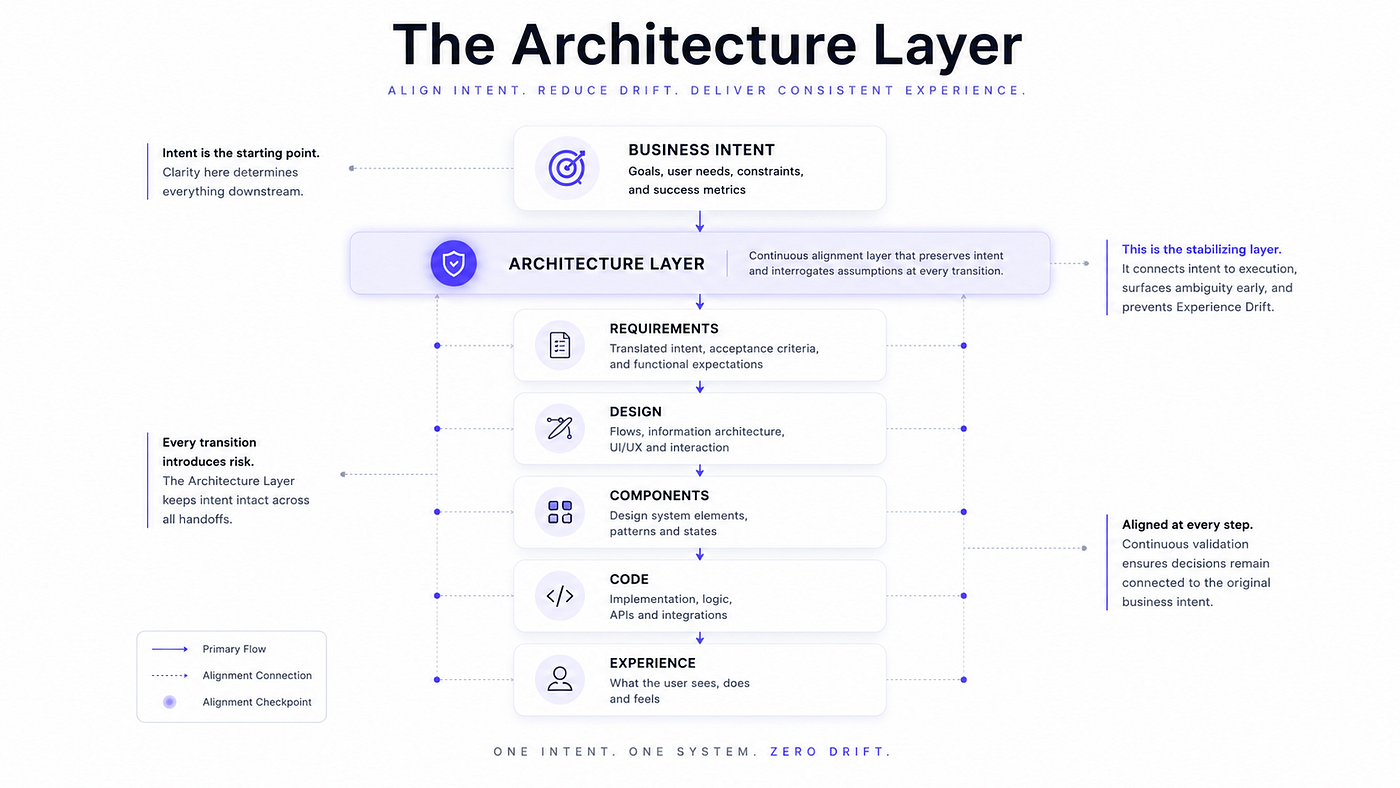
Business Intent → Requirements → Design → Components → Code → Experience
Every transition introduces interpretation, and every interpretation introduces potential drift. Most organizations attempt to solve this by improving the artifacts themselves: better documentation, better tickets, better annotations, better handoffs. But what if the problem isn’t the artifacts? What if the problem is the absence of a layer dedicated entirely to alignment?
That’s where the Architecture Layer sits.
Business Intent → Architecture Layer → Requirements → Design → Components → Code → Experience
Consider a requirement as simple as: “Relevant results.”
Without an Architecture Layer, that single phrase produces four different products:
Requirements → recent content
Design → recommended content
Engineering → ranked content
AI → personalized content
With an Architecture Layer, those interpretations are surfaced and resolved before any of them become reality.
Most organizations try to align artifacts. The Architecture Layer aligns intent.
Intent is the most fragile asset in product development.
Requirements can be rewritten.
Designs can be revised.
Components can be refactored.
Code can be replaced.
But once the original intent becomes distorted, every downstream artifact inherits that distortion.
The Architecture Layer exists to protect intent before it fragments across systems.
The Architecture Layer is not documentation. It is not design. It is not engineering. It is a continuous alignment mechanism that preserves original intent as it moves across artifact boundaries. Today, Claude is the most effective tool I’ve found for implementing it. But the Architecture Layer is a methodology, not a product feature. The framework survives regardless of which AI model exists 5 years from now.
What makes this distinct from existing alignment practices is the placement. Traditional design reviews, requirement workshops, and handoff checklists all operate within artifact layers. The Architecture Layer operates between them, at every transition point where intent is most at risk of distortion.
Detecting Experience Drift Before It Happens
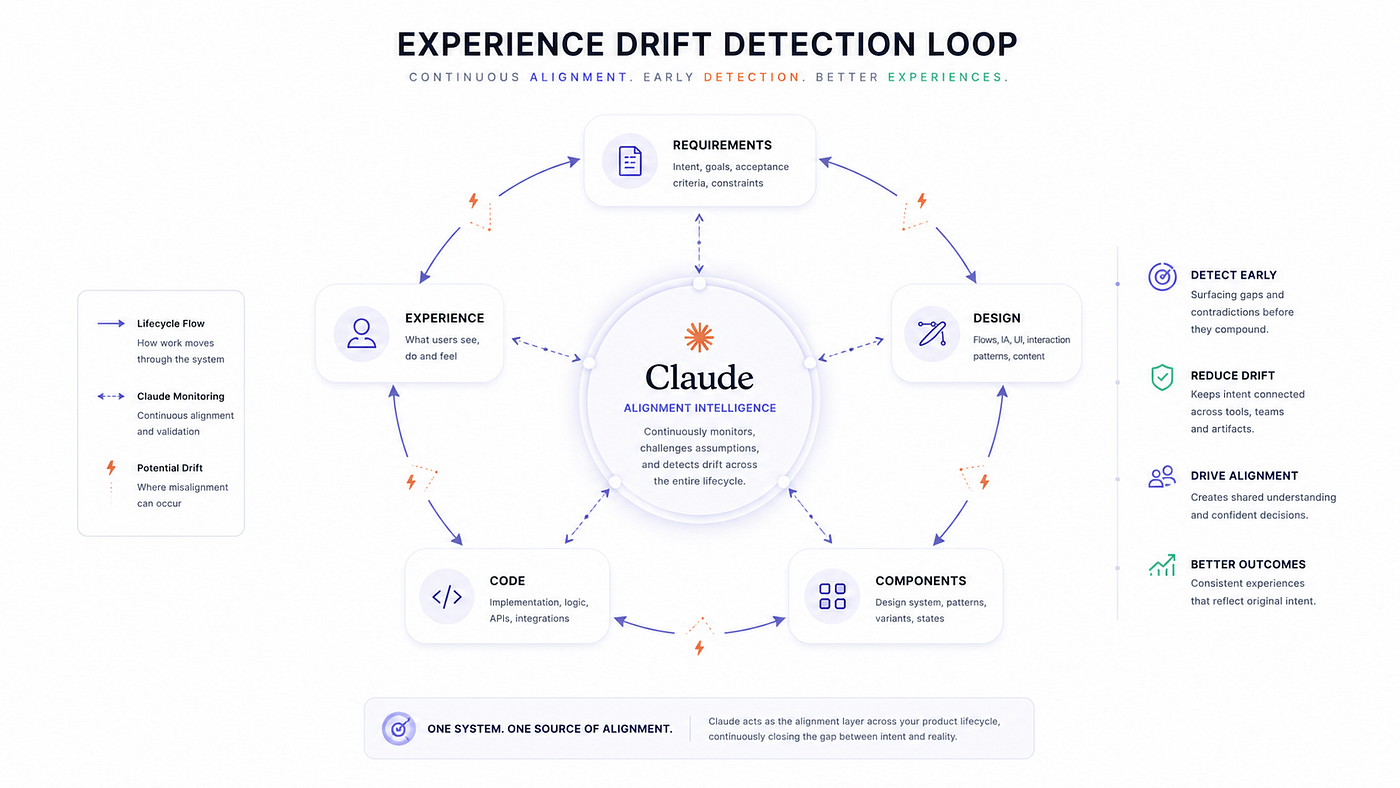
One of the most significant benefits of the Architecture Layer is early drift detection. Consider this requirement: “Users should see relevant results.” Sounds reasonable. But what does relevant mean? Recent? Popular? Personalized? AI-ranked? Industry-specific? Different teams answer differently, and without alignment, those interpretations eventually produce different requirements, different designs, different components, different business logic, and different customer experiences.
I saw this clearly in one project where the requirement described a feature as “personalized.” The product team meant personalized content. Design interpreted it as personalized layout. Engineering implemented personalized ranking. Nobody was wrong. Nobody had made a mistake. The feature still drifted before the first screen review happened, because 3 teams had read the same word and built 3 different things.
Claude doesn’t necessarily provide the answer. It reveals that multiple answers exist. That distinction matters more than most practitioners realize. Most people believe AI generates solutions. Increasingly, I find its greatest value is exposing ambiguity, and ambiguity is exactly where Experience Drift begins. The field has spent years building better artifact tools. What it hasn’t built is a systematic method for interrogating assumptions before those artifacts are created. That’s the gap the Architecture Layer addresses.
My Daily Workflow
People often imagine AI-powered design workflows as fully automated systems generating interfaces from prompts. My workflow is much simpler and more deliberate.
Step 1: Problem Framing. I gather business goals, user needs, stakeholder expectations, and technical constraints. These become inputs for Claude before any design work begins. The goal at this stage isn’t output. It’s clarity.
Step 2: Alignment Review. Claude identifies missing scenarios, contradictions, hidden assumptions, and alternative interpretations. The output is not a design. It is a cleaner problem definition. This is the step most teams skip, and it’s where most drift originates.
Step 3: Design Exploration. Only after alignment improves do I move into Figma. At this stage, design decisions are grounded in validated assumptions rather than embedded ones. The screens I produce here are faster to build and easier to defend because the hard thinking already happened.
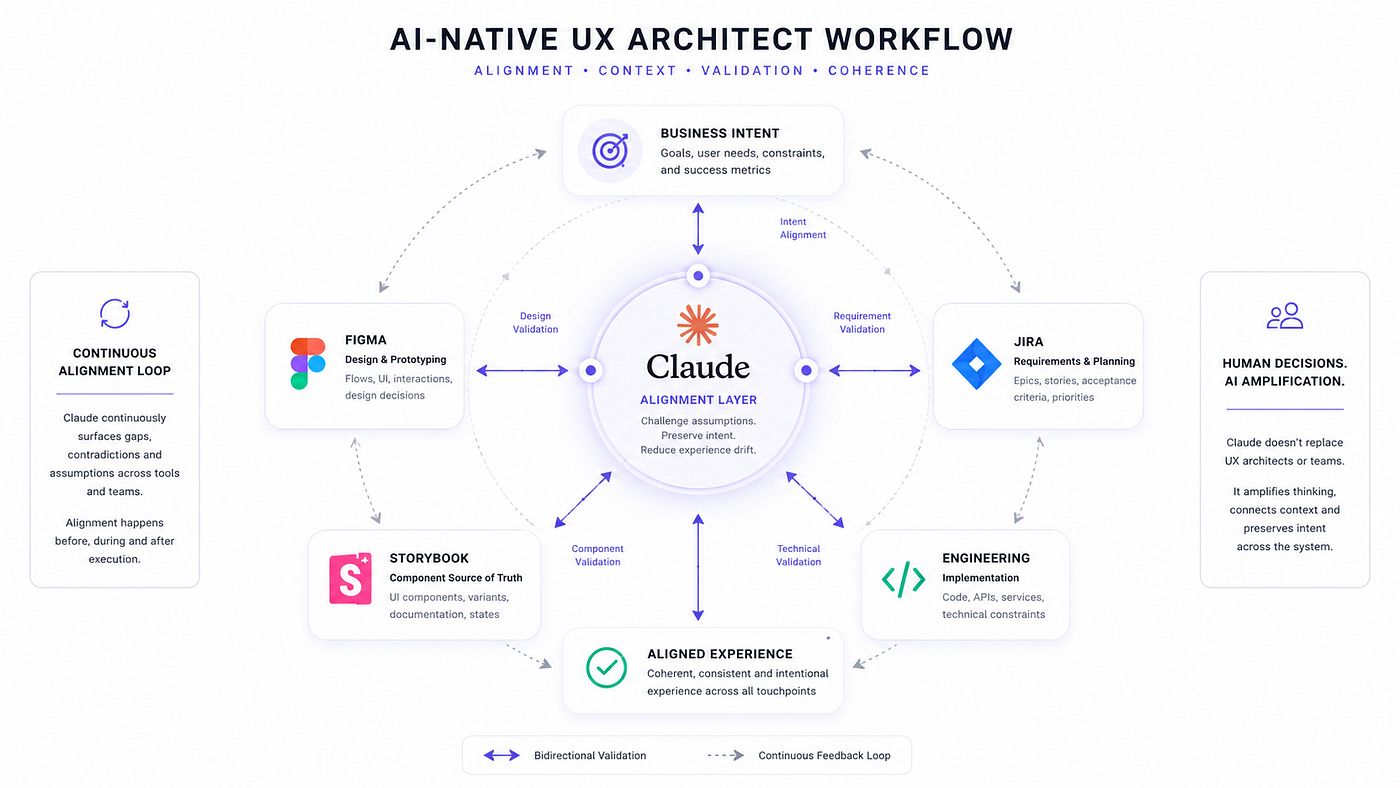
Step 4: System Validation. Requirements move into Jira. Components move into Storybook. Designs evolve in Figma. As these artifacts develop independently, Claude remains available as a validation layer whenever inconsistencies emerge across them. This is not a one-time check. It’s a continuous practice.
Step 5: Experience Verification. Before release, I compare original intent, requirements, design artifacts, components, and production behavior. The goal is simple: catch drift before customers do.
The New Role of UX Architects
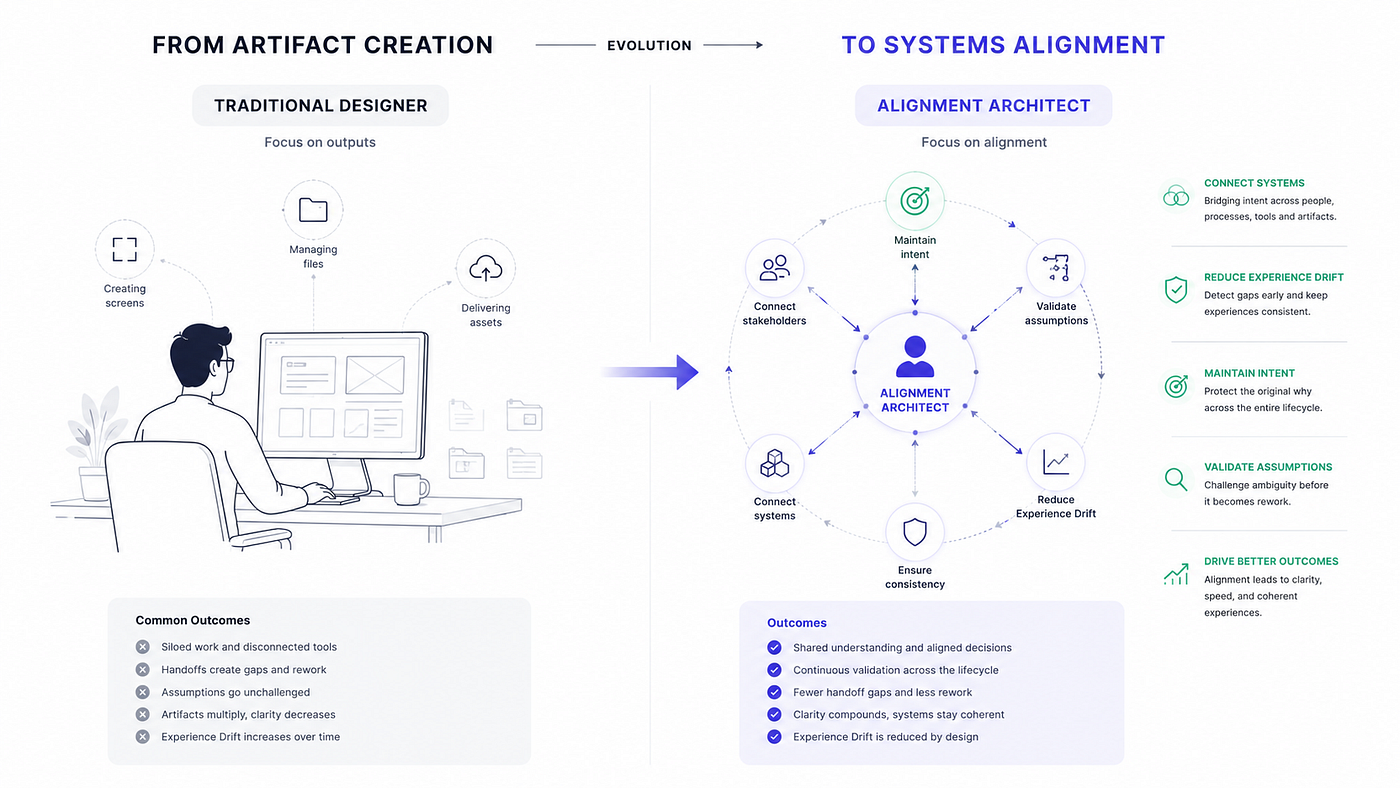
For years, many organizations viewed designers as creators of screens. That definition is becoming increasingly incomplete. Modern products contain AI systems, personalization engines, accessibility requirements, design systems, analytics platforms, business rules, and continuous deployment pipelines. At enterprise scale, these systems interact in ways that no single artifact fully captures. The challenge is no longer creating interfaces. The challenge is maintaining coherence across interconnected systems that were never designed to talk to each other.
I still draw screens, constantly. That work hasn’t disappeared. But the harder and higher-value work is operating at the layer above: understanding where intent is at risk, which assumptions haven’t been tested, and which artifact boundaries are most likely to introduce drift. That’s the role I’ve been building toward, and increasingly, it’s the role that separates teams shipping coherent products from teams shipping drift with good visual design on top.
The future UX architect is less of an artifact creator and more of an alignment architect. Less time drawing screens, more time preserving intent. Less time documenting decisions, more time validating assumptions. Less time producing artifacts, more time maintaining system integrity.
Claude Isn’t Replacing UX Architects
Every few months, another headline claims AI will replace designers. I think that’s the wrong question entirely. Claude isn’t replacing UX architects. It’s helping us operate at a higher layer of the problem. The question is no longer whether AI can generate interfaces. The question is whether your organization has a mechanism for preserving intent before those interfaces exist.
What would change in your current process if alignment had its own dedicated layer?
Looking Ahead
Claude helped me realize something important. The future of product design isn’t AI-generated screens. It’s AI-preserved intent. The Architecture Layer exists because intent is fragile, and every artifact boundary is an opportunity for it to distort.
But another question emerged as I started working this way. What happens when the design artifacts themselves stop being static? What happens when prototypes become executable? What happens when design becomes a system instead of a file?
That’s where Figma Make enters the story.
This article is Part 2 of the AI-Native Product Design series
**Part 1: The End of Static Mockups**
Part 2: How I Use Claude as a UX Architect
Part 3: Figma Make for Enterprise Product Design
Part 4: Storybook Is Becoming the Source of Truth
Part 5: Building an AI-Native Design Organization
This series explores how AI is transforming the relationship between requirements, design systems, code, and product experience.
메타데이터
- post_id
- f8a404822093
- slug
- how-i-use-claude-as-a-ux-architect-f8a404822093
- url
- https://www.designsystemscollective.com/how-i-use-claude-as-a-ux-architect-f8a404822093
- canonical_url
- https://www.designsystemscollective.com/how-i-use-claude-as-a-ux-architect-f8a404822093
- author_url
- https://medium.com/@surendarselvaraj
- status
- ok
- fetched_at
- 2026-06-24 18:57:25