Google TabFM : LLM for Tabular Data, Bye XGBoost
How to use Google TabFM for Free?
Google TabFM : LLM for Tabular Data, Bye XGBoost
How to use Google TabFM for Free?
Photo by KOBU Agency on Unsplash
Machine learning has become incredibly good at understanding images, text, audio, and even videos. But one area has remained surprisingly traditional: tabular data.
[embed]
Whether you’re working with customer records, financial transactions, healthcare reports, sales spreadsheets, or sensor logs, chances are your data lives in rows and columns. For years, models like XGBoost, LightGBM, CatBoost, and Random Forests have dominated this space. They usually require feature engineering, hyperparameter tuning, and dataset-specific training before delivering good results.
Google Research wants to change that.
With TabFM (Tabular Foundation Model), Google introduces a foundation model designed specifically for structured data. Instead of training a new model for every dataset, TabFM can perform predictions in a zero-shot manner by simply looking at a few training examples provided as context.
In many benchmark datasets, this approach even beats carefully tuned gradient-boosted tree models. Let’s understand what makes TabFM different.
What is Google TabFM?
TabFM is a foundation model for tabular data developed by Google Research.
Unlike conventional machine learning models that need to be trained from scratch on every dataset, TabFM works much like an LLM, but for tables.
Instead of learning during training on your dataset, it receives a set of labeled examples as context during inference and predicts labels for unseen rows in a single forward pass. There is:
- No gradient updates
- No fine-tuning
- No hyperparameter search
- No lengthy training process
Simply provide your training data as context, and the model performs inference immediately.
This makes TabFM one of the first practical foundation models designed exclusively for structured datasets.
Why Traditional Tabular Machine Learning is Slow
Consider building a customer churn prediction model. Normally, the workflow looks something like this:
- Clean missing values
- Encode categorical features
- Scale numerical values
- Perform feature engineering
- Split train/test sets
- Train multiple models
- Tune hundreds of hyperparameters
- Compare validation scores
- Retrain the best model
Even experienced data scientists may spend days optimizing a single dataset. Now imagine replacing most of this workflow with:
clf.fit(X_train, y_train)
predictions = clf.predict(X_test)
No parameter tuning.
No searching through dozens of configurations.
That’s the promise of TabFM.
How Zero-Shot Learning Works
The interesting part is that TabFM isn’t “training” on your dataset.
Instead, your training rows become part of the model’s input.Think of it like giving examples to ChatGPT. For example:
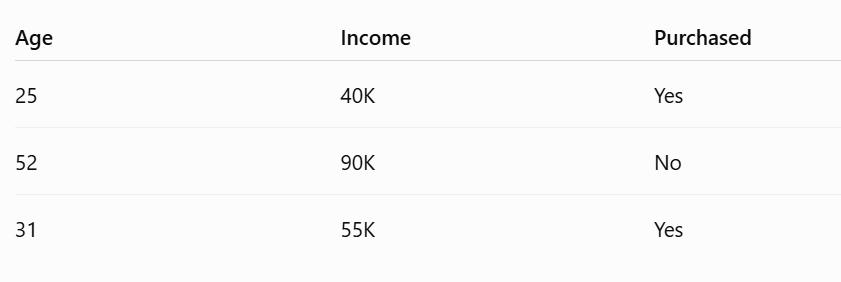
Then you ask:
What about this customer?
The model studies the provided examples and predicts the answer directly. This technique is known as In-Context Learning (ICL). Large language models use this idea for text. TabFM applies the same concept to structured data.
Supported Tasks
TabFM currently supports two major machine learning problems.
Classification
Predict categories. Examples include:
- Fraud detection
- Customer churn
- Disease diagnosis
- Spam detection
- Loan approval
- Product recommendation
The current version supports up to 10 output classes.
Regression
Predict continuous numerical values. Examples include:
- House prices
- Sales forecasting
- Revenue prediction
- Temperature prediction
- Insurance cost estimation
Loading TabFM is Surprisingly Simple
For classification:
from tabfm import TabFMClassifier
from tabfm import tabfm_v1_0_0_pytorch as tabfm
model = tabfm.load(model_type="classification")clf = TabFMClassifier(model=model)clf.fit(X_train, y_train)predictions = clf.predict_proba(X_test)Regression looks nearly identical:
from tabfm import TabFMRegressormodel = tabfm.load(model_type="regression")reg = TabFMRegressor(model=model)reg.fit(X_train, y_train)predictions = reg.predict(X_test)If you’re already using the Hugging Face ecosystem, you can also load the model directly from the Hub using the provided checkpoints.
How TabFM Actually Works
The architecture is far more sophisticated than simply feeding a spreadsheet into a Transformer. Google designed a multi-stage pipeline that understands both columns and rows separately before making predictions.
Step 1: Column Attention
Every cell in the table is converted into an embedding.
Numerical values are transformed using Fourier features, while categorical values receive dedicated embeddings.
Instead of processing rows immediately, TabFM first studies relationships between columns. For example:
- Age ↔ Income
- Salary ↔ Occupation
- Credit Score ↔ Loan Amount
This helps the model discover feature interactions.
Step 2: Row Compression
Once column relationships are learned, each row is summarized into a compact representation. Special CLS tokens collect important information from every feature within the row.
This dramatically reduces the amount of information that later transformer layers need to process.
Step 3: In-Context Learning Transformer
The compressed rows are then passed into a 24-layer causal Transformer.
Training rows become context. Test rows become the queries. The model predicts outputs without updating any weights. This architecture is remarkably similar to how modern LLMs perform few-shot learning.
Model Architecture
Some notable specifications include:
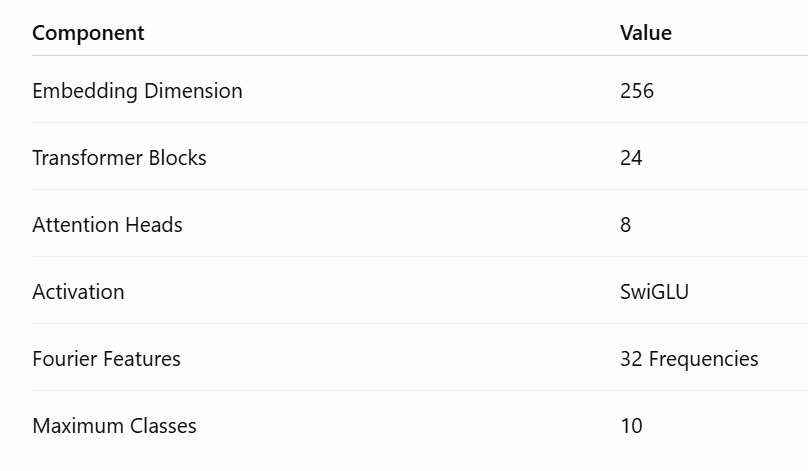
Although relatively compact compared to modern LLMs, the architecture is highly specialized for structured datasets.
Why Google Trained It on Synthetic Data
One of the biggest challenges in tabular AI is the lack of large public datasets. Unlike text or images:
- Business data is private.
- Healthcare data is confidential.
- Financial records cannot be openly shared.
Google solved this by generating hundreds of millions of synthetic datasets using Structural Causal Models (SCMs).
These synthetic datasets simulate realistic relationships between variables while avoiding privacy and licensing issues. Instead of memorizing real companies’ data, TabFM learns general patterns that appear across tabular problems.
Performance
Google evaluated TabFM on TabArena, a benchmark containing:
- 51 datasets
- 38 classification tasks
- 13 regression tasks
The impressive part is that TabFM operates in zero-shot mode — it makes predictions without any dataset-specific optimization. Despite this, Google reports that it outperforms several heavily tuned supervised baselines, including gradient-boosted tree methods, across the benchmark. The optional TabFMClassifier.ensemble() preset, which combines feature crosses, SVD-derived features, and non-negative least squares (NNLS) blending, delivers additional gains on many datasets.
This is notable because gradient-boosted trees have long been considered the gold standard for tabular machine learning.
Advantages of TabFM
Several characteristics make TabFM stand out.
No Hyperparameter Tuning
Finding the best learning rate, tree depth, or regularization parameters often takes longer than training itself. TabFM removes this step entirely.
Zero-Shot Predictions
Predictions can be generated immediately after providing example rows. No iterative optimization is required.
Handles Mixed Data Types
The model works with:
- Numerical columns
- Categorical columns
- Pandas DataFrames
- NumPy arrays
without requiring separate model architectures.
Current Limitations
Despite its impressive capabilities, TabFM is not a universal replacement for every tabular ML workflow.Some important limitations include:
Maximum of 10 Classes
Classification tasks with more than ten output categories are not supported by the current architecture.
Memory Usage
Since all training rows are provided as context during inference, memory usage grows with the size of the training dataset.
Very large datasets may require sampling or batching strategies.
Wide Tables
Google recommends tables with up to around 500 features. Performance may degrade on significantly wider datasets.
Non-Commercial License
The released model weights are currently available under the TabFM Non-Commercial License v1.0. Organizations planning commercial deployments should review the license carefully.
No Fine-Tuning
TabFM is designed for zero-shot inference rather than task-specific fine-tuning. For some specialized domains, a custom-trained model may still achieve better results.
Where TabFM Can Be Useful
TabFM is particularly well-suited for scenarios where quickly building a strong baseline matters more than extensive model tuning. Potential use cases include:
- Customer churn prediction
- Fraud detection
- Credit risk assessment
- Healthcare diagnosis support
- Insurance claim prediction
- Demand forecasting
- Sales prediction
- Marketing analytics
- Manufacturing quality control
- Scientific tabular datasets
It can also be valuable for rapid experimentation, where data scientists want to evaluate a new dataset without investing time in feature engineering and hyperparameter searches.
Final Thoughts
For years, the AI revolution has largely focused on text, images, and code, while structured data continued to rely on traditional machine learning pipelines.
TabFM brings the foundation model paradigm to spreadsheets and databases by treating labeled examples as context rather than training data. If its benchmark performance translates well to real-world applications, it could simplify how many tabular ML projects are started — reducing the need for extensive tuning while providing strong baseline performance out of the box.
It is still early, and the current release has practical limitations such as the 10-class cap, growing memory requirements with larger context sizes, and a non-commercial license. Even so, TabFM offers a compelling glimpse into what the future of tabular machine learning could look like: pretrained foundation models that work across a wide range of structured datasets with minimal setup.
The model weights are open-sourced and can be accessed here
메타데이터
- post_id
- f91e440aeb03
- slug
- google-tabfm-llm-for-tabular-data-bye-xgboost-f91e440aeb03
- url
- https://medium.com/data-science-in-your-pocket/google-tabfm-llm-for-tabular-data-bye-xgboost-f91e440aeb03
- canonical_url
- https://medium.com/data-science-in-your-pocket/google-tabfm-llm-for-tabular-data-bye-xgboost-f91e440aeb03
- author_url
- https://medium.com/@mehulgupta_7991
- status
- ok
- fetched_at
- 2026-07-08 18:29:56