Trigger Log-Based Billing Alert using Pub/Sub Notification and Cloud Functions
PubSub Notification을 통해서 Billing Alert을 Cloud Log에 저장하고 Log-Based Alert 생성하기
Trigger Log-Based Billing Alert using Pub/Sub Notification and Cloud Functions
PubSub Notification을 통해서 Billing Alert을 Cloud Log에 저장하고 Log-Based Alert 생성하기
Google의 Billing Alert은 Email Notification과 Pub/Sub Notification 두가지를 제공한다. Email Notification을 사용하면 정해진 Format의 Alert을 가장 손쉽게 받아 볼 수 있지만, Email Content를 원하는 형태로 가공할 수는 없다.
이렇게 Email Content를 가공해야 하는 경우라면 Pub/Sub Notification을 이용해서 Content를 원하는 데로 가공해서 Email로 전송하면 되는데, 이렇게 되면 Email 전송을 위한 별도의 3rd Party 솔루션이 필요하게 된다.
별도의 3rd Party API를 사용하지 않고 Google Cloud에서 제공하는 Notification Channel을 그대로 활용하여 가공된 Billing Alert Content를 제공하려면 어떻게 해야할까?
Notification Channel API에서는 Notification Channel에 직접 Write하는 API를 노출하고 있지 않기 때문에, Google Cloud 내에서 Notification Channel을 사용하는 Alert을 생성하는 방법으로 기존 Notification Channel을 활용할 수가 있게 된다.
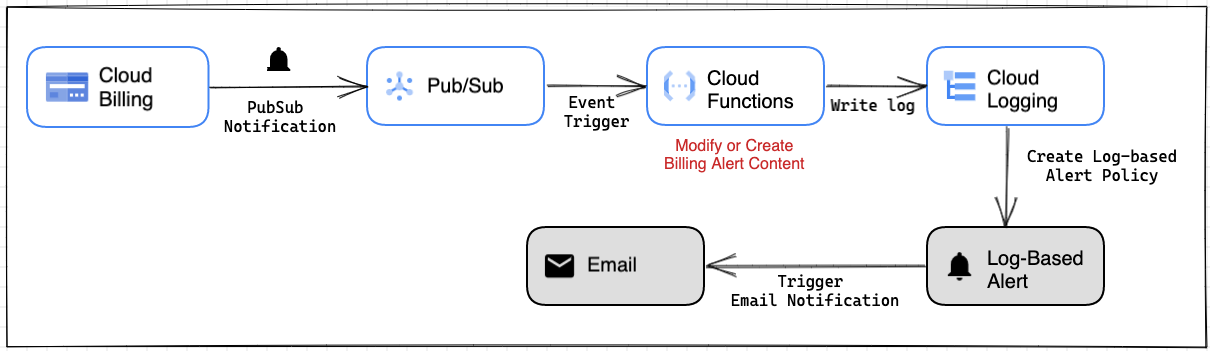
즉 가공된 Billing Alert Content를 Cloud Logging에 기록하고 Log-based Alert을 생성하게 되면 Notification Channel(SMS, Email, Webhook 등)을 활용할 수 있게 되는 것이다.
흐름은 다음과 같다.
사전 준비
- Pub/Sub Notification 생성
- Email Notification 생성
- Billing Alert 생성
Notification 생성 과정은 여기서는 설명하지 않으니, Google Document를 참고해서 미리 생성해 둔다.
Billing Alert 생성
Billing Alert을 생성하고 만들어둔 Pub/Sub Notification Channel을 선택한다.

Budget Alert 설정 상세는 다음을 참고한다.
[embed]Setting Billing Budget Billing Budget 설정하기medium.com
Cloud Functions 작성
Pub/Sub Notification으로 부터 Event를 받아서 Cloud Logging에 기록하는 Cloud Functions를 작성한다.
Cloud Functions에서 Cloud Logging에 Log를 기록하고 Log를 검색해야 하므로 Logs Viewer 권한과 Logs Writer 권한을 Cloud Functions의 Service Account에 부여해야 한다.

Email Notification과 다르게 Pub/Sub Notification은 alert이 valid하는 동안 반복된다. 따라서 같은 메시지를 반복적으로 여러번 받게 되기 때문에, 동일 내용의 Log Entry가 24시간 내에 이미 기록된 적이 있는지를 조회한 후, 기록된 적이 없으면(통지된 적이 없으면) Log를 기록하도록 하였다.
# main.py

import base64
import json
import datetime
import pytz
from google.cloud import logging

logging_client = logging.Client()

def process_billing_alert(payload, context):

    alert_attrs = payload.get("attributes")
    alert_data = json.loads(base64.b64decode(payload.get("data")).decode("utf-8"))

    billing_id = alert_attrs.get("billingAccountId")
    budget_name = alert_data.get("budgetDisplayName")
    cost = "{:,.2f}".format(float(alert_data.get("costAmount")))
    budget = "{:,.2f}".format(float(alert_data.get("budgetAmount")))
    currency = alert_data.get("currencyCode")
    threshold = float(alert_data.get("alertThresholdExceeded")) * 100

    interval_datetime = datetime.datetime.now() - datetime.timedelta(hours=24)
    formatted_datetime = interval_datetime.astimezone(pytz.timezone("UTC")).strftime("%Y-%m-%dT%H:%M:%SZ")

    filter_str = 'log_id("billing_alerts") AND ' \
             f'jsonPayload.billing_id="{billing_id}" AND '  \
             f'jsonPayload.budget_name="{budget_name}" AND '  \
             f'jsonPayload.cost="{cost}" AND '  \
             f'jsonPayload.budget="{budget}" AND '  \
             f'jsonPayload.currency="{currency}" AND '  \
             f'jsonPayload.threshold="{threshold}" AND ' \
             f'timestamp > "{formatted_datetime}"'

    results = logging_client.list_entries(
        filter_=filter_str,
    )
    results_len = len(list(results))

    logger = logging_client.logger('billing_alerts')
    if results_len > 0 :
        logger.log_text("This Billing Alert has been triggered and saved Cloud Logging already", severity="INFO")
    else:
        log_msg = {
            "billing_id" : f"{billing_id}",
            "budget_name" : f"{budget_name}",
            "cost": f"{cost}",
            "budget" : f"{budget}",
            "currency" : f"{currency}",
            "threshold" : f"{threshold}",
        }

        logger.log_struct(log_msg , severity="INFO")
requirements.txt
google-cloud-logging>=3.5.0
pytz
Cloud Functions 배포
gcloud functions deploy process_billing_alert --region=REGION --runtime=python39 \
--trigger-topic=[PUBSUB NOTIFICATION TOPIC]
Log-Based Alert 생성하기
Log-based Alert은 Cloud Console에서 생성이 가능하다. Cloud Logging에서 다음과 같이 Log를 조회하고 바로 생성할 수 있다.

그런데 Log-Based Alert Policy에서 User Log Content 기반으로 Document를 생성하고 싶을때는 Label을 생성해야 하는데 이 과정은 Console 상에서 수행할 수 없기 때문에, 여기에서는 CLI 기반으로 Alert Policy를 생성할 것이다.
Alert Policy 정의 Json 파일 만들기
아래 파일에서 log.extracted_label 으로 참조하는 값들이 User Defined Label이다. 이 부분을 위해서 CLI로 Policy를 생성하는 것이다. 아래 Json파일을 log_alert.json으로 저장한다.
{
    "displayName": "Billing Log Alert",
    "documentation": {
      "content": "Billign Alert Triggered and logged in Cloud Logging <br> \n - Project ID : ${project} <br> \n - Billing ID : ${log.extracted_label.billing_id} <br> \n - Budget  : ${log.extracted_label.currency} ${log.extracted_label.budget} <br> \n - Cost : ${log.extracted_label.currency} ${log.extracted_label.cost} <br> \n  - Threshold : ${log.extracted_label.threshold} %",
      "mimeType": "text/markdown"
    },

    "conditions": [
      {
        "displayName": "Log match condition: Billing Alert Log",
        "conditionMatchedLog": {
          "filter": "logName=\"projects/[YOUR-PROJECT-ID]/logs/billing_alerts\"\nNOT jsonPayload.\"logging.googleapis.com/diagnostic\".instrumentation_source.name=\"python\"\nNOT textPayload !=\"\"",
          "labelExtractors": {
            "billing_id": "EXTRACT(jsonPayload.billing_id)",
            "budget_name": "EXTRACT(jsonPayload.budget_name)",
            "cost": "EXTRACT(jsonPayload.cost)",
            "budget": "EXTRACT(jsonPayload.budget)",
            "currency": "EXTRACT(jsonPayload.currency)",
            "threshold": "EXTRACT(jsonPayload.threshold)"
          }
        }
      }
    ],
    "combiner": "OR",

    "alertStrategy": {
      "notificationRateLimit": {
        "period": "300s"
      },
      "autoClose": "1800s"
    },

    "notificationChannels": [
      "projects/[YOUR-PROJECT-ID]/notificationChannels/[YOUR-Notification-ID]"
    ]
  }
Log-based Alert은 Email Notification을 통해 보내질 것이기 때문에, 하단의 notificationChannels에는 미리 만들어둔 Email Notification Channel의 name을 다음과 같이 조회해서 입력한다.
gcloud alpha monitoring channels list \
--filter='displayName:"[Your Email Notification Display Name"' \
--format="value(name)"
Alert Policy 만들기
gcloud alpha monitoring policies create --policy-from-file="log_alert.json"Policy가 만들어 졌으면 Console에서 잘 만들어졌는지 확인한다.

Edit를 클릭하여 Alert Policy 내용을 좀 더 상세하게 보면 다음과 같다. Document 부분이 User Defined Label을 이용하여 작성된 것이고, 이 내용이 Email에 포함되어 전송된다.

이제 Billing Alert이 Trigger되는 것만 기다리면 된다. Billing Alert을 Email Notification과 Pub/Sub Notification에 모두 보내도록 설정했는데, 두개의 Notification이 거의 동시에 도착했다. 위의 것이 Log-based Alert이고 아래 것이 기본 Billing Email Alert이다.

빨간색 박스가 Log-Based Alert에서 작성한 Document 부분이다.

Billing Log를 Cloud Logging에 기록했으므로 추후 금액이나 Threshold 기준으로 로그를 조회해 볼 수도 있을 것이다.

이 Article은 개인의 경험을 기술한 것으로 특정 제품의 공식 가이드가 아닙니다. 기술된 제품들의 버전에 따라 문서의 방법이 바르게 동작하지 않을 수 있습니다.
메타데이터
- post_id
- f925360f0ef2
- slug
- trigger-log-based-billing-alert-using-pub-sub-notification-and-cloud-functions-f925360f0ef2
- url
- https://medium.com/@mnlee/trigger-log-based-billing-alert-using-pub-sub-notification-and-cloud-functions-f925360f0ef2
- canonical_url
- https://medium.com/@mnlee/trigger-log-based-billing-alert-using-pub-sub-notification-and-cloud-functions-f925360f0ef2
- author_url
- https://medium.com/@mnlee
- status
- ok
- fetched_at
- 2026-07-25 15:44:25