DHCP : The Foundation of Automated Network Connectivity
How Dynamic Host Configuration Protocol Streamlines IP Address Management in Modern Networks
DHCP : The Foundation of Automated Network Connectivity
How Dynamic Host Configuration Protocol Streamlines IP Address Management in Modern Networks
In today's interconnected world, every device that joins a network requires a valid IP address to communicate. Imagine manually assigning IP addresses to hundreds or even thousands of devices across an organization it would be time-consuming, error-prone, and nearly impossible to manage efficiently. This is where the Dynamic Host Configuration Protocol (DHCP) comes into play.
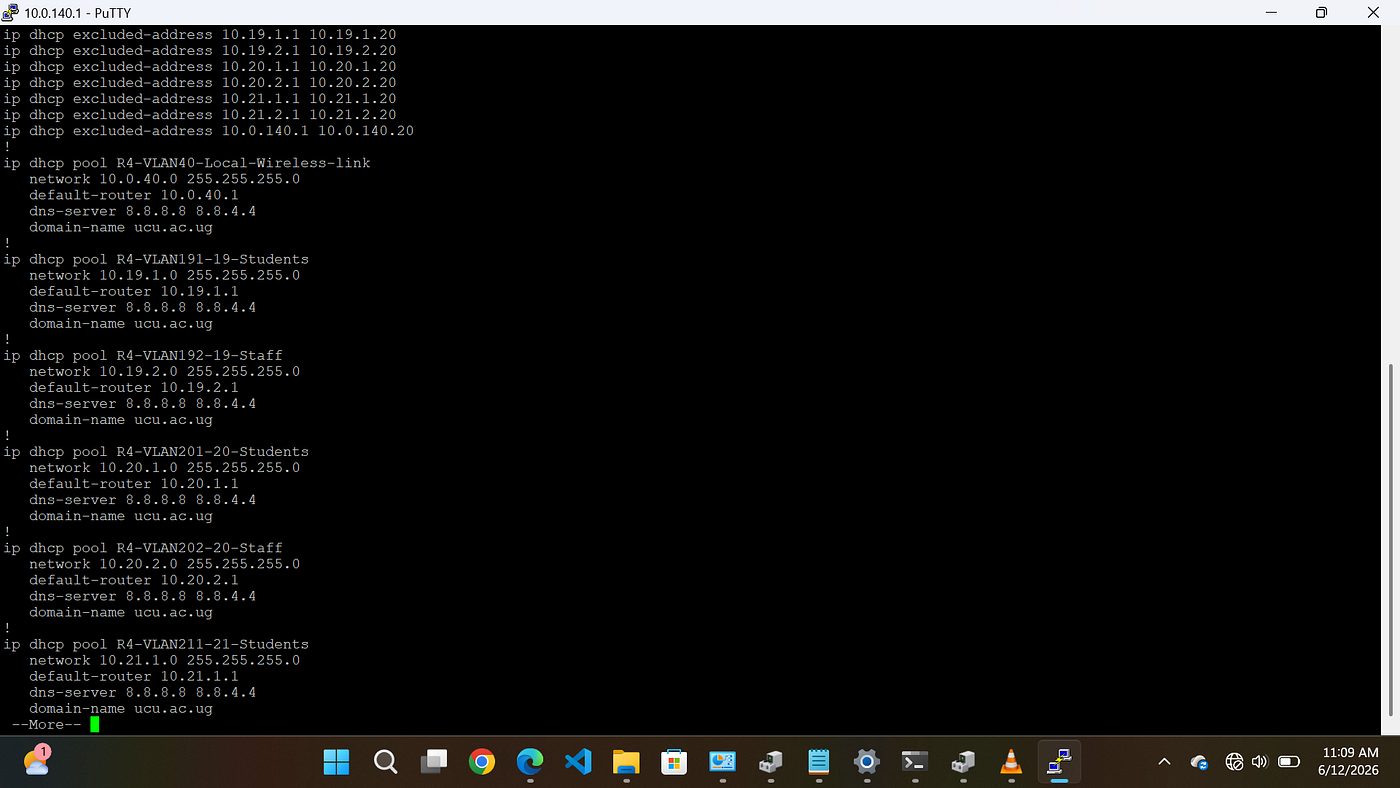
Configured DHCP pools automatically allocate IP addresses and network parameters to client devices, ensuring efficient and centralized IP addresses management
DHCP is one of the most fundamental services in modern networking, enabling seamless connectivity by automatically assigning IP addresses and other critical network parameters to devices. Whether in homes, enterprises, educational institutions, or data centers, DHCP ensures devices can connect and communicate with minimal administrative effort.
What is DHCP? DHCP is a network management protocol that automatically assigns IP addresses and network configuration settings to devices connected to a network. Rather than requiring administrators to manually configure each device, DHCP dynamically provides the necessary information needed for communication.
A DHCP server typically assigns: - IP Address -Subnet Mask -Default Gateway -DNS Server Addresses -Lease Duration This automation significantly reduces configuration errors and simplifies network administration.
Why DHCP Matters As networks continue to grow in size and complexity, efficient IP address management becomes increasingly important. DHCP addresses several critical challenges:
1. Simplified Network Administration Network administrators no longer need to manually configure individual devices. New devices can join the network and receive valid configurations automatically. 2. Reduced Configuration Errors Manual IP assignments often lead to duplicate addresses, incorrect subnet masks, and gateway misconfigurations. DHCP minimizes these risks through centralized management. 3. Efficient IP Address Utilization DHCP assigns addresses for a specific lease period. Once a device disconnects, the IP address can be returned to the pool and reused by another device. 4. Scalability Organizations can easily support growing numbers of devices without significantly increasing administrative overhead.
How DHCP Works The DHCP process follows a four-step sequence commonly known as DORA: 1. Discover A client broadcasts a DHCP Discover message to locate available DHCP servers on the network. 2. Offer A DHCP server responds with a DHCP Offer, proposing an available IP address and configuration details. 3. Request The client requests the offered address by sending a DHCP Request message. 4. Acknowledge The server confirms the assignment through a DHCP Acknowledgement (ACK), officially granting the IP address lease. This entire process occurs within seconds, often without users realizing it.
DHCP Architecture A DHCP environment consists of three primary components: DHCP Client Any device requesting network configuration information, such as: - Computers - Smartphones - Printers - Servers - IoT Devices
DHCP Server The system responsible for assigning and managing IP addresses and related network parameters.
DHCP Relay Agent Used when clients and DHCP servers reside on different networks. The relay agent forwards DHCP requests across subnet boundaries, allowing centralized DHCP management.
Understanding DHCP Leasing A DHCP lease represents the duration for which a client can use an assigned IP address. The lease process includes: - Lease Assignment - Lease Renewal - Lease Rebinding - Lease Expiration Lease-based allocation ensures efficient address utilization, particularly in environments where devices frequently connect and disconnect.
Understanding DHCP Pools At the heart of every DHCP deployment lies the DHCP pool, a collection of IP addresses and network configuration parameters that the DHCP server uses to assign settings to clients. A DHCP pool defines the range of addresses available for allocation, along with essential network information such as the subnet mask, default gateway, DNS servers, and lease duration. When a client requests network access, the DHCP server selects an available address from the pool and assigns it to the device. For example, in a network using the subnet 192.168.1.0/24, an administrator may reserve addresses 192.168.1.1 through 192.168.1.20 for infrastructure devices such as routers, switches, servers, and printers. The remaining addresses can then form the DHCP pool from which client devices receive their configurations automatically.
DHCP pools provide several important benefits: - Centralized IP address management - Efficient utilization of available address space - Reduced risk of duplicate IP address assignments - Simplified network administration - Improved scalability for growing networks
Properly designed DHCP pools are essential for maintaining organized and reliable network operations. Administrators must carefully size address pools to accommodate current devices while allowing room for future growth. Regular monitoring of pool utilization also helps prevent address exhaustion, ensuring uninterrupted connectivity for users and devices. By automating address allocation through DHCP pools, organizations can significantly reduce administrative overhead while maintaining efficient and consistent network configurations across their infrastructure.
Example Cisco DHCP Pool Configuration Router(config)# ip dhcp excluded-address 192.168.1.1 192.168.1.20
Router(config)# ip dhcp pool OFFICE-LAN Router(dhcp-config)# network 192.168.1.0 255.255.255.0 Router(dhcp-config)# default-router 192.168.1.1 Router(dhcp-config)# dns-server 8.8.8.8 Router(dhcp-config)# domain-name company.local This configuration creates a DHCP pool named OFFICE-LAN and automatically assigns IP addresses and network settings to clients within the specified subnet.
DHCP Allocation Methods Dynamic Allocation IP addresses are assigned from a pool for a limited period and may change over time.
Automatic Allocation The DHCP server permanently assigns an address to a client after its initial allocation.
Manual Allocation (Reservation) Specific devices always receive the same IP address based on their MAC address. Common examples include: - Servers - Printers - Network Cameras - VoIP Systems - Critical Infrastructure Devices
DHCP Security Considerations Although DHCP simplifies network management, it also introduces potential security risks if not properly secured.
Rogue DHCP Servers Unauthorized DHCP servers can distribute incorrect network settings, disrupting communication or redirecting traffic.
DHCP Starvation Attacks Attackers may exhaust the DHCP address pool by generating numerous fake requests.
Mitigation Strategies - Enable DHCP Snooping on switches - Use Port Security - Implement VLAN segmentation
- Monitor DHCP logs regularly - Restrict unauthorized devices These measures help maintain the integrity and reliability of network services.
DHCP in Enterprise Networks In enterprise environments, DHCP often integrates with: - DNS Services - Active Directory - Network Access Control (NAC) - IP Address Management (IPAM) Solutions - High Availability Configurations Such integrations provide centralized control, improved scalability, and enhanced operational efficiency.
Best Practices for DHCP Deployment To maximize reliability and performance: ✔ Design appropriately sized address pools ✔ Reserve addresses for critical infrastructure ✔ Configure redundant DHCP servers ✔ Document DHCP scopes and reservations ✔ Monitor lease utilization ✔ Implement DHCP Snooping where supported ✔ Regularly audit DHCP configurations Following these practices helps ensure uninterrupted network operations.
Conclusion DHCP is a cornerstone of modern networking, providing automated IP address management that enables efficient, scalable, and reliable communication across networks of all sizes. By eliminating manual configuration, reducing errors, and streamlining device connectivity, DHCP allows organizations to focus on delivering services rather than managing individual network settings.
The introduction of DHCP pools further enhances this capability by ensuring that IP addresses are allocated systematically, efficiently, and securely. Together, DHCP leasing, pooling, and automated configuration mechanisms create a robust framework that supports the demands of modern enterprise, educational, and service-provider networks. As networks continue to evolve with cloud computing, IoT, and enterprise mobility, DHCP remains an essential technology that quietly powers the connectivity we rely on every day.
메타데이터
- post_id
- f92fcd13353b
- slug
- dhcp-the-foundation-of-automated-network-connectivity-f92fcd13353b
- url
- https://medium.com/@sherinaflavia12/dhcp-the-foundation-of-automated-network-connectivity-f92fcd13353b
- canonical_url
- https://medium.com/@sherinaflavia12/dhcp-the-foundation-of-automated-network-connectivity-f92fcd13353b
- author_url
- https://medium.com/@sherinaflavia12
- status
- ok
- fetched_at
- 2026-06-15 20:49:13