Connection Pooling with Npgsql — Why Your ASP.NET App Needs It
A practical guide for .NET developers
Connection Pooling with Npgsql — Why Your ASP.NET App Needs It
A practical guide for .NET developers
The Problem Nobody Talks About
You built a solid ASP.NET API. It works perfectly on your local machine. But the moment real traffic hits — hundreds of users clicking, buying, searching at the same time — your app slows down, timeouts start appearing, and PostgreSQL starts throwing errors.
Sound familiar?
The culprit is often not your SQL queries. It is how your app opens and closes database connections.
What Actually Happens When You Hit the Database?
Every time your backend communicates with PostgreSQL, opening a fresh connection is not free. Under the hood, it performs several expensive steps:
- TCP handshake — network round trip
- SSL handshake — security setup
- PostgreSQL authentication — username/password verification
- Session setup — memory allocation inside PostgreSQL
All of this takes roughly 50–100ms per connection. That might sound small — but multiply it by 500 requests per second, and your app is spending most of its time just connecting, not actually doing work.
Think of It Like a Taxi Company 🚕
Imagine two taxi companies:
Company A (No Pool):
- Customer arrives → Build a brand new car → Complete the trip → Destroy the car
- Next customer → Build another car → Complete trip → Destroy again
Company B (With Pool):
- Keep 20 cars ready at the garage
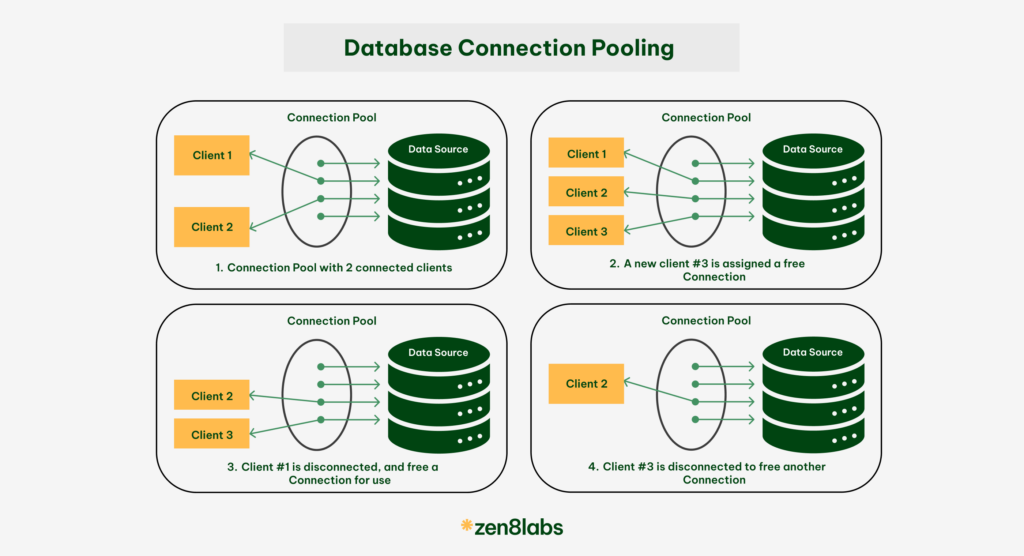
- Customer arrives → Take a free car → Complete the trip → Return car to garage
- Next customer → Take the same car again
Company A is insane. Nobody does that. Yet without connection pooling, that is exactly what your app does with database connections.
What Is Connection Pooling?
Connection pooling is simple:
Keep database connections alive and reuse them — instead of creating and destroying one for every request. That is it. One sentence. No magic.
When your app starts, Npgsql opens a set of connections and keeps them ready in a “pool.” When a request needs the database, it grabs a free connection from the pool, does its work, and returns it. The connection is not closed — it goes back to the pool, waiting for the next request.
One word to remember: Reusable.
Real World Scenario — User Clicks “Buy”
Here is what happens when a user clicks the Buy button in your e-commerce app:
User clicks Buy
      ↓
ASP.NET receives the request
      ↓
Your code calls OpenConnectionAsync()
      ↓
Npgsql checks the pool → finds an idle connection
      ↓
Gives the connection instantly (~1ms) ⚡
      ↓
Runs SQL: INSERT order, UPDATE stock
      ↓
Disposes connection → returns to pool (NOT closed)
      ↓
Response sent to user (ok)
Without a pool, that same flow would spend 100ms just connecting before even touching your SQL.
Key Configuration Parameters
You can tune the pool behavior in your connection string:
"ConnectionStrings": {
  "DefaultConnection": "Host=localhost;Database=mydb;Username=postgres;
  Password=yourpassword;Minimum Pool Size=5;Maximum Pool Size=50;
  Connection Idle Lifetime=300;"
}
What Happens When the Pool Is Full?
If all connections are busy and a new request arrives:
- It waits in a queue
- If a connection frees up within the
Timeoutperiod → request proceeds - If no connection frees up in time →
NpgsqlException: connection pool exhausted
This is why tuning Maximum Pool Size matters in high-traffic scenarios.
Don’t create. Don’t destroy. Just reuse.
메타데이터
- post_id
- f9547446eafe
- slug
- connection-pooling-with-npgsql-why-your-asp-net-app-needs-it-f9547446eafe
- url
- https://medium.com/@hossensajjad401/connection-pooling-with-npgsql-why-your-asp-net-app-needs-it-f9547446eafe
- canonical_url
- https://medium.com/@hossensajjad401/connection-pooling-with-npgsql-why-your-asp-net-app-needs-it-f9547446eafe
- author_url
- https://medium.com/@hossensajjad401
- status
- ok
- fetched_at
- 2026-07-13 06:23:13





